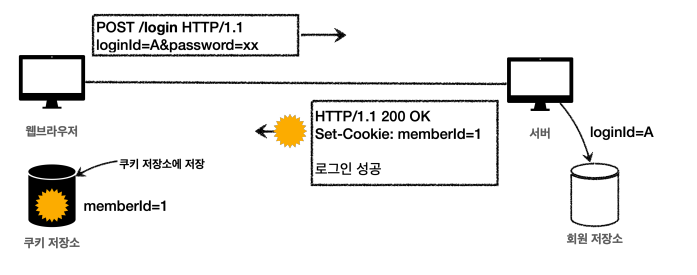
Cookie & Session 무엇인지 알아보자!
- Cookie
유저들의 효율적이고 안전한 웹 사용을 보장하기 위하여 웹사이트에 널리 사용되는 보안 방식입니다. 쿠키를 통해 접속자의 장치를 인식하고, 접속자의 설정과 과거 이용내역에 대한 일부 데이터를 저장한다.
- Session
사용자가 웹 브라우저를 통해 웹 서버에 접속한 시점으로부터 웹 브라우저를 종료하여 연결을 끝내는 시점까지 같은 사용자로부터 오는 일련의 요청을 하나의 상태로 보고 그 상태를 일정하게 유지하는 것이다.
쿠키를 통한 로그인
Cookie의 종류
- 영속 쿠키 : 만료 날짜를 입력하면 해당 날짜까지 유지
- 세션 쿠키 : 브라우저 종료시 까지 유지
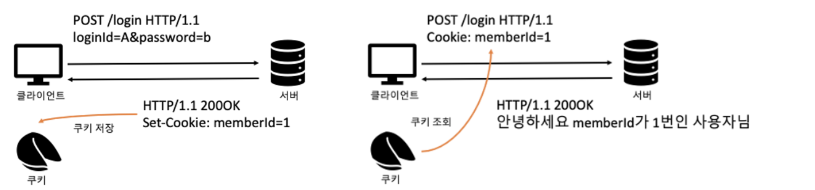
- V1 로그인
@PostMapping("login")
public String login(@Valid @ModelAttribute LoginForm form, BindingResult bindingResult, HttpServletResponse response) {

	// 생략

    Cookie idCookie = new Cookie("memberId", String.valueOf(loginMember.getId()));
    response.addCookie(idCookie);

    return "redirect:/";
}
로그인에 성공하면 쿠키를 생성하고 HttpServletResponse에 담는다. 쿠키 이름은 memberId 이고, 값은 회원의 Id를 담아두었다. 브라우저를 종료 전까지 회원의 id를 서버에 계속 보내줄 것이다.
Cookie idCookie = new Cookie("memberId", String.valueOf(loginMember.getId()));Cookie라는 클래스 생성자로 key / value를 인수로 넘겨주어 생성한다.
response.addCookie(idCookie);생성된 쿠키를 서버 응답 객체에 addCookie를 이용해 담아준다. 웹 브라우저에서 Set-Cookie property에 쿠키정보가 담겨져 반환된다.
- v1 쿠키 조회
@GetMapping("/")
public String homeLogin(@CookieValue(name = "memberId", required = false) Long memberId, Model model) {
    if (memberId == null) {
        return "home";
    }

    Member loginMember = memberRepository.findById(memberId);
    if (loginMember == null) {
        return "home";
    }

    model.addAttribute("member", loginMember);
    return "loginHome";
}@CookieValue(name = "memberId", required = false)쿠키를 편하게 조회할 수 있도록 도와주는 어노테이션, 쿠키 정보중 key, memberId인 쿠키값을 찾아 memberId 변수에 할당해준다. required 정보가 false로 설정되어 있기 때문에 비회원도 접근 가능하다.
- v1 로그아웃
private void expireCookie(HttpServletResponse response, String cookieName) {
    Cookie cookie = new Cookie(cookieName, null);
    cookie.setMaxAge(0);
    response.addCookie(cookie);
}
expireCookie 메서드를 이용하여 setMaxAge(0)를 이용하여 해당 쿠키를 종료한다.
세션을 통한 로그인 처리
중요 정보를 서버의 세션 저장소에 key / value 값으로 저장한 뒤 부라우저에서는 key값만 가지고 있도록 하는 것이다.
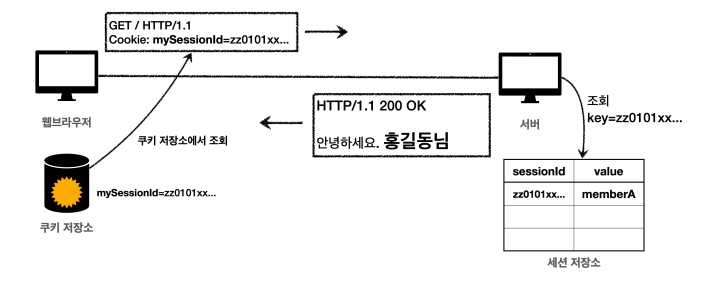
웹 브라우저에 접근 시 쿠키에서 저장하고 있는 sessionId를 같이 전달하여 서버의 세션저장소에서 해당 sessionId를 key로 가지고 있는 value 값을 조회해서 로그인 여부를 판단한다.
- SessionManager 생성
@Component
public class SessionManager {

    private static final String SESSION_COOKIE_ID = "mySessionId";
    public Map<String, Object> sessionStore = new ConcurrentHashMap<>();

    /**
     * 세션 생성
     */
    public void createSession(Object value, HttpServletResponse response){
        // 세션 Id 생성, 값을 세션에 저장
        String sessionId = UUID.randomUUID().toString();
        sessionStore.put(sessionId, value);

        Cookie cookie = new Cookie(SESSION_COOKIE_ID, sessionId);
        response.addCookie(cookie);
    }

    public Object getSession(HttpServletRequest request) {

        Cookie cookie = findCookie(request, SESSION_COOKIE_ID);
        if (cookie == null){
            return null;
        }

        return sessionStore.get(cookie.getValue());
    }

    public void expire(HttpServletRequest request){
        Cookie cookie = findCookie(request, SESSION_COOKIE_ID);
        if (cookie != null){
            sessionStore.remove(cookie.getValue());
        }
    }

    public Cookie findCookie(HttpServletRequest request, String cookieName){
        Cookie[] cookies = request.getCookies();
        if (cookies == null){
            return null;
        }

        return Arrays.stream(cookies)
                .filter(cookie -> cookie.getName().equals(cookieName))
                .findFirst()
                .orElse(null);
    }
}
new ConcurrentHashMap<>() : 동시 요청을 생각하여 ConcurrentHashMap 생성
- v2 세션 로그인
@PostMapping("login")
public String loginV2(@Valid @ModelAttribute LoginForm form,
											BindingResult bindingResult,
											HttpServletResponse response) {
    // 생략
    sessionManager.createSession(loginMember, response);
    return "redirect:/";
}sessionStore.put(sessionId, value);createSession을 통하여 uuid로 생성된 고유의 키와 전달해준 value를 넣어준다. 그리고 Cookike에 uuid를 value값으로 넣어준다. 이렇게하면 하나밖에 존재하지 못하는 key / value 값으로 session이 생성된다. (쿠키 발행)
- v2 세션 로그아웃
@PostMapping("/logout")
public String logoutV2(HttpServletRequest request) {
  	sessionManager.expire(request);
   	return "redirect:/";
}
expire 함수를 통해 Cookie의 값을 찾아 null이 아니라면(로그인한 유저라면) 세션을 지워준다.
@GetMapping("/")
public String homeLoginV2(HttpServletRequest request, Model model) {
    Member member = (Member) sessionManager.getSession(request);

    if (member == null) {
        return "home";
    }

    model.addAttribute("member", member);
    return "loginHome";
}
로그인이 정상적으로 처리됐다면 member는 null값이 아니기 때문에 로그인 화면으로 들어가진다.
HttpSession을 통한 로그인
Servlet에서는 HttpSession을 통하여 우리가 만들었던 복잡한 SessionManager 없이도 쉽게 사용이 가능하다.
- v3 로그인
@PostMapping("login")
public String loginV3(@Valid @ModelAttribute LoginForm form, BindingResult bindingResult, HttpServletResponse response, HttpServletRequest request) {

	// 생략

    HttpSession session = request.getSession();
    session.setAttribute(SessionConst.LOGIN_MEMBER, loginMember);

    return "redirect:/";
}
HttpSession session = request.getSession(); 을 통하여 세션을 생성하고 조회할 수 있다.
- v3 로그아웃
@PostMapping("/logout")
public String logoutV3(HttpServletResponse response, HttpServletRequest request) {
    HttpSession session = request.getSession(false);
    if (session != null) {
        session.invalidate();
    }

    return "redirect:/";
}
HttpSession session = request.getSession(false) 을 받아와 session이 null이 아닐 경우 invalidate() 메서드를 통하여 세션을 제거한다.
request.getSession(true)
- 세션이 있으면 기존 세션을 반환한다.
- 세션이 없으면 새로운 세션을 생성해서 반환한다.
request.getSession(false)
-
세션이 있으면 기존 세션을 반환한다.
-
세션이 없으면 새로운 세션을 생성하지 않는다. null 을 반환한다
-
v3 로그인 처리
스프링은 세션을 더 편리하게 사용할 수 있도록 @SessionAttribute 을 지원
@GetMapping("/")
public String homeLoginV3Spring(
        @SessionAttribute(name = SessionConst.LOGIN_MEMBER, required = false)Member loginMember,
        HttpServletRequest request, Model model) {

    if (loginMember == null) {
        return "home";
    }

    model.addAttribute("member", loginMember);
    return "loginHome";
}
@SessionAttribute(name = SessionConst.LOGIN_MEMBER, required = false) 이전에 사용한 @CookieValue와 비슷하고, 클라이언트로부터 전달받은 내용의 세션중에서 key가 일치하는게 있는지 찾는다. required가 false이니 만약 못찾으면 null 할당