
Kafka란
Kafka는 실시간으로 기록 스트림을 게시, 구독, 저장 및 처리할 수 있는 분산형 데이터 스트리밍 플랫폼입니다. 여러 소스에서 데이터 스트림을 처리하고 여러 사용자에게 전달하도록 설계되었습니다.
Kafka는 전통적인 엔터프라이즈 메시징 시스템의 대안입니다. 하루에 1조 4천억 건의 메시지를 처리하기 위해 LinkedIn이 개발한 내부 시스템으로 시작했으나, 현재 이는 다양한 기업의 요구 사항을 지원하는 애플리케이션을 갖춘 오픈소스 데이터 스트리밍 솔루션이 되었습니다.
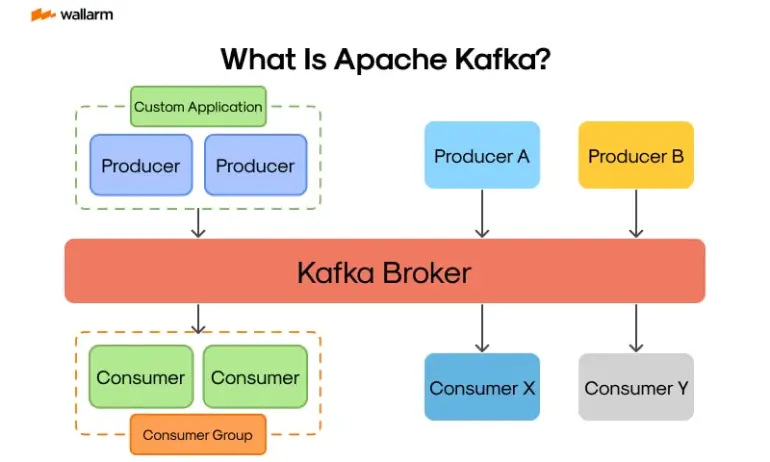
이미지 출처 : https://securityboulevard.com/2024/01/what-is-kafka/
Kafka 적용하기
패스트 캠퍼스 기업연계 파이널 프로젝트를 드랍하고 개인 프로젝트로 진행을 했기에 아쉽게도 서버비용 지원이 없습니다. 맘같아선 Kafaka Cluster로 구현해 좀 더 제대로 사용해보고 싶었지만 싱글 노드로나마 구축했습니다.
Producer
1. 의존성 추가
dependencies {

    ...

    // kafka
    implementation 'org.springframework.kafka:spring-kafka'
    testImplementation 'org.springframework.kafka:spring-kafka-test'
}

tasks.named('test') {
    useJUnitPlatform()
}

tasks.register("prepareKotlinBuildScriptModel") {}

bootJar {
    enabled = true
}

jar {
    enabled = false
}
2. Configuration 클래스 작성
@Configuration
public class KafkaProducerConfig {

    @Value("${spring.kafka.producer.bootstrap-servers}")
    private String bootstrapServers;
    @Value("${spring.kafka.producer.key-serializer}")
    private String keySerializer;
    @Value("${spring.kafka.producer.value-serializer}")
    private String valueSerializer;

    @Bean
    public ProducerFactory<String, Object> producerFactory() {
        Map<String, Object> configMap = new HashMap<>();
        configMap.put(ProducerConfig.BOOTSTRAP_SERVERS_CONFIG, bootstrapServers);
        configMap.put(ProducerConfig.KEY_SERIALIZER_CLASS_CONFIG, keySerializer);
        configMap.put(ProducerConfig.VALUE_SERIALIZER_CLASS_CONFIG, valueSerializer);
        return new DefaultKafkaProducerFactory<>(configMap);
    }

    @Bean
    public KafkaTemplate<String, Object> kafkaTemplate() {
        return new KafkaTemplate<>(producerFactory());
    }
}
환경 변수로 받아온 값들을 ConfigMap에 저장해 KafkaProducerFactory를 생성하고 KafkaTemplate Bean에 담아 반환하도록 합니다.
3. Dto 클래스 작성
아래 Dto는 Producer와 Consumer 동일하게 작성합니다.
public record ReservationMessage(@JsonProperty("reservationId") Long reservationId,
                                 @JsonProperty("roomId") Long roomId,
                                 @JsonProperty("checkInDate") LocalDate checkInDate,
                                 @JsonProperty("checkOutDate") LocalDate checkOutDate) {

}
객실 서비스에서 데이터 조회 및 처리를 하기위해 해당 객실ID와 체크인, 체크아웃으로 특정 할 수 있도록 지정했습니다.
4. Producer 관련 클래스 작성
@Component
@RequiredArgsConstructor
public class ReservationProducer {

    private static final String RESERVATION_TOPIC = "room-reserve";
    private static final String CANCEL_TOPIC = "room-cancel";

    private final KafkaTemplate<String, Object> kafkaTemplate;
    private final ObjectMapper objectMapper;

    public void sendReservation(final Long reservationId, final Long roomId,
        final LocalDate checkIn,
        final LocalDate checkOut) throws JsonProcessingException {
        final ReservationMessage message = new ReservationMessage(reservationId, roomId, checkIn,
            checkOut);
        kafkaTemplate.send(RESERVATION_TOPIC, objectMapper.writeValueAsString(message));
    }

    public void sendCancelReservation(final Long reservationId, final Long roomId,
        final LocalDate checkIn,
        final LocalDate checkOut) throws JsonProcessingException {
        final ReservationMessage message = new ReservationMessage(reservationId, roomId,
            checkIn,
            checkOut);
        kafkaTemplate.send(CANCEL_TOPIC, objectMapper.writeValueAsString(message));
    }
}
Producer에는 두 가지 토픽(예약, 예약 취소)에 대한 이벤트를 발행합니다.
이 때 ReservationMessage Dto에 필요한 내용을 담아 토픽을 설정한 후 메세지로 보내줍니다.
5. 예약 서비스 - Service 로직 추가
@Slf4j
@Service
@RequiredArgsConstructor
public class ReservationService {

    private final ReservationProducer reservationProducer;

    @Transactional
    public ReservationResponse reserve(ReservationRequest request,
        Long memberId) throws JsonProcessingException {

        ...

        Reservation saved = reservationRepository.save(reservation);

        reservationProducer.sendReservation(saved.getId(), request.getRoomId(), checkInDate,
            checkOutDate);

        return ReservationResponse.from(saved);
    }
}
예약 서비스 레이어에서 ReservationProducer를 의존성 주입해 전역변수로 선언하고
reserve 메서드에서 sendReservation 메서드를 호출해 처리했습니다.
6. application.yml
spring:
  application:
    name: ${RESERVATION_APP_NAME}
  profiles:
    active: ${APP_PROFILE}
  config:
    import: optional:configserver:${CONFIG_SERVER_URI}
7. accommodation-dev.yml ( Config Server )
## msa server-dev
server:
  port: 8083

  ...

  kafka:
    ## kafka producer
    producer:
      bootstrap-servers: localhost:9092
      key-serializer: org.apache.kafka.common.serialization.StringSerializer
      value-serializer: org.apache.kafka.common.serialization.StringSerializer
Consumer
1. 의존성 추가
dependencies {

    ...

    // kafka
    implementation 'org.springframework.kafka:spring-kafka'
    testImplementation 'org.springframework.kafka:spring-kafka-test'
}

tasks.named('test') {
    useJUnitPlatform()
}

tasks.register("prepareKotlinBuildScriptModel") {}

bootJar {
    enabled = true
}

jar {
    enabled = false
}
2. Configuration 클래스 작성
@Configuration
public class KafkaConsumerConfig {

    @Value("${spring.kafka.consumer.bootstrap-servers}")
    private String bootstrapServers;
    @Value("${spring.kafka.consumer.group-id}")
    private String groupId;
    @Value("${spring.kafka.consumer.key-deserializer}")
    private String keyDeserializer;
    @Value("${spring.kafka.consumer.value-deserializer}")
    private String valueDeserializer;

    @Bean
    public ConsumerFactory<String, Object> consumerFactory() {
        Map<String, Object> configMap = new HashMap<>();
        configMap.put(ConsumerConfig.BOOTSTRAP_SERVERS_CONFIG, bootstrapServers);
        configMap.put(ConsumerConfig.GROUP_ID_CONFIG, groupId);
        configMap.put(ConsumerConfig.KEY_DESERIALIZER_CLASS_CONFIG, keyDeserializer);
        configMap.put(ConsumerConfig.VALUE_DESERIALIZER_CLASS_CONFIG, valueDeserializer);
        return new DefaultKafkaConsumerFactory<>(configMap);
    }

    @Bean
    public ConcurrentKafkaListenerContainerFactory<String, Object> kafkaListenerContainerFactory() {
        final ConcurrentKafkaListenerContainerFactory<String, Object> factory = new ConcurrentKafkaListenerContainerFactory<>();
        factory.setConsumerFactory(consumerFactory());
        return factory;
    }
}
Producer와 다르게 Consumer에서는 Group에 대한 내용이 등장하는데 동일한 토픽을 구독하고 있는 컨슈머의 집합입니다. 예를들어 어느 상품의 주문이 생성되었다는 이벤트가 발행되면 해당 상품 주문이라는 토픽의 컨슈머 그룹에 속해 있는 재고 관리 서비스, 결제 서비스 등이 각자 비즈니스 로직을 수행할 수 있습니다.
3. Dto 클래스 작성
Consumer에서도 Producer와 동일한 내용의 Message Dto를 작성합니다.
public record ReservationMessage(@JsonProperty("reservationId") Long reservationId,
                                 @JsonProperty("roomId") Long roomId,
                                 @JsonProperty("checkInDate") LocalDate checkInDate,
                                 @JsonProperty("checkOutDate") LocalDate checkOutDate) {

}
4. Consumer 관련 클래스 작성
@Component
@RequiredArgsConstructor
public class ReservationConsumer {

    private final RoomService roomService;
    private final TransactionProducer transactionProducer;
    private final ObjectMapper objectMapper;

    @KafkaListener(topics = "room-reserve", groupId = "reservation-group")
    public void consumeReservationEvent(final String reservationMessage)
        throws JsonProcessingException {
        final ReservationMessage message = objectMapper.readValue(reservationMessage,
            ReservationMessage.class);

        try {
            roomService.decreaseCountByOne(message.roomId(), message.checkInDate(),
                message.checkOutDate());
            final ReservationMessageResponse response = new ReservationMessageResponse(
                message.reservationId(), ReservationStatus.SUCCESS,
                StringUtils.EMPTY);
            transactionProducer.sendTransactionResult(response);

        } catch (Exception e) {
            final ReservationMessageResponse response = new ReservationMessageResponse(
                message.reservationId(), ReservationStatus.FAILURE,
                e.getMessage());
            transactionProducer.sendTransactionResult(response);
        }
    }

    @KafkaListener(topics = "room-cancel", groupId = "reservation-group")
    public void consumeReservationCancelEvent(final String cancelMessage)
        throws JsonProcessingException {
        final ReservationMessage message = objectMapper.readValue(cancelMessage,
            ReservationMessage.class);

        roomService.increaseCountByOne(message.roomId(), message.checkInDate(),
            message.checkInDate());
        final ReservationMessageResponse response = new ReservationMessageResponse(
            message.reservationId(), ReservationStatus.CANCEL, StringUtils.EMPTY);
        transactionProducer.sendTransactionResult(response);
    }
}
이벤트가 발행되어 메세지를 수신하게 되면 해당 메세지를 해석하고 관련된 비즈니스 로직을 수행하도록 합니다.
로직에서 소개하지 않은 내용들이 일부 있는데 이는 SAGA Pattern과 관련된 이야기로 이후에 다루도록 하겠습니다.
5. application.yml
spring:
  application:
    name: ${ROOM_APP_NAME}
  profiles:
    active: ${APP_PROFILE}
  config:
    import: optional:configserver:${CONFIG_SERVER_URI}
6. room-dev.yml ( Config Server )
## msa server-dev
server:
  port: 8084

  ...

  kafka:
    ## kafka consumer
    consumer:
      bootstrap-servers: localhost:9092
      group-id: reservation-group
      key-deserializer: org.apache.kafka.common.serialization.StringDeserializer
      value-deserializer: org.apache.kafka.common.serialization.StringDeserializer
마무리
다음은 Choreography SAGA Pattern과 적용법에 대해 포스팅해보겠습니다.