
OpenFeign이란
Spring Cloud OpenFeign은 Spring Cloud 프로젝트에 포함된 동기 통신 클라이언트로, 선언적 REST 클라이언트로서 웹 서비스 클라이언트 작성을 보다 쉽게 할 수 있습니다.
직접 RestTemplate을 호출해서 대상 서버에게 통신을 요청하는 기존 방식과는 달리 인터페이스로 선언만 해두면 자동으로 구현체가 생성되는 형식입니다.
OpenFeign을 사용하는 이유
프로젝트 기획상 숙소 조회시 체크인, 체크아웃, 인원수 등을 조건으로 조회하는 경우 객실 데이터가 필요합니다. 이 경우 어떻게 결합도를 낮춘 상태로 다른 서비스의 정보를 조회가 가능할까 고민을 했고, 그 결과 다음과 같은 방법들이 존재한다는 것을 알게 되었습니다.
-
동기 방식
- OpenFeign
- RestTemplate
-
비동기 방식
- Spring WebClient
이 중 OpenFeign을 고른 기준은 다음과 같습니다.
- 애플리케이션의 규모가 크다 / 작다 -> 작다
- 당장 적용할 수 있을 정도로 학습 곡선이 낮은가 / 높은가 -> 낮다
이외에는 Spring Cloud환경에서 MSA를 구축하고 있는데 OpenFeign의 경우 Spring Cloud와의 통합을 지원하여 마이크로서비스 아키텍처에서 유용하다는 점에 선택을 했습니다.
OpenFeign 적용하기
1. 의존성 추가
dependencies {

	--- 중략 ---

   // spring cloud openfeign client
   implementation 'org.springframework.cloud:spring-cloud-starter-openfeign'

}

tasks.named('test') {
   useJUnitPlatform()
}

tasks.register("prepareKotlinBuildScriptModel") {}

bootJar {
   enabled = true
}

jar {
   enabled = false
}
숙소 서비스에 openfeign client 의존성을 주입합니다.
2. 숙소와 객실간을 통신할 Dto 작성
아래 작성된 ResponseDto의 경우 객실 서비스에도 동일한 Response가 필요합니다.
@Getter
@AllArgsConstructor
@NoArgsConstructor
public class RoomDetailResponse {

   private Long id;

   private String name;

   private String accommodationName;

   private String description;

   private int totalPrice;

   private int price;

   private int numberOfStay;

   private int standardNumber;

   private int maximumNumber;

   private int roomCount;

   private String type;

   private List<String> roomImageList;

   private RoomOptionResponse productOption;
}
3. OpenFeign Client 클래스 작성
@FeignClient(value = "room-service", url = "${spring.cloud.openfeign.dest-room-url}")
public interface RoomClient {

   @GetMapping("/api/accommodation/{accommodationId}/room-details")
   List<RoomDetailResponse> getRoomDetailList(
       @PathVariable Long accommodationId,
       @RequestParam(required = false) LocalDate checkInDate,
       @RequestParam(required = false) LocalDate checkOutDate,
       @RequestParam(defaultValue = "2") int personNumber
   );
}${spring.cloud.openfeign.dest-room-url}은 해당 서비스의 host:port이므로 http://localhost:8084 와 같이 해당 서비스의 port까지 적으면 됩니다.
그리고 getRoomDetailList 메서드의 경우 객실 서비스에 실제 존재하는 API이고 숙소 서비스에서 해당 API에 요청을 보내 필요한 정보를 RoomDetailResponse Dto로 반환받게 됩니다.
4. Service 로직 작성
@Service
@RequiredArgsConstructor
public class AccommodationService {

	private final AccommodationRepository accommodationRepository;
	private final AccommodationImageRepository accommodationImageRepository;
	private final RoomClient roomClient;

    --- 생략 ---
	private boolean hasValidRooms(Accommodation accommodation, LocalDate checkInDate,
        LocalDate checkOutDate, Integer personNumber) {
        List<RoomDetailResponse> roomEntityList = roomClient.getRoomDetailList(
            accommodation.getId(), checkInDate, checkOutDate, personNumber);

        return roomEntityList.stream()
            .anyMatch(room -> room.getRoomCount() > 0);
    }
}
3에서 작성한 Client를 Service에 의존성 주입을 하고 해당 인터페이스의 메서드를 호출하면 됩니다.
※ 실제 사용되는 내용에 비해 Response에 담기는 정보가 많습니다만.. 이후 재사용 또는 확장을 염두해두고 작성했으니 양해바라겠습니다.
5. OpenFeign 활성화
@EnableFeignClients
@EnableDiscoveryClient
@SpringBootApplication
public class AccommodationServiceApplication {

   public static void main(String[] args) {
       SpringApplication.run(AccommodationServiceApplication.class, args);
   }

}
OpenFeign을 사용하기 위해선 메인 클래스에서 @EnableFeignClients 어노테이션을 추가해 활성화하면 됩니다.
동작 확인
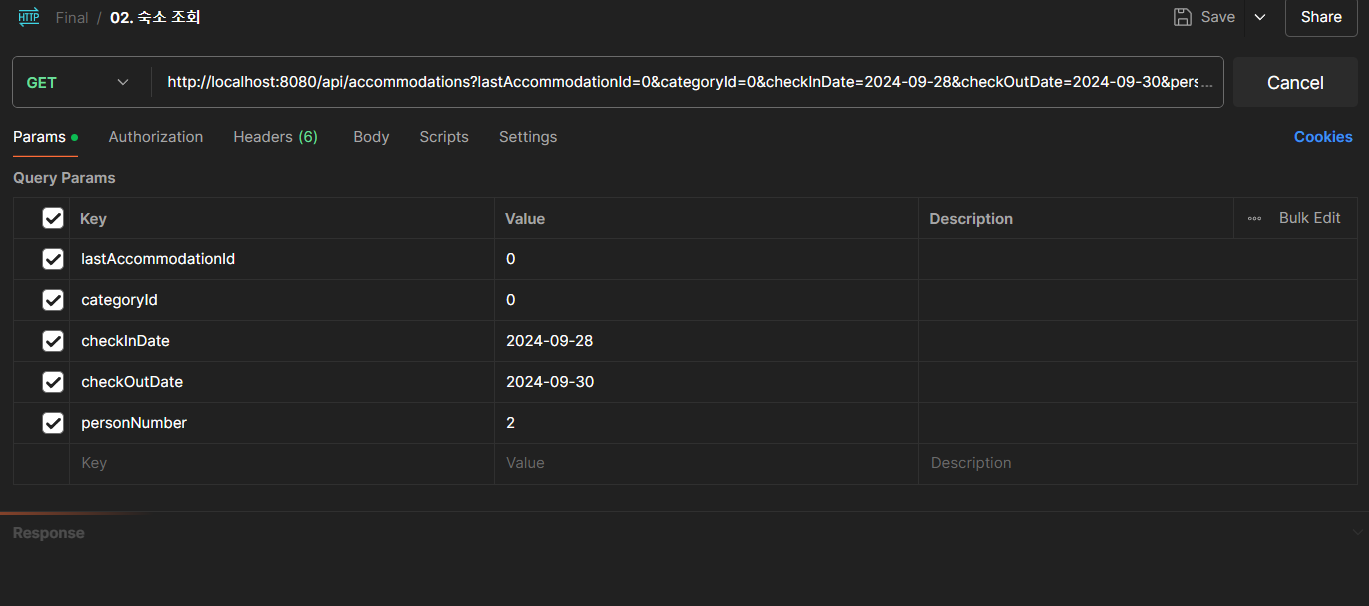
아래와 같은 조건으로 숙소 조회 API를 호출하겠습니다.
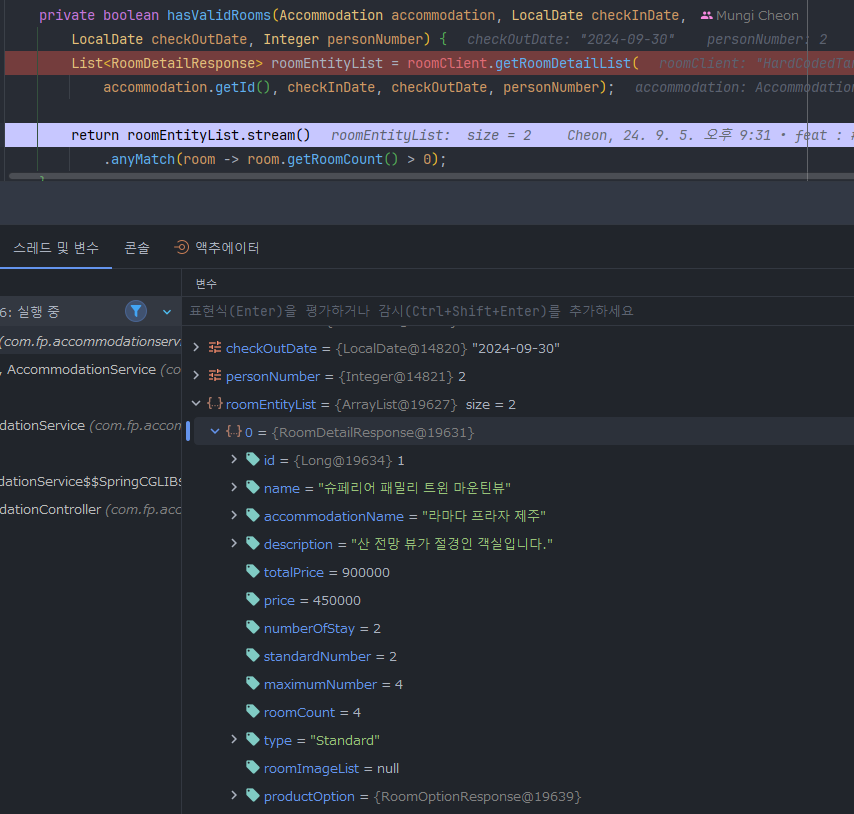
숙소 조회 API가 호출되었을 때 OpenFeign Client 로직 결과를 확인해보면 정상적으로 통신이 되어 해당 Response Dto를 반환받은 것을 확인 할 수 있습니다.
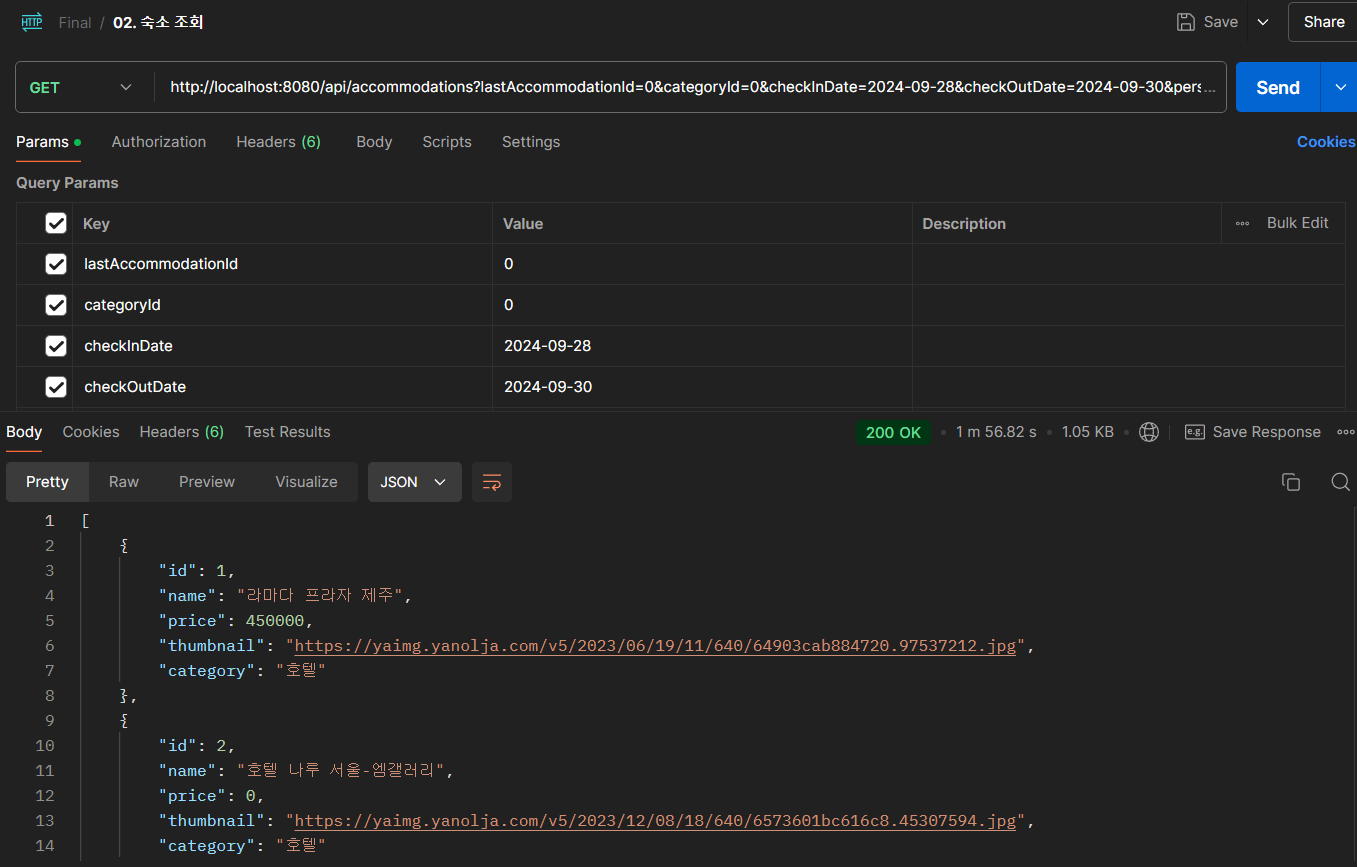
숙소 조회 API의 결과 입니다.
마무리
다음은 Kafka에 대해 포스팅해보겠습니다.