1. ⚔️ 과제 1: 몬스터 상태 전이 구조 변경
기존의 반복 공격 방식에서 탈피하여, 공격 후 대기 및 재판단이 이루어지는 정교한 FSM으로 구조를 변경하였다.
📝 주요 변경 사항
- 구조 변경:
Chase→Combat(즉시 1회 공격) →Interval대기 → 상태 재확인(Idle/Chase/Combat) 순으로 로직을 재설계했다. - 애니메이션 최적화:
Trigger파라미터를 사용하여 공격 애니메이션이 중복 실행되지 않고 깔끔하게 1회씩 출력되도록 구현했다.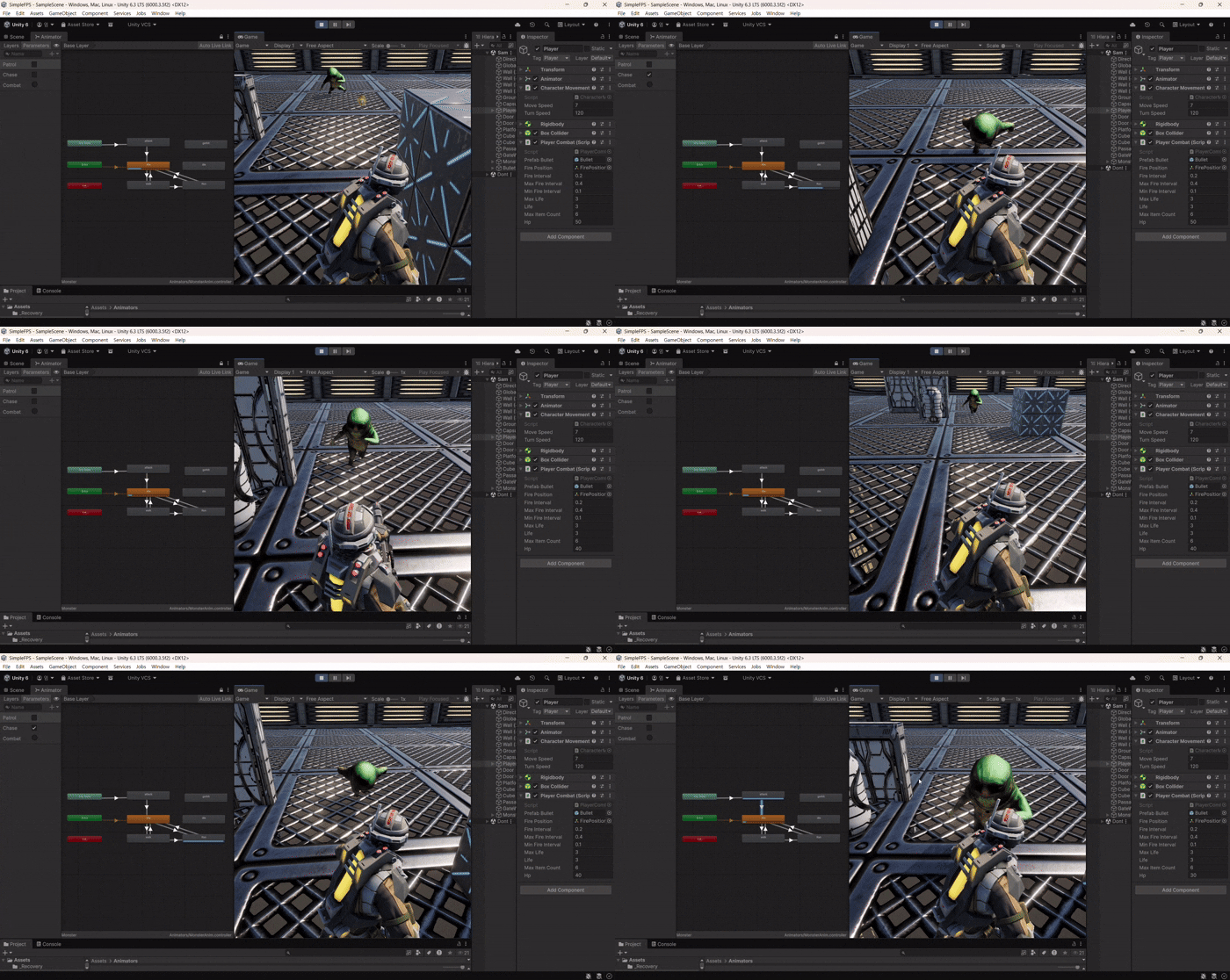
💻 핵심 소스코드 (MonsterAI.cs)
private void Combat_Init()
{
	// Combat 애니메이션 시작
	_anim.SetBool("Chase", false);
	_anim.SetBool("Patrol", false);
	_anim.SetTrigger("Combat");
	transform.LookAt(_target.transform);
	// 공격 범위, 속도, 공격력 설정 (능력치 의존)
	// 공격
	_attackCooldown = _attackInterval;
	_target = GameObject.FindGameObjectWithTag("Player");
	_playerCombat.TakeDamage(_damage);
}
private void Combat_Update()
{
	// 공격 대상의 상태 - 살아있는지 -> Idle 로 전환
	if (_target == null || _playerCombat.IsAlive == false)
	{
		ChangeState(MonsterState.IDLE);
		return;
	}
	_attackCooldown -= Time.deltaTime;

	// 딜레이
	if (_attackCooldown > 0)
	{
		return;
	}

	// 공격 범위 내에 있는지 -> Combat / Chase 로 전환
	float distTarget = Vector3.Distance(transform.position, _target.transform.position);

	if (distTarget <= _attackRange)
	{
		ChangeState(MonsterState.COMBAT);
	}
	else if (distTarget <= _chaseRange)
	{
		ChangeState(MonsterState.CHASE);
	}
	else
	{
		ChangeState(MonsterState.IDLE);
	}
	// 공격을 받았는지 -> 애니메이션 전환 (GotHit)
	// 본인 상태 확인 -> Dead 전환
}
💡 문제 해결 (Troubleshooting)
- 💡 애니메이션 끊김 방지:
Any State에서 공격 애니메이션으로 연결하되,Has Exit Time을 적절히 설정하여 공격 동작이 도중에 잘리지 않고 자연스럽게 마무리되도록 세팅했다.
2. 🎨 과제 2: Coroutine Practice (RGB 매칭 게임)
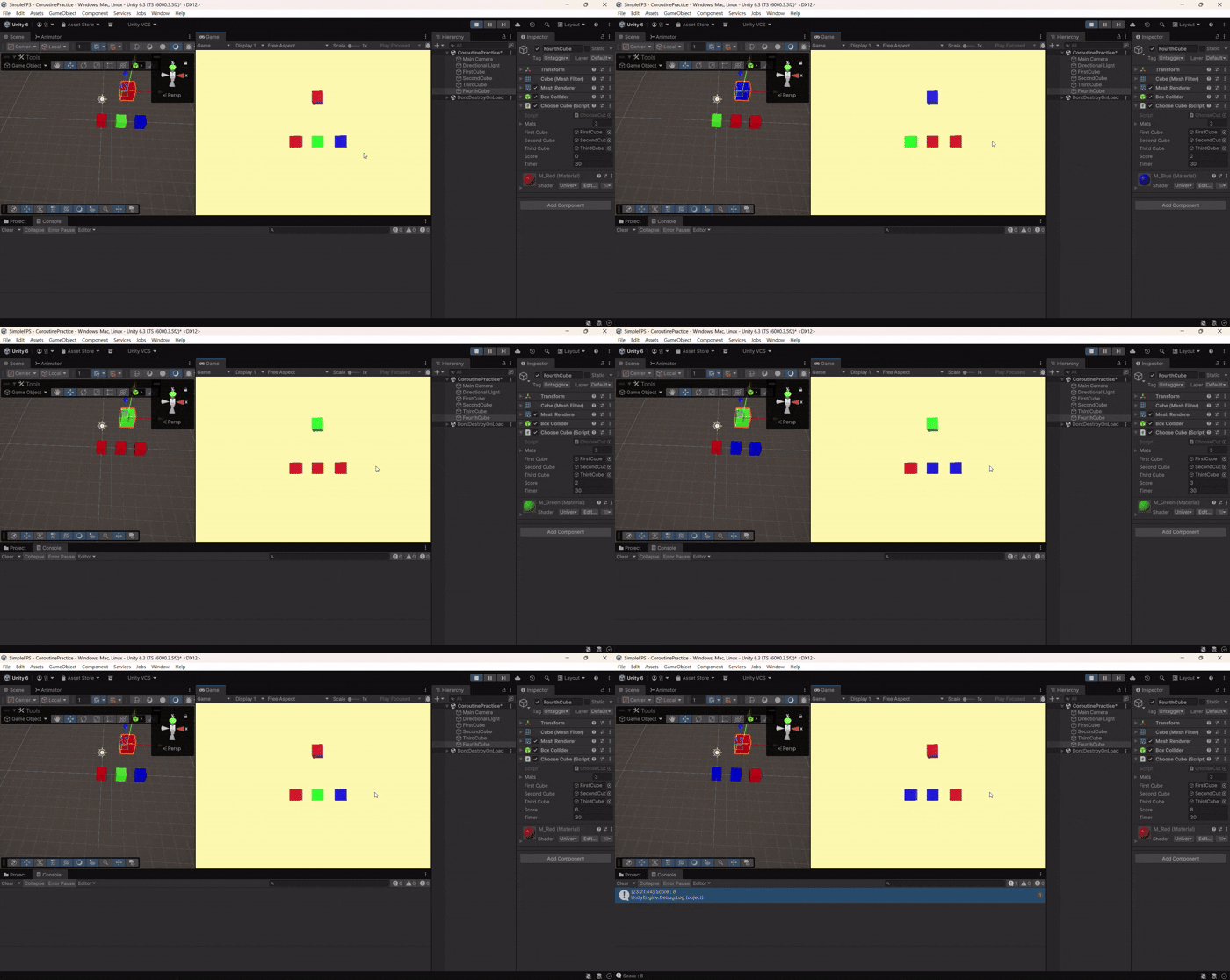
코루틴의 WaitUntil과 WaitForSeconds를 활용하여 R→G→B 순서대로 큐브를 맞추는 미니게임을 제작했다.
📝 주요 구현 내용
- 랜덤 색상 변경:
ChangeColor스크립트에서 랜덤한 시간 간격으로 큐브의 색상을 변경하도록 처리했다. - 정답 시퀀스 제어:
WaitUntil을 사용하여 플레이어가 올바른 색상을 누를 때까지 코루틴이 대기하게 만들어 R-G-B 순서를 강제했다. - 제한 시간 시스템: 별도의 코루틴으로 타이머를 돌려 시간이 종료되면 게임 루프 코루틴을 정지시키고 점수를 출력했다.
💻 핵심 소스코드 (ChooseCube.cs)
using System.Collections;

using UnityEngine;

public class ChooseCube : MonoBehaviour
{
	[SerializeField] private Material[] _mats;
	[SerializeField] private GameObject _firstCube;
	[SerializeField] private GameObject _secondCube;
	[SerializeField] private GameObject _thirdCube;
	private MeshRenderer _meshRenderer;

	private ChangeColor _firstScript;
	private ChangeColor _secondScript;
	private ChangeColor _thirdScript;
	private Coroutine _gameCoroutine;

	private int _currentIndex = 0;
	private bool _correct = false;
	[SerializeField] private int _score = 0;
	[SerializeField] private float _timer = 30f;
	void Start()
    {
		_meshRenderer = GetComponent<MeshRenderer>();
		_firstScript = _firstCube.GetComponent<ChangeColor>();
		_secondScript = _secondCube.GetComponent<ChangeColor>();
		_thirdScript = _thirdCube.GetComponent<ChangeColor>();

		_gameCoroutine = StartCoroutine(ChangeCorrectColor());
		StartCoroutine(TimerStop());
	}

    void Update()
    {
		if (Input.GetKeyDown(KeyCode.Alpha1))
		{
			StartCoroutine(_firstScript.ClickEffect());
			if (_currentIndex == _firstScript.currentIndex)
			{
				_correct = true;
			}
			else if (_currentIndex != _secondScript.currentIndex)
			{
				Debug.Log("초기화");
				if (_gameCoroutine != null) StopCoroutine(_gameCoroutine);
				_gameCoroutine = StartCoroutine(ChangeCorrectColor());
			}
		}
		if (Input.GetKeyDown(KeyCode.Alpha2))
		{
			StartCoroutine(_secondScript.ClickEffect());
			if (_currentIndex == _secondScript.currentIndex)
			{
				_correct = true;
			}
			else if (_currentIndex != _secondScript.currentIndex)
			{
				Debug.Log("초기화");
				if (_gameCoroutine != null) StopCoroutine(_gameCoroutine);
				_gameCoroutine = StartCoroutine(ChangeCorrectColor());
			}
		}
		if (Input.GetKeyDown(KeyCode.Alpha3))
		{
			StartCoroutine(_thirdScript.ClickEffect());
			if (_currentIndex == _thirdScript.currentIndex)
			{
				_correct = true;
			}
			else if (_currentIndex != _secondScript.currentIndex)
			{
				Debug.Log("초기화");
				if (_gameCoroutine != null) StopCoroutine(_gameCoroutine);
				_gameCoroutine = StartCoroutine(ChangeCorrectColor());
			}
		}
	}

	bool IsCorrect()
	{
		return _correct;
	}

	IEnumerator ChangeCorrectColor()
	{
		_currentIndex = 0;
		while (true)
		{
			_currentIndex = (_currentIndex) % _mats.Length;
			_meshRenderer.material = _mats[_currentIndex];
			_correct = false;
			yield return new WaitUntil(IsCorrect);
			_currentIndex = (++_currentIndex) % _mats.Length;
			_meshRenderer.material = _mats[_currentIndex];
			_correct = false;
			yield return new WaitUntil(IsCorrect);
			_currentIndex = (++_currentIndex) % _mats.Length;
			_meshRenderer.material = _mats[_currentIndex];
			_correct = false;
			yield return new WaitUntil(IsCorrect);
			_currentIndex++;
			_score++;
			Debug.Log("Score : " + _score);
		}
	}
	IEnumerator TimerStop()
	{
		yield return new WaitForSeconds(_timer);

		if (_gameCoroutine != null)
		{
			StopCoroutine(_gameCoroutine);
			Debug.Log("Final Score : " + _score);
		}
	}
}
💡 문제 해결 (Troubleshooting)
- 💡 컴포넌트 참조 실수: 특정 키가 작동하지 않아 4시간가량 사투를 벌였으나, 알고 보니 하이어라키 창에서 큐브 오브젝트의 컴포넌트 참조가 서로 뒤바뀌어 있었다. 코드가 완벽해도 데이터 연결(Inspector)이 틀리면 버그가 발생한다는 것을 뼈저리게 느꼈다.
🚀 향후 개선 계획 및 회고
- 🛑 게임 종료 연출: 타이머 종료 시 정답 큐브뿐만 아니라 선택용 큐브들의 색상 변화 코루틴도 함께 정지시켜 시각적인 완성도를 높일 계획이다.
- 📝 코루틴 활용:
Update에서 시간을 재는 방식보다 코루틴이 가독성 면에서 훨씬 유리하다는 것을 깨달았다. 앞으로 상태 전이 대기 로직에 적극 활용해 보고 싶다.

코딩 학습 공간