COCO dataset은 80개의 class로 구성되어 Computer vision 관련 모델을 학습하고 검증하는데 사용되는 대표적인 dataset이다.
총 33만개의 이미지가 포함되고 20만개의 이미지에 Object detection, Segmentationl, Captioning(그림을 단어로 설명하는 작업)에 대한 주석이 포함되어있다.
주석에는 Bounding box, Segmentation mask, Caption in image에 대한 정보가 포함되어있다.
COCO dataset은 "Train2017", "Val2017", "Test2017" 3가지의 디렉리로 구성되어 있는데 Train에는 11.8만의 이미지가 포함되고 Val dataset은 5천개의 이미지가 있으며 Test에는 2만개의 이미지로 구성되어 있다. Test dataset에 대한 주석은 제공되지 않고 Test dataset에 대한 구체적인 성능 평가를 받기 위해서는 COCO evaluation server에 제공해야 한다.
Ultralytics에서는 COCO dataset에 대한 구성으로 YAML(야뮬)파일을 사용하며 데이터세트의 경로, 클래스, 기타 정보들을 포함한다.
https://github.com/ultralytics/ultralytics/blob/main/ultralytics/cfg/datasets/coco.yaml
# Ultralytics 🚀 AGPL-3.0 License - https://ultralytics.com/license

# COCO 2017 dataset https://cocodataset.org by Microsoft
# Documentation: https://docs.ultralytics.com/datasets/detect/coco/
# Example usage: yolo train data=coco.yaml
# parent
# ├── ultralytics
# └── datasets
#     └── coco  ← downloads here (20.1 GB)

# Train/val/test sets as 1) dir: path/to/imgs, 2) file: path/to/imgs.txt, or 3) list: [path/to/imgs1, path/to/imgs2, ..]
path: ../datasets/coco # dataset root dir
train: train2017.txt # train images (relative to 'path') 118287 images
val: val2017.txt # val images (relative to 'path') 5000 images
test: test-dev2017.txt # 20288 of 40670 images, submit to https://competitions.codalab.org/competitions/20794

# Classes
names:
  0: person
  1: bicycle
  2: car
  3: motorcycle
  4: airplane
  5: bus
  6: train
  7: truck
  8: boat
  9: traffic light
  10: fire hydrant
  11: stop sign
  12: parking meter
  13: bench
  14: bird
  15: cat
  16: dog
  17: horse
  18: sheep
  19: cow
  20: elephant
  21: bear
  22: zebra
  23: giraffe
  24: backpack
  25: umbrella
  26: handbag
  27: tie
  28: suitcase
  29: frisbee
  30: skis
  31: snowboard
  32: sports ball
  33: kite
  34: baseball bat
  35: baseball glove
  36: skateboard
  37: surfboard
  38: tennis racket
  39: bottle
  40: wine glass
  41: cup
  42: fork
  43: knife
  44: spoon
  45: bowl
  46: banana
  47: apple
  48: sandwich
  49: orange
  50: broccoli
  51: carrot
  52: hot dog
  53: pizza
  54: donut
  55: cake
  56: chair
  57: couch
  58: potted plant
  59: bed
  60: dining table
  61: toilet
  62: tv
  63: laptop
  64: mouse
  65: remote
  66: keyboard
  67: cell phone
  68: microwave
  69: oven
  70: toaster
  71: sink
  72: refrigerator
  73: book
  74: clock
  75: vase
  76: scissors
  77: teddy bear
  78: hair drier
  79: toothbrush

# Download script/URL (optional)
download: |
  from ultralytics.utils.downloads import download
  from pathlib import Path

  # Download labels
  segments = True  # segment or box labels
  dir = Path(yaml['path'])  # dataset root dir
  url = 'https://github.com/ultralytics/assets/releases/download/v0.0.0/'
  urls = [url + ('coco2017labels-segments.zip' if segments else 'coco2017labels.zip')]  # labels
  download(urls, dir=dir.parent)
  # Download data
  urls = ['http://images.cocodataset.org/zips/train2017.zip',  # 19G, 118k images
          'http://images.cocodataset.org/zips/val2017.zip',  # 1G, 5k images
          'http://images.cocodataset.org/zips/test2017.zip']  # 7G, 41k images (optional)
  download(urls, dir=dir / 'images', threads=3)
기본적으로 YOLO CLI를 사용하여 훈련을 진행하는 경우에는 따로 다운로드 받을 필요 없이 YAML파일에 저장된 내용대로 경로를 찾아 dataset이 없다면 다운로드 받고 있다면 그대로 사용한다.
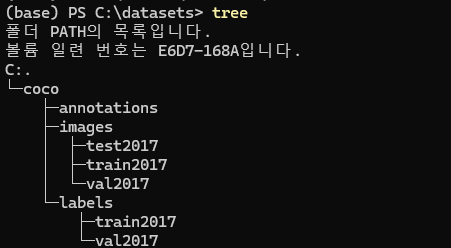
YOLO dataset을 다운받게 되면
다음과 같이 디렉터리가 구성되는데 coco 디렉터리 내부에 annotations와 images가 생성된다.
annotations는 주석이 달려있는 json파일이 존재하는 파일로 해당 json파일을 YOLO형식에 맞게 수정하면 labels 디렉터리가 생기게 된다.(json2yolo)
(YOLO CLI 사용시 해당 과정 불필요)
coco dataset format을 살펴보게 되면 annotations 디렉터리에는 아래 그림과 같이
< captions _Tr_Val, instances_Tr_Val, poss _Tr_Val > 로 구성되어 있다.
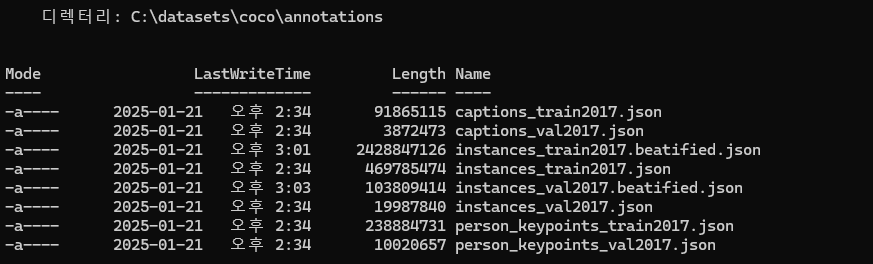
 annotation은 json형식의 파일로 내부를 살펴보면 처음 다운로드 한 파일에서는 하나의 줄에 모든 정보가 들어가 있어 VScode 같은 IDE에서는 val같이 데이터 수가 적은 파일만 살펴볼 수 있는 등의 문제가 있어 해당 json파일을 보기 좋게 줄을 나누어주는 과정이 필요하다.(내부 데이터를 확인하지 않고 사용만 하려면 불필요함.)
해당 과정은 github를 살펴보아도 나오지만 jq를 사용하는 방식을 추천한다.
https://nepersica.tistory.com/22
다음 과정을 거치면 다음과 같이 줄바꿈이 진행되어 새롭게 파일이 저장된다.
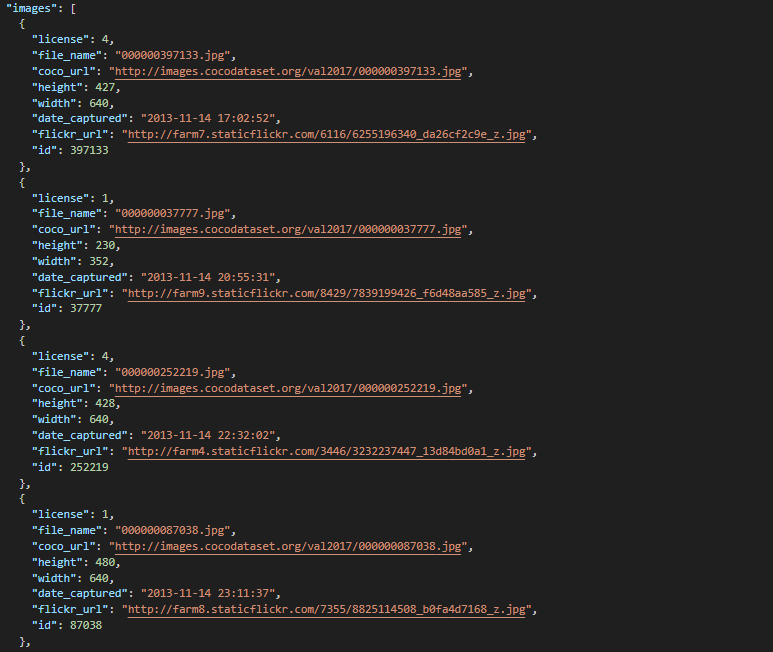
| 변수 명 | 설명 |
|---|---|
| license | 이미지의 라이센스에 대한 숫자 코드 |
| file_name | 파일의 이름 |
| coco_url | coco dataset 서버에서 해당 이미지가 저장된 링크 |
| height | 이미지의 높이(세로 길이) |
| width | 이미지의 너비(가로 길이) |
| data_captured | 이미지가 촬영된 날짜 |
| flickr_url | 이미지가 업로드된 flickr라는 사이트의 링크 |
| id | coco dataset에서의 고유 식별 번호 |
후반부에는 이미지에 대한 annotaions을 제공한다. Bbox와 segmentation points등
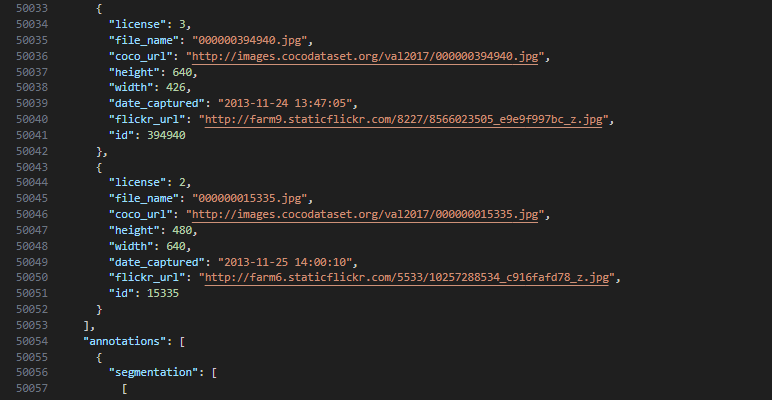
{
      "segmentation": [
        [
          260.4,
          231.26,
          215.06,
          274.01,
          194.33,
          307.69,
          195.63,
          329.72,
          168.42,
          355.63,
          120.49,
          382.83,
          112.71,
          415.22,
          159.35,
          457.98,
          172.31,
          483.89,
          229.31,
          504.62,
          275.95,
          500.73,
          288.91,
          495.55,
          344.62,
          605.67,
          395.14,
          634.17,
          480,
          632.87,
          480,
          284.37,
          404.21,
          223.48,
          336.84,
          202.75,
          269.47,
          154.82,
          218.95,
          179.43,
          203.4,
          194.98,
          190.45,
          211.82,
          233.2,
          205.34
        ]
      ],
      "area": 108316.66515000002,
      "iscrowd": 0,
      "image_id": 520301,
      "bbox": [
        112.71,
        154.82,
        367.29,
        479.35
      ],
      "category_id": 18,
      "id": 3186
},| 변수 명 | 설명 |
|---|---|
| segmentation | 경계를 찍은 points 정보 |
| area | 객체의 면적 (Segmentation으로 Bounding box의 면적은 아니다.) |
| iscrowd | 객체가 하나로 연결되어있는지 아닌지에 대한 정보, 하나의 객체가 가려져 분리되어 있다면 1로 표시되고 연결이 잘 되어있다면 0으로 표시된다. |
| image_id | 이미지의 고유 번호 |
| bbox | 객체를 둘러싸는 Bounding Box의 정보로 순서대로 Bounding Box의 중심좌표 (x,y)와 중심 좌표를 기준으로 하는 width, height정보를 가진다. |
| category_id | 객체의 분류 카테고리 번호 |
| id | 객체 주석의 고유 번호 |
마지막 영역에는 categorise 정보가 들어간 내용으로
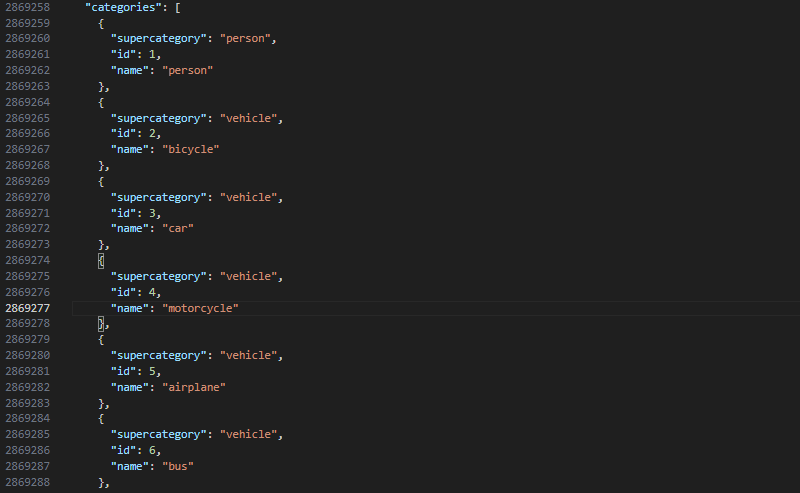
supercategory는 상위 개념의 클래스를 의미하고 내부 name에서 하위 개념의 클래스를 구별해준다.
categories에서 id는 클래스의 번호를 의미한다. (coco.yaml)의 순서와 동일함.