인프런 김영한 님의 스프링 입문 - 코드로 배우는 스프링 부트, 웹, MVC, DB 접근 기술 강의를 보고 정리한 내용입니다.
1. 프로젝트 생성
프로젝트 생성
-
Java 설치 필수 → oracle jdk (원하는 버전) 검색 후 다운로드
-
스프링 부트 스타터 사이트에서 스프링 프로젝트 생성
- https://start.spring.io
- 스프링에서 운영하는 스프링 부트 기반으로 스프링 관련 프로젝트를 생성해주는 사이트
-
프로젝트 선택
- Gradle(요즘 추세, 스프링 라이브러리 관리 자체도 넘어오는 추세)
- Java
- Spring Boot Version
- 원하는 버전 선택 (SNAPSHOT이 아닌 제일 최근 버전)
- Project Metadata
- Group : 기업명, 기업 도메인 명
- Artifact : build 나올 때 결과물, 프로젝트 명
- Name
- Description
- Package name
- Dependencies
- Spring Web
- Thymeleaf : html을 만들어주는 템플릿 엔진
-
다운로드 → intellij open → 다운로드 한 파일의 build.gradle 선택 → open as project
💡 gradle build가 안될 때
1. ⌘; (File → Project structure) Project의 SDK 버전 다운로드 받은 파일의 버전과 같이 변경
2. ⌘, (Intellij → Settings → Build, Execution, Deployment → Build tools → Gradle) gradle JVM 버전 다운로드 받은 파일의 버전과 같이 변경
프로젝트 구조
- .idea (intellij가 사용하는 설정 파일)
- gradle (gradle 관련 파일)
- src
- main
- java
- resources (실제 Java 코드 파일을 제외한 xml이나 propertices 설정 파일, html …)
- test (테스트 코드들)
- build.gradle (gradle 설정 파일, 버전 설정하고 라이브러리 땡겨오기)
plugins { // 버전 관련 id 'java' id 'org.springframework.boot' version '3.3.5' id 'io.spring.dependency-management' version '1.1.6' } group = 'hello' version = '0.0.1-SNAPSHOT' java { // java 버전 toolchain { languageVersion = JavaLanguageVersion.of(17) } } repositories { // 라이브러리를 여기서 다운받아라 라고 설정해두는,, mavenCentral() } dependencies { //라이브러리 implementation 'org.springframework.boot:spring-boot-starter-thymeleaf' implementation 'org.springframework.boot:spring-boot-starter-web' testImplementation 'org.springframework.boot:spring-boot-starter-test' testRuntimeOnly 'org.junit.platform:junit-platform-launcher' } tasks.named('test') { useJUnitPlatform() } - .gitignore (git에 올라가면 안되는 파일 관리)
- gradlew
- gradlew.bat
- settings.gradle
- main
2. 라이브러리 환경 살펴보기
라이브러리 살펴보기
Gradle이 프로젝트를 시작할 때 선택한 라이브러리와 의존 관계가 있는 라이브러리를 함께 다운로드 한다.- Intellij의 왼쪽
Gradle버튼을 클릭하면 라이브러리 간의 의존 관계로 함께 당겨와진 라이브러리들을 확인할 수 있다.
주요 라이브러리
스프링 부트 라이브러리
- spring-boot-starter-web
- spring-boot-starter-tomcat: 톰캣(웹 서버)
- spring-webmvc: 스프링 웹 MVC
- spring-boot-starter-thymeleaf: 타임리프 템플릿 엔진(View)
- spring-boot-starter(공통): 스프링 부트 + 스프링 코어 + 로깅
- spring-boot
- spring-core
- spring-boot-starter-logging
- slf4j, logback
- spring-boot
테스트 라이브러리
- spring-boot-starter-test
- junit: 테스트 프레임워크
- mockito: 목 라이브러리
- assertj: 테스트 코드를 좀 더 편하게 작성하게 도와주는 라이브러리
- spring-test: 스프링 통합 테스트 지원
3. View 환경 설정
Welcome Page 만들기
1. 정적 페이지
resources/static경로에index.html생성- 홈 화면(Welcome 페이지)가 된다.
- 스프링 부트가 제공하는 Welcome Page 기능 → Spring.io Welcome Page 설명
static/index.html을 올려두면 Welcome page 기능을 제공한다.- Spring Boot는 정적 및 템플릿 기반의 Welcome Page를 지원한다.
- Spring Boot는 먼저
index.html파일을 미리 설정된 위치 (resources/static)에서 찾는다. - 만약 정적 페이지를 찾지 못하면, 템플릿 엔진(Thymeleaf, Mustache 등)이 사용할 수 있는
index템플릿을 찾는다.
- Spring Boot는 먼저
- 이 중 하나라도 찾게 되면, 해당 파일이 Application의 Welcome Page로 설정된다.
💡 Welcome Page는 Application에 실제로
index의 경로가 정의되어 있지 않을 경우에만 동작한다.
→ Application이index라는 경로에 (ex:/index,/)에 대한 명시적인 라우트(route)를 가지고 있다면, 그 라우트가 우선 사용된다.
없을 경우 index.html 파일이나 index 템플릿을 찾아 Welcome Page로 사용한다.
2. thymleaf 템플릿 엔진
thymeleaf 공식 사이트: https://www.thymeleaf.org/
스프링 공식 튜토리얼: https://spring.io/guides/gs/serving-web-content/
스프링부트 메뉴얼: https://docs.spring.io/spring-boot/docs/2.3.1.RELEASE/reference/html/spring-boot-features.html#boot-features-spring-mvc-template-engines
특징
- Thymeleaf는 자바 기반의 server-side 템플릿 엔진으로, HTML, XML, JavaScript, CSS 등의 파일을 서버에서 동적으로 생성하여 클라이언트에 전송할 수 있게 도와준다.
- 주로 Spring Boot와 함께 사용되며, HTML 파일을 템플릿으로 사용하여 데이터 바인딩, 루프 처리, 조건부 렌더링 등을 쉽게 처리할 수 있다.
주요 개념
- 템플릿 엔진: HTML 문서에서 동적으로 데이터를 삽입하고, 반복 처리나 조건문을 적용할 수 있게 해주는 엔진이다.
- 스프링과의 통합: Thymeleaf는 Spring MVC와 통합되어,
Model객체에 담긴 데이터를 템플릿으로 쉽게 전달할 수 있다 (Spring Boot에서는 기본 템플릿 엔진으로 Thymeleaf가 설정되어 있어 쉽게 사용할 수 있음) - 표현식:
${}: 모델에 있는 데이터를 출력할 때 사용 (예:<span>${user.name}</span>).th:if,th:each: 조건문과 반복문을 HTML 안에서 처리할 수 있게 해줌 (예:<li th:each="item : ${items}">${item.name}</li>).
동작 환경 그림
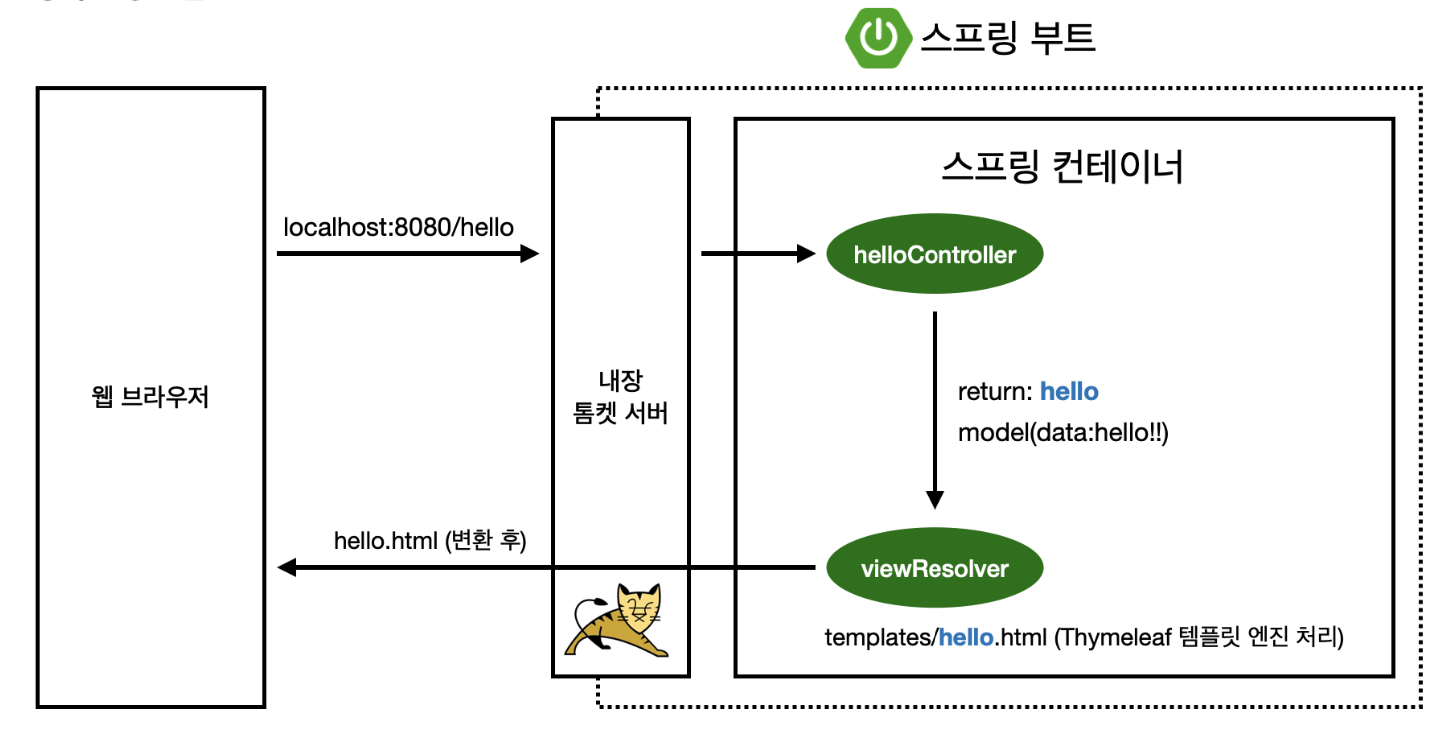
- Spring Boot는 내장 톰캣 서버를 포함하고 있다.
- Spring Boot 애플리케이션을 실행하면, 내장된 톰캣 서버가 함께 시작되어 HTTP 요청을 수신하고 처리할 수 있다.
- 웹 브라우저에서
localhost:8080/hello입력- 사용자가 브라우저를 통해
http://localhost:8080/hello로 접근하면 해당 요청이 애플리케이션으로 전달된다.
- 사용자가 브라우저를 통해
- 요청이 톰캣 서버로 전달됨
- 내장 톰캣 서버가 이 요청을 받고, 스프링 컨테이너에 요청을 전달한다.
- 스프링 컨테이너가
/hello경로에 매핑된 메서드가 있는지 확인 - 매핑된 메서드 실행
- 모델 생성: 메서드 내에서 Model 객체가 생성된다.
- 모델에 데이터 추가 (
addAttribute) - ViewName 반환 (
return): 메서드는 "hello"라는 View 이름을 반환한다. Spring Boot는 이 이름을 사용해 특정 HTML 파일을 찾는다.
- ViewResolver가 View를 찾아 렌더링
- 기본적으로 Spring Boot는
resources/templates경로의 ViewName을 찾아서 렌더링 한다. resources:templates/+ {ViewName} +.html
- 기본적으로 Spring Boot는