📌 모듈의 필요성
-
코드 관리의 용이성
: 코드가 길어지면 한 개 파일에 모든 코드를 넣고 관리하기 어렵다 -
실행의 효율성
: 긴 코드는 메모리 용량을 많이 차지해 실행 시간이 오래 걸린다 -
재사용성: 관련 함수나 클래스들을 한 개 파일에 묶으면 재사용이 쉽다
그렇다면 모듈에 대해 학습해보자
1. 모듈(Module)
- 관련된 상수, 함수 또는 클래스 등을 모아놓은 파일
- import를 통해 다른 모듈 파일을 호출 할 수 있다
- 모듈 크기는 특정하지 않고, 기능의 논리적 그룹에 따라 다르다
📌 모듈 불러오기
1) import 모듈이름
2) from 모듈이름 import 모듈 내 클래스 이름
3) 한꺼번에 불러오기: import Rectangle, Circle
#Retangle.py
class Rectangle:
    def __init__(self,x1,y1,x2,y2):
        self.x1 = x1
        self.y1 = y1
        self.x2 = x2
        self.y2 = y2

    def calcArea(self):
        width = abs(self.x2 - self.x1)
        heigth = abs(self.y2 - self.y1)
        return width * heigth

#Circle.py
import math
class Circle:
    def __init__(self,x,y,r):
        self.x = x
        self.y = y
        self.r = r

    def calcArea(self):
        return math.pi *(self.r ** 2)


 import Rectangle, Circle
r = Rectangle.Rectangle(1,2,3,4)
c = Circle.Circle(1,3,5)

print(r.calcArea()) #Rectangel 내 calcArea() 불러와 계산
print(c.calcArea()) #Circle내 calcArea() 불러와 계산
📍 다음 코드에서 Rectangle.Rectangle로 이름이 겹쳐지고 있다. 앞과 뒤의 Rectangle이 각각 무엇일까?
import Rectangle
r = Rectangle.Rectangle(10, 20, 20, 10)
print(r.calcArea())
>> 앞은 Module 뒤는 Module 내 class
💡 원 클래스 구현해보기
>> 요구사항
1) 다음 내용을 클래스 외부에 정의
- 원주율 pi 변수(3.1415)
- 원 둘레 계산하는 circumference(인자 r을 받음) 함수
2) 원 클래스 구현
- 원 생성자는 반지름을 인자로 전달받고 멤버 변수에 저장
- 멤버 함수로 원주를 반환하는 getCircumference() 구현
3) 결과 출력
- Circle1 클래스의 getCircumference() 함수는 모듈 내에 있는 circumference() 함수를 사용
- 원주율은 Circle모듈의 내부 변수인 pi를 사용
- Circle1 모듈의 pi값을 화면에 출력하고, circumference() 함수
- Circle 클래스의 getCircumference() 함수의 결과값을 화면에 출력
#Cicle.py
pi = 3.1415
def circumference(r):
    return 2 * pi * r

class Circle1:
    def __init__(self,r):
        self.r = r

    def getCircumference(self):
        return circumference(self.r)


#test.py
import Circle

print(Circle.pi)
print(f"반지름이 10인 원 둘레: {Circle.circumference(10): .2f}")
c = Circle.Circle1(5)
print(c.getCircumference())
📌 name
- 직접 실행되었는지 or 모듈로 임포트 된 것인지 확인
- 검수코드가 아닌 main 함수만 실행 시키고 싶을 때 사용하는 조건문
# 직접 실행된 경우
 __name__ = __main__
# 모듈로 임포트 된 경우
__name__ = 스크립트 한 파일 이름(확장자 제외)
#dice5
import random
def throwDice():
return random.randint(1, 6)
if __name__ == "__main__":
print("testing throwDice()")
for i in range(10):
print(throwDice(), end = ' ')
print("")
# TestDice5.py
import dice5
print("Testing dice5 module")
print(f"TestDice5: __name__ = {__name__}") #TestDice5 실행
for i in range(3):
print(dice5.throwDice())
# 동작 이해하기
1) dice5를 import 해온다
2) dice5가 실행된다 -> dice5에서 직접 실행되는 것이 아니기 때문에 if문 실행 x
3) TestDice5에서 print문 실행
4) TestDice5가 직접 실행되기 때문에 __name__ = __main__
5) 아래 for문 반복
>> Testing dice5 module
>> TestDice5: __name__ = __main_
>> 4
>> 2
>> 6
2. 패키지, 라이브러리
- 패키지(package): 관련 모듈을 묶어 놓은 것
- 라이브러리: 관련 패키지를 모아서 한개의 묶음으로 만든 것
- 패키지 관리 프로그램: 다른 사람들이 만들어둔 패키지(모듈)을 쉽게 설치하고 사용할 수 있도록 pip 관리 도구 사용
#pip 또는 pip3 사용

pip install/uninstall 패키지_이름
pip3 intsall/uninstall 패키지_이름
📌 날짜와 시간 다루기
1) datetime 모듈
-
date 클래스: 현재 날짜 or 지정된 날짜의 요일일 확인하거나 저장된 서식으로 년원일 정보 변환
-
time 클래스: 시간정보를 서식에 맞춰 문자열로 반환 (time모듈과 다르다!!!)
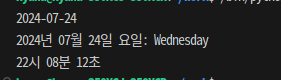
💡 datetime 모듈을 사용해 다음을 출력해보자
>> 오늘의 년도,월,일
>> 현재 일자를 형식에 맞게 출력(2022년 08월 18일 요일: Thursday)
>> 현재 시각을 형식에 맞게 출력(12시 35분 25초)
import datetime

d = date(2024, 7, 24)
print(d)
print(d.strftime("%Y년 %m월 %d일 요일: %A") #요일 'Wed'로 쓰고싶으면 '%a'

t = time(22, 8, 12)
print(t.strftime("%H시 %M분 %S초")
2) time 모듈
- 정해진 기준(epoch)를 중심으로 시간 정보 반환
📍 Epoch: 컴퓨터 시스템에서 시간 측정을 시작하는 기준점 📍
time 모듈에서는 일반적으로 1970년 1월 1일 00:00:00 UTC를 Epoch로 사용
이 시점을 기준으로 초 단위의 시간을 계산하여 time 모듈의 여러 함수들이 동작
💡 합을 구하는데 걸리는 시간을 확인해보자
import time

t1= time.time() # 작업 시작 시점의 현재 시간을 초 단위로 반환
sum = 0

maxNum = 10000000

for i in range (1, maxNum):
    sum += i

t2 = time.time()  # 작업이 끝난 시점의 현재 시간을 초 단위로 반환


print(f"1부터 {maxNum}까지 합하는 데 걸리는 시간은 {t2-t1}초")

3. 파일 관리
📌 os 모듈
- 파일 시스템, 환경 변수, 경로 조작 등 광범위한 운영 체제 작업 지원
✔ os.getcwd() : 현재 작업중인 디렉토리 경로 학인
✔ os.chdir() : 현재 작업중인 디렉토리 경로 변경
✔ os.mkdir() : 디렉토리 생성
✔ os.rmdir() : 디렉토리 삭제
✔ os.path.exists() : 경로/파일 존재 확인
✔ os.listdir(): 주어진 경로에 있는 모든 것을 리스트로 반환
✔ os.path.isdir(): 주어진 경로가 디렉토리인지 파악
✔ os.path.join(): 경로 결합
✔ os.path.isfile(): 주어진경로가 파일인지 파악
✔ os.path.getsize(): 파일 크기를 바이트로 반환
✔ os.remove(): 현재 작업 디렉트로에서 파일 삭제
✔ os.path.basename(): 파일 이름만 출력
📌 glob 모듈
- 특정 패턴에 맞는 파일 목록을 쉽게 매칭
- 와일드 카드 문자를 사용히 파일 이름 매칭 가능
?bc.txt: 3글자 파일명으로 끝나고 'bc.txt'로 끝나는 파일 찾기
*.txt: 확장자가 ".txt"인 모든 파일을 찾기
*: 현재 디렉토리의 모든 파일과 디렉토리를 찾기

!! glob은 파일 이름 매칭에 특화 !!
✔ os.path.join(file path , '와일드카드'): 파일 경로와 '와일드카드' 을 결합하여 검색 패턴 생성
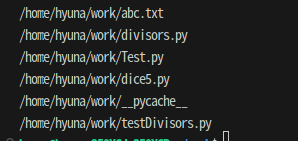
#os와 glob 이용해서 파일 목록 출력하기
import os
import glob

files_path = r"/home/hyuna/work"

find_files = os.path.join(files_path,"*")
files = glob.glob(find_files)

for file in files:
    print(file)
- 명령행 인자
프로그램이 실행될 때 외부에서 추가적인 정보나 데이터를 전달하는 방법
💡 패키지 생성 및 모듈 호출
>> my_package 패키지 생성하고, 안에 utilities.py 만들기
>> multiply_numbers 함수를 정의하고, 다른 파이썬 파일에서 함수를 호출하여 결과를 출력
# my_package/utilities.py
def multiply_numbers(a, b):
return a * b
# main.py
from my_package.utilities import multiply_numbers
result = multiply_numbers(4, 5)
print(f"Result: {result}") # Result: 20
💡 작업 디렉토리 안 모든 파일을 출력해보자
```python
import os

my_path  = os.getcwd()

if os.path.isdir(my_path) == True:
    print(my_path)
    print(os.listdir(my_path))
else:
    print("nothing")

>> /home/hyuna/work
>> ['abc.txt', 'divisors.py', 'Test.py', 'dice5.py', '__pycache__', 'testDivisors.py']
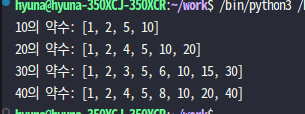
💡 인자로 전달된 정수의 약수 리스트를 반환하는 함수를 모듈화 시키고, 모듈을 사용해보자
>> 각각 divisors.py와 testDivisors.py 파일을 만들어 작성해보자
#divisors.py
def get_divisor(n):
    divisor_list = []
    for i in range(1, n+1):
        if n % i == 0:
            divisor_list.append(i)
    print(f"{n}의 약수: {divisor_list}")


#testDivisors.py
import divisors

def main():
    test_numbers = [10, 20, 30 ,40]
    for num in test_numbers:
        try:
            divisor_numbers = divisors.get_divisor(num)
            print(f"{num}의 약수: {divisor_numbers}")
        except ValueError as e:
            print(e)

if __name__ ==  "__main__":
    main()
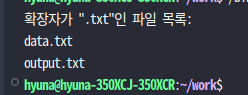
💡 os.listdir() 함수를 이용해 정해진 디렉토리에 있는 파일 목록을 뽑은 후, 확장자가 "txt"인 파일들만 출력해보자
>> 확장자가 txt인 파일들 이름만 출력한다 (basenname()사용)
import os
import glob

def All_txt_list():
    current_directory = os.getcwd()
    pattern = os.path.join(current_directory, '*.txt')
    txt_list = glob.glob(pattern)

    if txt_list:
        print('확장자가 ".txt"인 파일 목록: ')
        for file in txt_list:
               print(os.path.basename(file))
    else:
        print('확장자가 ".txt"인 파일이 없습니다')

if __name__ == "__main__":
    All_txt_list()