#INTRO
스펀지밥 & 뚱이
2222일 기념 인형 뽑기ㅋㅋㅋ
#자연어 감정분석 (라이브 세션)
-
자연어 > 벡터 변환 과정 실습 완료.
-
임베딩 실습은 주말에.. 해야겠다.
📌 데이터 확인
#
네이버 영화 리뷰 자연어 데이터, 총 20만행으로 이루어져 있다.
- document : 영화의 텍스트 리뷰
- label : 감정(0 - 부정적 / 1 - 긍정적)
📌 자연어 전처리
전처리는 분석 목적에 맞게, 임베딩 과정에서 글을 더 잘 이해할 수 있도록
필요 없는 문자들을 제거하는 과정이다.
정답이 없고 다양한 방법으로 전처리 가능 !
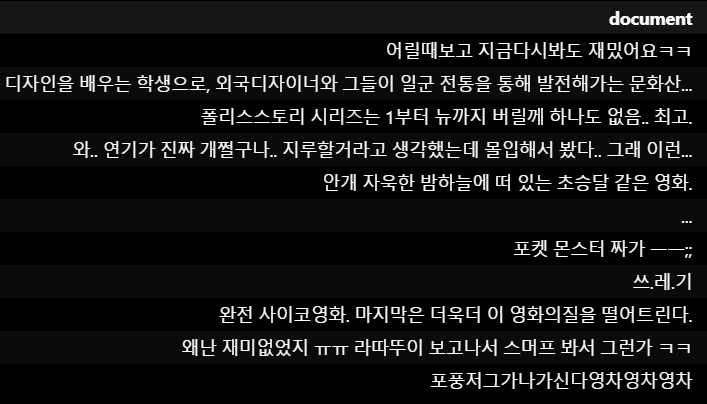
- 정제 : 한글이 아닌 문자 삭제하기
# 정규 표현식 (Regular Expression, re) 라이브러리 불러오기
import re

# 한글과 공백을 제외한 문자 제거 함수 생성
def clean_text(text):
	# isinstance = 객체 타입 검사하는 내장 함수
    # isinstance(object, classinfo)
    # : object (검사할 객체), classinfo (타입, 클래스 등)
    if isinstance(text, str):  # 입력값이 문자열인지 확인
        return re.sub(r'[^가-힣\s]', '', text)
    else:
        return ''  # 문자열이 아닌 경우 빈 문자열 반환

# 텍스트 정제
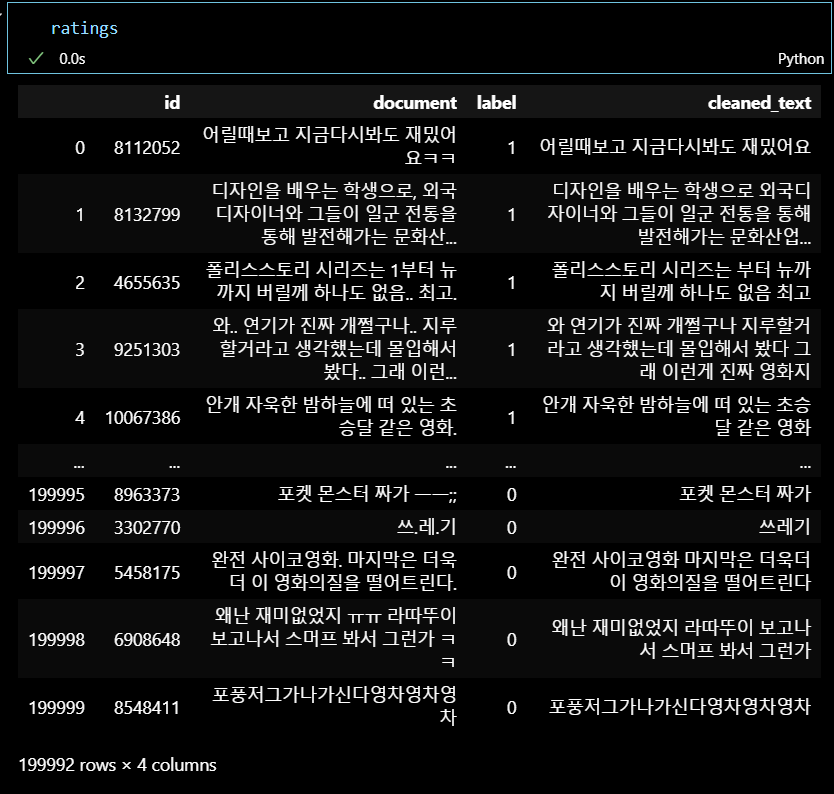
ratings['cleaned_text'] = ratings['document'].apply(clean_text)
ratings
정제 전
 정제 후
정제 후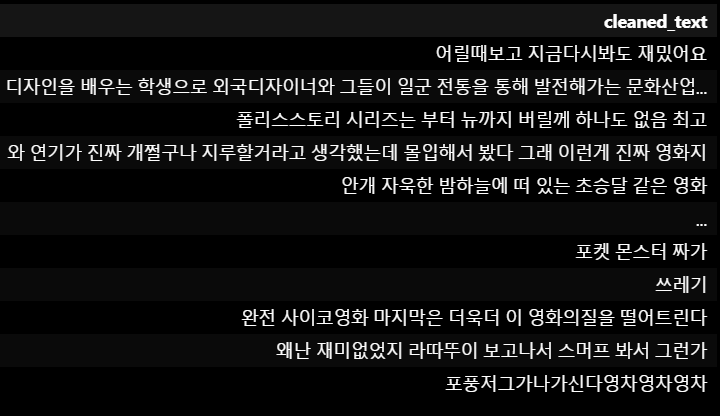
- 결측치 처리
print(ratings.isnull().sum())
# 결측치 처리
ratings.dropna(inplace=True)
print(ratings.isnull().sum())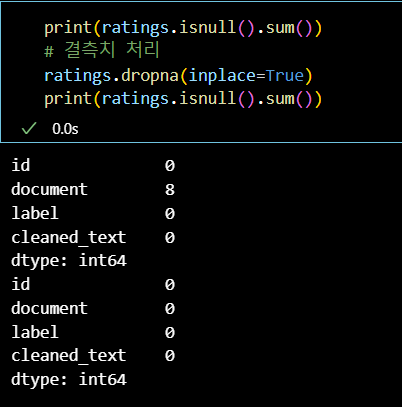
📌 시각화
- 길이 분석 (전체 문장 길이 분포 확인)
import matplotlib.pyplot as plt

# 텍스트 길이 계산
ratings['text_length'] = ratings['cleaned_text'].apply(len)

# 텍스트 길이 분포 시각화
plt.figure(figsize=(10, 6))
ratings['text_length'].hist(bins=70)
plt.xlabel('Text Length')
plt.ylabel('Frequency')
plt.title('Distribution of Text Length')
plt.show()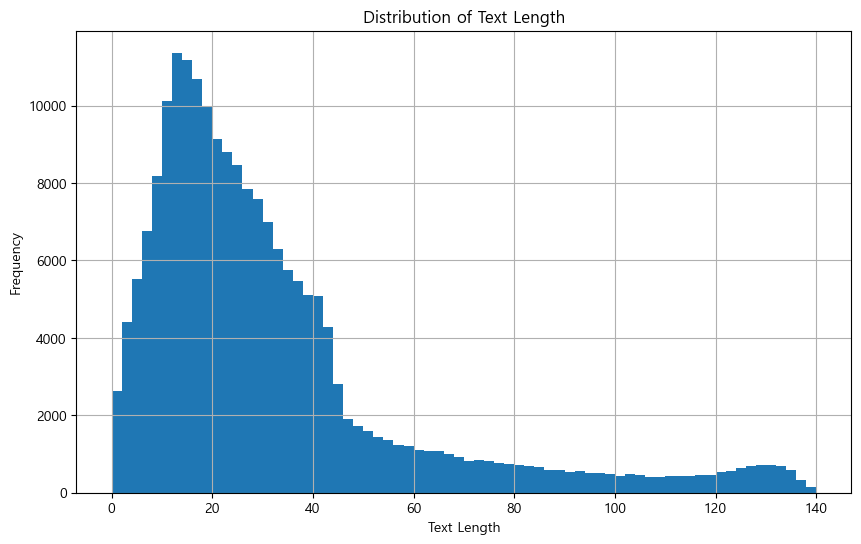
- 단어 빈도 분석
from collections import Counter
import matplotlib.pyplot as plt
import seaborn as sns
import matplotlib.font_manager as fm
import matplotlib.pyplot as plt
plt.rcParams['font.family'] ='Malgun Gothic'
plt.rcParams['axes.unicode_minus'] =False

# 단어 빈도 계산
all_words = ' '.join(ratings['cleaned_text']).split()
word_freq = Counter(all_words)


# 상위 20개 단어 시각화
common_words = word_freq.most_common(20)
words, counts = zip(*common_words)

plt.figure(figsize=(10, 6))
bars = sns.barplot(x=counts, y=words)

# Font 설정 (한글이기 때문에 맑은 고딕으로 설정)
font_path = 'C:/Windows/Fonts/malgun.ttf'
font_prop = fm.FontProperties(fname=font_path)

# 각 막대에 주석 추가
for bar, count in zip(bars.patches, counts):
    plt.annotate(f'{count}', (bar.get_width(), bar.get_y() + bar.get_height() / 2),
                 ha='center', va='center', fontsize=12, fontproperties=font_prop, color='black')

plt.xlabel('Frequency', fontsize=14, fontproperties=font_prop)
plt.ylabel('Words', fontsize=14, fontproperties=font_prop)
plt.title('Top 20 Most Common Words', fontsize=16, fontproperties=font_prop)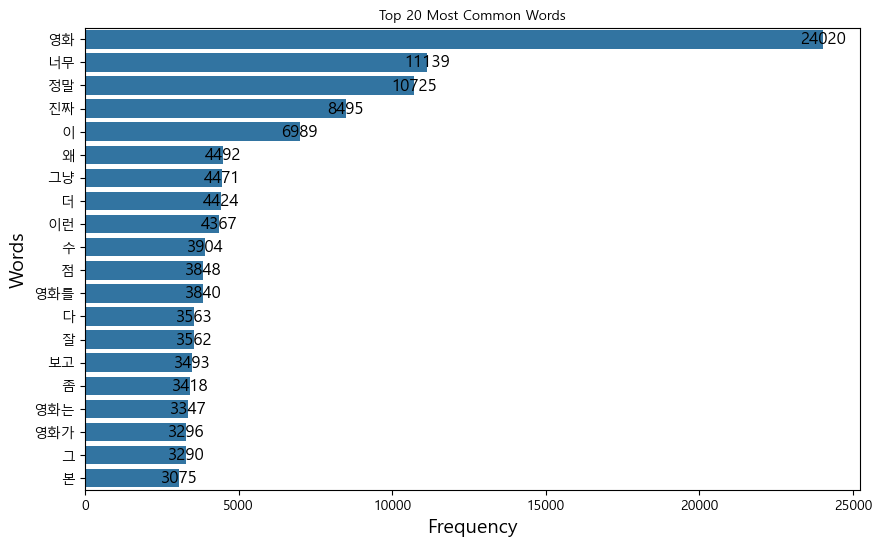
- n-gram 분석 : n-gram은 n개 짜리 연속된 단어를 의미,
주로 같이 자주 등장하는 단어들을 분석할 때 사용한다.
from sklearn.feature_extraction.text import CountVectorizer
import pandas as pd
import matplotlib.pyplot as plt
import seaborn as sns

# 2-그램 분석
vectorizer = CountVectorizer(ngram_range=(2, 2))
X = vectorizer.fit_transform(ratings['cleaned_text'])

# 2-그램 빈도 계산
gram_freq = X.sum(axis=0).A1
gram_vocab = vectorizer.get_feature_names_out()

# 상위 20개 2-그램 시각화
gram_freq_df = pd.DataFrame({'ngrams': gram_vocab, 'counts': gram_freq})
top_ngrams = gram_freq_df.nlargest(20, 'counts')

plt.figure(figsize=(10, 6))
sns.barplot(x='counts', y='ngrams', data=top_ngrams)
plt.xlabel('Frequency')
plt.ylabel('2-grams')
plt.title('Top 20 Most Common 2-grams')
plt.show()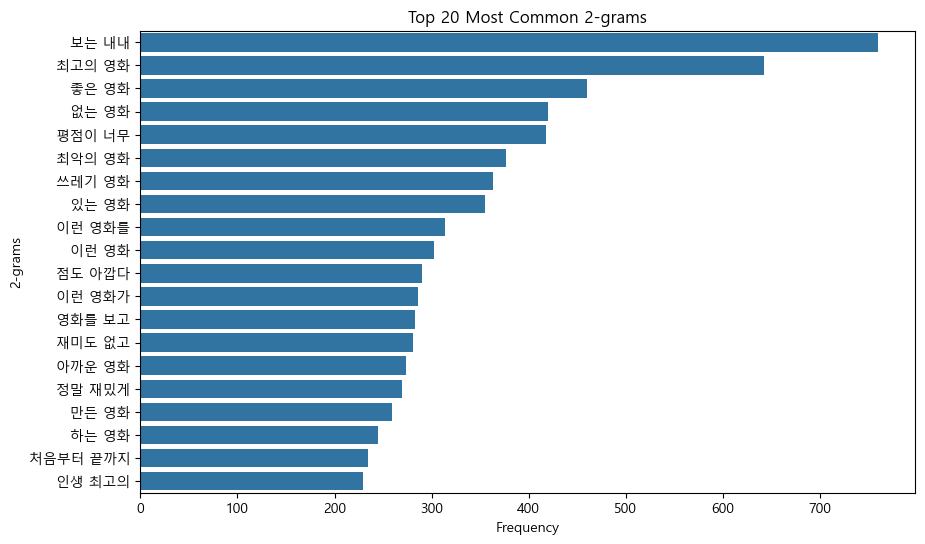
📌 토큰화
- 자연어를 의미 단위로 나누고 각 단위를 숫자로 매핑하는 과정
간단한 띄어쓰기를 이용하거나,
형태소를 분석하거나,
대량의 데이터로 이미 학습된 토크나이저를 사용할 수 있다.
- 띄어쓰기 활용 (영문 데이터에서 활용 가능한 기초적인 방법)
# 띄어쓰기 기반 토큰화 함수
def whitespace_tokenizer(text):
    return text.split()

# 텍스트 전처리
ratings['tokens_whitespace'] = ratings['cleaned_text'].apply(whitespace_tokenizer)

ratings['tokens_whitespace']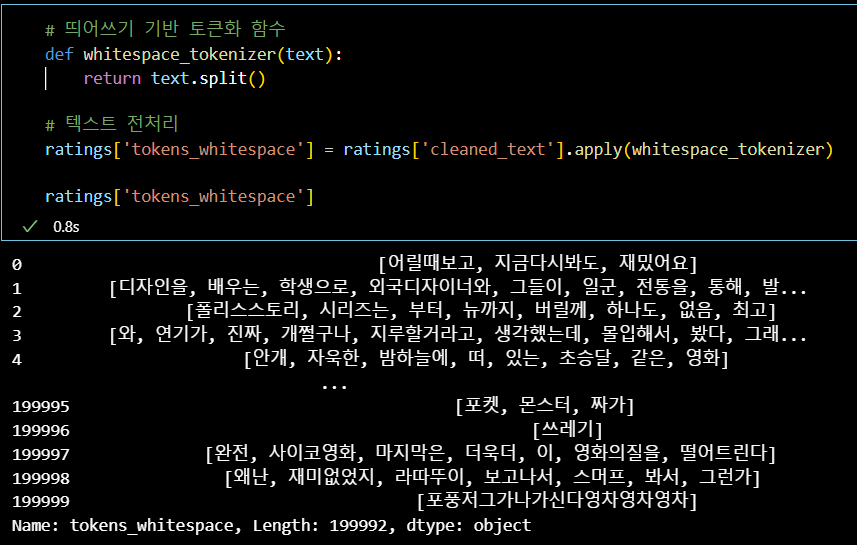
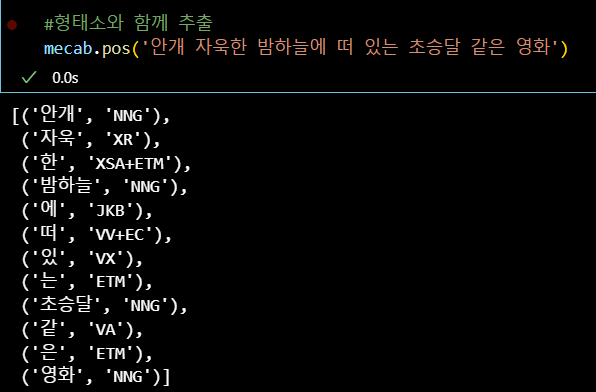
- 형태소 활용 (국문 데이터에서 활용 가능한 기초적인 방법)
# !pip install python-mecab-ko

from mecab import MeCab

mecab = MeCab()

# Mecab 기반 토큰화 함수
def mecab_tokenizer(text):
    tokens = mecab.morphs(text)
    return tokens

# 텍스트 전처리
ratings['tokens_mecab'] = ratings['cleaned_text'].apply(mecab_tokenizer)
ratings['tokens_mecab']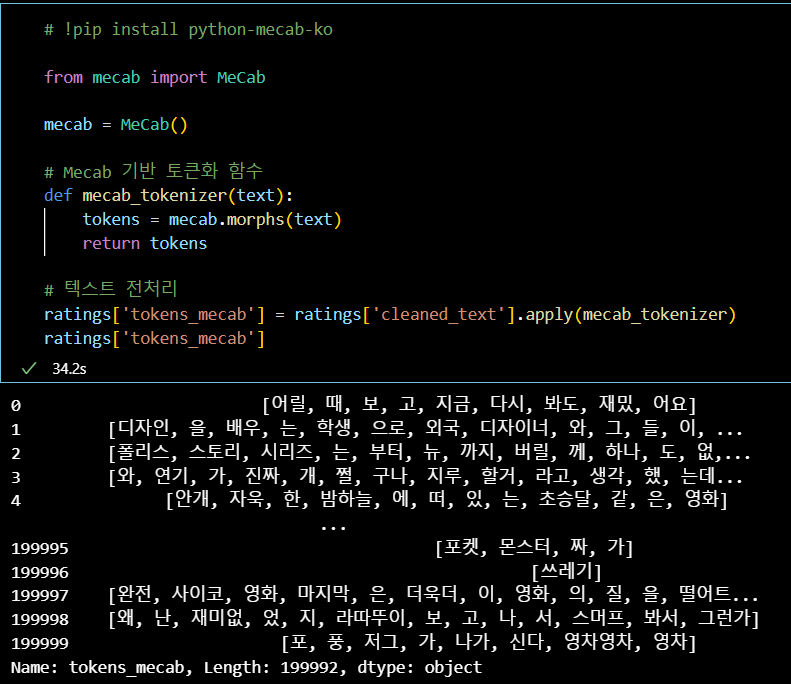
추천하는 형태소 분석기는 mecab으로
국문 문장을 다양한 형태소 단위로 분류해주는 라이브러리이다.
- 추가적인 내장 함수를 통해 다양한 분석도 할 수 있으니,
텍스트에서 feature를 추출하여 정형데이터 머신러닝에 꽤나 유용하다.
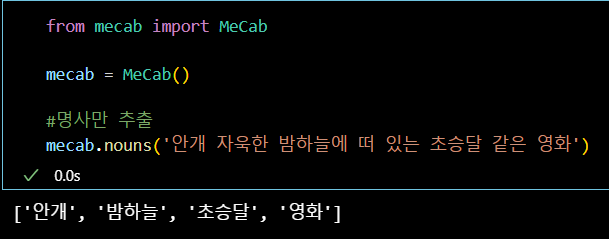
- Pretrained Tokenizer 사용
# !pip install transformers
from transformers import BertTokenizer

tokenizer = BertTokenizer.from_pretrained('google-bert/bert-base-multilingual-cased')
def bert_tokenizer(text):
    tokens = tokenizer.tokenize(text)
    return tokens
ratings['tokens_bert'] = ratings['cleaned_text'].apply(bert_tokenizer)
ratings['tokens_bert']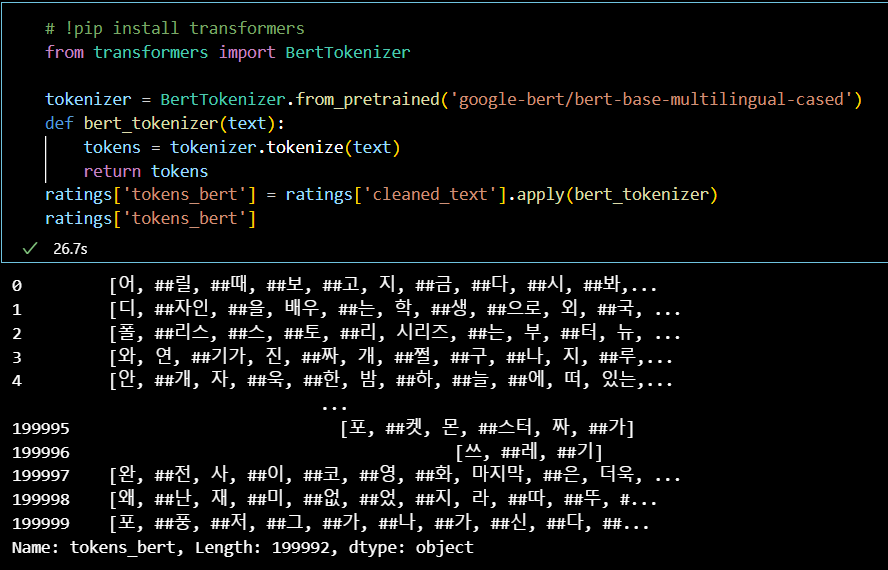
- 불용어 제거 및 인코딩
이렇게 다양한 방식으로 문장을 의미 단위(토큰)으로 쪼갠 뒤,
불용어(의미가 없는 토큰)을 제거하고,
stopwords = [
    '의', '가', '이', '은', '들', '는', '좀', '잘', '걍', '과', '를', '으로',
    '자', '에', '와', '한', '하다', '에서', '더', '을', '도', '있다', '어',
    '없다', '것', '보', '사람', '때', '뭐', '그', '하나', '같다'
    ]

def remove_stopwords(tokens):
    return [token for token in tokens if token not in stopwords]

# 불용어 제거 적용
ratings['tokens_bert_no_stopwords'] = ratings['tokens_bert'].apply(remove_stopwords)
ratings['tokens_bert_no_stopwords']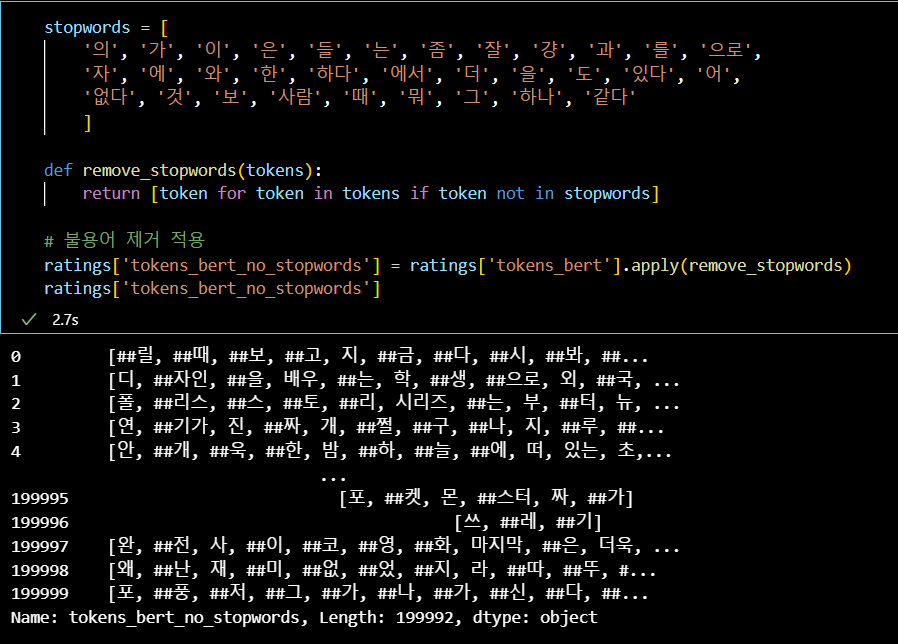
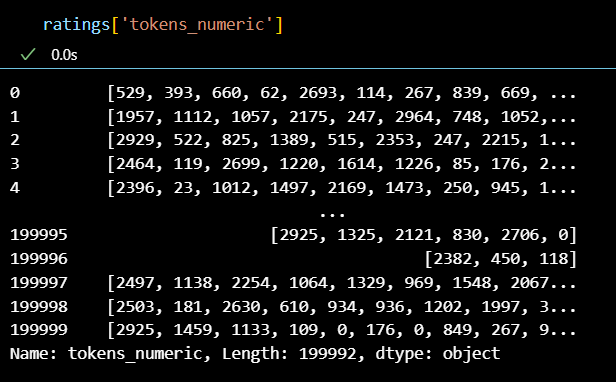
- 문장을 숫자 벡터로 변환
- 마지막으로 라벨 인코더를 돌려 문장을 1차적으로
숫자 벡터로 변환한다.
- 마지막으로 라벨 인코더를 돌려 문장을 1차적으로
from sklearn.preprocessing import LabelEncoder

# 모든 토큰을 수집하여 숫자로 매핑
all_tokens = [token for tokens in ratings['tokens_bert_no_stopwords'] for token in tokens]
label_encoder = LabelEncoder()
label_encoder.fit(all_tokens)

# 숫자로 매핑된 토큰 열 추가를 위한 함수 정의
def tokens_to_numbers(tokens):
    return label_encoder.transform(tokens)

# 숫자로 매핑된 토큰 열 추가
ratings['tokens_numeric'] = ratings['tokens_bert_no_stopwords'].apply(tokens_to_numbers)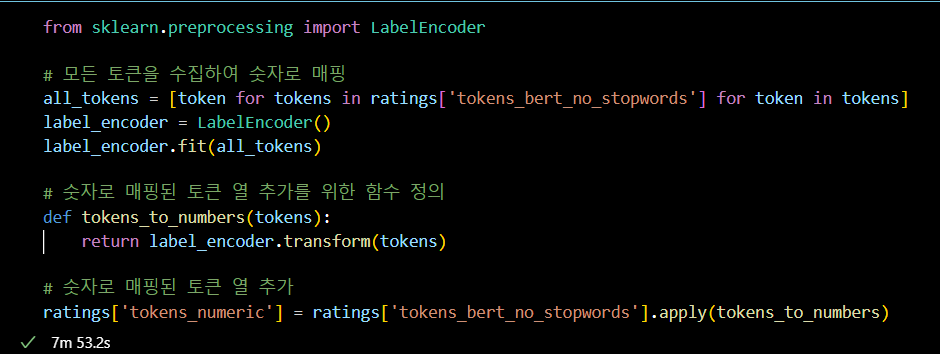
+) 모든 과정을 컬럼별로 확인
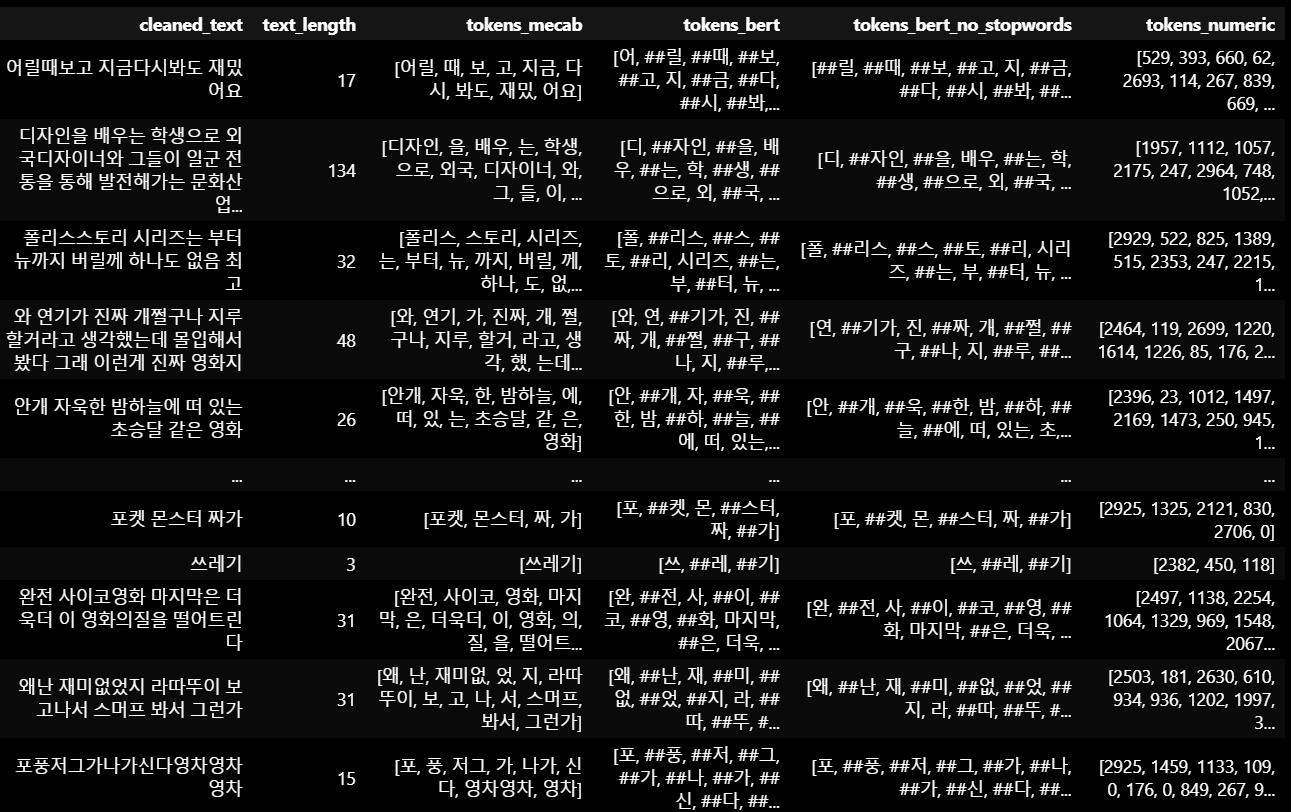
위 과정들을 통해 자연어를 숫자로 변환할 수 있었다.
#OUTRO
오늘의 한 줄.
주말이 왔다!
커피 좋아하는 데이터 꿈나무