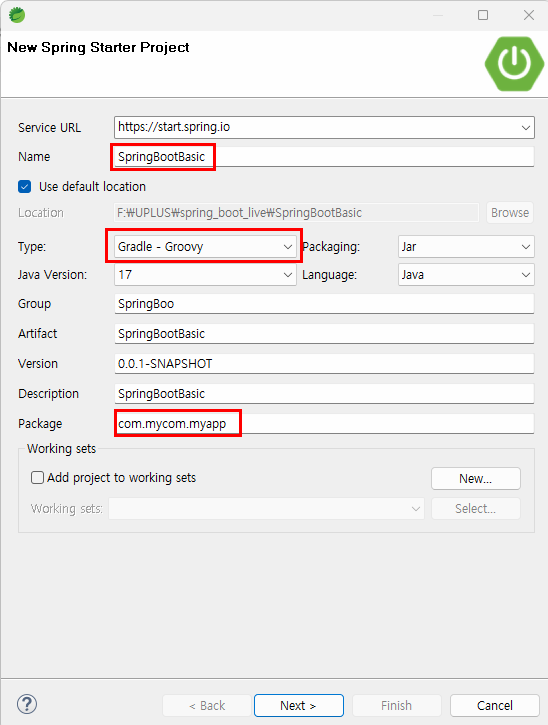
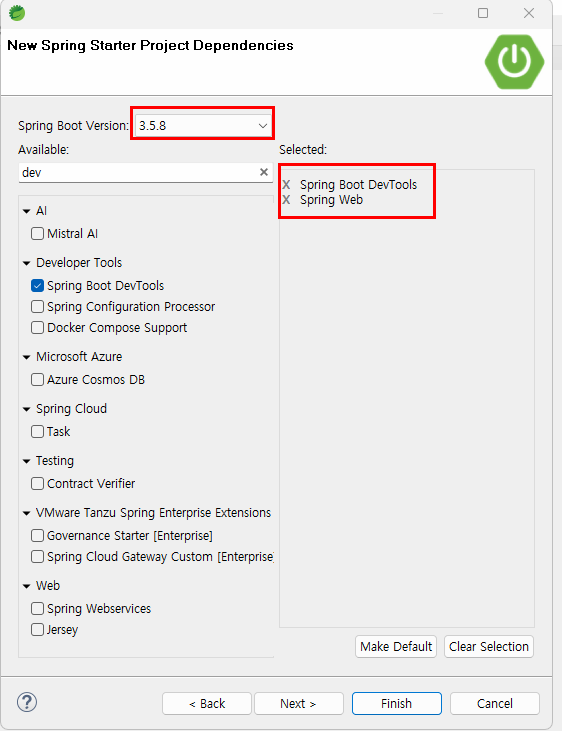
src/main/resources/static에 index.html
<!DOCTYPE html>
<html>
<head>
<meta charset="UTF-8">
<title>Insert title here</title>
</head>
<body>
	<h1>index.html 입니다.</h1>
	<hr>
	<a href="#" >회원</a>
	<a href="#" >게시판</a>
	<a href="#" >관리자</a>

	<!--
		#1. SPA
			spa 구현할 경우 아래 각 대메뉴에 해당하는 div(화면)을 메뉴 선택에 맞게 보이고, 안보이게 하는 javascript 코드 구현
			- Javascript 로 직접 구현 자체가 부담.
			- 복잡한 Front 를 하나의 index.html 파일을 여러 개발자가 함께 개발

		#2. SPA X 선택 -> 복수 개의 html
			- index.html + 대메뉴별 user.html, board.html, admin.html
			- html 간의 이동 시 화면 refresh
			- html 간의 이동
				- hyperlink 를 통한 이동 ( Spring 등 백엔드 인지 X )
				- Controller 를 통한 이동
	 -->
	<div id="user">회원</div>
	<div id="board">게시판</div>
	<div id="admin">관리자</div>
</body>
</html>===
url mapping ex. get
요청에 대한 처리 parameter
응답 - html(index.html vs multi), json
CORS
===
application.properties에
server.port = 80 를 통해 port 번호를 바꿀 수 있다.
SpringBootBasicApplication가 있는 곳 하위에 controller를 만들어야 함
pagecontroller
jsp를 사용안하기에 .html이라고 전부 작성해주어야 함
package com.mycom.myapp.controller;

import java.util.HashMap;
import java.util.Map;

import org.springframework.stereotype.Controller;
import org.springframework.web.bind.annotation.GetMapping;
import org.springframework.web.bind.annotation.PostMapping;
import org.springframework.web.bind.annotation.RequestParam;
import org.springframework.web.bind.annotation.ResponseBody;

// SpringMVC = JSP를 사용하는 프로젝트를 일반적으로 의미
// JSP를 사용하지 않는 SpringBoot 프로젝트도 내부적으로 MVC 패턴 사용 (DispatcherServlet)
@Controller
public class PageController {

	@GetMapping("/")
	public String home() {
		System.out.println("/");
		return "home.html";
	}

	@GetMapping("/login")
	public String login() {
		System.out.println("/login");
		return "login.html";
	}
	@PostMapping("/login")
	public String login(@RequestParam("username") String username, @RequestParam("password") String password) {
		System.out.println(username+", "+password);
		// return "main.html"에서 "Request method 'POST' is not supported" 오류 발생
		// ResourceHttpRequestHandler는 GET, HEADER 요청만 처리 => redirect 이용
//		return "main.html";
		return "redirect:main.html";
	}

	//AJAX 로그인 요청
	@GetMapping("/login2")
	public String login2() {
		System.out.println("/login2");
		return "login2.html";
	}

	// jackson library
	@PostMapping("/login2")
	@ResponseBody // page가 아닌 data 응답 필요
	public Map<String, String> login2(@RequestParam("username") String username, @RequestParam("password") String password) {
		System.out.println(username+", "+password);
		Map<String, String> map = new HashMap<>();
		map.put("result", "success");
		return map;
	}
}
login.html
<!DOCTYPE html>
<html>
<head>
<meta charset="UTF-8">
<title>Insert title here</title>
</head>
<body>
	<h1>login.html</h1>
	<hr>

	<form action="/login" method="post">
		<input type="text" name="username">
		<input type="password" name="password">
		<button type="submit">login</button>
	</form>

</body>
</html>
login2.html
<!DOCTYPE html>
<html>
<head>
<meta charset="UTF-8">
<title>Insert title here</title>
</head>
<body>
	<h1>login2.html</h1>
	<hr>

	<form>
		<input type="text" name="username" id="username">
		<input type="password" name="password" id="password">
	</form>
	<button id="btnLogin">login</button>

<script>
	window.onload = function(){
		document.querySelector("#btnLogin").onclick = async function(){
			let urlParams = new URLSearchParams({
				username:document.querySelector("#username").value,
				password:document.querySelector("#password").value
			});

			let fetchOptions = {
				method: "post",
				body:urlParams
			}

			let response = await fetch("/login2", fetchOptions);
			let data = await response.json();
			console.log(data);

			if(data.result == "success"){
				window.location.href = "/main.html";
			} else{
				alert("fail to login");
			}
		};
	}
</script>
</body>
</html>
페이지 이동과 데이터 처리 구분을 확실히 해야 함
===
jsonController
package com.mycom.myapp.controller;

import java.util.ArrayList;
import java.util.List;

import org.springframework.web.bind.annotation.GetMapping;
import org.springframework.web.bind.annotation.RestController;

import com.mycom.myapp.dto.CarDto;

//@Controller
//@ResponseBody // 컨트롤러의 모든 응답이 json
@RestController // @Controller + @ResponseBody
public class JsonController {

	// 단순 문자열
	@GetMapping("/string")
	public String m1() {
		System.out.println("/string");
		return "hello";
	}

	// json 문자열
	@GetMapping("/jsonstring")
	public String m2() {
		System.out.println("/jsonstring");
		return " \"result\":\"success\" ";
	}

	// dto
	@GetMapping("/dto")
	public CarDto m3() {
		System.out.println("/dto");
		return new CarDto("소나타",40000,"홍길동");
	}

	// dto
	@GetMapping("/listdto")
	public List<CarDto> m4() {
		System.out.println("/listdto");
		List<CarDto> list = new ArrayList<>();
		list.add(new CarDto("소나타",40000,"홍길동"));
		list.add(new CarDto("그랜저",50000,"이길동"));
		list.add(new CarDto("제네시스",60000,"삼길동"));
		return list;
	}

    // json request
	// postman 테스트는 정상 처리
	// jsonController.html로 처리하면 null로 됨 => EmpDto [emplyeeId=0, firstName=null, lastName=null, email=null, hireDate=null]
	// => @RequestBody 추가
	// request payload 값으로 postman-body-raw-json도 처리 가능
	@PostMapping("/emp")
	public Map<String, String> m5(@RequestBody EmpDto dto) {
		System.out.println("/emp");
		System.out.println(dto);
		Map<String, String> map = new HashMap<>();
		map.put("result", "success");
		return map;
	}

	@PostMapping("/emplist")
	public Map<String, String> m6(@RequestBody List<EmpDto> list) {
		System.out.println("/emplist");
		System.out.println(list);
		Map<String, String> map = new HashMap<>();
		map.put("result", "success");
		return map;
	}
}
jsonController.html
<!DOCTYPE html>
<html>
<head>
<meta charset="UTF-8">
<title>Insert title here</title>
</head>
<body>
	<h1>jsonController.html</h1>
	<hr>

	<button id="btnSendEmp">emp 보내기</button>
	<button id="btnSendEmpList">emp list 보내기</button>

<script>
	let emp = {
		employeeId: 1,
		firstName: '길동',
		lastName: '홍',
		email: 'hong@gildong.com',
		hireDate: '2025-11-24'
	}

	let empList = [
		{
			employeeId: 1,
			firstName: '길동',
			lastName: '홍',
			email: 'hong@gildong.com',
			hireDate: '2025-11-24'
		},
		{
			employeeId: 2,
			firstName: '길동',
			lastName: '2',
			email: 'hong2@gildong.com',
			hireDate: '2025-11-2'
		},
		{
			employeeId: 3,
			firstName: '길동',
			lastName: '3',
			email: 'hong3@gildong.com',
			hireDate: '2025-11-4'
		}
	];

	window.onload = function(){
		document.querySelector("#btnSendEmp").onclick = async function(){

			let fetchOptions = {
				method: "post",
				headers:{
					'content-Type':'application/json'
				},
				body:JSON.stringify(emp)
			}

			let response = await fetch("/emp", fetchOptions);
			let data = await response.json();
			console.log(data);
		};

		// list btn
		document.querySelector("#btnSendEmpList").onclick = async function(){

			let fetchOptions = {
				method: "post",
				headers:{
					'content-Type':'application/json'
				},
				body:JSON.stringify(empList)
			}

			let response = await fetch("/emplist", fetchOptions);
			let data = await response.json();
			console.log(data);
		};
	}
</script>
</body>
</html>
CORS
몇 일 날려먹을 확률이 크다.
1. 기본 개념 확실히 잡기
2. 오류가 발생하면, 블로그 따라 하지 않기(조건이 다르기에 따라해도 안될 가능성이 높음)
3. CORS 크롬 extends 설치 x
4. 백엔드 서버로 이동해서 테스트 해본다. => 문제가 없다면, CORS 문제는 아님
CORSController
package com.mycom.myapp.controller;

import java.util.HashMap;
import java.util.Map;

import org.springframework.web.bind.annotation.CrossOrigin;
import org.springframework.web.bind.annotation.DeleteMapping;
import org.springframework.web.bind.annotation.GetMapping;
import org.springframework.web.bind.annotation.PathVariable;
import org.springframework.web.bind.annotation.PostMapping;
import org.springframework.web.bind.annotation.PutMapping;
import org.springframework.web.bind.annotation.RequestParam;
import org.springframework.web.bind.annotation.RestController;

@RestController

public class CORSController {

	@GetMapping("/cors")
	public Map<String, String> getCORS(@RequestParam("param") String param){
		System.out.println("get cors param :"+param);
		Map<String, String> map = new HashMap<>();
		map.put("result", "success");
		return map;
	}
	@PostMapping("/cors")
	public Map<String, String> postCORS(@RequestParam("param") String param){
		System.out.println("post cors param :"+param);
		Map<String, String> map = new HashMap<>();
		map.put("result", "success");
		return map;
	}
	@PutMapping("/cors/{num}")
	public Map<String, String> putCORS(
			@RequestParam("param") String param,
			@PathVariable("num") String num
	){
		System.out.println("put cors param :"+param);
		System.out.println("put cors num :"+num);
		Map<String, String> map = new HashMap<>();
		map.put("result", "success");
		return map;
	}
	@DeleteMapping("/cors/{num}")
	public Map<String, String> deleteCORS(@PathVariable("num") String num){
		System.out.println("delete cors num :"+num);
		Map<String, String> map = new HashMap<>();
		map.put("result", "success");
		return map;
	}
}
corsTest.html
<!DOCTYPE html>
<html>
<head>
<meta charset="UTF-8">
<title>Insert title here</title>
</head>
<body>
	<h1>corsTest.html 입니다.</h1>
	<hr>

	<button id="btnGetRequest">Get request</button>
	<button id="btnPostRequest">Post request</button>
	<button id="btnPutRequest">Put request</button>
	<button id="btnDelRequest">Delete request</button>

<script>
	window.onload = function(){
		document.querySelector("#btnGetRequest").onclick = makeGetRequest;
		document.querySelector("#btnPostRequest").onclick = makePostRequest;
		document.querySelector("#btnPutRequest").onclick = makePutRequest;
		document.querySelector("#btnDelRequest").onclick = makeDeleteRequest;
	}

	async function makeGetRequest() {
		let response = await fetch("http://localhost:8080/cors?param=1");
		let data = await response.json();
		console.log(data);
	}

	async function makePostRequest() {
		let urlParams = new URLSearchParams({
			param: 2
		});
		let fetchOptions = {
				method: "post",
				body: urlParams
		};
		let response = await fetch("http://localhost:8080/cors", fetchOptions);
		let data = await response.json();
		console.log(data);
	}

	async function makePutRequest() {
		let urlParams = new URLSearchParams({
			param: 3
		});
		let fetchOptions = {
				method: "put",
				body: urlParams
		};
		let response = await fetch("http://localhost:8080/cors/123", fetchOptions);
		let data = await response.json();
		console.log(data);
	}

	async function makeDeleteRequest() {

		let fetchOptions = {
				method: "delete"
		};
		let response = await fetch("http://localhost:8080/cors/123", fetchOptions);
		let data = await response.json();
		console.log(data);
	}
</script>

</body>
</html>
프론트에서 에러가 발생(ex. Access to fetch at 'http://localhost:8080/cors?param=1' from origin 'http://127.0.0.1:5500' has been blocked by CORS policy: No 'Access-Control-Allow-Origin' header is present on the requested resource.) => @CrossOrigin("*") // cors 허용 => 헤더에 Access-Control-Request-Headers가 생김
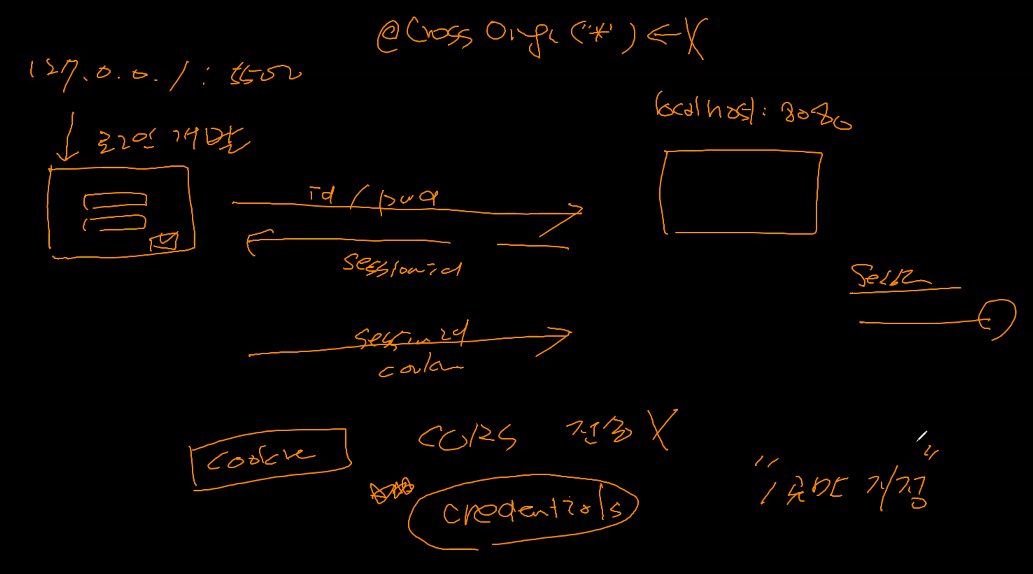
cors 환경에서 쿠키 전송 불가(credentials) = 로그인 안됨 => 프론트와 백에서 둘 다 설정해야 함. 프론트는 credentials를 true, 백은 한 곳만 지정 가능
프론트는 fetch와 axios 방식 존재. axios를 사용할 경우, withCredentials=true 해줘야 함.
@CrossOrigin("*")는 credentials가 없는 요청에는 문제가 없지만, 포함되면 오류 발생
corsTest2.html
fetchOptions에 credentials 추가
		let fetchOptions = {
			method: "get",
			credentials : "include"
		};
CORSController
@CrossOrigin(
		origins = "http://127.0.0.1:5500",
		allowCredentials="true",
		allowedHeaders = "*",
		methods= {RequestMethod.GET, RequestMethod.POST, RequestMethod.PUT, RequestMethod.DELETE, RequestMethod.OPTIONS}
)
preflighgt - put, delete 방식이 브라우저마다 약간 다르기에 미리 물어보는 것. 이를 위해 RequestMethod.OPTIONS 추가. 처음에만 작동함.
모든 컨트롤러에 @CrossOrigin을 작성하기는 힘들기에, WebMvcConfigurer 한 곳에서 일괄 관리함.
package com.mycom.myapp.config;

import org.springframework.context.annotation.Configuration;
import org.springframework.web.servlet.config.annotation.CorsRegistry;
import org.springframework.web.servlet.config.annotation.WebMvcConfigurer;

@Configuration
public class WebMvcConfig implements WebMvcConfigurer{
	// cors 정책 일관 관리
	@Override
	public void addCorsMappings(CorsRegistry registry) {
		registry.addMapping("/**")
			.allowedOrigins("http://127.0.0.1:5500")
			.allowedHeaders("*")
			.allowCredentials(true)
			.allowedMethods("GET","POST","PUT","DELETE","OPTIONS");
	}

}