relative
position: relative; 자체로는 특별한 의미가 없다.
위치를 이동시켜주는 top, right, bottom, left 프로퍼티가 있어야 원래의 위치에서 이동할 수 있다.
<div class="box">div</div>
    <div class="relative box">div.relative</div>
    <div class="relative top-20 box">div.relative.top-20</div>
.relative {
position: relative;
}
.top-20 {
top: -20px;
left: 30px;
}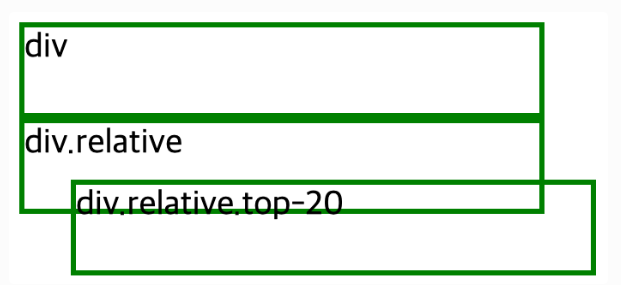
div.relative.top-20 은 위로 20px 이동하고, 왼쪽에서 30px 만큼 떨어졌다.
마이너스 값을 주면 아래로 떨어지지 않고, 위로 올라간다.
absolute
position: absolute;* 는 이름과 같이 절대적인 위치에 둘 수 있다.
어떤 기준으로 절대적이냐 하면, 특정 부모에 대해 절대적으로 움직이게 된다.
부모 중에 position이 relative, fixed, absolute 하나라도 있으면 그 부모에 대해 절대적으로 움직이게 된다.
<div class="relative box">
      div.relative

      <p class="absolute right-0">
        p.absolute.right-0
      </p>
    </div>
p {
margin: 0;
background-color: yellow;
}
.absolute {
position: absolute;
}
.right-0 {
right: 0;
bottom: 0;
}
원래 p 태그는 block-element이기 때문에 가로 크기가 부모 너비만큼 전부 차지해야 하는데, 마치 inline-element처럼 내용의 크기만큼만 너비가 생겼다.
이렇게 absolute 값을 갖게 되면, 내용의 크기만큼만 가로크기가 된다.
fix
fixed는 말그대로 고정됐다는 뜻이다. absolute는 relative를 가진 부모가 필요했는데, fixed는 필요없다. fixed는 눈에 보이는 브라우저 화면 크기만큼, 화면 내에서만 움직인다. 상대적으로 고정되었다는 뜻이다.
float
position대신에 float로 레이아웃을 만들 수 있다.
예제1
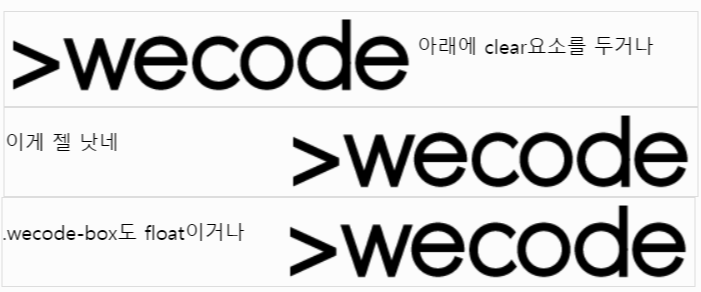
float속성에는 left,right,none 가운데 하나를 값으로 줄 수 있다. 그런데 float속성을 사진 요소는 부모가 높이를 인지할 수 없어서 아래와 같이 부모를 벗어난다.

예제2-문제해결
float를 해결하려면 clear라는 속성이 필요하다.
- 해결방법1
<div class="wecodeBox">
      <img class="floatLeft" src="https://s3.ap-northeast-2.amazonaws.com/cdn.wecode.co.kr/logo/wecode_logo_bk.png">
      <p>아래에 clear요소를 두거나</p>
      <br class="clear">
    </div>
.clear {
clear: both;- 해결방법2
<div class="wecodeBox lastBox">
      <img class="floatRight" src="https://s3.ap-northeast-2.amazonaws.com/cdn.wecode.co.kr/logo/wecode_logo_bk.png">
      <p>이게 젤 낫네</p>
    </div>
.lastBox {
overflow: hidden;
}- 해결방법3
바깥 div(.wecodeBox)를 float시킨다. 그러면 자식의 float 높이를 인지하여 그만큼 높이를 차지하게 된다. 하지만,float이 되어버려 block 요소의 성질이 없어지게 된다. 이러면 width를 100% 추가하거나 해야한다.
.wecodeBox {
  border: 1px solid #ddd;
  float: left;
  width: 100px;
}