/ 1-18. 예외, 에러 처리
예외처리(Exception, Error Handling)
-
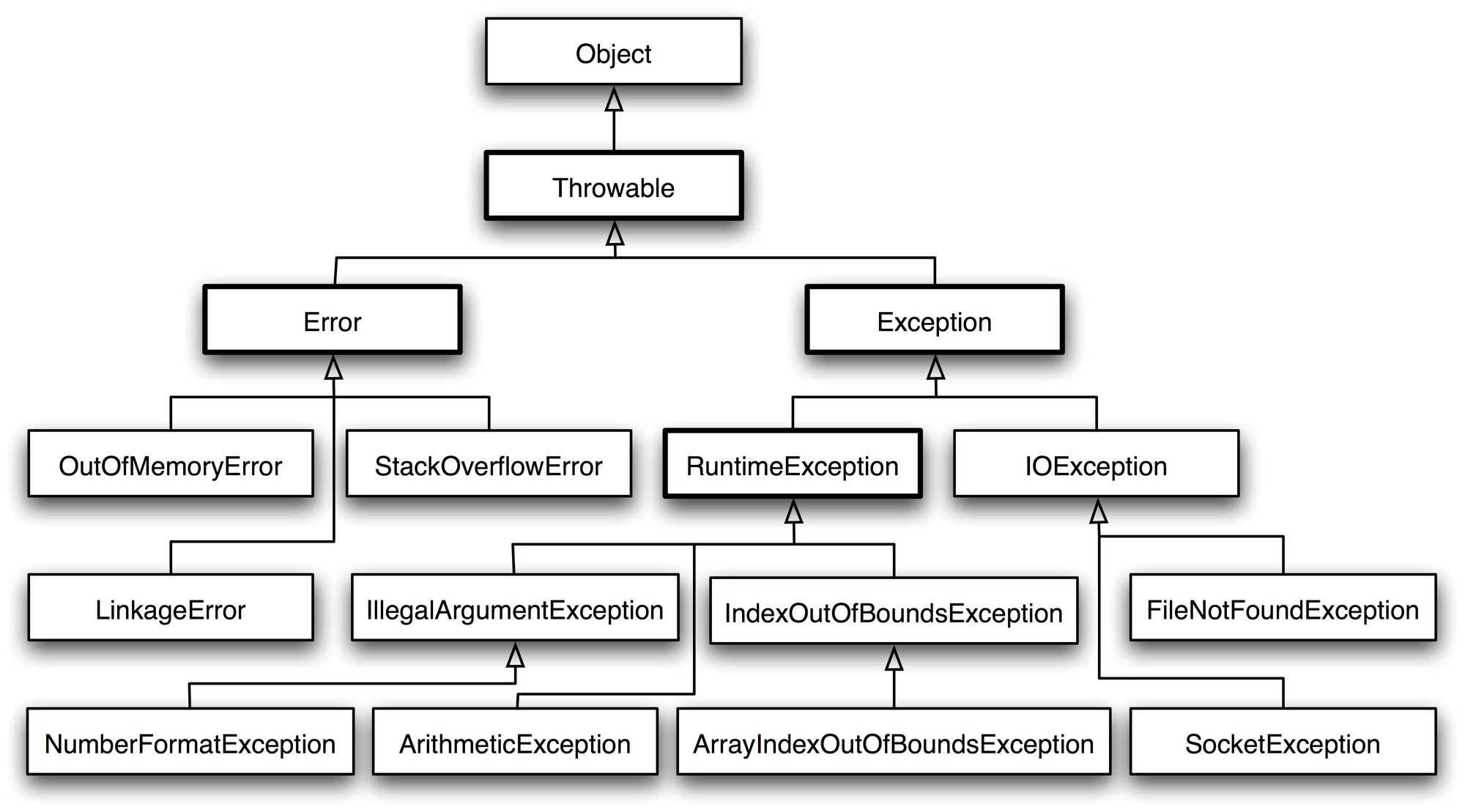
에러(Error) : 프로그램이 종료되어야 하는 심각한 문제를 표현합니다. 대부분 컴퓨터나 JVM이 시스템적으로 동작할 수 없는 상황을 표현합니다. ex) OOM(out of memory error)
-
예외(Exception) : 잘못된 사용 또는 코딩으로 인한 오류를 말한다. 프로그램이 종료된다는 점에서 에러와 동일하지만, 예외처리를 통해 계속 실행 상태를 유지할 수 있다
(다양한 예외 상황이 발생할 수 있다. 이것에 대응하기 위해서 예외 처리 코드가 필요하다)
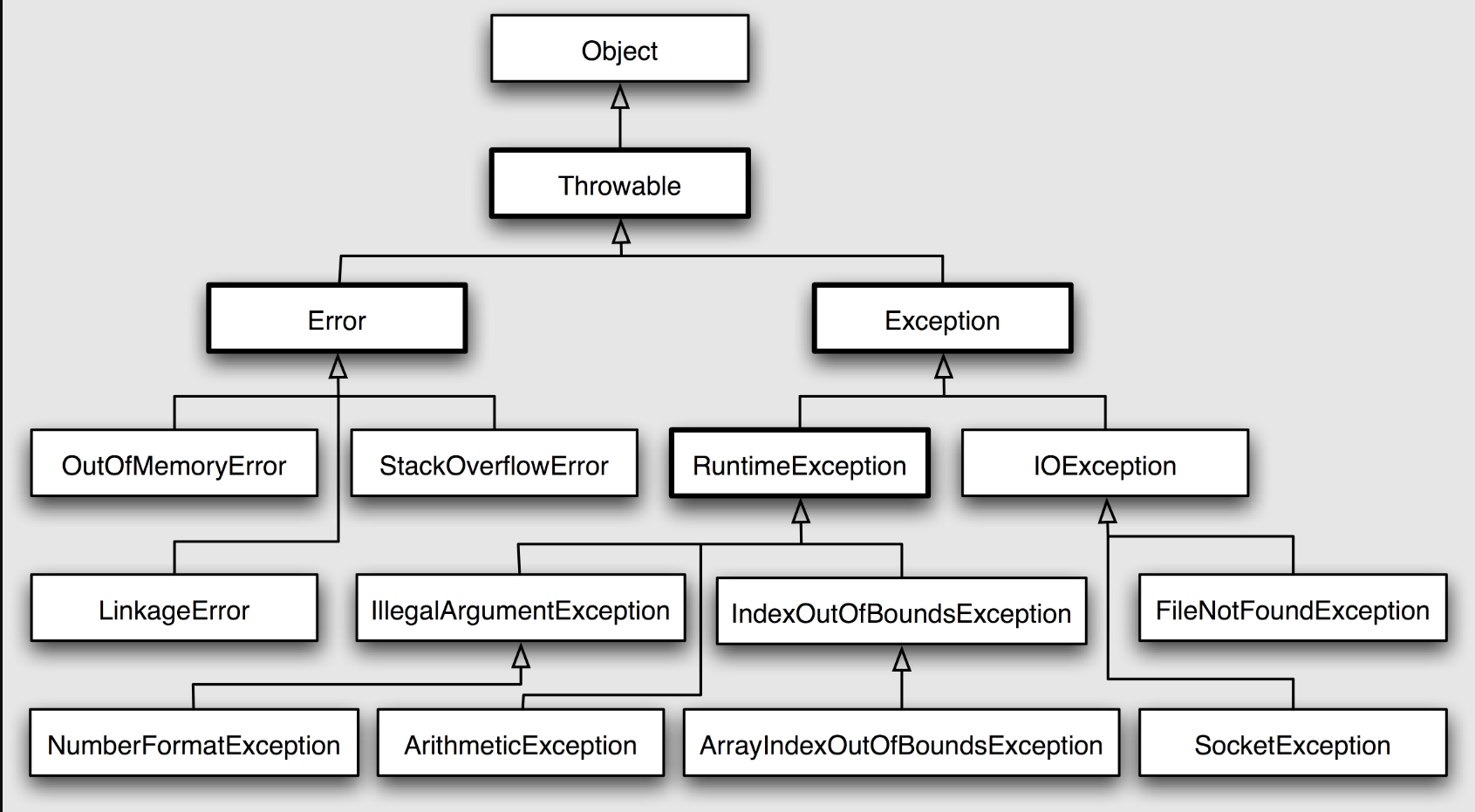
자바에서는 상속을 이용해서 모든 예외를 표현합니다. 모든 예외 클래스는 Throwable의 자손 클래스 입니다
- 실행도중 발생하는 Exception은 RuntimeException을 상속받아서 정의
- 파일을 읽고 쓰거나, 원격에 있는 저장소로부터 데이터를 읽고 쓸 때 나는 에러를 표현하려면 IOException을 상속받아서 정의
/ try-catch(-finally) 예외 처리코드 형식
try {
    // 예외가 발생할 가능성이 있는 코드를 구현합니다.
} catch (FileNotFoundException e) { # 하위예외클래스 위쪽
    // FileNotFoundException이 발생했을 경우,이를 처리하기 위한 코드를 구현합니다.
} catch (IOException e) { # 상위 예외클래스 아래쪽
    // FileNotFoundException이 아닌 IOException이 발생했을 경우,이를 처리하기 위한 코드를 구현합니다.
} finally {
    // 예외의 발생여부에 관계없이 항상 수행되어야하는 코드를 구현합니다.
}- finally구문 필수는 아니다
- catch블록이 여러개라 하더라라도 catch블록은 단 하나만 실행된다
- 처리해야 할 예외 클래스들이 상속관계에 있을때, 하위클래스 catch블록이 위에 있어야함
위에부터 차례로 검사되는데 하위 예외가 상위 예외에 포함되기 때문에 하위 먼저 검사대상 되야함
/ try-catch(-finally) 예제
# 0으로 나눠질때 exception 발생
public class Main {
    public static void main(String[] args) {
        int number = 10;
        int result;

        for (int i = 10; i >= 0; i--) {
            try {
                result = number / i;
                System.out.println(result);
            } catch (Exception e) {
                System.out.println("Exception발생: " + e.getMessage());
                # 예외 정보를 얻는 방법 sout(e.getMessage());
            } finally {
                System.out.println("항상 실행되는 finally 구문");
            }
        }
    }

}
/ try-with-resource 형식
입출력과 함께 자주 쓰이는 구문입니다
기존의 try-catch(-finally)문은 자원을 닫을 때 close()를 사용해야 합니다
try-with-resource문은 try문을 벗어나는 순간 자동적으로 close()가 호출됩니다
사용방법 : try() 안의 입출력 스트림을 생성하는 로직을 작성할 때
해당 객체가 AutoClosable 인터페이스를 구현한 객체여야 합니다
(AutoClosable 인터페이스에는 예외가 발생할 경우 close()메소드를 호출하기로 정의되어있기 때문)
/ try-with-resource 예제
import java.io.FileOutputStream;
import java.io.IOException;

public class Main {
    public static void main(String[] args) {
			## FileOutputStream, AutoClosable 인터페이스를 구현한 객체
        try (FileOutputStream out = new FileOutputStream("test.txt")) {
            // test.txt file 에 Hello Sparta 를 출력
            out.write("Hello Sparta".getBytes());
            out.flush();
        } catch (IOException e) {
            e.printStackTrace();
            # e.getMessage() 예외 발생이유만 / e.printStackTrace() + 예외 어디서 발생했는지 추적한 내용포함
        }
    }
}
/ try-with-resource 예제를 try-catch 문으로 작성했을때, 길어지고
import java.io.FileOutputStream;
import java.io.IOException;

public class Main {
    public static void main(String[] args) throws IOException {
    #FileOutputStream 을 열고 닫을때 생기는 Exception 까지 그 상위에서 catch를 하거나 throws로 감싸줘야합니다
        FileOutputStream out = new FileOutputStream("test.txt");
        try {
            // test.txt file 에 Hello Sparta 를 출력
            out.write("Hello Sparta".getBytes());
            out.flush();
        } catch (IOException e) {
            e.printStackTrace();
        }
        out.close(); #  자원을 닫을 때 close()를 사용
    }
}
/ 메소드에서의 예외 선언
catch문을 이용해서 예외처리를 하지 않은 경우,
메소드에 throws로 예외가 발생할 수 있다는 것을 알려주어야 합니다
throws 키워드가 있는 함수를 호출한다면, caller(호출하는) 쪽에서 catch와 관련된 코드를 작성해주어야 합니다
void method() throws IndexOutOfBoundsException, IllegalArgumentException {
   //메소드의 내용
}
/ 예외, 에러 처리 퀴즈
class ArrayCalculation {

    int[] arr = { 0, 1, 2, 3, 4 };

    public int divide(int denominatorIndex, int numeratorIndex)
            throws ArithmeticException, ArrayIndexOutOfBoundsException {
        return arr[denominatorIndex] / arr[numeratorIndex];
    }
}

public class Main {
    public static void main(String[] args) {
        ArrayCalculation arrayCalculation = new ArrayCalculation();

        System.out.println("2 / 1 = " + arrayCalculation.divide(2, 1));
        try {
            System.out.println(
                    "1 / 0 = " + arrayCalculation.divide(1, 0));
        } catch (ArithmeticException e) {
            System.out.println("잘못된 계산입니다. " + e.getMessage());
        }
        try {
            System.out.println("Try to divide using out of index element = "
                    + arrayCalculation.divide(5, 0));
        } catch (ArrayIndexOutOfBoundsException e) {
            System.out.println(
                    "잘못된 index 범위로 나누었습니다. 타당 index 범위는 0부터" + (arrayCalculation.arr.length - 1) + "까지 입니다.");
        }
    }

}
/ 날짜와 시간 다루기
예제)
import java.time.LocalDate;
import java.time.LocalTime;
# java.time 패키지의 가장 기본이 되는 클래스 입니다
import java.time.LocalDateTime;


public class Main {
    public static void main(String[] args) {
        System.out.println("now()를 활용하여 생성");
        LocalDate date = LocalDate.now();
        LocalTime time = LocalTime.now();
        LocalDateTime dateTime = LocalDateTime.now();

        System.out.println(date);
        System.out.println(time);
        System.out.println(dateTime);

        System.out.println("of()를 활용하여 생성");
        LocalDate newDate = LocalDate.of(2021, 03, 29);
        LocalTime newTime = LocalTime.of(22, 50, 55);

        System.out.println(newDate);
        System.out.println(newTime);
    }
}
/ now() vs of()
now()는 현재의 날짜 시간을, of()는 지정하는 값이 필드에 담겨집니다.
/ DateTimeFormatter
지정한 형식대로 출력이 될 수 있도록
DateTimeFormatter formatter = DateTimeFormatter.ofLocalizedTime(FormatStyle.SHORT);
String shortFormat = formatter.format(LocalTime.now());
System.out.println(shortFormat);
형식을 변환하는데 사용한 DateTimeFormatter 클래스는 SHORT이외에도 다양한 FormatStyle 종류가 있습니다.
DateTimeFormatter newFormatter = DateTimeFormatter.ofPattern("yyyy/MM/dd");
String myDate = newFormatter.format(LocalDate.now());
System.out.println(myDate);
ofPattern에 작성한 형식대로 날짜가 출력되었을 것입니다! 이러한 방식을 활용하여 우리는 원하고자 하는 형식으로 출력을 할 수 있습니다.
/ 날짜와 시간의 차이 계산
LocalDate today = LocalDate.now();
LocalDate birthday = LocalDate.of(2021, 8, 9);
Period period = Period.between(today, birthday);
System.out.println(period.getMonths());
System.out.println(period.getDays());
오늘 일자와 생일 일자간의 날짜 차이를 계산하기 위해서는 between()을 사용하면 구할 수 있습니다. (between() 이외에도 until()로 구할 수도 있습니다