서비스 · 프로세스 관리 34 / 50 · Part 4. 로그·스케줄링·운영
실습 환경: Rocky Linux 9.8 · Ubuntu 24.04.5 (systemd로 부팅한 Docker 격리 컨테이너, 테스트 계정analyst)
1. 들어가며
33편의 crontab은 사용자별 작업이었다. 서버에는 이와 별도로 패키지와 관리자가 등록하는 시스템 cron 이 있다. 로그 로테이션, 패키지 캐시 정리, 파일 시스템 점검 같은 작업이 여기서 돈다. 그런데 이 영역은 파일이 여러 디렉터리에 흩어져 있고 배포판마다 구조가 달라, 점검할 때 빠뜨리기 쉽다.
이번 글에서는 /etc/crontab, /etc/cron.d/, cron.hourly·daily·weekly·monthly 디렉터리, 그리고 서버가 꺼져 있던 동안 놓친 작업을 실행해 주는 anacron 의 관계를 Rocky와 Ubuntu에서 비교한다.
2. 핵심 개념
2-1. 시스템 cron 파일
| 위치 | 형식 | 특징 |
|---|---|---|
/etc/crontab | 분 시 일 월 요일 **계정** 명령 | 시스템 전체 crontab |
/etc/cron.d/* | /etc/crontab과 같음 (계정 필드 있음) | 패키지·관리자가 파일 단위로 추가 |
/etc/cron.hourly/ 등 | 실행 파일(스크립트) 을 넣는 디렉터리 | run-parts가 알파벳 순서로 실행 |
사용자 crontab과 가장 큰 차이는 6번째 필드가 실행 계정 이라는 점이다. 이 필드를 빠뜨리면 명령의 첫 단어를 계정으로 해석해 실행되지 않는다.
2-2. run-parts
run-parts /etc/cron.daily는 디렉터리 안의 실행 가능한 파일을 모두 순서대로 실행 한다. Debian 계열의 run-parts는 이름에 점(.)이 있으면 건너뛰는 규칙이 있어 backup.sh가 실행되지 않는 함정이 있다.
2-3. anacron
| 항목 | cron | anacron |
|---|---|---|
| 기준 | 정확한 시각 | 주기(일 단위) |
| 서버가 꺼져 있을 때 | 그 시각의 작업은 건너뜀 | 다음에 켜졌을 때 따라잡아 실행 |
| 최소 단위 | 1분 | 1일 |
| 기록 | — | /var/spool/anacron/작업명에 마지막 실행 날짜 |
| 설정 | crontab | /etc/anacrontab (주기 지연(분) 작업ID 명령) |
3. 동작 원리
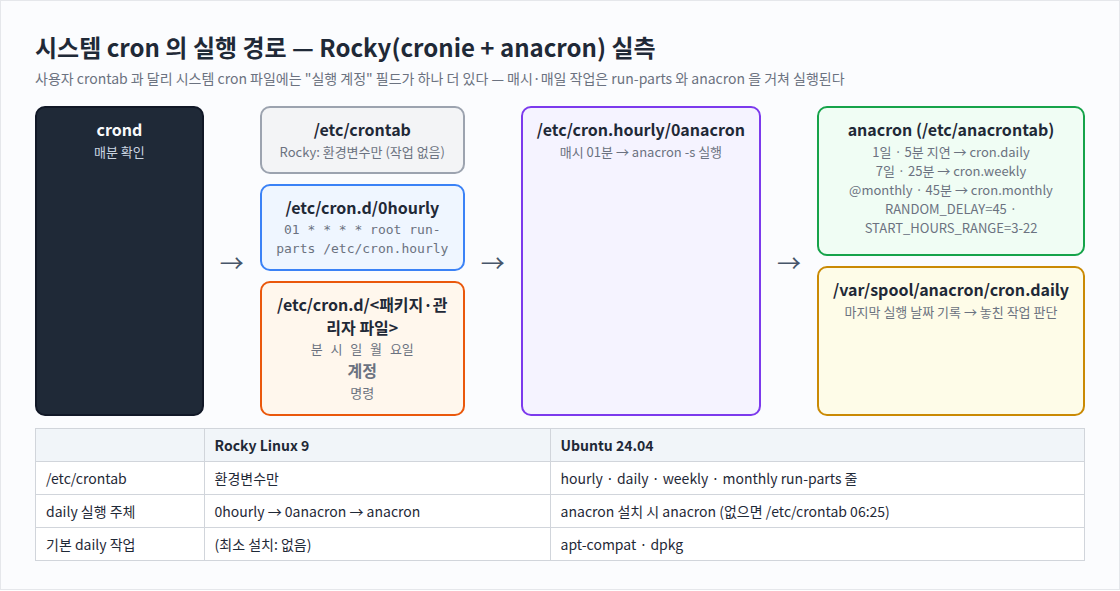
[Rocky]
매시 01분 : crond → /etc/cron.d/0hourly → run-parts /etc/cron.hourly
                                          → 0anacron → anacron -s
anacron   : /etc/anacrontab 확인
            cron.daily 마지막 실행이 1일 이상 전인가? → 5분 + RANDOM(0~45분) 후 run-parts /etc/cron.daily
            START_HOURS_RANGE=3-22 밖이면 실행하지 않음
            실행 후 /var/spool/anacron/cron.daily 에 오늘 날짜 기록

[Ubuntu]
/etc/crontab : 17분마다 hourly run-parts
               06:25 daily — 단, anacron 이 설치되어 있으면(test -x) 건너뛰고 anacron 에 맡김
그래서 Rocky에서는 /etc/crontab이 거의 비어 있어도 daily 작업이 돈다. "crontab에 없으니 실행 안 된다"는 판단은 틀릴 수 있다.
4. 명령어 실습
# 1) (Rocky) 시스템 cron 파일
cat /etc/crontab | grep -v '^#' | grep -v '^$'
ls -l /etc/cron.d/ /etc/cron.hourly/ /etc/cron.daily/ /etc/cron.weekly/ /etc/cron.monthly/
cat /etc/cron.d/0hourly

# 2) (Rocky) anacron
grep -v '^#' /etc/anacrontab | grep -v '^$'
ls -l /var/spool/anacron/; cat /var/spool/anacron/cron.daily
journalctl --no-pager -o cat -g 'anacron|run-parts' | tail -4

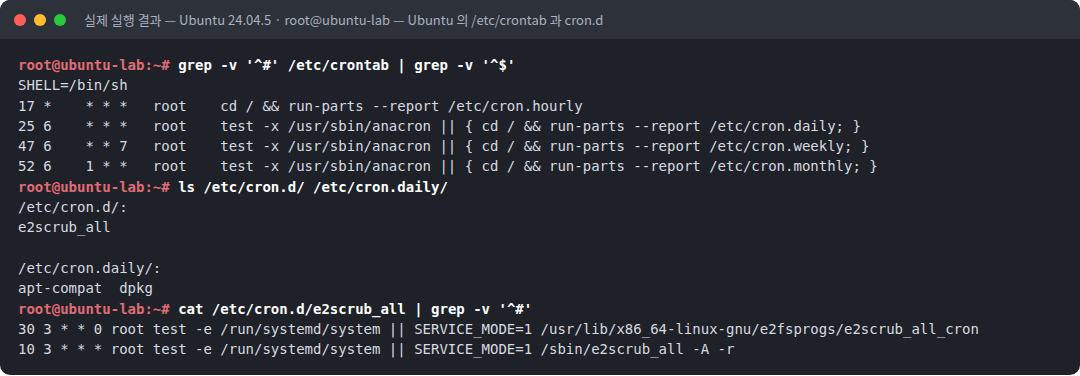
# 3) (Ubuntu) /etc/crontab 과 cron.d
grep -v '^#' /etc/crontab | grep -v '^$'
ls /etc/cron.d/ /etc/cron.daily/
cat /etc/cron.d/e2scrub_all | grep -v '^#'

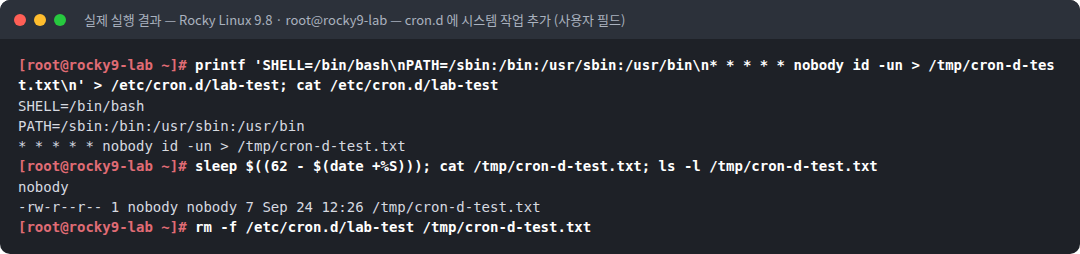
# 4) (Rocky) cron.d 에 작업 추가 — 6번째 필드 = 실행 계정
printf 'SHELL=/bin/bash\nPATH=/sbin:/bin:/usr/sbin:/usr/bin\n* * * * * nobody id -un > /tmp/cron-d-test.txt\n' > /etc/cron.d/lab-test
sleep $((62 - $(date +%S))); cat /tmp/cron-d-test.txt; ls -l /tmp/cron-d-test.txt
rm -f /etc/cron.d/lab-test /tmp/cron-d-test.txt
5. 실행 결과
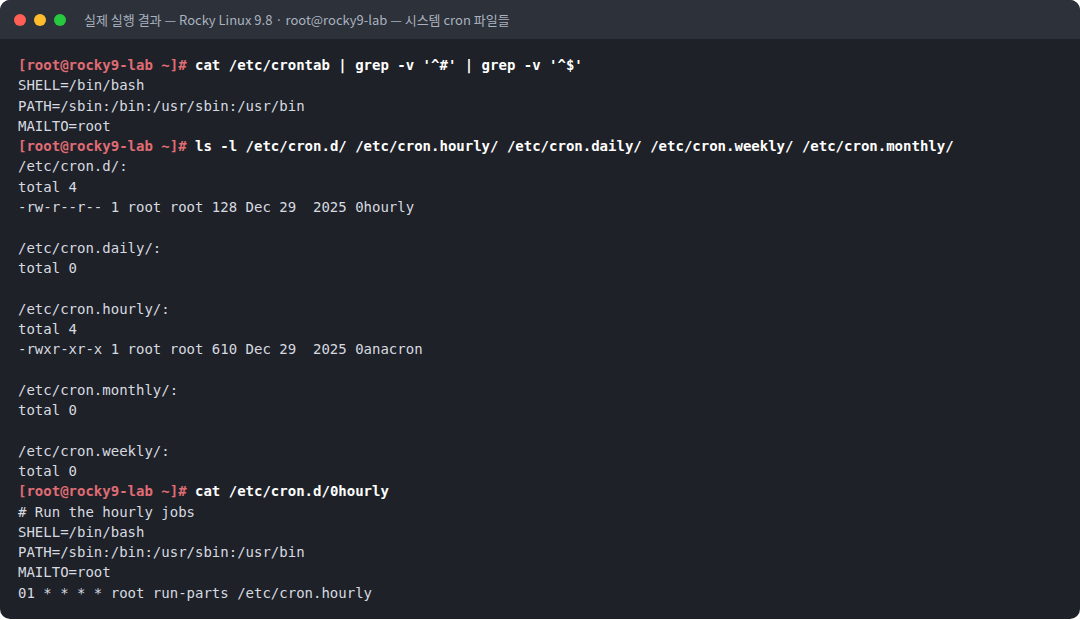
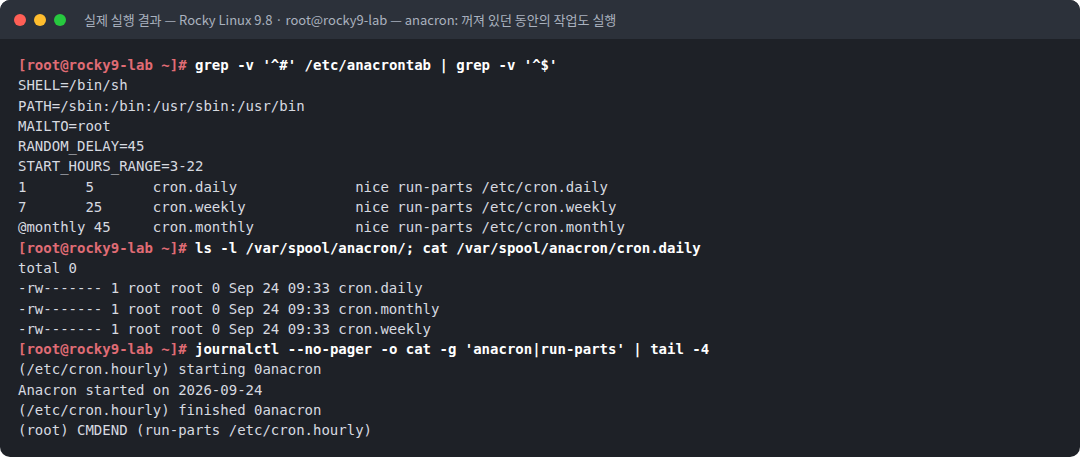
텍스트 원본(실제 출력):
[root@rocky9-lab ~]# cat /etc/crontab | grep -v '^#' | grep -v '^$'
SHELL=/bin/bash
PATH=/sbin:/bin:/usr/sbin:/usr/bin
MAILTO=root
[root@rocky9-lab ~]# ls -l /etc/cron.d/ /etc/cron.hourly/ /etc/cron.daily/ /etc/cron.weekly/ /etc/cron.monthly/
/etc/cron.d/:
total 4
-rw-r--r-- 1 root root 128 Dec 29  2025 0hourly

/etc/cron.daily/:
total 0

/etc/cron.hourly/:
total 4
-rwxr-xr-x 1 root root 610 Dec 29  2025 0anacron

/etc/cron.monthly/:
total 0

/etc/cron.weekly/:
total 0
[root@rocky9-lab ~]# cat /etc/cron.d/0hourly
# Run the hourly jobs
SHELL=/bin/bash
PATH=/sbin:/bin:/usr/sbin:/usr/bin
MAILTO=root
01 * * * * root run-parts /etc/cron.hourly
[root@rocky9-lab ~]# grep -v '^#' /etc/anacrontab | grep -v '^$'
SHELL=/bin/sh
PATH=/sbin:/bin:/usr/sbin:/usr/bin
MAILTO=root
RANDOM_DELAY=45
START_HOURS_RANGE=3-22
1 5 cron.daily nice run-parts /etc/cron.daily
7 25 cron.weekly nice run-parts /etc/cron.weekly
@monthly 45 cron.monthly nice run-parts /etc/cron.monthly
[root@rocky9-lab ~]# ls -l /var/spool/anacron/; cat /var/spool/anacron/cron.daily
total 0
-rw------- 1 root root 0 Sep 24 09:33 cron.daily
-rw------- 1 root root 0 Sep 24 09:33 cron.monthly
-rw------- 1 root root 0 Sep 24 09:33 cron.weekly
[root@rocky9-lab ~]# journalctl --no-pager -o cat -g 'anacron|run-parts' | tail -4
(/etc/cron.hourly) starting 0anacron
Anacron started on 2026-09-24
(/etc/cron.hourly) finished 0anacron
(root) CMDEND (run-parts /etc/cron.hourly)root@ubuntu-lab:~# grep -v '^#' /etc/crontab | grep -v '^$'
SHELL=/bin/sh
17 * * * * root cd / && run-parts --report /etc/cron.hourly
25 6 * * * root test -x /usr/sbin/anacron || { cd / && run-parts --report /etc/cron.daily; }
47 6 * * 7 root test -x /usr/sbin/anacron || { cd / && run-parts --report /etc/cron.weekly; }
52 6 1 * * root test -x /usr/sbin/anacron || { cd / && run-parts --report /etc/cron.monthly; }
root@ubuntu-lab:~# ls /etc/cron.d/ /etc/cron.daily/
/etc/cron.d/:
e2scrub_all
/etc/cron.daily/:
apt-compat dpkg
root@ubuntu-lab:~# cat /etc/cron.d/e2scrub_all | grep -v '^#'
30 3 * * 0 root test -e /run/systemd/system || SERVICE_MODE=1 /usr/lib/x86_64-linux-gnu/e2fsprogs/e2scrub_all_cron
10 3 * * * root test -e /run/systemd/system || SERVICE_MODE=1 /sbin/e2scrub_all -A -r[root@rocky9-lab ~]# printf 'SHELL=/bin/bash\nPATH=/sbin:/bin:/usr/sbin:/usr/bin\n* * * * * nobody id -un > /tmp/cron-d-test.txt\n' > /etc/cron.d/lab-test; cat /etc/cron.d/lab-test
SHELL=/bin/bash
PATH=/sbin:/bin:/usr/sbin:/usr/bin
* * * * * nobody id -un > /tmp/cron-d-test.txt
[root@rocky9-lab ~]# sleep $((62 - $(date +%S))); cat /tmp/cron-d-test.txt; ls -l /tmp/cron-d-test.txt
nobody
-rw-r--r-- 1 nobody nobody 7 Sep 24 12:26 /tmp/cron-d-test.txt
[root@rocky9-lab ~]# rm -f /etc/cron.d/lab-test /tmp/cron-d-test.txt6. 결과 해석
| 관찰 | 의미 |
|---|---|
Rocky /etc/crontab: SHELL·PATH·MAILTO만 | 시스템 crontab에 작업이 하나도 없다. 실제 일정은 cron.d와 anacron에 있다 |
cron.d/0hourly → 01 * * * * root run-parts /etc/cron.hourly | 계정 필드 root가 있다. 매시 01분 hourly 디렉터리 실행 |
cron.hourly/0anacron 하나뿐 | hourly 단계에서 anacron을 깨우는 것이 전부다 |
anacrontab 1 5 cron.daily, 7 25 cron.weekly, @monthly 45 cron.monthly | 주기(일)·지연(분)·작업ID·명령 |
RANDOM_DELAY=45, START_HOURS_RANGE=3-22 | 여러 서버가 동시에 무거운 작업을 하지 않도록 무작위 지연을 두고, 3~22시에만 실행 |
/var/spool/anacron/cron.* 크기 0 | 아직 한 번도 완료 기록이 없다(실습 컨테이너가 방금 생성됨). 완료되면 20260924 같은 날짜가 기록된다 |
journal (/etc/cron.hourly) starting 0anacron → Anacron started on 2026-09-24 | 21편 pstree에서 본 anacron 프로세스가 이렇게 시작되었다 |
Ubuntu /etc/crontab의 test -x /usr/sbin/anacron \|\| { ... run-parts ... } | anacron이 있으면 cron은 daily를 직접 돌리지 않는다 |
Ubuntu cron.daily/apt-compat, dpkg | 패키지가 설치한 기본 daily 작업 |
e2scrub_all: test -e /run/systemd/system \|\| ... | systemd 환경이면 실행하지 않는다 — 같은 작업을 systemd timer가 맡기 때문이다(35편) |
cron.d 작업 결과 nobody, 파일 소유자 nobody | 6번째 필드의 계정으로 실행되었다 |
7. 보안 관점
| 주제 | 내용 |
|---|---|
| root 지속성 | /etc/cron.d/에 파일 하나, 또는 /etc/cron.daily/에 스크립트 하나만 넣으면 root로 주기 실행 된다. 패키지 파일처럼 보이는 이름(0yum-update, sysstat-collect)으로 위장한다 |
| 기존 스크립트 변조 | 새 파일 대신 cron.daily/logrotate 같은 기존 스크립트에 한 줄을 추가 하는 방식은 더 눈에 띄지 않는다. 패키지 무결성 검사(rpm -V, debsums)로 찾는다 |
| 권한 | cron 디렉터리·스크립트가 root 외 쓰기 가능하면 권한 상승 경로다. find /etc/cron* -perm -o+w |
| 실행 시각 | anacron의 무작위 지연 때문에 daily 작업은 매일 다른 시각 에 실행된다. 침해 타임라인 분석 시 journal의 실제 실행 시각을 확인한다 |
8. 보안관제 관점
[점검 1]  시스템 cron 파일 목록과 수정 시각
          ls -la --time-style=full-iso /etc/crontab /etc/cron.d/ /etc/cron.{hourly,daily,weekly,monthly}/
[점검 2]  패키지 소유 여부
          for f in /etc/cron.d/* /etc/cron.*/*; do rpm -qf "$f" >/dev/null 2>&1 || echo "미소유: $f"; done
          (Ubuntu: dpkg -S "$f")
[점검 3]  패키지 파일 변조
          rpm -V cronie crontabs logrotate    /  debsums -c
[점검 4]  내용 패턴
          grep -rnE 'curl|wget|nc |bash -i|base64|/dev/tcp|/tmp/|/dev/shm' /etc/crontab /etc/cron.d /etc/cron.*
     ↓
[판단]    미소유 파일 · 최근 수정 · 위험 패턴 → 45편 절차로 조사
9. 실무에서 자주 발생하는 실수
| 실수 | 결과 | 예방 |
|---|---|---|
| cron.d 파일에 계정 필드 누락 | 실행 안 됨 (첫 단어를 계정으로 해석) | 6번째 필드에 계정 |
| cron.daily 스크립트 실행 권한 누락 | run-parts가 건너뜀 | chmod 755 |
Ubuntu에서 backup.sh 이름 사용 | run-parts가 점 있는 이름을 건너뜀 | 확장자 없이 backup |
| cron.d 파일 권한 644 외 설정 | 일부 cron은 그룹/타인 쓰기 가능 파일을 무시 | root 소유 644 |
| /etc/crontab만 보고 "예약 작업 없음" 판단 | cron.d·anacron·timer 누락 | 39편 전수 점검 |
10. 실습 체크리스트
[ ] /etc/crontab, /etc/cron.d, 주기 디렉터리의 역할을 구분했다
[ ] Rocky 의 0hourly → 0anacron → anacron 흐름을 확인했다
[ ] anacrontab 의 주기·지연·RANDOM_DELAY·START_HOURS_RANGE 를 해석했다
[ ] Ubuntu /etc/crontab 의 test -x anacron 구조를 확인했다
[ ] cron.d 작업이 지정 계정(nobody)으로 실행되는 것을 확인했다
[ ] 시스템 cron 파일의 패키지 소유 여부를 점검할 수 있다
11. 핵심 정리
- 시스템 cron은
/etc/crontab,/etc/cron.d/,cron.hourly~monthly디렉터리로 구성된다. - 시스템 cron 줄은 6번째 필드가 실행 계정 이다.
- anacron은 일 단위 작업을 서버가 꺼져 있던 동안 놓쳐도 따라잡아 실행 하고, 무작위 지연을 둔다.
- Rocky는
0hourly → 0anacron → anacron, Ubuntu는/etc/crontab의test -x anacron구조다. - root 권한 지속성은 cron.d 파일 추가·주기 스크립트 변조로 이루어지므로 패키지 소유·무결성으로 점검한다.
12. 다음 편 예고
다음 글 「35. systemd timer」 에서는 cron을 대체하는 systemd timer를 다룬다. OnCalendar와 OnUnitActiveSec, Persistent=로 anacron처럼 놓친 작업을 실행하는 방법, systemd-analyze calendar로 일정을 검증하는 방법을 실습한다. timer 설정 안의 % 가 systemd 지정자로 해석되는 함정 도 확인한다.
참고 자료
- crontab(5) — /etc/crontab, /etc/cron.d 형식 — https://man7.org/linux/man-pages/man5/crontab.5.html
- anacron(8), anacrontab(5) — https://man7.org/linux/man-pages/man8/anacron.8.html
- run-parts(8) — https://manpages.debian.org/bookworm/debianutils/run-parts.8.en.html
시리즈 이동
- [이전 글] 33. cron 구조와 crontab 문법
- [현재 글] 34. 시스템 cron과 anacron
- [다음 글] 35. systemd timer