데칼 액터 구현 오류 해결하기
6/13 마지막 멘토링에서 데칼 액터 구현한 것을 멘토님들에게 보여드렸더니, 2가지 피드백을 받았다.
문제 상황 (피드백)
- 몬스터가 아닌 액터에도 데칼 액터가 붙는다.
- 데칼 액터가 몬스터를 따라다니지 않는다. 데칼 액터 월드 위치가 고정되어 있어서, 다른 액터가 들어오면 데칼 액터가 붙은 효과의 오류가 생긴다.
해결 방법
-
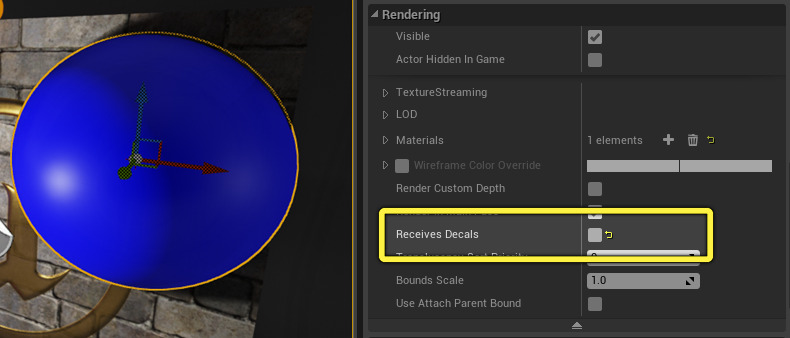
다른 액터들에게는 데칼 액터를 Recieve 받지 않도록 한다.
-
데칼 액터의 위치를 고정시키지 말고, 몬스터의 하위로 들어가게 하면 같이 움직일 것이다.
즉 SpawnActor가 아닌 Component (New Object) 로!
{// ACMProjectileActor.cpp 생성자
    // 2. For Decal Component Material
    	static ConstructorHelpers::FObjectFinder<UMaterialInstance> DecalMaterialRef(TEXT("/Script/Engine.MaterialInstanceConstant'/Game/Vefects/Blood_VFX/VFX/Decals/MI_VFX_Blood_Decal_WallSplatter01_Censor.MI_VFX_Blood_Decal_WallSplatter01_Censor'"));
    	if (DecalMaterialRef.Object)
    	{
    		DecalMaterial = DecalMaterialRef.Object;
    	}
    	else
    	{
    		UE_LOG(LogTemp, Warning, TEXT("Failed to call DecalMetrial Object"));
    	}
    	DecalSize = FVector(32.0f, 64.0f, 64.0f);
    }


    void ACMProjectileActor::AttachDecalToMonster(AActor* HitMonster, const FLinearColor& InColor)
    {
    	//UDecalComponent* DecalComponent = UGameplayStatics::SpawnDecalAttached(DecalMaterial, DecalSize,
    	//	HitMonster->GetRootComponent(), // Attach Component
    	//	NAME_None,						// Socket Name
    	//	HitMonster->GetActorLocation(), HitMonster->GetActorRotation(), // Relative Pos, Rot
    	//	EAttachLocation::KeepRelativeOffset, // Attach Type
    	//	10.0f);							// Decal LifeTime (sec) [0: Permanent]
    	UDecalComponent* DecalComponent = NewObject<UDecalComponent>(HitMonster);
    	if (DecalComponent)
    	{
    		// Initialize
    		DecalComponent->SetDecalMaterial(DecalMaterial);
    		DecalComponent->DecalSize = DecalSize;

    		// Change Color
    		UMaterialInstanceDynamic* DynamicMaterial =
    			DecalComponent->CreateDynamicMaterialInstance();
    		if (DynamicMaterial)
    		{
    			// Multiply by CurrentColor
    			DynamicMaterial->SetVectorParameterValue(FName("Tint"), InColor);
    		}

    		// Pin Position to Monster
    		DecalComponent->SetupAttachment(HitMonster->GetRootComponent());
    		DecalComponent->RegisterComponent();

    		// Position
    		DecalComponent->SetWorldLocation(HitMonster->GetActorLocation());
    		DecalComponent->SetWorldRotation(HitMonster->GetActorRotation());

    	}

    }

    void ACMProjectileActor::OnHit(UPrimitiveComponent* HitComponent, AActor* OtherActor, UPrimitiveComponent* OtherComponent, FVector NormalImpulse, const FHitResult& Hit)
    {
    	if ((OtherActor != this) && (OtherComponent != nullptr))
    	{

    		ensure(OtherActor != nullptr);
    		ACMMonster* HitMonster = Cast<ACMMonster>(OtherActor);

    		if (HitMonster != nullptr)
    		{
    			HitMonster->ChangeColor(CurrentColor);


    			// 2. Decal Component
    			AttachDecalToMonster(HitMonster, CMSharedDefinition::TranslateColor(CurrentColor));

    		}


    		Destroy();
    	}
    }
몬스터 위치와 회전 정확히 붙이기 위해서 참고한 자료
Ho to spawn decal attached to a surface at the hit location?
https://www.youtube.com/watch?v=XYJCsf3zqx8
결국 아래 코드로 해결했다.
		// Position
		DecalComponent->SetWorldLocation(HitMonster->GetActorLocation());
		DecalComponent->SetWorldRotation(HitMonster->GetActorRotation());
참고자료 - 한길님의 도움을 받았다.
하지만 이 역시 문제가 남아있다. 몬스터 디테일 창에 컴포넌트가 보이지 않는 것이다. 정상적으로 부착은 되나, 디테일 창에 뜨지 않았다. → 후에 몬스터가 데칼 컴포넌트를 기본으로 갖고 있는 것으로 수정함
데칼 다른 액터 중복 오류 해결하기
문제 상황
-
몬스터에게 데칼을 쏘면, 몬스터 디테일 창에 데칼 컴포넌트가 뜨지 않았다. (부착은 잘 되어 정상적으로 작동하긴 했다. )
-
몬스터에게 데칼을 쏜 후, 다른 몬스터들이 겹치면, 총을 맞지 않은 몬스터들도, 범위 내에 들어간 만큼 데칼이 살짝 묻혀진다.
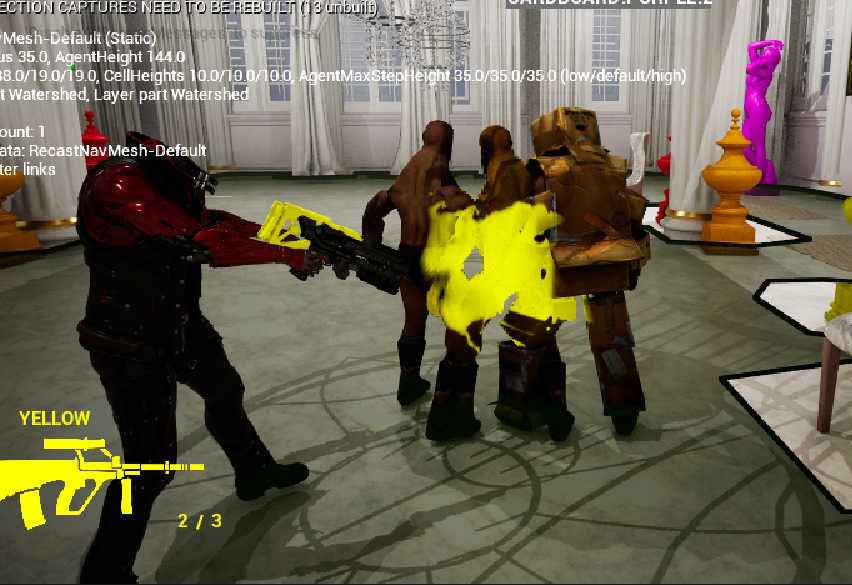
가운데 몬스터만 맞은 것 처럼 깔끔하게 보여야 한다.
이 사진은 양 옆 몬스터들도 가까이 있어서 살짝 묻혀보인다.
해결방법
- [문제 1]
- 몬스터 내에 기본적으로 DecalComponent 를 갖고 있게 하여, Visibility를 껐다가, 총을 쐈을 때 키면서, 색깔을 바꿔주었다. (즉, ACMProjectileActor.cpp 의 로직을 Monster로 옮기고, Projectile은 Visibility 와 색깔 변경만 손 봄)
- [문제 2]
- 데칼 사이즈를 줄였다.
- 아직 데칼을 키지 않은 몬스터는 Receive Decal 을 false로 해주었다가, 켤 때 true로 바꿔준다.
데칼을 아직 안맞은 몬스터에게는 더 확실하게 할 수 있다.
데칼을 맞은 다른 몬스터에게는 해당 X - 몬스터 끼리 겹치지 않게 충돌 범위를 따로 두어 더 큰 sphere collision component를 둔다.
수정한 코드
void ACMProjectileActor::OnHit(UPrimitiveComponent* HitComponent, AActor* OtherActor, UPrimitiveComponent* OtherComponent, FVector NormalImpulse, const FHitResult& Hit)
{
	if ((OtherActor != this) && (OtherComponent != nullptr))
	{
		// Knock Back
		//OtherComponent->AddImpulseAtLocation(ProjectileMovementComponent->Velocity * 100.0f, Hit.ImpactPoint);

		ensure(OtherActor != nullptr);
		ACMMonster* HitMonster = Cast<ACMMonster>(OtherActor);
		if (HitMonster != nullptr)
		{
			HitMonster->ChangeColor(CurrentColor);

			// // 1. Decal Actor
			// ACMColorDecalEffect* DecalEffect = GetWorld()->SpawnActor<ACMColorDecalEffect>(EffectClass);
			// if (DecalEffect)
			// {
			// 	DecalEffect->ChangeColor(CurrentColor);
			// 	DecalEffect->SetActorLocation(HitMonster->GetActorLocation());
			//
			// }

			// 2. Decal Component
			HitMonster->UpdateDecal(CMSharedDefinition::TranslateColor(CurrentColor));

		}

		Destroy();
	}
}
ACMMonster::ACMMonster()
{
//...
// Load Decal Material
static ConstructorHelpers::FObjectFinder<UMaterialInstance> DecalMaterialRef(TEXT("/Script/Engine.MaterialInstanceConstant'/Game/Vefects/Blood_VFX/VFX/Decals/MI_VFX_Blood_Decal_WallSplatter01_Censor.MI_VFX_Blood_Decal_WallSplatter01_Censor'"));
if (DecalMaterialRef.Object)
{
DecalMaterial = DecalMaterialRef.Object;
}
else
{
UE_LOG(LogTemp, Warning, TEXT("Failed to call DecalMetrial Object"));
}
DecalSize = FVector(32.0f, 48.0f, 80.0f);
DecalComponent = CreateDefaultSubobject<UDecalComponent>(TEXT("DecalComponent"));
ensure(DecalComponent);
DecalComponent->SetupAttachment(RootComponent);
InitializeDecalComponent();
// Big Size of Monster Collision against Monster
MonsterCollisionComponent = CreateDefaultSubobject<USphereComponent>(TEXT("MonsterCollisionComponent"));
MonsterCollisionComponent->SetCollisionProfileName(TEXT("ConfrontMonster"));
MonsterCollisionComponent->SetWorldScale3D(FVector(3.0f, 3.0f, 3.0f));
}
void ACMMonster::InitializeDecalComponent() const
{
// Initialize Shape
DecalComponent->SetDecalMaterial(DecalMaterial);
DecalComponent->DecalSize = DecalSize;
// Initialize Visibility & Receive State
DecalComponent->SetVisibility(false);
TurnReceiveDecal(false);
// Position
// DecalComponent->SetWorldLocation(HitMonster->GetActorLocation());
// DecalComponent->SetWorldRotation(HitMonster->GetActorRotation());
}
void ACMMonster::TurnReceiveDecal(bool IsTurnOn) const
{
GetMesh()->SetReceivesDecals(IsTurnOn);
}
void ACMMonster::UpdateDecal(const FLinearColor& InDecalColor) const
{
if(DecalComponent)
{
DecalComponent->SetVisibility(true);
TurnReceiveDecal(true);
// Set the color of the Decal Material
UMaterialInstanceDynamic* DecalDynamicMaterial = DecalComponent->CreateDynamicMaterialInstance();
if (DecalDynamicMaterial)
{
DecalDynamicMaterial->SetVectorParameterValue(FName("Tint"), InDecalColor);
}
}
}
void ACMMonster::UpdateDecal(const FLinearColor& InDecalColor, const FVector& InDecalSize) const
{
if(DecalComponent)
{
UpdateDecal(InDecalColor);
DecalComponent->DecalSize = InDecalSize;
}
}
[문제2]의 해결 방법은 __ 멘토님의 도움을 받았습니다.
바닥에도 데칼 효과 주기
사전 상황
데칼을 몬스터 하위 컴포넌트로 부착하게끔 하여, 몬스터를 계속 따라다니게끔 했다.
하지만, 데칼 효과가 바닥에도 떨어지는 것이 생동감 있고 예뻐서, 컴포넌트와 별개로 액터를 바닥에 생성하기로 했다.
대신 1초만에 사라지게 했다.
멘토님이 조언 주신 주의사항
- Decal Size를 조정하고
- 다른 액터에는 안붙게끔, 바닥에만 붙게끔 z 포지션을 조정하기
→ 이렇게 하면 타이머 후 Destroy 안해도 되지만, 원래 데칼은 너무 많으면 안되니까 지워주도록 했다.
코드
CMColorDecalEffect.cpp
#include "Weapon/CMColorDecalEffect.h"

#include "CMSharedDefinition.h"
#include "Components/DecalComponent.h"

ACMColorDecalEffect::ACMColorDecalEffect()
{
	static ConstructorHelpers::FObjectFinder<UMaterialInterface> DecalMaterialRef(TEXT("/Script/Engine.MaterialInstanceConstant'/Game/Vefects/Blood_VFX/VFX/Decals/MI_VFX_Blood_Decal_WallSplatter01_Censor.MI_VFX_Blood_Decal_WallSplatter01_Censor'"));
	if(DecalMaterialRef.Object)
	{
		SetDecalMaterial(DecalMaterialRef.Object);
	}
	DestroyTime = 1;
}

void ACMColorDecalEffect::BeginPlay()
{
	Super::BeginPlay();

	// 데칼 컴포넌트에 접근
	UDecalComponent* DecalComp = this->FindComponentByClass<UDecalComponent>();
	if (DecalComp)
	{
		DecalComp->DecalSize = DecalComp->DecalSize / 2; // 사이즈 조정

		// 동적 머티리얼 인스턴스 생성
		UMaterialInstanceDynamic* DynamicMaterialInstance = DecalComp->CreateDynamicMaterialInstance();
	}

}

void ACMColorDecalEffect::ChangeColor(const FGameplayTag& InColor)
{
	CurrentColor = InColor;
	const FLinearColor RealColor = CMSharedDefinition::TranslateColor(CurrentColor);

	// 각 매터리얼에 설정된 Dynamic 가져오기
	UMaterialInterface* SkeletalMeshMaterial = GetDecalMaterial();
	UMaterialInstanceDynamic* DynamicMaterial =
		Cast<UMaterialInstanceDynamic>(SkeletalMeshMaterial);

	if(DynamicMaterial)
	{
		// 현재 컬러로 곱하기
		DynamicMaterial->SetVectorParameterValue(FName("Tint"), RealColor);

		// 전체 Parameter 훑는 방법
		TArray<FMaterialParameterInfo> MaterialParameters;
		TArray<FGuid> Guid;
		DynamicMaterial->GetAllVectorParameterInfo(MaterialParameters, Guid);
		for(FMaterialParameterInfo MaterialParam : MaterialParameters)
		{
			FLinearColor ColorInformation;
			DynamicMaterial->GetVectorParameterValue(MaterialParam, ColorInformation);
			UE_LOG(LogTemp, Warning, TEXT("ACMColorDecalEffect::Set Color as %s"), *ColorInformation.ToString());

		}
	}
	else
	{
		UE_LOG(LogTemp, Warning, TEXT("ACMColorDecalEffect::Failed to Load DynmaicMaterial"));
	}
}

void ACMColorDecalEffect::SetTimerOn()
{
	// Timer Handler for Update Minute
	GetWorld()->GetTimerManager().SetTimer(DecalTimerHandle, this, &ACMColorDecalEffect::CalcMinute, 1.0f, true);
}

void ACMColorDecalEffect::CalcMinute()
{
	BeforeDestroyTime += 1;
	if(BeforeDestroyTime >= DestroyTime)
	{
		StopTimer();
	}
}

void ACMColorDecalEffect::StopTimer()
{
	GetWorldTimerManager().ClearTimer(DecalTimerHandle);
	Destroy();
}