📅 2024-09-20 개인프로젝트 21일차 - 선수 조회 페이지(3)
TODO
- 선수 조회 페이지 - 페이지네이션 오류 해결
- 선수 정보 Selenium 방식 수정
1. 선수 조회 페이지 - 페이지네이션 오류 해결
- 페이지네이션이 이상해서 players.jsp를 확인해보니 model로 보내주지 않는데 ${} 쓰고 있었다... 이걸 3시간이나 걸려서 알아낸 나도 참..
(멍청인가..)
- 현재 페이지네이션 함수
<script>
    var totalPages = 1; // 초기값은 1로 설정
    var currentPage = 1;

    function renderPagination() {
        const paginationControls = $('#pagination-controls');
        paginationControls.empty(); // 기존 버튼 제거

        if (totalPages <= 1) return; // 페이지가 1개 이하일 경우 버튼을 표시하지 않음

        // 첫 페이지 버튼
        if (currentPage > 1) {
            paginationControls.append(`<a class="btn btn-sm">1</a>`);
        }

        // 이전 페이지 버튼
        if (currentPage > 1) {
            paginationControls.append(`<a class="btn btn-sm"token interpolation">${currentPage - 1})">이전</a>`);
        }

        // 페이지 버튼
        const startPage = Math.max(1, currentPage - 3);
        const endPage = Math.min(totalPages, currentPage + 3);
        console.log(`페이지 버튼 범위 : startPage=${startPage}, endPage=${endPage}`);
        for (let i = startPage; i <= endPage; i++) {
            paginationControls.append(`
                <a class="btn btn-sm ${i == currentPage ? 'btn-active' : ''}"token interpolation">${i})">${i}</a>
            `);
        }

        // 다음 페이지 버튼
        if (currentPage < totalPages) {
            paginationControls.append(`<a class="btn btn-sm"token interpolation">${currentPage - 1})">다음</a>`);
        }

        // 마지막 페이지 버튼
        if (currentPage < totalPages) {
            paginationControls.append(`<a class="btn btn-sm"token interpolation">${totalPages})">${totalPages}</a>`);
        }
    }

    function goToPage(page) {
        if (page < 1 || page > totalPages) return; // 페이지 범위를 벗어나면 무시
        currentPage = page;
        sendAjaxRequest(); // 페이지 변경 시 AJAX 요청
    }

    function updatePagination(newTotalPages, page) {
        totalPages = newTotalPages;
    }
</script>- 위 코드를 전면 수정해야했다... 아래는 수정한 코드 (${}를 쓰질 못하니까 로직이 복잡하네..)
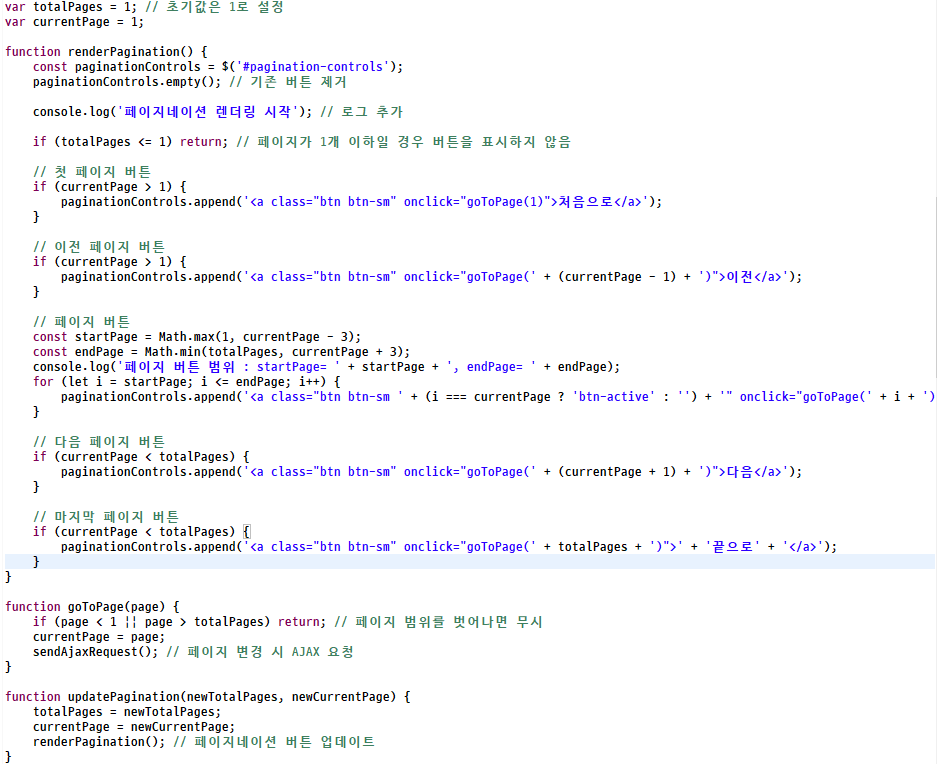
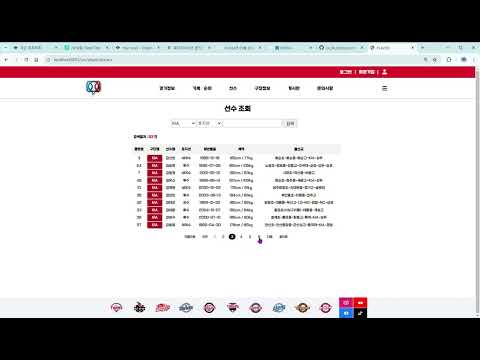
- 문제없이 페이지네이션이 된다.. 선택된 페이지 CSS도 잘 적용 된다..
- 적용된 동영상
2. 선수 정보 Selenium 방식 수정
- 기존에 Selenium을 활용하여 직접 DB에 넣는 방식에서 CSV파일 생성으로 변경
- ex) 두산 소속 선수 정보 데이터 CSV 파일로 저장하는 코드
@Component
public class Doosan {

	public void crawl() {
		// 웹드라이버 실행 파일 경로 설정
		System.setProperty("webdriver.chrome.driver",
				"C:/work_YGC/sts-4.24.0.RELEASE-workspace/baseball_ygc/chromedriver.exe");

		// 웹 드라이버 초기화
		WebDriver driver = new ChromeDriver();
		WebDriverWait wait = new WebDriverWait(driver, Duration.ofSeconds(20)); // 20초 대기

		try {
			// 크롤링할 웹 페이지 URL
			driver.get("https://www.koreabaseball.com/Player/Search.aspx");

			// 팀 드롭다운 메뉴 선택
			WebElement teamDropdown = wait.until(
					ExpectedConditions.elementToBeClickable(By.id("cphContents_cphContents_cphContents_ddlTeam")));
			teamDropdown.click();
			// 해당 구단 선택
			// '' 부분에 구단명을 넣어주면 된다.
			WebElement samsungOption = wait
					.until(ExpectedConditions.elementToBeClickable(By.xpath("//option[text()='두산']")));
			samsungOption.click();

			// 검색 버튼 클릭
			WebElement searchButton = driver.findElement(By.id("cphContents_cphContents_cphContents_btnSearch"));
			searchButton.click();

			extractPlayerDataToCSV(driver, wait);

			// 페이징
			// 최초 페이지 1부터 시작
			int currentPage = 1;
			final int MAX_PAGES = 5; // 최대 페이지 수
			while (currentPage <= MAX_PAGES) {
				// 1 ~ 5번까지 각각 해당하는 페이지번호를 선택
				WebElement nextPageButton = driver.findElement(
						By.cssSelector(".paging a#cphContents_cphContents_cphContents_ucPager_btnNo" + currentPage));

				// nextPageButton이 존재하는 경우에 해당하는 다음 페이지 번호를 누르면
				// table의 클래스명이 tEx인 요소가 사라질때까지 기다린 후에 extractPlayerData(driver, wait); 실행
				if (nextPageButton.isEnabled()) {
					nextPageButton.click();
					wait.until(ExpectedConditions.stalenessOf(driver.findElement(By.cssSelector("table.tEx"))));
					extractPlayerDataToCSV(driver, wait);
				} else {
					break; // 더 이상 페이지가 없는 경우 루프 종료
				}
				// 순차적으로 1 ~ 5번까지 nextPageButton의 id값을 설정하기 위해 +1씩 해줘야한다.
				currentPage++;
			}
		} finally {
			// 웹 드라이버 종료
			driver.quit();
		}
	}

	private void extractPlayerDataToCSV(WebDriver driver, WebDriverWait wait) {
		// CSV 파일을 작성할 준비 - 파일명을 "players.csv"로 지정
		String filePath = "C:/work_YGC/sts-4.24.0.RELEASE-workspace/baseball_ygc/playersDS.csv";
		File file = new File(filePath);
		try (CSVWriter writer = new CSVWriter(new FileWriter(file))) {
			System.out.println("CSV 파일이 생성된 경로: " + file.getAbsolutePath());

			// 테이블이 화면에 보일 때까지 대기
			WebElement table = wait.until(ExpectedConditions.visibilityOfElementLocated(By.cssSelector("table.tEx")));

			// 테이블의 모든 행을 가져옴
			List<WebElement> rows = table.findElements(By.cssSelector("tbody > tr"));

			// 각 행에 대해 처리
			for (WebElement row : rows) {
				// 각 행의 셀 데이터를 가져옴
				List<WebElement> cells = row.findElements(By.tagName("td"));

				// 셀이 7개 이상일 때만 처리
				if (cells.size() >= 7) {
					String numberStr = cells.get(0).getText().trim(); // 등번호 추출

					// 등번호가 비어있으면 다음 행으로 넘어감
					if (numberStr.isEmpty()) {
						continue;
					}

					int number;
					try {
						// 등번호를 정수로 변환
						number = Integer.parseInt(numberStr);
					} catch (NumberFormatException e) {
						// 변환할 수 없으면 다음 행으로 넘어감
						continue;
					}

					// 나머지 셀 데이터 추출
					String name = cells.get(1).getText().trim(); // 이름
					String teamName = cells.get(2).getText().trim(); // 소속 구단
					String position = cells.get(3).getText().trim(); // 포지션
					String birthDate = cells.get(4).getText().trim(); // 생년월일

					// 키, 몸무게는 "185cm, 100kg" 형식이므로 쉼표로 분리
					String[] heightWeight = cells.get(5).getText().split(", ");
					int height = Integer.parseInt(heightWeight[0].replace("cm", "").trim()); // 키
					int weight = Integer.parseInt(heightWeight[1].replace("kg", "").trim()); // 몸무게

					String career = cells.get(6).getText().trim(); // 경력

					// 플레이어 데이터를 CSV 파일에 추가
					String[] playerData = { String.valueOf(number), name, teamName, position, birthDate,
							String.valueOf(height), String.valueOf(weight), career };
					writer.writeNext(playerData); // CSV 파일에 한 줄 추가
				}
			}
		} catch (IOException e) {
			// 파일 작성 중 에러 발생 시 출력
			e.printStackTrace();
		}
	}
}- 자꾸 CSV 데이터를 덮어쓰길래 뭐가 문제인지 찾아보니까 해당 파일이 이미 생성되어 있으면 덮어쓰기를 방지하는 방법이 있었다..
- true : append 모드로 열기
- append 모드 : 파일을 처음부터 다 새로 쓰는 것이 아니라, 기존 있는 파일에 마지막 줄부터 내용 추가가 된다.
- try (CSVWriter writer = new CSVWriter(new FileWriter(file))) 이 부분을 try (CSVWriter writer = new CSVWriter(new FileWriter(file, true)))로 바꿔주면 된다.
- CSV로 잘 만들어진다..
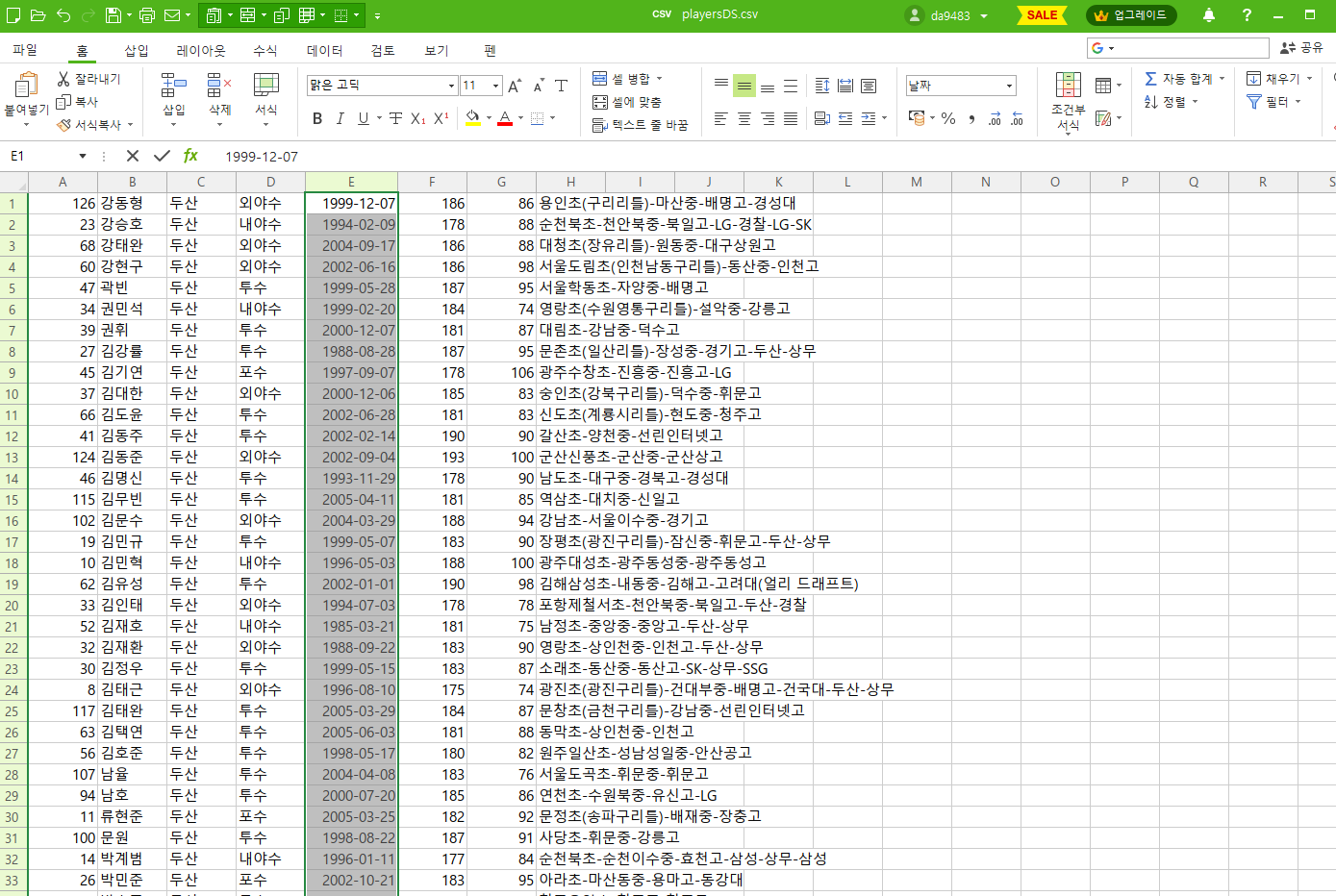
- 확인해보니까 등번호가 없는 선수는 데이터를 저장하지 않았다는 것을 발견.
- 등번호가 없으면 해당 선수 데이터를 건너 뛰는 것이 아닌 등번호에 null값을 넣고 데이터를 저장하는 것으로 수정
- 수정 전 코드
					String numberStr = cells.get(0).getText().trim(); // 등번호 추출

					// 등번호가 비어있으면 다음 행으로 넘어감
					if (numberStr.isEmpty()) {
						continue;
					}

					int number;
					try {
						// 등번호를 정수로 변환
						number = Integer.parseInt(numberStr);
					} catch (NumberFormatException e) {
						// 변환할 수 없으면 다음 행으로 넘어감
						continue;
}- 수정 후 코드
					String numberStr = cells.get(0).getText().trim(); // 등번호

					Integer number = null;
					if (!numberStr.isEmpty()) {
						try {
							number = Integer.parseInt(numberStr); // 등번호
						} catch (NumberFormatException e) {
							// 등번호가 숫자로 변환되지 않는 경우 처리
							number = null;
						}
					}
앞으로 남은거
✔ 선수 정보에 선수 사진 넣기 - 아마 DB도 수정될거 같다. 그럼 ERD도 바꿔야겠지?
✔ 달력 API, 구장정보 지도 API 수정(편의시설 필터로 인해 나온 아이콘을 누르면 정보가 떠야하는데 안뜬다.)
✔ 날씨 API, 경기일정 페이지, 예매버튼 누르면 a태그로 해당 예매사이트로 이동
✔ 구단 순위, 선수 기록 페이지
✔ 디자인 바꾸기

우당탕탕....