오늘도 어제에 이어서 필수 기능 구현을 하였다.
남은 부분들이 모두 아이템 데이터를 구현하고 난 뒤에 하는 것이 좋겠다고
생각이 들어서 그 부분을 먼저 구현하였다.
[ 필수 기능 ]
- 기본 이동 및 점프
- 체력바 UI
- 동적 환경 조사
- 점프대
- 아이템 데이터
- 아이템 사용
[ 아이템 데이터 ]
ScriptableObject로 정의하여 이름, 설명, 속성 등을 관리하게 하였다.
강의에서 사용했던 방법대로 구현하니까 막히는 부분 없이 구현할 수 있었다.
public enum ItemType
{
    Available,
    Resource
}

public enum AvailableType
{
    Health,
    Speed
}

[Serializable]
public class ItemDataAvailable
{
    public AvailableType type;
    public float value;
}

[CreateAssetMenu(fileName = "Item", menuName = "New Item")]

public class ItemData : ScriptableObject
{
    [Header("Info")]
    public string displayName;
    public string description;
    public ItemType type;
    public Sprite icon;

    [Header("Stacking")]
    public bool canStack;
    public int maxStackAmount;

    [Header("Available")]
    public ItemDataAvailable[] Available;
}
다만, 내가 필요로 하는 속성들만 사용하였다.
사용가능한 아이템과 아닌 걸로 나눴고,
사용 가능 아이템은 체력과 스피드를 사용할 것이기 때문에 그렇게 설정했다.
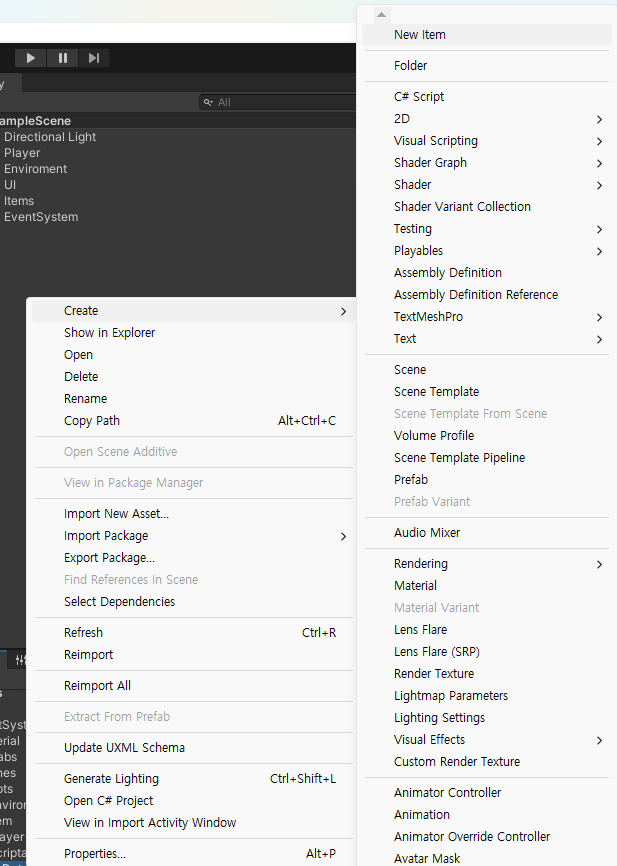
프로젝트 창에서 마우스 우클릭으로 create에 있는 NewItem을 눌러 생성할 수 있다.
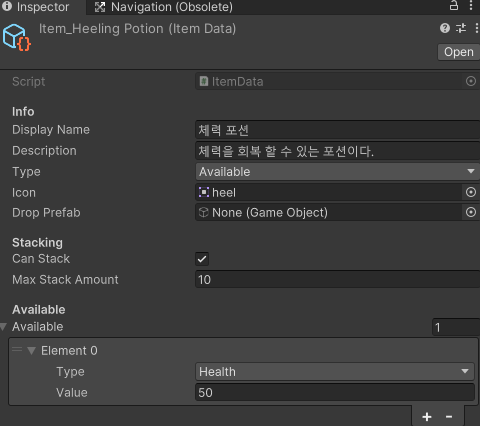
그렇게 생성한 데이터를 인스펙터 창에서 설정해주면 끗
[ 동적 환경 조사 ]
Raycast를 통해 플레이어가 조사하는 오브젝트의 정보를 UI에 표시하게 해준다.
강의에서 사용한 방법으로 화면의 가운데에서 Ray를 쏘는 방식으로 하였다.
(나중에 3인칭으로 변경하게 된다면 이것도 바꿔야 될 것 같다.)
private void Update()
{
    if (Time.time - lastCheckTime > checkRate)
    {
        lastCheckTime = Time.time;

        Ray ray = cam.ScreenPointToRay(new Vector3(Screen.width / 2, Screen.height / 2));
        RaycastHit hit;

        if (Physics.Raycast(ray, out hit, maxCheckDistance, layerMask))
        {
            if (hit.collider.gameObject != curInteractGameObject)
            {
                curInteractGameObject = hit.collider.gameObject;
                curInteractable = hit.collider.GetComponent<IInteractable>();
                SetPromptText();
            }
        }
        else
        {
            curInteractGameObject = null;
            curInteractable = null;
            promptText.gameObject.SetActive(false);
        }
    }
}
강의 방법 그대로 사용했기 때문에 문제가 발생하지 않을 줄 알았다.
발생한 문제
플레이어가 오브젝트를 바라봐도 정보가 UI에 표시되지 않았고 Null 오류가 났다.
해결
오류 뜬걸 보니까 인스턴스 머시기 하면서 그게 Null이라고 나왔다.
컴포넌트에 추가해둔 스크립트를 보니, 내가 PromptText에 다른 걸 넣어놨었다.
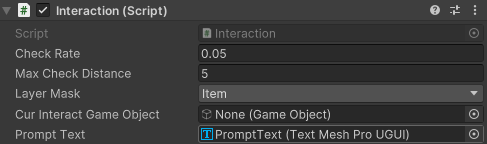
레이어 설정도 제대로 안되있던 것 같아서 추가로 설정해주었고,
다 수정해주니까 정상적으로 작동하였다.
[ 아이템 사용 ]
내가 생각한 구상은 인벤토리가 있지 않고, 인게임 UI에 항상 아이템 슬롯이
표시되며 할당된 키를 눌러 획득한 아이템을 사용할 수 있게 하고 싶었다.
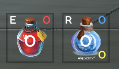
이런 식으로 사용하려는 아이템 슬롯 UI를 만들어 주었다.
우선 아이템을 사용하기 위해서는 획득을 먼저 해야됐다.
위에서 동적 환경 조사를 통해 정보창을 띄어주게 되는데,
할당된 키를 눌르면 아이템을 획득할 수 있게 했다.
public void OnInteractInput(InputAction.CallbackContext context)
{
    if (context.phase == InputActionPhase.Started && curInteractable != null)
    {
        curInteractable.OnInteract();
        curInteractGameObject = null;
        curInteractable = null;
        promptText.gameObject.SetActive(false);
    }
}

------------------------------------------------------

public void OnInteract()
{
    CharacterManager.Instance.Player.itemData = data;
    CharacterManager.Instance.Player.addItem?.Invoke();
    CharacterManager.Instance.Player.uiItem.AddItem(data, 1);
    Destroy(gameObject);
}

------------------------------------------------------

public void AddItem(ItemData data, int amount)
{
    foreach (var slot in itemSlots)
    {
        if (slot.itemData == data)
        {
            slot.stackCount = Mathf.Min(slot.stackCount + amount, data.maxStackAmount);
            slot.UpdateUI();
            return;
        }
    }
}
아이템을 아이템 슬롯에 반영할 수 있게 AddItem메서드를 사용하여 해당 아이템 슬롯의
개수를 변경하게 해주었다.
아이템 사용 역시 할당된 키를 입력하면 그에 맞는 아이템을 사용할 수 있게 만들었다.
public void OnUseItem(InputAction.CallbackContext context)
{
    if (context.performed)
    {
        if (Keyboard.current.eKey.isPressed)
        {
            if (slots[0].stackCount > 0)
            {
                UseHealingPotion();
            }
        }
        else if (Keyboard.current.rKey.isPressed)
        {
            if (slots[1].stackCount > 0)
            {
                UseSpeedPotion();
            }
        }
    }
}
InputSystem을 설정할 때 하나의 액션에 두개의 바인드를 넣어서 설정하였기 때문에
Keyboard.current를 통해서 해당 키가 눌렸을때의 조건문을 추가하여
해당 아이템을 사용할 수 있게 만들었다.
발생한 문제
- 아이템 사용 키를 눌렀을때 개수가 0이여도 사용이 되고, 효과가 계속 중접 적용이 되었다.
- 사용 시 쿨타임과 지속시간을 UI에 표시하게 해두었는데 그것이 작동하지 않았다.
해결
- isUsePotion을 통해 사용 중일 때 true로 바꾸고 조건문을 통해 !isUsePotion 일때만
포션을 사용할 수 있게 바꿔주었고 stackCount가 0보다 클때만 포션을 사용 할 수있게
조건문을 추가하였다. 이렇게 바꾸니까 첫번째 문제는 해결 되었다.
public void UseSpeedPotion()
{
	isUsePotion = true;

    if (speedPotion != null && speedPotion.Available.Length > 0)
    {
        speed = speedPotion.Available[0].value;
    }

    CharacterManager.Instance.Player.uiItem.UseItem(speedPotion);
    StartCoroutine(SpeedUpTime(speed));
    slots[1].UsePotion(speedPotion);

    isUsePotion = false;
}

------------------------------------------------------------

if (Keyboard.current.rKey.isPressed && !isUsePotion)
{
    if (slots[1].stackCount > 0)
    {
        UseSpeedPotion();
    }
}
- 아래의 코드 처럼 2개의 위치를 바꿔 주니까 UI도 정상적으로 작동이 되었다.
왜 그런가 생각해보니까 UsePotion에는 스택이 0보다 클때만 작동하게 해두었는데
UseItem이 먼저 실행되면서 스택 차감이 먼저 되어서 0이 되버렸다.
그래서 아래 작성된 UI 업데이트 관련 부분이 아이에 실행 되지 않았던 것이었다.
// UsePotion과 UseItem의 위치를 바꿈

-변경 전-
CharacterManager.Instance.Player.uiItem.UseItem(speedPotion);
StartCoroutine(SpeedUpTime(speed));
slots[1].UsePotion(speedPotion);

-변경 전-
slots[1].UsePotion(speedPotion);
CharacterManager.Instance.Player.uiItem.UseItem(speedPotion);
StartCoroutine(SpeedUpTime(speed));
[ 필수 기능 구현 완료? ]
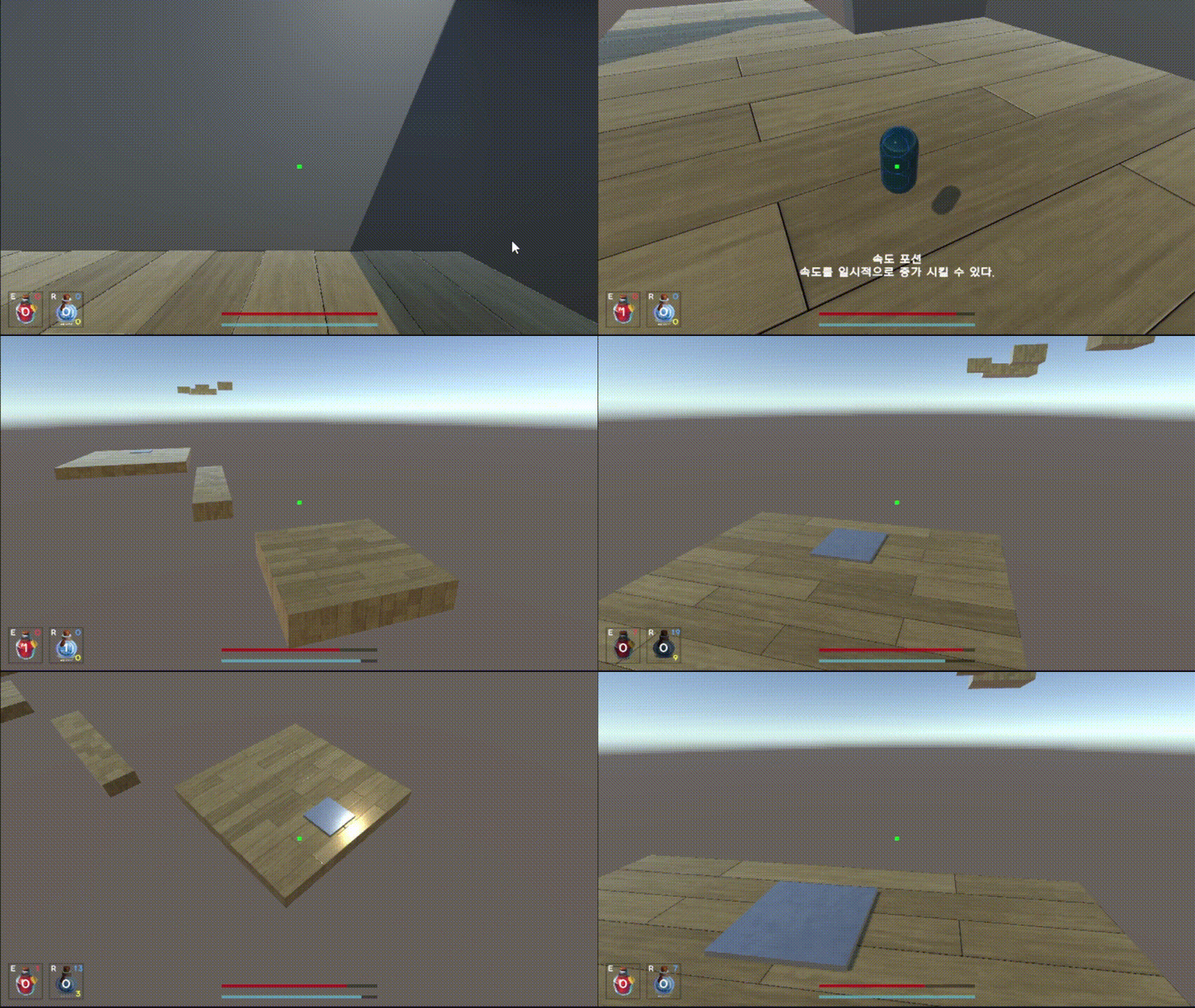
오늘은 그래도 내가 생각했던 필수 기능 구현 범위까지 완료한 것 같다.
주말에 푹 쉬고 와서 도전 기능 구현도 한번 찍먹 해봐야겠다.
가장 해보고 싶은 것은 3인칭으로 바꾸는 것인데,
현재는 1인칭으로 구현이 되어있기 때문에 3인칭으로 바꾸는데 있어
많은 것들을 변경해야 될 것 같은데 잘 될지 모르겠다...ㅎ
아무튼 도전 기능 중에 쉬운 것 몇 개는 해볼 생각이다.