
✒️ 글의 목표와 테스트 환경
제가 요즘 Camel DSL 을 자주 작성하는데, 나중에 또 써먹기 위해 기록합니다.
참고로 여기서 작성된 모든 Camel DSL 들은 제가 Ubuntu 24.04 에 설치한
Jbang Camel (ver 4.13.0) 으로 실제 실행시켜본 것들입니다.
그리고 제가 주로 xml io dsl 을 사용하다 보니 이 게시물의 대부분의
dsl 들이 xml 포맷입니다. 이점 유의해주세요.
이 게시물의 DSL 들은 앞으로 계속해서 추가될 예정입니다.
계속해서 새로운 방법을 알게될 예정이라서요 😊
🔥 다양한 DSL 사용법
🚀 Rest DSL 로 REST API 생성하기
Apache Camel 에서는 Rest DSL 이라는 특이한 dsl 이 있습니다.
이 DSL 을 사용하면 간단하게 Apache Camel 기반의 REST API 를 구현할 수 있습니다.
<?xml version="1.0" encoding="UTF-8"?>
<camel>

    <restConfiguration component="netty-http" host="0.0.0.0" port="8080" bindingMode="off"/>

    <rest path="/api">
        <get path="/hello">
            <to uri="direct:hello"/>
        </get>
    </rest>

    <route id="hello-route">
        <from uri="direct:hello"/>
        <setBody>
            <constant>Hello from Camel with XML DSL!</constant>
        </setBody>
        <log message="${body}"/>
    </route>

</camel>
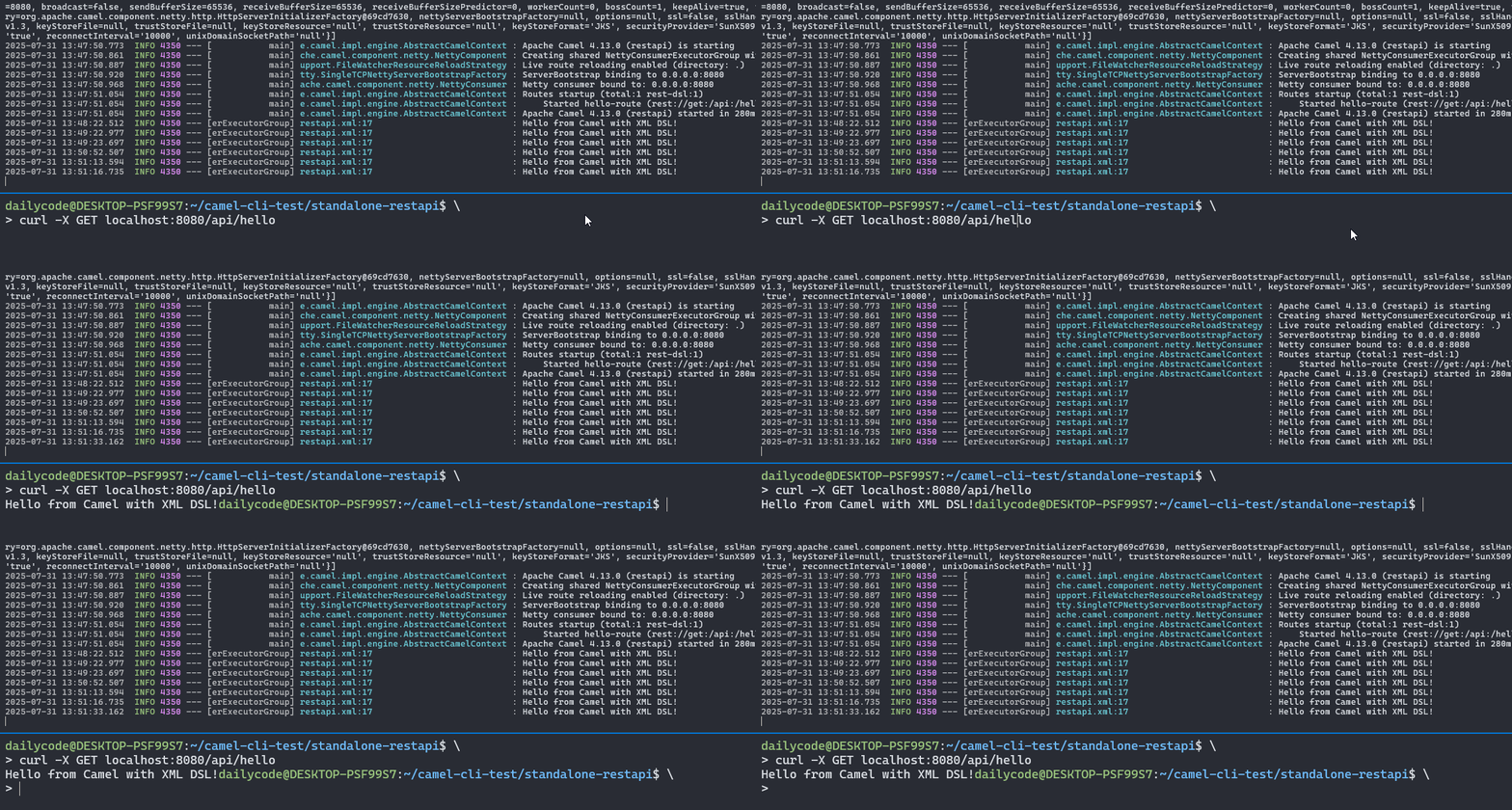
이렇게 작성하고 camel run 으로 실행을 하고 나서 아래처럼 curl 명령어로 테스트해봅니다.
curl -X GET localhost:8080/api/hello요청을 날리면 http response 로 <route id="hello-route"> 에서 생성된
Body 가 반환되는 것을 확인할 수 있습니다.
참고로 restConfiguration 에서 component 에
netty-http또는undertow
설정만이StandAlone하게 동작한다고 합니다.나머지 component 들은 이미 실행중인 서버에게 요청을 위임하는 거라고 하네요.
(제가 조사한 바로는 그렇습니다... 아니면 댓글로 알려주세요!)
🚀 XML -> JSON 변환
저는 가끔 SOAP 서버에서 데이터를 받고,
그걸 JSON 형태로 변환해서 사용해야 되는 경우가 다수 있었습니다.
이와 관련된 예시 작성을 작성해보겠습니다.
작업 과정은 다음과 같습니다.
- rest dsl 을 통해서 xml 을 반환하는 endpoint 를 만들고
- 해당 endpoint 에 http 요청을 날려서 받은 결과를 json 으로 변환하는 dsl 작성
>> rest dsl 작성
<?xml version="1.0" encoding="UTF-8"?>
<camel>
	<!-- 파일명:  rest-xml-response.xml -->
    <restConfiguration component="netty-http" host="0.0.0.0" port="8080" bindingMode="off"/>

    <rest path="/ws">
        <get path="/sample" produces="text/xml">
            <to uri="direct:hello"/>
        </get>
    </rest>

    <route id="hello-route">
        <from uri="direct:hello"/>
        <setBody>
          <constant>
            <![CDATA[
<soap:Envelope xmlns:soap="http://schemas.xmlsoap.org/soap/envelope/">
  <soap:Body>
    <ns2:getPersonResponse xmlns:ns2="http://example.com/person">
      <return>
        <id>123</id>
        <name>John Doe</name>
        <email>john@example.com</email>
      </return>
    </ns2:getPersonResponse>
  </soap:Body>
</soap:Envelope>
            ]]>
          </constant>
        </setBody>
        <!--<log message="${body}"/>-->
    </route>

</camel>
위처럼 작성하고 실행시켜서 Rest API 서버를 구동합니다.
camel run rest-xml-response.xml

# 이후에 간단하게 curl 로 테스트
# curl localhost:8080/ws/sample
>> http 요청 및 json 변환 dsl 작성
rest api 에 요청을 보내서 받은 xml 결과를 json 으로 변환하는 DSL 작성
여기서 xml -> json 변환할 때 사용한 건 xj component 입니다.
<?xml version="1.0" encoding="UTF-8"?>
<!-- 파일명: http-request.xml -->
<camel>
  <route id="simple-http-request">
    <from uri="timer:kickoff"/>
    <to uri="http://localhost:8080/ws/sample"/>

    <!-- http response 인 xml 을 json 문자열로 변형  -->
    <to uri="xj:identity?transformDirection=XML2JSON"/>

    <!-- json 문자열을 기반으로 Java Map 생성 (Jackson 사용) -->
    <unmarshal><json library="Jackson"/></unmarshal>

    <!-- 마지막으로 json 에서 실제 필요한 데이터만 추출! -->
    <setBody>
        <simple>${body[Body][getPersonResponse][return]}</simple>
    </setBody>

    <!-- 추출된 정보는 LinkedHashMap 인데, 이걸 다시 json 으로 마셜링!  -->
    <marshal>
      <json library="Jackson"/>
    </marshal>

    <log message="HTTP Response Body: ${body}"/>

    <!--
		tip: 더 자세하게 Exchange 의 정보를 보고싶다면 <log>
		대신 아래 <to> 사용. 특히 Body 에 세팅된 데이터의
		타입을 확인할 때 아주 좋습니다.
	-->
    <!--<to uri="log:log"/>-->
  </route>
</camel>
🚀 Map 객체 생성 후 json 반환
이번에는 Map 객체를 생성하고, 이를 json 으로 반환해보죠.
이 과정에서 groovy script 를 사용해보겠습니다.
<?xml version="1.0" encoding="UTF-8"?>
<camel>
    <restConfiguration component="undertow" host="0.0.0.0"
                       port="8080" bindingMode="off"/>

    <rest path="/api">
        <get path="/json" produces="application/json">
            <to uri="direct:json"/>
        </get>
    </rest>

    <route id="json-create-route">
        <from uri="direct:json"/>
  		<setBody>
    		<groovy>
      		import java.util.HashMap
      		def map = new HashMap()
      		map.put("id", 10)
      		map.put("name", "Alice")
      		return map
    		</groovy>
  		</setBody>

        <marshal>
            <json library="Jackson"/>
        </marshal>
      	<log message="return value => ${body}"/>
    </route>
</camel>
🚀 setBody 에서 resource 적용
가끔은 body 의 내용을 외부 파일에서 가져오고 싶을 때가 있다.
이게 단순학게 file component 사용할 할 수도 있겠지만,
이거는 오로지 file component 를 consumer 로 사용할 때만 가능한 방법이라
제한이 많다.
이를 대신하기 위해서는 아래와 같이 resource 를 사용하면 된다.
<?xml version="1.0" encoding="UTF-8"?>
<camel>
    <!-- 파일명:  rest-xml-response.xml -->
    <restConfiguration component="netty-http" host="0.0.0.0" port="8080" bindingMode="off"/>

    <rest path="/ws">
        <get path="/sample" produces="text/xml">
            <to uri="direct:create-xml"/>
        </get>
    </rest>

    <route id="create-response">
        <from uri="direct:create-xml"/>
        <setBody>
            <simple>resource:file:seol_response.xml</simple>
        </setBody>
        <log message="Response body: ${body}"/>
    </route>

</camel>
🚀 pollingEnrich 로 중간에 consumer 사용
아래처럼 파일을 놓고...

restapi.xml 내용을 아래와 같이 작성하고...
<?xml version="1.0" encoding="UTF-8"?>
<camel>
<restConfiguration component="netty-http" host="0.0.0.0" port="8080" bindingMode="off"/>
<rest path="/api">
<get path="/hello">
<to uri="direct:hello"/>
</get>
</rest>
<route id="hello-route">
<from uri="direct:hello"/>
<!-- 중간에 consumer 를 호출 -->
<pollEnrich>
<constant>file:{{env:PWD}}?fileName=response.json&noop=true&initialDelay=0&idempotent=false</constant>
</pollEnrich>
<setHeader name="Content-Type">
<constant>application/json</constant>
</setHeader>
<log message="Response from file: ${body}"/>
</route>
</camel>camel run restapi.xml 을 실행하면,
response.json 파일을 읽어서 http 반환값으로 줍니다.
참고 링크