의존성 추가
사용해야 될 의존성은 다음과 같습니다.
<dependency>
  <groupId>com.github.mwiede</groupId>
  <artifactId>jsch</artifactId>
  <version>2.27.7</version>
</dependency>
테스트 환경
저는 현재 Window 11 을 사용 중이고,
개발환경 및 테스트 환경은 Ubuntu 22.04(WSL2) 환경에서 진행됩니다.
그리고 아래와 같은 스크립트를 하나 작성하고 실행해서 기본적인
테스트 디렉토리와 파일들을 만들었습니다.
#!/bin/bash

mkdir -p ~/sftp_data2
cd ~/sftp_data2

for i in {0..5}; do
  echo "HELLO WORLD $(date -d "2025-12-10 + $i days" +%Y%m%d)" \
  		> data_$(date -d "2025-12-10 + $i days" +%Y%m%d).txt
done
실행하면 다음과 같은 형태로 만들어집니다.
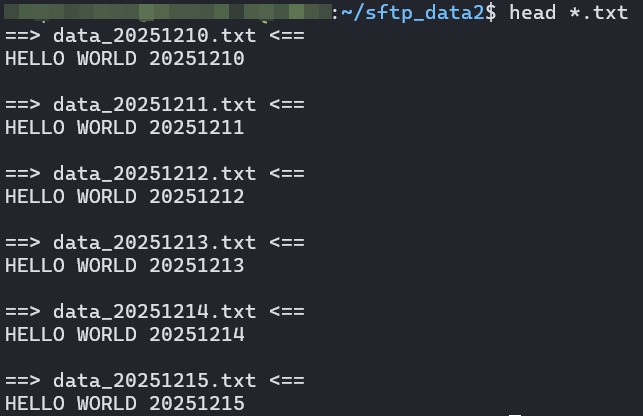
예시 코드
코드의 목표는 다음과 같습니다.
-
sftp 를 통해서 파일을 다운로드 받는다.
이때 파일에yyyyMMdd가 suffix 로 있는데,
2025-12-12 이후의 파일만 다운로드 받는다. -
다운로드 받은 파일들은 원격에서 백업 디렉토리로 이동시킨다.
간단하죠? 이제 코드를 보죠.
package me.dailycode.sftp;

import com.jcraft.jsch.*;

import java.io.File;
import java.io.IOException;
import java.io.InputStream;
import java.nio.charset.StandardCharsets;
import java.util.*;
import java.util.regex.Matcher;
import java.util.regex.Pattern;

public class SftpStudyApplication {

	// 자신의 환경에 맞게 바꿔서 사용하세요.

    /** 원격서버 HOST */
    private static final String REMOTE_HOST = "localhost";

    /** 원격서버 PORT */
    private static final int REMOTE_PORT = 22;

    /** SSH 로그인 계정 */
    private static final String USERNAME = "SSH_LOGIN_USERNAME";

    /** SSH 로그인 비밀번호 */
    private static final String PASSWORD = "SSH_LOGIN_PASSWORD";

    /** 원격 서버의 디렉토리 경로 */
    private static final String REMOTE_DIR = "~/sftp_data2";

    /** 원격 서버에서 다운로드 받은 파일을 넣을 경로 */
    private static final String LOCAL_DIR = "~/sftp_local";

    /** 다운로드 받은 파일의 필터링을 위한 날짜값 */
    private static final String FILTER_DATE = "20251212";


    public static void main(String[] args) {
        JSch jSch = new JSch();
        Session session = null;
        Channel channel = null;

        try {

            // 비밀번호 접속이 아니라 개인키를 사용한 접속이면 아래처럼 메소드 호출
            // jSch.addIdentity("개인키_파일_경로");
            // 그리고 나서 밑에 session.setPassword(PASSWORD) 호출을 주석처리!

            // 기본설정 (접속정보)
            session = jSch.getSession(USERNAME, REMOTE_HOST, REMOTE_PORT);

            // 비번 설정,  addIdentity 를 했다면 필요 없음!
            session.setPassword(PASSWORD);

            // 호스트 키 검증 비활성화 (테스트 편의성을 위함)
            Properties config = new Properties();
            config.put("StrictHostKeyChecking", "no");
            session.setConfig(config);

            // 연결
            System.out.println("서버 연결 중...");
            session.connect();
            System.out.println("연결 완료");

            // SFTP 채널열기
            channel = session.openChannel("sftp");
            channel.connect();
            ChannelSftp channelSftp = (ChannelSftp) channel;

            // 원격 디렉토리로 이동
            channelSftp.cd(REMOTE_DIR);
            System.out.println("원격 디렉토리: " + REMOTE_DIR);

            List<String> filteredFiles = filterFiles(channelSftp, FILTER_DATE);
            for (String fnm : filteredFiles) {
                System.out.println(fnm);
            }

            File localDirectory = new File(LOCAL_DIR);
            if (!localDirectory.exists() && !localDirectory.mkdirs()) {
                System.out.println("로컬 디렉토리가 존재하지 않아 신규로 생성하려 했으나 실패했습니다.");
            }


			// 원격의 파일을 로컬로 다운로드!
            downloadFiles(channelSftp, filteredFiles, LOCAL_DIR);

			// 원격 파일을 원격의 백업 디렉토리로 이동 시킴
            if (!filteredFiles.isEmpty()) {
                moveFileSSH(session, filteredFiles, REMOTE_DIR, REMOTE_DIR + "/backup");
            }

        } catch (JSchException | SftpException e) {
            throw new RuntimeException(e);
        } finally {
            if (channel != null && channel.isConnected()) {
                channel.disconnect();
            }
            if (session != null && session.isConnected()) {
                session.disconnect();
            }
            System.out.println("연결종료");
        }
    }

    private static void downloadFiles(ChannelSftp channelSftp, List<String> filteredFiles, String localDir) {
        System.out.println("\n========== 파일 다운로드 시작 ===========");

        int totalCount = 0;

        for (String filename : filteredFiles) {
            String localFilePath = localDir + "/" + filename;

            try {
                System.out.println("다운로드 중... " + filename + "...");

                // 파일 다운로드
                channelSftp.get(filename, localFilePath);

                totalCount++;

            } catch (SftpException e) {
                System.out.println("실패 - " + e.getMessage());
                failCount++;
            }
        }

        System.out.println("\n=== 다운로드 완료 ===");
        System.out.println("다운로드 파일 수 : " + totalCount + "개");
        System.out.println("저장 위치: " + localDir);
    }

    private static List<String> filterFiles(ChannelSftp channelSftp, String filterDate)
            throws SftpException {
        List<String> filteredFiles = new ArrayList<>();
        Pattern pattern = Pattern.compile("data_(\\d{8})\\.txt");

        // 디렉토리 목록 조회
        Vector<ChannelSftp.LsEntry> fileList = channelSftp.ls("data_*.txt");

        System.out.println("====== 파일 검색 및 필터링 ======");
        for (ChannelSftp.LsEntry entry : fileList) {
            String filename = entry.getFilename();
            Matcher matcher = pattern.matcher(filename);
            if (matcher.matches()) {
                String fileDate = matcher.group(1);

                if (fileDate.compareTo(filterDate) >= 0) {
                    filteredFiles.add(filename);
                }
            }
        }

        Collections.sort(filteredFiles);

        System.out.println("\n총 " + filteredFiles.size() + "개의 파일이 선택되었습니다.");

        return filteredFiles;
    }

    private static void moveFileSSH(Session session, List<String> files,
                                    String sourceDir, String targetDir) {

        System.out.println("\n========== 파일 이동 시작 ===========");

        String fileNames = String.join(" ", files);
        String command = "cd " + sourceDir + " && "
                + "mkdir -p " + targetDir + " && "
                + "mv " + fileNames + " " + targetDir + "/";

        System.out.println("실행 명령어: " + command);

        ChannelExec channel = null;

        try {
            channel = (ChannelExec) session.openChannel("exec");
            channel.setCommand(command);
            channel.connect();

            // try-with-resources로 스트림 자동 관리
            try (InputStream stdout = channel.getInputStream();
                 InputStream stderr = channel.getErrStream()) {


                // 스트림 내용 읽기 (블로킹)
                String stdoutStr = new String(stdout.readAllBytes(), StandardCharsets.UTF_8);
                String stderrStr = new String(stderr.readAllBytes(), StandardCharsets.UTF_8);
                System.out.println("stdout: " + stdoutStr);
                System.out.println("stderr: " + stderrStr);
                System.out.println("exitCode: " + channel.getExitStatus());

                if (channel.getExitStatus() == 0) {
                    System.out.println("✅ 파일 이동 성공!");
                } else {
                    throw new RuntimeException("백업 도중 에러가 발생했습니다! exitCode : " + channel.getExitStatus());
                }
            }

        } catch (JSchException | IOException e) {
            throw new RuntimeException(e);
        } finally {
            if (channel != null) {
                channel.disconnect();
            }
        }
    }

}
참고: com.jcraft:jsch 안 쓰는 이유
참고로 com.jcraft:jsch 가 아니라 아래 의존성을 쓰시는 분들도 많을 겁니다.
<!-- https://mvnrepository.com/artifact/com.jcraft/jsch -->
<dependency>
    <groupId>com.jcraft</groupId>
    <artifactId>jsch</artifactId>
    <version>0.1.55</version>
</dependency>
하지만 com.jcraft:jsch 현재 유지보수가 안되고 있고,
이 프로젝트를 어떤 분께서 fork 해서 관리 및 고도화가 이루어지고 있습니다.
그게 바로 com.github.mwiede:jsch 입니다.
Maven Repository 에서도 com.github.mwiede:jsch 를 사용하도록
com.jcraft 패키지에 relocated 표기가 된 것을 확인할 수 있습니다.
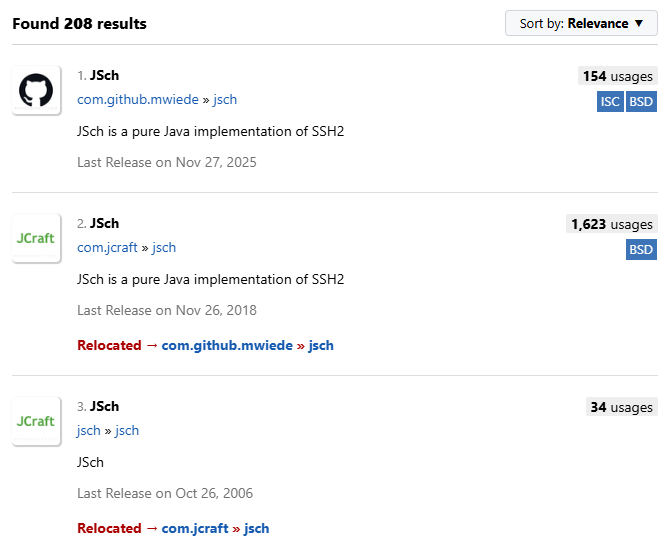
참고한 링크

백엔드 개발자로 일하고 있는 식빵(🍞)입니다.