
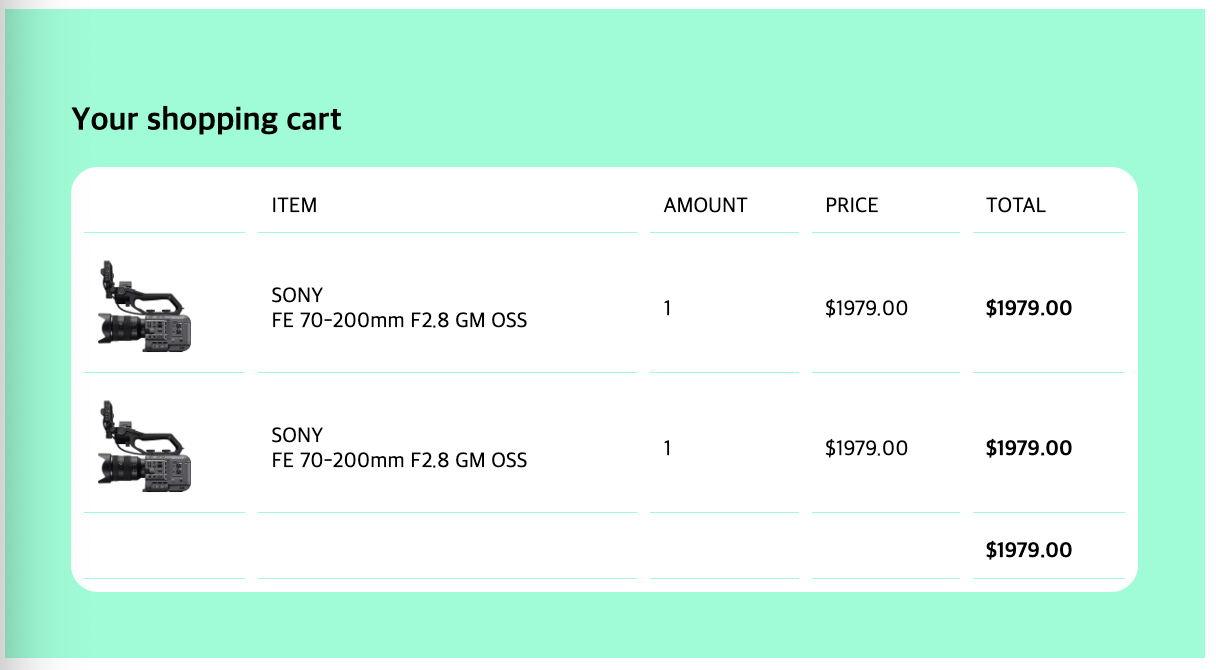
HTML
<!DOCTYPE html>
<html>
<head>
    <meta charset="UTF-8">
    <title>cart</title>
    <link href = "cart2.css" rel = "stylesheet">
</head>
<body>
<div class = "background">
    <h2>Your shopping cart</h2>
    <table class = "cart-table">
        <thead>
            <tr>
                <td></td>
                <td>ITEM</td>
                <td>AMOUNT</td>
                <td>PRICE</td>
                <td>TOTAL</td>
            </tr>
        </thead>
        <tbody>
            <tr>
                <td>
                    <img  style = "width: 70px;" src="https://sony.scene7.com/is/image/sonyglobalsolutions/Primary_Image-1?$S7Product$&fmt=png-alpha">
                </td>
                <td>SONY<br>FE 70-200mm F2.8 GM OSS</td>
                <td>1</td>
                <td>$1979.00</td>
                <td><strong>$1979.00</strong></td>
            </tr>
            <tr>
                <td>
                    <img style = "width: 70px;" src="https://sony.scene7.com/is/image/sonyglobalsolutions/Primary_Image-1?$S7Product$&fmt=png-alpha">
                </td>
                <td>SONY<br>FE 70-200mm F2.8 GM OSS</td>
                <td>1</td>
                <td>$1979.00</td>
                <td><strong>$1979.00</strong></td>
            </tr>
            <tr>
                <td></td>
                <td></td>
                <td></td>
                <td></td>
                <td><strong>$1979.00</strong></td>
            </tr>
        </tbody>
    </table>
</div>
</body>
</html>- thead, tbody
table의 header는 thead로, 나머지는 tbody로 묶어주기 - th, tr, td
th는 thead, 테이블의 제목
tr은 trow, 테이블의 row(행)
td는 tdata, 테이블의 data(열)
CSS
.black {
    background-color: black;
    padding: 40px;
}

.white {
    background-color: white;
    padding: 30px;
    margin: auto;
    width: 80%;
    max-width: 600px;
}

.letter {
    font-size: 20px;
}

.form-input {
    width: 100%;
    padding: 10px;
    margin:auto;
    border-radius: 5px;
    border: 1px solid black;
    box-sizing: border-box;
}

.form-long {
    height: 200px;
}

.wid-100 {
    padding: 10px;
}

.wid-50 {
    width: 50%;
    float: left;
    padding: 10px;
    box-sizing: border-box;
}

.button {
    padding: 10px;
    background-color: rgb(255, 170, 0);
    border: 1px solid rgb(255, 170, 0);
    border-radius: 5px;
    color: white;
    display: block;
    margin-left: auto;
}

.button:hover{
    color: black;
}
selector
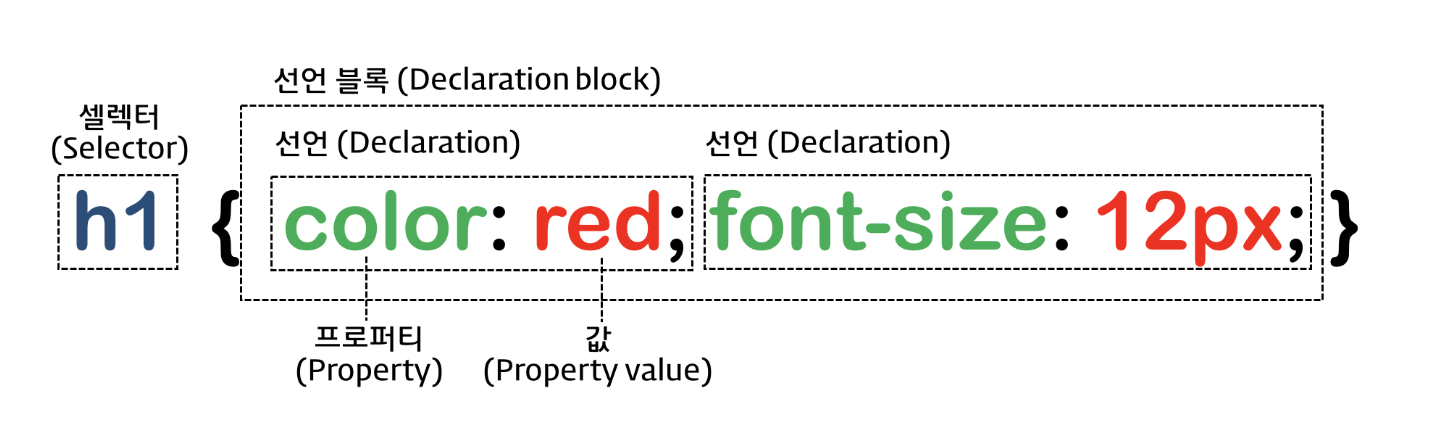
스타일을 주고자 하는 요소를 셀렉터 자리로 특정하고 스타일 정의
여기서 쓰인 것은 클래스
클래스 어트리뷰트값 지정해서 일치하는 요소 선택, 어트리뷰트값 중복 가능
