추가 리소스
시작
URL
CoroutineScope, Job, CoroutineContext 등 기본 코루틴 개념을 알아봅니다.
CoroutineScope
CoroutinScope는 launch 나 async를 사용한 coroutine의 동작을 추적한다.
scope.cancel()을 통해 작업은 취소될 수 있다.
Job이나 Dispatcher 는 CoroutinContext와 함께 결합되어있다.
CoroutinScope를 사용할 때 CoroutinContext를 파라미터로 생성합니다.
val scope = CoroutineScope(Job() +Dispatchers.Main)
val job = scope.launch{
	/new coroutine
}
Job
job은 코루틴을 다루기위한 핸들러이다. lauch나 async를 통해 만든 모든 coroutine은 job을 반환한다 그리고 job은 독립적이며 coroutine의 생명주기를 관리한다.
CoroutineContext
CoroutinContext는 Coroutine의 동작을 정의한 요소들의 집합이다.
CoroutinContext는 아래 내용들로 구성되어있다.
- Job: 코루틴의 생명주기를 제어한다.
- CoroutinDispatcher: dispatcher는 적절한 쓰레드를 작동시킨다.
- CoroutinName: 코루틴의 이름으로 디버깅에 유용하게 사용한다.
- CoroutinExceptionHandler: 예상치 못한 예외를 다룬다.
새로운 Coroutine의 CourutinContext는 무엇인가? 우리는 job 객체가 새로 생성됨을 알고있다, 그리고 lifecycle을 관리할 수 있다.
나머지 요소로 ConroutinContext는 다른 Coroutine 또는 CoroutineScope에 상속될 수 있다.
CoroutinScope 생성 후 CoroutinScope 내부에서 더 많은 Coroutin을 생성할 수 있다.
val scope = CoroutinScope(Job() + Dispatchers.Main)

val job = scope.launch{
	val result = async{
    }.await()
}
Job Lifecycler
Job은 New, Activte, Completing, Completed, Cancelling, Cancelled 상태를 거친다.
우리는 Job의 isActive, isCanclled, isCompleted 상태만 접근할 수있다.
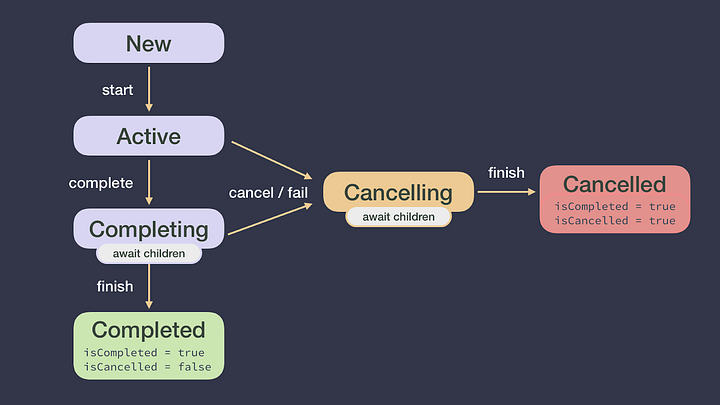
만약 Coroutine이 Active상태이다, 그리고 coroutine의 실패, 또는 job.cancel() ghcnftl job은 Cancelling 상태가된다. (isActive = false, isCancelled = true)
모든 자식 동작이 완료되면 Cancelled 상태가되고 isCompleted =true 가된다.
Parent CoroutineContext explained
task 계층에서 Coroutine은 하나의 CoroutinScope를 가지거 또는 다른 Coroutine을 부모로 가지고 있다. 그러나 CourotineContext를 부모로가진 CoroutineContext는 다를 수 있다.
Parent context = Defaults + inherited CoroutineContext + arguments
참고 :CoroutineContexts는 연산자를 사용하여 결합할 수 있습니다+. 은CoroutineContext요소 집합CoroutineContext왼쪽에 있는 요소를 재정의하고 오른쪽에 있는 요소로 새 요소가 생성됩니다. 예:(Dispatchers.Main, “name”) + (Dispatchers.IO) = (Dispatchers.IO, “name”)
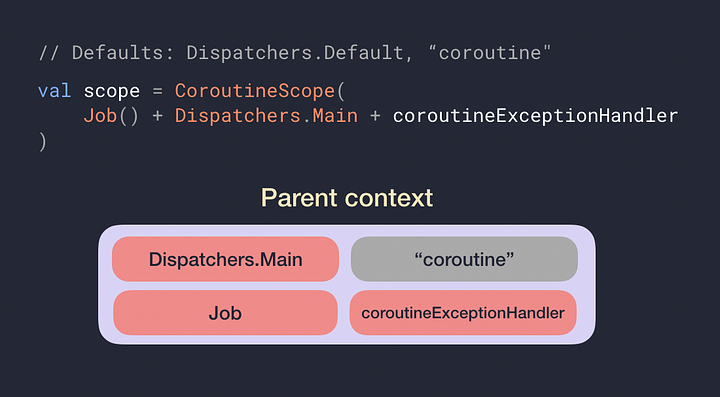 이 CoroutineScope에 의해 시작되는 모든 코루틴은 최소한 CoroutineContext에 해당 요소를 갖습니다. CoroutineName은 기본값에서 왔기 때문에 회색입니다.
CoroutineContext이제 우리는 새 코루틴의 상위가 무엇인지 알았으므로 실제는 CoroutineContext다음과 같습니다.
New coroutine context = parent CoroutineContext + Job()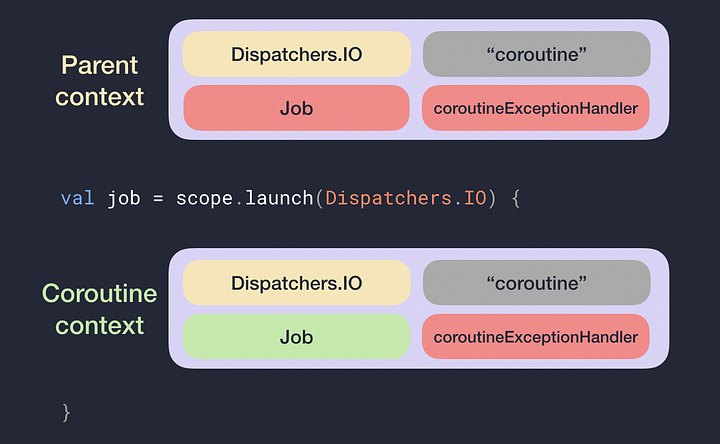
Cancellation and Exceptions in Coroutines (Part 2)
URL
메모리 관리를 위해 Coroutine은 취소될 수 있다.
Calling cancel
여러개의 Coroutine 을 실행할 때 그것은 개별적으로 취소 될 수 있도록 계획되어있다. 반면에 Scope를 취소할 경우 자식 코루틴들은 모두 취소된다.
// assume we have a scope defined for this layer of the app
val job1 = scope.launch { … }
val job2 = scope.launch { … }
scope.cancel()
하나의 코루틴만 취소하고싶은 경우 아래와 같이 job.cancel()을 사용할 수 있다.
// assume we have a scope defined for this layer of the app
val job1 = scope.launch { … }
val job2 = scope.launch { … }
// First coroutine will be cancelled and the other one won’t be affected
job1.cancel()
코루틴을 취소할경우 CancellationException이 발생하며 형제 코루틴에 영향을 미치지 않는다.
ViewModel의 lifecyclerScope에 Coroutine을 연결시키면 ViewModel의 생명 주기에 따라 Coroutine이 동작 됩니다.
cancel()을 호출한다고 즉시 중지 되지 않는다.
아래 코드를 보면 cancel()을 호출해도 hello가 2번만 호출되지 않고 3번 또는 4번 호출 된다.
import kotlinx.coroutines.*

fun main(args: Array<String>) = runBlocking<Unit> {
   val startTime = System.currentTimeMillis()
    val job = launch (Dispatchers.Default) {
        var nextPrintTime = startTime
        var i = 0
        while (i < 5) {
            // print a message twice a second
            if (System.currentTimeMillis() >= nextPrintTime) {
                println("Hello ${i++}")
                nextPrintTime += 500L
            }
        }
    }
    delay(1000L)
    println("Cancel!")
    job.cancel()
    println("Done!")
}

//=>Hello 0
//=>Hello 1
//=>Hello 2
코루틴 취소는 협조가 필요합니다.
-> 코루틴 취소 상태를 체크하여 멈추고 싶은 시점을 명확히 할 수 있다.
while (i < 5 && isActive)
// =>
fun Job.ensureActive(): Unit {
    if (!isActive) {
         throw getCancellationException()
    }
}
// =>
while (i < 5) {
    ensureActive()
    …
}
yeild()를 사용해서 coroutine을 취소하는 경우
- cpu heavy
- 쓰레드풀 고갈
- 풀에 스레드를 추가하지 않고 다른 작업을 하고싶은 경우
Job.join vs Deferred.await 취소
Job: .launch => join
- join 후 cancel 호출시 job이 completed 가 될 떄 까지 기다린다.
- join 후 cancle은 영향을 미치지 않는다. 이미 completed 상태가 됐기 때문이다.
Deffered: .async => await
- await 는 completed 상태일 때 값을 반환한다. await 상태일 때 cancel을 호출할 경우 JobCancellationException을 발생시킨다.
Handling cancellation side effects
isActive를 뺴거나 추가해서 실행시켜보자
fun main(args: Array<String>) = runBlocking<Unit> {
   val startTime = System.currentTimeMillis()
    val job = launch (Dispatchers.Default) {
        var nextPrintTime = startTime
        var i = 0
        while (i < 5 && isActive) {
            // print a message twice a second
            if (System.currentTimeMillis() >= nextPrintTime) {
                println("Hello ${i++}")
                nextPrintTime += 500L
            }
        }
        // the coroutine work is completed so we can cleanup
	    println("Clean up!")

    }
    delay(1000L)
    println("Cancel!")
    job.cancel()
    println("Done!")
}
try catch로 코드를 다룰 수 있다
import kotlinx.coroutines.*

suspend fun work(){
    val startTime = System.currentTimeMillis()
    var nextPrintTime = startTime
    var i = 0
    while (i < 5) {
        yield()
        // print a message twice a second
        if (System.currentTimeMillis() >= nextPrintTime) {
            println("Hello ${i++}")
            nextPrintTime += 500L
        }
    }
}
fun main(args: Array<String>) = runBlocking<Unit> {
   val job = launch (Dispatchers.Default) {
        try {
        	work()
        } catch (e: CancellationException){
            println("Work cancelled!")
        } finally {
            println("Clean up!")
        }
    }
    delay(1000L)
    println("Cancel!")
    job.cancel()
    println("Done!")
}
Coroutin cancel 상태는 suspend 상태에서 사용할 수 없다.
val job = launch {
   try {
      work()
   } catch (e: CancellationException){
      println(“Work cancelled!”)
    } finally {
      withContext(NonCancellable){
         delay(1000L) // or some other suspend fun
         println(“Cleanup done!”)
      }
    }
}
delay(1000L)
println(“Cancel!”)
job.cancel()
println(“Done!”)
Exceptions in coroutines Cancellation and Exceptions in coroutines (Part 3) — Gotta catch ’em all!
A Coroutine suddenly failed! what now?
자식 코루틴이 cancel 되면 자식 코루틴은 취소하고 예외를 부모에게 전파한다.
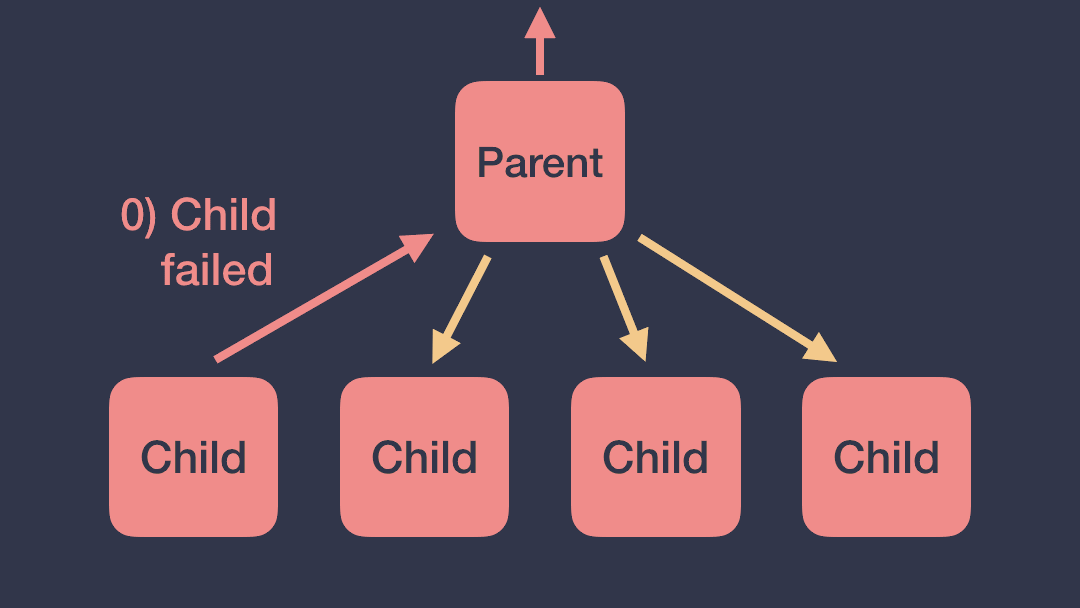
이렇게 동작되는것을 원치 않을경우
CoroutineScope 의 CoroutinContext 안의 SupervisorJpb을 사용하여 처리할 수 있다.
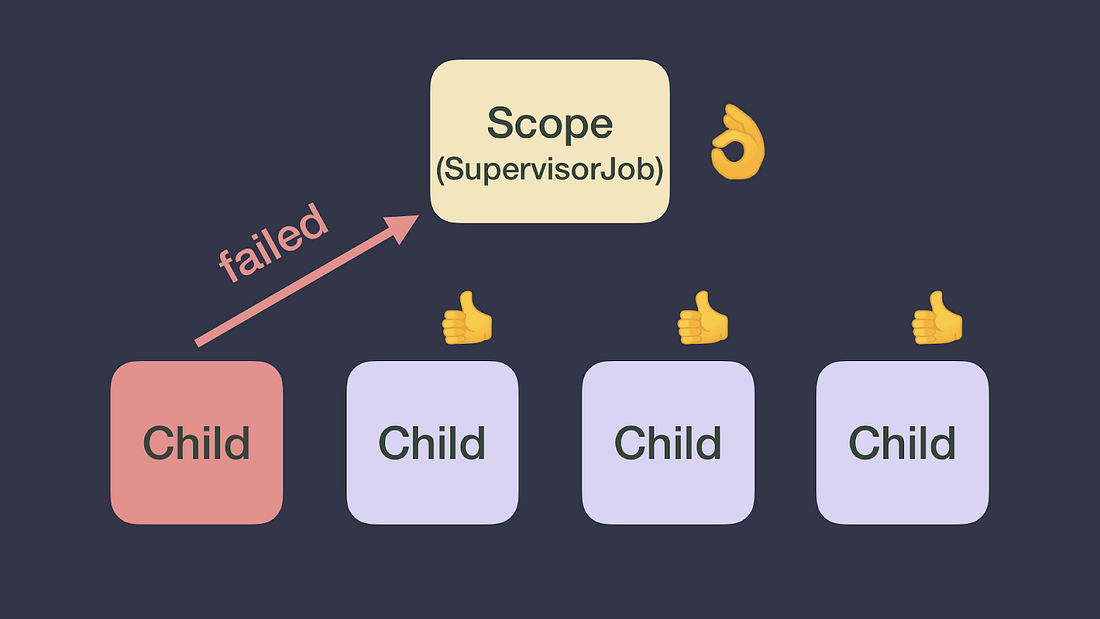
child1이 실패해도 child2는 실패하지 않습니다.
// Scope handling coroutines for a particular layer of my app
val scope = CoroutineScope(SupervisorJob())
scope.launch {
    // Child 1
}
scope.launch {
    // Child 2
}
아래의 경우도 동일하다.
// Scope handling coroutines for a particular layer of my app
val scope = CoroutineScope(Job())
scope.launch {
    supervisorScope {
        launch {
            // Child 1
        }
        launch {
            // Child 2
        }
    }
}
아래 코드의 child1 과 child2의 부모는 Job() 이다
val scope = CoroutineScope(Job())
scope.launch(SupervisorJob()) {
    // new coroutine -> can suspend
   launch {
        // Child 1
    }
    launch {
        // Child 2
    }
}
scope를 재정의한다고해서 scope가 바뀌지 않는다.
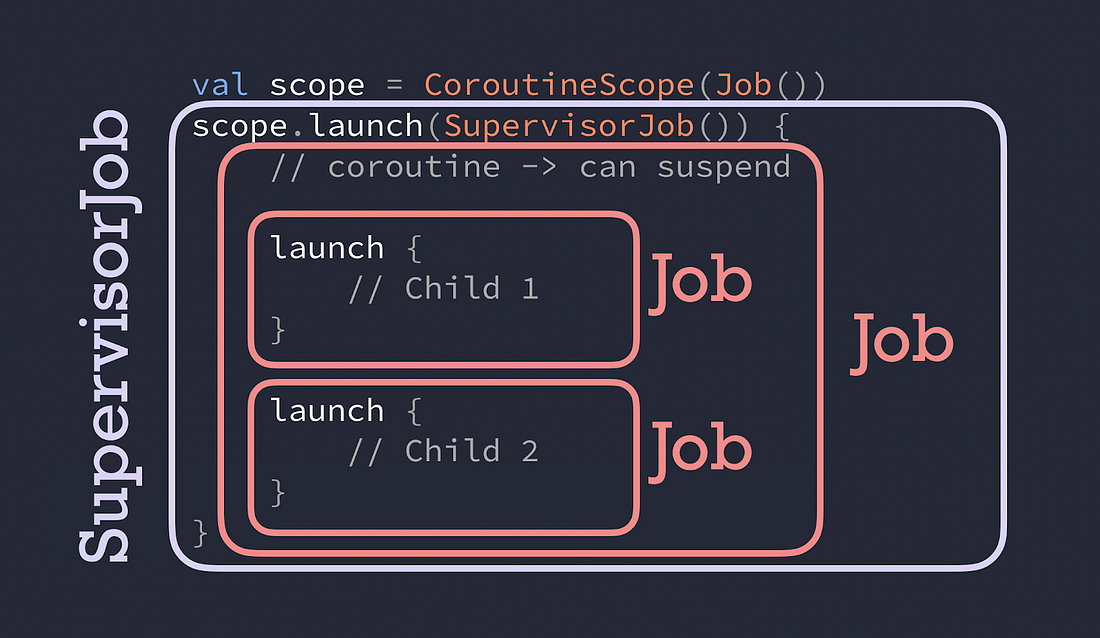
Under the hood (내부적으로 어떻게 동작하는가)
SuperviorJob은 childCanclled method 에서 return false 를 한다. 이는 예외를 처리하지 않는다는 뜻이다.
Dealing With Exceptions(예외다루기)
Launch
scope.launc 안에서 예외가 발생할 경우 단순 try catch 처리할 수 있다.
scope.launch {
    try {
        codeThatCanThrowExceptions()
    } catch(e: Exception) {
        // Handle exception
    }
}
Async
supervisorScope 내에서 선언된 async의 예외는 await 함수에 던져진다.
supervisorScope {
    val deferred = async {
        codeThatCanThrowExceptions()
    }
    try {
        deferred.await()
    } catch(e: Exception) {
        // Handle exception thrown in async
    }
}
Async에 예외처리를해도 부모로 예외를 던지기 때문에 catch 할 수 없다.
coroutineScope {
    try {
        val deferred = async {
            codeThatCanThrowExceptions()
        }
        deferred.await()
    } catch(e: Exception) {
        // Exception thrown in async WILL NOT be caught here
        // but propagated up to the scope
    }
}
더군다나 async 예외는 Coroutine builder와 관계없이 항상 전파된다.
val scope = CoroutineScope(Job())
scope.launch {
    async {
        // If async throws, launch throws without calling .await()
    }
}
CoroutineExceptionHandler
CoroutineExceptionHandler는 Coroutine 예외를 처리하기 위한 CoroutineContext의 옵션 요소이다.
val handler = CoroutineExceptionHandler {
    context, exception -> println("Caught $exception")
}

val scope = CoroutineScope(Job())
scope.launch(handler) {
    launch {
        throw Exception("Failed coroutine")
    }
}
아래 같은 경우에는 예외를 받을 수 없다.
CoroutinContext에 적절히 배치되지 못했기 때문이다.
val scope = CoroutineScope(Job())
scope.launch {
    launch(handler) {
        throw Exception("Failed coroutine")
    }
}Coroutines & Patterns for work that shouldn’t be cancelled
Cancellation and Exceptions in Coroutines (Part 4)
part2에서 코루틴 취소의 중요성에 대해 배웠다.
Android 에서는 viewModelScope 또는 lifecycleScope에서 제공해주는 CoroutineScope를 사용할 수 있다. 이것들은 scope가 완료될 때 (acitivity/ fragment/ lifecycle 의 완료) coroutine이 cancel 된다.
만약 화면이 종료되어도 실행시키고싶다면 어떻게 해야할까?
(예: 데이터베이스 쓰기 서버에 특정 네트워크 요청 만들기)
Coroutine or WorkManager?
Coroutine은 애플리케이션 프로세스가 살아있는 한 실행됩니다. 프로세스보다 오래 지속되야하는 작업을(예: 원격 서버에 로그전송)을 실행해야하는 경우 Workmanager을 사용하세요.
workmanager는 향후에 실행될 것으로 예상되는 중요한 작업에 사용하는 라이브러리 입니다.
현재 프로세스에서 유효하고 사용자가 앱을 종료하면 취소될 수 있는 작업에 Coroutine을 사용하세요. (예: 캐시하려는 네트워크 요청 생성)
Coroutine 모범 사례
- Inject Dispatchers into class (Dispatcher을 class에 주입)
Coroutine을 새로 생성하거나 WithContext와 함께 호출할때 하드코딩하지 마시오
장점: 테스트에 유용하다 (unit단위 테스트 과 instrumetation test 계측 테스트 둘다 쉽게 교체될 수 있다)
- ViewModel/Presenter layer should create coroutines
UI 전용 작업인 경우 UI 레이어에서 이를 수행할 수 있습니다. 프로젝트에서 이것이 불가능하다고 생각하면 모범사례1을 따르지 않고있을 가능성이 높습니다.
(즉 Dispatchers를 주입하지 않는 VM 을 테스트하는 것이 더 어렵습니다. 이 경우 suspend functions을 노출하면 가능해집니다.)
장점: UI 레이어는 단순해야하며 비지니스 로직을 직접적으로 실행해서는 안됩니다. 대신 ViewModel/Presenter 레이어에 맡기세요. UI 레이어를 테스트하려면 애뮬레이터를 실행해야하는 Android instrumentation test가 필요합니다.
- ViewModel/Presenter 아래의 레이어는 일시 중지 기능과 흐름을 노출해야합니다.
만약 Coroutine을 생성한다면 coroutineScope 또는 supervisorScope를 사용해야한다. 만약 너가 다른 Scope를 필요한다면 다음 내용을 숙지해라
장점: Caller (일반적으로 ViewModle layer)는 실행을 제어할 수 있다. 그리고 라이프 사이클에서 일어나는 동작도 제어할 수 있다.
Operations는 Coroutine을 취소하면 안된다.
아래 ViewModel 그리고 Repositiory를 가진 로직이 있다 생각해보자
아래 veryImportantOperation는 viewModelScope에서 동작되고 있다.
ViewModelScope는 언제든 취소될수 있기 때문에 ViewModel Scope의 바깥에서 동작시키고싶다.
class MyViewModel(private val repo: Repository) : ViewModel() {
  fun callRepo() {
    viewModelScope.launch {
      repo.doWork()
    }
  }
}
class Repository(private val ioDispatcher: CoroutineDispatcher) {
  suspend fun doWork() {
    withContext(ioDispatcher) {
      doSomeOtherWork()
      veryImportantOperation() // This shouldn’t be cancelled
    }
  }
}
어떻게 해야할까?
Application class에 operatione을 coroutine안에서 실행시킨다. 이 scope는 필요한 클래스에 injected 되어야한다.
CoroutineExceptionHandler가 필요한가? 너는 자신의 ? 너가 사용할 Dispatcher 가 필요한 Thread Pool을 가지고 있나?
이러한 환경들은 CoroutineContext에 넣어라
너는 applicationScope를 부를 수 있다 그리고 SupervisorJob()을 호출해야한다. 이것은 계층 내에서 Coroutine failure를 전달 시키지 않도록 방지한다.
class MyApplication : Application() {
  // No need to cancel this scope as it'll be torn down with the process
  val applicationScope = CoroutineScope(SupervisorJob() + otherConfig)
}
우리는 이 scope를 취소할 필요가 없다. 우리는 프로세스가 살아 있는동안 coroutineScope를 계속 유지시킬것이다. 그래서 우리는 SupervisorJob을 참조할 필요가 없다. 이 코루틴은 긴 생명주기를 같든다.
Operation이 취소되지 않기 위해서 application CoroutinScope에서 생성된 coroutine을 호출해라
언제든 지 Repository 객체를 applicationScope에 전달하여 생성할 수 있다.
테스트를 위한 아래 테스트 색션을 확인해라
어떤 코루틴 빌더를 사용하는가?
매우 중요한 기능을 실행하기 위해서 너는 launch 또는 async를 사용한 새로운 coroutins을 시작할 필요가 있다.
- 만약 리턴값이 필요하면 async나 await을 호출하여 끝나길 기다린다.
- 만약 필요 없다면, launch를 실행한다 그리고 join을 사용하여 끝나길 기다린다.
part3에서 exception 예외처리를 해야한다.
아래 코드는 launch 사용 방법이다.
class Repository(
  private val externalScope: CoroutineScope,
  private val ioDispatcher: CoroutineDispatcher
) {
  suspend fun doWork() {
    withContext(ioDispatcher) {
      doSomeOtherWork()
      externalScope.launch {
        // if this can throw an exception, wrap inside try/catch
        // or rely on a CoroutineExceptionHandler installed
        // in the externalScope's CoroutineScope
        veryImportantOperation()
      }.join()
    }
  }
}
아래는 async 사용방법이다.
class Repository(
  private val externalScope: CoroutineScope,
  private val ioDispatcher: CoroutineDispatcher
) {
  suspend fun doWork(): Any { // Use a specific type in Result
    withContext(ioDispatcher) {
      doSomeOtherWork()
      return externalScope.async {
        // Exceptions are exposed when calling await, they will be
        // propagated in the coroutine that called doWork. Watch
        // out! They will be ignored if the calling context cancels.
        veryImportantOperation()
      }.await()
    }
  }
}
어떤 경우에도 ViewModel 코드는 변경되지 않으며 위의 경우 ViewModelScope가 파괴되더라도 externalScope는 계속 실행됩니다.
또한 어떤 suspend가 불려진다해도 veryImportantOperation()이 완료된 후 값이 반환됩니다.
또다른 패턴
class Repository(
  private val externalScope: CoroutineScope,
  private val ioDispatcher: CoroutineDispatcher
) {
  suspend fun doWork() {
    withContext(ioDispatcher) {
      doSomeOtherWork()
      withContext(externalScope.coroutineContext) {
        veryImportantOperation()
      }
    }
  }
}
위 패턴에는 주의점이 있다.
- doWork는 취소될 수 있다.(veryImportantOperation이 실행될 때, 이것은 cancellation시점까지 유지된다. veryImportantOperation이 이 끝날때까지 실행되지 않는다.)
- CoroutineExceoptionHandler는 WithContext에서 사용되는 context가 사용될 때 이 Exception는 다시 던져진다.
Testing
Dispatchers 그리고 CoroutinScopes는 주입될 필요가 있다. 어떤경우에 어떤걸 주입할 것인가?
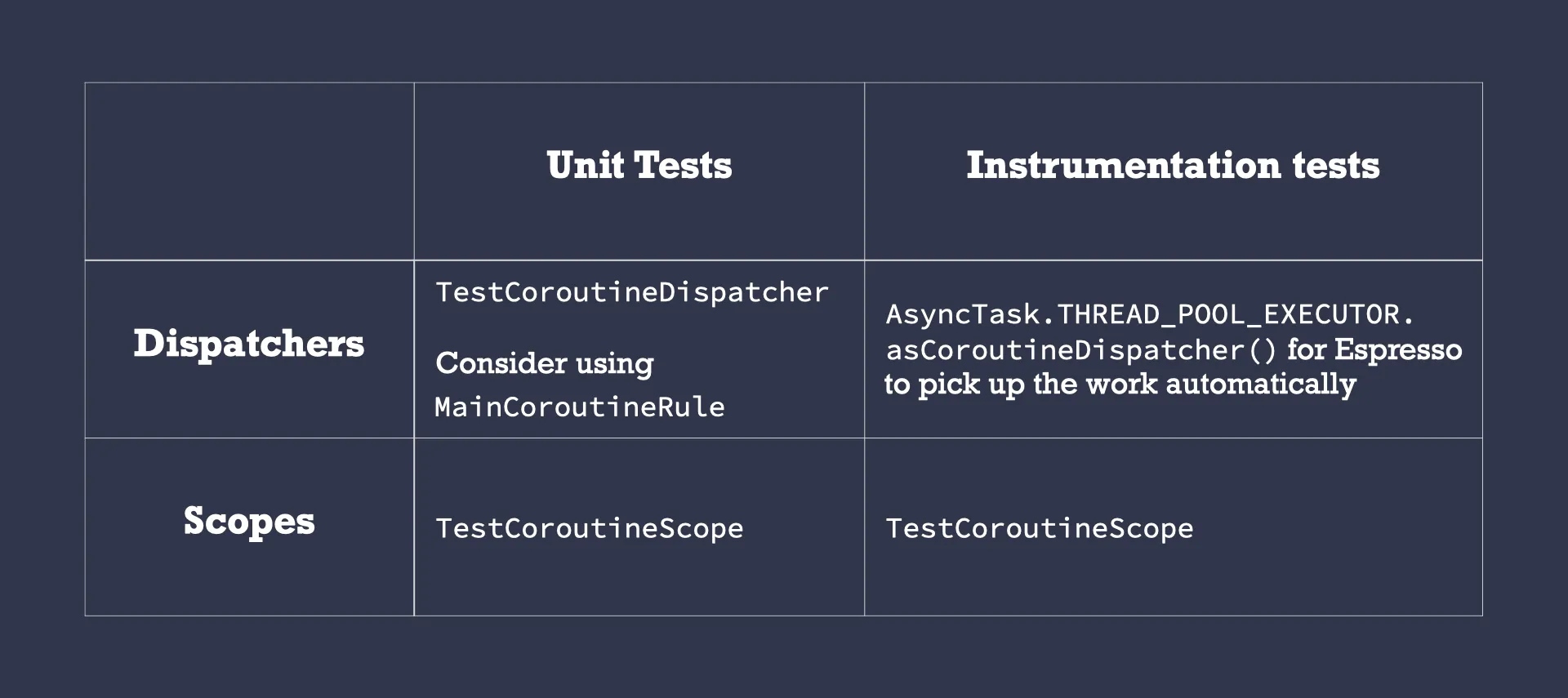
대안
- 글로벌 스코프 사용하면 안되는 이유
- 하드코딩값을 장려하게된다.
- 테스트를 어렵게 만든다.
- 모든 코루틴에 대한 공통 CoroutineContext를 가질 수 없다.
- Android 의 ProcessLIfecyclerOwner 범위
