🔫 계산기 과제 Lv3 구현중 발생한 Exception 트러블슈팅
해당 내용은 [TIL] 2025-01-10 에서 추가 수정되었습니다.
1. 개요
Enum, Generic, Lambda, Stream을 활용하여 계산기를 구현하고 Java의 문법을 이해합니다. 이번 TIL는 계산기 구현 과정에서 겪은 Exception을 해결한 케이스에 대해 정리합니다.
2. 트러블슈팅
2.1 배경 (클래스 다이어그램)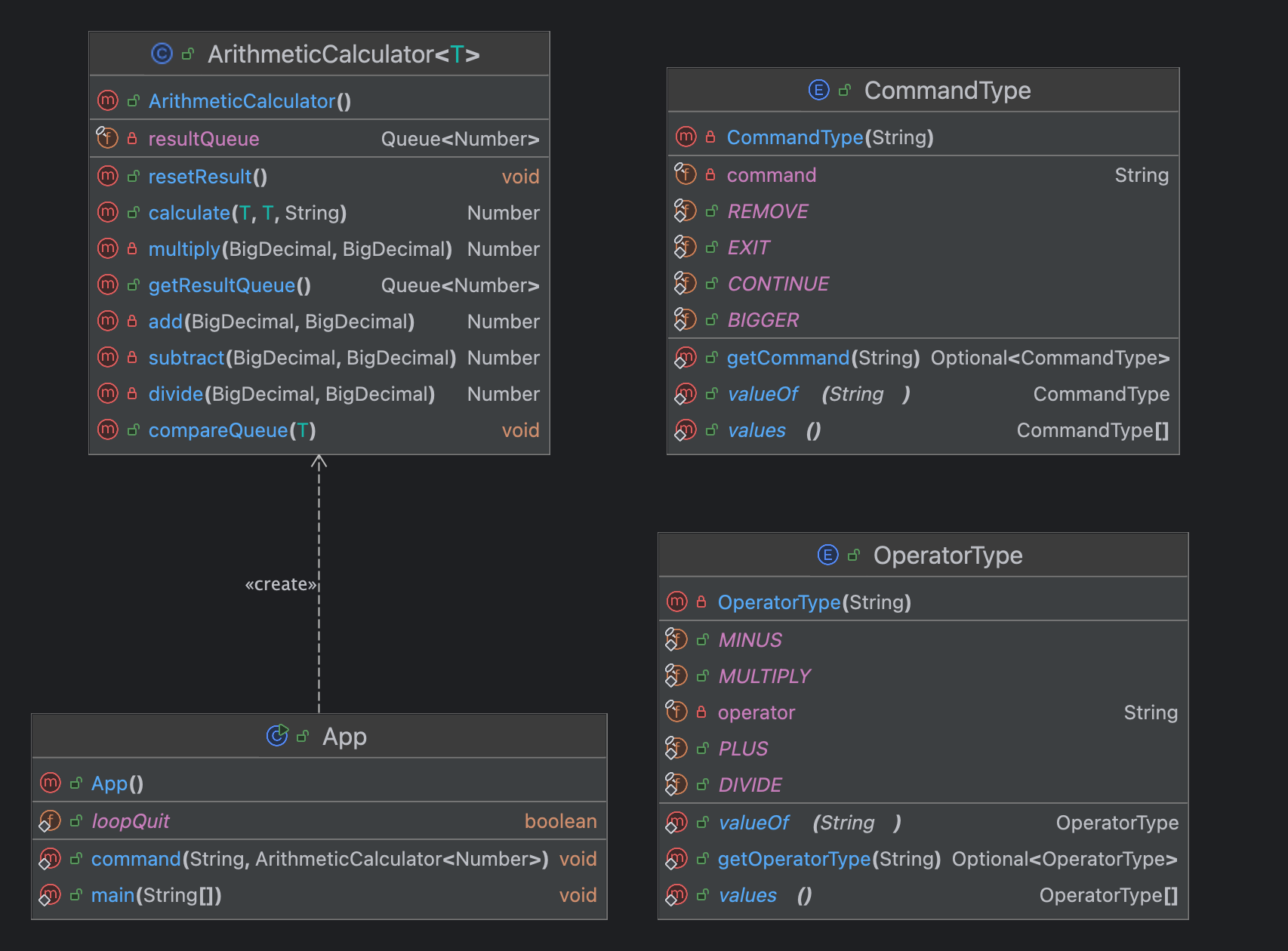
App: 프로그램 실행부ArithmeticCalculator: 계산기 연산 수행 역할OperatorType: 연산자 타입 (Enum)CommandType: 사용자 메뉴 타입 (Enum)
2.2 발단
연산 기호, 사용자 메뉴 입력 문제
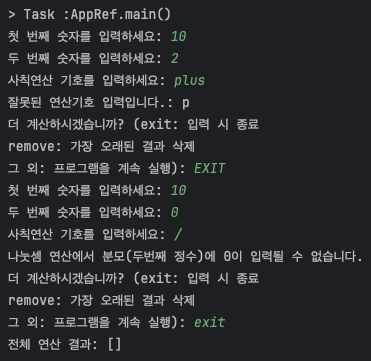 계산기 프로그램은 다음과 같이 콘솔로 사용자에게 첫 번째 숫자, 두 번째 숫자(피연산자), 사칙연산 기호(연산자), 다음 동작(사용자 메뉴)를 입력 받아 연산을 실행합니다.
이때 다음과 같은 문제가 발생합니다.
- 타입 안정성 부족: 사용자가 +, -, *, / 외 다른 연산기호를 입력
- 데이터 일관성: 사용자가 프로그램 종료를 위해 "exit"를 입력할 때 다양한 형식(대문자, 소문자, 혼용)으로 입력할 수 있어 데이터 일관성이 떨어짐
이러한 문제를 해결하기 위해 연산기호와 사용자 메뉴를 Enum으로 구현했습니다.
2.3 전개
▶︎ OperatorType.java
public enum OperatorType {
    PLUS("+"), MINUS("-"), MULTIPLY("*"), DIVIDE("/");

    private final String operator;

    OperatorType(String operator) {
        this.operator = operator;
    }
}
연산자 타입을 관리하는 OperatorType을 다음과 같이 작성했습니다.
▶︎ ArithmeticCalculator.java
public Number calculate(T num1, T num2, String operatorStr) {
    OperatorType operator = OperatorType.valueOf(operatorStr); // e1: 사칙연산 기호 오류 : throw IllegalArgumentException 발생
    BigDecimal big1 = (BigDecimal) num1;
    BigDecimal big2 = (BigDecimal) num2;
    // operator에 OperatorType 값이 있는 경우
    Number result = switch (operator) {
        case PLUS -> add(big1, big2); // 덧셈
        case MINUS -> subtract(big1, big2); // 뺄셈
        case MULTIPLY -> multiply(big1, big2); // 곱셈
        case DIVIDE -> divide(big1, big2); // 나눗셈
    };
    resultQueue.add(result);
    return result;
}
사용자가 Enum의 operator 필드와 일치하는 연산기호를 입력하면 해당하는 Enum 상수로 연산(calculate) 제어를 할 것으로 예상했습니다. 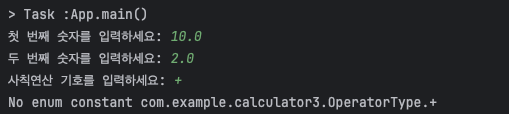
🚨 예상과 달리 IllegalArgumentException이 발생하고 프로그램이 정상적으로 실행되지 않음
2.4 위기
사용자가 operator에 해당하는 연산기호를 입력하면 해당되는 Enum 상수를 찾는 getOperatorType(String operator) 메서드 추가하여 다음과 같이 수정했습니다.
▶︎ OperatorType.java
public static OperatorType getOperatorType(String operator) {
    for (OperatorType value : OperatorType.values()) {
        if(value.operator.equals(operator)) {
            return value;
        }
    }
    return null;
}
▶︎ ArithmeticCalculator.java
    public Number calculate(T num1, T num2, String operatorStr) {
        OperatorType operator = OperatorType.getOperatorType(operatorStr); // e1: 사칙연산 기호 오류 : throw IllegalArgumentException 발생
        BigDecimal big1 = (BigDecimal) num1;
        BigDecimal big2 = (BigDecimal) num2;
        // operator에 OperatorType 값이 있는 경우
        Number result = switch (operator) {
            case PLUS -> add(big1, big2); // 덧셈
            case MINUS -> subtract(big1, big2); // 뺄셈
            case MULTIPLY -> multiply(big1, big2); // 곱셈
            case DIVIDE -> divide(big1, big2); // 나눗셈
        };
        resultQueue.add(result);
        return result;
    }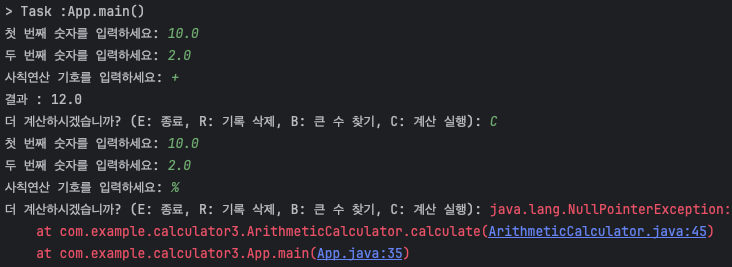
🚨 Enum 상수에 포함되는 연산기호 입력 시 정상 실행되었으나 정의되지 않은 문자열 입력 시 NullPointerException이 발생함.
getOperatorType 메서드에서 루프 반복에서 일치하는 Enum 상수가 없는 경우 return null; 이 원인
2.5 절정
리턴 타입을 Optional로 감싸고 호출하는 calculate 메서드에서 Optional이 빈 값일 경우에 대한 예외 처리를 하도록 수정했습니다.
▶︎ OperatorType.java
public static Optional<OperatorType> getOperatorType(String operator) {
    for (OperatorType value : OperatorType.values()) {
        if(value.operator.equals(operator)) {
            return Optional.of(value);
        }
    }
    return Optional.empty();
}
▶︎ ArithmeticCalculator.java
public Number calculate(T num1, T num2, String operatorStr) {
    Optional<OperatorType> operator = OperatorType.getOperatorType(operatorStr); // e1: 사칙연산 기호 오류 : throw IllegalArgumentException 발생
    BigDecimal big1 = (BigDecimal) num1;
    BigDecimal big2 = (BigDecimal) num2;
    if (operator.isPresent()) {
        // operator에 OperatorType 값이 있는 경우
        Number result = switch (operator.get()) {
            case PLUS -> add(big1, big2); // 덧셈
            case MINUS -> subtract(big1, big2); // 뺄셈
            case MULTIPLY -> multiply(big1, big2); // 곱셈
            case DIVIDE -> divide(big1, big2); // 나눗셈
        };
        resultQueue.add(result);
        return result;
    } else {
        // operator에 OperatorType 값이 없는 경우 (empty)
        throw new IllegalArgumentException("잘못된 연산기호: " + operatorStr);
    }
}
Optional.isPresent() 값으로 분기처리를 하여 잘못된 연산기호를 입력했을 경우, NullPointerException 을 회피하고 IllegalArgumentException으로 예외를 던져 App(프로그램 실행부)에서 예외 처리됩니다.
2.6 결말
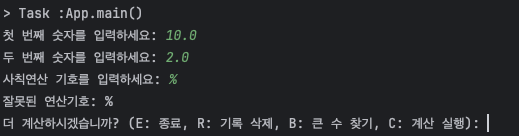
사용자가 정의되지 않은 연산기호 입력 시 "잘못된 연산기호" 메세지를 출력하고 프로그램은 정상적으로 실행됩니다.
3. 마무리
Enum을 활용하여 타입 안정성 향상과 데이터 일관성을 얻을 수 있지만 사용자에게 직접 문자열을 입력받는 경우 사용자는 Enum에 정의된 상수를 정확히 알지 못하므로 여러 Exception 이 발생할 수 있다. 그에 따라 개발자는 발생할 수 있는 예외를 예측하여 프로그램에 적절한 제약을 걸어야 합니다.