🔫 계산기 과제 Lv3 구현하며 겪은 문제점과 해결방법, 새로 알게된 점을 기록합니다.
🧑🔧 계산기 과제 리펙토링
계산기 Lv 3을 검토하던 중 기존 코드의 경우 정상 흐름의 로직과 예외 흐름의 로직이 섞여있어 코드 해석의 어려움이 있음을 발견했다.
문제점
연산 기호와 사용자 메뉴를 ENUM 상수로 관리하며 포함되지 않은 값을 입력했을 경우 Optional.empty() 반환
👉 계산기3 트러블슈팅 (Enum 메서드의 반환값이 null → NullPointerException 발생으로 아래와 같이 수정)
기존코드
▶︎ ArithmeticCalculator: OperatorType의 getOperatorType()을 호출
public <T extends Number> Number calculate(T num1, T num2, String operatorStr) {
        Optional<OperatorType> operator = OperatorType.getOperatorType(operatorStr);
        BigDecimal big1 = (BigDecimal) num1;
        BigDecimal big2 = (BigDecimal) num2;
        if (operator.isPresent()) {
            // operator OperatorType 값이 있는 경우
            OperatorType operatorType = operator.get();
            Number result = operatorType.calculate(big1, big2);
            resultQueue.add(result);
            return result;
        } else {
            // operator OperatorType 값이 없는 경우 (empty)
            // e1: 사칙연산 기호 오류 : throw IllegalArgumentException
            throw new IllegalArgumentException("잘못된 연산기호: " + operatorStr);
        }
    }
▶︎ App: CommandType의 getCommand()를 호출, static 변수 loopQuit로 흐름 제어
public class App {
    public static boolean loopQuit = false;
    public static void main(String[] args) {
        /* Calculator 인스턴스 생성 */
        ArithmeticCalculator calculator = new ArithmeticCalculator();
        Scanner sc = new Scanner(System.in);

        while (true) {
            try {
                loopQuit = false;
                System.out.print("첫 번째 숫자를 입력하세요: ");
                Number num1 = sc.nextBigDecimal();
                System.out.print("두 번째 숫자를 입력하세요: ");
                Number num2 = sc.nextBigDecimal();
                sc.nextLine(); // 입력 후 버퍼의 개행문자(\n) 제거
                System.out.print("사칙연산 기호를 입력하세요: ");
                String operator = sc.nextLine();

                /* 연산 수행 역할은 Calculator 클래스가 담당 */
                Number result = calculator.calculate(num1, num2, operator);

                System.out.println("결과 : " + result);
            } catch (InputMismatchException e) {
                System.out.println("잘못된 숫자 입력입니다.");
                sc.nextLine(); // 입력 후 버퍼의 개행문자(\n) 제거
            } catch (ArithmeticException | IllegalArgumentException e) {
                System.out.println(e.getMessage());
            } finally {
                // 사용자 메뉴: 계산 성공과 예외 발생에 상관 없이 수행되어야 하는 로직
                boolean loopQuit = false;
                while (!loopQuit) {
                    System.out.print("더 계산하시겠습니까? (E: 종료, R: 기록 삭제, B: 큰 수 찾기, C: 계산 실행): ");
                    command(sc.nextLine(), calculator);
                    loopQuit = command(sc.nextLine(), calculator);
                }
            }
        }
    }

	public static void command(String input, ArithmeticCalculator calculator) {
        Optional<CommandType> command = CommandType.getCommand(input.toUpperCase()); // 대소문자 구분 없이 입력
        if (command.isPresent()) {
            loopQuit = command.get().action(calculator);
        } else {
            System.out.println("잘못된 입력입니다. 다시 입력해주세요.");
            loopQuit = false;
        }
기존 코드의 경우 호출부에서 조건문(if(Optional.isPresent()))을 이용하여 NullPointerException을 회피하거나 IllegalArgumentException으로 바꿔 예외를 던졌다. 예외 처리는 App의 Main에서 처리한다.
기존코드의 문제점
- 사용자 입력을 받는 부분의 로직에서 조건문으로 분기하여 정상흐름과 예외흐름이 같이 섞여있다.
- Optional을 사용함으로써 굳이 NullPointerException이 발생할 위험을 감수할 필요가 없다.
해결 방법
기존 Enum 상수를 호출할 때 Optional을 반환하는 부분을 제거하고 Enum 상수에 포함되지 않은 문자를 입력할 경우에 바로 예외를 던진다.
▶︎ OperatorType
	public static OperatorType getOperatorType(String operator) {
        for (OperatorType value : OperatorType.values()) {
            if (value.operator.equals(operator)) {
                return value;
            }
        }
        throw new IllegalArgumentException("잘못된 연산기호 입력: " + operator);
    }
▶︎ CommandType
    public static CommandType getCommand(String command) {
        for (CommandType value : CommandType.values()) {
            if (value.command.equals(command)) {
                return value;
            }
        }
        throw new IllegalArgumentException("잘못된 메뉴 입력: " + command);
    }
OperatorType 과 CommandType 의 메서드에서 던지는 IllegalArgumentException 은 RuntimeException 을 상속받는 언체크 예외로 별도의 throws 처리를 하지 않아도 된다.
각 메서드의 호출부도 수정한다.
▶︎ ArithmeticCalculator
	public <T extends Number> Number calculate(T num1, T num2, String operatorStr) {
        OperatorType operator = OperatorType.getOperatorType(operatorStr);
        BigDecimal big1 = (BigDecimal) num1;
        BigDecimal big2 = (BigDecimal) num2;

        Number result = operator.calculate(big1, big2); // operatorType에 따라 계산한 후 결과를 반환
        resultQueue.add(result);
        return result;
    }
▶︎ App: 호출부인 command()의 코드가 간소화되었고, 모든 예외는 main() 에서 처리한다.
public class App {
    public static void main(String[] args) {
        /* Calculator 인스턴스 생성 */
        ArithmeticCalculator calculator = new ArithmeticCalculator();
        Scanner sc = new Scanner(System.in);

        while (true) {
            try {
                System.out.print("첫 번째 숫자를 입력하세요: ");
                Number num1 = sc.nextBigDecimal();
                System.out.print("두 번째 숫자를 입력하세요: ");
                Number num2 = sc.nextBigDecimal();
                sc.nextLine(); // 입력 후 버퍼의 개행문자(\n) 제거
                System.out.print("사칙연산 기호를 입력하세요: ");
                String operator = sc.nextLine();

                /* 연산 수행 역할은 Calculator 클래스가 담당 */
                Number result = calculator.calculate(num1, num2, operator);

                System.out.println("결과 : " + result);
            } catch (InputMismatchException e) {
                System.out.println("[입력 오류] 잘못된 숫자 입력입니다.");
                sc.nextLine(); // 입력 후 버퍼의 개행문자(\n) 제거
            } catch (ArithmeticException | IllegalArgumentException e) {
                System.out.println("[입력 오류] " + e.getMessage());
            } finally {
                // 사용자 메뉴: 계산 성공과 예외 발생에 상관 없이 수행되어야 하는 로직
                boolean loopQuit = false;
                while (!loopQuit) {
                    try {
                        System.out.print("더 계산하시겠습니까? (E: 종료, R: 기록 삭제, B: 큰 수 찾기, C: 계산 실행): ");
                        loopQuit = command(sc.nextLine(), calculator);
                    } catch (IllegalArgumentException e) {
                        System.out.println("[입력 오류] " + e.getMessage());
                    }
                }
            }
        }
    }

    public static boolean command(String input, ArithmeticCalculator calculator) {
        // 대소문자 구분 없이 입력
        return CommandType.getCommand(input.toUpperCase()).action(calculator);
    }
}
Optional을 사용하지 않아 NullPointerException이 발생할 위험이 사라지고,
static 변수 loopQuit를 finally에서만 사용하는 지역 변수로 스코프 범위를 한정시켰다.
로직의 정상흐름과 예외흐름을 분리하고 예외처리를 모두 main()에서 처리하도록 공통화하여 코드가 더욱 깔끔해졌다.
결과
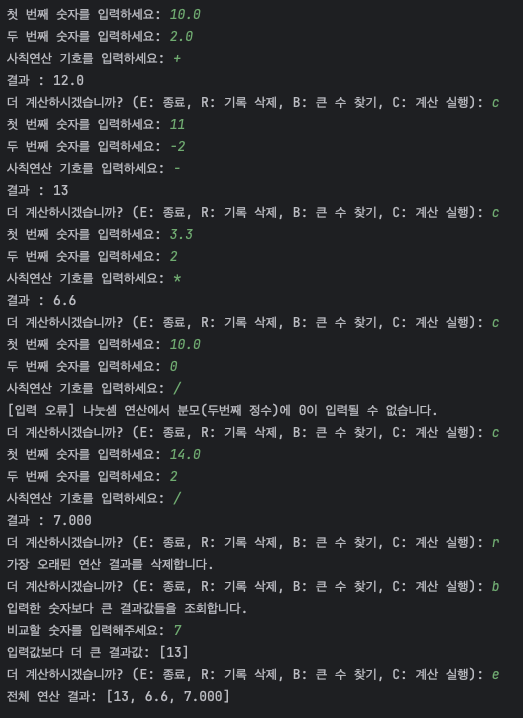
- 정상적인 연산 실행
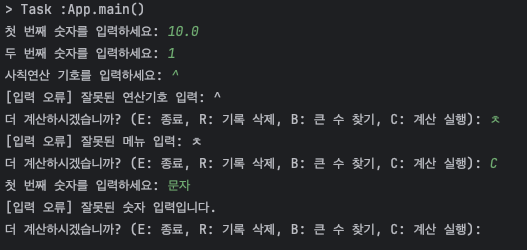
- 예외 발생
배운 점
- 적절한 시점의 예외 생성으로 정상로직과 예외로직을 분리시켜 코드 간결성과 코드 가독성을 높일 수 있다.