난 처음에 bullMQ가 blankqueue를 말하는줄알았다. 머쓱;
암튼 동시성 제어의 문제가 해결되지 않아 직렬화하는 방식으로 bullMQ과 redis를 돌입하기시작했다. 우선 bullMQ와 redis는 무엇인고. bull이 있고, bullMQ가 있다.
간단하게 말해서 bull을 업그레이드 시켜놓은게 bullMQ라고 보면된다.
bull :Redis 기반의 큐를 관리하는 Node.js 라이브러리. 간단하고 가벼우며, 주로 작은 및 중간 규모의 프로젝트에서 사용. 나는 bull을 사용했다.
bullMQ: bullmq는 bull의 확장된 버전. 여러 Redis 인스턴스 간에 작업을 분산하고 여러 프로세스 또는 스레드에서 작업을 실행하는 등 고급 기능을 제공. bullmq는 높은 성능과 확장성을 갖추고 있어 대규모 애플리케이션에서 사용 _ typescript로 사용가능한듯
redis: 오픈 소스의 데이터 구조 서버로, 주로 메모리 기반의 키-값 저장소로 사용되며, 데이터베이스, 캐시 및 메시지 브로커와 같은 다양한 용도로 활용된다. 캐싱을 하기 위해서 사용되며, 데이터베이스로도 사용이 된다.
우선 bullMQ에 대해서 알아보자.
🐃 bull
1. 설치 (window, node환경)
yarn add bull
or
npm install bull --save
2. producer와 consumer 와 listener
producer
//producer 2개 중 1
const reservationQueue = new Bull('reservation', {
  connection: {
    host: 'redis-17384.c295.ap-southeast-1-1.ec2.cloud.redislabs.com',
    port: 17384,
    password: 'Ks4y5J1ETjtBqDyiqwsZ9l8P9wH4z8fJ',
  },
});
//producer 2개 중 2 /** 공연 예매 **/ router.post('/reservation/:showId', authMiddleware, async (req, res, next) => { try { const { showId } = req.params; const { userId } = req.user; /** bull 큐에 작업 추가**/ await reservationQueue.add('handleReservationJob', { showId: +showId, userId: +userId, }); return res.status(200).json({ message: '좌석 예매가 완료되었습니다.' }); } catch (error) { console.log(`catch로 빠진 ${error}`); next(error); // if(transaction) { // await prisma.$executeRaw`ROLLBACK` // } } });
consumer
큐에 추가된 작업을 처리하거나 큐에서 이벤트를 수신하거나 둘 다 수신하는 메서드를 정의
const handleReservationJob = async (job) => {
  const { showId, userId } = job.data;
  let transaction;
  try {
    transaction = await prisma.$transaction(
      async (tx) => {
        const user = await tx.users.findFirst({
          where: { userId: +userId },
        });

        if (!user) {
          throw new Error('유저 정보를 찾을 수 없습니다.');
        }

        await tx.$queryRaw`SELECT * FROM Shows FOR UPDATE;`;

        let updatedShow = await prisma.shows.findFirst({
          where: { showId: +showId },
        });

        if (user.credit < updatedShow.price || user.credit === 0) {
          console.log(`${userId} : credit부족`);
          throw new Error('credit이 부족합니다.');
        }
        await tx.$executeRaw`UPDATE Users SET credit = credit - ${updatedShow.price} WHERE userId=${userId};`;

        if (updatedShow.quantity <= 0) {
          console.log(`${userId} : 예매수량부족`);
          throw new Error('예매 수량이 부족합니다.');
        }

        await tx.$executeRaw`UPDATE Shows SET quantity = quantity-1 WHERE showId=${showId};`;

        await tx.$executeRaw`INSERT INTO Reservation(UserId, ShowId) VALUES (${user.userId}, ${showId});`;
      },
      {
        isolationLevel: Prisma.TransactionIsolationLevel.RepeatableRead,
      },
    );
  } catch (error) {
    console.log(`예매 작업 처리 중 에러 발생: ${error}`);
    // if(transaction) {
    //   await prisma.$executeRaw`ROLLBACK`
    // }
  } finally {
    if (transaction) {
      await prisma.$executeRaw`COMMIT`;
    }
  }
};

//consumer
reservationQueue.process(handleReservationJob);
listener
reservationQueue.on('completed', (job) => {
  console.log(`Job ${job.id} completed`);
});

reservationQueue.on('failed', (job, error) => {
  console.log(`Job ${job.id} failed with error: ${error.message}`);
});
일단 메뉴얼에서 하라는대로 위와같이 해봤는데 메모리누수에 대한 경고가 떴다.

메모리 누수란? 메모리 누수(Memory Leak)란 더 이상 사용하지 않는 객체들이 불필요하게 메모리를 차지하고 있는 상황을 의미한다.
setMaxListeners 메서드를 사용하여 이벤트 리스너의 최대 개수를 설정하지 않으면, 기본적으로 경고가 발생한다고 한다. Node.js는 기본적으로 이벤트 리스너 수를 제한하여 메모리 누수를 방지하려고. 경고가 발생하는 이유 중 하나는 하나의 EventEmitter에 대해 동시에 추가된 이벤트 리스너의 개수가 기본 제한을 초과했을 때라고 한다.
경고를 무시할수는 없어서 이벤트 리스너의 수를 제한하는 코드를 하나 넣어줬다.
//메모리 누수 방지 : 리스너 수 제한
reservationQueue.setMaxListeners(10000);
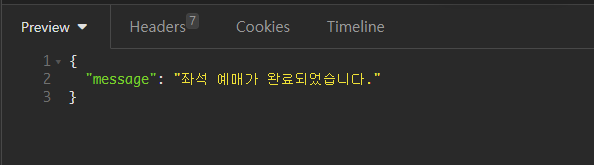
코드를 입력하고 나서 api를 실행해보니 사용자의 credit이 없는데 return으로 좌석이 예매가 완료되었다고 뜨고, 콘솔에는 크레딧이 부족하다는 에러메시지가 떴다.

const handleReservationJob = async (job) => {
  const { showId, userId } = job.data;
  console.log('뜰까?', showId, userId);

  let transaction;
  try {
    transaction = await prisma.$transaction(
      //...생략
  } catch (error) {
    console.log(`예매 작업 처리 중 에러 발생: ${error}`);
    handlerErrors(error, res, next); //추가
    // if (transaction) {
    //   await prisma.$executeRaw`ROLLBACK`;
    // }
  }
  // finally {
  //   if (transaction) {
  //     await prisma.$executeRaw`COMMIT`;
  //   }
  // }
};
문제는 간단하게 해결됐다. handleReservationJob의 catch부분에 에러미들웨어를 넣음으로써 해결되었다. 그러다 또 발생한 문제.
중간에 에러가 발생하면(credit부족, quantity 부족) throw new Error로 만든 에러메시지가 반환이 되어야하는데 이번에 새로 만든 에러 미들웨어로 자꾸 넘어가는 것이다.
엄청 당연한 말이어서 추가했던 handlerErrors을 주석처리하고 next()를 넣었다. 그랬더니 또다시 발생한 문제.
const handleReservationJob = async (job, res, next) => {
  const { showId, userId } = job.data;
  console.log('뜰까?', showId, userId);

  let transaction;
  try {
    transaction = await prisma.$transaction(
      async (tx) => {
        const user = await tx.users.findFirst({
          where: { userId: +userId },
        });

        if (!user) {
          throw new Error('유저 정보를 찾을 수 없습니다.');
        }

        await tx.$queryRaw`SELECT * FROM Shows FOR UPDATE;`;

        let updatedShow = await prisma.shows.findFirst({
          where: { showId: +showId },
        });

        if (user.credit < updatedShow.price || user.credit === 0) {
          console.log(`${userId} : credit부족`);
          throw new Error('credit이 부족합니다.');
        }
        await tx.$executeRaw`UPDATE Users SET credit = credit - ${updatedShow.price} WHERE userId=${userId};`;

        if (updatedShow.quantity <= 0) {
          console.log(`${userId} : 예매수량부족`);
          throw new Error('예매 수량이 부족합니다.');
        }

        await tx.$executeRaw`UPDATE Shows SET quantity = quantity-1 WHERE showId=${showId};`;

        await tx.$executeRaw`INSERT INTO Reservation(UserId, ShowId) VALUES (${user.userId}, ${showId});`;
      },
      {
        isolationLevel: Prisma.TransactionIsolationLevel.RepeatableRead,
      },
    );
   } catch (error) {
     console.log(`예매 작업 처리 중 에러 발생: ${error}`);
     handlerErrors(error, res, next);
   }
};
위의 코드에서 자꾸 이런 오류메시지가 떴다.

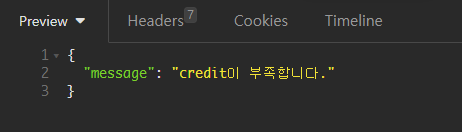
에러처리한다고 만들어둔 미들웨어가 말썽이었던걸까...그렇게 생각을 하다가 에러가 자꾸 발생한 handleReservationJob을 그냥 에러처리를 안해주면 안되는건가? 하는 생각이 들었다. 왜냐하면 handleReservationJob을 라우터에서 부르고 그때 try catch문으로 에러를 잡아주기때문에 두번이나 잡을 필요가 있을까?하는 생각이 들었다. 그렇게 handleReservationJob에 있는 try catch문을 지우니 내가 원하던대로 credit이 부족하거나 quatity가 부족하다는 에러메시지가 떴다.
딱 여기까지 에러잡은 코드
//producer 2개 중 1
const reservationQueue = new Bull('reservation', {
  connection: {
    host: 'redis-17384.c295.ap-southeast-1-1.ec2.cloud.redislabs.com',
    port: 17384,
    password: 'Ks4y5J1ETjtBqDyiqwsZ9l8P9wH4z8fJ',
  },
});

//에러 핸들러
const handlerErrors = (error, res, next) => {
  if (res && res.status) {
    console.error(`Error: ${error.message}`);
    return res.status(400).json({ message: '서버 에러~!' });
  } else {
    console.error(`Error: ${error.message}`);
  }
};

//consumer 2개 중 1
const handleReservationJob = async (job, res, next) => {
  const { showId, userId } = job.data;
  console.log('뜰까?', showId, userId);

  let transaction;

  transaction = await prisma.$transaction(
    async (tx) => {
      const user = await tx.users.findFirst({
        where: { userId: +userId },
      });
  if (!user) {
    throw new Error('유저 정보를 찾을 수 없습니다.');
  }

  await tx.$queryRaw`SELECT * FROM Shows FOR UPDATE;`;

  let updatedShow = await prisma.shows.findFirst({
    where: { showId: +showId },
  });
if (user.credit < updatedShow.price || user.credit === 0) { console.log(`${userId} : credit부족`); throw new Error('credit이 부족합니다.'); } await tx.$executeRaw`UPDATE Users SET credit = credit - ${updatedShow.price} WHERE userId=${userId};`;
  if (updatedShow.quantity <= 0) {
    console.log(`${userId} : 예매수량부족`);
    throw new Error('예매 수량이 부족합니다.');
  }
await tx.$executeRaw`UPDATE Shows SET quantity = quantity-1 WHERE showId=${showId};`;
  await tx.$executeRaw`INSERT INTO Reservation(UserId, ShowId) VALUES (${user.userId}, ${showId});`;
},
{
  isolationLevel: Prisma.TransactionIsolationLevel.RepeatableRead,
},
);
};
//consumer 2개 중 2
reservationQueue.process(handleReservationJob);//listener 2개 중 1
reservationQueue.on('completed', (job) => {
console.log(일 번호 ${job.id} 완료!);
});//listener 2개 중 2
reservationQueue.on('failed', (job, error) => {
console.log(일 번호 ${job.id} 에러 발생했음: ${error.message});
});//메모리 누수 방지 : 리스너 수 제한
reservationQueue.setMaxListeners(10000);//producer 2개 중 2
/ 공연 예매 /
router.post('/reservation/:showId', authMiddleware, async (req, res, next) => {
try {
const { showId } = req.params;
const { userId } = req.user;/** bull 큐에 작업 추가**/ await reservationQueue.add('handleReservationJob', { data: { showId, userId }, }); return res.status(200).json({ message: '좌석 예매가 완료되었습니다.' });} catch (error) {
console.log(catch로 빠진 ${error});
// handlerErrors(error, res, next);
next(error);
}
});
이제 진짜 문제다.
1) 왜 failed로 만 갈까
//listener 2개 중 1
reservationQueue.on('completed', (job) => {
  console.log(`일 번호 ${job.id} 완료!`);
});

//listener 2개 중 2
reservationQueue.on('failed', (job, error) => {
  console.log(`일 번호 ${job.id} 에러 발생했음: ${error.message}`);
});
왼쪽 터미널에서는 리스너로 흘러가서 에러가 발생했고, api실행결과는 return res.status(200)으로 흘러갔다.
2) redis에는 왜 데이터가 가질않을까.
[참고자료]
bull 참고자료 : https://github.com/OptimalBits/bull
https://optimalbits.github.io/bull/
bullMQ 참고자료 : https://github.com/taskforcesh/bullmq
