EC2 생성과 로드밸런서 생성을 마쳤다면, 사실 서버 연결이 문제다.
EC2로 배포한 퍼블릭 주소와 nGinx를 연결해줘야하는데 CLI를 이용해야해서 꽤나 힘들다. 누가 리눅스 GUI만들어줬으면 좋겠다.
1. ssh키를 이용해서 ubuntu 환경에 접속
ssh -i <keypair.pem> ubuntu@<EC2주소>

//예시
ssh -i sparta_keypair.pem ubuntu@13.125.253.21
2. /etc/nginx/conf.d 로 이동
sudo vi backend 파일에 넣기
아래 코드 미완임
server {
  listen 80;
  server_name localhost;


  location / {
    proxy_pass http://localhost:3334;
  }
}
esc + 저장하고 나오기 등등
:q! 저장안하고 나오기
:wq! 저장하고 나오기
3. nginx 재시작
sudo service nginx restart
4. 기타사항, 오류가 난다면?!
- 로그 위치
/var/log/nginx
- nginx 버전 확인
nginx -v
- html 파일 위치
- index.html파일이 아이피주소가 나와있는 페이지 : index.html 파일이 처음 로드밸런서 메인화면에 forwarding되어있을것이다. 그걸 수정해서 사용하면 좋겠다.(서버가 작동하지 않아요ㅠ라는 문구를 넣는다거나)
/var/www/html
- 파일 이름 수정하기(index.html -> index2.html)
mv index.html index2html
- nginx 파일중에 conf파일 forwarding 해주고있다는게 나와있는 디렉토리
/etc/nginx/conf.d
이건 혹시몰라 메모하는거임 신경쓰지마셈
upstream backend {
  server localhost:3334;
}

server {
    listen 80;
    server_name localhost;

    location / {
      proxy_pass http://backend;
    }
}


server {
    listen 80;
    server_name localhost;

    location / {
        proxy_pass http://localhost:3334;
        proxy_set_header Host $host;
        proxy_set_header X-Real-IP $remote_addr;
        proxy_set_header X-Forwarded-For $proxy_add_x_forwarded_for;
        proxy_set_header X-Forwarded-Proto $scheme;
    }
}
💥👊 트러블슈팅
nginx 설정 파일 변경 -> 서버 연결 X
/etc/nginx/conf.d/의 위치에 backend.conf파일 만들었다. 근데 연결이 안된다.
server {
  listen 80;
  server_name localhost;

  location / {
    proxy_pass http://localhost:3334;
  }
}
1. backend.conf 파일 내용 변경 => 실패
1) 퍼블릭 주소
server {
    listen 80;
    server_name localhost;

    location / {
        proxy_pass http://43.201.9.239:3334; //퍼블릭주소

    }
}
2) 프라이빗 주소
server {
    listen 80;
    server_name localhost;

    location / {
        proxy_pass http://172.31.40.116:3334; //프라이빗주소

    }
}
3) 로드밸런서 주소
server {
    listen 80;
    server_name localhost;

    location / {
        proxy_pass http://ALB-1072658801.ap-northeast-2.elb.amazonaws.com/; //로드밸런서DNS이름

    }
}
2. backend.conf 파일 내용 변경-1 : upstream 추가 => 실패
upstream backend {
  	server localhost:3334;
}

server {
    listen 80;
    server_name localhost;

    location / {
        proxy_pass http://backend;
    }
}
3. 디렉토리 정확하게 기재 => 실패
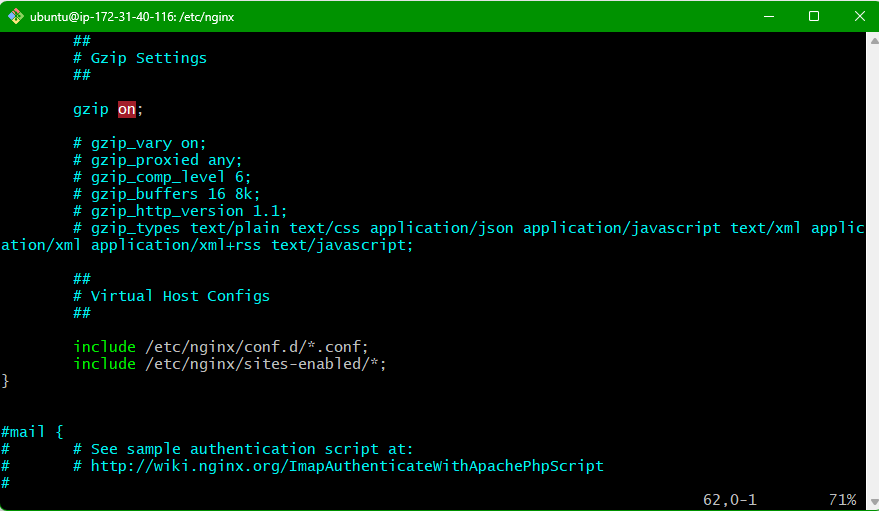
include /etc/nginx/conf.d/*.conf; => include /etc/nginx/conf.d/backend.conf;
4. site-enabled 폴더 내에 파일 생성 => 실패
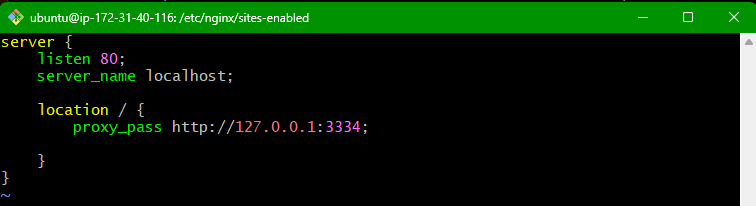
이렇게 해도 두번째 includes에 포함되어 있어서 첫번째 conf파일이 이상하면 바로 넘어가서 될줄알았다. 하지만 되지않는다. conf파일 자체가 문제인듯하다.
5. servar_name이 로컬이 아닌 외부 IP주소 변경 => 실패
server {
    listen 80;
    server_name 43.201.77.212:3334;

    location / {
        proxy_pass http://backend;
    }
}
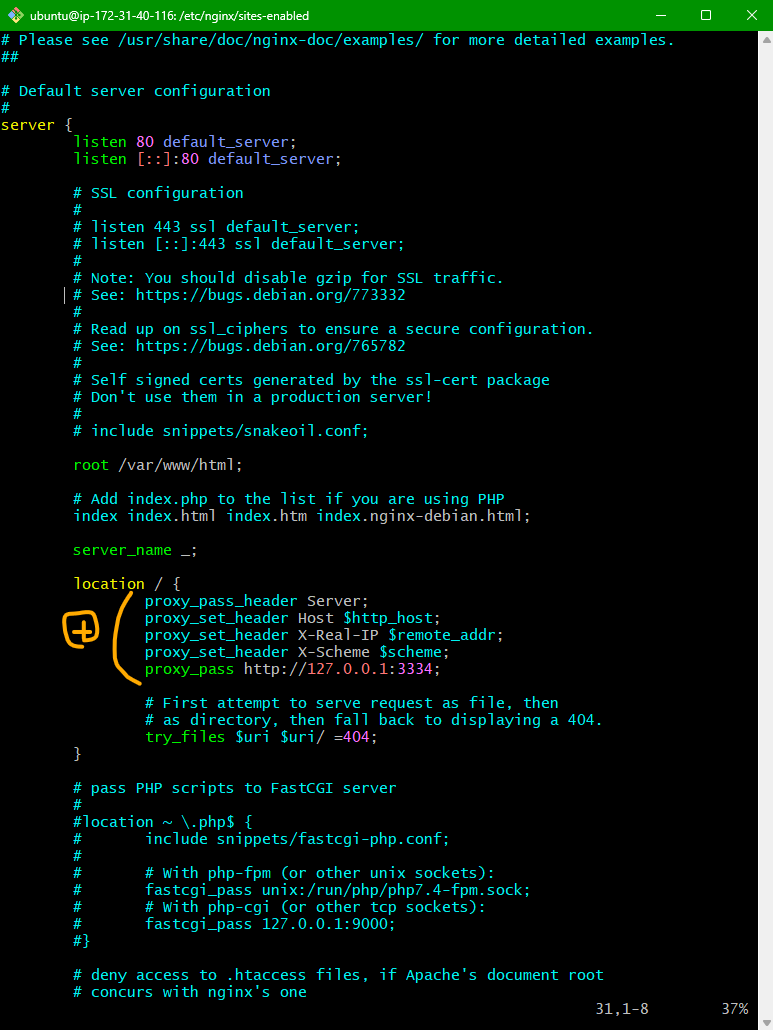
6. sites-enabled 파일 안에 있는 default.conf 수정 => 성공!
##
# You should look at the following URL's in order to grasp a solid understanding
# of Nginx configuration files in order to fully unleash the power of Nginx.
# https://www.nginx.com/resources/wiki/start/
# https://www.nginx.com/resources/wiki/start/topics/tutorials/config_pitfalls/
# https://wiki.debian.org/Nginx/DirectoryStructure
#
# In most cases, administrators will remove this file from sites-enabled/ and
# leave it as reference inside of sites-available where it will continue to be
# updated by the nginx packaging team.
#
# This file will automatically load configuration files provided by other
# applications, such as Drupal or Wordpress. These applications will be made
# available underneath a path with that package name, such as /drupal8.
#
# Please see /usr/share/doc/nginx-doc/examples/ for more detailed examples.
##

# Default server configuration
#
server {
        listen 80 default_server;
        listen [::]:80 default_server;

        # SSL configuration
        #
        # listen 443 ssl default_server;
        # listen [::]:443 ssl default_server;
        #
        # Note: You should disable gzip for SSL traffic.
        # See: https://bugs.debian.org/773332
        #
        # Read up on ssl_ciphers to ensure a secure configuration.
        # See: https://bugs.debian.org/765782
        #
        # Self signed certs generated by the ssl-cert package
        # Don't use them in a production server!
        #
        # include snippets/snakeoil.conf;

        root /var/www/html;

        # Add index.php to the list if you are using PHP
        index index.html index.htm index.nginx-debian.html;

        server_name _;

        location / {
                proxy_pass_header Server;  //이거 추가
                proxy_set_header Host $http_host; //이거 추가
                proxy_set_header X-Real-IP $remote_addr; //이거 추가
                proxy_set_header X-Scheme $scheme; //이거 추가
                proxy_pass http://127.0.0.1:3334; //이거 추가

                # First attempt to serve request as file, then
                # as directory, then fall back to displaying a 404.
                try_files $uri $uri/ =404;
        }

        # pass PHP scripts to FastCGI server
        #
        #location ~ \.php$ {
        #       include snippets/fastcgi-php.conf;
        #
        #       # With php-fpm (or other unix sockets):
        #       fastcgi_pass unix:/run/php/php7.4-fpm.sock;
        #       # With php-cgi (or other tcp sockets):
        #       fastcgi_pass 127.0.0.1:9000;
        #}

        # deny access to .htaccess files, if Apache's document root
        # concurs with nginx's one
        #
        #location ~ /\.ht {
        #       deny all;
        #}
}


# Virtual Host configuration for example.com
#
# You can move that to a different file under sites-available/ and symlink that
# to sites-enabled/ to enable it.
#
#server {
#       listen 80;
#       listen [::]:80;
#
#       server_name example.com;
#
#       root /var/www/example.com;
#       index index.html;
#
#       location / {
#               try_files $uri $uri/ =404;
#       }
#}
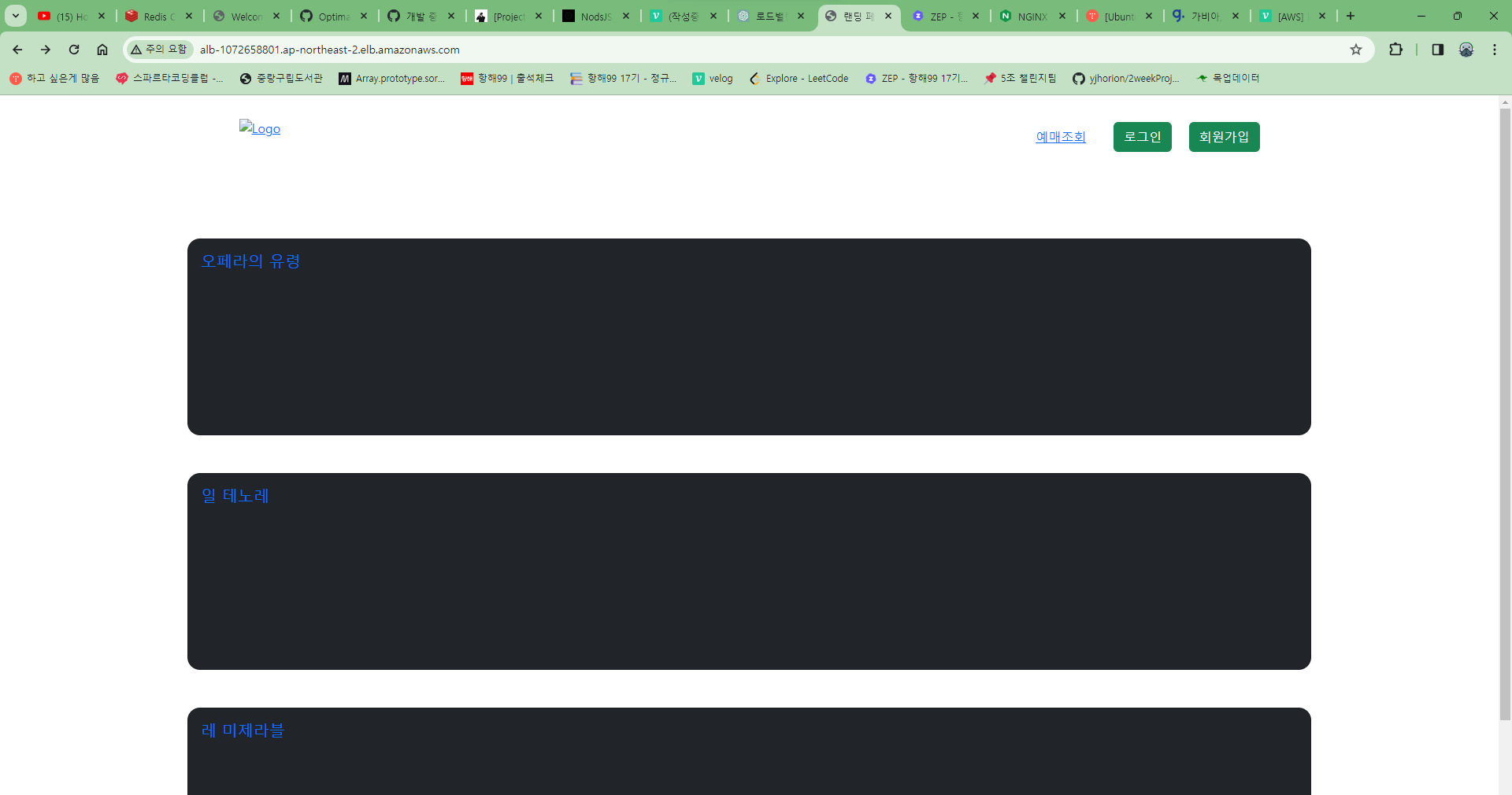
새로고침해도 기존 nginx의 html은 안뜬다. 근데 이제 다른 페이지로 넘어가려고 하면 404가 떠버린다. 이유가 뭘까. 인스턴스에 3334포트를 허용을 안해서 그런가
6-1. 인스턴스 인바운드 규칙 3334 포트 넣기
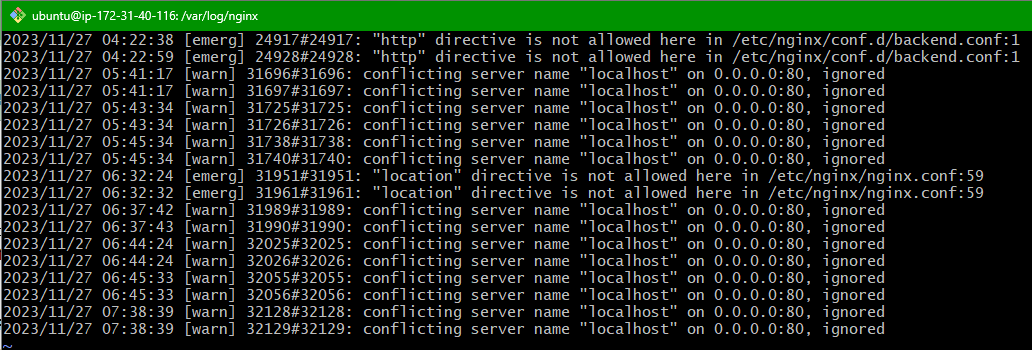
로그를 확인해보니 (error.log) 위와 같이 나왔다, 충돌이 일어난건가..
인스턴스에 3334 포트를 넣어줬다. 그럼에도 변함이 없다.
[참고자료]
https://docs.nginx.com/nginx/admin-guide/web-server/web-server/
