React로 미니 블로그 만들기
React를 학습하면서 미니 블로그를 구현해 보았습니다. 주요 컴포넌트와 기능을 작성한 코드 및 설명을 아래에 정리합니다. 이 프로젝트는 styled-components와 react-router-dom을 활용하여 스타일링과 페이지 이동을 구현하였습니다.
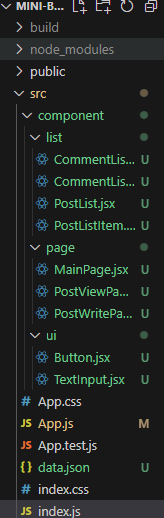
비즈니스 로직과 비슷한 형태로 구축하였습니다.
import React from "react";
import styled from "styled-components";
import CommentListItem from "./CommentListItem";

const Wrapper = styled.div`
    display: flex;
    flex-direction: column;
    align-items: flex-start;
    justify-content : center;

    & {
        :not(:last-child){
            margin-bottom : 16px;
        }
    }

`;

function CommentList(props){
    const {comments} = props;

    return (
        <Wrapper>

            {comments.map((comment,index)=>{
                return <CommentListItem key= {comment.id} comment={comment}/>;
            })}
        </Wrapper>
    )

}

export default CommentList;
import React from "react";
import styled from "styled-components";
const Wrapper = styled.div`
width: calc(100%-32px);
padding:16px;
display:flex;
flex-direction:column;
align-items:flex-start;
justify-content : center;
border: 1px solid grey;
border-radius: 8px;
cursor: pointer;
background : white;
:hover{
background : lightgrey;
}
`;
const ContentText = styled.p`
font-size: 14px;
`;
function CommentListItem(props){
const {comment} = props;
return (
<Wrapper>
<ContentText>{comment.content}</ContentText>
</Wrapper>
);
}
export default CommentListItem;import React from "react";
import styled from "styled-components";
import PostListItem from "./PostListItem";
const Wrapper = styled.div`
display: flex;
flex-direction : column;
align-items : flex-start;
justify-content: center;
& {
:not(:last-child){
margin-bottom: 16px;
}
}
`;
function PostList(props){
const {posts, onClickItem} = props;
return (
<Wrapper>
{posts.map((post,index)=>{
return (
<PostListItem
key={post.id}
post={post}
onClick={()=>{
onClickItem(post);
}}
/>
)
})}
</Wrapper>
)
}
export default PostList;
import React from "react";
import styled from "styled-components";


const Wrapper = styled.div`
    width: calc(100% - 32px);
    padding : 16px ;
    display: flex;
    flex-direction : column;
    align-items: flex-start;
    justify-content: center;
    border: 1px solid grey;
    border-radius: 8px;
    cursor: pointer;
    background: white;
    :hover{
        background : lightgrey;
    }
`;

const TextText = styled.p`
    font-size: 20px;
    font-weight: 500;
`;


function PostListItem(props){

    const { post, onClick} = props;
    return (
        <Wrapper onClick={onClick}>
            <TextText>{post.title}</TextText>
        </Wrapper>
    );
}

export default PostListItem;

import React from 'react';
import { useNavigate } from 'react-router-dom';
import styled from 'styled-components';
import PostList from '../list/PostList';
import Button from '../ui/Button';
import data from '../../data.json';

const Wrapper = styled.div`
    padding : 16px;
    width : calc(100%-32px);
    flex-direction : column;
    align-items:center;
    justify-content : center;
`;

const Container = styled.div`
    width: 100%;
    max-width: 720px;

    &{
        :not(:last-child){
            margin-bottom: 16px;
        }
    }
`;

function MainPage(props){

    const {}= props;
    const navigate = useNavigate();

    return (

        <Wrapper>
            <Container>
                <Button
                    title="글 작성하기"
                    onClick={()=>{
                        navigate("/post-write");
                    }}
                />

                <PostList
                    posts={data}
                    onClickItem={(item)=>{
                        navigate(`/post/${item.id}`);
                    }}
                />
            </Container>
        </Wrapper>
    )
}

export default MainPage;

import React, { useState } from 'react';
import { useNavigate, useParams } from 'react-router-dom';
import styled from 'styled-components';
import CommentList from '../list/CommentList';
import TextInput from '../ui/TextInput';
import Button from '../ui/Button';
import data from '../../data.json';

const Wrapper = styled.div`
    padding: 16px;
    width: calc(100% - 32px);
    display: flex;
    flex-direction: column;
    align-items: center;
    justify-content: center;
`;

const Container = styled.div`
    width: 100%;
    max-width: 720px;

    :not(:last-child) {
        margin-bottom: 16px;
    }
`;

const PostContainer = styled.div`
    padding: 8px 16px;
    border: 1px solid grey;
    border-radius: 8px;
`;

const TitleText = styled.p`
    font-size: 28px;
    font-weight: 500;
`;

const ContentText = styled.p`
    font-size: 20px;
    line-height: 32px;
    white-space: pre-wrap;
`;

const CommentLabel = styled.p`
    font-size: 16px;
    font-weight: 500;
`;

function PostViewPage(props) {
    const navigate = useNavigate();
    const { postId } = useParams();

    const post = data.find((item) => {
        return item.id == postId;
    });

    const [comment, setComment] = useState('');

    return (
        <Wrapper>
            <Container>
                <Button
                    title='뒤로 가기'
                    onClick={() => {
                        navigate('/');
                    }}
                />
                <PostContainer>
                    <TitleText>{post.title}</TitleText>
                    <ContentText>{post.content}</ContentText>
                </PostContainer>

                <CommentLabel>댓글</CommentLabel>
                <CommentList comments={post.comments} />

                <TextInput
                    height={40}
                    value={comment}
                    onChange={(event) => {
                        setComment(event.target.value);
                    }}
                />
                <Button
                    title='댓글 작성하기'
                    onClick={() => {
                        navigate('/');
                    }}
                />
            </Container>
        </Wrapper>
    );
}

export default PostViewPage;


import React, { useState } from 'react';
import { useNavigate } from 'react-router-dom';
import styled from 'styled-components';
import TextInput from '../ui/TextInput';
import Button from '../ui/Button';

const Wrapper = styled.div`
    padding: 16px;
    width: calc(100% - 32px);
    display: flex;
    flex-direction: column;
    align-items: center;
    justify-content: center;
`;

const Container = styled.div`
    width: 100%;
    max-width: 720px;

    :not(:last-child) {
        margin-bottom: 16px;
    }
`;

function PostWritePage(props) {
    const navigate = useNavigate();

    const [title, setTitle] = useState('');
    const [content, setContent] = useState('');

    return (
        <Wrapper>
            <Container>
                <TextInput
                    height={20}
                    value={title}
                    onChange={(event) => {
                        setTitle(event.target.value);
                    }}
                />

                <TextInput
                    height={480}
                    value={content}
                    onChange={(event) => {
                        setContent(event.target.value);
                    }}
                />

                <Button
                    title='글 작성하기'
                    onClick={() => {
                        navigate('/');
                    }}
                />
            </Container>
        </Wrapper>
    );
}

export default PostWritePage;


import React from "react";
import styled from "styled-components";

const StyledButton = styled.button`
    padding: 8px 16px;
    font-size: 16px;
    border-width: 1px;
    border-radius: 8px;
    cursor: pointer;
`;

function Button(props) {
    const { title, onClick } = props;

    return <StyledButton onClick={onClick}>{title || "button"}</StyledButton>;
}

export default Button;

import React from "react";
import styled from "styled-components";

const StyledTextarea = styled.textarea`
    width: calc(100% -32px);
    ${(props)=>
        props.height &&
        `

        height: ${props.height}px;`

    }
    padding:16px;
    font-size: 16px;
    line-height: 20px;
`;

function TextInput(props){
    const{height,value,onChange} = props;

    return <StyledTextarea height={height} value={value} onChange={onChange}/>;
}

export default TextInput;


import React from "react";
import {
    BrowserRouter,
    Routes,
    Route
} from "react-router-dom";
import styled from "styled-components";
// Pages
import MainPage from './component/page/MainPage';
import PostWritePage from './component/page/PostWritePage';
import PostViewPage from './component/page/PostViewPage';

const MainTitleText = styled.p`
    font-size: 24px;
    font-weight: bold;
    text-align: center;
`;

function App(props) {
    return (
        <BrowserRouter>
            <MainTitleText>dCha 미니 블로그</MainTitleText>
            <Routes>
                <Route index element={<MainPage />} />
                <Route path="post-write" element={<PostWritePage />} />
                <Route path="post/:postId" element={<PostViewPage />} />
            </Routes>
        </BrowserRouter>
    );
}

export default App;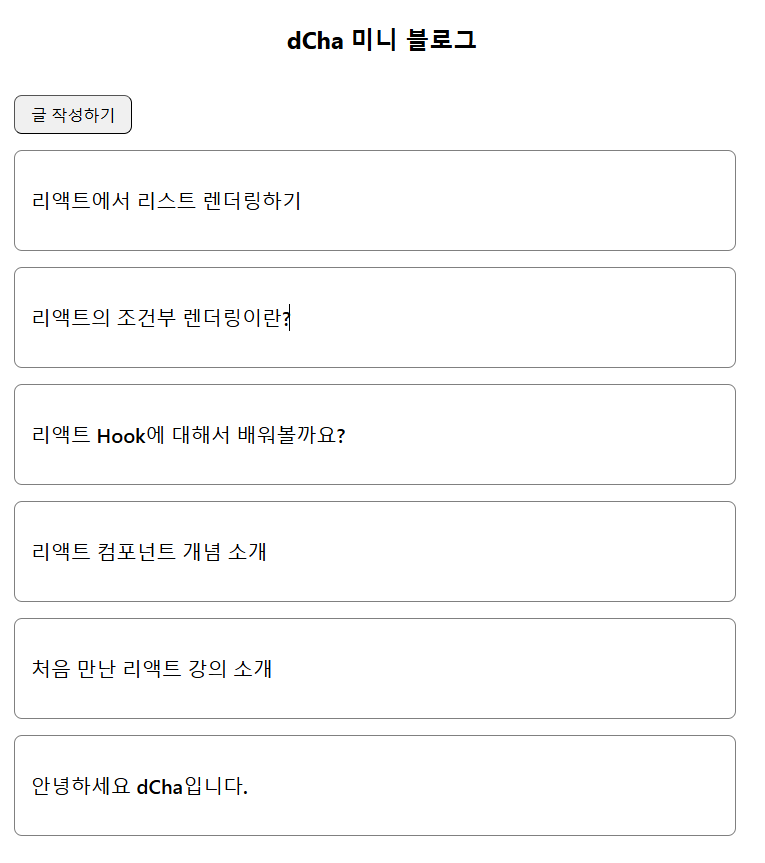
- 프로젝트 구조
메인 페이지 (MainPage):
글 목록 표시.
글 작성 버튼과 글 선택 시 글 상세 페이지로 이동.
글 작성 페이지 (PostWritePage):
제목과 내용을 입력받아 작성 완료 후 메인 페이지로 돌아감.
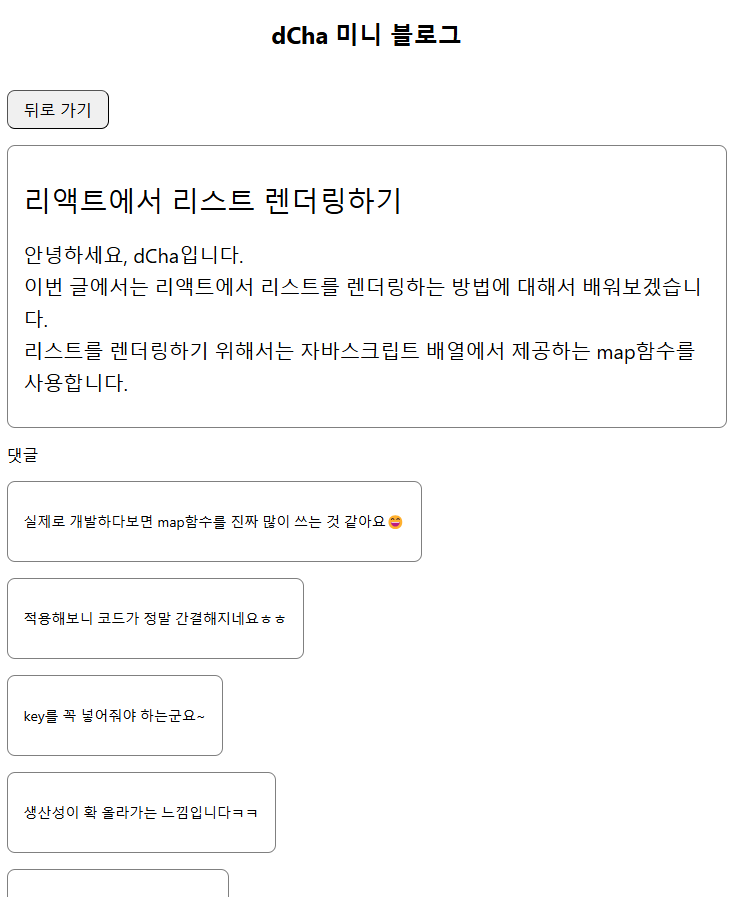
글 상세 보기 페이지 (PostViewPage):
선택한 글의 제목과 내용, 댓글을 표시.
댓글 작성 후 메인 페이지로 돌아감.
컴포넌트 분리:
Button: 버튼 컴포넌트.
TextInput: 입력 필드 컴포넌트.
PostList, PostListItem: 글 목록과 글 항목 컴포넌트.
CommentList, CommentListItem: 댓글 목록과 댓글 항목 컴포넌트. - 주요 구현 기능
1) 메인 페이지
기능: 블로그 글 목록을 표시하며, 글 작성과 글 상세 보기에 대한 라우팅 구현.
사용 기술:
useNavigate로 페이지 이동.
styled-components로 스타일링.
핵심 로직:
data.json에서 글 데이터를 불러와 PostList로 전달.
글 클릭 시 해당 글의 상세 페이지로 이동.
2) 글 작성 페이지
기능: 사용자가 제목과 내용을 입력하고 저장 버튼 클릭 시 메인 페이지로 이동.
사용 기술:
useState로 제목과 내용 상태 관리.
TextInput 컴포넌트를 활용해 입력 필드 구현.
Button 컴포넌트로 작성 완료 버튼 구현.
3) 글 상세 보기 페이지
기능: 글 제목, 내용, 댓글 목록 표시 및 댓글 추가 기능 제공.
사용 기술:
URL 파라미터(useParams)로 특정 글 데이터 가져오기.
댓글 추가 입력 필드와 댓글 목록 관리.
핵심 로직:
data.json에서 글 ID로 글 데이터를 필터링.
댓글 작성 후, 메인 페이지로 돌아감.
4) 댓글 목록
구성: 댓글 항목(CommentListItem)과 댓글 목록(CommentList) 컴포넌트로 구성.
기능: 각 댓글을 스타일링해 표시.
사용 기술:
map으로 댓글 데이터를 렌더링.
styled-components로 스타일 구현. - 사용한 기술 및 개념
1) React
컴포넌트 기반으로 화면을 설계하고 데이터를 Props로 전달.
상태 관리(useState)와 React Router(useNavigate, useParams)를 사용해 동적 라우팅과 데이터 관리.
2) Styled-Components
CSS-in-JS 스타일링 도구.
컴포넌트별로 스타일을 캡슐화하여 관리.
조건부 스타일링 및 스타일 재사용으로 생산성 향상.
3) React Router
페이지 이동과 URL 기반 데이터 전달을 구현.
메인 페이지, 글 작성 페이지, 글 상세 보기 페이지를 라우팅.
4) JSON 데이터
글과 댓글 데이터를 data.json으로 관리.
JSON 데이터를 필터링하거나 매핑하여 컴포넌트에 전달. - 주요 학습 포인트
1) 컴포넌트 설계
프로젝트를 작은 컴포넌트 단위로 분리.
재사용 가능한 컴포넌트(Button, TextInput) 설계.
상태 관리와 Props 전달을 통한 데이터 흐름 이해.
2) 상태 관리와 데이터 흐름
useState를 사용한 상태 관리.
부모-자식 컴포넌트 간 데이터 전달 방식 학습.
3) 페이지 이동과 라우팅
React Router를 사용해 URL 기반 페이지 전환 구현.
useNavigate와 useParams를 사용한 데이터 전달.
4) 스타일링
styled-components를 활용한 컴포넌트 기반 스타일링.
조건부 스타일링과 CSS 속성 조합으로 효율적인 스타일 관리. - 학습 결과
React의 기본 개념(컴포넌트, Props, 상태 관리)을 실습을 통해 익힘.
프로젝트를 컴포넌트 단위로 나누고 유지보수 가능한 구조 설계.
페이지 이동, 데이터 전달, 스타일링을 통합해 실제 프로젝트와 유사한 형태로 구현.
JSON 데이터를 활용해 동적 렌더링과 데이터 처리 경험.
- React Router 설정
BrowserRouter:
애플리케이션의 라우팅을 관리하는 컴포넌트.
URL 변경 및 페이지 이동을 처리.
Routes:
라우팅 규칙을 정의하는 컨테이너 컴포넌트.
Route:
특정 경로에 해당하는 컴포넌트를 렌더링. - 라우팅 정의
:
기본 경로(/)에 해당하며, MainPage 컴포넌트를 렌더링.
:
/post-write 경로에서 PostWritePage 컴포넌트를 렌더링.
:
/post/:postId 경로에서 PostViewPage 컴포넌트를 렌더링.
:postId는 URL 파라미터로, 특정 게시글 ID를 전달. - 메인 제목
MainTitleText:
styled-components로 스타일링된 제목 컴포넌트.
블로그의 상단에 표시되는 메인 타이틀(dCha 미니 블로그)로 설정.
전체 구조
이 App 컴포넌트는 애플리케이션의 엔트리 포인트로 작동하며, 다음과 같은 흐름으로 페이지를 관리합니다:
/ → MainPage 렌더링 (글 목록).
/post-write → PostWritePage 렌더링 (글 작성 페이지).
/post/:postId → PostViewPage 렌더링 (특정 글 상세 보기).