문제설명
Given a string s and an integer k, return the maximum number of vowel letters in any substring of s with length k.
Vowel letters in English are 'a', 'e', 'i', 'o', and 'u'.
제한사항
1 <= s.length <= 105sconsists of lowercase English letters.1 <= k <= s.length
입출력 예
Example 1:
Input: s = "abciiidef", k = 3
Output: 3
Explanation: The substring "iii" contains 3 vowel letters.
Example 2:
Input: s = "aeiou", k = 2
Output: 2
Explanation: Any substring of length 2 contains 2 vowels.
Example 3:
Input: s = "leetcode", k = 3
Output: 2
Explanation: "lee", "eet" and "ode" contain 2 vowels.
답
내가 쓴 답
/**
 * @param {string} s
 * @param {number} k
 * @return {number}
 */
var maxVowels = function(s, k) {
  let arr = s.split("");
  let result = arr.slice(0, -k + 1).map((_, i) => arr.slice(i, i + k));

  const pattern = /[aeiou]/;
  let vowelCounts = result.map(subArray => {
    let count = 0;
    for (let i = 0; i < subArray.length; i++) {
      if (pattern.test(subArray[i])) {
        count++;
      }
    }
    return count;
  });


  let maxCount = vowelCounts.reduce((a, b) => Math.max(a, b), 0);
  return maxCount;
}
98 / 106 testcases passed
이 코드가 틀렸던 이유는 s = "novowels", k=1 일때 문자열 전체를 점검해야하는 경우이므로 문자열 전체를 점검하는 경우를 나눠서 작성해줘야한다. 따라서 이 경우를 고려한 알고리즘은 다음과 같다.
/**
 * @param {string} s
 * @param {number} k
 * @return {number}
 */
var maxVowels = function(s, k) {
  let arr = s.split("");
  let result = arr.slice(0, -k + 1).map((_, i) => arr.slice(i, i + k));
  const pattern = /[aeiou]/;

  if (k === 1) {
    for (j = 0; j < arr.length; j++) {
      if (pattern.test(arr[j])) {
        return 1;
      }
    }
    return 0;
  }

  let vowelCounts = result.map(subArray => {
    let count = 0;
    for (let i = 0; i < subArray.length; i++) {
      if (pattern.test(subArray[i])) {
        count++;
      }
    }
    return count;
  });

  if (k !== 1) {
    let maxCount = vowelCounts.reduce((a, b) => Math.max(a, b), 0);
    return maxCount;
  }
}
그랬더니..?
RunTime Error
<--- Last few GCs --->
[20:0x60a2180] 1204 ms: Scavenge 143.2 (165.5) -> 142.9 (181.5) MB, 14.6 / 0.0 ms (average mu = 0.930, current mu = 0.882) allocation failure
[20:0x60a2180] 1210 ms: Scavenge 158.6 (181.5) -> 158.6 (181.5) MB, 3.9 / 0.0 ms (average mu = 0.930, current mu = 0.882) allocation failure
[20:0x60a2180] 1222 ms: Scavenge 158.6 (181.5) -> 158.4 (191.8) MB, 11.8 / 0.0 ms (average mu = 0.930, current mu = 0.882) allocation failure
<--- JS stacktrace --->
FATAL ERROR: Scavenger: semi-space copy Allocation failed - JavaScript heap out of memory
1: 0xb00e10 node::Abort() [nodejs run]
2: 0xa1823b node::FatalError(char const, char const) [nodejs run]
3: 0xcee09e v8::Utils::ReportOOMFailure(v8::internal::Isolate, char const, bool) [nodejs run]
4: 0xcee417 v8::internal::V8::FatalProcessOutOfMemory(v8::internal::Isolate, char const, bool) [nodejs run]
5: 0xea65d5 [nodejs run]
6: 0xf1fc4e v8::internal::SlotCallbackResult v8::internal::Scavenger::ScavengeObjectv8::internal::FullHeapObjectSlot(v8::internal::FullHeapObjectSlot, v8::internal::HeapObject) [nodejs run]
7: 0xf20ef8 v8::internal::Scavenger::ScavengePage(v8::internal::MemoryChunk) [nodejs run]
8: 0xf21217 v8::internal::ScavengerCollector::JobTask::ConcurrentScavengePages(v8::internal::Scavenger) [nodejs run]
9: 0xf24714 v8::internal::ScavengerCollector::JobTask::ProcessItems(v8::JobDelegate, v8::internal::Scavenger) [nodejs run]
10: 0xf24860 v8::internal::ScavengerCollector::JobTask::Run(v8::JobDelegate) [nodejs run]
11: 0x18e5876 v8::platform::DefaultJobState::Join() [nodejs run]
12: 0x18e58e3 v8::platform::DefaultJobHandle::Join() [nodejs run]
13: 0xf259f3 v8::internal::ScavengerCollector::CollectGarbage() [nodejs run]
14: 0xea6c25 v8::internal::Heap::Scavenge() [nodejs run]
15: 0xeb5050 [nodejs run]
16: 0xeb5a30 v8::internal::Heap::CollectGarbage(v8::internal::AllocationSpace, v8::internal::GarbageCollectionReason, v8::GCCallbackFlags) [nodejs run]
17: 0xeb89ae v8::internal::Heap::AllocateRawWithRetryOrFailSlowPath(int, v8::internal::AllocationType, v8::internal::AllocationOrigin, v8::internal::AllocationAlignment) [nodejs run]
18: 0xe79dda v8::internal::Factory::NewFillerObject(int, bool, v8::internal::AllocationType, v8::internal::AllocationOrigin) [nodejs run]
19: 0x11f33d6 v8::internal::Runtime_AllocateInYoungGeneration(int, unsigned long, v8::internal::Isolate*) [nodejs run]
20: 0x15e7cf9 [nodejs run]
※ 이 오류가 뜬 테스트 코드는 3000자가 넘어가니 생략하겠다
결국 메모리 부족에 의해 내가 작성한 코드는 틀린코드가 되었다.
혹시 시간 복잡도에 의해 메모리 부족이 발생한건 아닌지 점검해보기로 했다.
- 시간 복잡도 점검
s.split(""): O(n) (n은 문자열 길이)result생성: O(n * k) (슬라이싱 연산이 n - k + 1회 실행되며, 각 연산이 k 길이만큼 문자열을 생성함)if (k === 1)문: O(n) (최악의 경우 n개의 문자를 모두 확인)vowelCounts생성: O(n * k) (k 길이의 문자열이 n - k + 1개 있음)if (k !== 1)문: O(n) (n개의 원소 중 최대값 찾기)
k가 s.length에 가까울 경우, 시간 복잡도는 O(n^2)에 가까워지는 것 말고는 시간복잡도를 만족한다.
그렇다면 메모리 부족이 일어난 이유가 무엇인지 원인을 분석해보았다.
- 중간 결과를 저장하기 위한 배열 생성:
result배열을 생성할 때, 문자열의 길이에 따라 부분 문자열을 저장하기 위한 공간이 크게 요구된다. 이로 인해 메모리 사용량이 증가하게 된다. - 모음 개수를 저장하는
vowelCounts배열:result배열의 각 부분 문자열에 대해 모음 개수를 계산하여 저장하는 배열이 추가로 생성된다. 이 배열도 메모리 사용량을 증가시키는 요인입니다.
따라서 메모리 사용량을 증가시키는 경우를 고려하여 코드를 작성하는 방법으로, 찾아보니 윈도우 슬라이스라는 방법이 있어서 윈도우 슬라이스라는 방법으로 작성했다.
수정한 답
/**
 * @param {string} s
 * @param {number} k
 * @return {number}
 */
var maxVowels = function(s, k) {
  const vowels = new Set(['a', 'e', 'i', 'o', 'u']);

  let currentVowelCount = 0;
  for (let i = 0; i < k; i++) {
    if (vowels.has(s[i])) {
      currentVowelCount++;
    }
  }

  let maxVowelCount = currentVowelCount;

  for (let i = k; i < s.length; i++) {
    if (vowels.has(s[i])) {
      currentVowelCount++;
    }
    if (vowels.has(s[i - k])) {
      currentVowelCount--;
    }

    maxVowelCount = Math.max(maxVowelCount, currentVowelCount);
  }

  return maxVowelCount;
}
여러가지 풀이
/**
 * @param {string} s
 * @param {number} k
 * @return {number}
 */
 function checkString(ch){
     if(ch=='a'||ch=='e'||ch=='i'||ch=='o'||ch=='u'){
         return true
     }
     return false
 }
var maxVowels = function(s, k) {
    let c=0;;
    let maxCount=0;
    for(let i=0;i<k;i++){
        if(checkString(s[i])){
            c++
        }
    }
    maxCount=Math.max(maxCount,c)
    for(let i=k;i<s.length;i++){
        if(checkString(s[i-k])){
            c--
        }
        if(checkString(s[i])){
            c++
        }
       maxCount=Math.max(maxCount,c)
    }
    return maxCount
};
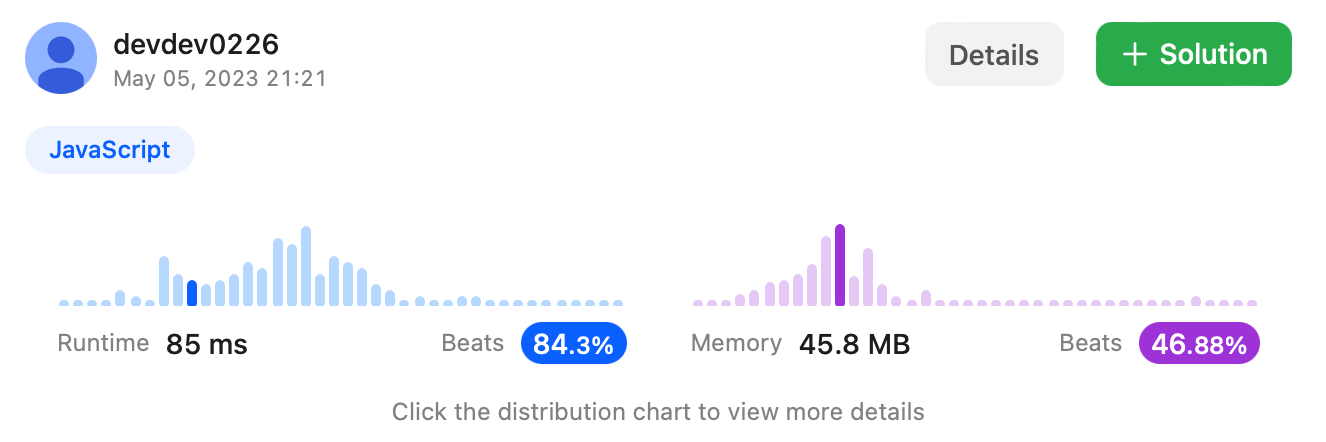
속도 백분위
피드백
릿코드는 출제의도를 파악해서 문제를 풀어야한다는 점에서 프로그래머스와 다르게 제한적이라는 것을 알았다. 그리고 테스트 코드가 어이가 없어서 (3000자가 넘어가는 경우도 테스트 코드로 집어넣는다는게..) 이런 경우까지 집어넣어 효율성을 점검한다는게 나에겐 이해가 되지 않았지만
한편으로 내가 짠 코드가 어떻게 작동하는 코드인지 시간복잡도와 메모리 사용량을 점검해볼 수 있었던 계기였다.
아마 내가 보기엔 이 문제의 출제의도는 윈도우 슬라이스를 통해 풀어야하는 문제였던 것 같다. 덕분에 윈도우 슬라이스라는게 무엇인지도 알 수 있었다.
복습
1. slice() 매서드
- slice()함수가 slice(0,0)인 경우, slice()함수를 호출한 배열을 그대로 반환하는게 아니라 빈 배열을 반환한다.
2. 논리 연산자 제대로 쓰기
- if (k === 1) 일때 논리연산자를 할당연산자(=)를 쓰지말고 Boolean연산자를 쓰도록 하자.
3. 경우의 수 고려하기
- k=1일때 result 배열의 각 원소에 대해 모음이 있는지 확인할 때 모음이 없는 경우까지 고려해줘야한다. 모음이 없는 경우, return 0; 문이 실행되어 0을 반환한다.