GIT
버전관리 시스템(형상관리)
• Configuration Management Systems
• Version Control Systems
버전관리
Source Data + History
• 협업, 작업추적, 복구 등이 가능
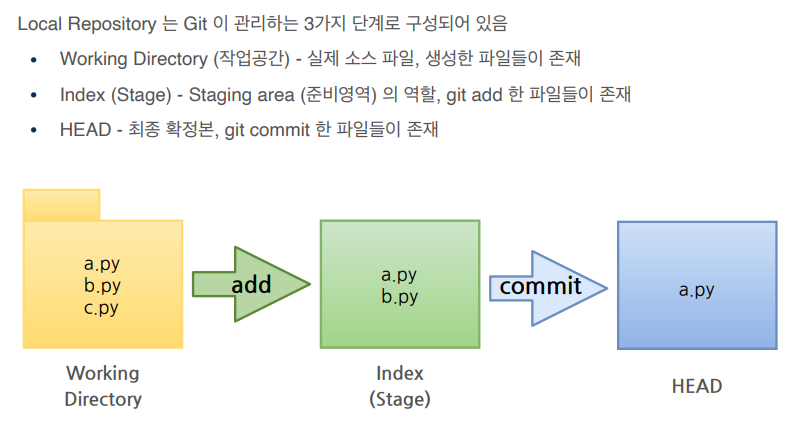
Local Repository
git bash
ls : 파일리스트보기
mkdir : 디렉토리 만들기
cd 파일명 : 해당 파일로 접속하기
git init : Repository 가 생성
touch test.txt : 파일을 생성
git status : 파일 상태 확인
git add : stage로 올림
git commit -m '커밋내용' test.txt : head로 커밋
cat exam.txt : 파일내용 확인
cat > exam.txt
파일내용 + ctrl+D : 파일내용 작성 후 저장 (기존 내용 있으면 지워지고 덮어씌움)
cat >> exam.txt : 기존에 있는 내용 다음에 작성 후 저장
Remote Repository
local에서 만든 Repository를 github에서 만든 Remote Repositoty와 연결
git remote add origin https://사용자이름:토큰@github.com/사용자이름/test_project.git
local과 remote가 연결됬는지 확인
git remote -v
local에서 github으로 푸시
git push origin master
github에서 local로 땡겨오기
git pull origin master
Github에서 만든 Remote Repositoty를 local로 복사해오기 (저장할 폴더에 위치 후 생성)
git clone https://사용자이름:토큰@github.com/사용자이름/test_project.git
Branch
local branch 조회
git branch
remote branch 조회
git branch -r
local, remote branch 조회
git branch -a
local branch 생성
git branch branch01
local branch 이동
git checkout branch01
local branch 생성 후 이동
git checkout -b branch02
remote branch 로 푸시
git push origin branch01
local branch 삭제
git branch -d branch02
remote branch 삭제 푸시
git push origin --delete branch02
이글은 제로베이스 데이터 취업스쿨의 강의자료 일부를 발췌하여 작성되었습니다.