
1. 순수 웹소켓 채팅방 생성
1. 웹소켓 의존성 추가
implementation 'org.springframework.boot:spring-boot-starter-websocket’2. backendproject.purewebsocket. handler 패키지 안에 ChatWebSocketHandler.java 생성
  package com.example.backendproject.purewebsocket.handler;

  import com.example.backendproject.purewebsocket.dto.ChatMessage;
  import com.fasterxml.jackson.databind.ObjectMapper;
  import org.springframework.web.socket.CloseStatus;
  import org.springframework.web.socket.TextMessage;
  import org.springframework.web.socket.WebSocketSession;
  import org.springframework.web.socket.handler.TextWebSocketHandler;

  import java.lang.runtime.ObjectMethods;
  import java.util.Collections;
  import java.util.HashSet;
  import java.util.Set;

  public class ChatWebSocketHandler extends TextWebSocketHandler {

      //sessions : 현재 웹소켓에 연결된 클라이언트들(WebSocketSession)을 관리하는 Set컬렉션
      //           이 컬렉션에서 WebSocketSession 객체를 추가하거나 제거하면서 접속적인 유저를 추적
      //HashSet을 사용하는 이유 : Set은 중복을 허용하지 않음 -> 같은 클라이언트 세션이 여러번 저장되는 것 방지 가능
      //Collections.synchronizedSet() : 기본적으로 HashSet은 스레드에 안전하지 않음. 웹소켓 서버는 멀티스레드 환경에서 작동하므로, 여러 사용자가 동시에 접속하거나 연결을 끊는 경우가 발생 -> 동시성 문제
      //이 때 synchronizedSet()를 사용해 동기화된 안전한 Set을 만들어 동시성 문제를 예방한다.
      private final Set<WebSocketSession> sessions = Collections.synchronizedSet(new HashSet<>());

      //서버에서 메시지를 보내면 JSON형식이다. 그것을 자바 객체로 변환해주고, 다시 자바객체를 JSON 문자열로 바꿔주는 역할
      private final ObjectMapper objectMapper =new ObjectMapper();

      //ctrl + o : 오버라이드 단축키
      //클라이언트가 웹소켓 서버에 접속했을 때 호출
      //WebSocketSession session : 서버에 접속한 id.
      @Override
      public void afterConnectionEstablished(WebSocketSession session) throws Exception {
          super.afterConnectionEstablished(session);

          //서버에 접속한 id를 sessions에 넣어줌(관리하기 위해)
          sessions.add(session);

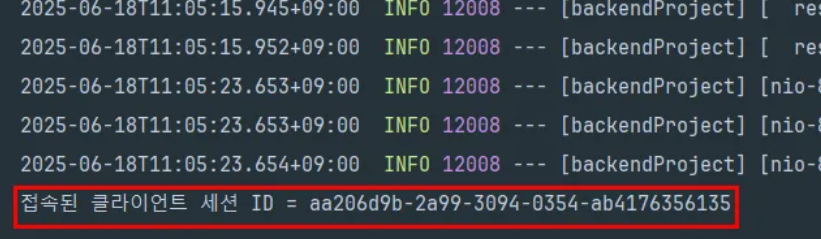
          System.out.println("접속된 클라이언트 세션 ID = " + session.getId());
      }

      //클라이언트가 보낸 메세지를 서버가 받았을 때 호출(즉, 사용자가 메시지를 보냈을 떄)
      @Override
      protected void handleTextMessage(WebSocketSession session, TextMessage message) throws Exception {
          super.handleTextMessage(session, message);

          // JSON 문자열 -> 자바객체 변환
          ChatMessage chatMessage = objectMapper.readValue(message.getPayload(), ChatMessage.class);

          for(WebSocketSession s: sessions){
              if(s.isOpen()){
                  //자바 객체 -> JSON 문자열
                  s.sendMessage(new TextMessage(objectMapper.writeValueAsString(chatMessage)));
              }
          }
      }

      //클라이언트의 연결이 끊겼을 때 호출
      @Override
      public void afterConnectionClosed(WebSocketSession session, CloseStatus status) throws Exception {
          super.afterConnectionClosed(session, status);

          //연결이 끊기면 session 삭제
          sessions.remove(session);
      }
  }
3. backendproject.purewebsocket. dto패키지 내에 ChatMessage.java 생성
package com.example.backendproject.purewebsocket.dto;


import lombok.Getter;

@Getter
public class ChatMessage {

    private String message; //메시지
    private String from;    //발신자
}
4. backendproject.purewebsocket.config 패키지 내에 WebSocketConfig.java 생성
package com.example.backendproject.purewebsocket.config;

import com.example.backendproject.purewebsocket.handler.ChatWebSocketHandler;
import org.springframework.context.annotation.Configuration;
import org.springframework.web.socket.config.annotation.EnableWebSocket;
import org.springframework.web.socket.config.annotation.WebSocketConfigurer;
import org.springframework.web.socket.config.annotation.WebSocketHandlerRegistry;

@Configuration
@EnableWebSocket
public class WebSocketConfig implements WebSocketConfigurer {

    @Override
    public void registerWebSocketHandlers(WebSocketHandlerRegistry registry) {
                //ws-chat 앤드포인트로 요청을 보낼 수 있는지 결정하는 보안 정책 설정
        registry.addHandler(new ChatWebSocketHandler(),"/ws-chat")
                .setAllowedOriginPatterns("*"); //모든 브라우저에서 접근 가능
    }
}
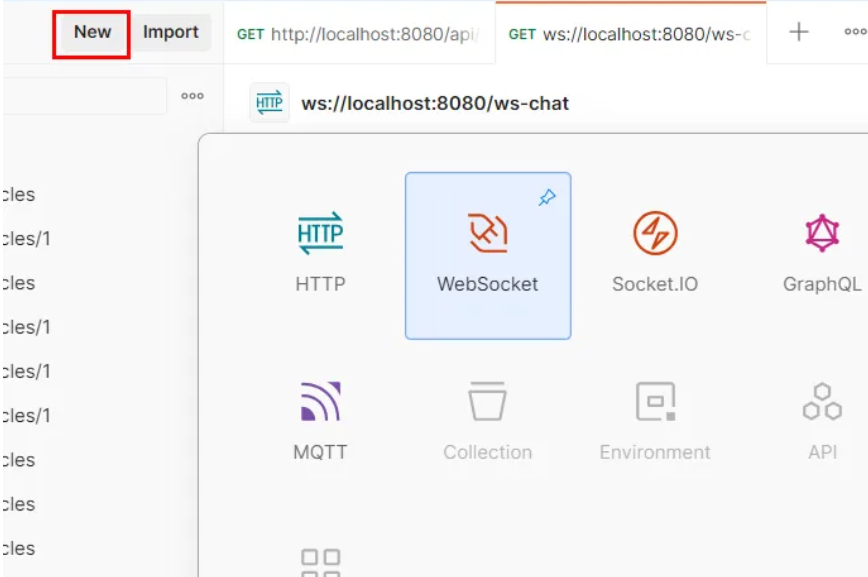
5. 포스트맨에서 확인 postman ->new -> websocket
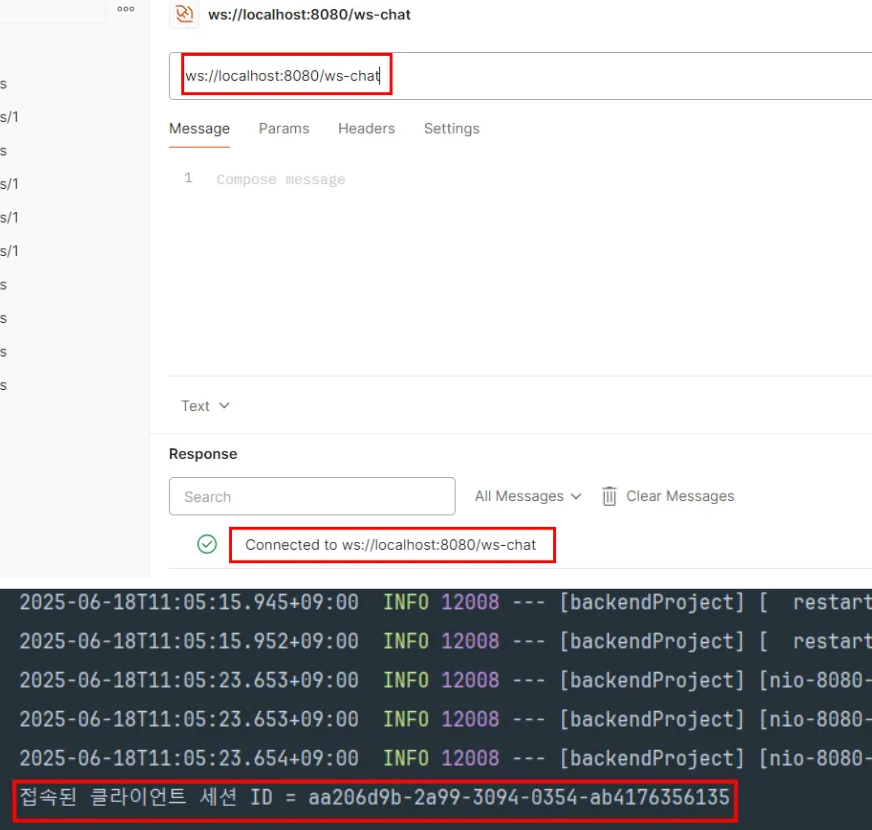
6. ws://localhost:8080/ws-chat 작성후 connect
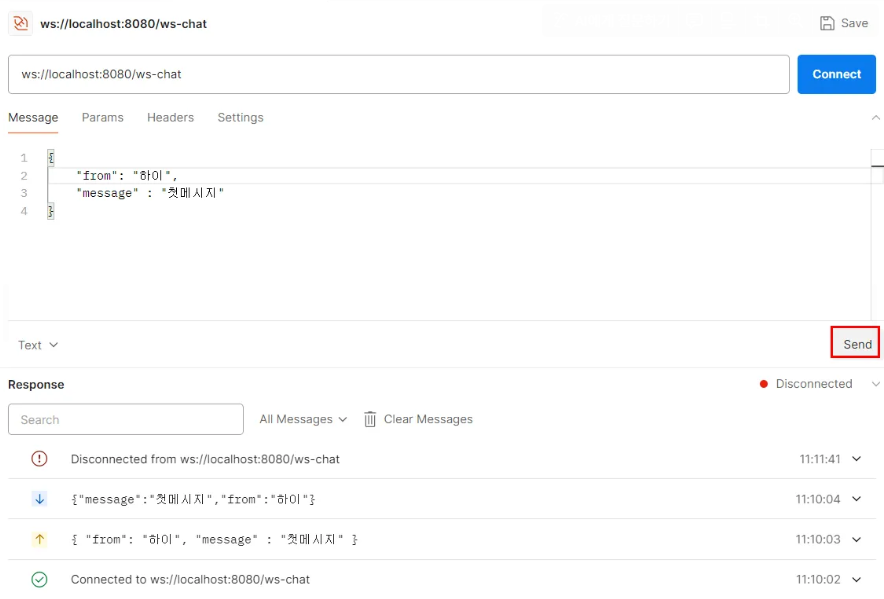
7. JSON 문자열로 메시지 보내보기
8. 프론트엔드와 연동 : static 폴더 안에 purechat1.html 작성
<!DOCTYPE html>
<html lang="ko">
<head>
    <meta charset="UTF-8">
    <title>Pure WebSocket Chat</title>
    <style>
        body { font-family: 'Segoe UI', sans-serif; background: #f7f8fa; }
        .container {
            width: 400px; margin: 60px auto; background: #fff; padding: 32px 30px;
            border-radius: 14px; box-shadow: 0 2px 8px rgba(0,0,0,0.07);
        }
        h2 { text-align: center; color: #2c3e50; margin-bottom: 24px; }
        #chatArea {
            width: 100%; height: 250px; border: 1px solid #aaa;
            border-radius: 8px; margin-bottom: 18px; overflow-y: auto;
            background: #fafdff; padding: 10px 7px; font-size: 15px;
        }
        .row { display: flex; gap: 10px; align-items: center; margin-bottom: 13px; }
        input[type="text"] {
            box-sizing: border-box; border: 1px solid #ccc; border-radius: 6px;
            font-size: 15px; padding: 9px; outline: none; background: #f9fafd;
            transition: border 0.2s;
        }
        input[type="text"]:focus { border-color: #4078c0; background: #fff; }
        #user { width: 110px; }
        #msg { flex: 1; min-width: 0; }
        button {
            background: #4078c0; color: white; font-weight: bold;
            border: none; border-radius: 6px; padding: 10px 20px;
            font-size: 15px; cursor: pointer; transition: background 0.2s;
        }
        button:hover { background: #285690; }
        .btn-disconnect {
            background: #eee; color: #285690; font-weight: bold;
        }
        .btn-disconnect:hover { background: #e0e8f5; }
        .sysmsg { color: #666; font-style: italic; margin: 7px 0 3px 0;}
        .msgrow { margin-bottom: 3px;}
        .from { font-weight: bold; color: #4078c0;}
        .hidden { display: none; }
    </style>
</head>
<body>
<div class="container">
    <h2>Pure WebSocket Chat</h2>

    <!-- 로그인 영역 -->
    <div class="row" style="margin-bottom: 15px;">
        <input type="text" id="user" placeholder="닉네임">
        <button onclick="connect()">Connect</button>
        <button class="btn-disconnect" onclick="disconnect()">Disconnect</button>
    </div>

    <!-- 채팅 영역 (처음엔 숨김) -->
    <div id="chatWrapper" class="hidden">
        <div id="chatArea"></div>
        <div class="row">
            <input type="text" id="msg" placeholder="메시지" onkeydown="if(event.key==='Enter'){sendMessage();}">
            <button onclick="sendMessage()">Send</button>
        </div>
    </div>
</div>

<script>
    let ws = null;

    function connect() {
        const user = document.getElementById("user").value;
        if (!user) {
            alert("닉네임을 입력하세요!");
            return;
        }

        ws = new WebSocket("/ws-chat");

        ws.onopen = function () {
            showSysMsg('Connected!');
            document.getElementById("chatWrapper").classList.remove("hidden");
        };

        ws.onmessage = function (event) {
            const msg = JSON.parse(event.data);
            showMessage(msg.from, msg.message);
        };

        ws.onclose = function () {
            showSysMsg('Disconnected');
            document.getElementById("chatWrapper").classList.add("hidden");
        };
    }

    function disconnect() {
        if (ws) {
            ws.close();
            ws = null;
        }
    }

    function sendMessage() {
        const user = document.getElementById("user").value;
        const msg = document.getElementById("msg").value;
        if (!user || !msg) {
            alert("닉네임과 메시지를 모두 입력하세요!");
            return;
        }
        ws.send(JSON.stringify({ from: user, message: msg }));
        document.getElementById("msg").value = "";
    }

    function showMessage(from, message) {
        const chatArea = document.getElementById("chatArea");
        chatArea.innerHTML += `<div class="msgrow"><span class="from">${from}:</span> ${message}</div>`;
        chatArea.scrollTop = chatArea.scrollHeight;
    }

    function showSysMsg(msg) {
        const chatArea = document.getElementById("chatArea");
        chatArea.innerHTML += `<div class="sysmsg">${msg}</div>`;
        chatArea.scrollTop = chatArea.scrollHeight;
    }
</script>
</body>
</html>
9. 프로젝트 하위에 htmlController.java 생성
package com.example.backendproject.purewebsocket;

import org.springframework.stereotype.Controller;
import org.springframework.web.bind.annotation.GetMapping;

@Controller
public class HtmlController {
    @GetMapping("/")
    public String index(){
        return "redirect:/purechat2.html";
    }
}
10.localhost:8080 접속
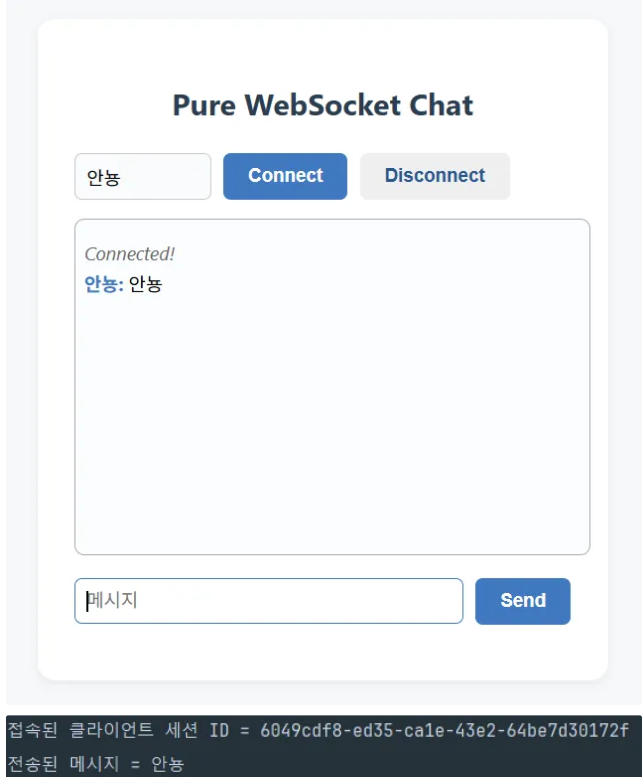
2. 데이터베이스 컨테이너 연동하여 채팅방 만들기
1. ChatWebSocketHandler.java 수정
package com.example.backendproject.purewebsocket.handler;

import com.example.backendproject.purewebsocket.dto.ChatMessage;
import com.fasterxml.jackson.databind.ObjectMapper;
import org.springframework.web.socket.CloseStatus;
import org.springframework.web.socket.TextMessage;
import org.springframework.web.socket.WebSocketSession;
import org.springframework.web.socket.handler.TextWebSocketHandler;

import java.lang.runtime.ObjectMethods;
import java.util.Collections;
import java.util.HashSet;
import java.util.Map;
import java.util.Set;
import java.util.concurrent.ConcurrentHashMap;
import java.util.concurrent.ConcurrentMap;

public class ChatWebSocketHandler extends TextWebSocketHandler {

    //sessions : 현재 웹소켓에 연결된 클라이언트들(WebSocketSession)을 관리하는 Set컬렉션
    //           이 컬렉션에서 WebSocketSession 객체를 추가하거나 제거하면서 접속적인 유저를 추적
    //HashSet을 사용하는 이유 : Set은 중복을 허용하지 않음 -> 같은 클라이언트 세션이 여러번 저장되는 것 방지 가능
    //Collections.synchronizedSet() : 기본적으로 HashSet은 스레드에 안전하지 않음. 웹소켓 서버는 멀티스레드 환경에서 작동하므로, 여러 사용자가 동시에 접속하거나 연결을 끊는 경우가 발생 -> 동시성 문제
    //이 때 synchronizedSet()를 사용해 동기화된 안전한 Set을 만들어 동시성 문제를 예방한다.
    private final Set<WebSocketSession> sessions = Collections.synchronizedSet(new HashSet<>());

    //서버에서 메시지를 보내면 JSON형식이다. 그것을 자바 객체로 변환해주고, 다시 자바객체를 JSON 문자열로 바꿔주는 역할
    private final ObjectMapper objectMapper =new ObjectMapper();

    //방과 방 안에 있는 세션을 관리하는 객체
    private final Map<String, Set<WebSocketSession>> rooms = new ConcurrentHashMap<>();

    //ctrl + o : 오버라이드 단축키
    //클라이언트가 웹소켓 서버에 접속했을 때 호출
    //WebSocketSession session : 서버에 접속한 id.
    @Override
    public void afterConnectionEstablished(WebSocketSession session) throws Exception {
        super.afterConnectionEstablished(session);

        //서버에 접속한 id를 sessions에 넣어줌(관리하기 위해)
        sessions.add(session);

        System.out.println("접속된 클라이언트 세션 ID = " + session.getId());
    }

    //클라이언트가 보낸 메세지를 서버가 받았을 때 호출(즉, 사용자가 메시지를 보냈을 떄)
    @Override
    protected void handleTextMessage(WebSocketSession session, TextMessage message) throws Exception {
        super.handleTextMessage(session, message);

        // JSON 문자열 -> 자바객체 변환
        ChatMessage chatMessage = objectMapper.readValue(message.getPayload(), ChatMessage.class);


        String roomId = chatMessage.getRoomId();    //클라이언트에게 받은 메세지에서 roomID를 추출
        if(!rooms.containsKey(roomId)){ //방을 관리하는 객체에 현재 세션이 들어가는 방이 있는지 확인
            rooms.put(roomId, ConcurrentHashMap.newKeySet());   //없으면 새로운 방을 생성
        }

        //방이 있으면 기존의 방에 session만 추가
        rooms.get(roomId).add(session);


        for(WebSocketSession s: rooms.get(roomId)){
            if(s.isOpen()){
                //자바 객체 -> JSON 문자열
                s.sendMessage(new TextMessage(objectMapper.writeValueAsString(chatMessage)));

                System.out.println("전송된 메시지 = " + chatMessage.getMessage());
            }
        }
    }

    //클라이언트의 연결이 끊겼을 때 호출
    @Override
    public void afterConnectionClosed(WebSocketSession session, CloseStatus status) throws Exception {
        super.afterConnectionClosed(session, status);

        //연결이 끊기면 session 삭제
        sessions.remove(session);

        //연결이 해제되면 소속되어 있는 방에서 제거
        for(Set<WebSocketSession> room : rooms.values()){
            room.remove(session);
        }
    }
}
2. 의존성 추가
runtimeOnly 'com.mysql:mysql-connector-j'
implementation 'org.springframework.boot:spring-boot-starter-data-jpa'
3. application.properties 변경
spring.datasource.url=jdbc:mysql://localhost:3307/backend?serverTimezone=Asia/Seoul&characterEncoding=UTF-8&rewriteBatchedStatements=true
spring.datasource.username=root
spring.datasource.password=1234
#mysql8.0 기준 하이버네이트에게 어떤 DB를 쓰는지 명시해주기
spring.jpa.database-platform=org.hibernate.dialect.MySQL8Dialect
spring.jpa.hibernate.ddl-auto=update
- 기존에 만든 database 컨테이너 정보 기재
4. room 패키지 추가 후 코드작성 → controller, service, entity, repository
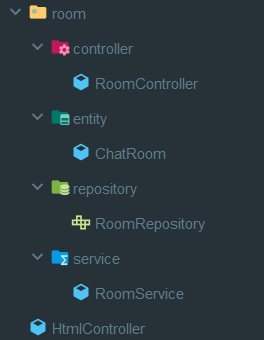
5. static 폴더에 purechat2.html 추가
<!DOCTYPE html>
<html lang="ko">
<head>
    <meta charset="UTF-8">
    <title>Room-Based WebSocket Chat</title>
    <style>
        body { font-family: 'Segoe UI', sans-serif; background: #f7f8fa; }
        .container {
            width: 540px;
            margin: 60px auto;
            background: #fff;
            padding: 32px 30px;
            border-radius: 14px;
            box-shadow: 0 2px 8px rgba(0,0,0,0.07);
        }
        h2 { text-align: center; color: #2c3e50; margin-bottom: 24px; }
        .row { display: flex; gap: 10px; align-items: center; margin-bottom: 13px; }
        input[type="text"] {
            box-sizing: border-box;
            border: 1px solid #ccc;
            border-radius: 6px;
            font-size: 15px;
            padding: 9px;
            outline: none;
            background: #f9fafd;
            transition: border 0.2s;
            width: 100%;
            max-width: 130px;
        }
        input[type="text"]:focus {
            border-color: #4078c0;
            background: #fff;
        }
        button {
            background: #4078c0; color: white; font-weight: bold;
            border: none; border-radius: 6px; padding: 10px 20px;
            font-size: 15px; cursor: pointer; transition: background 0.2s;
        }
        button:hover { background: #285690; }
        .btn-disconnect {
            background: #eee; color: #285690; font-weight: bold;
        }
        .btn-disconnect:hover { background: #e0e8f5; }
        #chatArea {
            width: 100%; height: 250px; border: 1px solid #aaa;
            border-radius: 8px; margin-bottom: 18px; overflow-y: auto;
            background: #fafdff; padding: 10px 7px; font-size: 15px;
        }
        .sysmsg { color: #666; font-style: italic; margin: 7px 0 3px 0; }
        .msgrow { margin-bottom: 3px; }
        .from { font-weight: bold; color: #4078c0; }
        .hidden { display: none; }
        #roomList { margin-bottom: 20px; }
        .room-item {
            padding: 6px 10px;
            border: 1px solid #ccc;
            border-radius: 6px;
            margin-bottom: 5px;
            cursor: pointer;
        }
        .room-item:hover {
            background: #e8f0ff;
        }
    </style>
</head>
<body>
<div class="container">
    <h2>Pure WebSocket Chat Room ADD</h2>

    <!-- 방 목록 표시 -->
    <div id="roomList">
        <strong>방 목록:</strong>
        <div id="rooms"></div>
    </div>

    <!-- 닉네임 입력 및 disconnect -->
    <div class="row" id="nicknameRow">
<!--        <input type="text" id="user" placeholder="닉네임">-->
        <input type="text" id="room" placeholder="방 번호">
        <button onclick="manualConnect()">Connect</button>

    </div>

    <!-- 채팅 영역 (처음엔 숨김) -->
    <div id="chatWrapper" class="hidden">
        <div id="chatArea"></div>
        <div class="row">
            <input type="text" id="msg" placeholder="메시지" onkeydown="if(event.key==='Enter'){sendMessage();}">
            <button onclick="sendMessage()">Send</button>
            <button class="btn-disconnect" onclick="disconnect()">Disconnect</button>
        </div>
    </div>
</div>

<script>
    let ws = null;
    let roomId = "";
    let nickname = "";

    window.onload = function () {
        loadRoomList();
    };

    function loadRoomList() {
        fetch("/api/rooms")
            .then(response => response.json())
            .then(data => {
                const roomsDiv = document.getElementById("rooms");
                const roomListSection = document.getElementById("roomList");
                roomsDiv.innerHTML = "";

                if (data.length === 0) {
                    roomListSection.classList.add("hidden");
                } else {
                    roomListSection.classList.remove("hidden");
                    data.forEach(room => {
                        const div = document.createElement("div");
                        div.className = "room-item";
                        div.textContent = `방 번호: ${room.roomId}`;
                        div.onclick = () => enterRoom(room.roomId);
                        roomsDiv.appendChild(div);
                    });
                }
            });
    }

    function enterRoom(id, inputNick = null) {
        if (!inputNick) {
            const nick = prompt("닉네임을 입력하세요:");
            if (!nick) {
                alert("닉네임이 필요합니다.");
                return;
            }
            nickname = nick;
        } else {
            nickname = inputNick;
        }

        roomId = id;

      //방목록 데이터베이스에 저장하는 곳
      //방목록 데이터베이스에 저장하는 곳
      //방목록 데이터베이스에 저장하는 곳
      fetch(`/api/rooms/${roomId}`, { method: "POST" })


        ws = new WebSocket("/ws-chat");

        ws.onopen = function () {
            showSysMsg(`[${nickname}]님이 방 [${roomId}]에 입장했습니다.`);
            document.getElementById("chatWrapper").classList.remove("hidden");
            document.getElementById("roomList").classList.add("hidden");
            document.getElementById("nicknameRow").classList.add("hidden");
        };

        ws.onmessage = function (event) {
            const msg = JSON.parse(event.data);
            showMessage(msg.from, msg.message, msg.roomId);
        };

        ws.onclose = function () {
            showSysMsg("Disconnected");
            document.getElementById("chatWrapper").classList.add("hidden");
            document.getElementById("roomList").classList.remove("hidden");
            document.getElementById("nicknameRow").classList.remove("hidden");
            loadRoomList();
        };
    }

    function manualConnect() {
        const inputRoom = document.getElementById("room").value;
        if (!inputRoom) {
            alert("방 번호를 입력하세요.");
            return;
        }

        const inputNick = prompt("닉네임을 입력하세요:");
        if (!inputNick) {
            alert("닉네임이 필요합니다.");
            return;
        }

        nickname = inputNick;
        enterRoom(inputRoom, inputNick);
    }

    function disconnect() {
        if (ws) {
            ws.close();
            ws = null;
        }
    }

    function sendMessage() {
        const msg = document.getElementById("msg").value;
        if (!nickname || !msg || !roomId) {
            alert("모든 정보를 입력해주세요.");
            return;
        }

        ws.send(JSON.stringify({
            from: nickname,
            message: msg,
            roomId: roomId
        }));
        document.getElementById("msg").value = "";
    }

    function showMessage(from, message, room) {
        const chatArea = document.getElementById("chatArea");
        chatArea.innerHTML += `<div class="msgrow"><span class="from">[${room}] ${from}:</span> ${message}</div>`;
        chatArea.scrollTop = chatArea.scrollHeight;
    }

    function showSysMsg(msg) {
        const chatArea = document.getElementById("chatArea");
        chatArea.innerHTML += `<div class="sysmsg">${msg}</div>`;
        chatArea.scrollTop = chatArea.scrollHeight;
    }
</script>
</body>
</html>
6. 웹에서 확인
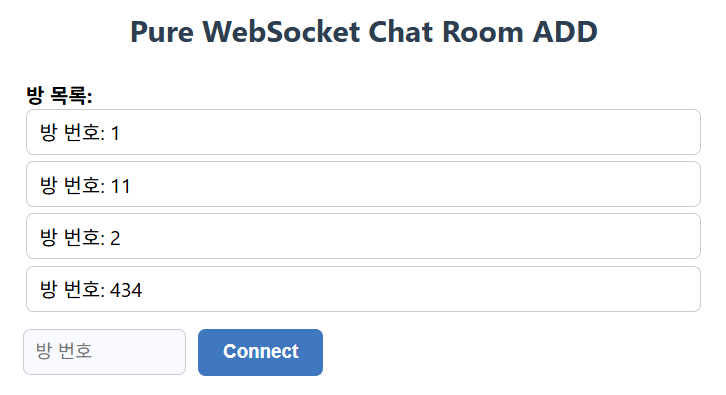
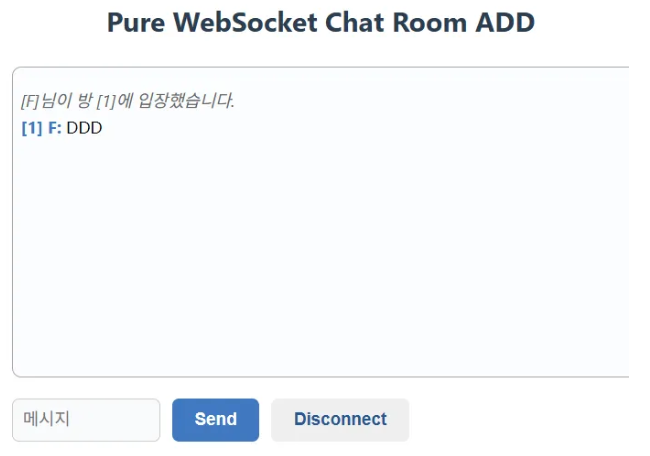

배우고 기록하며 성장하는 백엔드 개발자입니다!