TopAppBar란?
- 액션바나 앱바라고 부르는 형태의 컴포넌트이다.
title 설정하기
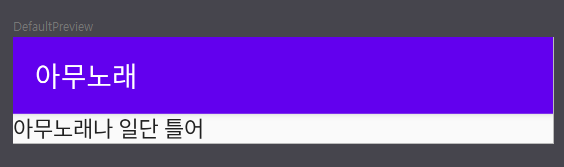
    Column {
        TopAppBar(
            title = { Text(text = "아무노래") }
        )
        Text(text = "아무노래나 일단 틀어")
    }
navigationIcon 설정하기
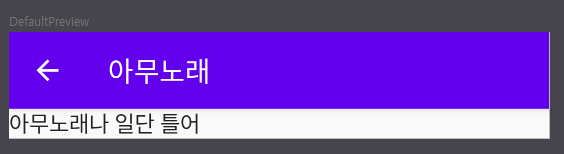
    Column {
        TopAppBar(
            title = { Text(text = "아무노래") },
            navigationIcon = {
                IconButton(onClick = { /*TODO*/ }) {
                    Icon(imageVector = Icons.Filled.ArrowBack, contentDescription = "뒤로가기")
                }
            }
        )
        Text(text = "아무노래나 일단 틀어")
    }
actions 설정하기
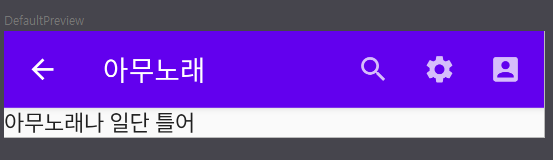
    Column {
        TopAppBar(
            title = { Text(text = "아무노래") },
            navigationIcon = {
                IconButton(onClick = { /*TODO*/ }) {
                    Icon(imageVector = Icons.Filled.ArrowBack, contentDescription = "뒤로가기")
                }
            },
            actions = {
                IconButton(onClick = { /*TODO*/ }) {
                    Icon(imageVector = Icons.Filled.Search, contentDescription = "검색")
                }
                IconButton(onClick = { /*TODO*/ }) {
                    Icon(imageVector = Icons.Filled.Settings, contentDescription = "설정")
                }
                IconButton(onClick = { /*TODO*/ }) {
                    Icon(imageVector = Icons.Filled.AccountBox, contentDescription = "계정")
                }
            }
        )
        Text(text = "아무노래나 일단 틀어")
    }
항목이 구별되지 않은 TopAppBar도 만들어보자
- content 파라미터 버전
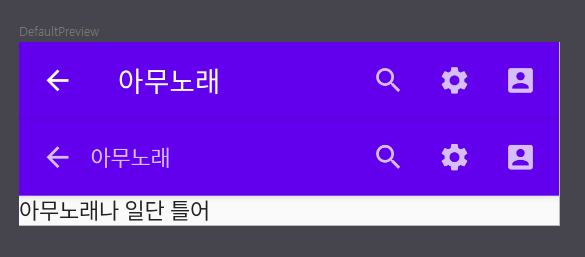
- 첫번째 TopAppBar가 항목이 구별된 TopAppBar고 두번째 TopAppBar가 항목이 구별되지 않은 TopAppBar다.
- 이처럼 항목이 없는 TopAppBar를 만들어줄 경우 사이 공백과 모든 것을 커스텀해줘야 한다.
- 이처럼 항목이 없는 TopAppBar를 만들어줄 경우 사이 공백과 모든 것을 커스텀해줘야 한다.
        TopAppBar {
            IconButton(onClick = { /*TODO*/ }) {
                Icon(imageVector = Icons.Filled.ArrowBack, contentDescription = "뒤로가기")
            }
            Text(text = "아무노래", modifier = Modifier.weight(1f))
            IconButton(onClick = { /*TODO*/ }) {
                Icon(imageVector = Icons.Filled.Search, contentDescription = "검색")
            }
            IconButton(onClick = { /*TODO*/ }) {
                Icon(imageVector = Icons.Filled.Settings, contentDescription = "설정")
            }
            IconButton(onClick = { /*TODO*/ }) {
                Icon(imageVector = Icons.Filled.AccountBox, contentDescription = "계정")
            }
        }
Android zizon
방금 전 포스팅은 못 참죠 화이팅입ㄴㅣ다!!!!!!!1