Scanner 그리고 Parser
Scanner와 Parser는 자바스크립트 코드를 해석하고 실행할 때 바이트 코드로 변환하기 위한 AST를 생성하고 구문을 분석하는 역할을 한다.
Scanner
스캐너는 자바스크립트 코드 문자열을 토큰으로 분리하는 역할을 한다.
예를 들면 let, const, function등의 식별자, +, -, * 등의 연산자, {, }, ; 등의 표현식 구분자 등이 토큰으로 분리된다.
💡 이 때 공백과 주석은 무시한다!
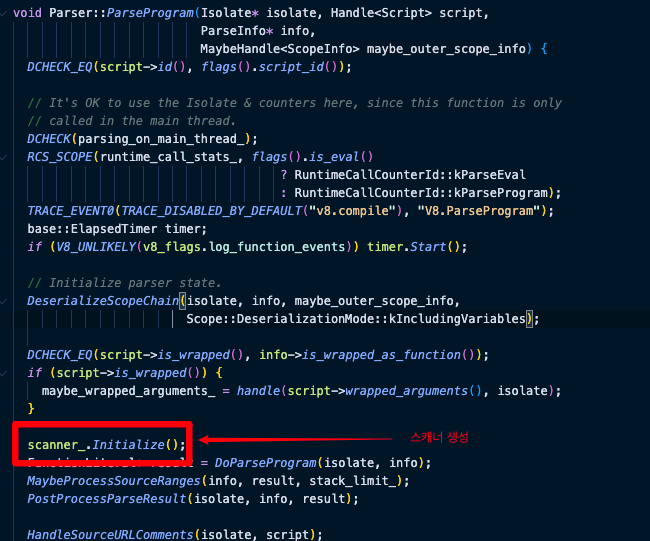
아래 코드를 보면 ParseProgram이 scanner를 initialize하는 것을 볼 수 있다.
즉, 자바스크립트 코드를 토큰화 한 뒤 파서가 AST로 변환하는 것이다.
Parser
파서는 스캐너로부터 전달 받은 토큰 스트림을 구문 분석하여 AST(Abstract Syntax Tree) 추상 구분 트리를 생성한다.
AST구문이 유효하지 않다면 Syntax Error를 발생시키게 된다!
// asm-parser.cc
// 기대되는 토큰이 오지 않으면 Unexpected token을 반환한다!
#define EXPECT_TOKEN_OR_RETURN(ret, token)      \
  do {                                          \
    if (scanner_.Token() != token) {            \
      FAIL_AND_RETURN(ret, "Unexpected token"); \
    }                                           \
    scanner_.Next();                            \
  } while (false)

#define EXPECT_TOKEN(token) EXPECT_TOKEN_OR_RETURN(, token)
// EXPECT_TOKEN(n) 이 있다면 nullptr를 함께반환한다.
#define EXPECT_TOKENn(token) EXPECT_TOKEN_OR_RETURN(nullptr, token)
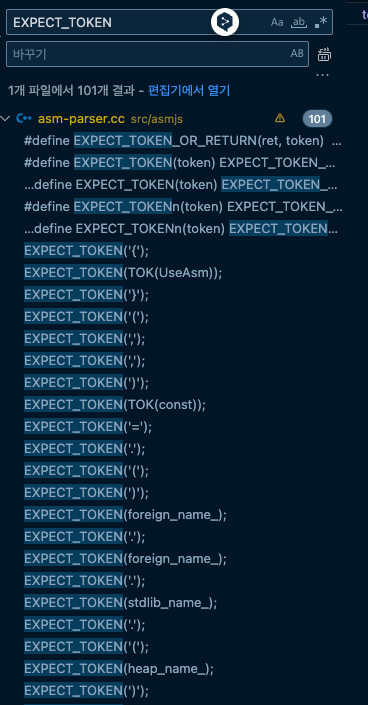
V8엔진에 EXPECT_TOKEN을 검색해보면 아래와 같이 리스트업이 된다.
🔥 ValidationModeule의 일부분을 한 번 보자
// asm-parser.cc
void AsmJsParser::ValidateModule() {
  // 1. 파라미터가 존재하는가?
  RECURSE(ValidateModuleParameters());
  // 2. '{'을 기대한다.
  EXPECT_TOKEN('{');
  // ?
  EXPECT_TOKEN(TOK(UseAsm));
  // 3. 세미콜론을 건너뛴다.
  RECURSE(SkipSemicolon());
  // 4. 모듈 변수(?)의 유효성 검사를 한다.
  RECURSE(ValidateModuleVars());
  // 5. 모듈내의 모든 함수에 대해 ValidationFunction을 실행한다.
  while (Peek(TOK(function))) {
    RECURSE(ValidateFunction());

  // 6. ?
  while (Peek(TOK(var))) {
    RECURSE(ValidateFunctionTable());
  }
  // 7. export 섹션을 검사한다.
  RECURSE(ValidateExport());
  // 8. 세미콜론을 건너 뛴다.
  RECURSE(SkipSemicolon());
  // 9. '}'을 기대한다.
  EXPECT_TOKEN('}');
  ...
😎 멀리서 크게 보면 { 이 후에 }에 나오기를 기대하고 있다 :)
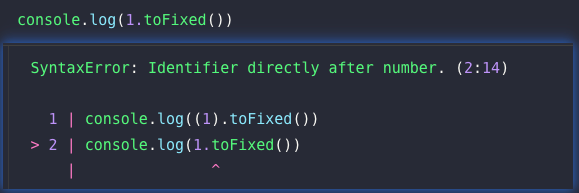
📝 SyntaxError의 예시는 다음과 같다.
🧐🧐 더 많은 테스트를 확인해 보고 싶다면 V8엔진의 테스트 코드 부분을 보면 좋다.
아래
parser-syntax-check.js말고도class-syntax-expression.js,class-syntax-declaration.js등과 같은 V8 파일도 함께 참고해 보면 좋을 것 같다.
// parser-syntax-check.js
description(
"This test checks that the following expressions or statements are valid ECMASCRIPT code or should throw parse error"
);

function runTest(_a, errorType)
{
    var success;
    if (typeof _a != "string")
        testFailed("runTest expects string argument: " + _a);
    try {
        eval(_a);
        success = true;
    } catch (e) {
        success = !(e instanceof SyntaxError);
    }
    if ((!!errorType) == !success) {
        if (errorType)
            testPassed('Invalid: "' + _a + '"');
        else
            testPassed('Valid:   "' + _a + '"');
    } else {
        if (errorType)
            testFailed('Invalid: "' + _a + '" should throw ' + errorType.name);
        else
            testFailed('Valid:   "' + _a + '" should NOT throw ');
    }
}

function valid(_a)
{
    // Test both the grammar and the syntax checker
    runTest(_a, false);
    runTest("function f() { " + _a + " }", false);
}

function invalid(_a, _type)
{
    _type = _type || SyntaxError;
    // Test both the grammar and the syntax checker
    runTest(_a, true);
    runTest("function f() { " + _a + " }", true);
}

// ...

debug  ("Unary operators and member access");

valid  ("");
invalid("(a");
invalid("a[5");
invalid("a[5 + 6");
invalid("a.");
invalid("()");
invalid("a.'l'");
valid  ("a: +~!new a");
invalid("new -a");
valid  ("new (-1)");
//...
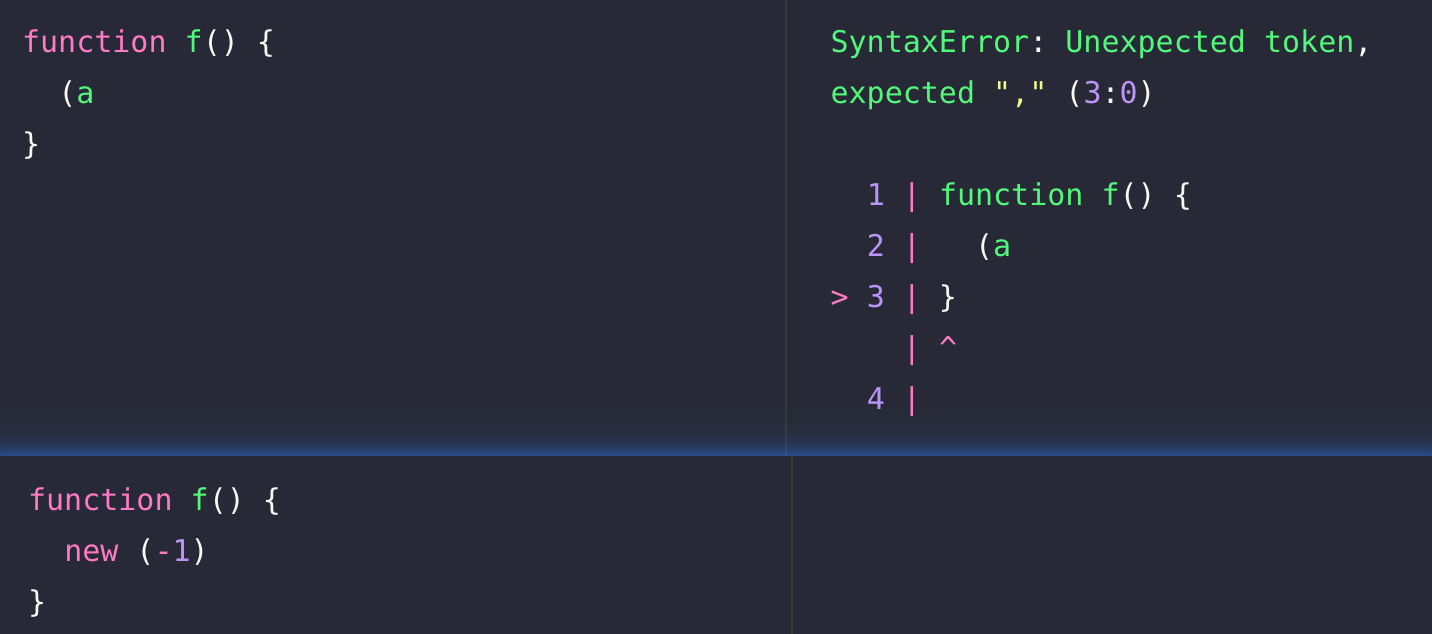
위 구문 에러는 함수 선언 대괄호 블록 내에 유효한 구문과 유효하지 않은 구문을 테스트하는 코드이다.
function f() {
	// 아래의 예시 코드를 여기 넣어보자
    (a;
    new (-1)
}
💡결과는 아래와 같다!
ECMAScript
ECMA스크립트란, Ecma International이 ECMA-262 기술 규격에 따라 정의하고 있는 표준화된 자바스크립트 프로그래밍 언어를 말한다!
ECMAScript의 구문 정의 탭은 아래의 부분을 보면 된다. ECMAScript 탭에서 해당 부분들을 보면 구문을 유추할 수 있다.
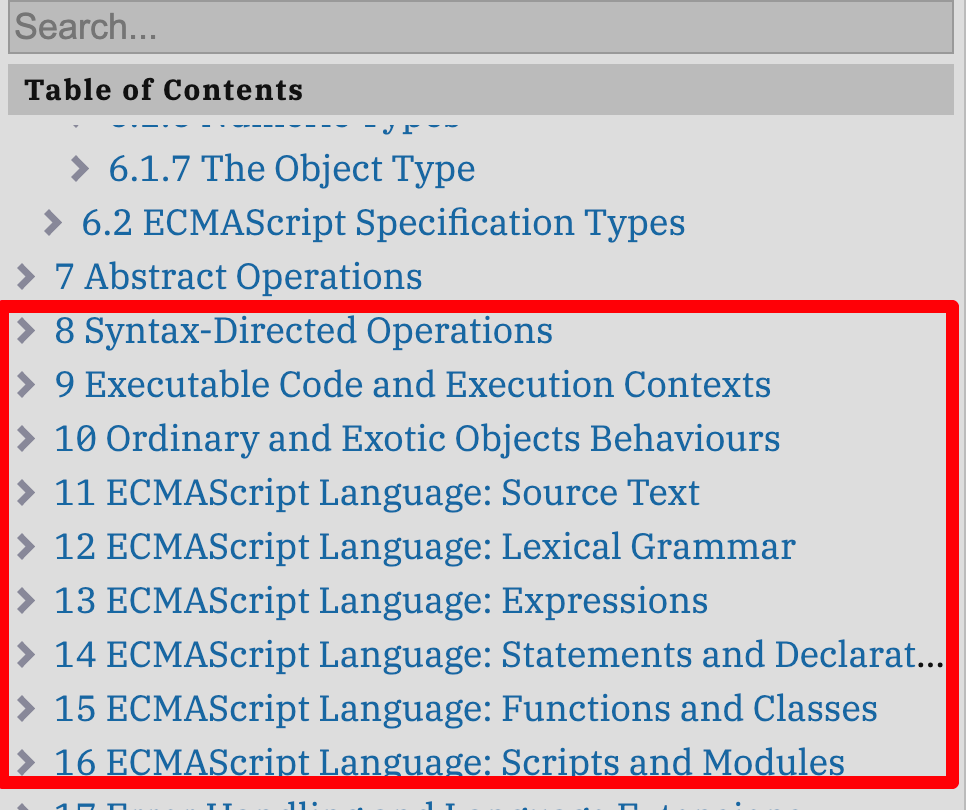
Object Literal
위 ECMAScript의 Object Literal 구문 탭을 한 번 들여다 보자.
🔥🔥🔥 더 자세히 보고 싶다면 ECMAScript의 목차 중 13.2.5 Object Initializer 부분을 보면 된다.
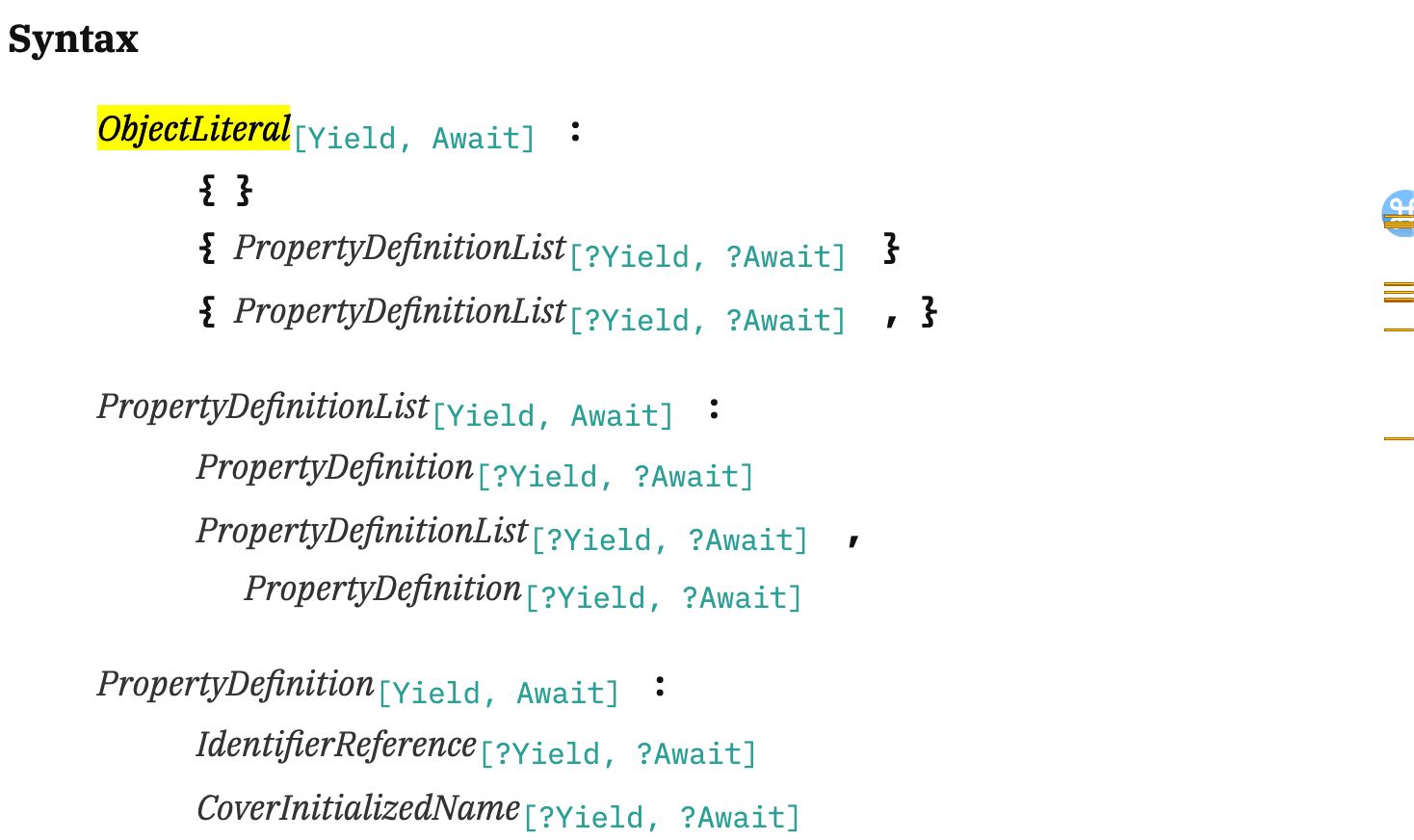
//objectLiteral
// ObjectLiteral은 빈 객체이거나, 프로퍼티 정의 목록 리스트(PropertyDefinitionList)을 가진 객체 리터럴 일 수 있다.
ObjectLiteral[Yield, Await] :
{ }
{ PropertyDefinitionList[?Yield, ?Await] }
{ PropertyDefinitionList[?Yield, ?Await] , }
// 프로퍼티 정의 목록 리스트(PropertyDefinitionList)는 하나 이상의 PropertyDefinition으로 구성된다.
PropertyDefinitionList[Yield, Await] :
PropertyDefinition[?Yield, ?Await] // {}
PropertyDefinitionList[?Yield, ?Await] , // {foo: 1, bar: 'hello'}
PropertyDefinition[?Yield, ?Await] // {foo: 1, bar: 'hello' ,}// PropertyDefinition은 식별자 참조, 커버 초기화 이름?
// 프로퍼티 이름과 할당 표현식
// 메서드 정의
// 전개 연산자 표현식으로 구성될 수 있다.
PropertyDefinition[Yield, Await] :
// 식별자 참조
IdentifierReference[?Yield, ?Await] // foo
// 커버 초기화 이름?
CoverInitializedName[?Yield, ?Await] //???
// 프로퍼티 이름: 할당 표현식
PropertyName[?Yield, ?Await] : AssignmentExpression[+In, ?Yield, ?Await] // foo: 1, bar: 'hello'
// 메서드 정의
MethodDefinition[?Yield, ?Await] // sayHello { console.log('hello')}
// 전개 표현식
... AssignmentExpression[+In, ?Yield, ?Await] // ...obj// PropertyName은 리터럴 프로퍼티 이름 또는 계산된 프로퍼티 이름이 될 수 있다.
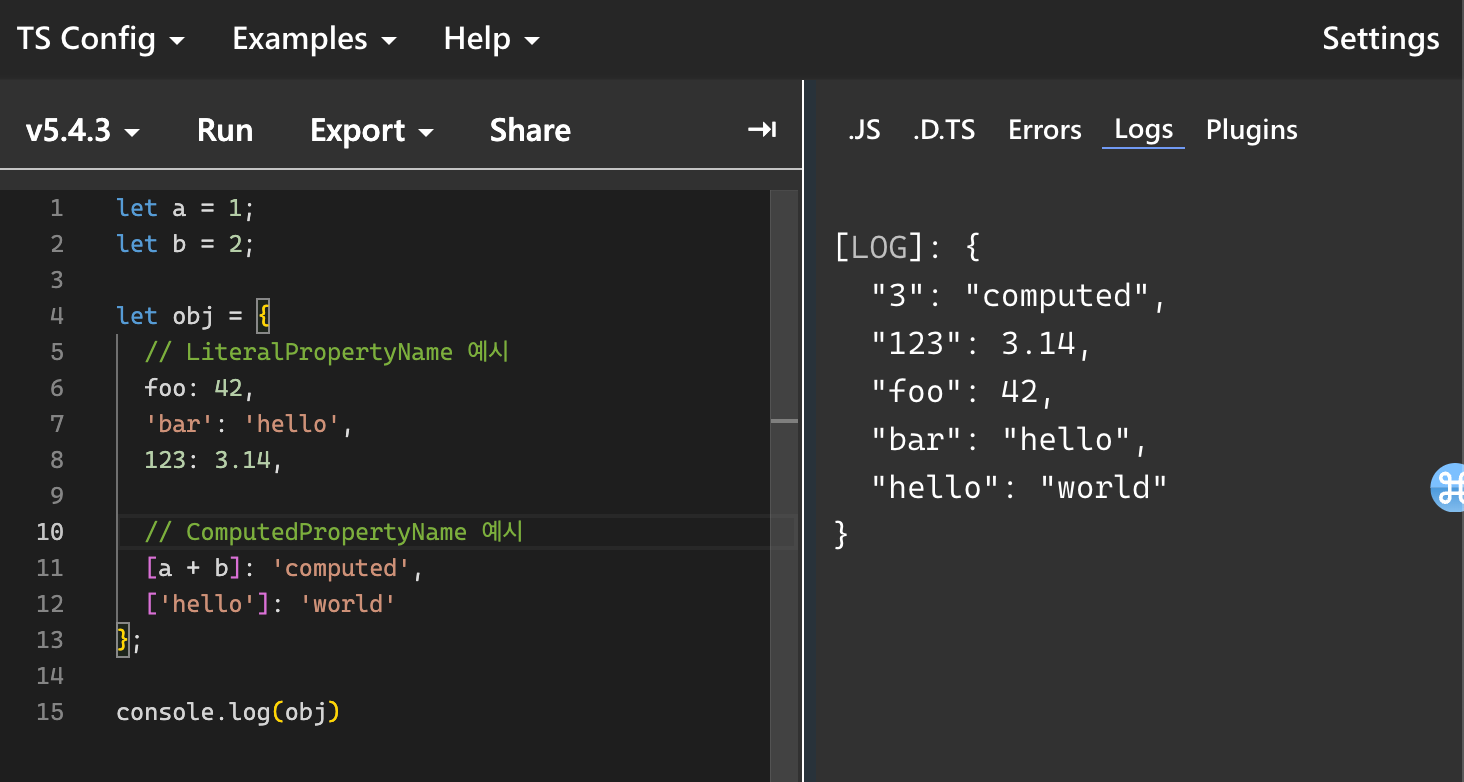
PropertyName[Yield, Await] : // foo, bar, 123
LiteralPropertyName
ComputedPropertyName[?Yield, ?Await] // [a + b], ['hello']
let a = 1;
let b = 2;
let obj = {
// LiteralPropertyName 예시
foo: 42,
'bar': 'hello',
123: 3.14,
// ComputedPropertyName 예시
[a + b]: 'computed',
['hello']: 'world'
};
// LiteralPropertyName은 식별자 이름, 문자열 리터럴, 숫자 리터럴이 될 수 있다.
LiteralPropertyName :
	IdentifierName				// foo
	StringLiteral				// 'bar'
	NumericLiteral				// 123

let obj = {
  // IdentifierName 예시
  foo: 42,

  // StringLiteral 예시
  'bar': 'hello',

  // NumericLiteral 예시
  123: 3.14
};
객체, 배열, 클래스와 같은 언어에서 제공하는 자료형을 사용하기 위해서 `충족해야 하는 문법`이 존재하고 있었다.
LiteralPropertyName은 식별자거나 숫자나 문자 타입이어야만 했고, Object Leteral은 {로 시작하고 }로 끝나야만 했다.
✅ 즉, 이러한 구문 문법이 올바르게 되어 있는 지 아닌 지 검사하는 역할을 파서가 하는 것이다!
Identifier Names
12.7.1 Identifier Names
Unicode escape sequences are permitted in an IdentifierName, where they contribute a single Unicode code point equal to the IdentifierCodePoint of the UnicodeEscapeSequence. The \ preceding the UnicodeEscapeSequence does not contribute any code points. A UnicodeEscapeSequence cannot be used to contribute a code point to an IdentifierName that would otherwise be invalid. In other words, if a \ UnicodeEscapeSequence sequence were replaced by the SourceCharacter it contributes, the result must still be a valid IdentifierName that has the exact same sequence of SourceCharacter elements as the original IdentifierName. All interpretations of IdentifierName within this specification are based upon their actual code points regardless of whether or not an escape sequence was used to contribute any particular code point.
Two IdentifierNames that are canonically equivalent according to the Unicode Standard are not equal unless, after replacement of each UnicodeEscapeSequence, they are represented by the exact same sequence of code points.
ECMAScript에서 제공하는 식별자 이름에 대한 추가적인 설명을 한번 보자.
- 식별자 이름에 이스케이프 시퀀스(
\)를 사용할 수 있다. - 이스케이프 시퀀스 앞의
\는코드 포인트에 어떠한 기여도 하지 않는다. - 이스케이프 시퀀스를 제거하고 원래 문자로 대체했을 때
유효한 식별자 이름이어야 한다. - 동등한 두 식별자 이름은 이스케이프 시퀀스를
제거 했을 때정확히 동일해야 같은 것으로 간주한다.
📝 이스케이프 문자를 활용한 예시는 아래와 같다.
let \u0061\u0062\u0063 = 123; // let abc = 123
console.log(\u0061\u0062\u0063); // 123

let obj = {
  '\u03C0': 3.14, // π: 3.15
  '\u0024\u0070\u0072\u0069\u0063\u0065': 9.99 // $price: 9.99
};
console.log(obj['\u03C0']); // 3.14
console.log(obj['\u0024\u0070\u0072\u0069\u0063\u0065']); // 9.99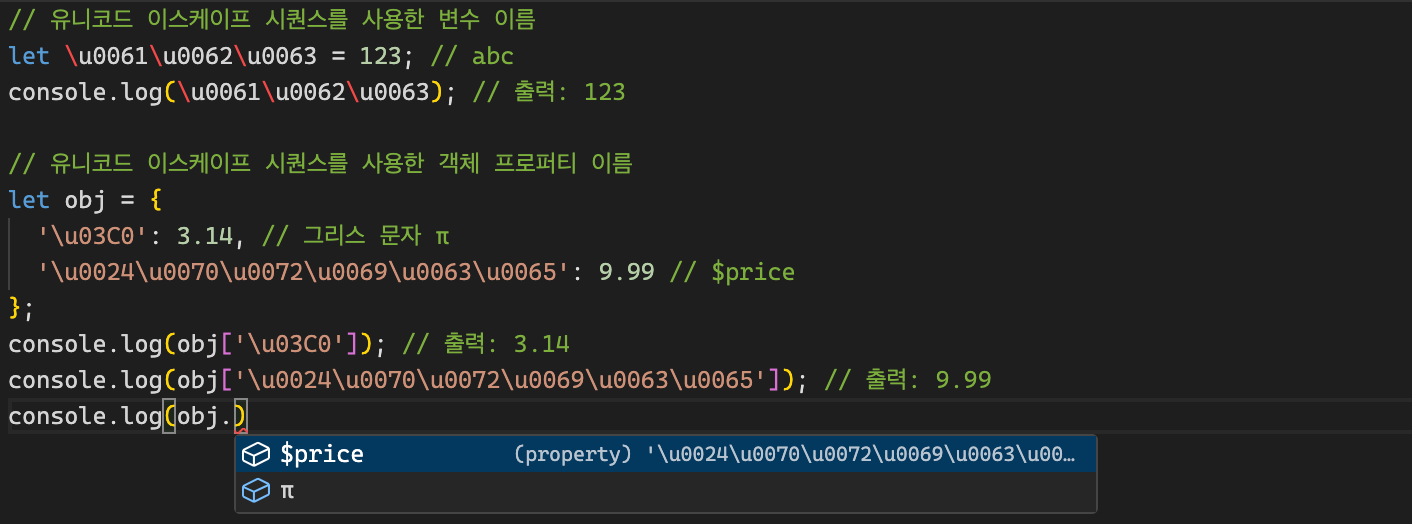
ObjectLiteral의 프로퍼티 이름은 식별자, 문자, 숫자로 될 수 있다고 했다.
하지만 이스케이프 시퀀스를 통해서도 프로퍼티 이름을 활용할 수도 있다!
ECMAScript에서 제공되는 정보는 모두 구현되어 있다는 것을 조금이나마 확인해 볼 수 있는 시간이었다!
💡 한 줄로 요약해보면 V8 엔진은 자바스크립트 코드를 UTF String Stream으로 만들고, 스캐너를 통해 토큰화를 진행한다.
이 후 파서에게 전달하여 AST 자료 구조로 만듦과 동시에 구문 분석을 진행한다.
구문 분석 중 순차적으로 유효한 토큰이 제공되지 않았다면 Syntax Error를 던지게 된다!
올바른 자바스크립트 구문으로 이루어진 코드가 Scanner와 Parser에 의해, AST로 변환된 되게 되면 Ignition 이라는 친구가 바이트 코드를 생성하여 JS VM에 던지고 컴퓨터는 코드를 실행하게 된다.
참고 자료