CSS 필수 개념
기본 스타일 시트
- 웹 브라우저가 기본으로 가지고 있는 스타일 시트 (css)
- reset (고여있는 퍼블리셔들은 자신만의 reset.css)
적용 우선 순위 (개발상)
똑같은 속성이 중복되어있으면 중복된 값 중 하나만 선택해서 적용한다.
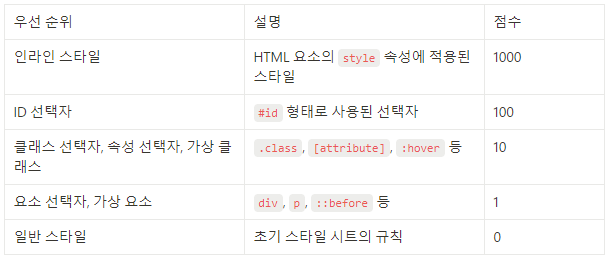
핵 (hack) - !important
상속 (물려받다)
단위
절대 단위
px: 픽셀
%, em, rem, vw, vh: 기준에 따라 크기가 변함
vw, vh: width height
뷰포트 크기에 기반한 단위
색상 표기법
키워드 표기법
색상을 영문 이름 지정하는 것
HEX 표기법 (HEX = 16진수)
00~ff
#RRGGBB
16진수
rgb(255, 255, 255)
0~255
rgba (RED, GREEN, BLUE, ALpha)
0.1 0.2 0.3 ... 0.9 1
HSLA 표기법
몰라도 됨
텍스트 관련 속성
font-family
폰트 지정
font-size
폰트 크기
color
텍스트 색상
font-weight
굵기 700 (bold) font-weight: bold
font-style
font-style: normal, italic, oblique
font-variant
영문을 크기가 작은 대문자 변경할 때
text-align
text-align: left, center, right, justify
text-decoration
text-decoration: none, underline, line-through, overline
텍스트 장식 설정
letter-spacing: 자간 (px_
문자 간격 조정
line-height: 행간
줄 간격 조정
박스 모델
모든 HTML 요소는 사각형 모양의 박스에 둘러 쌓여져 있다.
-
margin, margin-top, margin-right, margin-bottom, margin-left: 요소와 요소 간의 간격
-
border, border-top, border-right, border-bottom, border-left: 요소의 테두리 설정
-
padding, padding-top, padding-right, padding-bottom, padding-left: 요소 내부 여백
-
width, height: 요소의 너비와 높이
.article__button {
	marginbottom: 10px;
}

.article__button:last-of-type {
	marginbottom: 0px;
}
💫 https://www.w3.org/TR/CSS22/propidx
💫 codewars : 영어, 난이도별로 문제 제공, 다양한 답변
💫 실습1: 중앙정렬이 중요
배경 이미지
background-color
background-image: url(이미지 경로)
웹 접근성 포기
 div {
        width: 800px;
        height: 800px;
        border: 2px solid black;
        background-image: url("./media/london.png");
        background-position: center center;
        background-repeat: no-repeat;
        background-size: cover;
      }
💫 https://www.w3.org/TR/wai-aria-1.1/
💫 실습2: nav를 어떻게 중앙정렬하느냐