실습 순서
	1. 회원가입씬을 새로 만들어 로그인 아이디와 비밀번호 등록
    2. 등록된 아이디와 비밀번호로 로그인을 했을때만 게임이 실행
3. 닷지 게임을 플레이시 로그인한 계정에 기록을 등록 및 계정마다 최고 점수로 갱신- 회원가입Scene 생성
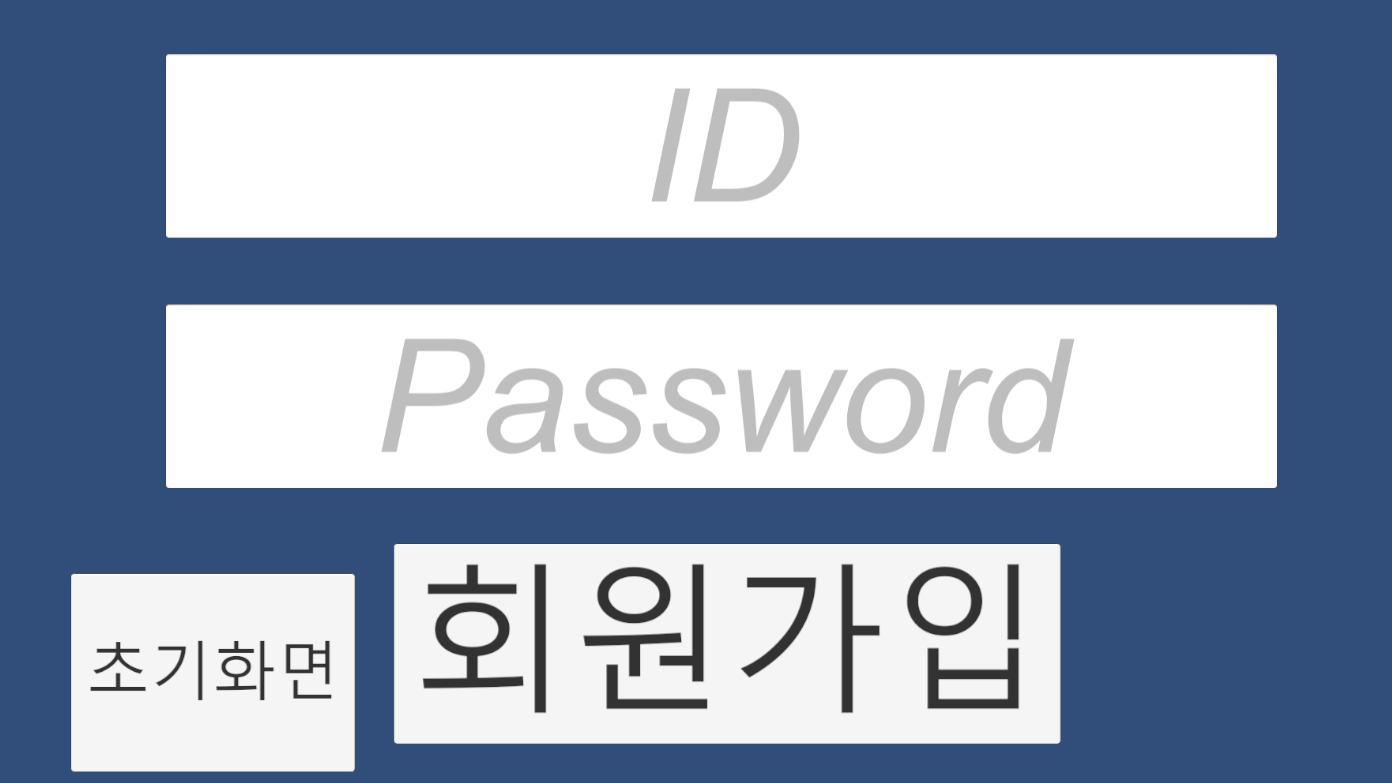
ID와 패스워드를 입력하고 회원가입버튼을 클릭하면 SQLite DB파일에 해당 아이디와 패스워드 데이터가 저장되도록 했다.
public class SignManager : MonoBehaviour
{
    SignID signID;
    SignPassword signPassword;

    private void Start()
    {
        signID = GetComponent<SignID>();
        signPassword = GetComponent<SignPassword>();
    }

    public void clickbutton()
    {
        string id = signID.signId;
        string password = signPassword.signpassword;

        string dbname = "TEST.db";
        string strConnection = "URI=file:" + Application.streamingAssetsPath + "/" + dbname;
        IDbConnection dbConnection = new SqliteConnection(strConnection);

        dbConnection.Open();

        IDbCommand dbcommand = dbConnection.CreateCommand();

        string Query = $"Insert INTO login (ID, Password) VALUES ('{id}','{password}')";
        dbcommand.CommandText = Query;
        dbcommand.ExecuteNonQuery();
        Debug.Log("회원등록 성공");

        dbConnection.Close();
    }

    public void loadMainScene()
    {
        SceneManager.LoadScene("MainScene");
    }
}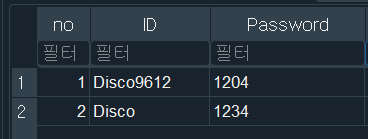
회원가입을 통해 등록된 데이터
- 로그인 했을때만 게임신 실행
public class loginManager : MonoBehaviour
{
    InputPlayerName inputPlayerName;
    InputPasswrod inputPasswrod;
    public string Id { get; set; }
    private string Password;
    public int checklogin { get; set; } = 0;

    // Start is called before the first frame update

    void Awake()
    {
        inputPlayerName = GetComponent<InputPlayerName>();
        inputPasswrod = GetComponent<InputPasswrod>();
    }

    public void loginCheck()
    {
        string dbname = "TEST.db";
        string strConnection = "URI=file:" + Application.streamingAssetsPath + "/" + dbname;
        IDbConnection dbConnection = new SqliteConnection(strConnection);

        string Id = inputPlayerName.stringId;
        string passworDate = inputPasswrod.stringpassword;

        dbConnection.Open();

        IDbCommand dbcommand = dbConnection.CreateCommand();

        string Query = $"SELECT Password FROM login Where ID = '{Id}'";
        IDbCommand selectCommand = dbConnection.CreateCommand();
        selectCommand.CommandText = Query;
        IDataReader reader = selectCommand.ExecuteReader();

        while (reader.Read())
        {
            string passworDdate = reader.GetString(0);
            if (passworDdate == passworDate)
            {
                Debug.Log("로그인성공");
                checklogin = 1;
                PlayerPrefs.SetInt("checklogin", 1);
                PlayerPrefs.SetString("Id", Id);
            }
            else
            {
                Debug.Log("비밀번호가 틀렷습니다");
                checklogin = 0;
            }
        }
        dbConnection.Close();


    }
}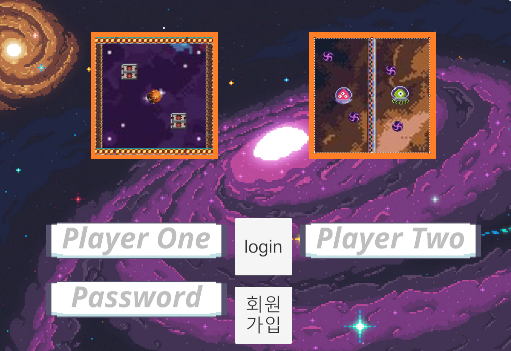
checklogin이라는 변수를 만들어서 아이디와 패스워드를 입력했을 때 해당 데이터 값이 회원가입 씬에서 등록하여 SQLite 데이터에 저장된 값과 일치할때만 checklogin = 1이 되도록 하여
public void LoadMainScene()
{
    if(_loginManager.checklogin == 1)
    {
        SceneManager.LoadScene("Avoid Obstacle");
    }

}
checklogin이 1일때만 게임씬으로 전환이 가능하도록 하였다.
- 기록 등록 및 최고점수 갱신
public class Rank : MonoBehaviour
{
    // Start is called before the first frame update
    CurrentTime currentTime;
    loginManager _loginManager;
    private void Start()
    {
        currentTime = GetComponent<CurrentTime>();
        _loginManager = gameObject.GetComponent<loginManager>();
    }
    public void record()
    {
        string dbname = "TEST.db";
        string strConnection = "URI=file:" + Application.streamingAssetsPath + "/" + dbname;
        IDbConnection dbConnection = new SqliteConnection(strConnection);

        int _checklogin = PlayerPrefs.GetInt("checklogin");

        dbConnection.Open();

        //데이터 읽기

        string tablename = "test";

        IDbCommand dbcommand = dbConnection.CreateCommand();

        int ranktime = (int)currentTime.NewTime;
        if (_checklogin == 1)
        {
            string playerID = PlayerPrefs.GetString("Id");
            string insertQuery = $"INSERT INTO {tablename} (Score, PlayerID) VALUES ('{ranktime}', '{playerID}');";

            dbcommand.CommandText = insertQuery;
            dbcommand.ExecuteNonQuery();

            string orderQuery = $"SELECT Score, PlayerID from {tablename} Order By Score DESC ";
            IDbCommand selectCommand = dbConnection.CreateCommand();
            selectCommand.CommandText = orderQuery;
            IDataReader reader = selectCommand.ExecuteReader();


            int Topscore = 0;
            int cnt = 0;
            while (reader.Read())
            {
                int score = reader.GetInt32(0);
                string player = reader.GetString(1);
                Debug.Log($"Score: {score}\t PlayerID: {playerID}");
                if (cnt == 0 && playerID == player)
                {
                    Topscore = score;
                    cnt++;
                }
            }
            string updatetopscoreQuery = $"Update login Set TopScore = '{Topscore}' where ID = '{playerID}'";
            IDbCommand updateCommand = dbConnection.CreateCommand();
            updateCommand.CommandText = updatetopscoreQuery;
            updateCommand.ExecuteNonQuery();
            reader.Close();

            Debug.Log($"PlayerID : {playerID}\tTopscore : {Topscore}");
        }

        dbConnection.Close();

    }

}
SQLite 명령어 where과 Update를 활용하여 로그인한 ID의 점수를 등록하고 그 로그인한 ID의 최고점수가 플레이를 할때 갱신할 수 있도록 코드를 작성하였다.
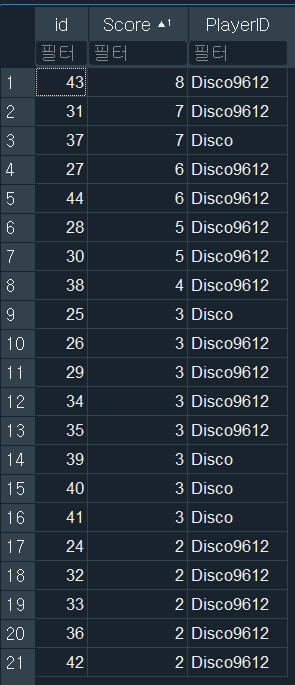
점수를 기록한 테이블
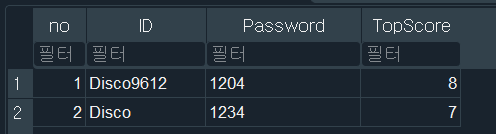
회원정보를 등록한 테이블
점수기록 테이블과 회원정보 테이블을 비교하면 최고점수가 적절히 갱신되었음을 확인할 수 있다.

유니티 C# 학습자