coroutine : 유니티에서 코루틴을 사용하면 작업을 다수의 프레임에 분산할 수 있다.
특징
- 코루틴은 유니티 프레임워크에서 업데이트 이후에 실행된다.
- 코루틴 실행 중 yield를 만나면 값을 enmerator.Current를 통해 값을 return하고 enmerator.MoveNext를 통해 다음 yield가 없다면 코루틴이 종료되고 있다면 다음 yield retrun문으로 넘어간다.
C# 실습
다음 코드의 동작 순서를 확인한다.
class Program
{
    static void Main()
    {

        IEnumerator<int> Test(bool cancel)
        {
            yield return 100;
            yield return 50;

            if (cancel)
            {
                yield break;
            }

            yield return 10;
        }

        IEnumerator<int> enmerator = Test(false);
        while(enmerator.MoveNext() )
        {
            Console.WriteLine(enmerator.Current);
        }

    }

}
인터페이스 IEnumerator을 확인하면
namespace System.Collections.Generic
{
    //
    // 요약:
    //     Supports a simple iteration over a generic collection.
    //
    // 형식 매개 변수:
    //   T:
    //     The type of objects to enumerate.
    public interface IEnumerator<out T> : IEnumerator, IDisposable
    {
        //
        // 요약:
        //     Gets the element in the collection at the current position of the enumerator.
        //
        // 반환 값:
        //     The element in the collection at the current position of the enumerator.
        T Current { get; }
    }
namespace System.Collections
{
//
// 요약:
// Supports a simple iteration over a non-generic collection.
public interface IEnumerator
{
//
// 요약:
// Gets the element in the collection at the current position of the enumerator.
//
// 반환 값:
// The element in the collection at the current position of the enumerator.
object Current { get; }
//
// 요약:
// Advances the enumerator to the next element of the collection.
//
// 반환 값:
// true if the enumerator was successfully advanced to the next element; false if
// the enumerator has passed the end of the collection.
//
// 예외:
// T:System.InvalidOperationException:
// The collection was modified after the enumerator was created.
bool MoveNext();
//
// 요약:
// Sets the enumerator to its initial position, which is before the first element
// in the collection.
//
// 예외:
// T:System.InvalidOperationException:
// The collection was modified after the enumerator was created.
void Reset();
}
}다음과 같은 코드가 있다.
즉 IEnumerator는
current 반환값이 있고 bool변수를 반환하는 MoveNext를 통해 작동한다.
이를 바탕으로 예제동작을 확인하면
-
IEnumerator<int> enmerator = Test(false);초기화가 먼저 진행된다. -
while(enmerator.MoveNext())반복문 시작
IEnumerator<int> Test(bool cancel)
{
    yield return 100;
    yield return 50;

    if (cancel)
    {
        yield break;
    }

    yield return 10;
}
이후 MovneNext메서드에서 코루틴이 실행 가능한지 확인하는데 반환값이 총 3개 있는데 아직 한번도 반환값을 넘긴적이 없으므로 MonveNext는 true를 반환한다. MoveNext에서 true가 retrun된다.Current값에는 현재 반환값이 100이므로 100이 들어가게 된다. 즉 enmerator.MoveNext =true, enmerator.Current = 100이다.
4. while(enmerator.MoveNext() ) { Console.WriteLine(enmerator.Current); }
MoveNext가 true이고 current값이 100이므로 100이 출력된다.
- 이후 같은 과정을 통해 50, 10이 출력되고 10이 출려된 이후 MoveNext값에 현재 반환한 값들이 코루틴이 반환할 수 있는 return 갯수를 넘었기 때문에 false가 출력되어 while반복문이 중단된다. 파라미터가 true라면 중간에 코루틴을 중단하므로 MoveNext값이 되어 while문을 이탈하게 되기때문에 100, 50만 출력된다.
유니티 실습
예제
  void Update()
  {
      if (Input.GetKeyDown(KeyCode.F10))
      {
          Debug.Log("코루틴 시작");
          StartCoroutine(EscapeSceneCoroutine());
      }
  }

IEnumerator EscapeSceneCoroutine()
  {
      float ingtime = 0f;
      while (ingtime <= 3f)
      {
          Debug.Log("코루틴 실행 중");
          ingtime += Time.deltaTime;
          yield return null;
      }

  }
F10버튼을 눌럿을때 3초동안 코르틴이 동작하는 예제이다.
위의 C# 에제를 통해 코루틴의 동작순서를 예측하면
1. F10버튼을 눌럿을때 코루틴이 초기화되며 시작한다.
- 첫번째 주기에서 코루틴에서 반환이 한번 일어나야하지만 한번도 일어나지 않았으므로 MoveNext값이 true기 때문에 코루틴이 동작하면서 current 값에 null을 return 한다.
- 코루틴이 이미 한번 값을 반환했으므로 MoveNext가 false를 retrun 한다. -> 코루틴 함수는 더이상 동작하지 않는다.
- while(ingtime<=3f) 즉 F10버튼을 누르고 3초동안 while문은 true이므로 3초 동안 Debug.Log("코루틴 실행 중"); 를 출력한다.
실행 결과
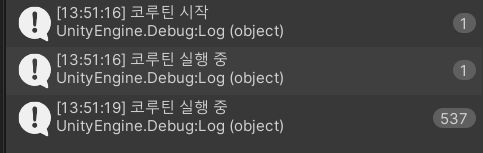
F10 버튼을 한번눌럿을때
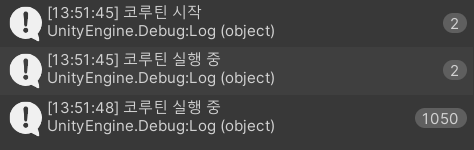
F10 버튼을 한번누르고 3초 후 다시한번 눌럿을때

유니티 C# 학습자