본 게시물은 CloudNet@팀 Gasida(서종호) 님이 진행하시는
AWS EKS Workshop Study 내용을 기반으로 작성되었습니다.
CA - Cluster Autoscaler
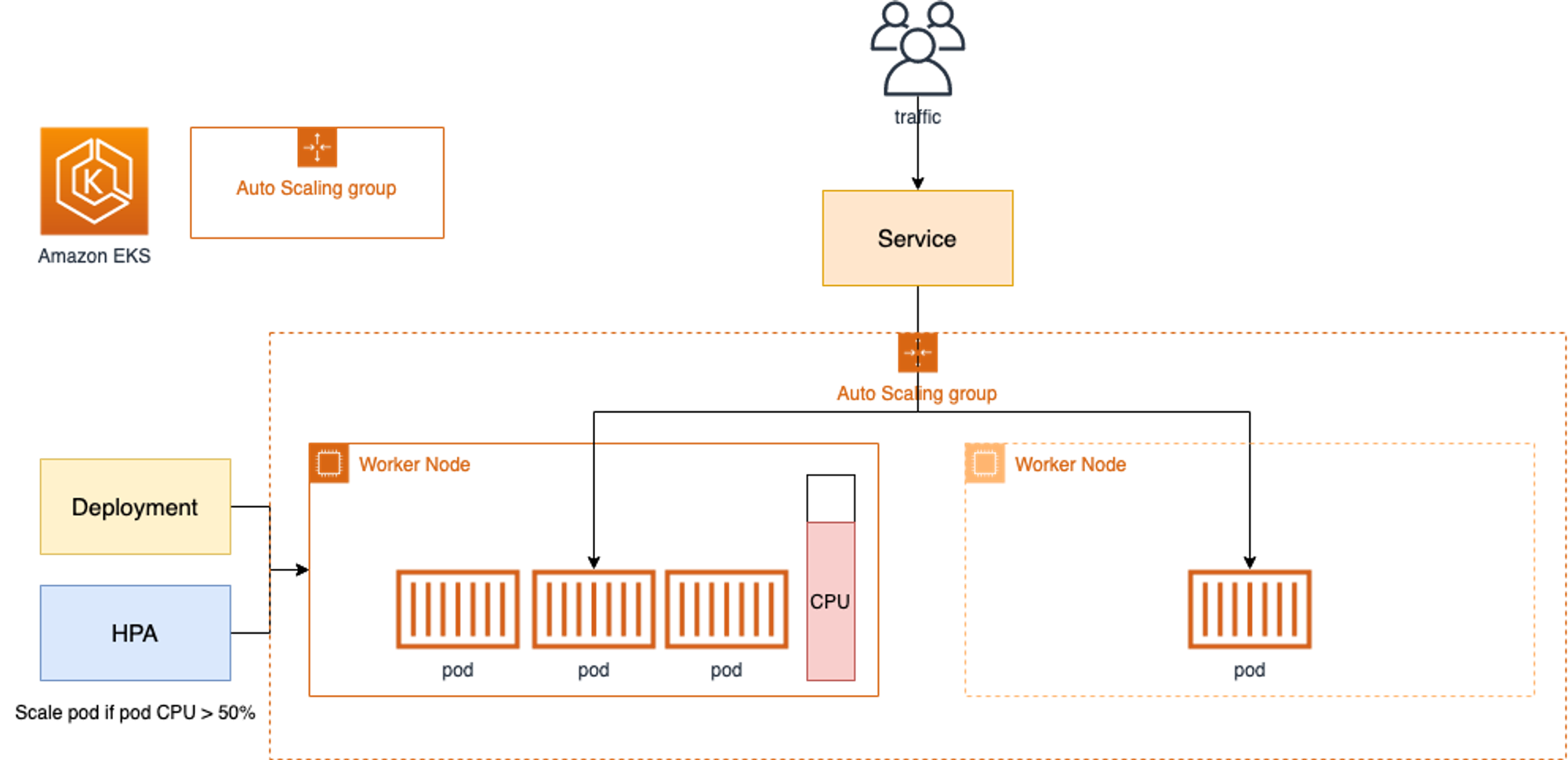
- Cluster Autoscale 동작을 하기 위한 cluster-autoscaler 파드(디플로이먼트)를 배치
- Cluster Autoscaler(CA)는 pending 상태인 파드가 존재할 경우, 워커 노드를 스케일 아웃
- 특정 시간을 간격으로 사용률을 확인하여 스케일 인/아웃을 수행하며, AWS에서는 Auto Scaling Group(ASG)을 사용하여 Cluster Autoscaler를 적용한다.
실습
설정 전 확인
# EKS 노드에 이미 아래 tag가 들어가 있음
# k8s.io/cluster-autoscaler/enabled : true
# k8s.io/cluster-autoscaler/myeks : owned
aws ec2 describe-instances  --filters Name=tag:Name,Values=$CLUSTER_NAME-ng1-Node --query "Reservations[*].Instances[*].Tags[*]" --output yaml | yh
...
- Key: k8s.io/cluster-autoscaler/myeks
      Value: owned
- Key: k8s.io/cluster-autoscaler/enabled
      Value: 'true'
...
Cluster Autoscaler(CA) 설정
# 현재 autoscaling(ASG) 정보 확인
# aws autoscaling describe-auto-scaling-groups --query "AutoScalingGroups[? Tags[? (Key=='eks:cluster-name') && Value=='클러스터이름']].[AutoScalingGroupName, MinSize, MaxSize,DesiredCapacity]" --output table
aws autoscaling describe-auto-scaling-groups \
    --query "AutoScalingGroups[? Tags[? (Key=='eks:cluster-name') && Value=='myeks']].[AutoScalingGroupName, MinSize, MaxSize,DesiredCapacity]" \
    --output table
-----------------------------------------------------------------
|                   DescribeAutoScalingGroups                   |
+------------------------------------------------+----+----+----+
|  eks-ng1-78c759e1-b9b0-1baf-207b-052f4b64dff1  |  3 |  3 |  3 |
+------------------------------------------------+----+----+----+

# MaxSize 6개로 수정
export ASG_NAME=$(aws autoscaling describe-auto-scaling-groups --query "AutoScalingGroups[? Tags[? (Key=='eks:cluster-name') && Value=='myeks']].AutoScalingGroupName" --output text)
aws autoscaling update-auto-scaling-group --auto-scaling-group-name ${ASG_NAME} --min-size 3 --desired-capacity 3 --max-size 6

# 확인
aws autoscaling describe-auto-scaling-groups --query "AutoScalingGroups[? Tags[? (Key=='eks:cluster-name') && Value=='myeks']].[AutoScalingGroupName, MinSize, MaxSize,DesiredCapacity]" --output table
-----------------------------------------------------------------
|                   DescribeAutoScalingGroups                   |
+------------------------------------------------+----+----+----+
|  eks-ng1-78c759e1-b9b0-1baf-207b-052f4b64dff1  |  3 |  6 |  3 |
+------------------------------------------------+----+----+----+

# 배포 : Deploy the Cluster Autoscaler (CA)
curl -s -O https://raw.githubusercontent.com/kubernetes/autoscaler/master/cluster-autoscaler/cloudprovider/aws/examples/cluster-autoscaler-autodiscover.yaml
sed -i "s/<YOUR CLUSTER NAME>/$CLUSTER_NAME/g" cluster-autoscaler-autodiscover.yaml
kubectl apply -f cluster-autoscaler-autodiscover.yaml

# 확인
kubectl get pod -n kube-system | grep cluster-autoscaler
kubectl describe deployments.apps -n kube-system cluster-autoscaler
kubectl describe deployments.apps -n kube-system cluster-autoscaler | grep node-group-auto-discovery
      --node-group-auto-discovery=asg:tag=k8s.io/cluster-autoscaler/enabled,k8s.io/cluster-autoscaler/myeks

# (옵션) cluster-autoscaler 파드가 동작하는 워커 노드가 퇴출(evict) 되지 않게 설정
kubectl -n kube-system annotate deployment.apps/cluster-autoscaler cluster-autoscaler.kubernetes.io/safe-to-evict="false"
Worker Node Scale Out
# 모니터링
kubectl get nodes -w
while true; do kubectl get node; echo "------------------------------" ; date ; sleep 1; done
while true; do aws ec2 describe-instances --query "Reservations[*].Instances[*].{PrivateIPAdd:PrivateIpAddress,InstanceName:Tags[?Key=='Name']|[0].Value,Status:State.Name}" --filters Name=instance-state-name,Values=running --output text ; echo "------------------------------"; date; sleep 1; done

# Deploy a Sample App
# We will deploy an sample nginx application as a ReplicaSet of 1 Pod
cat <<EoF> nginx.yaml
apiVersion: apps/v1
kind: Deployment
metadata:
  name: nginx-to-scaleout
spec:
  replicas: 1
  selector:
    matchLabels:
      app: nginx
  template:
    metadata:
      labels:
        service: nginx
        app: nginx
    spec:
      containers:
      - image: nginx
        name: nginx-to-scaleout
        resources:
          limits:
            cpu: 500m
            memory: 512Mi
          requests:
            cpu: 500m
            memory: 512Mi
EoF

kubectl apply -f nginx.yaml
kubectl get deployment/nginx-to-scaleout

# Scale our ReplicaSet
# Let’s scale out the replicaset to 15
kubectl scale --replicas=15 deployment/nginx-to-scaleout && date

# 확인
kubectl get pods -l app=nginx -o wide --watch
kubectl -n kube-system logs -f deployment/cluster-autoscaler

# 노드 자동 증가 확인
kubectl get nodes
NAME                                               STATUS   ROLES    AGE   VERSION
ip-192-168-1-45.ap-northeast-2.compute.internal    Ready    <none>   82m   v1.28.5-eks-5e0fdde
ip-192-168-1-90.ap-northeast-2.compute.internal    Ready    <none>   15s   v1.28.5-eks-5e0fdde
ip-192-168-2-248.ap-northeast-2.compute.internal   Ready    <none>   17s   v1.28.5-eks-5e0fdde
ip-192-168-2-75.ap-northeast-2.compute.internal    Ready    <none>   82m   v1.28.5-eks-5e0fdde
ip-192-168-3-126.ap-northeast-2.compute.internal   Ready    <none>   82m   v1.28.5-eks-5e0fdde
ip-192-168-3-28.ap-northeast-2.compute.internal    Ready    <none>   19s   v1.28.5-eks-5e0fdde


aws autoscaling describe-auto-scaling-groups \
    --query "AutoScalingGroups[? Tags[? (Key=='eks:cluster-name') && Value=='myeks']].[AutoScalingGroupName, MinSize, MaxSize,DesiredCapacity]" \
    --output table
-----------------------------------------------------------------
|                   DescribeAutoScalingGroups                   |
+------------------------------------------------+----+----+----+
|  eks-ng1-78c759e1-b9b0-1baf-207b-052f4b64dff1  |  3 |  6 |  6 |
+------------------------------------------------+----+----+----+


./eks-node-viewer --resources cpu,memory
혹은
./eks-node-viewer

# 디플로이먼트 삭제
kubectl delete -f nginx.yaml && date

# 노드 갯수 축소 : 기본은 10분 후 scale down 됨, 물론 아래 flag 로 시간 수정 가능 >> 그러니 디플로이먼트 삭제 후 10분 기다리고 나서 보자!
# By default, cluster autoscaler will wait 10 minutes between scale down operations,
# you can adjust this using the --scale-down-delay-after-add, --scale-down-delay-after-delete,
# and --scale-down-delay-after-failure flag.
# E.g. --scale-down-delay-after-add=5m to decrease the scale down delay to 5 minutes after a node has been added.

# 터미널1
watch -d kubectl get node

Every 2.0s: kubectl get node
NAME                                               STATUS   ROLES    AGE   VERSION
ip-192-168-1-45.ap-northeast-2.compute.internal    Ready    <none>   95m   v1.28.5-eks-5e0fdde
ip-192-168-2-75.ap-northeast-2.compute.internal    Ready    <none>   95m   v1.28.5-eks-5e0fdde
ip-192-168-3-126.ap-northeast-2.compute.internal   Ready    <none>   95m   v1.28.5-eks-5e0fdde
CA 문제점
- 하나의 자원에 대해 두군데 (AWS ASG vs AWS EKS)에서 각자의 방식으로 관리 ⇒ 관리 정보가 서로 동기화되지 않아 다양한 문제 발생
-
CA 문제점 : ASG에만 의존하고 노드 생성/삭제 등에 직접 관여 안함
-
EKS에서 노드를 삭제 해도 인스턴스는 삭제 안됨
-
노드 축소 될 때 특정 노드가 축소 되도록 하기 매우 어려움 : pod이 적은 노드 먼저 축소, 이미 드레인 된 노드 먼저 축소
-
특정 노드를 삭제 하면서 동시에 노드 개수를 줄이기 어려움 : 줄일때 삭제 정책 옵션이 다양하지 않음
- 정책 미지원 시 삭제 방식(예시) : 100대 중 미삭제 EC2 보호 설정 후 삭제 될 ec2의 파드를 이주 후 scaling 조절로 삭제 후 원복
-
특정 노드를 삭제하면서 동시에 노드 개수를 줄이기 어려움
-
폴링 방식이기에 너무 자주 확장 여유를 확인 하면 API 제한에 도달할 수 있음
-
스케일링 속도가 매우 느림
-
Cluster Autoscaler 는 쿠버네티스 클러스터 자체의 오토 스케일링을 의미하며, 수요에 따라 워커 노드를 자동으로 추가하는 기능
-
언뜻 보기에 클러스터 전체나 각 노드의 부하 평균이 높아졌을 때 확장으로 보인다 → 함정! 🚧
-
Pending 상태의 파드가 생기는 타이밍에 처음으로 Cluster Autoscaler 이 동작한다
- 즉, Request 와 Limits 를 적절하게 설정하지 않은 상태에서는 실제 노드의 부하 평균이 낮은 상황에서도 스케일 아웃이 되거나,
부하 평균이 높은 상황임에도 스케일 아웃이 되지 않는다!
- 즉, Request 와 Limits 를 적절하게 설정하지 않은 상태에서는 실제 노드의 부하 평균이 낮은 상황에서도 스케일 아웃이 되거나,
-
기본적으로 리소스에 의한 스케줄링은 Requests(최소)를 기준으로 이루어진다. 다시 말해 Requests 를 초과하여 할당한 경우에는 최소 리소스 요청만으로 리소스가 꽉 차 버려서 신규 노드를 추가해야만 한다. 이때 실제 컨테이너 프로세스가 사용하는 리소스 사용량은 고려되지 않는다.
-
반대로 Request 를 낮게 설정한 상태에서 Limit 차이가 나는 상황을 생각해보자. 각 컨테이너는 Limits 로 할당된 리소스를 최대로 사용한다. 그래서 실제 리소스 사용량이 높아졌더라도 Requests 합계로 보면 아직 스케줄링이 가능하기 때문에 클러스터가 스케일 아웃하지 않는 상황이 발생한다.
-
여기서는 CPU 리소스 할당을 예로 설명했지만 메모리의 경우도 마찬가지다.
-
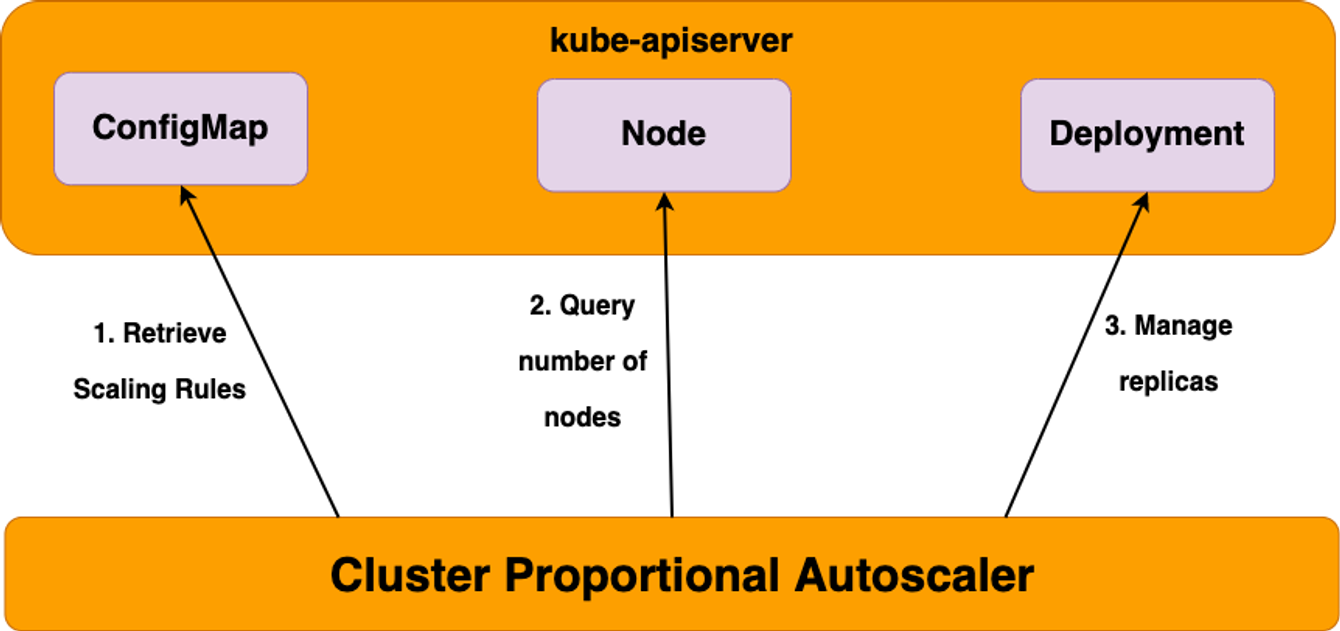
CPA - Cluster Proportional Autoscaler
노드 수 증가에 비례하여 성능 처리가 필요한 애플리케이션(컨테이너/파드)를 수평으로 자동 확장 ex. coredns
실습
#
helm repo add cluster-proportional-autoscaler https://kubernetes-sigs.github.io/cluster-proportional-autoscaler

# CPA규칙을 설정하고 helm차트를 릴리즈 필요
helm upgrade --install cluster-proportional-autoscaler cluster-proportional-autoscaler/cluster-proportional-autoscaler

# nginx 디플로이먼트 배포
cat <<EOT > cpa-nginx.yaml
apiVersion: apps/v1
kind: Deployment
metadata:
  name: nginx-deployment
spec:
  replicas: 1
  selector:
    matchLabels:
      app: nginx
  template:
    metadata:
      labels:
        app: nginx
    spec:
      containers:
      - name: nginx
        image: nginx:latest
        resources:
          limits:
            cpu: "100m"
            memory: "64Mi"
          requests:
            cpu: "100m"
            memory: "64Mi"
        ports:
        - containerPort: 80
EOT
kubectl apply -f cpa-nginx.yaml

# CPA 규칙 설정
cat <<EOF > cpa-values.yaml
config:
  ladder:
    nodesToReplicas:
    # node 개수, pod 개수
      - [1, 1]
      - [2, 2]
      - [3, 3]
      - [4, 3]
      - [5, 5]
options:
  namespace: default
  target: "deployment/nginx-deployment"
EOF
kubectl describe cm cluster-proportional-autoscaler

# 모니터링
watch -d kubectl get pod

# helm 업그레이드
helm upgrade --install cluster-proportional-autoscaler -f cpa-values.yaml cluster-proportional-autoscaler/cluster-proportional-autoscaler

# 노드 5개로 증가
export ASG_NAME=$(aws autoscaling describe-auto-scaling-groups --query "AutoScalingGroups[? Tags[? (Key=='eks:cluster-name') && Value=='myeks']].AutoScalingGroupName" --output text)
aws autoscaling update-auto-scaling-group --auto-scaling-group-name ${ASG_NAME} --min-size 5 --desired-capacity 5 --max-size 5
aws autoscaling describe-auto-scaling-groups --query "AutoScalingGroups[? Tags[? (Key=='eks:cluster-name') && Value=='myeks']].[AutoScalingGroupName, MinSize, MaxSize,DesiredCapacity]" --output table

Every 2.0s: kubectl get pod
NAME                                               READY   STATUS    RESTARTS   AGE
cluster-proportional-autoscaler-54fbf57d9c-7p6dn   1/1     Running   0          87s
nginx-deployment-788b6c585-gds25                   1/1     Running   0          14s
nginx-deployment-788b6c585-hlgbd                   1/1     Running   0          84s
nginx-deployment-788b6c585-kl9q5                   1/1     Running   0          14s
nginx-deployment-788b6c585-kttzp                   1/1     Running   0          2m
nginx-deployment-788b6c585-wg8c8                   1/1     Running   0          84s

# 노드 4개로 축소
aws autoscaling update-auto-scaling-group --auto-scaling-group-name ${ASG_NAME} --min-size 4 --desired-capacity 4 --max-size 4
aws autoscaling describe-auto-scaling-groups --query "AutoScalingGroups[? Tags[? (Key=='eks:cluster-name') && Value=='myeks']].[AutoScalingGroupName, MinSize, MaxSize,DesiredCapacity]" --output table

Every 2.0s: kubectl get pod
NAME                                               READY   STATUS    RESTARTS   AGE
cluster-proportional-autoscaler-54fbf57d9c-7p6dn   1/1     Running   0          3m23s
nginx-deployment-788b6c585-gprjq                   1/1     Running   0          69s
nginx-deployment-788b6c585-hlgbd                   1/1     Running   0          3m20s
nginx-deployment-788b6c585-wg8c8                   1/1     Running   0          3m20s
Karpenter : K8S Native AutoScaler
오픈소스 기반의 Node 관리 솔루션이며,
Kubernetes 환경에서 다양한 작업 부하에 대한 자동 스케일링을 제공한다.
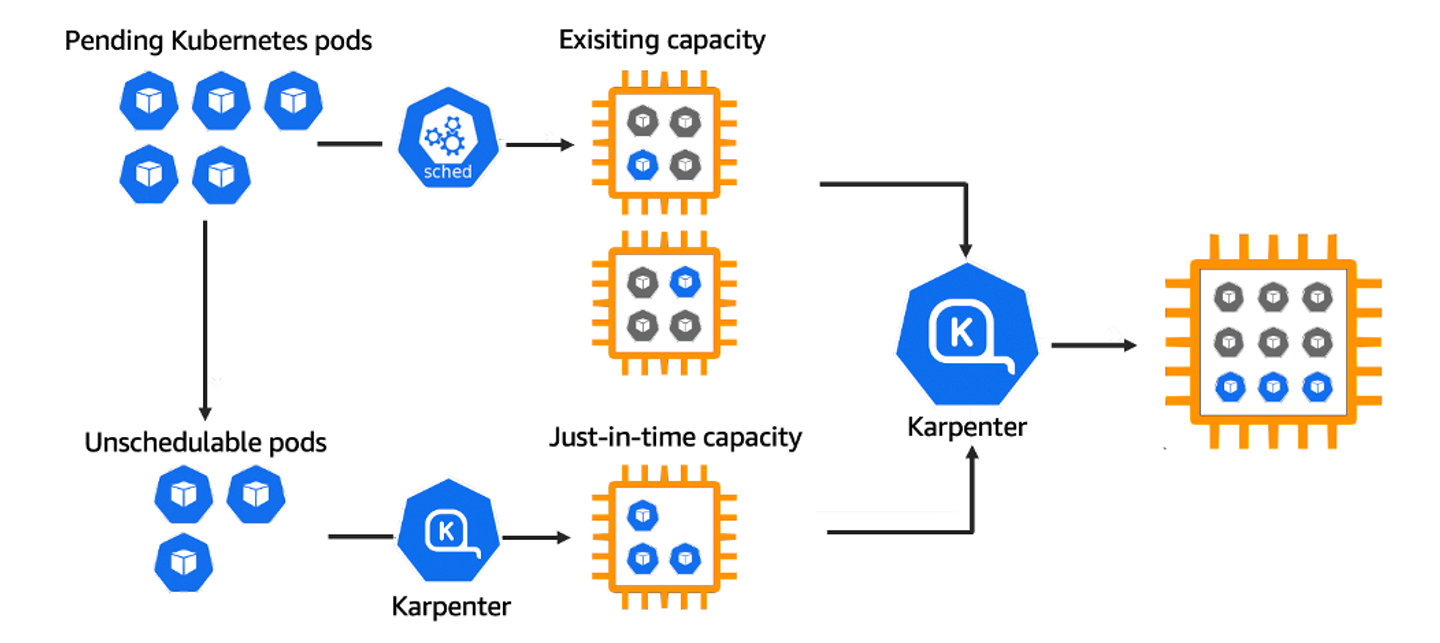
- k8s 스케줄러가 unschedulable로 표시한 pod를 모니터링
- pod에서 요청한 스케줄 제약(resource requests, nodeselectors, affinities, tolerations, and topology spread constraints) 을 평가
- pod의 요구사항을 충족하는 node를 프로비저닝
- 새로운 node에 pod를 스케줄링
- node가 더이상 필요하지 않을 시 삭제
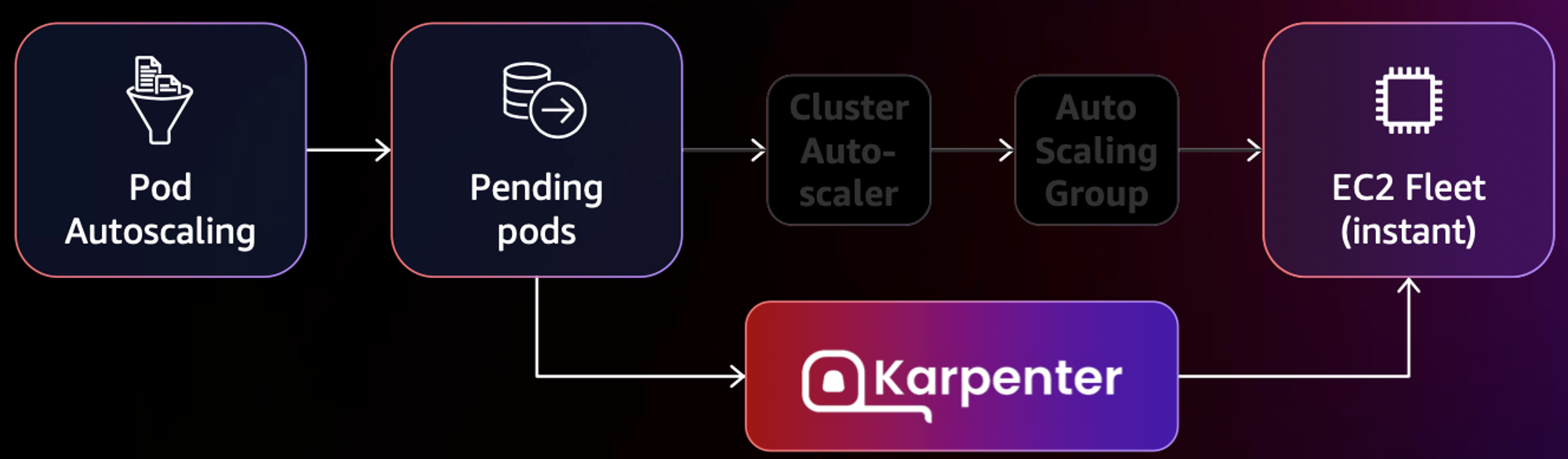
- 작동 방식
- 모니터링 → (스케줄링 안된 Pod 발견) → 스펙 평가 → 생성 ⇒ Provisioning
- 모니터링 → (비어있는 노드 발견) → 제거 ⇒ Deprovisioning
- Provisioner CRD : 시작 템플릿이 필요 없음 ← 시작 템플릿의 대부분의 설정 부분을 대신함
- 필수 : 보안그룹, 서브넷
- 리소스 찾는 방식 : 태그 기반 자동, 리소스 ID 직접 명시
- 인스턴스 타입은 가드레일 방식으로 선언 가능! : 스팟(우선) vs 온디멘드, 다양한 인스턴스 type 가능
- Pod에 적합한 인스턴스 중 가장 저렴한 인스턴스로 증설
- PV를 위해 단일 서브넷에 노드 그룹을 만들 필요 없음 → 자동으로 PV가 존재하는 서브넷에 노드 생성
- 사용 안 하는 노드를 자동으로 정리, 일정 기간이 지나면 노드를 자동으로 만료 시킬 수 있음
- ttlSecondsAfterEmpty : 노드에 데몬셋을 제외한 모든 Pod이 존재하지 않을 경우 해당 값 이후에 자동으로 정리됨
- ttlSecondsUntilExpired : 설정한 기간이 지난 노드는 자동으로 cordon, drain 처리가 되어 노드를 정리함
- 이때 노드가 주기적으로 정리되면 자연스럽게 기존에 여유가 있는 노드에 재배치 되기 때문에 좀 더 효율적으로 리소스 사용 가능 + 최신 AMI 사용 환경에 도움
- 노드가 제때 drain 되지 않는다면 비효율적으로 운영 될 수 있음
- 노드를 줄여도 다른 노드에 충분한 여유가 있다면 자동으로 정리
- 큰 노드 하나가 작은 노드 여러개 보다 비용이 저렴하다면 자동으로 합침 → 기존에 확장 속도가 느려서 보수적으로 운영 하던 부분을 해소
- 오버 프로비저닝 필요 : 카펜터를 쓰더라도 EC2가 뜨고 데몬셋이 모두 설치되는데 최소 1~2분이 소요 → 깡통 증설용 Pod를 만들어서 여유 공간을 강제로 확보!
- 오버 프로비저닝 Pod x KEDA : 대규모 증설이 예상 되는 경우 미리 준비
실습
Karpenter 설치
export CLUSTER_ENDPOINT="$(aws eks describe-cluster --name "${CLUSTER_NAME}" --query "cluster.endpoint" --output text)"
export KARPENTER_IAM_ROLE_ARN="arn:${AWS_PARTITION}:iam::${AWS_ACCOUNT_ID}:role/${CLUSTER_NAME}-karpenter"
echo "${CLUSTER_ENDPOINT} ${KARPENTER_IAM_ROLE_ARN}"

# EC2 Spot Fleet의 service-linked-role 생성 확인 : 만들어있는것을 확인하는 거라 아래 에러 출력이 정상!
# If the role has already been successfully created, you will see:
# An error occurred (InvalidInput) when calling the CreateServiceLinkedRole operation: Service role name AWSServiceRoleForEC2Spot has been taken in this account, please try a different suffix.
aws iam create-service-linked-role --aws-service-name spot.amazonaws.com || true

# docker logout : Logout of docker to perform an unauthenticated pull against the public ECR
docker logout public.ecr.aws

# helm registry logout
helm registry logout public.ecr.aws

# karpenter 설치
helm install karpenter oci://public.ecr.aws/karpenter/karpenter --version "${KARPENTER_VERSION}" --namespace "${KARPENTER_NAMESPACE}" --create-namespace \
  --set "serviceAccount.annotations.eks\.amazonaws\.com/role-arn=${KARPENTER_IAM_ROLE_ARN}" \
  --set "settings.clusterName=${CLUSTER_NAME}" \
  --set "settings.interruptionQueue=${CLUSTER_NAME}" \
  --set controller.resources.requests.cpu=1 \
  --set controller.resources.requests.memory=1Gi \
  --set controller.resources.limits.cpu=1 \
  --set controller.resources.limits.memory=1Gi \
  --wait

# 확인
kubectl get-all -n $KARPENTER_NAMESPACE
kubectl get all -n $KARPENTER_NAMESPACE
kubectl get crd | grep karpenter

# APi 변경
v1alpha5/Provisioner → v1beta1/NodePool
v1alpha1/AWSNodeTemplate → v1beta1/EC2NodeClass
v1alpha5/Machine → v1beta1/NodeClaim
NodePool 생성
cat <<EOF | envsubst | kubectl apply -f -
apiVersion: karpenter.sh/v1beta1
kind: NodePool
metadata:
  name: default
spec:
  template:
    spec:
      requirements:
        - key: kubernetes.io/arch
          operator: In
          values: ["amd64"]
        - key: kubernetes.io/os
          operator: In
          values: ["linux"]
        - key: karpenter.sh/capacity-type
          operator: In
          values: ["spot"]
        - key: karpenter.k8s.aws/instance-category
          operator: In
          values: ["c", "m", "r"]
        - key: karpenter.k8s.aws/instance-generation
          operator: Gt
          values: ["2"]
      nodeClassRef:
        apiVersion: karpenter.k8s.aws/v1beta1
        kind: EC2NodeClass
        name: default
  limits:
    cpu: 1000
  disruption:
    consolidationPolicy: WhenUnderutilized
    expireAfter: 720h # 30 * 24h = 720h
---
apiVersion: karpenter.k8s.aws/v1beta1
kind: EC2NodeClass
metadata:
  name: default
spec:
  amiFamily: AL2 # Amazon Linux 2
  role: "KarpenterNodeRole-${CLUSTER_NAME}" # replace with your cluster name
  subnetSelectorTerms:
    - tags:
        karpenter.sh/discovery: "${CLUSTER_NAME}" # replace with your cluster name
  securityGroupSelectorTerms:
    - tags:
        karpenter.sh/discovery: "${CLUSTER_NAME}" # replace with your cluster name
  amiSelectorTerms:
    - id: "${ARM_AMI_ID}"
    - id: "${AMD_AMI_ID}"
#   - id: "${GPU_AMI_ID}" # <- GPU Optimized AMD AMI
#   - name: "amazon-eks-node-${K8S_VERSION}-*" # <- automatically upgrade when a new AL2 EKS Optimized AMI is released. This is unsafe for production workloads. Validate AMIs in lower environments before deploying them to production.
EOF

# 확인
kubectl get nodepool,ec2nodeclass
NAME                            NODECLASS
nodepool.karpenter.sh/default   default

NAME                                     AGE
ec2nodeclass.karpenter.k8s.aws/default   6s
Scale Up deployment
# pause 파드 1개에 CPU 1개 최소 보장 할당
cat <<EOF | kubectl apply -f -
apiVersion: apps/v1
kind: Deployment
metadata:
  name: inflate
spec:
  replicas: 0
  selector:
    matchLabels:
      app: inflate
  template:
    metadata:
      labels:
        app: inflate
    spec:
      terminationGracePeriodSeconds: 0
      containers:
        - name: inflate
          image: public.ecr.aws/eks-distro/kubernetes/pause:3.7
          resources:
            requests:
              cpu: 1
EOF

# Scale up
kubectl get pod
kubectl scale deployment inflate --replicas 5
kubectl logs -f -n "${KARPENTER_NAMESPACE}" -l app.kubernetes.io/name=karpenter -c controller
kubectl logs -f -n "${KARPENTER_NAMESPACE}" -l app.kubernetes.io/name=karpenter -c controller | jq '.'

{
  "level": "INFO",
  "time": "2024-04-06T17:39:31.536Z",
  "logger": "controller",
  "message": "webhook disabled",
  "commit": "8b2d1d7"
}
{
  "level": "INFO",
  "time": "2024-04-06T17:39:31.537Z",
  "logger": "controller.controller-runtime.metrics",
  "message": "Starting metrics server",
  "commit": "8b2d1d7"
}
{
  "level": "INFO",
  "time": "2024-04-06T17:39:31.537Z",
  "logger": "controller.controller-runtime.metrics",
  "message": "Serving metrics server",
  "commit": "8b2d1d7",
  "bindAddress": ":8000",
  "secure": false
}
{
  "level": "INFO",
  "time": "2024-04-06T17:39:31.537Z",
  "logger": "controller",
  "message": "starting server",
  "commit": "8b2d1d7",
  "kind": "health probe",
  "addr": "[::]:8081"
}
{
  "level": "INFO",
  "time": "2024-04-06T17:39:31.802Z",
  "logger": "controller",
  "message": "Starting workers",
  "commit": "8b2d1d7",
  "controller": "nodeclaim.disruption",
  "controllerGroup": "karpenter.sh",
  "controllerKind": "NodeClaim",
  "worker count": 10
}
{
  "level": "INFO",
  "time": "2024-04-06T17:39:31.638Z",
  "logger": "controller",
  "message": "attempting to acquire leader lease kube-system/karpenter-leader-election...",
  "commit": "8b2d1d7"
}
{
  "level": "INFO",
  "time": "2024-04-06T17:41:07.518Z",
  "logger": "controller.provisioner",
  "message": "found provisionable pod(s)",
  "commit": "8b2d1d7",
  "pods": "default/inflate-75d744d4c6-zx2pl, default/inflate-75d744d4c6-6b5cz, default/inflate-75d744d4c6-xmqjf, default/inflate-75d744d4c6-qvxkh, default/inflate-75d744d4c6-jwfnm",
  "duration": "44.616748ms"
}
{
  "level": "INFO",
  "time": "2024-04-06T17:41:07.518Z",
  "logger": "controller.provisioner",
  "message": "computed new nodeclaim(s) to fit pod(s)",
  "commit": "8b2d1d7",
  "nodeclaims": 1,
  "pods": 5
}
{
  "level": "INFO",
  "time": "2024-04-06T17:41:07.536Z",
  "logger": "controller.provisioner",
  "message": "created nodeclaim",
  "commit": "8b2d1d7",
  "nodepool": "default",
  "nodeclaim": "default-7smzd",
  "requests": {
    "cpu": "5150m",
    "pods": "7"
  },
  "instance-types": "c4.2xlarge, c4.4xlarge, c5.2xlarge, c5.4xlarge, c5a.2xlarge and 55 other(s)"
}
{
  "level": "INFO",
  "time": "2024-04-06T17:41:10.339Z",
  "logger": "controller.nodeclaim.lifecycle",
  "message": "launched nodeclaim",
  "commit": "8b2d1d7",
  "nodeclaim": "default-7smzd",
  "provider-id": "aws:///ap-northeast-2d/i-03126916698318473",
  "instance-type": "r5d.2xlarge",
  "zone": "ap-northeast-2d",
  "capacity-type": "spot",
  "allocatable": {
    "cpu": "7910m",
    "ephemeral-storage": "17Gi",
    "memory": "59627Mi",
    "pods": "58",
    "vpc.amazonaws.com/pod-eni": "38"
  }
}
{
  "level": "INFO",
  "time": "2024-04-06T17:41:17.482Z",
  "logger": "controller.provisioner",
  "message": "found provisionable pod(s)",
  "commit": "8b2d1d7",
  "pods": "default/inflate-75d744d4c6-zx2pl, default/inflate-75d744d4c6-6b5cz, default/inflate-75d744d4c6-xmqjf, default/inflate-75d744d4c6-qvxkh, default/inflate-75d744d4c6-jwfnm",
  "duration": "8.131984ms"
}
{
  "level": "INFO",
  "time": "2024-04-06T17:41:27.483Z",
  "logger": "controller.provisioner",
  "message": "found provisionable pod(s)",
  "commit": "8b2d1d7",
  "pods": "default/inflate-75d744d4c6-zx2pl, default/inflate-75d744d4c6-6b5cz, default/inflate-75d744d4c6-xmqjf, default/inflate-75d744d4c6-qvxkh, default/inflate-75d744d4c6-jwfnm",
  "duration": "8.021636ms"
}
{
  "level": "INFO",
  "time": "2024-04-06T17:41:33.667Z",
  "logger": "controller.nodeclaim.lifecycle",
  "message": "registered nodeclaim",
  "commit": "8b2d1d7",
  "nodeclaim": "default-7smzd",
  "provider-id": "aws:///ap-northeast-2d/i-03126916698318473",
  "node": "ip-192-168-151-217.ap-northeast-2.compute.internal"
}
{
  "level": "INFO",
  "time": "2024-04-06T17:41:37.483Z",
  "logger": "controller.provisioner",
  "message": "found provisionable pod(s)",
  "commit": "8b2d1d7",
  "pods": "default/inflate-75d744d4c6-zx2pl, default/inflate-75d744d4c6-6b5cz, default/inflate-75d744d4c6-xmqjf, default/inflate-75d744d4c6-qvxkh, default/inflate-75d744d4c6-jwfnm",
  "duration": "8.596517ms"
}
{
  "level": "INFO",
  "time": "2024-04-06T17:41:45.182Z",
  "logger": "controller.nodeclaim.lifecycle",
  "message": "initialized nodeclaim",
  "commit": "8b2d1d7",
  "nodeclaim": "default-7smzd",
  "provider-id": "aws:///ap-northeast-2d/i-03126916698318473",
  "node": "ip-192-168-151-217.ap-northeast-2.compute.internal",
  "allocatable": {
    "cpu": "7910m",
    "ephemeral-storage": "18242267924",
    "hugepages-1Gi": "0",
    "hugepages-2Mi": "0",
    "memory": "64006592Ki",
    "pods": "58"
  }
}
Scale Down deployment
# Now, delete the deployment. After a short amount of time, Karpenter should terminate the empty nodes due to consolidation.
kubectl delete deployment inflate && date
kubectl logs -f -n "${KARPENTER_NAMESPACE}" -l app.kubernetes.io/name=karpenter -c controller

{
  "level": "INFO",
  "time": "2024-04-06T17:44:59.097Z",
  "logger": "controller.disruption",
  "message": "disrupting via consolidation delete, terminating 1 nodes (0 pods) ip-192-168-151-217.ap-northeast-2.compute.internal/r5d.2xlarge/spot",
  "commit": "8b2d1d7",
  "command-id": "a00800d0-9a3e-40c9-8927-13cffb047d90"
}
{
  "level": "INFO",
  "time": "2024-04-06T17:44:59.812Z",
  "logger": "controller.disruption.queue",
  "message": "command succeeded",
  "commit": "8b2d1d7",
  "command-id": "a00800d0-9a3e-40c9-8927-13cffb047d90"
}
{
  "level": "INFO",
  "time": "2024-04-06T17:44:59.840Z",
  "logger": "controller.node.termination",
  "message": "tainted node",
  "commit": "8b2d1d7",
  "node": "ip-192-168-151-217.ap-northeast-2.compute.internal"
}
{
  "level": "INFO",
  "time": "2024-04-06T17:45:00.266Z",
  "logger": "controller.node.termination",
  "message": "deleted node",
  "commit": "8b2d1d7",
  "node": "ip-192-168-151-217.ap-northeast-2.compute.internal"
}
{
  "level": "INFO",
  "time": "2024-04-06T17:45:00.658Z",
  "logger": "controller.nodeclaim.termination",
  "message": "deleted nodeclaim",
  "commit": "8b2d1d7",
  "nodeclaim": "default-7smzd",
  "node": "ip-192-168-151-217.ap-northeast-2.compute.internal",
  "provider-id": "aws:///ap-northeast-2d/i-03126916698318473"
}