MySQL 이중화
1. MySQL 이중화란 무엇인가?
MySQL 이중화 = Replication
- Primary(Master) : 쓰기(INSERT/UPDATE/DELETE)
- Replica(Slave) : 읽기(SELECT), 백업, 장애 대비
Binary Log(binlog) 기반으로 데이터 변경사항 전달
핵심 포인트
- 고가용성(HA) ≠ 자동 장애조치
- 부하 분산, 데이터 보호, 읽기 확장
2. MySQL 이중화 기본 구조
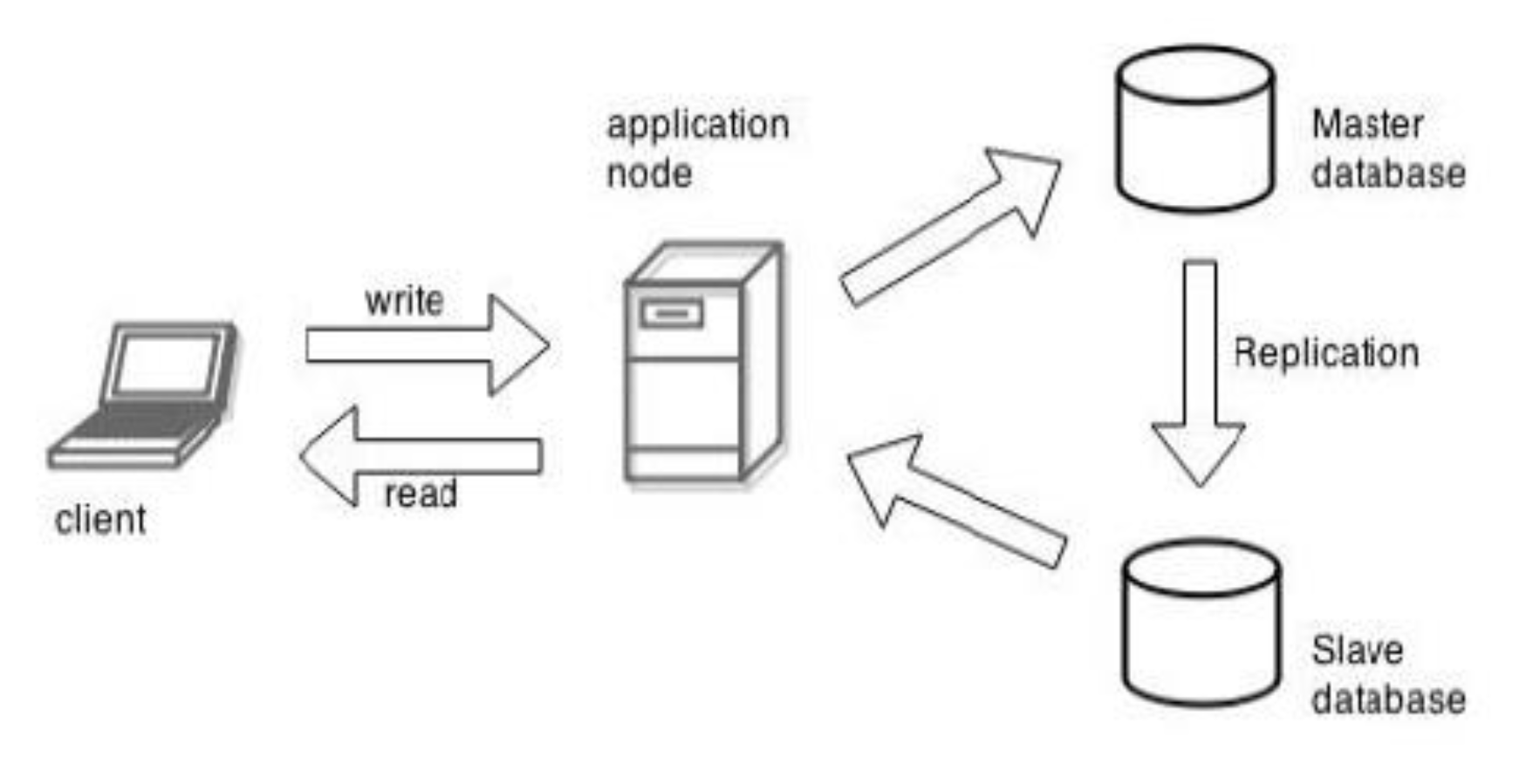
구조 요약
[ Client ]
    |
    v
[ Primary ]
  - binlog 기록
    |
    v
[ Replica ]
  - relay log
  - read only
3. 이중화 방식 종류
① Single Primary – Replica (가장 기본)
- 실습용 / 교육용 최적
- 대부분의 회사에서 기본으로 사용
② Primary – Multiple Replicas
- 읽기 부하 분산
- 리포트/백업 전용 Replica 분리
③ Dual Primary (Master–Master)
- 주의 필요
- 충돌 관리 필요 (
auto_increment_offset) - 실무에서는 제한적으로 사용
4. 실습 환경
VM 구성 예시
| 서버 | 역할 | IP |
|---|---|---|
| ubuntu-svr1 | Primary | 192.168.80.110 |
| ubuntu-svr2 | Replica | 192.168.80.120 |
- OS: Ubuntu 22.04
- MySQL 8.0
- 포트: 3306
ubuntu-svr2 설정
1. ubuntu-svr2에 mysql-server 설치
sudo apt update
sudo apt install mysql-server
2. 외부에서 접속이 가능하도록 설정 변경
sudo vi /etc/mysql/mysql.conf.d/mysqld.cnf
# bind-address = 127.0.0.1  -> 0.0.0.0 로 변경(또는 주석)
sudo systemctl restart mysql
5. Primary 서버 설정 (실습)
① MySQL 설정 수정
'바이너리 로그(Binary Log)'를 활성화하고, '복제(Replication)' 기능을 사용하기 위한 설정
sudo vi /etc/mysql/mysql.conf.d/mysqld.cnf[mysqld]
server-id=1
log-bin=/var/log/mysql/mysql-bin.log
binlog_format=ROWsudo systemctl restart mysql② Replication 전용 계정 생성
CREATE USER 'repl'@'%' IDENTIFIED BY 'repl1234';
GRANT REPLICATION SLAVE ON *.* TO 'repl'@'%';
FLUSH PRIVILEGES;
③ 현재 binlog 위치 확인 ⭐
SHOW MASTER STATUS;출력 예시:
File: mysql-bin.000001
Position: 1306
이 값이 Replica 서버 설정에 필요
④ Replica 전용 계정의 인증 방식과 비밀번호 설정(plugin) 변경
caching_sha2_password 방식 -> mysql_native_password 방식
SELECT user, host, plugin
FROM mysql.user
WHERE user='repl';

-- Primary
ALTER USER 'repl'@'%' IDENTIFIED WITH mysql_native_password BY 'repl1234';
FLUSH PRIVILEGES;
6. Replica 서버 설정 (실습)
① MySQL 설정
sudo vi /etc/mysql/mysql.conf.d/mysqld.cnf[mysqld]
server-id=2
relay-log=relay-bin
read_only=ONsudo systemctl restart mysql② Replication 연결 설정
sudo mysqlCHANGE MASTER TO
MASTER_HOST='192.168.80.110',
MASTER_USER='repl',
MASTER_PASSWORD='repl1234',
MASTER_LOG_FILE='mysql-bin.000001',
MASTER_LOG_POS=1306;
Primary server의binlog파일 위치와 일치 시켜야함!!
START REPLICA;③ 상태 확인 (중요 ⭐)
SHOW REPLICA STATUS\G
아래 두 값이 Yes여야 정상
Replica_IO_Running: Yes
Replica_SQL_Running: Yes
7. 동작 검증 실습
Primary에서 데이터 생성
CREATE DATABASE repl_test;
USE repl_test;

CREATE TABLE users (
  id INT PRIMARY KEY AUTO_INCREMENT,
  name VARCHAR(50)
);

INSERT INTO users (name) VALUES ('Alice'), ('Bob');
Replica에서 확인
USE repl_test;
SELECT * FROM users;
- 자동으로 데이터 동기화됨
8. 장애 상황 시나리오
❗ Primary 장애 발생 시
- Replica는 자동 승격 안 됨
- 수동 조치 필요 : 쓰기 가능한 상태로 변경 후 REPLICA 동작을 멈추고 Primary 설정을 해야함.
STOP SLAVE;
SET GLOBAL read_only = OFF;
-
이게 MySQL Replication의 한계
-
REPLICA 동작 중지 및 REPLICA 설정 초기화
REPLICA STOP;
RESET REPLICA ALL;
9. 실무에서는 이렇게 확장된다
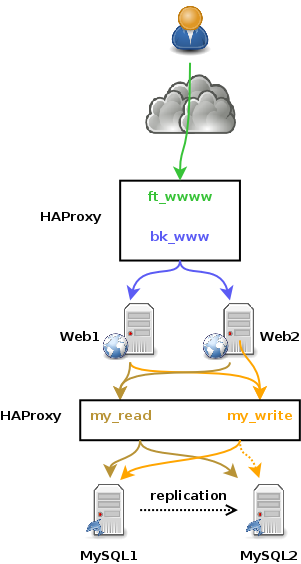
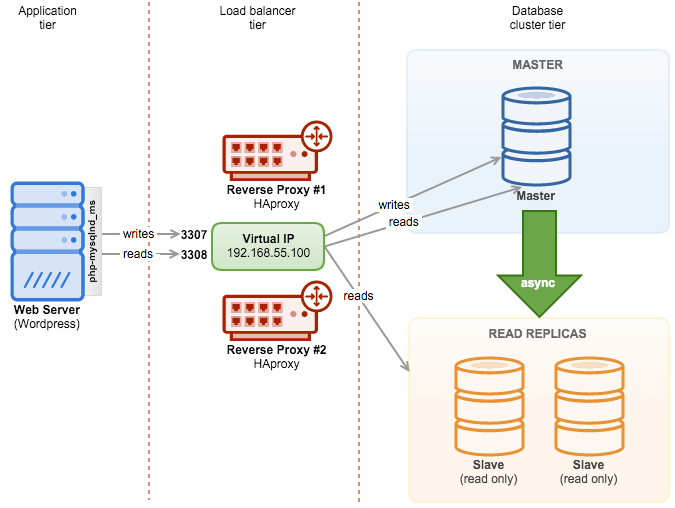
실무 구성
Client
  |
[ HAProxy ]
  ├── Write → Primary
  └── Read  → Replicas
PostgreSQL 이중화
1. PostgreSQL 이중화 개요
PostgreSQL 이중화의 목적은 MySQL과 동일.
- 고가용성(HA) : Primary 장애 시 빠른 복구
- 읽기 부하 분산 : Read Replica 활용
- 백업/DR : 운영 데이터 보호
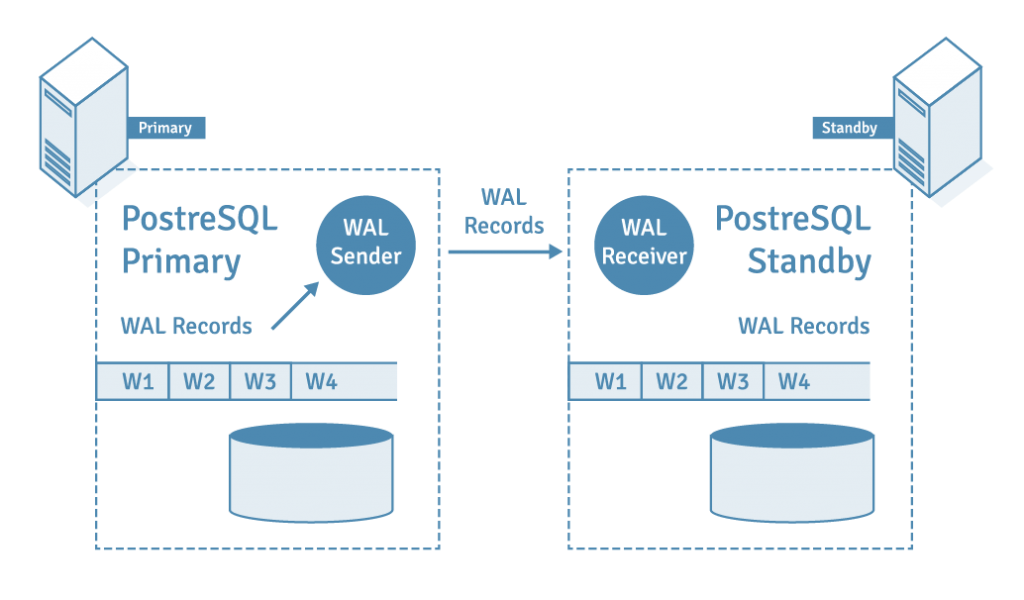
PostgreSQL의 핵심 특징은 WAL (Write-Ahead Log) 기반 복제.
PostgreSQL의
Standby 서버역시 Read Only이다.
2. PostgreSQL 이중화 방식 한눈에 정리
| 구분 | 설명 |
|---|---|
| Streaming Replication | WAL을 실시간으로 전송 |
| Logical Replication | 테이블 단위 논리 복제 |
| File-based Replication | WAL 아카이빙 |
| 동기 / 비동기 | Commit 시점 제어, 비동기는 Primary가 Standby commit유무와 상관없이 commit |
3. PostgreSQL Streaming Replication
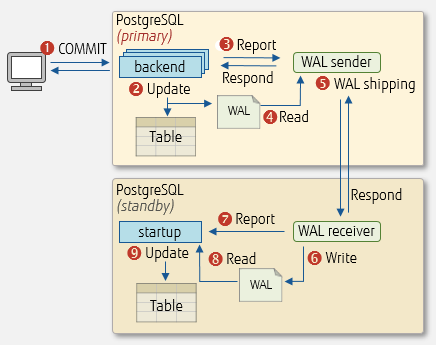
구조
[ Primary ]
   │  WAL
   ▼
[ Standby ]
- Primary에서 트랜잭션 발생
- WAL 로그 생성
- Standby가 WAL을 받아 동일한 상태로 재현
📌 MySQL Binary Log 복제와 개념적으로 동일
4. 동기(Synchronous) vs 비동기(Asynchronous)
1) 비동기 (기본값)
- Primary는 Standby 응답을 기다리지 않음
- 성능 우수
- 장애 시 일부 데이터 유실 가능
- 비동기 설정
# postgresql.conf (Primary)
# synchronous_commit = on
or
synchronous_commit = off
2) 동기
- Standby가 WAL 수신 완료해야 commit 성공
- 데이터 정합성 ↑
- 성능 ↓
- 동기 설정
# postgresql.conf (Primary)
synchronous_commit = on
synchronous_standby_names = 'standby1'
5. 기본 실습 시나리오 (Ubuntu 2대 기준)
-- (192.168.80.130) --
node1 : Primary
-- (192.168.80.110) --
node2 : Standby
6. 실습 ① Primary 서버 설정
1) PostgreSQL 설치
sudo apt update
sudo apt install -y postgresql
2) WAL 복제 설정
# /etc/postgresql/14/main/postgresql.conf
listen_addresses = '*'

wal_level = replica
max_wal_senders = 10
wal_keep_size = 64MB
3) 복제 계정 생성
sudo -iu postgres psql
CREATE ROLE repl WITH REPLICATION LOGIN PASSWORD 'replpass';
4) 접근 허용
# /etc/postgresql/14/main/pg_hba.conf
host replication repl 192.168.80.0/24 scram-sha-256
sudo systemctl restart postgresql7. 실습 ② Standby 서버 구성
1) PostgreSQL 중지
sudo systemctl stop postgresql
2) 기존 데이터 디렉토리 제거
sudo rm -rf /var/lib/postgresql/14/main/*
3) basebackup 수행
sudo -i
pg_basebackup \
  -h 192.168.80.130 \
  -D /var/lib/postgresql/14/main \
  -U repl \
  -Fp -Xs -P -R
📌 -R 옵션 → 자동으로 standby.signal 생성
4) PostgreSQL 시작
chown -R postgres:postgres /var/lib/postgresql/14/main/*
/var/lib/postgresql/14/main/디렉토리의 모든 파일/디렉토리의 소유자/소유그룹이 postgres로 되어있어야 한다.
sudo systemctl start postgresql8. 복제 상태 확인
Primary에서
SELECT client_addr, state, sync_state
FROM pg_stat_replication;

Standby에서
SELECT pg_is_in_recovery();
true→ Standby 정상
9. 장애 전환(Failover) 개념 정리
수동 승격 (standby -> primary)
sudo pg_ctlcluster 14 main promote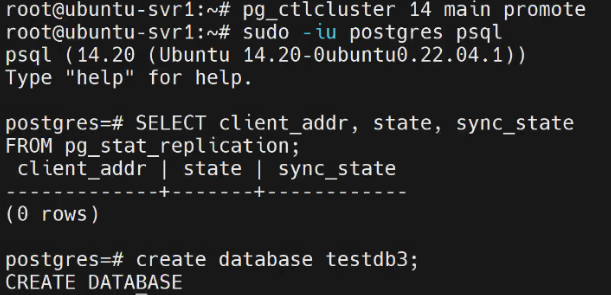
Primary로 승격이 되면쓰기가 가능해진다.
자동화 도구
- Patroni
- repmgr
- Pacemaker
10. MySQL 이중화와 비교
| 항목 | MySQL | PostgreSQL |
|---|---|---|
| 로그 | Binary Log (bin) | WAL |
| 기본 복제 | 비동기 | 비동기 |
| 동기 복제 | 제한적 | 내장 지원 |
| Replica 읽기 | 가능 | 가능 |
| 승격 | RESET SLAVE | pg_ctl promote |

Front-end Developer, Cloud Engineer