Frontend 대시보드 + MySQL · Redis · MongoDB · PostgreSQL (3대 VM)
0) 실습 목표
이 실습을 끝내면 아래를 “체감”한다.
- Redis: 대시보드가 매번 DB를 뒤지지 않고 실시간 최신값을 빠르게 가져온다.
- MongoDB: 시간에 따라 쌓이는 시계열 로그(이력)를 유연하게 저장한다.
- MySQL: 변경 빈도가 낮은 설정/임계값을 정합성 있게 관리한다.
- PostgreSQL(JSONB): 알람 이벤트를 스키마 변경 없이(필드 늘려도) 저장/검색/분석한다.
- 프론트는 하나의 화면에서 위 4개 DB의 결과를 종합해서 보여준다.
1) 전체 구조
1-1) VM 역할
| VM | IP | 역할 |
|---|---|---|
| VM1 | 192.168.80.110 | Monitoring API(Node.js) + Frontend Dashboard |
| VM2 | 192.168.80.120 | MySQL(설정/임계값) + Redis(실시간 최신값 캐시) |
| VM3 | 192.168.80.130 | MongoDB(이력 저장) + PostgreSQL(JSONB 알람 이벤트) |
1-2) 데이터 흐름
- VM1이 5초마다 CPU/메모리를 수집
- 최신값은 Redis에 저장(캐시, TTL 적용)
- 이력은 MongoDB에 저장(차트/추세)
- 임계값은 MySQL에서 읽어옴(설정값)
- 임계값 초과 시 알람을 PostgreSQL(JSONB)로 저장
- 프론트는 VM1 API에서 종합 데이터를 받아 UI로 표현
1-3) 전체 시스템 관계도
전체 흐름 한 줄 요약
Frontend(브라우저) 는 상태를 “보여주기만” 하고, Node 서버(VM1) 는 각 DB를 연결·중계하며,
DB들은 각자 다른 성격의 데이터를 맡는다.
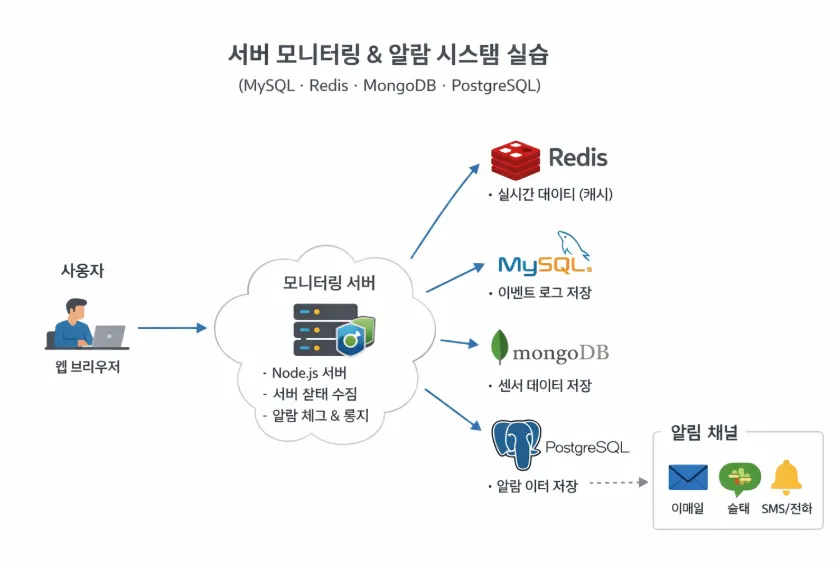
Frontend + Backend + DB 역할 요약 표
| 구성요소 | 역할 | 판단 여부 |
|---|---|---|
| Frontend | 조회/입력 UI | ❌ |
| Node(API) | 판단/중계 | ⭕ |
| MySQL | 자산 정보 | ❌ |
| Redis | 현재 상태 | ❌ |
| MongoDB | 정책/설정 | ❌ |
| PostgreSQL | 이력/분석 | ❌ |
👉 판단은 Node 한 곳에서만
2) 사전 준비 (3대 VM 공통)
2-1) /etc/hosts 등록(권장)
각 VM에서 실행:
sudo tee -a /etc/hosts >/dev/null <<'EOF'
192.168.80.110 vm1-app
192.168.80.120 vm2-data
192.168.80.130 vm3-log
EOF
2-2) 방화벽(UFW) 확인
각 VM에서:
sudo ufw status- inactive면 그대로 진행
- active면 각 VM 단계에서 포트 허용 명령을 수행
3) VM2 구축 (192.168.80.120) — MySQL + Redis
3-1) 설치
sudo apt update
sudo apt install -y mysql-server redis-server
sudo systemctl enable --now mysql
sudo systemctl enable --now redis-server
3-2) MySQL 외부 접속 허용(실습용)
MySQL이 외부에서 접속 가능하도록 bind-address 수정:
sudo sed -i 's/^bind-address.*/bind-address = 0.0.0.0/' /etc/mysql/mysql.conf.d/mysqld.cnf
sudo systemctl restart mysql
sudo ss -lntp | grep 3306
3-3) Redis 외부 접속 허용(실습용)
sudo sed -i "s/^bind .*/bind 0.0.0.0 ::1/" /etc/redis/redis.conf
sudo sed -i "s/^protected-mode yes/protected-mode no/" /etc/redis/redis.conf
sudo systemctl restart redis-server
sudo ss -lntp | grep 6379
3-4) MySQL 계정/DB/테이블 생성
sudo mysql <<'SQL'
CREATE DATABASE IF NOT EXISTS monitoring DEFAULT CHARACTER SET utf8mb4;

CREATE USER IF NOT EXISTS 'mon'@'192.168.80.%' IDENTIFIED BY 'monpass';
GRANT ALL PRIVILEGES ON monitoring.* TO 'mon'@'192.168.80.%';
FLUSH PRIVILEGES;

USE monitoring;

-- 임계값(설정) 테이블
CREATE TABLE IF NOT EXISTS thresholds (
  metric VARCHAR(50) PRIMARY KEY,
  warning INT NOT NULL,
  critical INT NOT NULL
);

-- 기본 임계값
INSERT INTO thresholds(metric, warning, critical)
VALUES
('cpu', 70, 90),
('memory', 75, 90)
ON DUPLICATE KEY UPDATE
warning=VALUES(warning),
critical=VALUES(critical);
SQL
3-5) (UFW active 시) 포트 허용
sudo ufw allow 3306/tcp
sudo ufw allow 6379/tcp
4) VM3 구축 (192.168.80.130) — MongoDB + PostgreSQL
4-1). MongoDB 공식 GPG 키 등록 (정석)
필수 패키지 설치
sudo apt update
sudo apt install -y gnupg curl
MongoDB 공식 GPG 키 등록
curl -fsSL https://www.mongodb.org/static/pgp/server-8.0.asc \
| sudo gpg --dearmor -o /usr/share/keyrings/mongodb-server-8.0.gpg
확인
ls -l /usr/share/keyrings/mongodb-server-8.0.gpg
➡️ 파일이 존재하면 정상
4-2). MongoDB APT 저장소 등록 (signed-by 필수)
echo "deb [ arch=amd64,arm64 signed-by=/usr/share/keyrings/mongodb-server-8.0.gpg ] \
https://repo.mongodb.org/apt/ubuntu jammy/mongodb-org/8.0 multiverse" \
| sudo tee /etc/apt/sources.list.d/mongodb-org-8.0.list
4-3). MongoDB 설치
sudo apt update
sudo apt install -y mongodb-org
설치 확인
mongod --version
- 버전 정보 출력되면 성공
4-5). MongoDB 서비스 기동
sudo systemctl enable --now mongod
systemctl status mongod --no-pager
4-5-1) MongoDB 외부 접근 허용(필요 시)
Mongo 서비스가 /etc/mongod.conf를 쓰는 환경이면:
sudo sed -i 's/bindIp.*/bindIp: 0.0.0.0/' /etc/mongod.conf
sudo systemctl restart mongodb
포트 확인:
sudo ss -lntp | grep 270174-6) MongoDB 인덱스 생성
VM3에서:
mongosh <<'JS'
use monitoring
db.metrics.createIndex({ timestamp: -1 })
JS
4-7) PostgreSQL 설치/기동
sudo apt install -y postgresql
sudo systemctl enable --now postgresql
sudo ss -lntp | grep 5432
4-8) PostgreSQL 외부 접근 허용(실습용)
4-8-1) listen_addresses 변경
sudo sed -i "s/^#listen_addresses =.*/listen_addresses = '*'/" /etc/postgresql/*/main/postgresql.conf4-8-2) pg_hba.conf 허용 규칙 추가
sudo tee -a /etc/postgresql/*/main/pg_hba.conf >/dev/null <<'EOF'
host    all             all             192.168.80.0/24          md5
EOF
재시작:
sudo systemctl restart postgresql4-9) DB/USER 생성 + JSONB 알람 테이블 생성
sudo -iu postgres psql <<'SQL'
CREATE DATABASE alerts;
CREATE USER alert WITH PASSWORD 'alertpass';
GRANT ALL PRIVILEGES ON DATABASE alerts TO alert;
SQL
테이블:
sudo -iu postgres psql -d alerts <<'SQL'
CREATE TABLE IF NOT EXISTS alert_events (
  id SERIAL PRIMARY KEY,
  created_at TIMESTAMPTZ DEFAULT now(),
  level TEXT NOT NULL,
  payload JSONB NOT NULL
);

CREATE INDEX IF NOT EXISTS idx_alert_events_created ON alert_events (created_at DESC);
CREATE INDEX IF NOT EXISTS idx_alert_payload_gin ON alert_events USING GIN (payload);
SQL
alert_events 테이블 권한 부여:
sudo -iu postgres psql -d alerts <<'SQL'
-- public 스키마 사용 권한
GRANT USAGE ON SCHEMA public TO alert;

-- 테이블 CRUD 권한
GRANT SELECT, INSERT, UPDATE, DELETE ON TABLE public.alert_events TO alert;

-- SERIAL(id) 때문에 시퀀스 권한도 필요
GRANT USAGE, SELECT ON SEQUENCE public.alert_events_id_seq TO alert;
SQL
4-10) (UFW active 시) 포트 허용
sudo ufw allow 27017/tcp
sudo ufw allow 5432/tcp
5) VM1 구축 (192.168.80.110) — Node.js + API + Dashboard
5-1) Node.js 20 설치
curl -fsSL https://deb.nodesource.com/setup_20.x | sudo -E bash -
sudo apt install -y nodejs
node -v
npm -v
5-2) 프로젝트 생성
mkdir -p ~/monitoring-lab/public
cd ~/monitoring-lab
npm init -y
npm install express mysql2 redis mongodb pg os-utils
6) VM1 코드 배포(파일 전체)
6-1) server.js
cat > ~/monitoring-lab/server.js <<'EOF'
const express = require("express");
const path = require("path");
const os = require("os-utils");
const mysql = require("mysql2/promise");
const redis = require("redis");
const { MongoClient } = require("mongodb");
const { Pool } = require("pg");

const app = express();
app.use(express.json());
app.use("/", express.static(path.join(__dirname, "public")));

// -------------------- DB 연결 --------------------
const mysqlPool = mysql.createPool({
  host: "192.168.80.120",
  user: "mon",
  password: "monpass",
  database: "monitoring",
  connectionLimit: 10
});

const redisClient = redis.createClient({
  url: "redis://192.168.80.120:6379"
});

const mongoClient = new MongoClient("mongodb://192.168.80.130:27017");

const pgPool = new Pool({
  host: "192.168.80.130",
  user: "alert",
  password: "alertpass",
  database: "alerts"
});

let metricsCol;

async function init() {
  await redisClient.connect();
  await mongoClient.connect();
  metricsCol = mongoClient.db("monitoring").collection("metrics");
  await metricsCol.createIndex({ timestamp: -1 });
  console.log("[BOOT] DB connections ready");
}

// -------------------- 수집 로직 --------------------
async function collectOnce() {
  return new Promise((resolve) => {
    os.cpuUsage(async (cpu) => {
      try {
        const memUsedPct = (1 - os.freememPercentage()) * 100;

        const data = {
          host: "vm1-app",
          cpu: Math.round(cpu * 100),
          memory: Math.round(memUsedPct),
          timestamp: new Date().toISOString()
        };

        // Redis: 최신값(실시간)
        await redisClient.setEx("latest:metrics", 30, JSON.stringify(data));

        // MongoDB: 이력
        await metricsCol.insertOne({ ...data, timestamp: new Date(data.timestamp) });

        // MySQL: 임계값 읽기
        const [thresholds] = await mysqlPool.query(
          "SELECT metric, warning, critical FROM thresholds"
        );

        // PostgreSQL(JSONB): CRITICAL 알람만 기록(교육용 단순화)
        for (const t of thresholds) {
          const v = data[t.metric];
          if (typeof v === "number" && v >= t.critical) {
            await pgPool.query(
              "INSERT INTO alert_events(level, payload) VALUES ($1, $2::jsonb)",
              ["CRITICAL", JSON.stringify({ ...data, metric: t.metric, value: v, critical: t.critical })]
            );
          }
        }

        resolve(data);
      } catch (e) {
        console.error("[collect] error:", e.message);
        resolve(null);
      }
    });
  });
}

setInterval(collectOnce, 5000);

// -------------------- API --------------------
app.get("/api/metrics/latest", async (req, res) => {
  const v = await redisClient.get("latest:metrics");
  if (!v) return res.status(204).send();
  res.json(JSON.parse(v));
});

app.get("/api/metrics/recent", async (req, res) => {
  const limit = Math.min(Number(req.query.limit || 60), 500);
  const rows = await metricsCol
    .find({}, { projection: { _id: 0 } })
    .sort({ timestamp: -1 })
    .limit(limit)
    .toArray();

  rows.reverse();
  res.json({ ok: true, rows });
});

app.get("/api/thresholds", async (req, res) => {
  const [rows] = await mysqlPool.query(
    "SELECT metric, warning, critical FROM thresholds ORDER BY metric"
  );
  res.json({ ok: true, rows });
});

app.get("/api/alerts", async (req, res) => {
  const limit = Math.min(Number(req.query.limit || 50), 200);
  const r = await pgPool.query(
    `SELECT id, created_at, level, payload
     FROM alert_events
     ORDER BY created_at DESC
     LIMIT $1`,
    [limit]
  );
  res.json({ ok: true, rows: r.rows });
});

app.get("/api/health", async (req, res) => {
  const out = { ok: true, redis: false, mysql: false, mongo: false, pg: false };
  try { await redisClient.ping(); out.redis = true; } catch {}
  try { await mysqlPool.query("SELECT 1"); out.mysql = true; } catch {}
  try { await metricsCol.estimatedDocumentCount(); out.mongo = true; } catch {}
  try { await pgPool.query("SELECT 1"); out.pg = true; } catch {}
  out.ok = out.redis && out.mysql && out.mongo && out.pg;
  res.json(out);
});

// -------------------- Start --------------------
init()
  .then(() => {
    app.listen(8080, "0.0.0.0", () => {
      console.log("Monitoring API + UI: http://0.0.0.0:8080");
    });
  })
  .catch((e) => {
    console.error("[BOOT] failed:", e);
    process.exit(1);
  });
EOF
6-2) public/index.html
cat > ~/monitoring-lab/public/index.html <<'EOF'
<!doctype html>
<html lang="ko">
<head>
  <meta charset="utf-8" />
  <meta name="viewport" content="width=device-width,initial-scale=1" />
  <title>Monitoring Dashboard Lab</title>
  <link rel="stylesheet" href="/style.css" />
</head>
<body>
  <header class="topbar">
    <div>
      <div class="title">Server Monitoring & Alert Dashboard</div>
      <div class="subtitle">Frontend + MySQL(설정) · Redis(실시간) · MongoDB(이력) · PostgreSQL(알람)</div>
    </div>

    <div class="toolbar">
      <label class="toggle">
        <input id="autoRefresh" type="checkbox" checked />
        <span>자동 새로고침</span>
      </label>
      <select id="refreshSec">
        <option value="3">3초</option>
        <option value="5" selected>5초</option>
        <option value="10">10초</option>
      </select>
      <button id="btnRefresh">지금 새로고침</button>
    </div>
  </header>

  <main class="grid">
    <section class="card span2">
      <div class="card-head">
        <div>
          <div class="card-title">시스템 상태 요약</div>
          <div class="card-sub">Redis 최신값 + MongoDB 최근 이력 차트</div>
        </div>
        <div class="pill" id="pillHealth">HEALTH: ...</div>
      </div>

      <div class="kpi-row">
        <div class="kpi">
          <div class="kpi-label">CPU(%) <span class="badge">Redis</span></div>
          <div class="kpi-value" id="kpiCpu">-</div>
          <div class="kpi-foot" id="kpiCpuHint">-</div>
        </div>
        <div class="kpi">
          <div class="kpi-label">Memory(%) <span class="badge">Redis</span></div>
          <div class="kpi-value" id="kpiMem">-</div>
          <div class="kpi-foot" id="kpiMemHint">-</div>
        </div>
        <div class="kpi">
          <div class="kpi-label">Last Update <span class="badge">Redis</span></div>
          <div class="kpi-value small" id="kpiTs">-</div>
          <div class="kpi-foot" id="kpiHost">-</div>
        </div>
      </div>

      <div class="chart-wrap">
        <div class="chart-title">최근 60개 샘플 <span class="badge">MongoDB</span></div>
        <canvas id="chart" height="160"></canvas>
        <div class="chart-legend">
          <span><i class="dot"></i> CPU</span>
          <span><i class="dot"></i> Memory</span>
        </div>
      </div>
    </section>

    <section class="card">
      <div class="card-head">
        <div>
          <div class="card-title">임계값 설정</div>
          <div class="card-sub">경고/위험 기준 <span class="badge">MySQL</span></div>
        </div>
      </div>
      <table class="table" id="tblThresholds">
        <thead>
          <tr><th>Metric</th><th>Warning</th><th>Critical</th></tr>
        </thead>
        <tbody></tbody>
      </table>
      <div class="hint">
        임계값은 설정 데이터(정합성 중요, 변경 빈도 낮음) → MySQL
      </div>
    </section>

    <section class="card">
      <div class="card-head">
        <div>
          <div class="card-title">최근 알람 이벤트</div>
          <div class="card-sub">CRITICAL 발생 기록 <span class="badge">PostgreSQL(JSONB)</span></div>
        </div>
      </div>
      <div class="feed" id="feedAlerts"></div>
      <div class="hint">
        알람 이벤트는 JSONB payload로 저장 → 필드가 늘어나도 스키마 변경 없음
      </div>
    </section>

    <section class="card span2">
      <div class="card-head">
        <div>
          <div class="card-title">원본 JSON</div>
          <div class="card-sub">문제 발생 시 빠르게 확인(운영자 관점)</div>
        </div>
      </div>
      <pre class="pre" id="raw"></pre>
    </section>
  </main>

  <script src="/app.js"></script>
</body>
</html>
EOF
6-3) public/style.css
cat > ~/monitoring-lab/public/style.css <<'EOF'
*{box-sizing:border-box}
:root{
  --bg:#0b1020;
  --card:#0f1730;
  --muted:#9fb0d0;
  --text:#eaf0ff;
  --border:#223056;
  --accent:#5aa9ff;
  --good:#3ddc97;
  --warn:#ffcc66;
  --bad:#ff6b6b;
}

body{
  margin:0;
  font-family:system-ui,-apple-system,Segoe UI,Roboto,sans-serif;
  background:var(--bg);
  color:var(--text);
}

.topbar{
  display:flex;
  justify-content:space-between;
  align-items:center;
  gap:12px;
  padding:16px 18px;
  border-bottom:1px solid var(--border);
  background:#0c142b;
}

.title{font-size:18px;font-weight:700}
.subtitle{font-size:12px;color:var(--muted);margin-top:4px}

.toolbar{display:flex;align-items:center;gap:10px;flex-wrap:wrap}
button{
  background:var(--accent);
  border:none;
  color:#061126;
  font-weight:700;
  padding:10px 12px;
  border-radius:10px;
  cursor:pointer;
}
button:hover{filter:brightness(1.05)}
select{
  background:#0b1020;
  color:var(--text);
  border:1px solid var(--border);
  padding:10px 10px;
  border-radius:10px;
}
.toggle{display:flex;align-items:center;gap:8px;color:var(--muted);font-size:13px}
.toggle input{transform:scale(1.1)}

.grid{
  display:grid;
  grid-template-columns:1.35fr 1fr 1fr;
  gap:14px;
  padding:14px;
}
@media (max-width:1100px){
  .grid{grid-template-columns:1fr}
}

.card{
  background:var(--card);
  border:1px solid var(--border);
  border-radius:16px;
  padding:14px;
  box-shadow:0 10px 24px rgba(0,0,0,.25);
}
.span2{grid-column:span 2}
@media (max-width:1100px){
  .span2{grid-column:span 1}
}

.card-head{
  display:flex;justify-content:space-between;align-items:flex-start;gap:10px;margin-bottom:10px
}
.card-title{font-size:15px;font-weight:800}
.card-sub{font-size:12px;color:var(--muted);margin-top:4px}

.badge{
  display:inline-block;
  font-size:11px;
  padding:2px 8px;
  border-radius:999px;
  border:1px solid var(--border);
  color:var(--muted);
  margin-left:6px;
}

.pill{
  font-size:12px;
  padding:6px 10px;
  border-radius:999px;
  border:1px solid var(--border);
  color:var(--muted);
}

.kpi-row{
  display:grid;
  grid-template-columns:repeat(3,1fr);
  gap:10px;
  margin-top:8px;
}
@media (max-width:1100px){
  .kpi-row{grid-template-columns:1fr}
}
.kpi{
  background:#0b1020;
  border:1px solid var(--border);
  border-radius:14px;
  padding:12px;
}
.kpi-label{font-size:12px;color:var(--muted)}
.kpi-value{font-size:32px;font-weight:900;margin-top:6px}
.kpi-value.small{font-size:14px;font-weight:700}
.kpi-foot{font-size:12px;color:var(--muted);margin-top:6px}

.chart-wrap{
  margin-top:12px;
  background:#0b1020;
  border:1px solid var(--border);
  border-radius:14px;
  padding:12px;
}
.chart-title{font-size:12px;color:var(--muted);margin-bottom:8px}
#chart{
  width: 100%;
  height: 160px;
  display: block;
}
.chart-legend{display:flex;gap:14px;color:var(--muted);font-size:12px;margin-top:8px}
.dot{display:inline-block;width:10px;height:10px;border-radius:50%;background:var(--accent);margin-right:6px}

.table{width:100%;border-collapse:collapse;margin-top:8px}
.table th,.table td{
  border-bottom:1px solid var(--border);
  padding:10px 6px;
  font-size:13px;
}
.table th{color:var(--muted);text-align:left;font-weight:700}

.feed{display:flex;flex-direction:column;gap:10px;margin-top:8px;max-height:320px;overflow:auto}
.feed-item{
  border:1px solid var(--border);
  background:#0b1020;
  border-radius:14px;
  padding:10px;
}
.feed-top{display:flex;justify-content:space-between;gap:10px}
.level{font-weight:900}
.time{color:var(--muted);font-size:12px}
.meta{color:var(--muted);font-size:12px;margin-top:6px}
.hint{color:var(--muted);font-size:12px;margin-top:10px}

.pre{
  background:#0b1020;
  border:1px solid var(--border);
  border-radius:14px;
  padding:12px;
  max-height:340px;
  overflow:auto;
  font-size:12px;
  color:#dbe7ff;
}
EOF
6-4) public/app.js
cat > ~/monitoring-lab/public/app.js <<'EOF'
async function jget(url){
  const r = await fetch(url);
  if (r.status === 204) return null;
  if (!r.ok) throw new Error(await r.text());
  return await r.json();
}

function fmtTs(iso){
  if(!iso) return "-";
  const d = new Date(iso);
  return d.toLocaleString();
}

function setHealthPill(h){
  const el = document.querySelector("#pillHealth");
  if(!h){ el.textContent = "HEALTH: ..."; return; }

  const ok = h.ok;
  el.textContent = `HEALTH: ${ok ? "OK" : "DEGRADED"} (redis:${h.redis} mysql:${h.mysql} mongo:${h.mongo} pg:${h.pg})`;
  el.style.color = ok ? "var(--good)" : "var(--warn)";
  el.style.borderColor = ok ? "rgba(61,220,151,.35)" : "rgba(255,204,102,.35)";
}

function renderThresholds(rows){
  const tbody = document.querySelector("#tblThresholds tbody");
  tbody.innerHTML = "";
  for(const r of rows){
    const tr = document.createElement("tr");
    tr.innerHTML = `<td>${r.metric}</td><td>${r.warning}</td><td>${r.critical}</td>`;
    tbody.appendChild(tr);
  }
}

function renderAlerts(rows){
  const box = document.querySelector("#feedAlerts");
  box.innerHTML = "";
  for(const r of rows){
    const p = r.payload || {};
    const div = document.createElement("div");
    div.className = "feed-item";

    const levelColor =
      r.level === "CRITICAL" ? "var(--bad)" :
      r.level === "WARNING" ? "var(--warn)" : "var(--good)";

    div.innerHTML = `
      <div class="feed-top">
        <div class="level" style="color:${levelColor}">${r.level}</div>
        <div class="time">${fmtTs(r.created_at)}</div>
      </div>
      <div class="meta">
        host=${p.host ?? "-"} | metric=${p.metric ?? "-"} | value=${p.value ?? "-"} | critical=${p.critical ?? "-"}
      </div>
    `;
    box.appendChild(div);
  }
}

// 외부 라이브러리 없이 간단 라인차트
function drawChart(points){
  const canvas = document.querySelector("#chart");
  const ctx = canvas.getContext("2d");

  const cssW = canvas.clientWidth;
  const cssH = canvas.clientHeight;
  const dpr = window.devicePixelRatio || 1;
  canvas.width = Math.floor(cssW * dpr);
  canvas.height = Math.floor(cssH * dpr);
  ctx.setTransform(dpr,0,0,dpr,0,0);

  ctx.clearRect(0,0,cssW,cssH);

  const padL=34,padR=10,padT=10,padB=20;
  const W=cssW-padL-padR;
  const H=cssH-padT-padB;

  // grid
  ctx.strokeStyle="rgba(255,255,255,0.06)";
  ctx.lineWidth=1;
  for(let i=0;i<=4;i++){
    const y=padT+(H*i/4);
    ctx.beginPath(); ctx.moveTo(padL,y); ctx.lineTo(padL+W,y); ctx.stroke();
  }

  // y labels
  ctx.fillStyle="rgba(159,176,208,0.8)";
  ctx.font="12px system-ui";
  for(let i=0;i<=4;i++){
    const val=100-(100*i/4);
    const y=padT+(H*i/4);
    ctx.fillText(String(Math.round(val)), 4, y+4);
  }

  if(!points || points.length<2){
    ctx.fillText("데이터 수집 대기...", padL, padT+16);
    return;
  }

  const n=points.length;
  const xAt=(i)=>padL+(W*(i/(n-1)));
  const yAt=(v)=>padT+(H*(1-(v/100)));

  // CPU
  ctx.strokeStyle="rgba(90,169,255,0.95)";
  ctx.lineWidth=2;
  ctx.beginPath();
  points.forEach((p,i)=>{
    const x=xAt(i), y=yAt(p.cpu);
    if(i===0) ctx.moveTo(x,y); else ctx.lineTo(x,y);
  });
  ctx.stroke();

  // MEM
  ctx.strokeStyle="rgba(61,220,151,0.95)";
  ctx.lineWidth=2;
  ctx.beginPath();
  points.forEach((p,i)=>{
    const x=xAt(i), y=yAt(p.memory);
    if(i===0) ctx.moveTo(x,y); else ctx.lineTo(x,y);
  });
  ctx.stroke();
}

async function refreshAll(){
  const raw = { health:null, latest:null, thresholds:null, recent:null, alerts:null };

  try { raw.health = await jget("/api/health"); } catch {}
  setHealthPill(raw.health);

  try { raw.latest = await jget("/api/metrics/latest"); } catch {}
  if(raw.latest){
    document.querySelector("#kpiCpu").textContent = String(raw.latest.cpu ?? "-");
    document.querySelector("#kpiMem").textContent = String(raw.latest.memory ?? "-");
    document.querySelector("#kpiTs").textContent  = fmtTs(raw.latest.timestamp);
    document.querySelector("#kpiHost").textContent = `host=${raw.latest.host ?? "-"} (Redis 최신값)`;
    document.querySelector("#kpiCpuHint").textContent = "실시간 최신값(캐시)";
    document.querySelector("#kpiMemHint").textContent = "실시간 최신값(캐시)";
  } else {
    document.querySelector("#kpiCpu").textContent = "-";
    document.querySelector("#kpiMem").textContent = "-";
    document.querySelector("#kpiTs").textContent  = "-";
    document.querySelector("#kpiHost").textContent = "Redis 최신값이 없음(수집 전/TTL 만료)";
  }

  try { raw.thresholds = await jget("/api/thresholds"); } catch {}
  if(raw.thresholds?.rows) renderThresholds(raw.thresholds.rows);

  try { raw.recent = await jget("/api/metrics/recent?limit=60"); } catch {}
  if(raw.recent?.rows) drawChart(raw.recent.rows);

  try { raw.alerts = await jget("/api/alerts?limit=50"); } catch {}
  if(raw.alerts?.rows) renderAlerts(raw.alerts.rows);

  document.querySelector("#raw").textContent = JSON.stringify(raw, null, 2);
}

let timer=null;
function setupAuto(){
  const chk=document.querySelector("#autoRefresh");
  const sel=document.querySelector("#refreshSec");

  function apply(){
    if(timer) clearInterval(timer);
    timer=null;
    if(chk.checked){
      const sec=Number(sel.value||5);
      timer=setInterval(refreshAll, sec*1000);
    }
  }

  chk.addEventListener("change", apply);
  sel.addEventListener("change", apply);
  apply();
}

document.querySelector("#btnRefresh").addEventListener("click", refreshAll);
setupAuto();
refreshAll();
EOF
7) 실행
7-1) VM1에서 실행
cd ~/monitoring-lab
node server.js
브라우저 접속:
http://192.168.80.110:8080
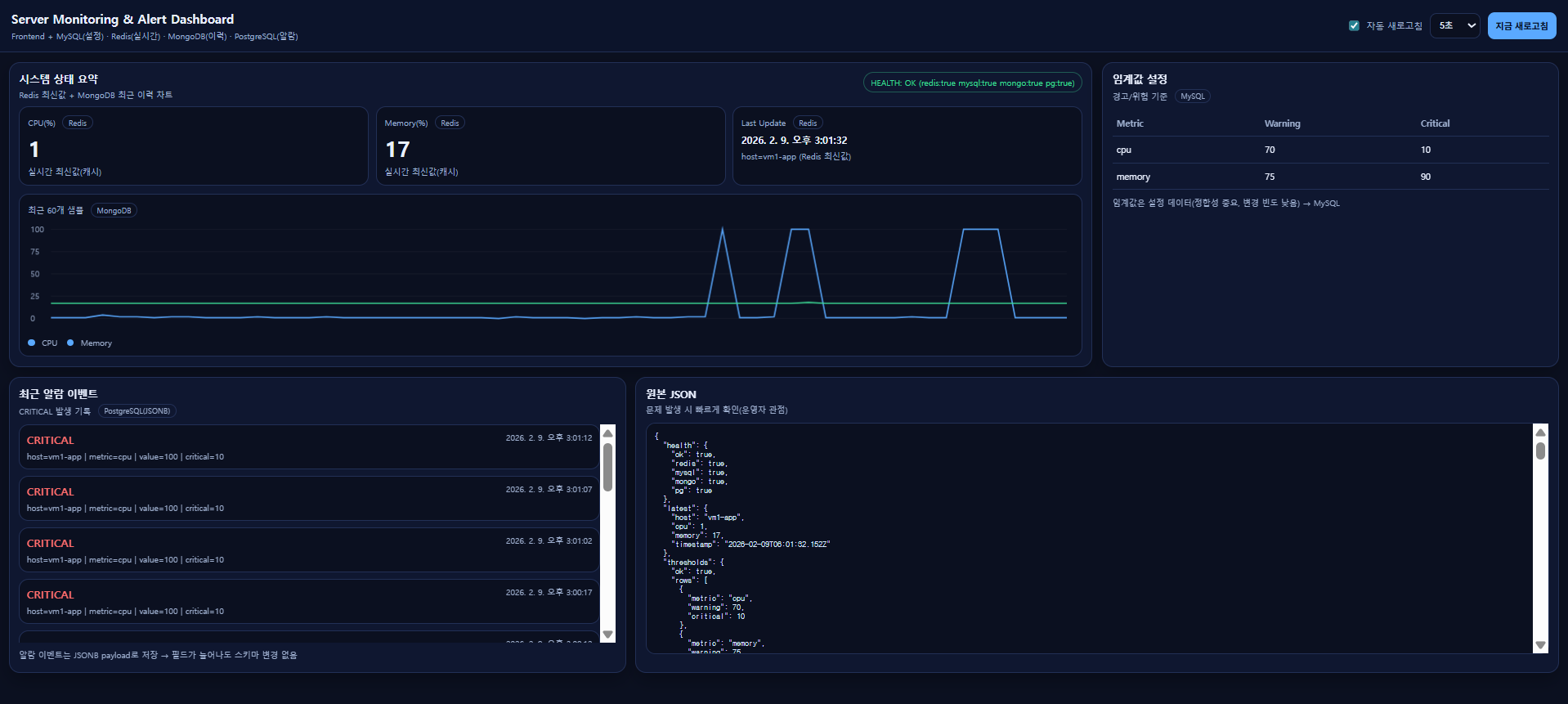
8) 검증
8-1) Redis(최신값)
VM2에서:
redis-cli get latest:metrics- JSON이 나오면 정상
- TTL 때문에 수집이 멈추면 사라질 수 있음(의도된 동작)
8-2) MongoDB(이력)
VM3에서:
mongosh monitoring --eval 'db.metrics.find().sort({timestamp:-1}).limit(5)'8-3) MySQL(임계값)
VM2에서:
sudo mysql -e "SELECT * FROM monitoring.thresholds;"8-4) PostgreSQL(알람 이벤트)
VM3에서:
sudo -u postgres psql -d alerts -c "SELECT id, created_at, level, payload FROM alert_events ORDER BY created_at DESC LIMIT 5;"9) 데이터에 적합한 DB 선택
9-1) Redis가 왜 필요한지(속도/최신값)
- 대시보드는
/api/metrics/latest에서 Redis 값을 바로 읽음 - MongoDB에서 매번 최신값 조회하면 부하/지연 ↑
9-2) Redis 다운 시 대시보드 변화
VM2에서:
sudo systemctl stop redis-server대시보드:
- KPI가 “Redis 최신값 없음”으로 바뀌거나 갱신이 멈춤
- 하지만 MongoDB 이력/알람 피드는 여전히 동작(부분 장애)
다시 복구:
sudo systemctl start redis-server9-3) 임계값 조정(MySQL 설정값이 즉시 반영되는지)
VM2 MySQL에서 cpu critical을 낮춰 알람 쉽게 발생시키기:
sudo mysql -e "UPDATE monitoring.thresholds SET critical=10 WHERE metric='cpu'; SELECT * FROM monitoring.thresholds;"잠시 후(수집 주기 5초):
- PostgreSQL 알람 피드에 CRITICAL이 쌓이는 것을 확인
원상복구:
sudo mysql -e "UPDATE monitoring.thresholds SET critical=90 WHERE metric='cpu';"10) (확장 실습) JSONB 필드
PostgreSQL은 payload(JSONB)에 필드를 늘려도 스키마 변경이 없음.
10-1) VM1 server.js에서 알람 payload에 필드 추가
collectOnce()에서 알람 insert 부분을 아래처럼 수정:
await pgPool.query(
  "INSERT INTO alert_events(level, payload) VALUES ($1, $2::jsonb)",
  ["CRITICAL", JSON.stringify({
    ...data,
    metric: t.metric,
    value: v,
    critical: t.critical,
    // ✅ 새 필드 추가(스키마 변경 없음)
    attempt: 1,
    tags: ["lab", "demo"],
    extra: { region: "seoul", rack: "R1" }
  })]
);
서버 재시작:
node server.jsVM3에서 JSONB 조회:
sudo -u postgres psql -d alerts -c "SELECT payload->>'attempt', payload->'extra' FROM alert_events ORDER BY created_at DESC LIMIT 3;"11) 트러블슈팅
11-1) VM1에서 MongoDB 연결 오류
- VM3에서 27017 Listen 확인:
sudo ss -lntp | grep 27017- 외부 바인드 설정 확인
11-2) PostgreSQL 인증 실패
- VM3
pg_hba.conf에192.168.80.0/24 md5규칙이 들어갔는지 확인 - 재시작 했는지 확인
11-3) Redis ECONNREFUSED
- VM2 redis-server 상태:
sudo systemctl status redis-server --no-pager
sudo ss -lntp | grep 6379
정리
- Redis = “지금 상태”
- MongoDB = “흐름(이력)”
- MySQL = “기준(설정)”
- PostgreSQL(JSONB) = “사건(알람) + 확장 + 분석”

Front-end Developer, Cloud Engineer