이번엔 공공데이터에서
인천국제공항공사_주차 정보
를 가져와서 사용해봤다.
<?xml version="1.0" encoding="utf-8"?>
<androidx.constraintlayout.widget.ConstraintLayout xmlns:android="http://schemas.android.com/apk/res/android"
    xmlns:app="http://schemas.android.com/apk/res-auto"
    xmlns:tools="http://schemas.android.com/tools"
    android:layout_width="match_parent"
    android:layout_height="match_parent"
    tools:context=".MainActivity">

    <com.skydoves.powerspinner.PowerSpinnerView
        android:id="@+id/spinnerView"
        android:layout_width="0dp"
        android:layout_height="wrap_content"
        android:background="#046C09"
        android:foreground="?attr/selectableItemBackground"
        android:gravity="center"
        android:hint="주차장 선택"
        android:padding="10dp"
        android:textColor="@color/white"
        android:textColorHint="@color/white"
        android:textSize="14.5sp"
        app:layout_constraintEnd_toEndOf="parent"
        app:layout_constraintStart_toStartOf="parent"
        app:layout_constraintTop_toTopOf="parent"
        app:spinner_arrow_gravity="end"
        app:spinner_arrow_tint="#FFFF00"
        app:spinner_divider_color="@color/white"
        app:spinner_divider_show="true"
        app:spinner_divider_size="0.4dp"
        app:spinner_item_height="46dp"
        app:spinner_popup_animation="normal"
        app:spinner_popup_elevation="14dp"
        tools:ignore="HardcodedText,UnusedAttribute" />

    <TextView
        android:id="@+id/parkingAll"
        android:layout_width="wrap_content"
        android:layout_height="wrap_content"
        android:text="총 주차가능"
        android:textSize="25sp"
        android:textStyle="bold"
        app:layout_constraintBottom_toBottomOf="parent"
        app:layout_constraintEnd_toEndOf="parent"
        app:layout_constraintStart_toStartOf="parent"
        app:layout_constraintTop_toTopOf="parent" />

    <TextView
        android:id="@+id/parkingNow"
        android:layout_width="wrap_content"
        android:layout_height="wrap_content"
        android:layout_marginTop="24dp"
        android:text="현재 주차수"
        android:textSize="25sp"
        android:textStyle="bold"
        app:layout_constraintEnd_toEndOf="@+id/parkingAll"
        app:layout_constraintStart_toStartOf="@+id/parkingAll"
        app:layout_constraintTop_toBottomOf="@+id/parkingAll" />

    <TextView
        android:id="@+id/parkingTime"
        android:layout_width="wrap_content"
        android:layout_height="wrap_content"
        android:layout_marginTop="24dp"
        android:text="기준시간"
        android:textSize="25sp"
        android:textStyle="bold"
        app:layout_constraintEnd_toEndOf="@+id/parkingNow"
        app:layout_constraintStart_toStartOf="@+id/parkingNow"
        app:layout_constraintTop_toBottomOf="@+id/parkingNow" />

</androidx.constraintlayout.widget.ConstraintLayout>
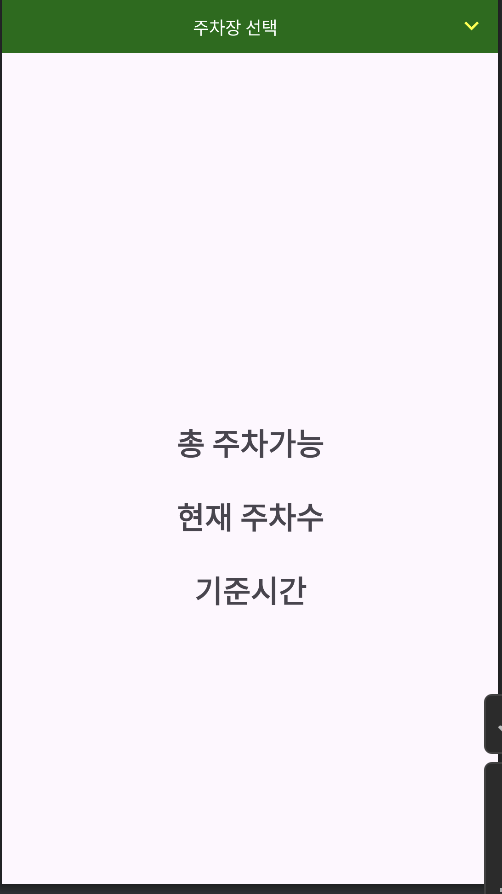
하나의 스피너, 3개의 텍스트뷰로 구성했다.
그리고 gson과 스피너, 레트로핏을 이용하기 위해서 종속성을 추가해주고,
    implementation ("com.google.code.gson:gson:2.10.1")
    implementation ("com.squareup.retrofit2:retrofit:2.9.0")
    implementation ("com.squareup.retrofit2:converter-gson:2.9.0")
    implementation ("com.squareup.okhttp3:okhttp:4.10.0")
    implementation ("com.squareup.okhttp3:logging-interceptor:4.10.0")
    implementation ("com.github.skydoves:powerspinner:1.2.6")
인터넷권한을 추가해줬다.
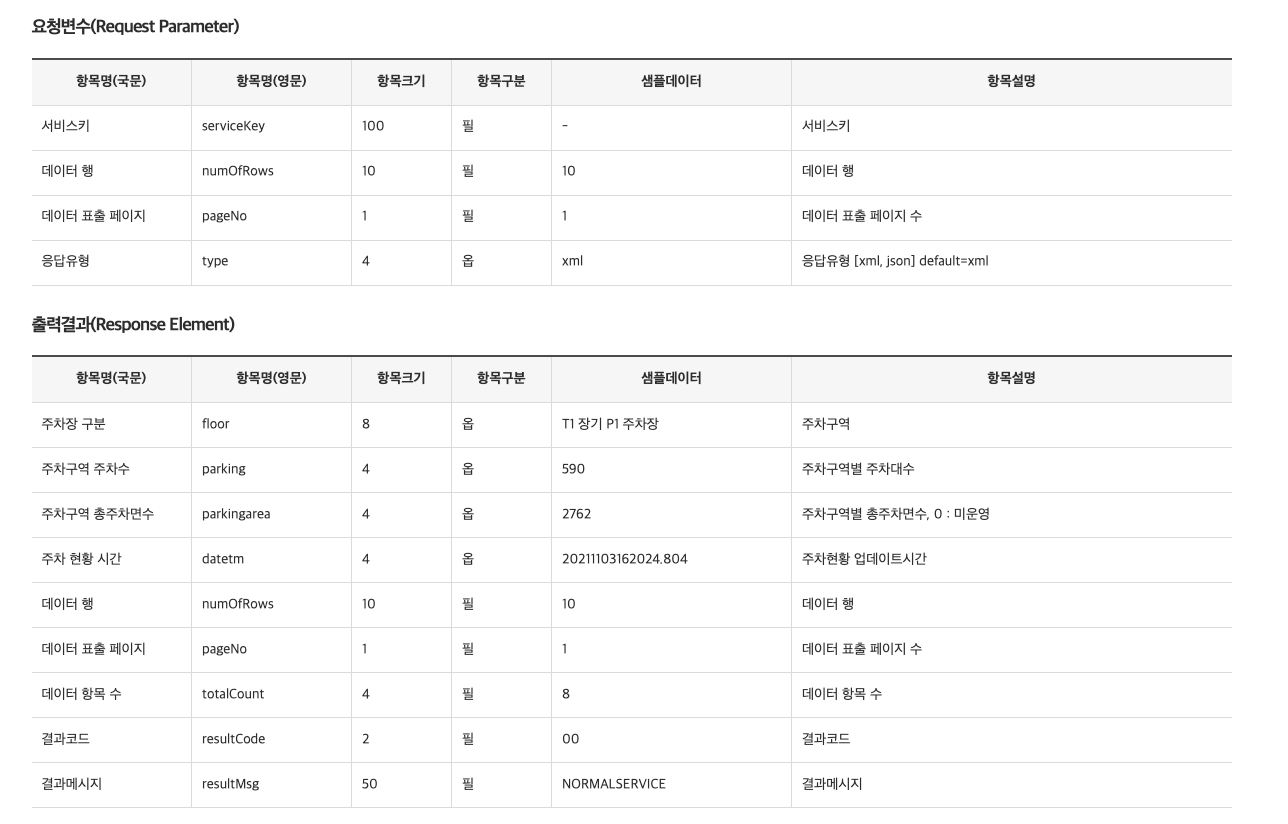
<uses-permission android:name="android.permission.INTERNET"/>이 데이터는 아래사진과같이 4가지 요청변수와 그에대한 결과값을 알려준다.
먼저 데이터를 받아왔다.
data class Park(val response: ParkResponse)

data class ParkResponse(
    @SerializedName("header")
    val parkHeader: ParkHeader,
    @SerializedName("body")
    val parkBody: ParkBody)

data class ParkHeader(
    val resultCode:String,
    val resultMsg:String
)

data class ParkBody(
    val numOfRows:Int,
    val pageNo:Int,
    val totalCount:Int,
    @SerializedName("items")
    val parkItem: MutableList<ParkItem>?
)

data class ParkItem(
    val datetm:String?,
    val floor:String?,
    val parking:String?,
    val parkingarea:String?
)
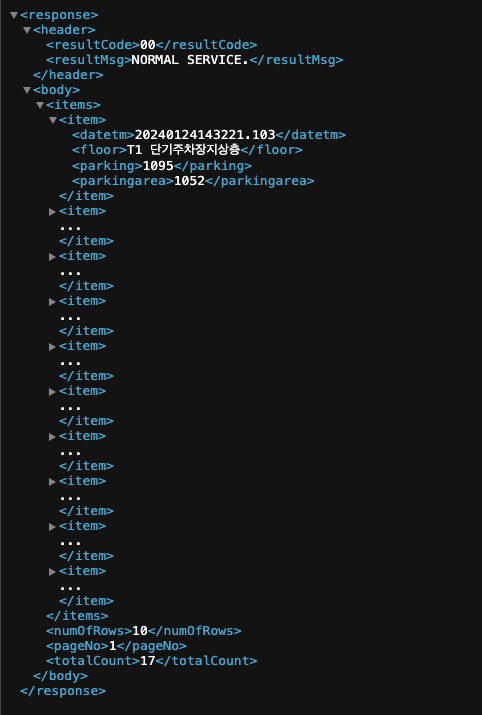
데이터 형식은 데이터 미리보기를 통해서 형식을 맞춰줬다.
다음으로 인터페이스를 만들어주고
interface NetWorkInterface {
    @GET("요청주소 뒷부분") //인천공항 여객주차장 현황
    suspend fun getPark(@QueryMap param: HashMap<String, String>): Park
}
다음으로 클라이언트를 만들어준다.
object NetWorkClient {
    private const val PARK_BASE_URL = "서비스 URL넣어주기/"

    private fun createOkHttpClient(): OkHttpClient {
        val interceptor = HttpLoggingInterceptor()

        if (BuildConfig.DEBUG)
            interceptor.level = HttpLoggingInterceptor.Level.BODY
        else
            interceptor.level = HttpLoggingInterceptor.Level.NONE

        return OkHttpClient.Builder()
            .connectTimeout(20, TimeUnit.SECONDS)
            .readTimeout(20, TimeUnit.SECONDS)
            .writeTimeout(20, TimeUnit.SECONDS)
            .addNetworkInterceptor(interceptor)
            .build()
    }

    private val parkRetrofit = Retrofit.Builder()
        .baseUrl(PARK_BASE_URL)
        .addConverterFactory(GsonConverterFactory.create())
        .client(createOkHttpClient())
        .build()

    val parkNetWork: NetWorkInterface = parkRetrofit.create(NetWorkInterface::class.java)

}
마지막으로 메인에서 ParkItem을 items로 받아오고, 앱 실행시 communicateWork를 불러와 스피너 안에 주차장의 종류를 넣어준다. 그리고 만들어둔 3개의 텍스트뷰에 해당 주차장에대한 총 주차자리, 사용중인주차자리, 몇시기준인지를 알려줬다.
class MainActivity : AppCompatActivity() {
    private val binding by lazy { ActivityMainBinding.inflate(layoutInflater) }
    var items = mutableListOf<ParkItem>()

    override fun onCreate(savedInstanceState: Bundle?) {
        super.onCreate(savedInstanceState)
        setContentView(binding.root)

        communicateNetWork(setUpParkParameter())

        binding.spinnerView.setOnSpinnerItemSelectedListener<String> { _, _, _, text ->

            var selected = items.filter { f -> f.floor == text }
            val originalTime = selected[0].datetm
            val originalFormat = SimpleDateFormat("yyyyMMddHHmmss")
            val parsedDate: Date = originalFormat.parse(originalTime?.substring(0,14))

            with(binding) {
                parkingAll.text = "총 주차자리 : "+ selected[0].parkingarea
                parkingNow.text = "사용중인 주차자리 : " + selected[0].parking
                parkingTime.text = parsedDate.toString()
            }
        }

    }

    private fun communicateNetWork(param: HashMap<String, String>) = lifecycleScope.launch() {
        val responseData = NetWorkClient.parkNetWork.getPark(param)

        items = responseData.response.parkBody.parkItem!!

        val parkingArea = ArrayList<String>()
        items.forEach {
            parkingArea.add(it.floor!!)
        }
        runOnUiThread {
            binding.spinnerView.setItems(parkingArea)
        }
    }

    private fun setUpParkParameter(): HashMap<String, String> {
        val authKey =
            "wDP6fsVX3kKuaOD7OKrRHaAgPUNtxYUy387PNJRBAW/F6GUdZgv5LyyIAkVXED3leDg3aUD+TFIgBHWCgMBdzQ=="
        return hashMapOf(
            "serviceKey" to authKey,
            "numOfRows" to "10",
            "pageNo" to "1",
            "type" to "json"
        )
    }

}
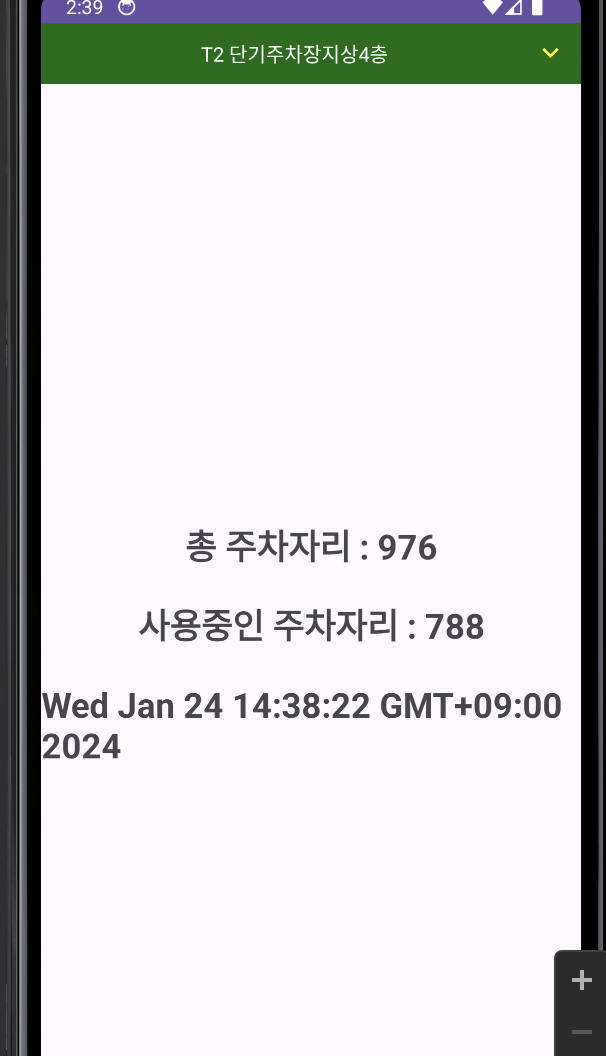
이렇게해서 결과물은 이렇게 나왔다.!
공공데이터에서 API값을 가져오는걸 두번 해봐서 이젠 다 가져올수 있을거같은 기분이 든다.!

이우진