-
R1은 강화학습 방식(Reinforcement Learning - RL) 및 지도방식(supervised fine-tuning - SFT)을 통해 성능을 높였다.
SFT: 미리 정해진 답지(초기 데이터)를 주고 해당 답지를 잘 맞추게 하는 방식
-
R1-Zero는 DeepSeek-V3-Base를 기반으로, SFT 없이 RL만으로 학습을 하였다 -> 데이터 라벨링, 인간의 개입이 없음
-
강화학습: 정답지가 없고, 모델이 적절한 대답을 했을때 보상을 주고 모델이 보상을 많이 얻게 하기 위한 방식으로 훈련을 한다
-
현제 reasoning 모델은 R1, gpt, gemini2.0 thinking, grok3
딥시크 단점
- 웹버전(v3)는 정보유출의 우려가 있음
- 서버 사용량이 너무 많아 사용이 안될때가 있음
해결방법: 파인튜닝으로 로컬로도 가능, 서버도 혼자 사용 가능, 성능도 목적에 따른 전문성이 높아짐
deepseek r1 full version
deepseek r1 distill - 용량 최소화(빠르지만 성능저하 발생, 한글지원 안됨)
- teacher모델: deepseek r1의 student모델로 지식과 추론 모델이 전달이 됨
Unsloth 라이브러리
- PyTorch를 기반으로, CUDA를 사용하는 NVIDIA GPU에서 작동
- Unsloth로 LLM을 로컬에서 훈련시키기 위해서는 최소 GPU RAM 11GB 이상 필요
특징
- 기존에 비해 훈련속도가 약30배 빨라진다
- 최적화된 메모리 관리 기술로 GPU 메모리 크기가 60% 줄어들어 배치크기가 6배 커진다
- 추론 속도 향상
- NVIDIA, Intel, AMU GPU 지원
- LoRA 어댑터 지원
원리
- 최적화된 커널 사용
- GPU에서 동시에 처리할 수 있는 데이터 양을 늘려 더 많은 연산을 동시에 수행
- 경사하강법 최적화
파인튜닝 과정
라이브러리 설치
pip install -q unsloth
pip install -q --force-reinstall --no-deps git+https://github.com/unslothai/unsloth.git
Hugging Face 토큰 생성
profile -> setting -> Access Tokens -> create token
# Hugging Face 로그인
from huggingface_hub import login
from getpass import getpass

# 토큰 입력
login(token=hf_LEkZ....)
모델 및 토큰라이저 로딩하기
- model_name은 https://huggingface.co/collections/unsloth/deepseek-r1-all-versions-678e1c48f5d2fce87892ace5 에서 선택하면 unsloth로 적은 크기의 효율적인 모델 사용 가능
- unsloth/DeepSeek-R1-Distill-Qwen-14B-GGUF 선택 - RTX4090 24GB로 사용 가능

- 토큰나이저는 입력된 텍스트를 모델에서 처리할수 있는 데이터로 변환
# 모델 로드
from unsloth import FastLanguageModel

# 모델 설정값 정의
max_seq_length = 2048
dtype = None
load_in_4bit = True

# 모델과 토크나이저 로드
model, tokenizer = FastLanguageModel.from_pretrained(
    model_name="unsloth/DeepSeek-R1-Distill-Qwen-14B-GGUF",
    max_seq_length=max_seq_length,
    dtype=dtype,
    load_in_4bit=load_in_4bit,
    token=None
)

print("설정이 완료되었습니다!")
프롬프트(instuction) 입력
모델이 실제 질문에 대한 답변을 생성할 때 사용하는 기본 프롬프트
prompt_style = """질문의 형식을 제공하는 지시문
Below is an... : 모델에게 CoT 유도
### instuction: 모델에 역할 정의
### Question: 실제 질문 내용
### Response: 모델의 응답 부분
<think>{}: 모델의 내부 사고 과정(Chain-of-Thought)이 기록될 위치
Chain-of-Thought: 단계별 논리적 추론 과정을 표현. 모델이 답변을 생성하기 전에 생각하는 과정을 보여준다
prompt_style = """Below is an instruction that describes a task, paired with an input that provides further context.
Write a response that appropriately completes the request.
Before answering, think carefully about the question and create a step-by-step chain of thoughts to ensure a logical and accurate response.

### Instruction:
{}

### Question:
{}

### Response:
<think>{}"""
파인튜닝 전 모델 추론
파인튜닝을 하지 않은 상태에서 input과 output의 형식으로 응답/추론을 출력
instruction model 데이터셋 형태 예시
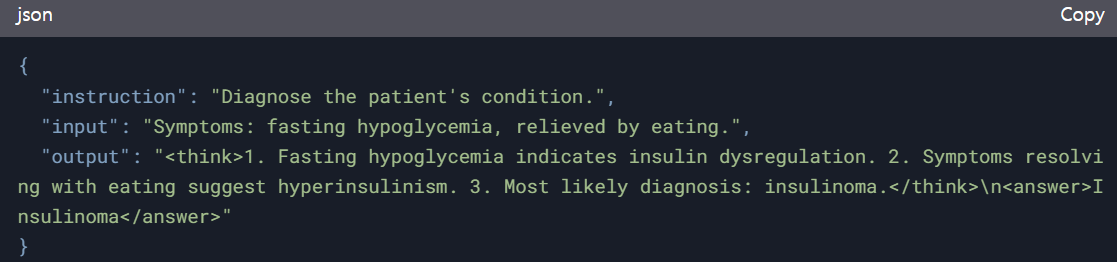
question = "A 55-year-old extremely obese man experiences weakness, sweating, tachycardia, confusion, and headache when fasting for a few hours, which are relieved by eating. What disorder is most likely causing these symptoms?"


FastLanguageModel.for_inference(model) #모델 추론속도를 두배로 높임
inputs = tokenizer([prompt_style.format(question, "")], return_tensors="pt").to("cuda")

outputs = model.generate(
    input_ids=inputs.input_ids,
    attention_mask=inputs.attention_mask,
    max_new_tokens=1200,
    use_cache=True,
)
response = tokenizer.batch_decode(outputs)
print(response[0].split("### Response:")[1])
Dataset 로딩 및 처리
모델이 훈련할때 사용되는 프롬프트
train_prompt_style = """Below is an instruction that describes a task, paired with an input that provides further context.
Write a response that appropriately completes the request.
Before answering, think carefully about the question and create a step-by-step chain of thoughts to ensure a logical and accurate response.

### Instruction:
{}

### Question:
{}

### Response:
<think>
{}
</think>
{}"""
EOS_TOKEN = tokenizer.eos_token # Must add EOS_TOKEN
def formatting_prompts_func(examples):
inputs = examples["Question"]
cots = examples["Complex_CoT"]
outputs = examples["Response"]
texts = []
for input, cot, output in zip(inputs, cots, outputs):
text = train_prompt_style.format(input, cot, output) + EOS_TOKEN
texts.append(text)
return {
"text": texts,
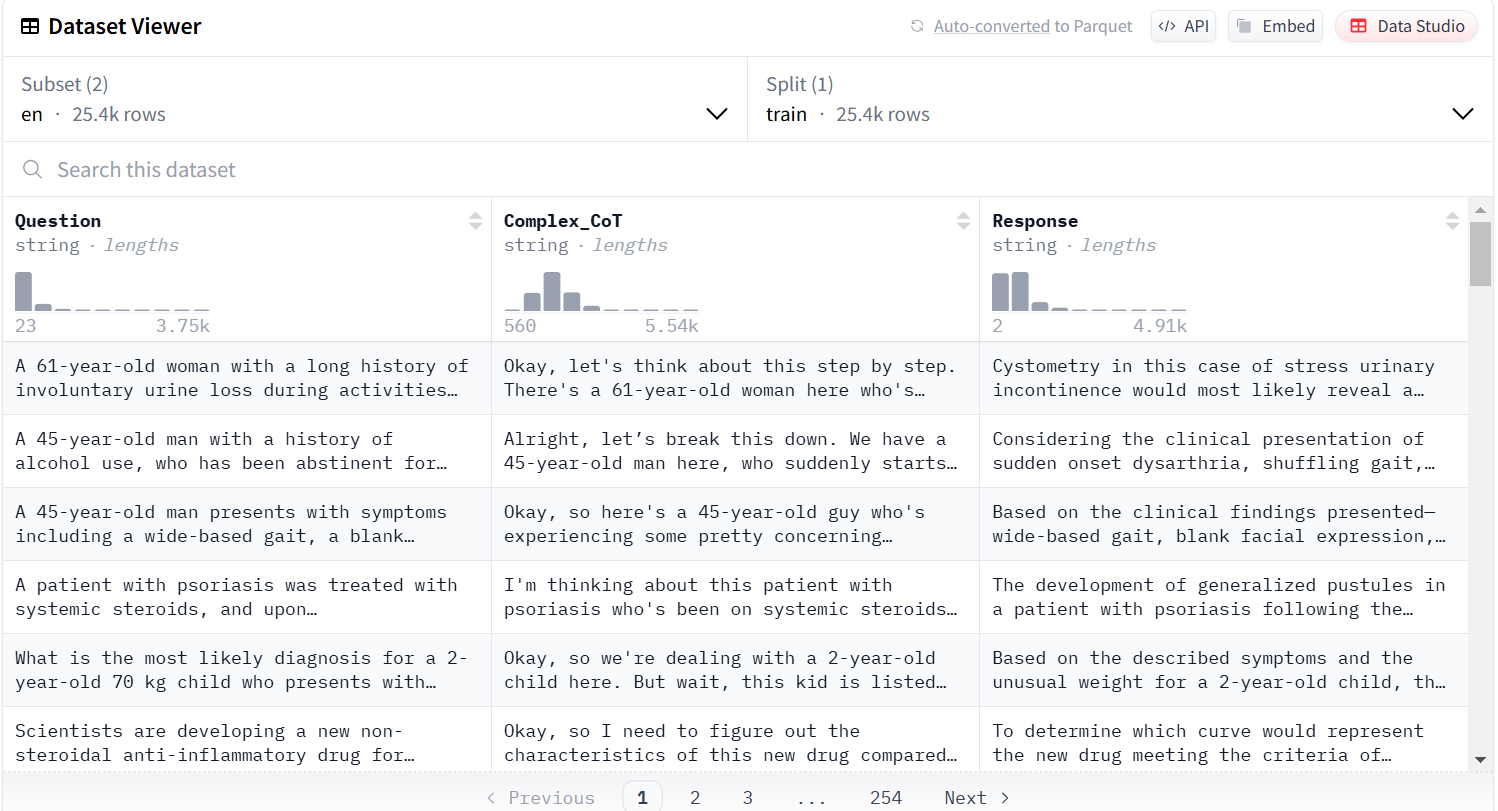
}원시 데이터셋(Question, Complex_CoT, Response)를 모델이 학습할 수 있는 단일 시퀀스 텍스트로 변환
from datasets import load_dataset
dataset = load_dataset("FreedomIntelligence/medical-o1-reasoning-SFT","en", split = "train[0:700]",trust_remote_code=True)
dataset = dataset.map(formatting_prompts_func, batched = True,)
dataset["text"][0]- eos_token(문장의 끝): 문장의 끝을 나타내는 토큰. 디코더가 출력 시퀀스의 끝을 예측했음을 나타낸다
sos토큰(문장의 시작)은 입력 시퀀스가 끝났음을 예측한다.
sos토큰과 eos토큰은 보통 디코더의 입력 시퀀스와 출력 시퀀스 모두에 추가된다. 이를통해 모델은 학습 과정에서 입력 시퀀스와 출력 시퀀스 간의 상관 관계를 파악하고, 문장의 시작과 끝을 알 수 있다. - load_dataset(데이터셋 이름): HuggingFace에 업로드해서 입력하거나, 로컬에 있는 파일을 사용해도 됨
"FreedomIntelligence/medical-o1-reasoning-SFT" 데이터셋의 형태
모델 세팅하기
- lora와 gradient_checkpointing 사용
model = FastLanguageModel.get_peft_model(
    model,
    r=16,
    target_modules=[
        "q_proj",
        "k_proj",
        "v_proj",
        "o_proj",
        "gate_proj",
        "up_proj",
        "down_proj",
    ],
    lora_alpha=16,
    lora_dropout=0,
    bias="none",
    use_gradient_checkpointing="unsloth",  # True or "unsloth" for very long context
    random_state=3407,
    use_rslora=False,
    loftq_config=None,
)
모델 훈련하기-데이터셋 훈련하기
import os
import wandb
from transformers import Trainer, TrainingArguments
from torch.utils.data import Dataset

# wandb 비활성화
os.environ["WANDB_DISABLED"] = "true"
wandb.init(mode="disabled")

class CustomDataset(Dataset):
    def __init__(self, dataset, tokenizer, max_length):
        self.dataset = dataset
        self.tokenizer = tokenizer
        self.max_length = max_length

    def __len__(self):
        return len(self.dataset)

    def __getitem__(self, idx):
        item = self.dataset[idx]
        text = item['text']

        # 토크나이징
        encodings = self.tokenizer(
            text,
            truncation=True,
            max_length=self.max_length,
            padding='max_length',
            return_tensors='pt'
        )

        # labels 추가 (input_ids와 동일하게 설정)
        return {
            'input_ids': encodings['input_ids'].squeeze(),
            'attention_mask': encodings['attention_mask'].squeeze(),
            'labels': encodings['input_ids'].squeeze()  # labels 추가
        }

processed_dataset = CustomDataset(dataset, tokenizer, max_seq_length)

training_args = TrainingArguments(
    output_dir="outputs",
    per_device_train_batch_size=2,
    gradient_accumulation_steps=4,
    warmup_steps=5,
    max_steps=60,
    learning_rate=2e-4,
    fp16=True,  # fp16 활성화
    logging_steps=10,
    optim="adamw_torch",
    weight_decay=0.01,
    lr_scheduler_type="linear",
    seed=3407,
    report_to="none",
    remove_unused_columns=False
)

trainer = Trainer(
    model=model,
    args=training_args,
    train_dataset=processed_dataset,
)

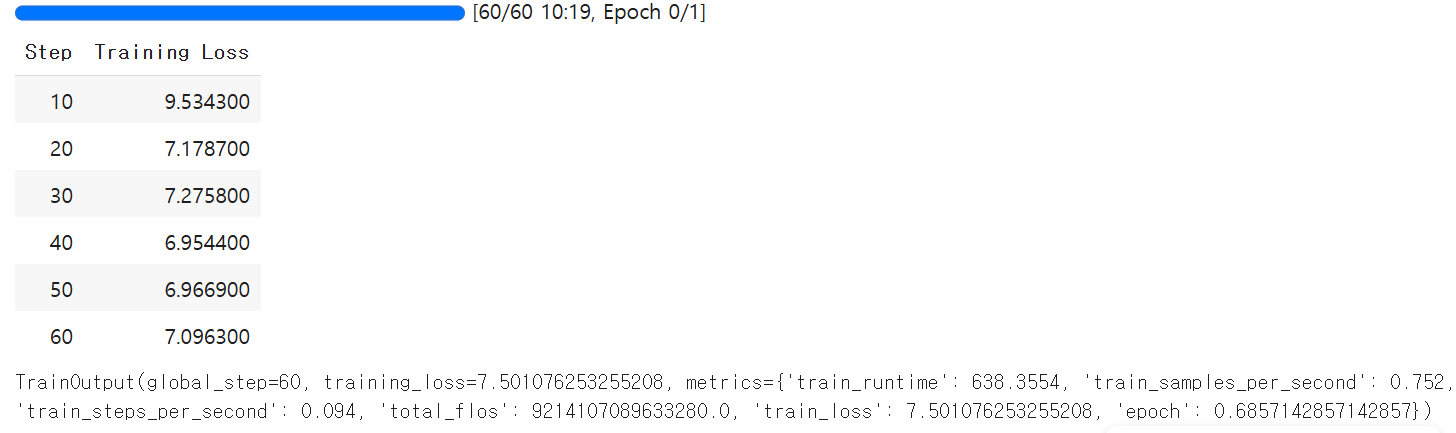
trainer.train()
오차
파인튜닝 후에 모델 추론
#"55세의 극도로 비만인 남성이 몇 시간 동안 금식할 때 허약감, 발한, 빈맥, 혼돈, 두통을 경험하며, 이는 식사를 하면 완화됩니다. 이러한 증상들을 가장 가능성 있게 유발하는 질환은 무엇입니까?"
question = "A 55-year-old extremely obese man experiences weakness, sweating, tachycardia, confusion, and headache when fasting for a few hours, which are relieved by eating. What disorder is most likely causing these symptoms?"


FastLanguageModel.for_inference(model)  # Unsloth has 2x faster inference!
inputs = tokenizer([prompt_style.format(question, "")], return_tensors="pt").to("cuda")

outputs = model.generate(
    input_ids=inputs.input_ids,
    attention_mask=inputs.attention_mask,
    max_new_tokens=1200,
    use_cache=True,
)
response = tokenizer.batch_decode(outputs)
print(response[0].split("### Response:")[1])
로컬에 모델 저장(.gguf파일)
new_model_local = "DeepSeek-R1"
model.save_pretrained(new_model_local)
tokenizer.save_pretrained(new_model_local)

model.save_pretrained_merged(new_model_local, tokenizer, save_method = "merged_16bit",)