appendix
- 주소 한 개가 가리키는 단위: 1 byte
- 주소 비트 수 → 주소 공간: 비트 수가 N이면 2^N개의 주소 표현
- 전체 메모리 용량: 각 주소가 1바이트씩 할당되므로, 총 2^N byte
- 16 bit → 64KB
- 32 bit → 4GB
- 주소 크기 = 프로그램 크기
Operating System
- A program that acts as an intermediary between a user of a computer and the computer hardware
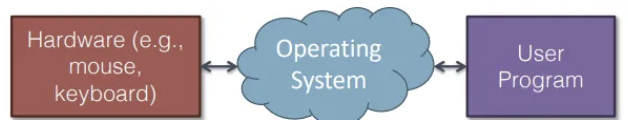
- Resource manager and allocator
- Efficient and Fair
- e.g) 10 → 5 5 , 7 3 ; 5 5 faster ⇒ Fairness
- Control program
- Controls execution of user programs
- Prevents errors and improper use
- Many Diffent OSes
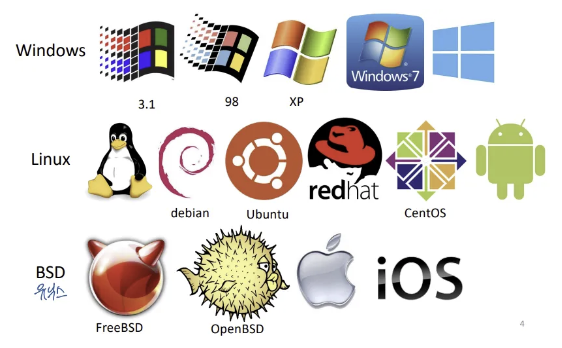
Two Common OS Families
Nowdays that’s basically everything
POSIX
Portable Operating System InterFace for Unix
- Anything Unix-ish
- e.g) Linex, BSDs, Mac, Android, iOS. QNX
Windows
- Stuff shipped by MicroSoft
Basic Computer Architecture
- IBM PC Architecture x86
- Until recently, most computers could still run MS-DOS based programs
- Alternatives: Amiga, Macintosh, PowerPC
- Architecture determines many properties of the OS
- load and take control
- interacts with devices
- manage CPU and memory
Some history
- 1981: IBM releases a PC to compete with Apple
- Basic Input/Output System (BIOS) for low-level control
- Three high-level OSes, including MS-DOS
- Developers were asked to write software for DOS or BIOS,
not bare-metal hardware
- 1982: Compaq releases IBM-compatible PCs ⇒ IBM Loses Control
- intel 808x CPU, Different hardware implementations
- Reverse enginerred BIOS, Customized version of MS-DOS
- 1985: IBM clones dominated computer sales
- Same underlying CPUs and hardware chips
- Close to 100% BIOS compatibility & MS-DOS was ubiquitous
- Thus, IBM PC hardware became the de-facto standard
- 1986: Compaq introduces 80386-based PC (x86)
- 1990’s: Industry is dominated by “WinTel”
- Intel x86 CPU architectures
Computer Component
CPU Central Processing Unit
- Physical standard < Intruction Set Architecture
- IBM PCs are Intel 80836 compatible
- Intel, AMD, VIA
- Today’s dominant ISA: x86-64, developed by AMD
RAM Random Access Memory
- ~ 1993: DRAM (Dynamic RAM)
- Dynamic: refresh
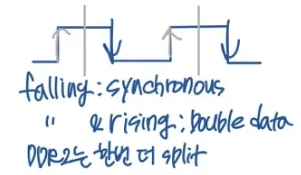
- 1993 ~: SDRAM (Synchronous DRAM)
- Current standard: Double data rate SDRAM (DDR SDRAM)
North Bridge
- Coordinates acess to main memory
- CPU - Memory
- CPU access to I/O degrades performance
I/O device
ISA → PCI → PCI Express(serial, fast)
South Bridge
- Facilitates I/O between deveces, the CPU, and main memory
- CPU - I/O
Storage connectors
- Also controlled by the South Bridge
- Old standard: Parallel ATA
- Other standards
- Small Computer System Interface
- Serial ATA
- SATA is faster than P-ATA
Architecture Review
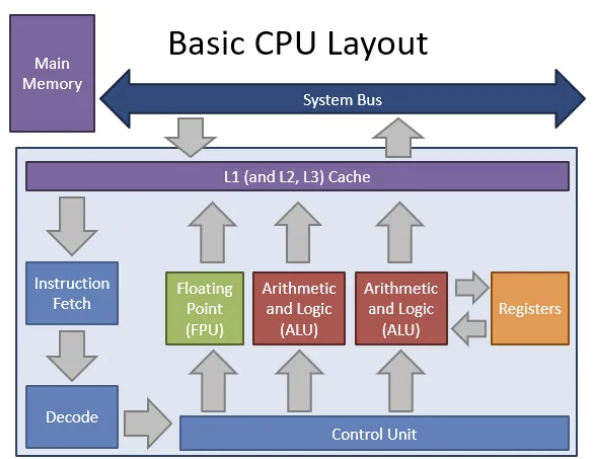
CPU
Now Storage Hierarchy
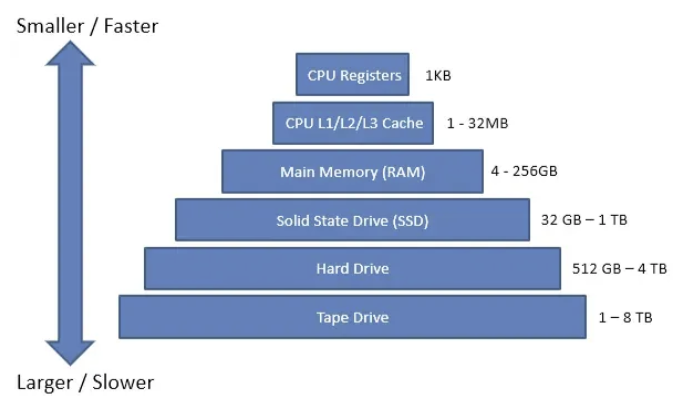
- Locality
- OS manage data area, programmer manage GPU
Typical Memory Layout
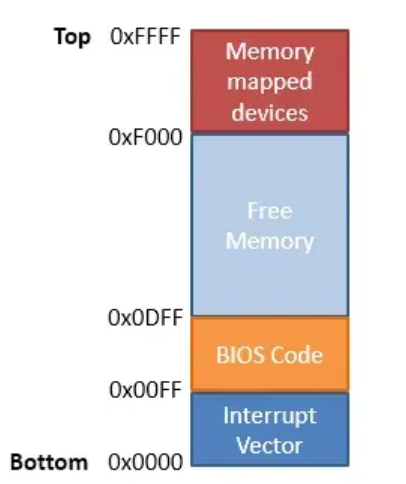
- 16-bit CPU can address 64KB of memory
- 1 byte is stored at each address
- Not all memory is free
Communicating between CPU and Devices
1. Polling I/O - Synchronous
- I/O-only memory space shard by the CPU and a device
- CPU and device communicate by reading or wiriting to the virtual memory space
- Each device is assigned some portion of the address space
- Polling forces the CPU to wait until the device is ready
- continuous device check → synchronous
- Problems
- CPU must mediate all transfers
- [Case] Transfer data from disk to memory
- CPU must copy value from the I/O port to memory → slow
- All I/O must be synchronous
- [Case] Disk wants to send data
- but the CPU isn’t reading the I/O port
- CPU가 지속적으로 입출력의 상태를 읽고 있어 다른 작업 수행 불가
- CPU must mediate all transfers
2. DMA: Direct Memory Access
- Regions of RAM that are shared by the CPU and a device
- Enables devices to transfer blocks of data directly to memory
- Interrupt generated when transfer is completed
- Much faster than the alternative method
- Interrupt generated after each byte is transferred
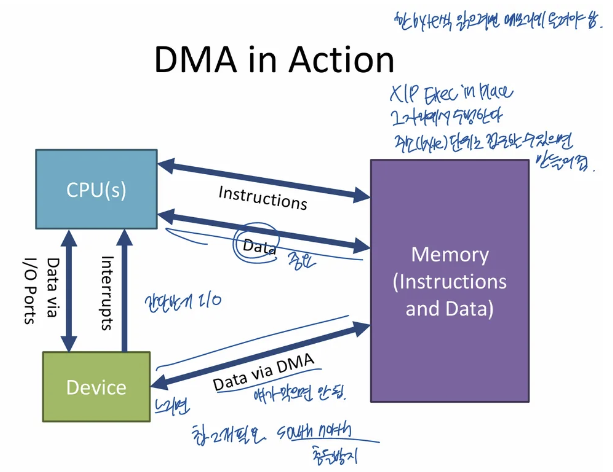
- Interrupt generated after each byte is transferred
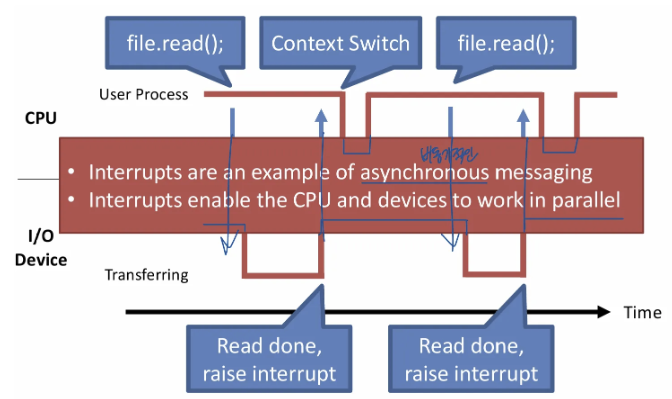
3. Interrupts - Asynchronous
- Signal from a device to the CPU
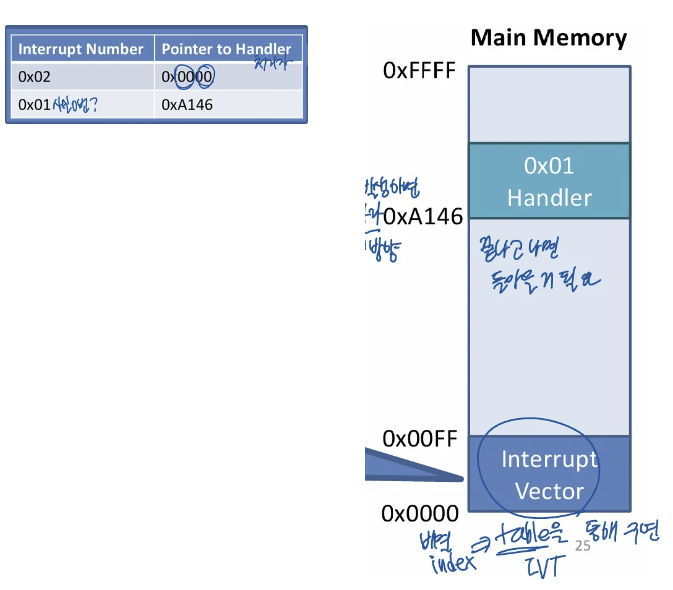
- Interrupts causes the OS to switch to handler code
- Each interrupts is assigned a number
- 복잡한 프로그램은 번호 지정
- Number acts as an index into the Interrupt Vector Table
- Each interrupts is assigned a number
- Interrupt causes a context switch
- State of the CPU must be saved before the switch
- and restored after the handler completes
- Context means the Current task status is register value
Interrupt Timeline
- Interrupt enables the CPU and devices to work in parallel
Booting Up
1. Starting the BIOS
Basic Input/Output System
- Code from the BIOS chip gets copied to RAM at a low address (e.g. 0xFF - 16 bits)
- jmp 0xFF written to RAM at 0xFFFF0
- x86 CPU always start with 0xFFFF0 in the EIP register
RAM 0xFF에 BIOS가 code copy, CPU가 시작하는 위치인 0xFFFF0에는 0xFF로 jmp하라는 명령어 존재
Essential goals of the BIOS
- Check hardware to make sure its functional
- Scan storage media for a Master Boot Record
- Load the boot record into RAM
- Tells the CPU to execute the loaded code
2. Load Settings from CMOS
3. Initialize devices
Scan and initializes hardware
- CPU and memory
- Keyboard and mouse
Builds the Interrupt Vector Table
4. Runs POST test(Power-On Self Test)
- 하드웨어가 잘 작동하는지 확인
5. initiate the bootstrap sequence
Bootstraping
- BIOS indenifies all poentially botable devices
- MBR has code(bootloader) that can load the actual OS
- 요즘은 bootloader를 올리는 코드인 경우가 많음 - chain loading
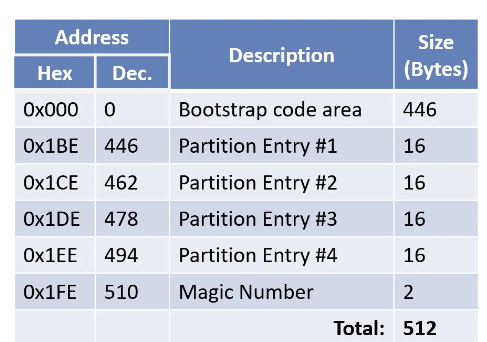
Master Boot Record
- 512 byte file written to sector 1
- 446 bytes of executable code
- Entries for 4 partitions
- The magic number 55AA servers to identify the MBR
Applications
System Call Interface
Interface between OS and Applications
System call table
- Layer of indirection to abstract the OS APIs
- Each OS API is given a specific index in the table
- OS가 지원하는 함수 API로 table에서찾아서 jmp → IVT와 유사
Traps: Software Interrupts
Software can also generate interrupts
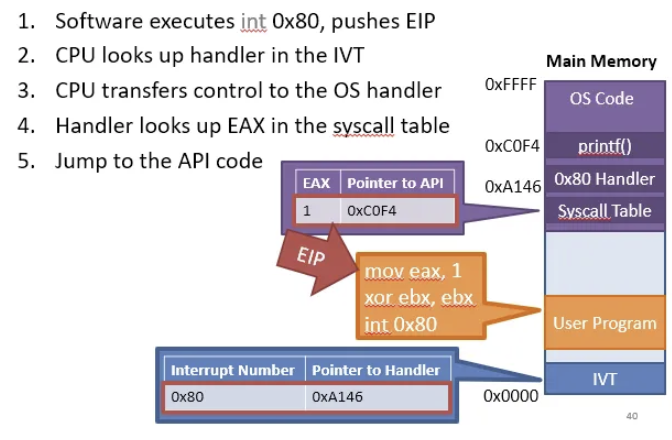
- 1 is system call number
- CPU calls 80 interrupt
- On x86, system calls are intiated via an interrupt
- On x86, int 0x80 is the system call interrupt
- EAX holds the table index of the desired API
- sys_read와 같은 system call은 직접 ssd에 접근하지 않고 커널로 제어 넘김
- trap(interrupt)을 발생시켜 커널로 제어를 넘김
Kernel
kernel
- The one program running at all times on the computer
- Bootloader는 kernel을 memory에 road하는 역할
kernel features
Device Management
- Required: CPU and Memory
- Optional: disks, keyboards, mice, video, etc.
Loading and executing programs
System calls and APIs
Protection and Security
Architecting Kernels
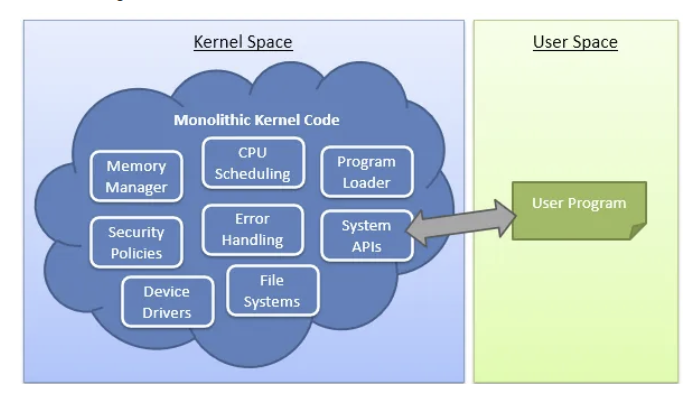
Monolithic kernels
- All functionality is compiled together
- All code runs in privileged kernel-space
- Pros
- Sing code base
- Robust APIs - System call이 정해져 있으면 일관성, 통합
- Fast performance
- Cons
- Large code base → Hard to manage
- Bugs crash the entire kernel
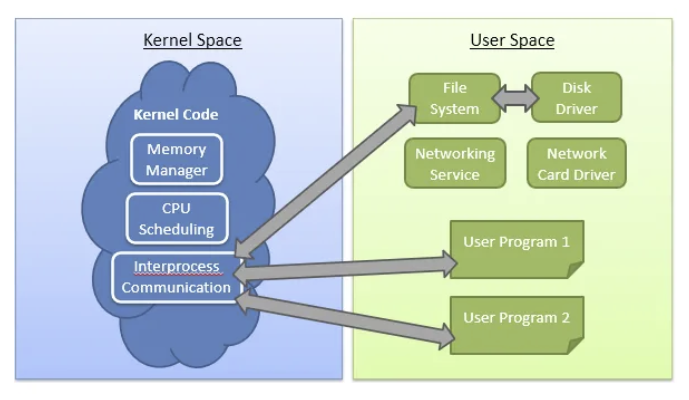
Micro kernels
- Only essential functionality is compiled into the kernel
- All other functionally runs in unprivileged user space
- Pros
- Small code base → Easy to manage, Context switching overhead 큼
- Service may crash, but the system will remain stable
- Cons
- Sloe performance - Many context switches
- No stable APIs
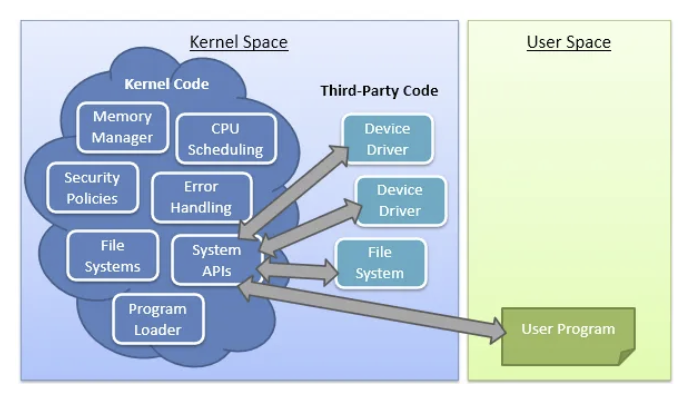
Hybrid kernel
- Most functionality is compiled into the kernel
- Some functions are loaded dynamically

갓생호소인