Running Dynamic Code
One basic function of an OS is to execute and manage code dynamically
- Command line terminal
- Icon double click
- Jobs/tasks run as part of a batch system -> server
Programs
- An execute file in long-term storage(e.g. chorm.exe)
Processes
- The basic unit of a program in execution
- The running instantiation of a program, stored in RAM
- fork()를 하면 메모리 할당 받고, exec()을 하면 RAM에 저장됨
- One-many relationship = One programs can call many processes
PCB: Process Control Block
PCB: Process Control Block = TCB: Task (or Thread) Control Block
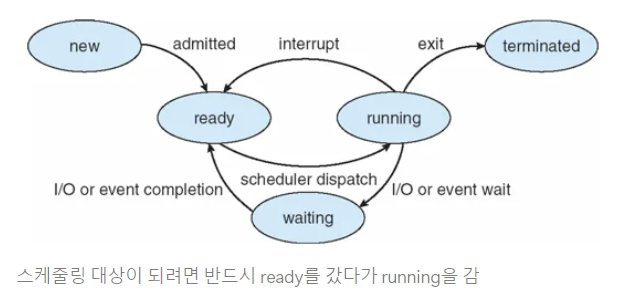
- Kernel data structure representing a process
- Created for each process by the loader
- Managed by the kernel
Thread: Control flow
- Instruction porinter: CPU에서 프로그램 동작을 나타내는 위치, 현재 수행하고 있는 메모리의 address
→ Control flow를 변경한다 = thread
Process vs Thread- Process는 memory address space를 가짐
- Thread는 Process의 메모리 주소 공간 공유
- Thread는 각자 자신의 영역에 메모리를 가지고 있음, 주소가 없는 게 아님
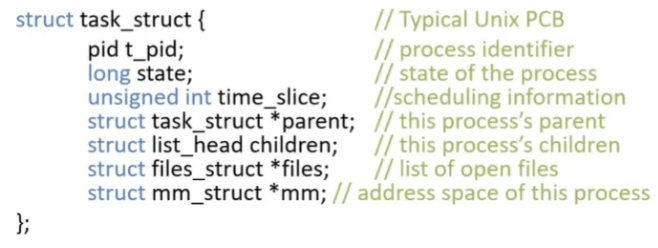
Process States
- new: being created
- running: being executed
- cpu 점유
- waiting: waiting for some event to occur
- I/O: context switching
- scheduling 대상에서 제외
- ready: waiting to be assigned to a processor
- scheduling 대상
- ready에 많으면 계속 확인해야 함
- terminated: finished
Parents and Children
- On Linux, all processes have parents
- If a process spawns ohter processes, they become it’s children ⇒ Tree
- If parent exits before its children → children: orphans
- If child exits before parent calls wait() → child: zombie
- wait(): child가 끝나길 기다리는 system call
- orphan이었던 child는 parnet의 처리를 받지 못해 zombie가 됨
- zombie는 찾아서 init process가 처리
Process Tree
init
- special process started by the kernel
- always roots the process tree
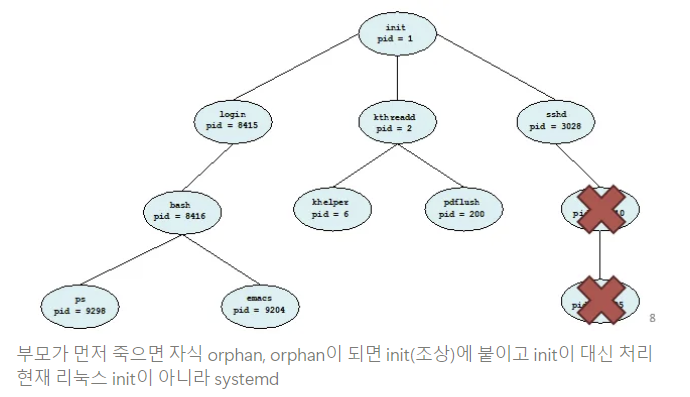
- always roots the process tree
Additional Execution Context
- File descriptors - PCB를 통해 저장하는 정보&관리
- stdin, stdout, stderr
- Files on disk
- Sockets
- Pipes
- Permissions
- User and group
- Access to specific APIs
- Memory protection
- Environment
- $PATH - 경로 찾기
- Shared Resources
- Locks
- Mutexes
- Shared Memory
EXAMPLE: UNIX
UNIX Process Management
system call
fork()
- Create a copy of the current process
- No arguments -> 같은 거 2개
exec()
- Change the program being run by the current process
- Code/data 영역을 file에서 읽은 program으로 change
wait()
- Wait for a process to finish
siganl()
- Send to a notification to another process
- child process가 끝나면 signal -> parent 일 시작
Process 생성 기법
parent process는 child process를 어떻게 만들어 내고, child process는 어떻게 자신만의 코드를 실행하는가?
fork(): parent copy -> child
- parent의 return 값은 child의 pid
- child의 return 값은 0
exec(): 자신의 메모리 공간을 다른 프로그램으로 교체- 자식이 exec()을 부르고 부모는 wait, 자식이 끝나면 signal
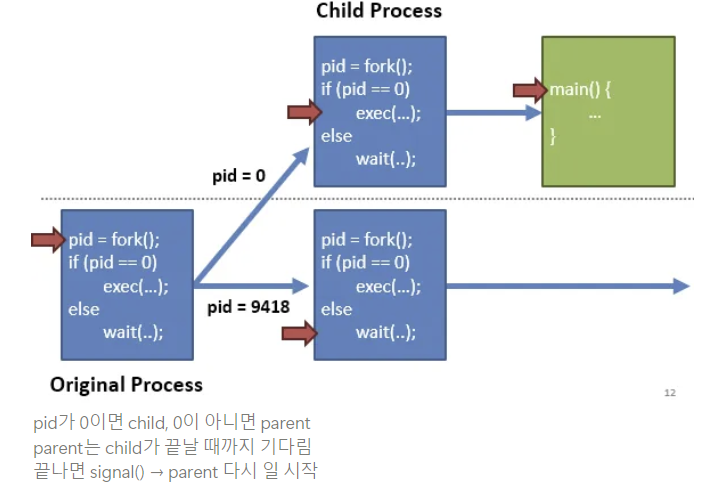
What does this code print?
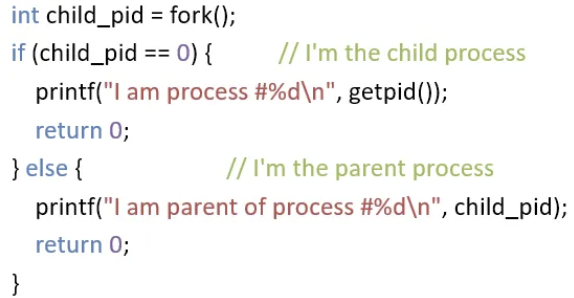
- parent process에서 wait()를 안 쓰면?
- 어떤 게 먼저 실행되는지 모름, 때마다 다름 => no guarantee
- parent 먼저 끝나면 child => zombie
- parent의 prinf() 앞에 wait() 추가해야 guaruntee
Implementing UNIX fork()
Steps to implement UNIX fork()
1. Create and Initilaize PCB in the kernel
2. Create a new address space
3. Initialize the address space with a copy of the entire contents of the parent
4. Inherit the exection context of the parent
5. Inform the scheduler that the new process is ready to run
parnet’s program code copy → overhead 큼
보통 fork → exec 하기 때문에 현대의 OS는 바로 copy를 진행하지 않음
exec을 부르지 않는 경우에 copy 진행
Implementing UNIX exec()
Steps to implement UNIX exec()
1. Load the new program into the current address space
- current address space: fork로 만들어진 현재 space = child
2. Copy command line arguments into memory in the new address space
3. Initialize the hardware context to start execution
- EIP = Entry pointer in the ELF header
- ESP = A newly allocated stack
- main부터 새로 실행하니까 stack 새로 할당
Process Termination
- Typically, a process will wait() until its child process(es) complete
- abort() can be used to immediately end a child process
- exit(): 정상적인 종료
- parent가 wait()하고 child가 exit()
Context Switching
Context Switching
- Saves state of a process before a switching to another process
- Restores original process state when switching back
Context란?
Process를 정지했다가 복원해서 수행하려고 할 때에 필요한 충분한 정보
switching이 가능하다면 충분한 정보
Process stack
Each process has a stack in memory that stores
- Local variables
- Arguments to functions
- Return addresses from functions
Stack
각 프로세스마다 가지는 변수 저장 메모리
Recusion: stack을 이용해서 데이터를 쌓고 돌아올 때는 stack을 빼면서 연산 - On x86
- The stack grows downwards
- ESP(Stack Pointer register) points to the bottom of the stack
- EBP(Base Pointer) points to the base of the current frame
- Instructions like push, pop, call, ret, int, and iret all modify the stack
- call: 함수를 호출하면 return ad 저장하고 시작
- iret: interrupt(int) 불렀을 때 다시 돌아오기
int bar(int a, int b) {
  int r = rand();
  return a + b - r;
}

int foo(int a) {
  int x, y;
  x = a * 2;
  y = a - 7;
  return bar(x, y);
}

int main(void) {
  …
  foo(12);
  …
}- mov ebp, esp : ebp <- esp
- esp는 stack에 값이 쓰여지면 저절로 늘어남
- 함수의 return 값은 eax에 저장
Call foo() & Store return addr to main()
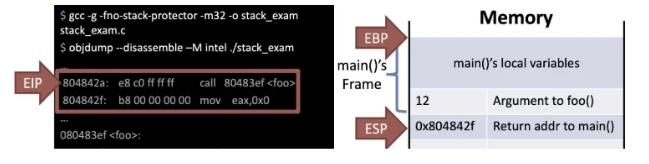
- main에서 foo() 호출
- call 804833f foo
- return ad(foo()가 끝나면 돌아올 주소) -> 8043ef로 jmp
Store EBP of previous func(main())

- push ebp: stack에 bp를 집어넣음
Allocate address space of current func foo()
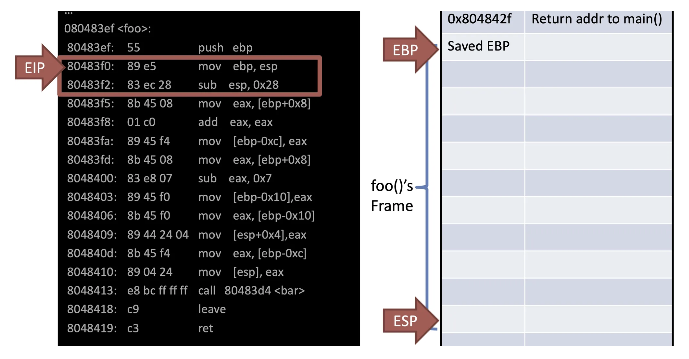
- mov: esp의 값을 ebp에 넣음
- sub: esp에서 0x28을 빼면 40byte 메모리 할당
=> foo frame 생성
Store local vars and args
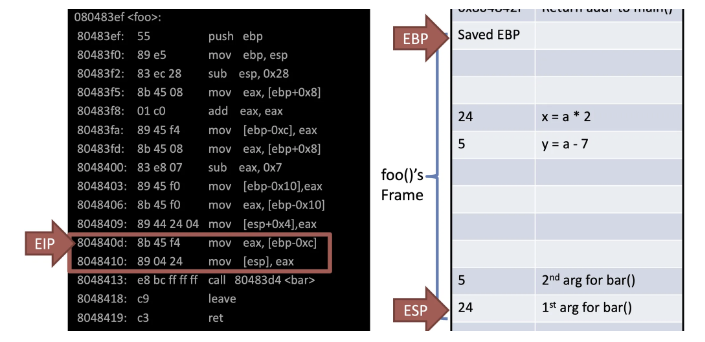
- bar를 부르기 위해 argument 저장
Call bar() & Store return addr to foo()
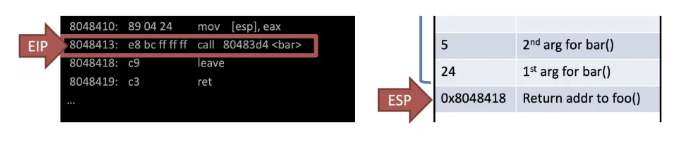
- bar를 부르고 다음 수행할 주소 8048418을 저장
Store EBP of previous func foo()
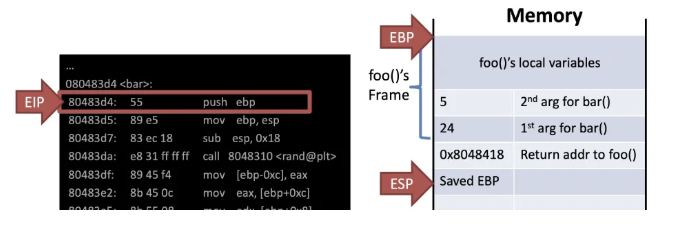
- push ebp: 이전 스택 위치 저장, 어디까지가 영역인지 필요하기 때문
Allocate address space of current func bar()
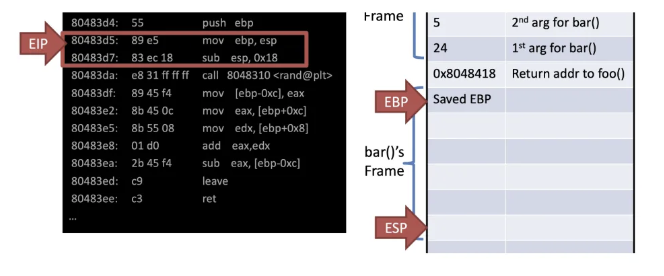
Leave = Deallocation of the current func bar()
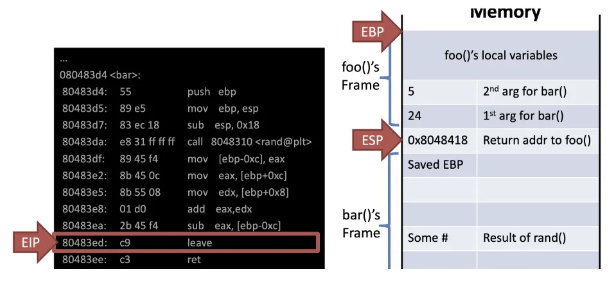
- leave -> mov esp, ebp; pop ebp;
- mov: frame 반납
- pop: 복원
- ret: function return -> 0x8048418
- eip <- esp
Stack Switching
Stack holds
- local variables
- arguments to functions
- return addresses
Except of register variables
A process's control flow is stored on the stack
Switching Between Processes
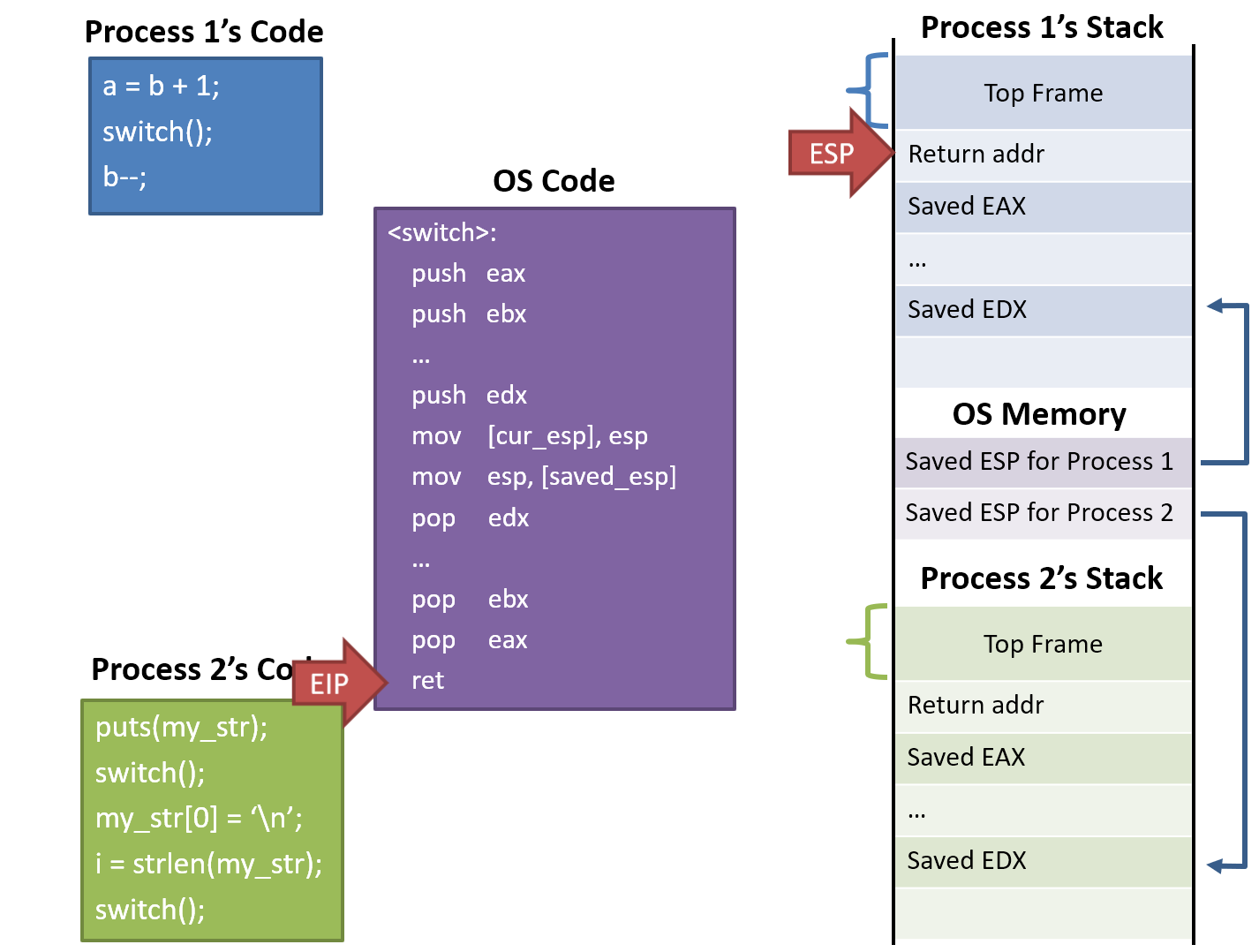
1. switch()
- process 1 calls into switch() routine
- ** push eax ... edx
- CPU registers are pushed onto the stack(of process 1)
- mov [cur_esp], esp
- The stack pointer is saved into memory (esp for process 1)
- mov esp, [saved_esp]
- Stack pointer for process 2 is loaded
- process 2로 전환하기 위해, process 2에 저장해 두었던 stack pointer를 불러옴
- ** pop eax ... edx
- CPU registers are restored (of process 2)
- ret
- switch() returns back to process2
- 복원 완료되면 switch() return (of process 2)
Abusing Call and Return
Switches into a process by return from a function
Switches out of a process by calling into a function
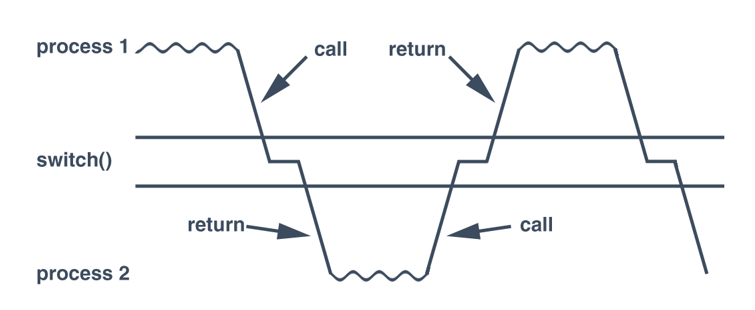
stack이 바뀌니까 return이 process 2 -> stack을 바꾸니까 context switching이 되는 것
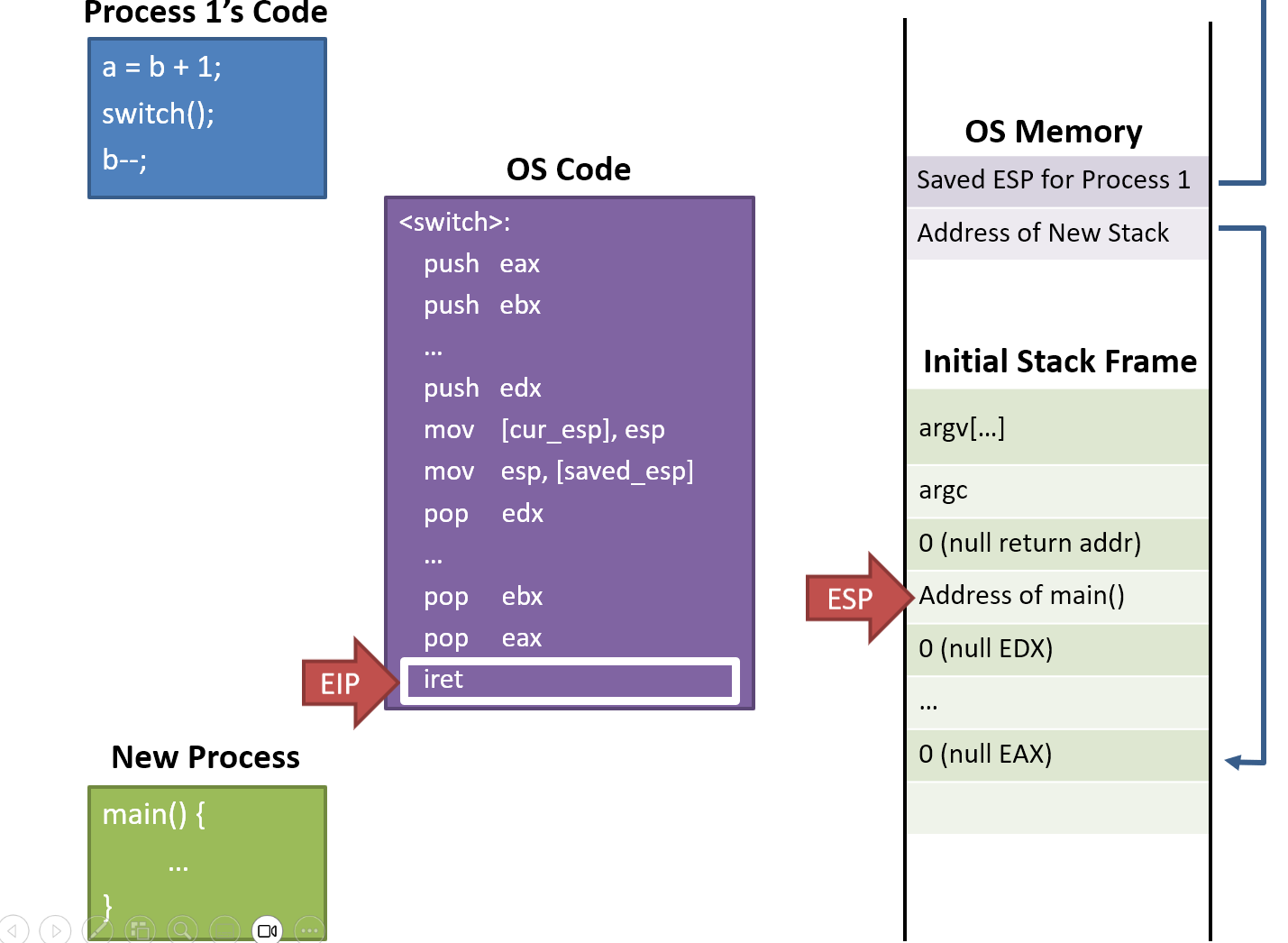
What about new processes?
A new process doesn't have a stack
=> Pretend that there was a previous call
- Build a fake initial stack frame
- Looks exactly like the instruction just before main() called into switch()
- When switch() return, run main() of the new process
When do we switch processes?
Voluntary yielding
- processes must voluntary give up contorl by calling on OS API (e.g. thread_yield())
- Problems
- Misbehaving or buggy apps may never yield => no context switching
- No guarantee that apps will yield in a resonable amount of time
- Wasteful of CPU resources (e.g. Process is idle-waiting on I/O)
Interjection on OS APIs
- When a process calls on OS API, OS has an opportunity to context switch
- Problems
- Misbehaving or buggy apps may never yield => no context switching
- Some normal apps don't use OS APIs for long periods
Context switching on I/O
- When a process is waiting on I/O, switch to anoter process
- Problems
- Some apps don't have any I/O for long periods of time
Preemptive Context Switching = Switch based on a timer interrupt
- OS, I/O: 반드시 context switching 해야 함
- Process가 수행 중에 CPU 포기 -> interrupt 발생 시 선제적으로
timer interrupt 사용!
- Use a timmer interrupt to force context switching at set intervals
- Limit the maximum running time of process
- If it's been running for some max duration (scheduling quantum), the handler switches to the next process
- Problems
- Requires hardware support (a programmable timer)
- built-in to most modern CPUs
- Requires hardware support (a programmable timer)
Isolation
Process Isolation
We can execute multiple processes concurrently
Problem: how do we stop procee form behaving badly?
- Overwritting kernel memory
- Reading/writing data form other processes
- Disabling interrupts
Thought Experiment
How to implement execution with limited privilege?
- Use an interpreter or a simulator
- Execute each program instruction in a simulator (e.g. Java)
- If the instruction is permmited, do the instruction
- However, Interpreters and simulators are slow
How do we go faster? - Run the unprivilged code directly on the CPU
레벨을 정하여 특권 부여
Protected Mode
x86 CPUs support three rings with different privileges
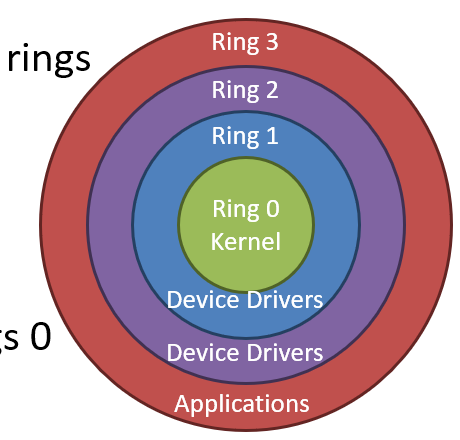
- Ring 0: OS kernel - 모든 것에 접근 가능
- Ring 1, 2: device drivers
- Ring 3: userland
Most OSes only use rings 0 and 3
Real vs Protected
- On startup, the CPU starts in 16-bit real mode
- Proteced mode is disabled
- Typically, bootloader switches CPU to protected mode
Bootloader가 Os를 동작시키려고 하면 protected로 전환
mov eax, cr0
or eax, 1   ; set bit 1 of CR0 to 1 to enable pmode
mov cr0, eax
cr0: CPU mode 변경 시 사용되는 특수 레지스터
복원을 위해 bit 하나만 변경
Dual-Mode Operation
Ring 0
- kernel/supervisor mode
- Full privileges of the hardware
Ring 3 - user mode or userland
- Limited privileges
OS memory, device에 대한 접근 권한이 없으므로, 원하면 OS에 요청하여 사용
-> system call 발생하여 context switching으로 ring 0으로 수행
Privileged Instructions
Examples
- sti/cli - Enable and disable interrupts
- Modifying the CR0 registers
- hlt - halt the CPU: 정지
If a user program attempts to execute a privileged instruction
- General protection exception gets thrown by the CPU
- hardware로 exception 발생 - 보안 규칙 위반하였을 때
- Control is transferred to the OSes exception handler
Changing Modes
Applications often need to access the OS
- e.g. system calls
- Writing files, displaying on the screen, receiving data from the network, etc...
But the Os is ring 0, and apps are ring 3
How do apps get access to the OS? - Apps invoke system calls with an iterrupt (e.g. int 0x80)
- int causes a mode transfer form ring 3 to ring 0
Mode Transfer
Userland
- Application executes trap (int) instruction
- EIP, CS and EFLAGS are pushed onto the stack
- Mode switches from sing 3 to ring 0
Kernel mode
- Save the stte of the current process
- Push EAX, EBX, etc.
- Register와 돌아갈 위치도 저장
- Locate and execute the syscall handler
- 복원
- Restore the state of process
- Pop EAX, EBX, etc.
- Place the return value in EAX
- Return 값은 EAX에
- User iret to return to the process
- Switches back to the original mode(typically 3)
System call Example
- Software executes int 0x80
- Push EIP, CS, EFLAGS
- CPU transfers execution to the OS handler
- Look up the handler in the IVT
- Switch from ring 3 to 0
- OS executes the system call
- Save the processes state
- Use EAX to locate the system call
- Execute the system call
- Restore the processes state
- Put the return value in EAX - user mode로 돌아가기 위해 printf()의 결과 put
- Return to the process with iret
- Pops EIP, CS and EFLAGS
- Switches from ring 0 to 3