피라미드 회전 프로그램
오일러 변환을 적용하여 회전
- 행렬의 곱 연산 함수
두 행렬을 곱한 결과를 반환하는 함수 구현
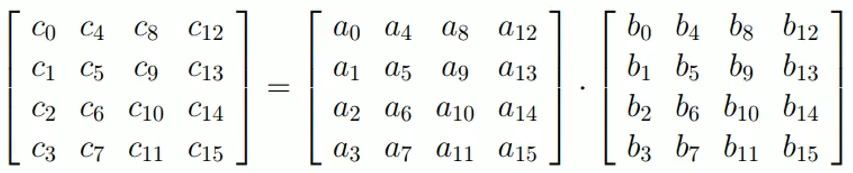
void matMult(GLfloat c[16], const GLfloat a[16], const GLfloat b[16]) {
	c[0] = a[0] * b[0] + a[4] * b[1] + a[8] * b[2] + a[12] * b[3];
	c[1] = a[1] * b[0] + a[5] * b[1] + a[9] * b[2] + a[13] * b[3];
	c[2] = a[2] * b[0] + a[6] * b[1] + a[10] * b[2] + a[14] * b[3];
	c[3] = a[3] * b[0] + a[7] * b[1] + a[11] * b[2] + a[15] * b[3];
	//
	c[4] = a[0] * b[4] + a[4] * b[5] + a[8] * b[6] + a[12] * b[7];
	c[5] = a[1] * b[4] + a[5] * b[5] + a[9] * b[6] + a[13] * b[7];
	c[6] = a[2] * b[4] + a[6] * b[5] + a[10] * b[6] + a[14] * b[7];
	c[7] = a[3] * b[4] + a[7] * b[5] + a[11] * b[6] + a[15] * b[7];
	//
	c[8] = a[0] * b[8] + a[4] * b[9] + a[8] * b[10] + a[12] * b[11];
	c[9] = a[1] * b[8] + a[5] * b[9] + a[9] * b[10] + a[13] * b[11];
	c[10] = a[2] * b[8] + a[6] * b[9] + a[10] * b[10] + a[14] * b[11];
	c[11] = a[3] * b[8] + a[7] * b[9] + a[11] * b[10] + a[15] * b[11];
	//
	c[12] = a[0] * b[12] + a[4] * b[13] + a[8] * b[14] + a[12] * b[15];
	c[13] = a[1] * b[12] + a[5] * b[13] + a[9] * b[14] + a[13] * b[15];
	c[14] = a[2] * b[12] + a[6] * b[13] + a[10] * b[14] + a[14] * b[15];
	c[15] = a[3] * b[12] + a[7] * b[13] + a[11] * b[14] + a[15] * b[15];
}- updateFunc()
키보드 입력으로 설정한 dir 방향으로 회전
glm::vec3 angle = { 0.0F, 0.0F, 0.0F }; // 현재 회전된 각도
glm::vec3 dir = { 0.0F, 0.0F, 0.0F }; // 회전할 방향 (+1.0 / 0.0 / -1.0)

GLfloat rotX[16]; // x축 회전
GLfloat rotY[16]; // y축 회전
GLfloat rotZ[16]; // z축 회전
GLfloat reg[16];
GLfloat mat[16];

void updateFunc(void) {
	system_clock::time_point curTime = system_clock::now();
	milliseconds elapsedTimeMSEC = duration_cast<milliseconds>(curTime - lastTime); // in millisecond
	GLfloat theta = (elapsedTimeMSEC.count() / 1000.0F) * (float)M_PI; // in <math.h>, M_PI = pi
	angle += theta * dir;
	lastTime = curTime;

	// rotX : rotation about X axis
	rotX[0] = 1.0F; rotX[4] = 0.0F; rotX[8] = 0.0F; rotX[12] = 0.0F;
	rotX[1] = 0.0F; rotX[5] = cosf(angle.x); rotX[9] = -sinf(angle.x); rotX[13] = 0.0F;
	rotX[2] = 0.0F; rotX[6] = sinf(angle.x); rotX[10] = cosf(angle.x); rotX[14] = 0.0F;
	rotX[3] = 0.0F; rotX[7] = 0.0F; rotX[11] = 0.0F; rotX[15] = 1.0F;
	// rotY : rotation about Y axis
	rotY[0] = cosf(angle.y); rotY[4] = 0.0; rotY[8] = sinf(angle.y); rotY[12] = 0.0F;
	rotY[1] = 0.0F; rotY[5] = 1.0F; rotY[9] = 0.0F; rotY[13] = 0.0F;
	rotY[2] = -sinf(angle.y); rotY[6] = 0.0; rotY[10] = cosf(angle.y); rotY[14] = 0.0F;
	rotY[3] = 0.0F; rotY[7] = 0.0F; rotY[11] = 0.0F; rotY[15] = 1.0F;
	// rotZ : rotation about Z axis
	rotZ[0] = cosf(angle.z); rotZ[4] = -sinf(angle.z); rotZ[8] = 0.0F; rotZ[12] = 0.0F;
	rotZ[1] = sinf(angle.z); rotZ[5] = cosf(angle.z); rotZ[9] = 0.0F; rotZ[13] = 0.0F;
	rotZ[2] = 0.0F; rotZ[6] = 0.0F; rotZ[10] = 1.0F; rotZ[14] = 0.0F;
	rotZ[3] = 0.0F; rotZ[7] = 0.0F; rotZ[11] = 0.0F; rotZ[15] = 1.0F;

	// combine them into a single matrix
	matMult(reg, rotY, rotX); // reg = rotY * rotX
	matMult(mat, rotZ, reg); // mat = rotZ * reg
}- drawFunc()
void drawFunc(void) {
	...
	GLuint locMat = glGetUniformLocation(prog, "uMat");
	glUniformMatrix4fv(locMat, 1, GL_FALSE, mat); // mat 행렬 대입
	// draw the pyramid
	glDrawArrays(GL_TRIANGLES, 0, 18); // 18 vertices
    ...
}
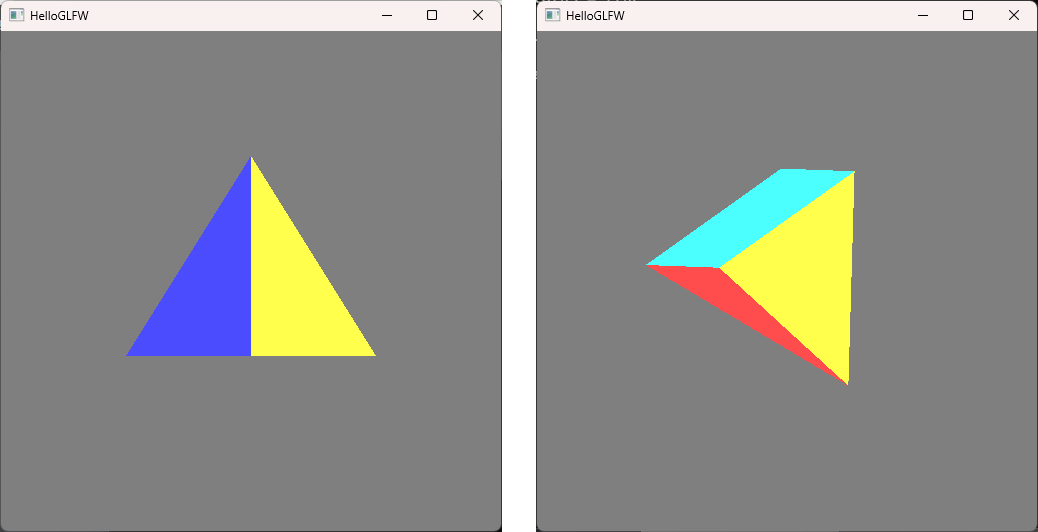
키보드 입력에 따라 피라미드가 x,y,z축 기준으로 회전
GLM을 이용한 회전 프로그램
-
glm::mat4(1.0)
단위행렬 반환 -
glm::mat4() * glm::mat4();
행렬의 곱 (operator overloading으로 구현됨) -
glm::scale()
vec3를 넘겨 스케일링 -
glm::translate()
vec3를 넘겨 평행이동 -
glm::rotate()
회전축을 vec3로 넘겨 angle 각도만큼 회전 -
updateFunc()
glm의 변환 함수는 post-multiplied, 새로운 행렬이 뒤쪽에 곱해짐
glm::vec3 angle = { 0.0F, 0.0F, 0.0F };
glm::mat4 mat = glm::mat4( 1.0F );

void updateFunc(void) {
	...
	// calculate the matrix: mat = Rz Ry Rx
	mat = glm::mat4(1.0F);
	mat = glm::rotate(mat, angle.z, glm::vec3(0.0F, 0.0f, 1.0f));
	mat = glm::rotate(mat, angle.y, glm::vec3(0.0F, 1.0f, 0.0f));
	mat = glm::rotate(mat, angle.x, glm::vec3(1.0F, 0.0f, 0.0f));
}
마우스 콜백
- GLFW 마우스 이벤트
- cursor enter/leave event
마우스 커서가 window에 들어오고 나가는 이벤트
glfwSetCursorEnterCallback() - cursor position event
window 내의 마우스 커서의 위치 (좌상단 기준, 픽셀단위 정수값)
glfwSetCursorPosCallback() - mouse button press/release event
window 내에서 마우스의 입력 이벤트
glfwSetMouseButtonCallback()
- cursor enter/leave event
마우스 콜백 예제 프로그램
- 메인 코드
마우스 이벤트를 받아 로그 출력
void cursorEnterFunc(GLFWwindow* win, int entered) {
	printf("cursor %s the window\n", (entered == GL_FALSE) ? "leaving" : "entering");
	fflush(stdout);
}

void cursorPosFunc(GLFWwindow* win, double xscr, double yscr) {
	printf("cursor pos: %f,%f\n", xscr, yscr);
	fflush(stdout);
}

void mouseButtonFunc(GLFWwindow* win, int button, int action, int mods) {
	switch (button) {
	case GLFW_MOUSE_BUTTON_1:
		printf("mouse button 1: ");
		break;
	case GLFW_MOUSE_BUTTON_2:
		printf("mouse button 2: ");
		break;
	case GLFW_MOUSE_BUTTON_3:
		printf("mouse button 3: ");
		break;
	}
	switch (action) {
	case GLFW_PRESS:
		printf("pressed\n");
		break;
	case GLFW_RELEASE:
		printf("released\n");
		break;
	}
	fflush(stdout);
}- 콜백 이벤트 등록
int main(int argc, char* argv[]) {
	...
	glfwSetCursorEnterCallback(window, cursorEnterFunc);
	glfwSetCursorPosCallback(window, cursorPosFunc);
	glfwSetMouseButtonCallback(window, mouseButtonFunc);
    ...
}
마우스가 윈도우에 들어오고 각 버튼 클릭 후 윈도우에서 나가는 이벤트 발생
cursor entering the window
cursor pos: 4.000000,395.000000
cursor pos: 5.000000,395.000000
cursor pos: 7.000000,396.000000
cursor pos: 8.000000,396.000000
mouse button 1: pressed
mouse button 1: released
mouse button 2: pressed
mouse button 2: released
mouse button 3: pressed
mouse button 3: released
cursor pos: 4.000000,396.000000
cursor leaving the window
마우스 드래깅
-
마우스 드래그 과정
시작점과 끝점을 잇는 벡터를 구함- 마우스 버튼 pressed
- 마우스 이동
- 마우스 버튼 released
-
이벤트 함수
드래그 하는 동안 로그 출력
int mousePressed = GL_FALSE;
glm::vec2 posStart; // mouse dragging start point
glm::vec2 posCur; // mouse dragging current point
glm::vec2 moveCur; // mouse dragging final vector

// 마우스 버튼이 눌리면 마우스의 현재 위치 기록
void cursorPosFunc(GLFWwindow* win, double xscr, double yscr) {
	if (mousePressed == GL_TRUE) {
		posCur = glm::vec2((GLfloat)xscr, (GLfloat)yscr);
		moveCur = posCur - posStart;
		printf("dragging point: %f,%f, move: %f, %f\n", posCur.x, posCur.y, moveCur.x, moveCur.y);
		fflush(stdout);
	}
}

void mouseButtonFunc(GLFWwindow* win, int button, int action, int mods) {
	GLdouble x, y;
	switch (action) {
	case GLFW_PRESS:
		mousePressed = GL_TRUE;
		glfwGetCursorPos(win, &x, &y);
		posStart = glm::vec2((GLfloat)x, (GLfloat)y); // 시작점 기록
		printf("dragging start point: %f,%f\n", posStart.x, posStart.y);
		break;
	case GLFW_RELEASE:
		mousePressed = GL_FALSE;
		glfwGetCursorPos(win, &x, &y);
		posCur = glm::vec2((GLfloat)x, (GLfloat)y);
		moveCur = posCur - posStart; // 최종 이동 벡터 저장
		printf("dragging end point: %f,%f, final move: %f, %f\n", posCur.x, posCur.y, moveCur.x, moveCur.y);
		break;
	}
	fflush(stdout);
}
가상 트랙볼
트랙볼: 3D 드래깅에 최적화된 디바이스
가상 트랙볼 구현
z는 가상의 구의 높이
vector U의 원점 p0 = (x0,y0,z0)
vector V의 원점 p1 = (x1,y1,z1)
vector N = U x V
회전축 N에 대한 각도 θ의 3D 회전
- 각도 θ의 계산
|u x v| = |u| |v| |sinθ|
|u ∘ v| = |u| |v| |cosθ|- atan2(y, x)
tan^-1(y/x) 반환
θ = atan2(sinθ, cosθ) = atan2(|u x v|, |u ∘ v|)
- atan2(y, x)
언리얼 프로그래머