주제
계산기 app
-
저번엔 Command Line Tool을 이용해서 계산기 프로그램을 만들었다면 이번엔 iOS UIKit을 이용해서 만들어봅시다.
-
level 1 : UILabel을 사용해서 수식을 표시할 수 있는 라벨을 띄우기
-
level 2 : UIStackView을 사용해서 4개의 버튼을 모아 가로 스택뷰 생성
-
level 3 : UIStackView을 사요해서 세로 스택 뷰 생성
-
level 4 : 연산 버튼 ( +, -, *, /, AC, =)들 orange로 설정
-
level 5 : 모든 버튼 원형으로 만들기
-
level 6 : 버튼을 클릭하면 label 공간에 표시
-
level 7 : 초기화 버튼 AC를 구현
-
level 8 : 등호(=)버튼을 클릭하면 연산이 수행되도록 구현
-
MVVM 패턴으로 구현
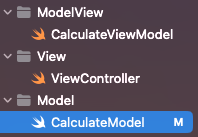
ModelView
import Foundation

class CalculatorViewModel {
    private var model = CalculatorModel()
    var updateDisplay: ((String, String) -> Void)?

    init() {
        updateDisplay?(model.displayText, model.historyText)
    }

    func buttonTapped(_ title: String) {
        if title == "AC" {
            model.clear()
        } else {
            model.updateDisplayText(with: title)
        }

        updateDisplay?(model.displayText, model.historyText)
    }
}
View
import UIKit

class ViewController: UIViewController {

    private let formulaLabel = UILabel()
    private let historyLabel = UILabel() // 계산 진행사항 표시용 레이블
    private var viewModel: CalculatorViewModel!

    override func viewDidLoad() {
        super.viewDidLoad()

        // ViewModel 초기화
        viewModel = CalculatorViewModel()

        // ViewModel의 UI 업데이트 클로저 설정
        viewModel.updateDisplay = { [weak self] displayText, historyText in
            self?.formulaLabel.text = displayText
            self?.historyLabel.text = historyText
        }

        setupUI()
    }

    private func setupUI() {
        // 계산 진행사항 레이블 생성 및 설정
        historyLabel.backgroundColor = .black
        historyLabel.textColor = .lightGray
        historyLabel.text = ""
        historyLabel.textAlignment = .right
        historyLabel.font = UIFont.systemFont(ofSize: 20)
        view.addSubview(historyLabel)

        // 결과 레이블 생성 및 설정
        formulaLabel.backgroundColor = .black
        formulaLabel.textColor = .white
        formulaLabel.text = "0"
        formulaLabel.textAlignment = .right
        formulaLabel.font = UIFont.boldSystemFont(ofSize: 60)
        view.addSubview(formulaLabel)

        // 레이블 AutoLayout 설정
        historyLabel.translatesAutoresizingMaskIntoConstraints = false
        formulaLabel.translatesAutoresizingMaskIntoConstraints = false
        NSLayoutConstraint.activate([
            // 계산 진행사항 레이블
            historyLabel.leadingAnchor.constraint(equalTo: view.leadingAnchor, constant: 30),
            historyLabel.trailingAnchor.constraint(equalTo: view.trailingAnchor, constant: -30),
            historyLabel.topAnchor.constraint(equalTo: view.topAnchor, constant: 100),
            historyLabel.heightAnchor.constraint(equalToConstant: 30),

            // 결과 레이블
            formulaLabel.leadingAnchor.constraint(equalTo: view.leadingAnchor, constant: 30),
            formulaLabel.trailingAnchor.constraint(equalTo: view.trailingAnchor, constant: -30),
            formulaLabel.topAnchor.constraint(equalTo: historyLabel.bottomAnchor, constant: 10),
            formulaLabel.heightAnchor.constraint(equalToConstant: 100)
        ])

        // 버튼 타이틀 배열
        let buttonTitles = [
            ["7", "8", "9", "+"],
            ["4", "5", "6", "-"],
            ["1", "2", "3", "*"],
            ["AC", "0", "=", "/"]
        ]

        // 수직 스택뷰 생성
        let verticalStackView = UIStackView()
        verticalStackView.axis = .vertical
        verticalStackView.spacing = 10
        verticalStackView.distribution = .fillEqually

        for row in buttonTitles {
            let horizontalStackView = UIStackView()
            horizontalStackView.axis = .horizontal
            horizontalStackView.spacing = 10
            horizontalStackView.distribution = .fillEqually

            for title in row {
                let button = createButton(withTitle: title)
                horizontalStackView.addArrangedSubview(button)
            }

            verticalStackView.addArrangedSubview(horizontalStackView)
        }

        view.addSubview(verticalStackView)
        verticalStackView.translatesAutoresizingMaskIntoConstraints = false
        NSLayoutConstraint.activate([
            verticalStackView.widthAnchor.constraint(equalToConstant: 350),
            verticalStackView.topAnchor.constraint(equalTo: formulaLabel.bottomAnchor, constant: 180),
            verticalStackView.centerXAnchor.constraint(equalTo: view.centerXAnchor),
            verticalStackView.bottomAnchor.constraint(lessThanOrEqualTo: view.bottomAnchor, constant: 0)
        ])
    }

    private func createButton(withTitle title: String) -> UIButton {
        let button = UIButton(type: .system)
        button.setTitle(title, for: .normal)
        button.titleLabel?.font = .boldSystemFont(ofSize: 30)
        button.setTitleColor(.white, for: .normal)

        if ["+", "-", "*", "/", "AC", "="].contains(title) {
            button.backgroundColor = UIColor.orange
        } else {
            button.backgroundColor = UIColor.gray
        }

        button.widthAnchor.constraint(equalToConstant: 80).isActive = true
        button.heightAnchor.constraint(equalToConstant: 80).isActive = true
        button.layer.cornerRadius = 40
        button.clipsToBounds = true

        button.addTarget(self, action: #selector(buttonTapped(_:)), for: .touchUpInside)

        return button
    }

    @objc private func buttonTapped(_ sender: UIButton) {
        guard let title = sender.title(for: .normal) else { return }
        viewModel.buttonTapped(title)
    }
}
Model
import Foundation

class CalculatorModel {
    private var inputValue: String = "0" // 현재 입력 값
    private var previousValue: Double? = nil // 이전 숫자
    private var currentOperator: String? = nil // 현재 연산자
    var historyText: String = "" // 계산 진행사항

    var displayText: String {
        return inputValue
    }

    func updateDisplayText(with input: String) {
        if let _ = Double(input) {
            // 숫자 입력 처리
            if inputValue == "0" || inputValue == "" {
                inputValue = input
            } else {
                inputValue += input
            }
        } else if input == "=" {
            // 계산 결과 처리
            calculateResult()
        } else if isOperator(input) {
            // 연산자 처리
            handleOperator(input)
        } else {
            // 잘못된 입력은 무시
            return
        }

        // 계산 진행사항 업데이트
        if input != "=" {
            historyText += input + " "
        }
    }

    private func calculateResult() {
        guard let operatorSymbol = currentOperator,
              let previous = previousValue,
              let current = Double(inputValue) else {
            return
        }

        let result: Double

        switch operatorSymbol {
        case "+":
            result = previous + current
        case "-":
            result = previous - current
        case "*":
            result = previous * current
        case "/":
            if current == 0 {
                inputValue = "Error" // 0으로 나눌 수 없음
                historyText = "Cannot divide by zero"
                clearAfterError()
                return
            }
            result = previous / current
        default:
            return
        }

        inputValue = String(result)
        previousValue = result
        currentOperator = nil
        historyText = "" // 계산 완료 시 진행사항 초기화
    }

    private func handleOperator(_ operatorSymbol: String) {
        if let current = Double(inputValue) {
            if let _ = previousValue {
                // 이전 값이 존재하면 중간 결과를 계산
                calculateResult()
            } else {
                // 이전 값이 없으면 현재 값을 저장
                previousValue = current
            }
        }
        currentOperator = operatorSymbol
        inputValue = "" // 새로운 숫자 입력을 위해 초기화
    }

    private func isOperator(_ input: String) -> Bool {
        return input == "+" || input == "-" || input == "*" || input == "/"
    }

    private func clearAfterError() {
        previousValue = nil
        currentOperator = nil
    }

    func clear() {
        inputValue = "0"
        previousValue = nil
        currentOperator = nil
        historyText = ""
    }
}
문제점
- 처음 1+2+3 연산을 수행할때 뒤의 2+3만 연산이 되서 5라는 값만 출력이 됨 ( 해결 완료 )
- 현재 2+2*2 연산을 수행할때 연산자 우선순위를 파악해서 계산을 하려고 함 ( 진행중)

흠...?