채팅앱 - 로그인
- MongoDB 연결후 회원가입 후 로그인
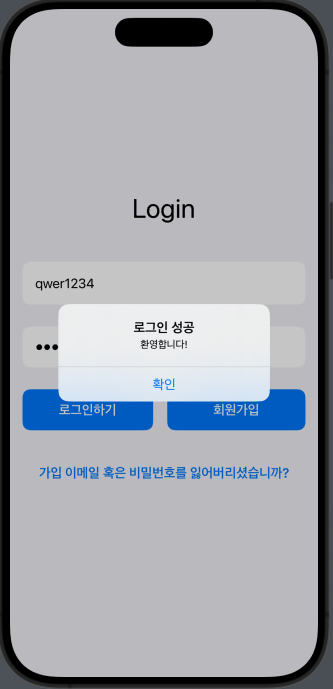
- 로그인 swift 코드
import SwiftUI

// 메인 화면
struct ContentView: View {
    @State private var username: String = ""
    @State private var password: String = ""
    @State private var isLoggedIn: Bool = false // 로그인 상태를 관리하는 변수
    @State private var showAlert: Bool = false // 알림 표시 여부
    @State private var alertTitle: String = ""
    @State private var alertMessage: String = ""

    var body: some View {
        NavigationView {
            VStack {
                Spacer()

                Text("Login")
                    .font(.largeTitle)
                    .padding(.bottom, 40)

                TextField("이메일을 입력하세요", text: $username)
                    .padding()
                    .background(Color.white)
                    .cornerRadius(10)
                    .padding(.bottom, 20)
                    .autocapitalization(.none)
                    .disableAutocorrection(true)

                SecureField("비밀번호를 입력하세요", text: $password)
                    .padding()
                    .background(Color.white)
                    .cornerRadius(10)
                    .padding(.bottom, 20)

                HStack {
                    Button(action: {
                        loginUser()
                    }) {
                        Text("로그인하기")
                            .font(.headline)
                            .foregroundColor(.white)
                            .padding()
                            .frame(maxWidth: .infinity)
                            .background(Color.blue)
                            .cornerRadius(10)
                    }
                    .padding(.trailing, 10)

                    // 회원가입 이동 버튼
                    NavigationLink(destination: RegisterView()) {
                        Text("회원가입")
                            .font(.headline)
                            .foregroundColor(.white)
                            .padding()
                            .frame(maxWidth: .infinity)
                            .background(Color.blue)
                            .cornerRadius(10)
                    }
                }
                .padding(.bottom, 20)

                NavigationLink(destination: RecoveryView()) {
                    Text("가입 이메일 혹은 비밀번호를 잃어버리셨습니까?")
                        .font(.headline)
                        .foregroundColor(.blue)
                        .padding()
                }

                Spacer()

                // ChatView로 이동하는 NavigationLink 추가
                NavigationLink(destination: ChatView(), isActive: $isLoggedIn) {
                    EmptyView()
                }
            }
            .padding()
            .background(Color(.systemGray6))
            .edgesIgnoringSafeArea(.all)
            .alert(isPresented: $showAlert) {
                Alert(title: Text(alertTitle), message: Text(alertMessage), dismissButton: .default(Text("확인"), action: {
                    // 알림 확인 후 로그인 성공 시 ChatView로 전환
                    if alertTitle == "로그인 성공" {
                        isLoggedIn = true
                    }
                }))
            }
        }
    }

    // 로그인 기능
    func loginUser() {
        guard let url = URL(string: "http://localhost:3001/login") else { return }

        let body: [String: String] = [
            "email": username,
            "password": password
        ]

        guard let jsonData = try? JSONSerialization.data(withJSONObject: body) else { return }

        var request = URLRequest(url: url)
        request.httpMethod = "POST"
        request.setValue("application/json", forHTTPHeaderField: "Content-Type")
        request.httpBody = jsonData

        URLSession.shared.dataTask(with: request) { data, response, error in
            if let error = error {
                print("Error: \(error.localizedDescription)")
                return
            }

            if let data = data {
                do {
                    let jsonResponse = try JSONSerialization.jsonObject(with: data, options: [])
                    if let responseDict = jsonResponse as? [String: Any], let message = responseDict["message"] as? String {
                        print("Response: \(message)")
                        // 로그인 성공 여부를 확인
                        DispatchQueue.main.async {
                            if message == "로그인 성공" { // 서버에서 보내는 메시지에 따라 확인
                                // 알림 표시
                                alertTitle = "로그인 성공"
                                alertMessage = "환영합니다!"
                            } else {
                                // 로그인 실패 알림 표시
                                alertTitle = "로그인 실패"
                                alertMessage = "이메일이나 비밀번호를 확인하세요."
                            }
                            showAlert = true
                        }
                    }
                } catch {
                    print("Error parsing response: \(error)")
                }
            }
        }.resume()
    }
}

// 회원가입 화면
struct RegisterView: View {
    @State private var username: String = ""
    @State private var password: String = ""
    @State private var confirmPassword: String = ""

    var body: some View {
        VStack {
            Spacer()

            Text("회원가입")
                .font(.largeTitle)
                .padding(.bottom, 40)

            TextField("이메일을 입력하세요", text: $username)
                .padding()
                .background(Color.white)
                .cornerRadius(10)
                .padding(.bottom, 20)
                .autocapitalization(.none)
                .disableAutocorrection(true)

            SecureField("비밀번호를 입력하세요", text: $password)
                .padding()
                .background(Color.white)
                .cornerRadius(10)
                .padding(.bottom, 20)

            SecureField("비밀번호를 확인하세요", text: $confirmPassword)
                .padding()
                .background(Color.white)
                .cornerRadius(10)
                .padding(.bottom, 20)

            Button(action: {
                registerUser()
            }) {
                Text("회원가입 하기")
                    .font(.headline)
                    .foregroundColor(.white)
                    .padding()
                    .frame(maxWidth: .infinity)
                    .background(Color.green)
                    .cornerRadius(10)
            }

            Spacer()
        }
        .padding()
        .background(Color(.systemGray6))
        .edgesIgnoringSafeArea(.all)
    }

    // 회원가입 기능
    func registerUser() {
        guard let url = URL(string: "http://localhost:3001/register") else { return }

        let body: [String: String] = [
            "email": username,
            "password": password
        ]

        guard let jsonData = try? JSONSerialization.data(withJSONObject: body) else { return }

        var request = URLRequest(url: url)
        request.httpMethod = "POST"
        request.setValue("application/json", forHTTPHeaderField: "Content-Type")
        request.httpBody = jsonData

        URLSession.shared.dataTask(with: request) { data, response, error in
            if let error = error {
                print("Error: \(error.localizedDescription)")
                return
            }

            if let data = data, let responseString = String(data: data, encoding: .utf8) {
                print("Response: \(responseString)")
                // 회원가입 성공 여부에 따른 추가 처리
            }
        }.resume()
    }
}

// 계정 찾기 화면
struct RecoveryView: View {
    @State private var username: String = ""
    @State private var email: String = ""

    var body: some View {
        VStack {
            Spacer()

            Text("계정찾기")
                .font(.largeTitle)
                .padding(.bottom, 40)

            TextField("가입하신 이메일을 입력하세요", text: $username)
                .padding()
                .background(Color.white)
                .cornerRadius(10)
                .padding(.bottom, 20)
                .autocapitalization(.none)
                .disableAutocorrection(true)

            Button(action: {
                resetPassword()
            }) {
                Text("재설정 하기")
                    .font(.headline)
                    .foregroundColor(.white)
                    .padding()
                    .frame(maxWidth: .infinity)
                    .background(Color.blue)
                    .cornerRadius(10)
            }

            Spacer()
        }
        .padding()
        .background(Color(.systemGray6))
        .edgesIgnoringSafeArea(.all)
    }

    // 비밀번호 재설정 기능
    func resetPassword() {
        guard let url = URL(string: "http://localhost:3001/recover") else { return }

        let body: [String: String] = [
            "email": username
        ]

        guard let jsonData = try? JSONSerialization.data(withJSONObject: body) else { return }

        var request = URLRequest(url: url)
        request.httpMethod = "POST"
        request.setValue("application/json", forHTTPHeaderField: "Content-Type")
        request.httpBody = jsonData

        URLSession.shared.dataTask(with: request) { data, response, error in
            if let error = error {
                print("Error: \(error.localizedDescription)")
                return
            }

            if let data = data, let responseString = String(data: data, encoding: .utf8) {
                print("Response: \(responseString)")
                // 재설정 성공 여부에 따른 추가 처리
            }
        }.resume()
    }
}

#Preview {
    ContentView()
}
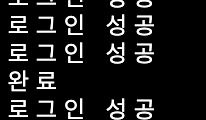
- node.js MongoDB 응답
초기 채팅 화면
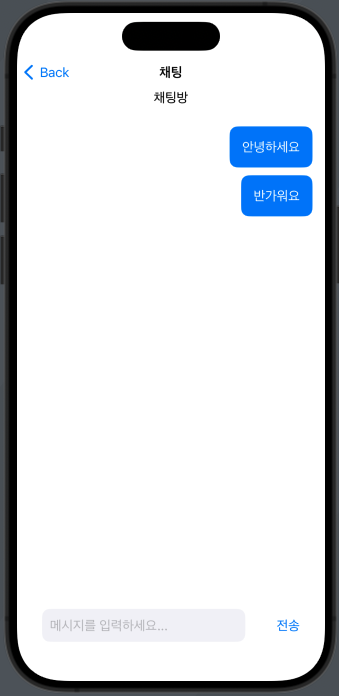
- chatView는 따로 분리해서 함
해야할일
- 주고받는 ui 구성하기
- ui 다듬기
- 배포해보기

흠...?