오늘의 강의 내용
* 네이버모바일 카피캣
.png)
.png)
.png)
.png)
카피캣 영역인 네이버모바일
.png)
.png)
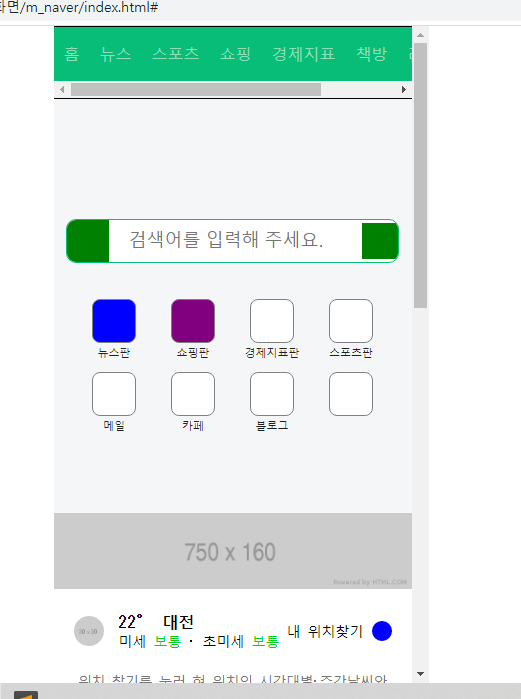
네이버모바일 카피캣 완료된 모습
<!-- index.html언어 -->
<!DOCTYPE html>
<html>
<head>
	<meta charset="utf-8">
	<meta name="viewport" content="width=device-width, initial-scale=1.0">
	<title>네이버 모바일</title>

	<link rel="stylesheet" type="text/css" href="css/style.css">
</head>
<body>


	<div class="wrapper">

		<nav id="main_nav">
			<ul>
				<li><a href="#">홈</a></li>
				<li><a href="#">뉴스</a></li>
				<li><a href="#">스포츠</a></li>
				<li><a href="#">쇼핑</a></li>
				<li><a href="#">경제지표</a></li>
				<li><a href="#">책방</a></li>
				<li><a href="#">리빙</a></li>
				<li><a href="#">뭐하지</a></li>
			</ul>
		</nav>


		<header id="header">

			<div class="search_wrap">
				<a href="#" class="link_logo"></a>
				<input type="text" placeholder="검색어를 입력해 주세요.">
				<a href="#" class="link_voice"></a>
			</div>

			<nav class="header_nav">
				<ul>
					<li>
						<a href="#">
							<i class="icon icon_1"></i>
							<span>뉴스판</span>
						</a>
					</li>

					<li>
						<a href="#">
							<i class="icon icon_2"></i>
							<span>쇼핑판</span>
						</a>
					</li>

					<li>
						<a href="#">
							<i class="icon"></i>
							<span>경제지표판</span>
						</a>
					</li>

					<li>
						<a href="#">
							<i class="icon"></i>
							<span>스포츠판</span>
						</a>
					</li>

					<li>
						<a href="#">
							<i class="icon"></i>
							<span>메일</span>
						</a>
					</li>

					<li>
						<a href="#">
							<i class="icon"></i>
							<span>카페</span>
						</a>
					</li>

					<li>
						<a href="#">
							<i class="icon"></i>
							<span>블로그</span>
						</a>
					</li>

					<li>
						<a href="#">
							<i class="icon"></i>
						</a>
					</li>
				</ul>
			</nav>

		</header>


		<div id="banner_1">
			<div class="banner_wrap">
				<img src="https://via.placeholder.com/750x160">
			</div>
		</div>


		<div id="weather">

			<div class="container">

				<div class="weather_top">
					<div class="weather_left">
						<img src="https://via.placeholder.com/30">
						<div class="txt_wrap">
							<h3>22° 대전</h3>
							<p>미세 <span>보통</span> · 초미세 <span>보통</span> </p>
						</div>
					</div>

					<div class="weather_right">
						<span>내 위치찾기</span>
						<i class="icon"></i>
					</div>
				</div>
				<div class="weather_bottom">
					<p>
						위치 찾기를 눌러 현 위치의 시간대별·주간날씨와<br>
						미세먼지 예보를 여기에서 바로 보세요
					</p>
				</div>

			</div>

		</div>


		<div id="now">

			<h2>NOW.</h2>
			<ul>
				<li>
					<a href="#">
						<img src="https://via.placeholder.com/100x138">
						<p>Hello Nice to meet you</p>
					</a>
				</li>

				<li>
					<a href="#">
						<img src="https://via.placeholder.com/100x138">
						<p>Hello Nice to meet you</p>
					</a>
				</li>

				<li>
					<a href="#">
						<img src="https://via.placeholder.com/100x138">
						<p>Hello Nice to meet you</p>
					</a>
				</li>

				<li>
					<a href="#">
						<img src="https://via.placeholder.com/100x138">
						<p>Hello Nice to meet you</p>
					</a>
				</li>

				<li>
					<a href="#">
						<img src="https://via.placeholder.com/100x138">
						<p>Hello Nice to meet you</p>
					</a>
				</li>
			</ul>

			<div class="btn_wrap">
				<a href="#" class="btn_now">나우 편성표</a>
				<a href="#" class="btn_shopping">쇼핑 편성표</a>
			</div>

		</div>


		<div id="banner_2">
			<div class="banner_wrap">
				<img src="https://via.placeholder.com/320x53">
			</div>
		</div>


		<div id="banner_3">
			<div class="banner_wrap">
				<img src="https://via.placeholder.com/320x75">
			</div>
		</div>


		<div id="banner_4">
			<div class="banner_wrap">
				<img src="https://via.placeholder.com/1250x370">
			</div>
		</div>


		<div id="corona">
			<div class="container">
				<div class="corona_wrap">
					<a href="#" class="left_corona">
						<img src="https://via.placeholder.com/35">
						<div class="txt_wrap">
							<h3>코로나19</h3>
							<p>국내외 확진 현황</p>
						</div>
					</a>
					<a href="#" class="right_corona">
						<img src="https://via.placeholder.com/35">
						<div class="txt_wrap">
							<h3>선별진료소</h3>
							<p>내 주변 센터 찾기</p>
						</div>
					</a>
				</div>
			</div>
		</div>


		<div id="ai">
			<div class="container">

				<div class="ai_wrap">

					<div class="ai_left">
						<img src="https://via.placeholder.com/40">
						<div class="txt_wrap">
							<p>
								더 편리해진 AI 검색 기능<br>
								네이버앱에서 만나보세요.
							</p>
						</div>
					</div>

					<div class="ai_right">
						<span>앱 사용하기</span>
					</div>

				</div>

			</div>
		</div>


	</div>

</body>
</html>

<!-- style.css언어 -->
* {
	margin: 0;
	padding: 0;
	box-sizing: border-box;
}

html, body {
	width: 100%;
	height: 100%;
}

ol, ul {
	list-style: none;
}

img {
	vertical-align: middle;
}

a {
	text-decoration: none;
}

button {
	border: none;
	background-color: transparent;
}

input {
	border: none;
	background-color: transparent;
}

input:focus {
	outline: none;
}

.wrapper {
	overflow-x: hidden;
	overflow-y: auto;
	width: 375px;
	height: 100vh;
	background-color: #eaeef3;

	margin: 0 auto;
}

#main_nav {
	overflow: hidden;
	background-color: rgb(7, 189, 120);
	border-top: solid 1px #000000;
	border-bottom: solid 1px #000000;
}

#main_nav ul {
	overflow-x: auto;
	display: flex;
	align-items: center;

	white-space: nowrap;
}

/*
#main_nav ul {
	-ms-overflow-style: none;
	scrollbar-width: none;
}

#main_nav ul::-webkit-scrollbar {
	display: none;
}
*/

#main_nav ul li {
	height: 54px;
	text-align: center;
}

#main_nav ul li a {
	height: 100%;
	line-height: 54px;

	color: rgb(141, 223, 183);
	padding: 0 10px;
}

#header {
	background-color: #f4f6f8;
	padding: 120px 0 80px;
}

#header .search_wrap {
	overflow: hidden;
	display: flex;
	flex-wrap: wrap;
	align-items: center;

	position: relative;
	width: 333px;
	background-color: #ffffff;
	border: solid 1px rgb(7, 189, 120);
	border-radius: 10px;

	margin: 0 auto 24px;
}

#header .search_wrap .link_logo {
	display: block;
	width: 42px;
	height: 42px;
	background-color: green;
}

#header .search_wrap input {
	width: calc(100% - 78px);
	height: 22px;

	font-size: 18px;
	padding: 0 20px;
}

#header .search_wrap .link_voice {
	display: block;
	width: 36px;
	height: 36px;
	background-color: green;
}

#header .header_nav {
	width: 316px;
	margin: 0 auto;
}

#header .header_nav ul {
	display: flex;
	flex-direction: row;
	flex-wrap: wrap;
	justify-content: flex-start;
	align-items: flex-start;
	align-content: flex-start;

	width: 100%;
}

#header .header_nav li {
	width: 25%;
	padding-top: 12px;
}

#header .header_nav a {
	display: block;
	width: 100%;

	text-align: center;
}

#header .header_nav .icon {
	display: inline-block;
	width: 44px;
	height: 44px;
	border-radius: 8px;
	background-color: #ffffff;
	border: solid 1px gray;
}

#header .header_nav .icon_1 {
	background-color: blue;
}

#header .header_nav .icon_2 {
	background-color: purple;
}

#header .header_nav span {
	display: block;

	font-size: 11px;
	color: #1e1e23;
	/*margin-top: 5px;*/
}


#banner_1 {
	background-color: #f4f4f4;
}

#banner_1 .banner_wrap {
	width: 100%;
	margin: 0 auto;
}

#banner_1 .banner_wrap img {
	width: 100%;
}


#weather {
	background-color: #ffffff;
}

#weather .container {
	padding: 0 20px;
}

#weather .weather_top {
	display: flex;
	flex-direction: row;
	flex-wrap: wrap;
	justify-content: space-between;
	align-items: center;
	align-content: center;

	padding: 22px 0 16px;
}

#weather .weather_top .weather_left {
	display: flex;
	flex-direction: row;
	flex-wrap: wrap;
	justify-content: flex-start;
	align-items: center;
	align-content: center;
}

#weather .weather_top .weather_left img {
	width: 30px;
	height: 30px;
	border-radius: 50%;

	margin-right: 15px;
}

#weather .weather_top .weather_left .txt_wrap {

}

#weather .weather_top .weather_left .txt_wrap h3 {
	font-size: 16px;
}

#weather .weather_top .weather_left .txt_wrap p {
	font-size: 14px;
}

#weather .weather_top .weather_left .txt_wrap p span {
	color: #00d01d;
}

#weather .weather_top .weather_right {
	display: flex;
	flex-direction: row;
	flex-wrap: wrap;
	justify-content: flex-end;
	align-items: center;
	align-content: center;
}

#weather .weather_top .weather_right span {
	font-size: 14px;
	margin-right: 8px;
}

#weather .weather_top .weather_right .icon {
	display: inline-block;
	width: 20px;
	height: 20px;
	background-color: blue;
	border-radius: 50%;

	color: #767678;
}

#weather .weather_bottom {
	padding: 6px 0 30px;
}

#weather .weather_bottom p {
	color: #767678;
	font-weight: 400;
	font-size: 14px;
	line-height: 20px;
	letter-spacing: -0.5px;

	text-align: center;
}


/* Now */
#now {
	background-color: #ffffff;
	padding: 20px 0 16px;
	margin-top: 10px;
}

#now h2 {
	font-size: 18px;
	font-weight: 700;
	color: red;

	margin-bottom: 14px;
	margin-left: 20px;
}

#now ul {
	overflow-y: auto;
	display: flex;
	flex-direction: row;
	flex-wrap: nowrap;
	justify-content: flex-start;
	align-items: center;
	align-content: center;

	padding-left: 20px;
}

/*
#now ul {
	-ms-overflow-style: none;
	scrollbar-width: none;
}

#now ul::-webkit-scrollbar {
	display: none;
}
*/

#now ul li {
	margin-right: 10px;
}

#now ul li:last-child {
	margin-right: 0;
}

#now ul li a {
	color: #000000;
}

#now ul li a img {
	width: 100px;
	height: 138px;

	border-radius: 5px;
}

#now ul li a p {
	font-size: 14px;
	padding-top: 10px;
}

#now .btn_wrap {
	overflow: hidden;
	width: 335px;
	border-radius: 10px;
	background-color: #f5f8fb;

	display: flex;
	flex-direction: row;
	flex-wrap: nowrap;
	justify-content: space-between;
	align-items: center;
	align-content: center;

	margin: 20px auto 0;
}

#now .btn_wrap a {
	display: block;
	width: 50%;
	height: 44px;
	text-align: center;
	line-height: 44px;

	color: #767678;
}

#now .btn_wrap .btn_now {

}

#now .btn_wrap .btn_shopping {

}

#now .btn_wrap .btn_shopping:before {
	display: block;
	content: '';
	width: 1px;
	height: 14px;

	margin-top: 15px;
	background-color: rgba(125, 127, 133, 0.2);

	vertical-align: top;

	float: left;
}


#banner_2 {
	background-color: #ffffff;
	margin-top: 10px;
}

#banner_2 .banner_wrap {
	width: 320px;
	margin: 0 auto;
}

#banner_2 .banner_wrap img {
	width: 100%;
}


#banner_3 {
	background-color: #ffffff;
	margin-top: 10px;
}

#banner_3 .banner_wrap {
	width: 320px;
	margin: 0 auto;
}

#banner_3 .banner_wrap img {
	width: 100%;
}


#banner_4 {
	overflow: hidden;
	background-color: #ffffff;
	margin-top: 10px;
}

#banner_4 .banner_wrap {
	width: 100%;
	height: 155px;
}

#banner_4 .banner_wrap img {
	position: relative;

	height: 100%;

	left: 50%;
	transform: translate(-50%);
}


#corona {
	background-color: #ffffff;
	margin-top: 10px;
}

#corona .container {
	padding: 0 20px;
}

#corona .corona_wrap {
	display: flex;
	flex-direction: row;
	flex-wrap: nowrap;
	justify-content: space-between;
	align-items: center;
	align-content: center;
}

#corona .corona_wrap a {
	position: relative;
	display: flex;
	flex-direction: row;
	flex-wrap: nowrap;
	justify-content: flex-start;
	align-items: center;
	align-content: center;

	padding: 20px 0;
}

#corona .corona_wrap a.right_corona {
	padding-left: 11px;
}

#corona .corona_wrap a.right_corona:before {
	display: block;
	content: '';

	position: absolute;
	width: 1px;
	height: 42px;
	background-color: #efeff0;

	top: 20px;
	left: 0;
}

#corona .corona_wrap img {
	width: 35px;
	margin-right: 8px;

	border-radius: 50%;
}

#corona .corona_wrap .txt_wrap {

}

#corona .corona_wrap .txt_wrap h3 {
	font-size: 14px;
	font-weight: 700;

	color: #000000;
}

#corona .corona_wrap .txt_wrap p {
	font-size: 12px;
	font-weight: 400;
	margin-top: 4px;

	color: #000000;
}


#ai {
	background-color: #ffffff;
	margin-top: 10px;
}

#ai .container {
	padding: 0 20px;
}

#ai .ai_wrap {
	display: flex;
	flex-direction: row;
	flex-wrap: nowrap;
	justify-content: space-between;
	align-items: center;
	align-content: center;

	padding: 20px 0;
}

#ai .ai_wrap .ai_left {
	display: flex;
	flex-direction: row;
	flex-wrap: nowrap;
	justify-content: flex-start;
	align-items: center;
	align-content: center;
}

#ai .ai_wrap .ai_left img {
	width: 40px;
	height: 40px;
	border-radius: 8px;

	margin-right: 8px;
}

#ai .ai_wrap .ai_left .txt_wrap {

}

#ai .ai_wrap .ai_left p {
	font-size: 13px;
	color: #424242;
	font-weight: 400;
}

#ai .ai_wrap .ai_right {
	display: flex;
	flex-direction: row;
	flex-wrap: nowrap;
	justify-content: flex-end;
	align-items: center;
	align-content: center;
}

#ai .ai_wrap .ai_right span {
	font-size: 12px;
	font-weight: 400;
	color: #03c95b;
}- 모바일용 웹페이지를 만들때에는 반드시 뷰포트 meta를 작성하여야 한다. 작성법은 아래와 같다.
<!-- html언어 -->
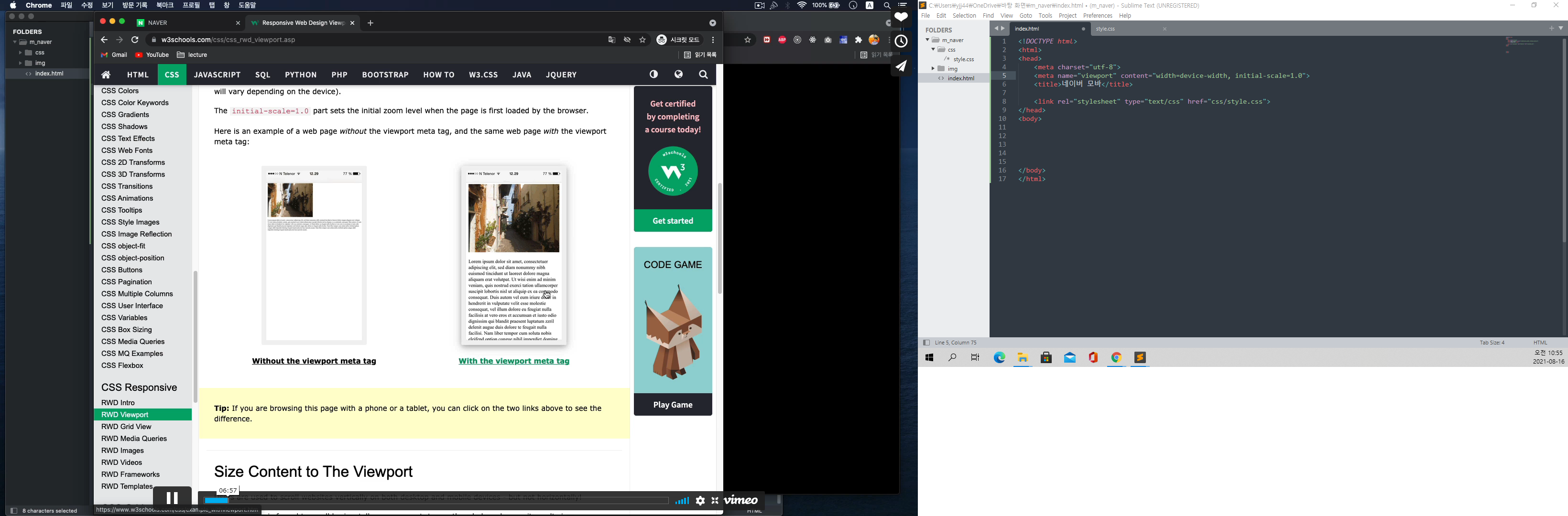
<meta name="viewport" content="width=device-width, initial-scale=1.0">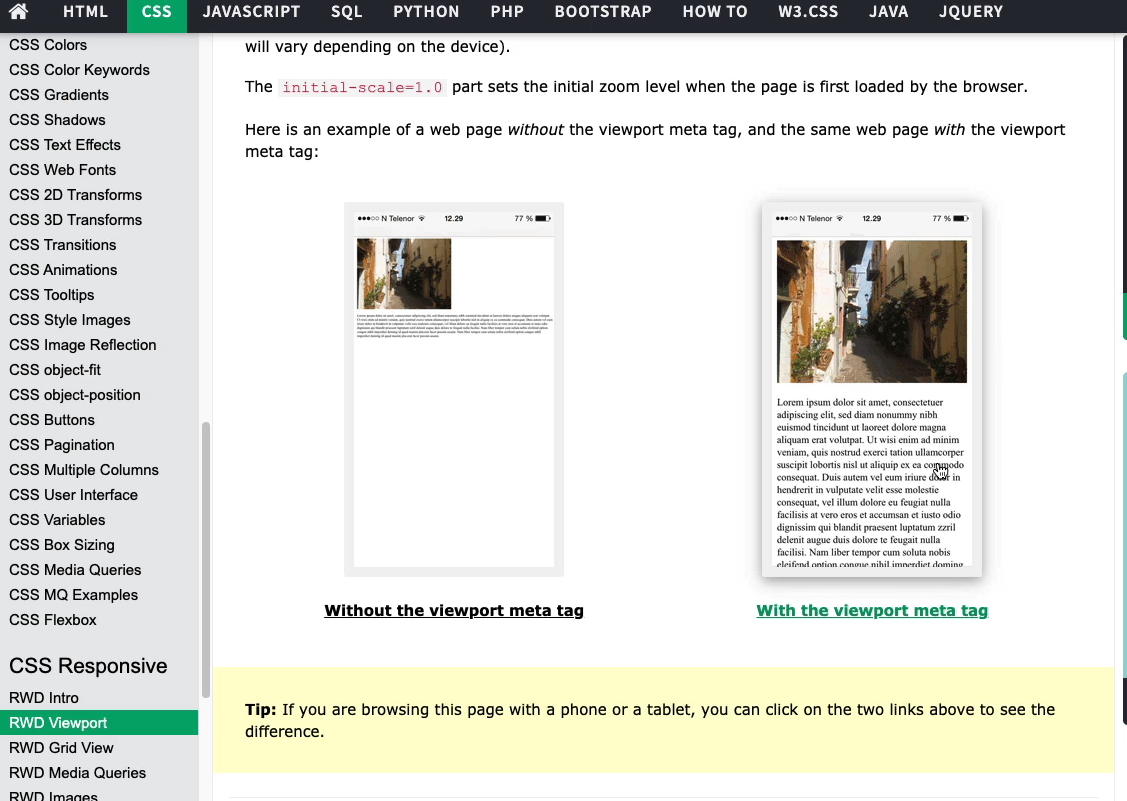
-
위 그림의 왼쪽은 뷰포트 meta를 작성하지 않았을때,
위 그림의 오른쪽은 뷰포트 meta를 작성하였을때 모습 -
vh(viewport height) 단위 : 기기화면의 높이값으로 100%로 맞추겠다는 것. 실무에서 종종 사용
-
스크롤 사라지게하는 css코드 (클릭 하여 드래그로 움직이는)
#main_nav ul {
	-ms-overflow-style: none; //익스플로러, 엣지에 영향
	scrollbar-width: none;  //파이어폭스에 영향
}

#main_nav ul::-webkit-scrollbar { //크롬, 사파리, 오페라에 영향
	display: none;
}
강의를 끝난후 소감
모바일버전을 만드는것이 아직은 작업횟수가 부족해서 인지 좀더 복잡한 느낌이 들었다.
힘든점, 문제점
강의내용과 내 소스코드에 수치상의 차이가 조금씩 있어 임의로 조정해야했다.
개선방안
모바일버전 의 연습은 pc버전보다는 상대적으로 적어 연습의 필요함을 느꼈다.

i will be the best