
Colab에서 Kaggle API 이용하기
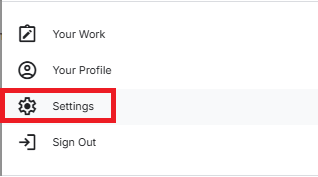
1. 프로필 클릭

2. Settings 클릭
3. API ➡ Create New Token 클릭
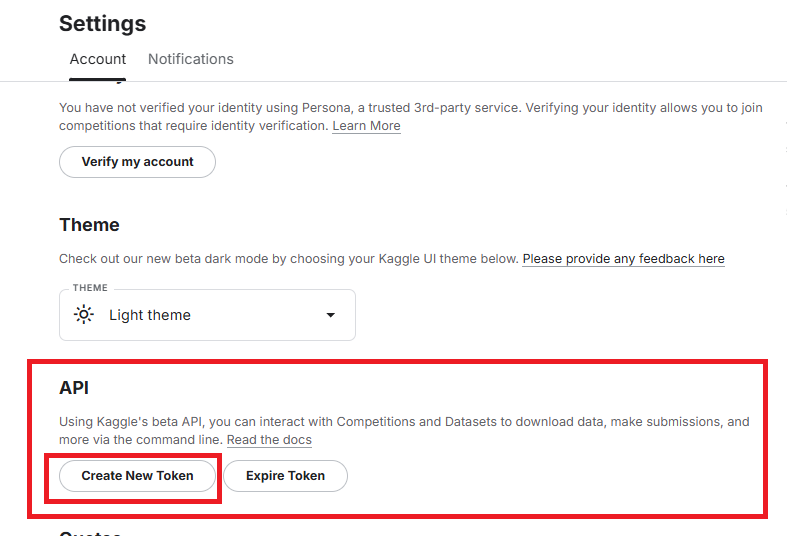
4. 토큰 다운로드

5. kaggle 다운로드 ➡ kaggle.json(토큰) 업로드
Colab에서 코드창 하나 열고 kaggle 다운로드 코드 삽입
!pip install kagglegoogle.colab의 files import 해서 다운받은 kaggle.json 업로드
from google.colab import files
files.upload()
6. kaggle 설정 파일 경로를 환경변수로 설정
import os
os.environ['KAGGLE_CONFIG_DIR'] = "/content"
7. 원하는 데이터셋 다운로드
!kaggle datasets download -d <dataset-id>dataset-id는 캐글 원하는 데이터셋 페이지 url에서 확인 가능

!kaggle datasets download -d ananthu017/emotion-detection-fer8. zip 파일 해제
!unzip emotion-detection-fer.zip데이터셋 준비 완료!

Validation Data 구성
library import
import os
import shutil
import random

source_dir = 'train_s'
train_dir = 'train'
valid_dir = 'valid'
디렉터리 생성/ 복제/ 리네임/ 삭제 함수
def create_dir(directory):
    if not os.path.exists(directory):
        os.makedirs(directory)

def copy_files(file_list, src_dir, dst_dir):
    for file in file_list:
        shutil.copy(os.path.join(src_dir, file), dst_dir)

def rename_dir(old_name, new_name):
    if os.path.exists(old_name):
        try:
            os.rename(old_name, new_name)
            print(f"폴더 이름이 '{old_name}'에서 '{new_name}'으로 변경되었습니다.")
        except Exception as e:
            print(f"폴더 이름 변경 중 오류가 발생했습니다: {e}")
    else:
        print(f"'{old_name}' 폴더가 존재하지 않습니다.")

def delete_dir(folder_path):
    if os.path.exists(folder_path):
        try:
            shutil.rmtree(folder_path)
            print(f"폴더 '{folder_path}'가 성공적으로 삭제되었습니다.")
        except Exception as e:
            print(f"폴더 삭제 중 오류가 발생했습니다: {e}")
    else:
        print(f"폴더 '{folder_path}'가 존재하지 않습니다.")
train 70% valid 30% 데이터셋 구성
rename_dir(train_dir, source_dir)
create_dir(train_dir)
create_dir(valid_dir)

categories = os.listdir(source_dir)

for category in categories:
    category_path = os.path.join(source_dir, category)

    if os.path.isdir(category_path):
        image_files = os.listdir(category_path)
        random.shuffle(image_files)

        split_idx = int(0.7 * len(image_files))
        train_files = image_files[:split_idx]
        valid_files = image_files[split_idx:]

        train_category_dir = os.path.join(train_dir, category)
        create_dir(train_category_dir)
        copy_files(train_files, category_path, train_category_dir)

        valid_category_dir = os.path.join(valid_dir, category)
        create_dir(valid_category_dir)
        copy_files(valid_files, category_path, valid_category_dir)

print("데이터를 성공적으로 Train과 Validation으로 나눴습니다.")
delete_dir('train_s')
validation 만들기 전
import os

def count_files(base_dir):
    sum_count=0
    categories = os.listdir(base_dir)
    for category in categories:
        category_path = os.path.join(base_dir, category)
        if os.path.isdir(category_path):
            file_count = len(os.listdir(category_path))
            sum_count += file_count
            print(f"{base_dir}/{category}: {file_count}")
    print(f"\n총 데이터 수: {sum_count}")

print(count_files('train'))
print(count_files('test'))
출력값
[train]
train/disgusted: 436
train/fearful: 4097
train/angry: 3995
train/neutral: 4965
train/happy: 7215
train/surprised: 3171
train/sad: 4830

총 데이터 수: 28709
[test]
test/disgusted: 111
test/fearful: 1024
test/angry: 958
test/neutral: 1233
test/happy: 1774
test/surprised: 831
test/sad: 1247

총 데이터 수: 7178
validation 만들기(7:3) 후
print(count_files('train'))
print(count_files('valid'))
print(count_files('test'))
출력값
[train]
train/disgusted: 305
train/fearful: 2867
train/angry: 2796
train/neutral: 3475
train/happy: 5050
train/surprised: 2219
train/sad: 3381

총 데이터 수: 20093
[valid]
valid/disgusted: 131
valid/fearful: 1230
valid/angry: 1199
valid/neutral: 1490
valid/happy: 2165
valid/surprised: 952
valid/sad: 1449

총 데이터 수: 8616
[test]
test/disgusted: 111
test/fearful: 1024
test/angry: 958
test/neutral: 1233
test/happy: 1774
test/surprised: 831
test/sad: 1247

총 데이터 수: 7178
🤔 흠.. 이렇게 만든 데이터가 7:2:1 비율이라서
이대로 진행하기로 결정!

Hi, I am Lucy. Welcome to Moon in the Room. 🌝