개요
- LangChain
- 실습
LangChain
- LLM을 사용하여 애플리케이션 생성을 단순화하도록 설계된 프레임워크
- python, JavaScript 기반 라이브러리 모두 사용 가능
- LLM 기반 애플리케이션을 구축하는 과정을 간소화 함
LangChain 공식 사이트
https://www.langchain.com/
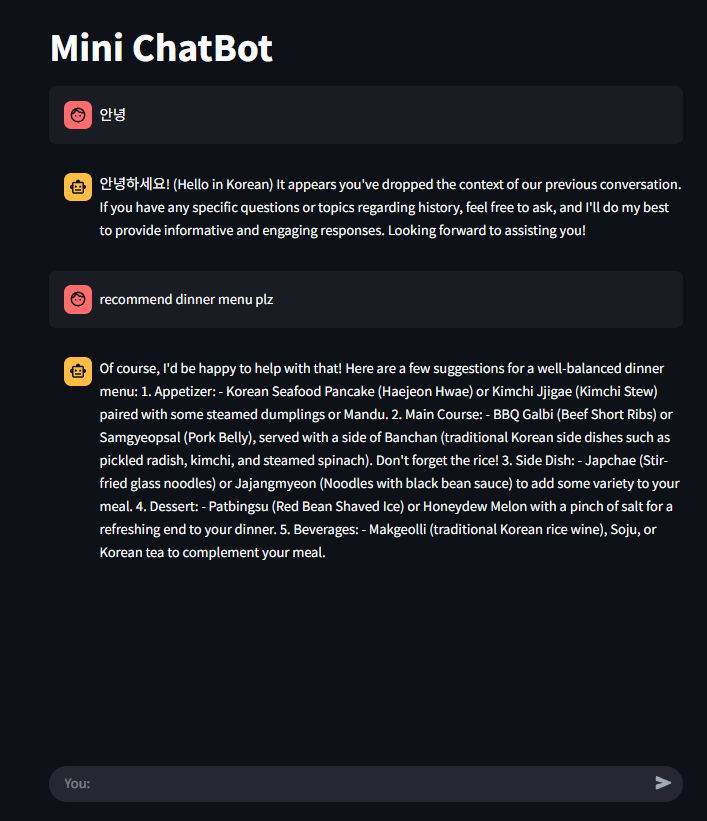
LangChain과 Ollama를 이용하여 간단한 챗봇 만들기
- Ollama의 Mistral 모델 사용
LLM에 전달한 프롬프트 형식을 미리 정의
if 'template' not in st.session_state:
    st.session_state.template = """knowledgeable chatbot,
    Your tone should be professional and informative.
    Context: {context}
    History: {history}
    User: {question}
    Chatbot:"""
프롬프트 템플릿 객체 생성 및 세션에 저장
if 'prompt' not in st.session_state:
  st.session_state.prompt = PromptTemplate(
    input_variables = ['history', 'context', 'question'],
    template = st.session_state.template,
  )
if 'memory' not in st.session_state:
st.session_state.memory = ConversationBufferMemory(
memory_key = 'history',
return_message = True,
input_key = 'question'
)이전 대화를 기억하고 유지하도록 대화 메모리 객체를 생성
if 'vectorstore' not in st.session_state:
  st.session_state.vectorstore = Chroma(
    persist_directory = 'mydata',
    embedding_function = OllamaEmbeddings(
      model = 'mistral:instruct'
    )
  )
로컬 LLM 생성 st.session_state에 저장
if 'llm' not in st.session_state:
  st.session_state.llm = Ollama(base_url = 'http://localhost:11434',
  model = 'mistral:instruct',
  verbose = True,
  callback_manager = CallbackManager(
    [StreamingStdOutCallbackHandler()]),
  )
사용자 질문을 받고 답변 반환까지 처리하는 함수
-문서 검색 → 프롬프트 구성 → LLM 호출 → 답변 반환
def run_ollama(question):
  if 'qa_chain' not in st.session_state:
      st.session_state.qa_chain = RetrievalQA.from_chain_type(
          llm=st.session_state.llm,
          chain_type="stuff",
          retriever=st.session_state.vectorstore.as_retriever(),
          chain_type_kwargs={
              "prompt": st.session_state.prompt,
              "memory": st.session_state.memory,
          }
      )
  return st.session_state.qa_chain.run(question
main 함수
def main():
  if 'chat_history' not in st.session_state:
    st.session_state.chat_history = []

  st.title('Mini ChatBot')


  # 기존 대화 내용 출력
  for message in st.session_state.chat_history:
      with st.chat_message(message['role']):
          st.markdown(message['message'])

  # 사용자 입력 처리
  if user_input := st.chat_input("You:", key="user_input"):
      # 사용자 말 출력
      user_message = {"role": "user", "message": user_input}
      st.session_state.chat_history.append(user_message)
      with st.chat_message("user"):
          st.markdown(user_input)

      # 챗봇 응답 처리
      with st.chat_message("assistant"):
          with st.spinner("Assistant is typing..."):
              response = run_ollama(user_input)

          # 타자기 효과 출력
          message_placeholder = st.empty()
          full_response = ""
          for chunk in response.split():
              full_response += chunk + " "
              time.sleep(0.03)
              message_placeholder.markdown(full_response + "|")  # 타이핑 느낌
          message_placeholder.markdown(full_response)

      chatbot_message = {"role": "assistant", "message": response}
      st.session_state.chat_history.append(chatbot_message)

안녕하세요. 도야입니다