개요
- 6일차
- 7일차
- 8일차
6일차
- CodeTalcker 및 AI studio의 비용 문제로 인해 프로젝트 경로 변경
- 한국인 피부 데이터를 이용한 화장품 및 패션 추천 으로 변경
- AI Hub 내 데이터 셋 분석 및 코드 분석
한국인 피부상태 측정 데이터 AI HUB
https://www.aihub.or.kr/aihubdata/data/view.do?currMenu=115&topMenu=100&dataSetSn=71645
깃허브
https://github.com/leejeongho3214/NIA
데이터 정리
- 10~ 60대까지 남여 피부 상태 데이터
- 이마, 미간, 눈옆, 볼, 입술, 턱 부분으로 분리되어 있음
- 모델 저장시 각 파트별로 모델이 저장되는 형태
- 기반 모델 : ResNet-50
7일차
- 모델 학습 진행
어려웠던 점
-
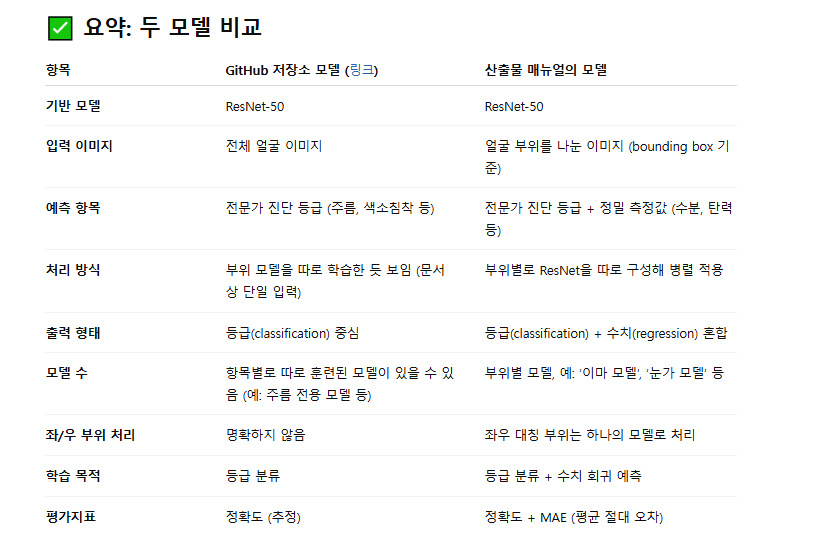
AI HUB에서 배포한 AI 모델과 Github의 모델 학습한 후 모델에 차이점이 있음
-
Github 기준으로 모델 학습 진행
-
기기 문제로 인해 모델 학습 불가
8일차
- 모델 로드 및 flask_endpoint 구축
얼굴 분류
- 해당 모델은 얼굴의 파트별로 나누어서 학습된 모델
- 이미지를 넣으면 해당 얼굴 파트에 맞게 분류
- bbox같은 경우 mediapipe를 이용하여 랜드마크를 구해
crop
mp_face_mesh = mp.solutions.face_mesh

# 각 부위에 사용할 landmark 인덱스
area_anchor_landmarks = {
    1: [9, 151, 107, 108],              # 이마
    2: [6, 168, 197],                   # 미간
    3: [356, 383, 384],  # 오른쪽 눈꼬리 주름 부위만
    4: [127, 243, 190],  # 왼쪽 눈꼬리 주름 부위만
    5: [280, 330, 347],  # 볼
    6: [50, 101, 118],
    7: [0, 17, 84, 91, 146, 291, 181, 61], # 입술
    8: [152, 200, 204, 432]             # 턱
}

def extract_faceparts_from_image(image: np.ndarray, output_size=(256, 256)) -> dict:
    faceparts = {}
    h, w = image.shape[:2]

    with mp_face_mesh.FaceMesh(static_image_mode=True, refine_landmarks=True) as face_mesh_instance:
        results = face_mesh_instance.process(cv2.cvtColor(image, cv2.COLOR_BGR2RGB))
        if not results.multi_face_landmarks:
            return {}

        landmarks = results.multi_face_landmarks[0].landmark

        for part_id, indices in area_anchor_landmarks.items():
            points = np.array([[int(landmarks[i].x * w), int(landmarks[i].y * h)] for i in indices])

            x_min, y_min = np.min(points, axis=0)
            x_max, y_max = np.max(points, axis=0)

            # 중심점 및 확장 정사각형 크기 계산
            cx = (x_min + x_max) // 2
            cy = (y_min + y_max) // 2
            half_size = int(max(x_max - x_min, y_max - y_min) * 0.6)

            x1 = max(cx - half_size, 0)
            y1 = max(cy - half_size, 0)
            x2 = min(cx + half_size, w)
            y2 = min(cy + half_size, h)

            if x2 <= x1 or y2 <= y1:
                print(f"잘못된 좌표 → part {part_id} 건너뜀")
                continue

            crop = image[y1:y2, x1:x2]
            if crop.size == 0:
                continue

            # 고급 보간법으로 리사이즈 (해상도 유지)
            crop = cv2.resize(crop, output_size, interpolation=cv2.INTER_LANCZOS4)

            # BGR → RGB → PIL.Image
            faceparts[part_id] = Image.fromarray(cv2.cvtColor(crop, cv2.COLOR_BGR2RGB))

    return faceparts
분리 예시
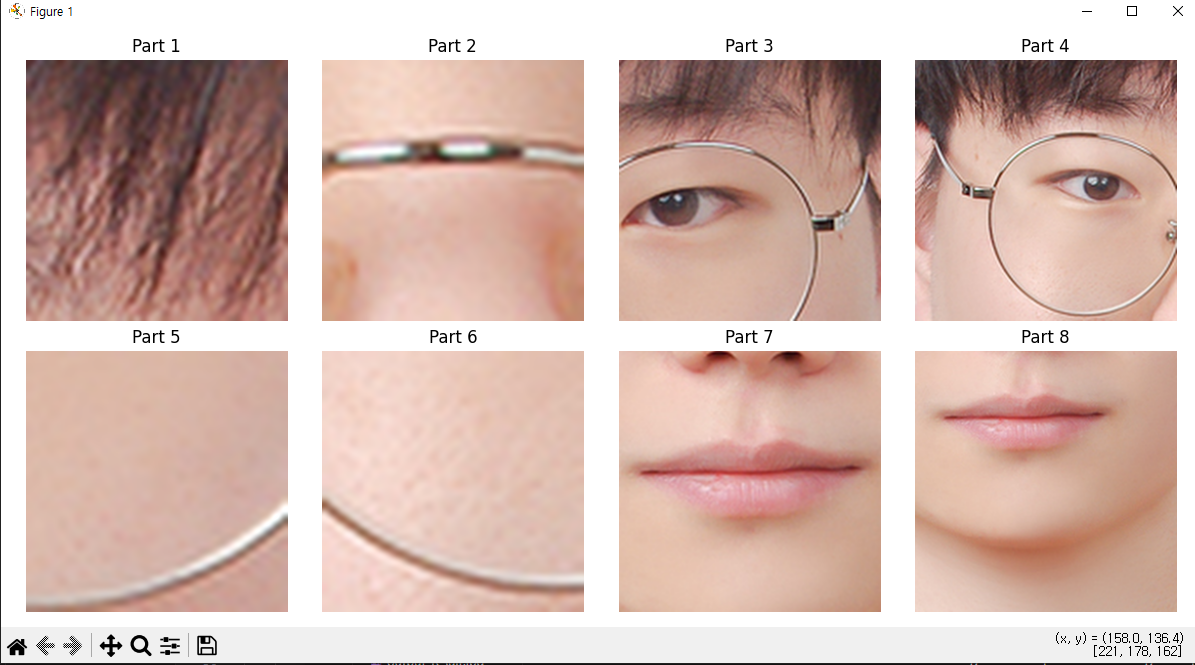
model_loader
- 모델 로드 및 추론
# 모델 로드
def load_models(base_path: str, device: torch.device):
    model_dict = {}

    for model_name, num_classes in MODEL_CLASSES.items():
        # 모델당 필요한 부위가 정의되어 있는지 확인
        if model_name not in MODEL_FACEPART_MAP:
            print(f"MODEL_FACEPART_MAP에 {model_name} 누락 - 스킵")
            continue

        model_path = os.path.join(base_path, model_name, "state_dict.bin")
        if not os.path.exists(model_path):
            print(f"{model_path} 없음 - {model_name} 스킵")
            continue

        # 모델 구조 정의
        model = models.resnet50(weights=None)
        model.fc = nn.Linear(model.fc.in_features, num_classes)

        # 가중치 로드
        state = torch.load(model_path, map_location=device)
        if "model_state" not in state:
            print(f"{model_name} - model_state 키 없음")
            continue

        model.load_state_dict(state["model_state"], strict=False)
        model = model.to(device).eval()

        # model + 사용하는 faceparts 저장
        model_dict[model_name] = {
            "model": model,
            "faceparts": MODEL_FACEPART_MAP[model_name]
        }

        print(f"{model_name} 모델 로드 완료 (클래스 수: {num_classes})")

    return model_dict

#추론 함수
def predict_all(faceparts: dict, model_dict: dict, device: torch.device):
    transform = transforms.Compose([
        transforms.Resize((256, 256)),
        transforms.ToTensor()
    ])

    results = {}

    with torch.no_grad():
        for model_name, model_info in model_dict.items():
            model = model_info["model"]
            target_parts = model_info["faceparts"]

            logits_sum = None
            count = 0

            for part_id in target_parts:
                if part_id not in faceparts:
                    print(f"[경고] {model_name} 모델용 부위 {part_id} 없음")
                    continue

                image = faceparts[part_id]
                input_tensor = transform(image).unsqueeze(0).to(device)
                output = model(input_tensor)

                logits_sum = output if logits_sum is None else logits_sum + output
                count += 1

            if logits_sum is None:
                results[model_name] = {"grade": None, "description": "부위 누락"}
                continue

            avg_logits = logits_sum / count
            pred_class = avg_logits.argmax(1).item()
            label_text = LABEL_MAP[model_name]["labels"].get(pred_class, "알 수 없음")

            results[model_name] = {
                "grade": pred_class,
                "description": label_text
            }

    return results
모델 출력 테스트
image = cv2.imread(image_path)
faceparts = extract_faceparts_from_image(image)
if image is None:
    raise FileNotFoundError(f"이미지를 불러올 수 없습니다: {image_path}")

if not faceparts:
    print("얼굴 부위를 감지하지 못했습니다.")
    exit(1)

check_faceparts(faceparts)

device = torch.device("cuda" if torch.cuda.is_available() else "cpu")
model_dict = load_models("./save_model", device)
results = predict_all(faceparts, model_dict, device)


for key, val in results.items():
    print(f"{key}: 등급 {val['grade']}")


# 결과를 시각화해서 저장
image_result = draw_predictions_on_image(image.copy(), faceparts, results)
cv2.imwrite("result.jpg", image_result)
cv2.namedWindow("결과", cv2.WINDOW_NORMAL)
cv2.imshow("결과", image_result)
cv2.waitKey(0)
cv2.destroyAllWindows()
출력 예시
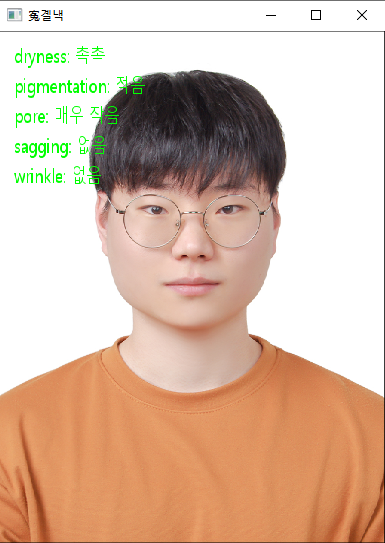
flask
- firebase를 이용하여 배포할 예정
- 모델에 대한 엔드 포인트 필요
# 전역 모델 로드
device = torch.device("cuda" if torch.cuda.is_available() else "cpu")
model_dict = load_models("./save_model", device)

@app.route('/predict', methods=['POST'])
def predict():
    if 'image' not in request.files:
        return jsonify({'error': 'No image uploaded'}), 400

    file = request.files['image']
    npimg = np.frombuffer(file.read(), np.uint8)
    image = cv2.imdecode(npimg, cv2.IMREAD_COLOR)

    if image is None:
        return jsonify({'error': 'Invalid image format'}), 400

    faceparts = extract_faceparts_from_image(image)
    if not faceparts:
        return jsonify({'error': 'Face not detected'}), 400

    results = predict_all(faceparts, model_dict, device)
    result_img = draw_predictions_on_image(image.copy(), faceparts, results)

    # 이미지 결과 base64 인코딩
    pil_result = Image.fromarray(cv2.cvtColor(result_img, cv2.COLOR_BGR2RGB))
    buffer = BytesIO()
    pil_result.save(buffer, format="JPEG")
    encoded_img = base64.b64encode(buffer.getvalue()).decode("utf-8")

    return jsonify({
        "results": results,
        "image": encoded_img
    })

# 테스트 페이지
@app.route('/')
def index():
    return "<h2>API는 /predict 엔드포인트로 POST 요청</h2>"

if __name__ == '__main__':
    app.run(debug=True)
웹 페이지 테스트
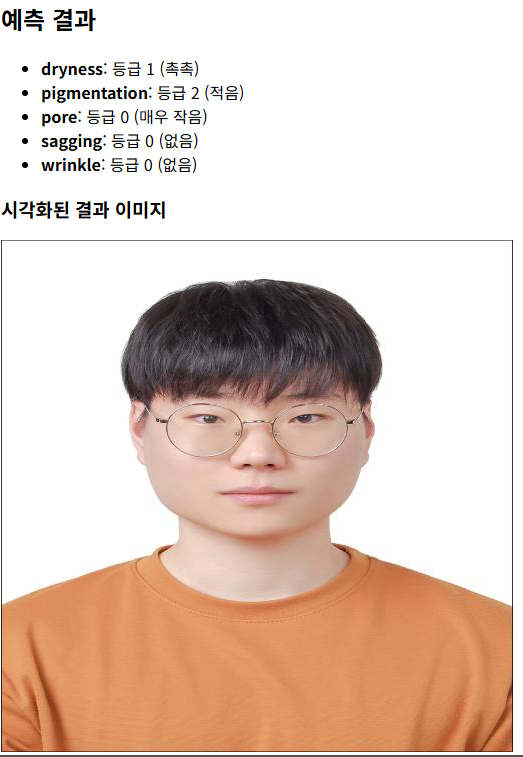

안녕하세요. 도야입니다