작업 제어 - 기본
반복문
반복문을 사용하면 관리자가 동일한 모듈을 사용하는 여러 개의 작업을 작성할 필요가 없습니다.
- loop 키워드를 사용함
반복문 변수 item에는 각각의 반복 작업중에 사용되는 값이 있음
- name: Postfix is running
service:
name: postfix
state: started
- name: Dovecot is running
service:
name: dovecot
state: started
- name: Postfix and Dovecot are running
service:
name: "{{ item }}"
state: started
loop:
- postfix
- dovecot
- loop에서 사용하는 목록은 변수를 통해 제공할 수 있음
vars:
mail_services:
- postfix
- dovecot
tasks:
- name: Postfix and Dovecot are running
service:
name: "{{ item }}"
state: started
loop: "{{ mail_services }}"
참고 : apt나 yum 같은 모듈은 변수(리스트)를 직접 매개변수로 받을 수 있어서 굳이 반복문 쓸 필요없다.
- name: optimal yum
apt:
name: "{{ list_of_packages }}"
state: present
- 사전 목록 반복
- name: add several users
user:
name: "{{ item.name }}"
state: present
groups: "{{ item.groups }}"
loop:
- { name: 'testuser1', groups: 'wheel' }
- { name: 'testuser2', groups: 'root' }
변수를 참조하는 방법은 item.<dict_key> 형식으로 참조할 수 있다.
조건문
특정 조건을 충족하는 작업 또는 플레이를 실행하거나 실행하지 않을 수 있다
- when문은 모듈 밑에다가 들여쓰기 맞춰서 사용. 참, 거짓 여부로 실행
- name: Simple Boolean Task Demo
hosts: all
vars:
run_my_task: true
tasks:
- name: httpd package is installed
yum:
name: httpd
when: run_my_task
- 해당 변수가 값이 있으면 실행
- name: Test Variable is Defined Demo
hosts: all
vars:
my_service: httpd
tasks:
- name: "{{ my_service }} package is installed"
yum:
name: "{{ my_service }}"
when: my_service is defined
-
조건문의 예
같음(문자열 값) ansible_machine == "x86_64"
같음(숫자 값) max_memory == 512
미만 min_memory < 128
보다 큼 min_memory > 256
작거나 같음 min_memory <= 256
크거나 같음 min_memory >= 512
같지 않음 min_memory != 512
변수 있음 min_memory is defined
변수 없음 min_memory is not defined
부울 변수가 true입니다.
1,True 또는 yes 값은 true로 평가됩니다. memory_available
부울 변수가 false입니다.
0,False 또는 no 값은 false로 평가됩니다. not memory_available
첫 번째 변수의 값이 두 번째 변수 목록의 값으로 표시됨 ansible_distribution in supported_distros #a in b a가 b안에 있으면 -
반복문과 조건문 결합
- name: install mariadb-server if enough space on root
yum:
name: mariadb-server
state: latest
loop: "{{ ansible_mounts }}"
when: item.mount == "/" and item.size_available > 300000000
-
ansible_mounts는 마운트된 파일시스템들 / 사전 목록 / 팩트
handler 핸들러
핸들러(Handler)는 작업을 실행하고 시스템의 변경(Changed)이 있을 때에 별도의 작업을 호출하고 실행하는 작업
핸들러는 작업에 변경이 있고, 반드시 알림(Notify)이 있을 때만 실행되는 작업이다.
ex)
- hosts: 10.0.2.4
vars:
http_port: 80
max_clients: 200
tasks:
- name: ensure apache is at the latest version
yum: name=httpd state=latest
- name: write the apache config file
copy:
src: httpd.conf
dest: /etc/httpd/conf/httpd.conf
notify:
- restart apache
- name: ensure apache is running (and enable it at boot)
service: name=httpd state=started enabled=yes
handlers:
- name: restart apache
service: name=httpd state=restarted
작업 오류 처리
플레이에서 작업 오류 관리
Ansible은 각 작업의 반환 코드를 평가하여 작업의 성공 여부를 판단합니다.
- 항상 그렇진않지만 0이 보통 성공
일반적으로 작업이 실패하면 Ansible은 해당 호스트의
나머지 플레이를 즉시 중단하고 이후의 모든 작업을 건너뜁니다.
하지만 작업이 실패해도 플레이를 계속 실행할 수 있게 하는 기능도 존재
-> 미리 실패를 예측하고 후속 조치가 수행되게 한다든가 등
작업 실패 무시 : 실패 무시하고 다음 작업 계속
-> ignore_errors 키워드를 사용
- name: Latest version of notapkg is installed
yum:
name: notapkg
state: latest
ignore_errors: yes
notapkg 패키지가 없어서 실패해도 계속 다음작업 수행
작업 실패 후 핸들러 강제 실행
일반적으로 작업이 실패하고 해당 호스트에서 플레이가 중단되면
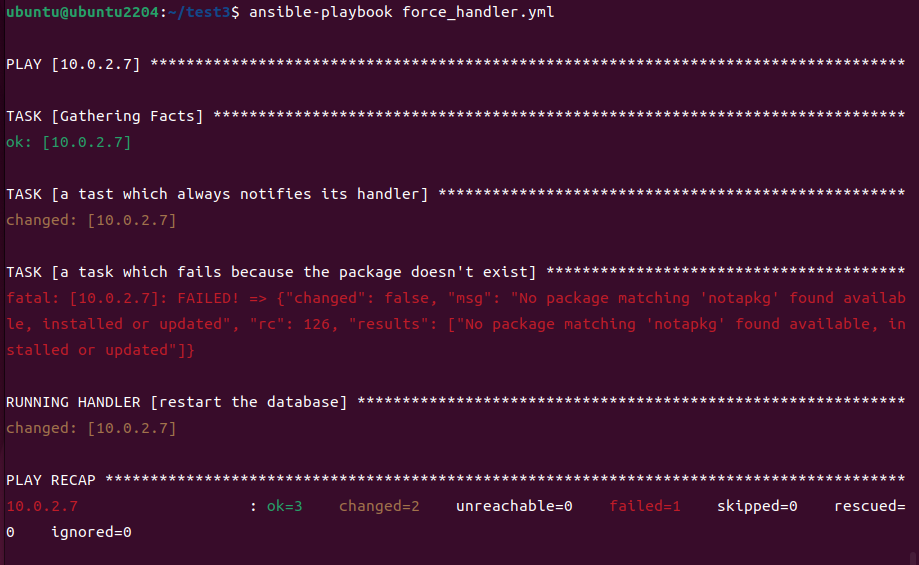
이전 작업에서 알림을 받은 모든 핸들러가 실행되지 않음
"플레이"에 force_handlers: yes 키워드를 설정하면 이후 작업이 실패하여
플레이가 중단되어도 알림을 받은 핸들러가 호출됨
ex)
#vim force_handler.yml
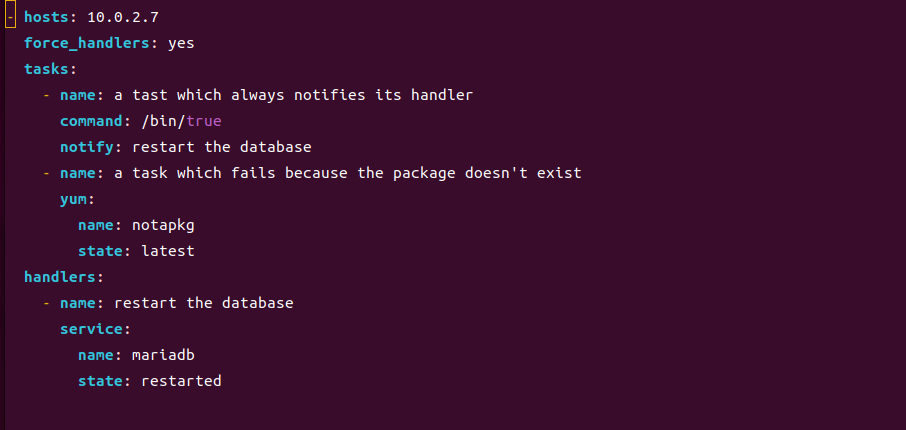
notapkg라는 yum이 존재하지 않기 때문에 playbook 멈추게 되면서 handlers도 실행이 안되어야 하지만, force_handlers:yes로 설정하면 handlers가 실행된다.
작업 실패 조건 지정
작업에 failed_when 키워드를 사용하여 작업이 실패했음을 나타내는 조건을 지정할 수 있습니다.
명령이 성공적으로 실행되어도 명령 출력에 실패로 표시되는 명령 모듈에서 자주 사용됩니다.
예를들어 스크립트 같은거 실행할때 failed_when을 사용하여 작업 실패 조건을 지정할 수 있다.
tasks:
- name: Run user creation script
shell: /usr/local/bin/create_users.sh
register: command_result
failed_when: "'Password missing' in command_result.stdout"
- 작업에서 결과를 “Changed”로 보고하는 시점 지정
작업에서 관리 호스트를 변경하는 경우 상태를 changed로 보고하고 핸들러에 알림을 전송함
changed_when 키워드를 사용하면 작업에서 변경을 수행했음을 보고하는 시점을 제어할 수 있음
tasks:
- shell:
cmd: /usr/local/bin/upgrade-database
register: command_result
changed_when: "'Success' in command_result.stdout"
notify:
- restart_database
handlers:
- name: restart_database
service:
name: mariadb
state: restarted
- Success가 출력이면 changed라고 보고하겠다
블록
block은 작업을 논리적으로 그룹화하는 절이며, 작업을 실행하는 방법을 제어하는 데 사용
대부분 단일작업에서 적용하였던 플레이북 키워드(when, become 등)을 블록수준에서 적용 가능
블록의 하나 이상의 작업이 실패한 경우, 실패한 작업에 대응(롤 백, 오류 수정 등)하는 작업을 지정할 수 있다.
- 블록 및 오류 처리
블록을 사용하면 rescue 및 always 문과 함께 오류를 처리할 수 있습니다.
• block: 실행할 기본 작업을 정의합니다.
• rescue: block 절에 정의된 작업이 실패하는 경우 실행되는 작업을 정의합니다.
• always: block 및 rescue 절에 정의된 작업의 성공 또는 실패 여부와
관계없이 항상 실행되는 작업을정의합니다.
tasks:
- name: Upgrade DB
block:
- name: upgrade the database
shell:
cmd: /usr/local/lib/upgrade-database
rescue:
- name: revert the database upgrade
shell: #rescue는 단독으로 못쓰고 block과 같이 사용해야 한다.
cmd: /usr/local/lib/revert-database #always는 단독으로 쓸수도 있고 같이 쓸수도 있다. 자유롭게
always:
- name: always restart the database
service:
name: mariadb
state: restarte
